









-
 Unlimited Activations
-
 Instant delivery
-
 Easy to install








 Unlimited Activations
Instant delivery
Easy to install
Unlimited Activations
Instant delivery
Easy to install
 Free Update
 Free Install Support

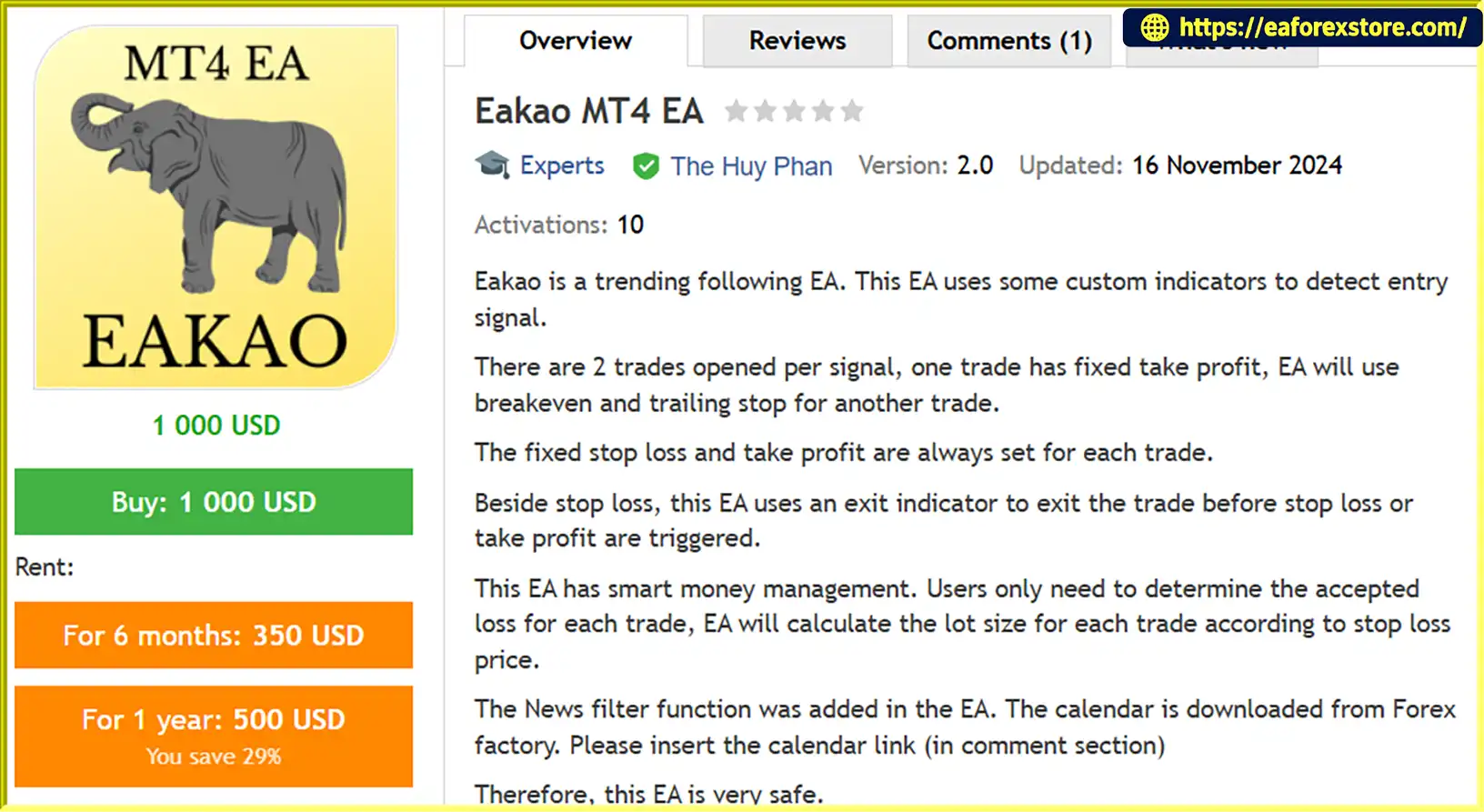
Eakao MT4 EA is an advanced automated Forex trading Expert Advisor designed for MetaTrader 4 (MT4). It uses a trend-following trading strategy combined with custom technical indicators to identify potential market entry opportunities.
The EA is designed to capture market trends through a unique two-trade execution system. For every valid trading signal, Eakao MT4 EA opens two separate positions with different profit management approaches.
The first position uses a fixed Take Profit, while the second position is managed through automatic Break-Even and Trailing Stop functions, allowing it to potentially benefit from extended market movements.
Each trade is protected by predefined Stop Loss and Take Profit levels. In addition, an internal Exit Indicator monitors market conditions and can close positions before the predefined Stop Loss or Take Profit is reached.
One of the most notable features is its Smart Money Management system. Traders only need to define the acceptable loss per trade, and the EA automatically calculates the appropriate lot size based on the Stop Loss distance.
With an integrated News Filter powered by the Forex Factory economic calendar, Eakao MT4 EA provides a comprehensive automated trading solution for traders looking to f
ollow market trends while maintaining structured risk management.
>>> Delivery time 24h-48h after payment.
>>> Refund if not delivered.
>>> You will receive the latest version without any limitations (ID+Time).Reviewed by Jason Stap <<<
Eakao MT4 Overview
Eakao MT4 EA uses custom technical indicators to analyze market conditions and identify potential trend-following entry signals.
The system is designed to recognize favorable market opportunities and execute trades according to its internal trading logic.
For every valid trading signal, the EA opens two separate positions with different trade management strategies.
Trade 1 – Fixed Take Profit: Uses a predefined Take Profit level to secure profits when the target is reached.
Trade 2 – Break-Even and Trailing Stop: Uses automatic Break-Even and Trailing Stop functions to manage the position and potentially capture larger market movements.
This dual-position approach provides two different profit-taking mechanisms within a single trading signal.
Every trade opened by Eakao MT4 EA has predefined Stop Loss and Take Profit levels.
These parameters establish clear exit conditions and help traders manage potential losses and profit targets.
In addition to conventional Stop Loss and Take Profit management, Eakao MT4 EA incorporates an Exit Indicator.
This indicator continuously evaluates market conditions and can close an open position before the predefined Stop Loss or Take Profit is triggered.
This provides an additional layer of trade management based on changing market signals.
The integrated Smart Money Management module automatically calculates position size according to the trader’s acceptable monetary loss per trade.
Users simply define how much they are willing to risk, and the EA calculates the appropriate lot size based on the distance between the entry price and Stop Loss.
This helps maintain more consistent monetary risk across trades with different Stop Loss distances.
Eakao MT4 EA includes a built-in News Filter that uses economic calendar data downloaded from Forex Factory.
This feature helps traders manage exposure around important economic announcements and potentially avoid trading during high-impact news events.
To activate the news calendar functionality, users must insert the required Forex Factory calendar link into the EA’s comment section, as instructed by the developer.
The second position uses automatic Break-Even and Trailing Stop management.
Break-Even: Adjusts the Stop Loss according to predefined conditions to help protect the position.
Trailing Stop: Dynamically adjusts the Stop Loss as the market moves favorably, allowing the trade to remain open for potential additional gains.
Eakao MT4 EA can be applied to multiple Forex currency pairs and Gold (XAUUSD).
Its flexible configuration makes it suitable for traders who want to diversify their automated trading across different instruments.
Eakao MT4 EA follows a systematic trading process based on trend analysis, dual-position execution, and automated risk management.
Step 1: Analyze Market Trends
The EA monitors price movements and uses its custom indicators to evaluate market conditions and identify potential trading opportunities.
Step 2: Generate Trading Signals
When the internal indicators identify a valid setup, the EA generates a trading signal based on its trend-following strategy.
Step 3: Calculate Position Size
The Smart Money Management system calculates the appropriate lot size based on the trader’s predefined acceptable loss and the Stop Loss distance.
Step 4: Open Two Positions
Once a valid signal is confirmed, the EA opens two separate trades in the same trading direction.
Step 5: Manage the First Position
The first trade follows its predefined Take Profit target and Stop Loss.
Step 6: Manage the Second Position
The second trade uses automatic Break-Even and Trailing Stop functions to manage potential extended market movements.
Step 7: Monitor Exit Conditions
The internal Exit Indicator continuously evaluates market conditions and may close positions before their predefined Stop Loss or Take Profit levels are reached.
Step 8: Apply News Protection
The integrated Forex Factory News Filter helps manage trading activity around scheduled economic announcements according to its configured settings.
Choosing the right Forex Expert Advisor requires a combination of reliable entry logic, flexible money management, and effective position management.
Eakao MT4 EA brings these features together in one automated trading system.
Key advantages include:
Trend Following Strategy: Uses custom indicators to identify potential market trends.
Dual-Trade Execution: Opens two positions per valid trading signal with different exit strategies.
Fixed Take Profit: Allows the first position to follow a predefined profit target.
Dynamic Trade Management: Uses Break-Even and Trailing Stop for the second position.
Intelligent Exit Indicator: Can close trades before predefined SL or TP levels are reached.
Smart Money Management: Automatically calculates lot size based on acceptable monetary loss.
Predefined Stop Loss: Every trade has an established Stop Loss level.
Forex Factory News Filter: Incorporates economic calendar data to help manage news-related exposure.
Multi-Pair Compatibility: Supports multiple Forex pairs and XAUUSD.
Easy Configuration: Traders can configure acceptable loss and other available parameters according to their preferences.
Eakao MT4 EA is designed for traders who prefer trend-following strategies combined with automated position sizing and multiple profit management techniques.
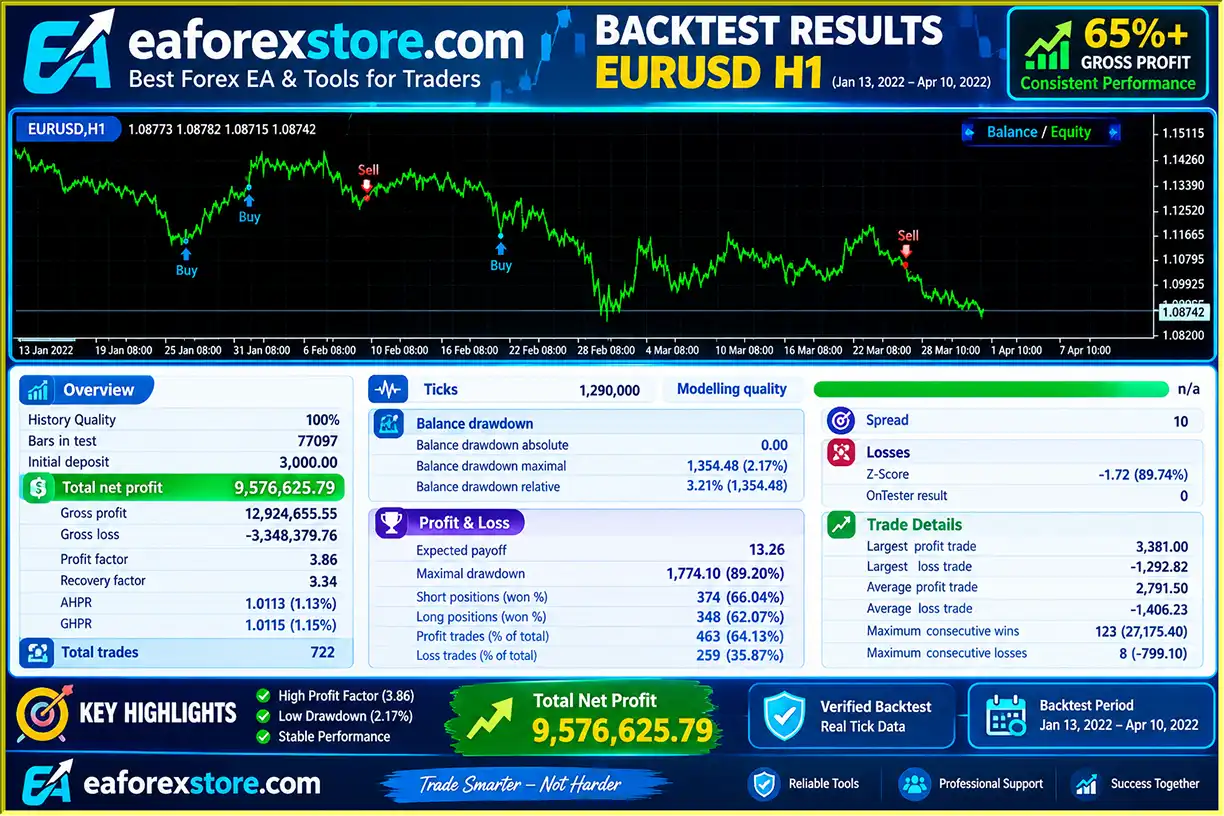
🔺EURUSD – Jan 13,2022 – Apr 10,2022
Eakao MT4 Backtets
Risk management is an important part of automated Forex trading, particularly when operating multiple positions from a single trading signal.
Eakao MT4 EA includes several features designed to help traders control position sizing and manage potential market exposure.
One of the main advantages of Eakao MT4 EA is its risk-based position sizing mechanism.
Instead of manually calculating lot sizes for every trade, users define the acceptable monetary loss per trade.
The EA then calculates the appropriate trading volume according to the Stop Loss distance.
The general principle is:
Smaller Stop Loss distance may allow a larger lot size for the same monetary risk.
Larger Stop Loss distance results in a smaller lot size for the same monetary risk.
This approach helps maintain consistent monetary risk across different trading setups.
| Feature | Function |
|---|---|
| Smart Money Management | Calculates lot size based on acceptable loss |
| Fixed Stop Loss | Defines the initial trade protection level |
| Fixed Take Profit | Establishes predefined profit targets |
| Break-Even | Adjusts Stop Loss according to predefined conditions |
| Trailing Stop | Follows favorable market movements |
| Exit Indicator | Can close positions when exit conditions are detected |
| News Filter | Helps manage exposure around economic announcements |
Eakao MT4 EA is recommended for the following trading instruments:
| No. | Currency Pair |
|---|---|
| 1 | EURUSD |
| 2 | GBPUSD |
| 3 | USDJPY |
| 4 | USDCAD |
| 5 | EURAUD |
| 6 | EURJPY |
| 7 | GBPCHF |
| 8 | GBPJPY |
| 9 | EURCAD |
| 10 | GBPAUD |
| 11 | XAUUSD |
| Parameter | Recommendation |
|---|---|
| Expert Advisor | Eakao MT4 EA |
| Platform | MetaTrader 4 |
| Trading Strategy | Trend Following |
| Recommended Timeframe | H1 |
| Currency Pairs | 10 Forex pairs + XAUUSD |
| Position Structure | 2 trades per signal |
| Money Management | Smart Risk-Based Lot Calculation |
| News Filter | Forex Factory Calendar |
1. Two Positions per Signal
Each trading signal opens two positions. Although both positions follow different management approaches, their combined exposure should be considered when calculating total account risk.
2. Smart Money Management
The acceptable loss setting must be configured carefully. Traders should ensure that the monetary risk remains appropriate for their account balance.
3. Market Gaps and Slippage
Stop Loss execution may differ from the specified price during periods of high volatility, low liquidity, or sudden market gaps.
4. News Events
Economic announcements can cause rapid price movements. The News Filter helps manage this exposure but cannot eliminate news-related trading risks.
5. Currency Correlation
Trading several currency pairs simultaneously may increase overall exposure, especially when multiple pairs share the same base or quote currency.
6. Gold Volatility
XAUUSD can experience significantly different volatility and trading costs compared with Forex currency pairs. Traders should evaluate its risk settings separately.
Important: No automated trading system can guarantee profits or completely eliminate losses. Always test Eakao MT4 EA on a demo account before using real funds.
| Pros | Cons |
|---|---|
| Advanced trend-following strategy | Performance depends on market conditions |
| Uses custom technical indicators | Internal indicator logic may not be customizable |
| Two trades per signal | Creates combined exposure from two positions |
| Fixed Take Profit for the first trade | Profit target may limit gains during strong trends |
| Break-Even and Trailing Stop for the second trade | Trailing Stop may close positions during temporary pullbacks |
| Intelligent Exit Indicator | May close trades before SL or TP |
| Automatic risk-based lot calculation | Requires accurate acceptable-loss configuration |
| Integrated Forex Factory News Filter | Requires correct calendar link configuration |
| Supports multiple Forex pairs and XAUUSD | Different instruments require different risk considerations |
| Recommended H1 timeframe | Requires MT4 to remain operational |
Overall, Eakao MT4 EA offers a combination of trend-following entries, dual-position management, and automated money management for traders seeking a structured Forex trading solution.
Follow these steps to install and activate Eakao MT4 EA on MetaTrader 4.
Download the Eakao MT4 EA file provided by the developer.
The file should normally have an .ex4 extension.
Launch MetaTrader 4 and log in to your trading account.
Navigate to:
File → Open Data Folder
Open the following directory:
MQL4 → Experts
Copy the downloaded .ex4 file into the Experts folder.
Return to MT4, open the Navigator panel, right-click Expert Advisors, and select Refresh.
Eakao MT4 EA should now appear in your Expert Advisors list.
Open your preferred currency pair and set the timeframe to H1.
Recommended instruments include EURUSD, GBPUSD, USDJPY, USDCAD, and XAUUSD.
Drag Eakao MT4 EA onto the selected chart.
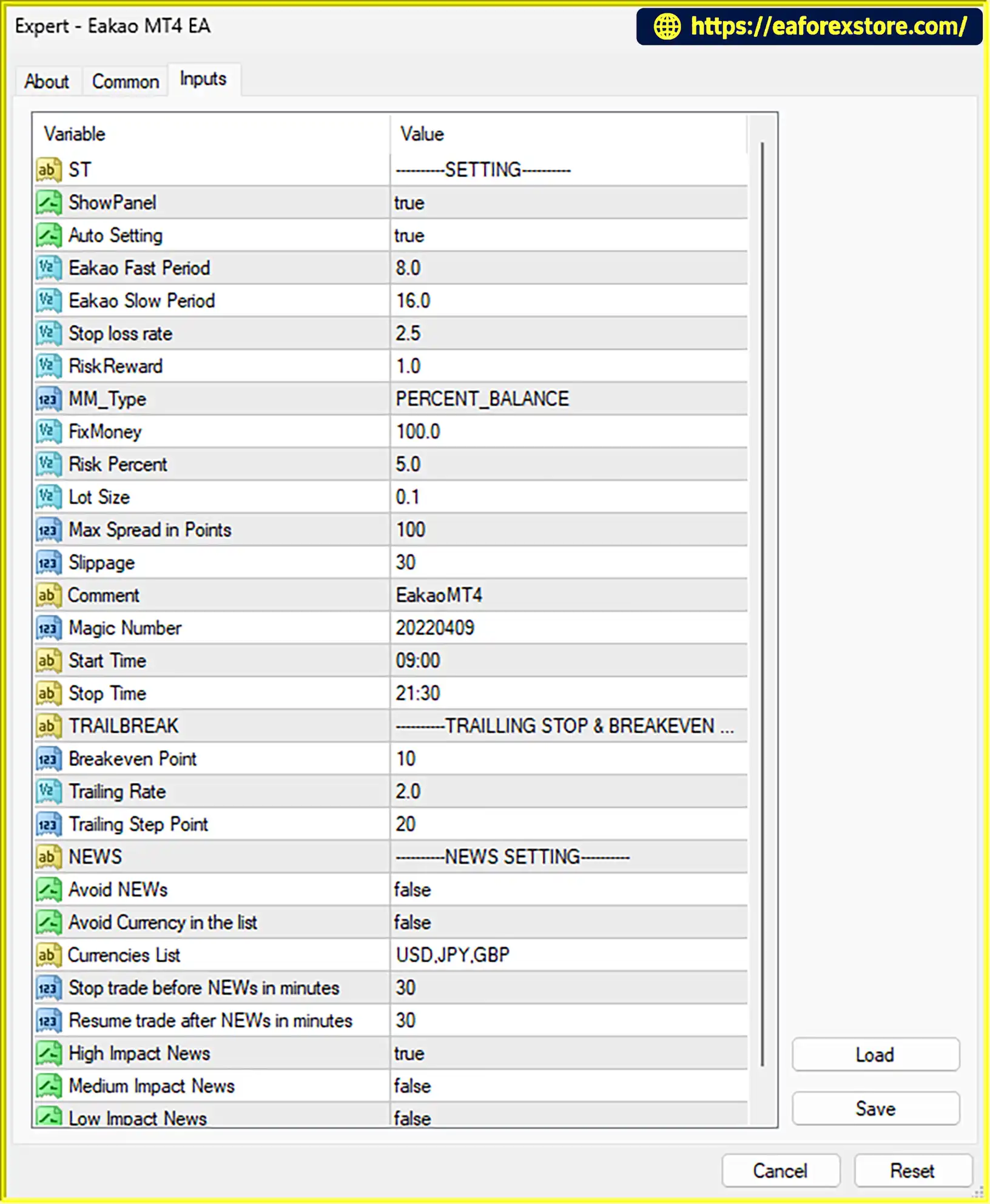
Configure the available parameters, especially:
Acceptable loss per trade.
Smart Money Management.
Stop Loss and Take Profit settings.
Break-Even parameters.
Trailing Stop settings.
News Filter settings.
To use the News Filter:
Obtain the required Forex Factory calendar link.
Open the EA’s Inputs or configuration settings.
Insert the calendar link into the designated comment section, following the developer’s instructions.
Verify that the calendar data is downloaded and processed correctly.
Make sure the calendar link and news settings are configured correctly before enabling automated trading.
Make sure the following settings are enabled:
Allow live trading in the EA settings.
Enable AutoTrading on the MT4 toolbar.
Confirm that automated trading permissions are correctly configured.
Check the Experts and Journal tabs to confirm that the EA is operating correctly.
A reliable VPS is recommended for continuous automated trading.
>> Join VIP Membership Now <<<
Eakao MT4 EA is an advanced trend-following Forex Expert Advisor designed to combine intelligent market analysis, dual-position execution, and automated money management.
Its two-trade system provides different approaches to profit management: one position follows a fixed Take Profit target, while the second uses Break-Even and Trailing Stop to potentially capture extended market movements.
The integrated Smart Money Management module simplifies position sizing by automatically calculating lot sizes based on the trader’s acceptable monetary loss and Stop Loss distance.
Additionally, the Exit Indicator and Forex Factory News Filter provide further tools for managing changing market conditions and scheduled economic announcements.
With support for multiple Forex pairs and XAUUSD, Eakao MT4 EA offers a flexible automated trading solution for traders who prefer trend-following strategies and structured risk management.
If you are looking for a multi-pair MT4 Expert Advisor with intelligent position sizing, dual-trade execution, and integrated news filtering, Eakao MT4 EA is worth exploring through careful demo testing.
Follow the Trend. Manage Risk. Let Automation Work.
1. What Is Eakao MT4 EA and How Does It Work?
Eakao MT4 EA is an automated Forex trading Expert Advisor designed for MetaTrader 4. It uses a trend-following strategy with custom technical indicators to identify potential trading opportunities. Once a valid signal is detected, the EA automatically calculates position size, opens two separate trades, and manages them using predefined Stop Loss, Take Profit, Break-Even, and Trailing Stop functions.
2. Why Does Eakao MT4 EA Open Two Trades for Each Trading Signal?
Eakao MT4 EA uses a dual-position trading system to apply two different profit management approaches. The first position follows a fixed Take Profit target, while the second position uses automatic Break-Even and Trailing Stop functions. This allows the first trade to secure profits at a predefined target while the second can remain open to potentially capture extended market movements.
3. How Does the Smart Money Management System Work?
The Smart Money Management system automatically calculates the appropriate lot size based on the trader's acceptable monetary loss per trade and the distance to the Stop Loss. Traders define how much they are willing to risk, and the EA adjusts the position size accordingly. This helps maintain more consistent monetary risk across trading setups with different Stop Loss distances.
4. Does Eakao MT4 EA Have a Built-in News Filter?
Yes. Eakao MT4 EA includes an integrated News Filter powered by economic calendar data from Forex Factory. It is designed to help manage trading exposure around important economic announcements. To activate this feature, users must insert the required Forex Factory calendar link into the designated comment section, following the developer's instructions.
5. Which Currency Pairs and Timeframes Does Eakao MT4 EA Support?
Eakao MT4 EA is recommended for the H1 (1-hour) timeframe and supports multiple Forex pairs as well as Gold (XAUUSD). The listed instruments are EURUSD, GBPUSD, USDJPY, USDCAD, EURAUD, EURJPY, GBPCHF, GBPJPY, EURCAD, GBPAUD, and XAUUSD. Traders should evaluate risk settings separately for each instrument, particularly because Gold can have different volatility and trading costs.
6. What Are the Backtest Results of Eakao MT4 EA?
According to the provided backtest report, Eakao MT4 EA achieved the following results on EURUSD from January 13, 2022, to April 10, 2022:
Initial Deposit: $3,000
Total Net Profit: $957,625.79
Win Rate: 64.13%
Maximum Drawdown: 9.49%
These figures are historical backtest results, not guaranteed live trading performance. Traders should independently verify the testing conditions and remember that spreads, commissions, slippage, market volatility, and execution quality can affect actual results.
7. Does Eakao MT4 EA Automatically Manage Stop Loss and Take Profit?
Yes. Every trade has predefined Stop Loss and Take Profit levels. The first position uses a fixed Take Profit, while the second position is managed through automatic Break-Even and Trailing Stop functions. In addition, the internal Exit Indicator monitors market conditions and may close positions before the predefined Stop Loss or Take Profit is reached.
8. How Do I Install and Set Up Eakao MT4 EA?
Download the Eakao MT4 EA .ex4 file.
Open MetaTrader 4 and select File → Open Data Folder.
Navigate to MQL4 → Experts.
Copy the EA file into the Experts folder.
Return to MT4, open Navigator, right-click Expert Advisors, and select Refresh.
Open your preferred trading chart and set the timeframe to H1.
Attach Eakao MT4 EA and configure acceptable loss per trade, Smart Money Management, Stop Loss, Take Profit, Break-Even, and Trailing Stop settings.
Configure the Forex Factory News Filter using the required calendar link and the developer's instructions.
Enable Allow live trading and the AutoTrading button.
Check the Experts and Journal tabs to confirm that the EA is operating correctly. A reliable VPS is recommended for continuous automated trading. Always test the EA on a demo account before using real funds.
In stock
In stock
In stock
In stock
In stock
Out of stock
No account yet?
Create an Account












 Automatic EA
 EA Best Seller
 Expert Advisor MT4
 Expert Advisor MT5
 HFT EA


Reviews
Clear filtersThere are no reviews yet.