









-
 Unlimited Activations
-
 Instant delivery
-
 Easy to install






 Unlimited Activations
Instant delivery
Easy to install
Unlimited Activations
Instant delivery
Easy to install
 Free Update
 Free Install Support

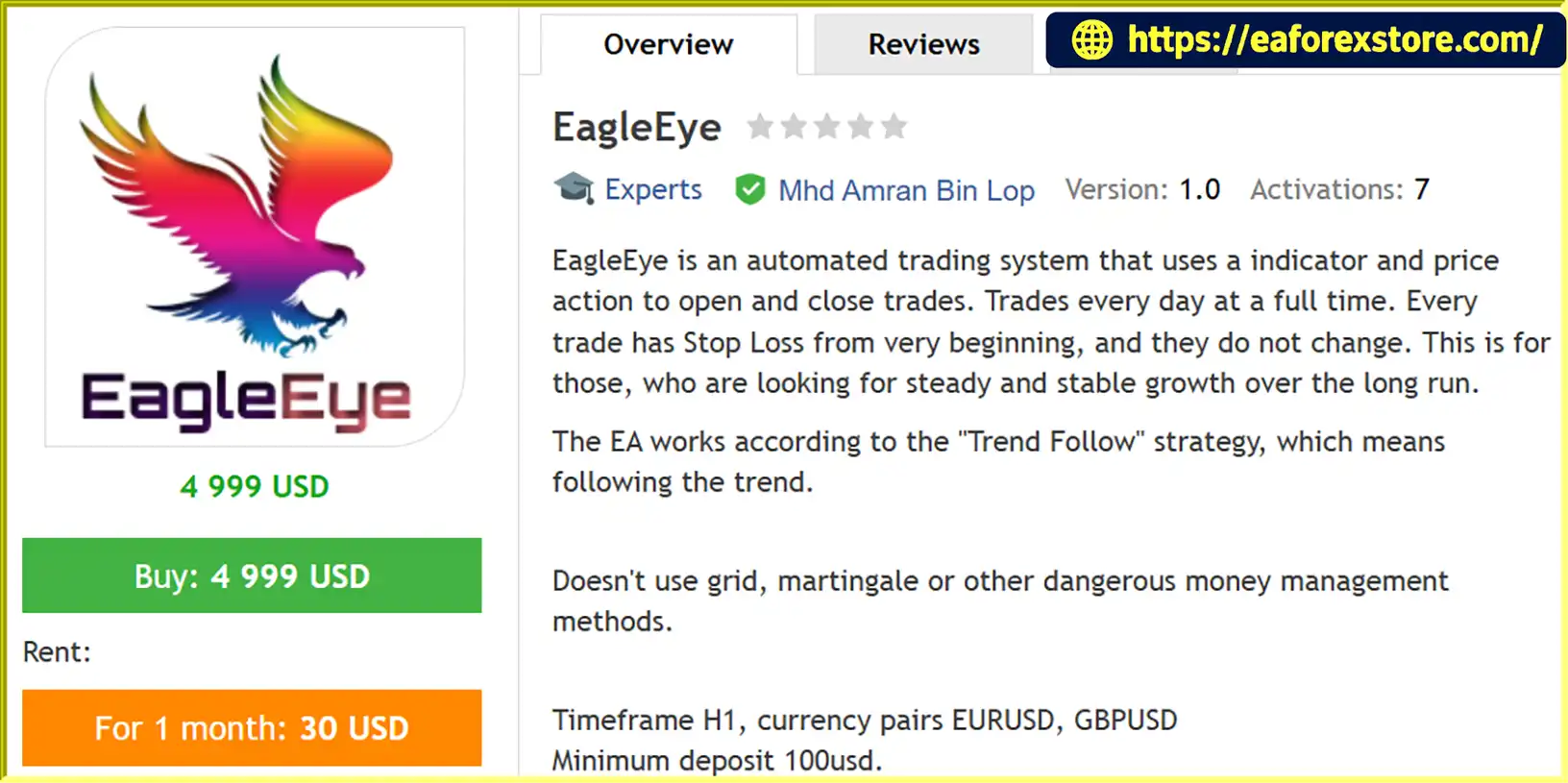
EagleEye EA MT4 is an automated Forex trading robot developed for the MetaTrader 4 platform. Designed around a trend-following strategy, this Expert Advisor (EA) combines technical indicator signals with price action analysis to identify potential trading opportunities, execute orders, and manage positions automatically.
The primary objective of EagleEye EA MT4 is to support a disciplined, systematic approach to Forex trading. Instead of relying on aggressive position recovery techniques, the robot focuses on following market trends while applying predefined risk management rules.
One of its key characteristics is that it does not use martingale, grid trading, or hedging strategies. Each position is opened with a hard Stop Loss, which remains fixed according to the developer’s description. This approach is intended to provide more predictable individual trade risk compared with strategies that continuously increase position sizes after losses.
EagleEye EA MT4 is primarily optimized for the EURUSD and GBPUSD currency pairs on the H1 timeframe. The developer also states that it can operate on other trending Forex instruments, although additional testing is recommended.
The software has a stated minimum deposit requirement of $100 and a minimum leverage recommendation of 1:100. It supports both fixed lot sizing and automatic risk-based position sizing, giving traders flexibility in managing their account exposure.
With automated trade execution, protective Stop Loss orders, configurable Take Profit levels, and multiple order management settings, EagleEye EA MT4 is designed for traders who prefer structured, trend-based automated trading.
>>> Delivery time 24h-48h after payment.
>>> Refund if not delivered.
>>> You will receive the latest version without any limitations (ID+Time).Reviewed by Jason Stap <<<
EagleEye EA MT4 Overview
EagleEye EA MT4 follows a trend-based trading approach that aims to identify opportunities in the direction of prevailing market movements.
The system combines technical indicators with price action analysis to evaluate trading signals and determine when to open or close positions.
The Expert Advisor uses both price movements and indicator-generated signals to support its trading decisions.
This combination is intended to provide additional market context rather than relying exclusively on a single indicator.
The exact technical indicators and signal conditions are not specified in the available product description.
One of the standout features of EagleEye EA MT4 is its avoidance of martingale and grid trading techniques.
The robot does not rely on progressively increasing trade sizes after losses or opening a grid of recovery positions.
This reduces exposure to certain risks associated with aggressive recovery strategies, although it does not eliminate the possibility of significant trading losses.
Each trade is opened with a predefined Stop Loss.
According to the developer, the initial Stop Loss remains unchanged after order execution.
This design aims to limit the planned loss on individual positions, although actual execution prices may differ during volatile market conditions.
EagleEye EA MT4 is designed to monitor trading opportunities throughout the trading week while MetaTrader 4 remains running and connected.
The robot can automatically evaluate market conditions and execute orders without requiring traders to manually monitor every price movement.
The recommended currency pairs for EagleEye EA are:
Both are major Forex pairs with generally high trading activity and liquidity during their active market sessions.
The EA may also be tested on other trending currency pairs, but its effectiveness on those instruments is not established by the supplied specifications.
The recommended operating timeframe is H1, meaning each candlestick represents one hour of market activity.
This timeframe allows the EA to evaluate hourly price movements and trend conditions.
EagleEye EA MT4 supports both fixed lot sizing and automatic position sizing based on a percentage of account capital.
Users can configure minimum and maximum lot sizes to define trading volume limits.
The EA includes several order management parameters, such as:
These settings allow users to customize how trades are executed and managed.
EagleEye EA MT4 is designed to be installed directly into MetaTrader 4.
Its configurable inputs allow traders to adjust money management and trade execution settings without modifying the underlying EA code.
EagleEye EA MT4 operates through a systematic process that combines trend identification, price action analysis, automatic order execution, and predefined trade protection.
The EA continuously monitors the selected currency pair for potential trading signals.
Its algorithm evaluates market price movements together with technical indicator information to identify possible trend-following opportunities.
The trading strategy focuses on following market trends rather than attempting to predict every reversal.
When the system identifies a potential directional opportunity that meets its programmed conditions, it prepares to execute a trade.
EagleEye EA combines its indicator-based signals with price action analysis.
These components help determine whether market conditions satisfy the robot’s internal trading rules.
The precise entry formula is not disclosed in the provided specifications.
Before opening a position, the EA determines the trade size according to the selected money management settings.
Traders can choose a fixed lot size or enable automatic lot calculation through RiskMM and RiskPercent.
Minimum and maximum lot settings can be used to restrict the calculated trading volume.
When the entry conditions are satisfied, the EA automatically places a buy or sell order.
Each trade is opened with a hard Stop Loss designed to establish a predefined protective exit level.
The software also supports Take Profit settings for defining profit targets.
After a position is opened, EagleEye EA monitors trading conditions and applies its configured exit rules.
The available settings include TrailingStop, TrailingStep, and BreakEven, although the developer describes the initial hard Stop Loss as remaining fixed.
Users should verify whether these optional features modify the broker-side Stop Loss or use another internal exit mechanism before enabling them.
Trades may be closed when a configured Take Profit, Stop Loss, or other programmed exit condition is triggered.
The EA then continues monitoring the market for subsequent trading opportunities.
Because the system follows trends, its performance may vary significantly between trending and range-bound market environments.
EagleEye EA MT4 offers several features that may appeal to traders looking for a rules-based automated trading system.
Trend-Based Trading Approach
The robot focuses on trading in the direction of market trends using technical indicators and price action information.
No Martingale or Grid Recovery
Unlike certain automated trading systems, EagleEye EA does not depend on martingale, grid, or hedging recovery methods.
This may appeal to traders who want to avoid strategies that can accumulate large positions during unfavorable price movements.
Predefined Stop Loss Protection
Each trade includes a protective Stop Loss from the beginning, making individual trade exposure easier to evaluate.
Flexible Risk Settings
The EA supports fixed lot sizing and percentage-based position sizing, allowing users to select different approaches to trading volume management.
Recommended Major Forex Pairs
EURUSD and GBPUSD are the primary recommended instruments, giving traders a clear starting point for testing.
Straightforward MT4 Integration
The EA is designed for MetaTrader 4 and includes familiar trading parameters that can be configured through the platform’s Inputs tab.
Automated Trading Execution
The robot can analyze market conditions, enter trades, and apply exit rules while the trading terminal remains active.
These characteristics make EagleEye EA MT4 an option worth evaluating for traders interested in trend-following automation without grid or martingale position recovery.
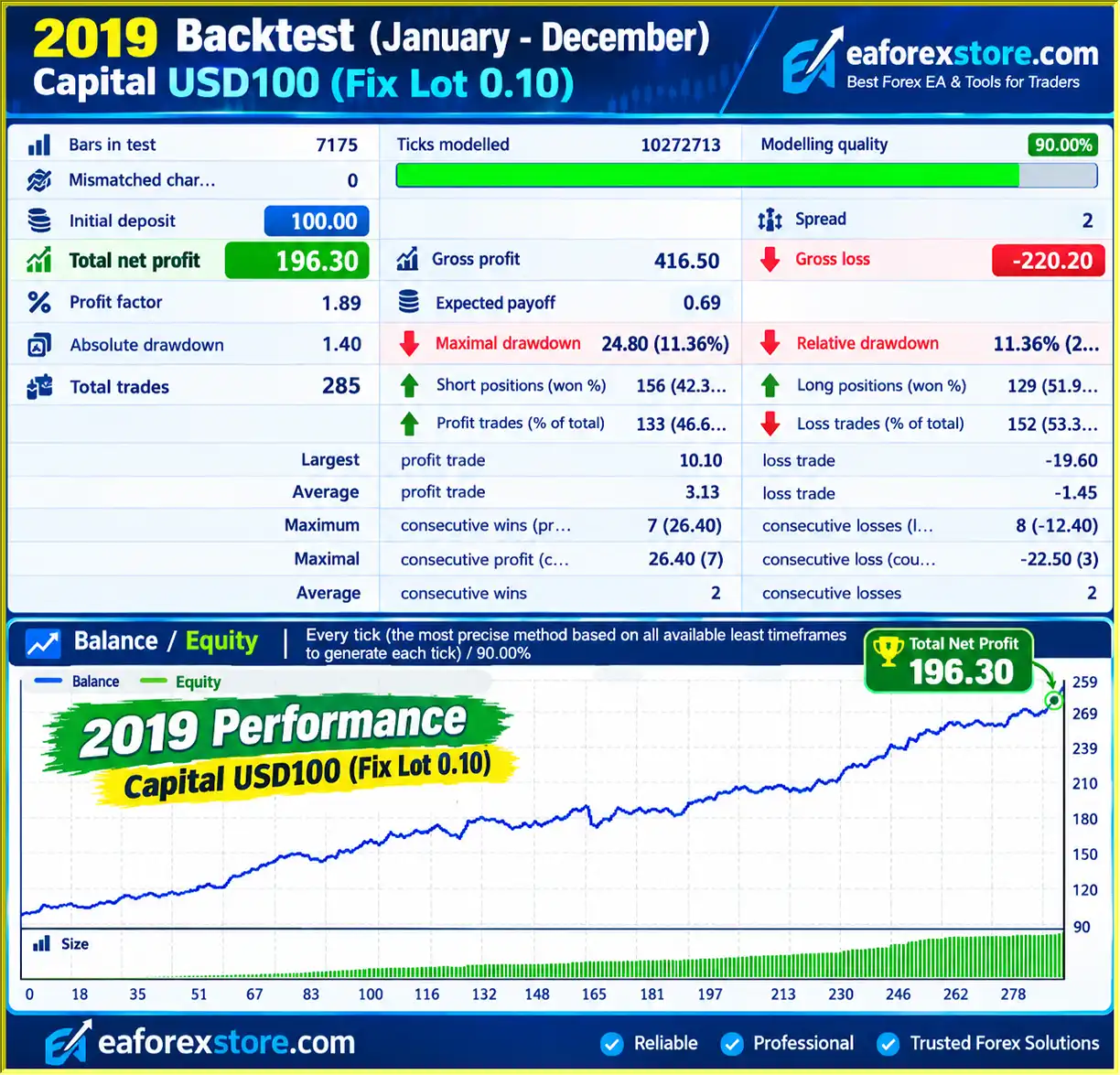
🔺 in 2019
EagleEye EA MT4 Backtets
Risk management is a central part of EagleEye EA MT4, particularly because the robot is designed to avoid aggressive recovery methods and apply a Stop Loss to every position.
However, traders should understand the limitations of each protective feature before using real funds.
EagleEye EA places a predefined Stop Loss when opening each trade.
According to the developer, this protective level remains unchanged throughout the position’s lifetime.
A hard Stop Loss can help establish a planned maximum loss based on the intended entry and exit prices.
However, broker-side execution may occur at a different price because of slippage, market gaps, or insufficient liquidity.
The TakeProfit parameter defines the target profit distance in points.
This gives traders control over the intended reward level for individual positions.
The appropriate setting depends on market volatility, spread costs, and the trading strategy being tested.
The Lots parameter allows users to specify a fixed trading volume.
This option can provide predictable nominal position sizes, although the percentage of account equity at risk may change as the account balance fluctuates.
The RiskMM feature enables automatic lot calculation based on the EA’s configured risk settings.
RiskPercent accepts values from 1 to 100.
Higher values may lead to larger positions and greater financial exposure. Increasing RiskPercent should not be considered a reliable method of increasing long-term profitability.
For conservative testing, smaller risk settings are generally more appropriate.
The MinLots and MaxLots parameters allow traders to configure trading volume boundaries.
These settings can help restrict order size, although the exact relationship between lot limits and the RiskMM calculation should be tested.
The MaxOrders parameter controls the maximum number of orders the EA is permitted to open.
Limiting simultaneous positions can help traders manage cumulative account exposure.
The EA includes optional TrailingStop, TrailingStep, and BreakEven parameters.
These functions are commonly used to manage open positions as prices move favorably.
However, the developer also states that the original Stop Loss remains unchanged. The interaction between these features is therefore unclear and should be verified through demo testing.
The Slippage parameter configures the permitted execution deviation.
Slippage can affect entry and exit prices, particularly during economic announcements, sudden volatility, or low-liquidity market periods.
The provided product information does not confirm dedicated email notifications, mobile push alerts, or custom warning messages.
Traders can monitor orders and account activity using MetaTrader 4’s standard Terminal, Experts, and Journal windows.
Although EagleEye EA avoids martingale and grid trading, its trend-following strategy can still experience consecutive losses during sideways or rapidly reversing markets.
The stated minimum deposit of $100 does not guarantee that the account has enough capital to withstand unfavorable market conditions.
Likewise, leverage of 1:100 increases available purchasing power but can also amplify losses.
Traders should carefully evaluate position sizing, maximum simultaneous orders, and historical drawdowns before using the EA on a live account.
Installing EagleEye EA MT4 is a straightforward process for traders familiar with the MetaTrader 4 platform.
Install MetaTrader 4 from your selected Forex broker.
Launch the platform and log in to your trading account.
For initial testing, it is recommended to use a demo account.
In MetaTrader 4, navigate to:
File → Open Data Folder → MQL4 → Experts
This directory contains the Expert Advisor files used by MT4.
Copy the EagleEye EA file, typically provided in EX4 or MQ4 format, into the Experts folder.
Restart MetaTrader 4 or refresh the Expert Advisors section in the Navigator panel.
Select one of the primary recommended Forex pairs:
Other trending currency pairs may be tested, but their suitability is not established by the supplied product information.
Set the chart timeframe to H1.
This is the recommended operating timeframe for EagleEye EA MT4.
Locate EagleEye EA under Expert Advisors in the Navigator window.
Drag it onto the chart.
Review the Common tab and enable the required automated trading permissions.
Open the Inputs tab and review the EA’s money management settings.
| Parameter | Description |
|---|---|
| Lots | Sets a fixed trading lot size |
| RiskMM | Enables automatic lot calculation based on risk settings |
| RiskPercent | Defines the percentage used by the automatic position sizing calculation |
| MinLots | Sets the minimum permitted trading volume |
| MaxLots | Sets the maximum permitted trading volume |
Fixed Lot vs. Automatic Risk Management
Fixed lot sizing allows users to select a constant trading volume.
Automatic risk management uses the configured RiskMM and RiskPercent settings to calculate position size.
The precise calculation method should be confirmed through testing.
The EA provides several adjustable parameters for managing positions.
| Parameter | Description |
|---|---|
| StopLoss | Defines the Stop Loss distance in points |
| TakeProfit | Defines the Take Profit distance in points |
| TrailingStop | Configures the trailing-stop distance |
| TrailingStep | Sets the trailing-stop adjustment step |
| BreakEven | Configures the break-even trigger or distance |
| MaxOrders | Limits the maximum number of orders |
| Slippage | Sets permitted execution deviation |
| Magic | Assigns a unique identifier to EA-generated orders |
Users should verify the parameter units and default values in their installed EA version before changing the settings.
Click the AutoTrading button in the MT4 toolbar.
Confirm that the Expert Advisor is active and that the trading platform is connected to the broker.
Check the Experts and Journal tabs for errors.
Open MetaTrader 4 Strategy Tester and evaluate EagleEye EA using historical market data.
Test EURUSD and GBPUSD on the H1 timeframe.
Important performance measurements include:
The developer cautions that previously presented backtests may be highly optimized, meaning their results should not be assumed to represent live trading outcomes.
Run EagleEye EA on a demo account before deploying it with real funds.
Monitor Stop Loss execution, lot calculations, position limits, and trade management behavior.
This is especially important when testing automatic risk settings or optional trailing and break-even functions.
If the EA is eventually used on a live account, regularly review its trading performance and risk exposure.
Keep MetaTrader 4 running and connected during the intended trading periods.
A VPS may help maintain terminal availability, but it cannot prevent market losses or guarantee successful order execution.
>> Join VIP Membership Now <<<
EagleEye EA MT4 is an automated Forex trading robot built around a trend-following strategy that combines technical indicators and price action analysis.
Its most notable characteristic is its avoidance of martingale, grid, and hedging recovery methods. Instead, the system applies a predefined Stop Loss to every position and provides configurable risk management controls.
The EA is designed primarily for EURUSD and GBPUSD on the H1 timeframe, making it a potential option for traders interested in automated strategies focused on major Forex currency pairs.
Its support for fixed and automatic lot sizing, Stop Loss and Take Profit parameters, maximum order limits, and other trade management functions provides flexibility for different trading preferences.
However, the supplied information does not include independently verified live trading performance or complete historical performance statistics.
The developer also acknowledges that highly optimized backtests cannot reliably predict live trading results.
Although EagleEye EA aims to support steady long-term trading, actual performance will depend on market trends, broker execution conditions, position sizing, and risk management decisions.
Overall, EagleEye EA MT4 may be worth testing for traders seeking an automated trend-following Forex robot that does not rely on martingale or grid trading strategies.
Before using real funds, evaluate the EA through historical backtesting, demo trading, and careful risk management to determine whether its behavior matches your trading objectives.
Risk Disclaimer: Forex and leveraged trading involve substantial financial risk. Automated trading systems cannot guarantee profits or prevent losses. Stop Loss orders may experience slippage, and historical backtesting results do not guarantee future trading performance. Always evaluate your financial risk tolerance before using an Expert Advisor with real capital.
1. What is EagleEye EA MT4 and how does it work?
EagleEye EA MT4 is an automated Forex trading robot designed for the MetaTrader 4 platform. It combines a trend-following strategy with technical indicators and price action analysis to identify potential trading opportunities. The Expert Advisor automatically executes buy and sell orders, applies predefined Stop Loss protection, and manages trades according to customizable risk management settings.
2. Is EagleEye EA MT4 profitable?
EagleEye EA MT4 has reported positive historical backtesting results. In a 2019 backtest, the EA generated $196.30 in net profit from a $100 initial deposit, with a 46.67% win rate and 11.36% maximum drawdown. However, these results are based on historical simulations rather than independently verified live trading performance. Actual profitability depends on market trends, broker execution, trading costs, and risk management settings.
3. Does EagleEye EA MT4 use Martingale, Grid, or Hedging strategies?
No. EagleEye EA MT4 does not use Martingale, Grid, or Hedging trading strategies. Instead, it follows a trend-based trading approach with a predefined hard Stop Loss on every position. This design avoids certain risks associated with aggressive recovery strategies that increase position sizes after losses. However, it does not eliminate trading risk or guarantee consistent profits.
4. Which currency pairs and timeframes are best for EagleEye EA MT4?
EagleEye EA MT4 is primarily optimized for EURUSD and GBPUSD on the H1 (1-hour) timeframe. These are the developer's recommended trading configurations. The EA may also operate on other trending Forex currency pairs, but their performance has not been established in the available specifications. Traders should backtest additional instruments before using them on a live trading account.
5. What is the minimum deposit required for EagleEye EA MT4?
The stated minimum deposit for EagleEye EA MT4 is $100, with a recommended minimum leverage of 1:100. The EA supports fixed lot sizes and automatic risk-based position sizing, allowing traders to configure trading volume according to their account balance. However, a $100 account may have limited capacity to absorb losses, especially when using higher leverage or aggressive risk settings.
6. Does EagleEye EA MT4 have built-in risk management features?
Yes. EagleEye EA MT4 includes hard Stop Loss protection, configurable Take Profit settings, automatic lot sizing, maximum order limits, and optional Trailing Stop and BreakEven parameters. The RiskMM and RiskPercent settings allow traders to adjust position sizing based on account risk preferences. However, users should verify how trailing-stop features interact with the EA's fixed Stop Loss mechanism before enabling them.
7. Can EagleEye EA MT4 run automatically 24/7 on a VPS?
Yes. EagleEye EA MT4 can run automatically on a Virtual Private Server (VPS) while MetaTrader 4 remains active and connected to the broker. VPS hosting allows the Forex robot to monitor market conditions, execute trades, and manage positions without keeping a personal computer running. However, trading opportunities depend on Forex market hours, and a VPS cannot guarantee uninterrupted execution or profitable results.
8. How do I install EagleEye EA MT4 on MetaTrader 4?
To install EagleEye EA MT4, copy the Expert Advisor file into the MQL4/Experts folder in your MetaTrader 4 data directory. Restart MT4, open an EURUSD or GBPUSD chart on the H1 timeframe, and attach the EA from the Navigator panel. Configure fixed or automatic lot sizing, Stop Loss, Take Profit, and maximum order settings. Enable AutoTrading and test the EA using the MT4 Strategy Tester and a demo account before trading live.
In stock
In stock
In stock
In stock
In stock
Out of stock
No account yet?
Create an Account












 Automatic EA
 EA Best Seller
 Expert Advisor MT4
 Expert Advisor MT5
 HFT EA


Reviews
Clear filtersThere are no reviews yet.