









-
 Unlimited Activations
-
 Instant delivery
-
 Easy to install






 Unlimited Activations
Instant delivery
Easy to install
Unlimited Activations
Instant delivery
Easy to install
 Free Update
 Free Install Support

Giraffe Super Trend EA MT4 is an automated Forex trading robot designed for the MetaTrader 4 platform. This Expert Advisor (EA) combines multiple technical indicators, including Moving Averages, MACD (Moving Average Convergence Divergence), and higher-timeframe trend analysis, to identify potential trading opportunities and execute buy or sell orders automatically.
Unlike basic Forex robots that rely on a single technical indicator, Giraffe Super Trend EA MT4 uses several market analysis factors to support its trading decisions. The system also evaluates individual currency pair characteristics, allowing its trading parameters to adapt to different market conditions.
One of the notable features of Giraffe Super Trend EA is its optional reverse trading functionality. This allows users to configure the robot to execute trades in the opposite direction of its standard signals, providing additional flexibility when testing alternative trading approaches.
The EA is primarily designed for the M30 (30-minute) and H1 (1-hour) timeframes and is recommended for six major and cross-currency pairs: USDCHF, EURUSD, USDCAD, AUDUSD, EURGBP, and EURJPY.
With automated position sizing, configurable trading hours, built-in Stop Loss and Take Profit settings, and multiple money management options, Giraffe Super Trend EA MT4 provides a flexible solution for traders interested in systematic Forex trading.
>>> Delivery time 24h-48h after payment.
>>> Refund if not delivered.
>>> You will receive the latest version without any limitations (ID+Time).Reviewed by Jason Stap <<<
Giraffe Super Trend EA MT4 Overview
Giraffe Super Trend EA MT4 combines Moving Averages and MACD indicators to evaluate potential trading signals.
By analyzing multiple technical indicators, the robot aims to identify market direction and assess entry opportunities based on a broader set of conditions.
The EA incorporates trend information from larger timeframes into its decision-making process.
This multi-timeframe approach helps the trading algorithm evaluate whether short-term signals align with the broader market direction.
Giraffe Super Trend EA automatically processes trading signals and executes orders according to its configured strategy.
This reduces the need for traders to monitor charts continuously or manually place every trade.
The Reverse Order setting gives traders the option to change the direction of the robot’s trading signals.
When configured to the standard mode, the EA follows its regular trading algorithm. When reverse mode is activated, the robot executes orders in the opposite direction.
This feature can be useful for strategy testing, although reverse trading does not necessarily improve profitability.
The robot evaluates currency pair characteristics to support its trading decisions.
Its recommended Forex pairs include:
These pairs are identified by the developer as suitable starting points for testing the EA.
Giraffe Super Trend EA MT4 offers three position sizing approaches:
This flexibility allows traders to choose a position sizing method that matches their trading preferences and risk tolerance.
The robot includes configurable Stop Loss and Take Profit functions.
These protective and profit-target orders are established using price-based distances, with the EA able to adjust values according to the selected currency pair.
Giraffe Super Trend EA includes a spread filter and a drawdown protection feature.
The spread filter is intended to help avoid trading when transaction costs become unfavorable, while drawdown protection is designed to provide additional account risk controls.
The exact conditions and effectiveness of these features should be verified through testing.
Users can customize the EA’s trading schedule to control when new trades are permitted.
This feature can help traders test different market sessions and avoid trading during periods they consider unsuitable.
Giraffe Super Trend EA displays trading-related information directly on the MT4 chart.
The integrated panel provides convenient access to EA information without requiring users to navigate through multiple platform windows.
The EA is designed to operate with both four-digit and five-digit Forex broker pricing formats and supports brokers offering variable spreads.
Broker-specific testing is recommended because spreads, execution conditions, and liquidity providers can affect automated trading performance.
Giraffe Super Trend EA MT4 follows an automated trading process that combines technical analysis, market direction evaluation, and position management.
The trading algorithm evaluates Moving Average signals and MACD information to determine potential market direction.
Moving Averages help identify broader price tendencies, while MACD provides additional information about momentum and directional changes.
Before executing a trade, the EA incorporates information from larger timeframes.
This allows the system to consider broader market conditions rather than relying exclusively on signals generated by the active chart.
The EA also analyzes the characteristics of the selected currency pair.
According to the product description, this analysis helps determine suitable trading conditions and can influence Stop Loss and Take Profit settings.
When the programmed conditions are satisfied, the robot identifies a potential buy or sell opportunity.
In standard mode, trades follow the EA’s normal signal direction.
If Reverse Order is set to -1, the system reverses the intended trading direction.
Before placing an order, Giraffe Super Trend EA determines the trading volume according to the selected money management method.
Traders can select fixed position sizing or an automated lot calculation approach.
The EA automatically places orders and manages positions using its configured Stop Loss and Take Profit settings.
The default Take Profit value is 120, while the default Stop Loss value is 80. These values may be adjusted by the algorithm depending on the selected currency pair.
After entering the market, the EA manages positions according to its internal exit algorithm and configured protective orders.
Trades may close when Stop Loss, Take Profit, or another programmed exit condition is triggered.
Actual results depend on market movements, spreads, slippage, and broker execution.
Giraffe Super Trend EA MT4 offers several characteristics that may appeal to traders seeking an automated Forex strategy.
Multiple Technical Indicators
The combination of Moving Averages, MACD, and higher-timeframe trend analysis provides a structured approach to identifying trading opportunities.
Flexible Trading Direction
Reverse Order functionality allows users to test both standard and opposite-direction signal execution without changing the underlying trading software.
Adaptable Position Sizing
With three money management methods, traders can customize how trading volume is calculated based on their preferred account management approach.
Currency-Specific Adjustments
The EA is designed to consider currency pair characteristics and adjust certain trading parameters accordingly.
Customizable Trading Schedule
Adjustable trading hours give users control over when automated order execution is allowed.
Built-In Protective Features
Stop Loss, Take Profit, spread filtering, and drawdown protection are intended to support more controlled automated trading.
Designed for MT4 Compatibility
The robot operates on MetaTrader 4, a widely used platform that offers charting tools, historical strategy testing, and automated trading support.
Overall, Giraffe Super Trend EA MT4 provides a combination of automatic signal generation and user-configurable trade management tools.
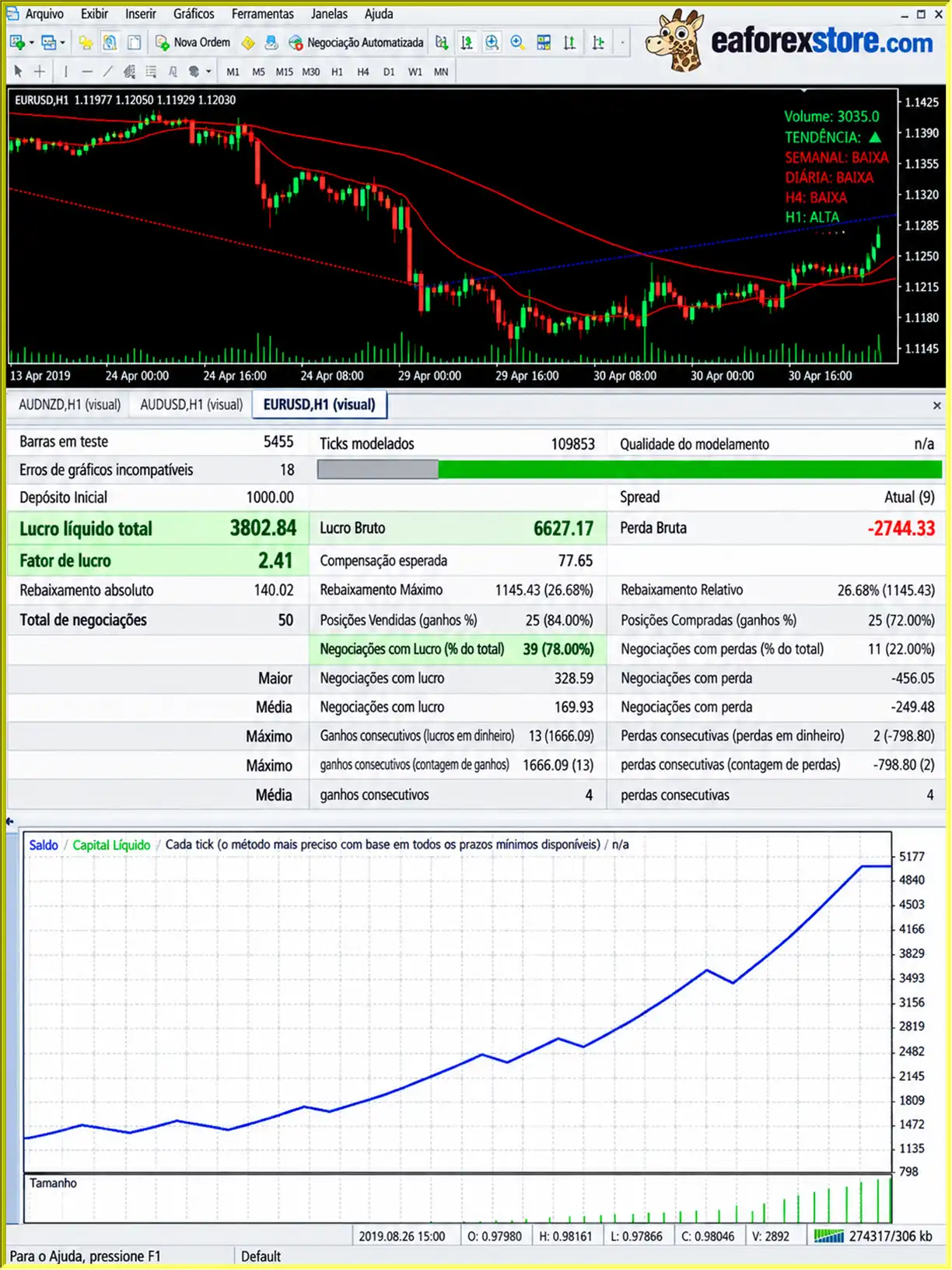
🔺EURUSD pair – H1
Giraffe Super Trend EA MT4 Backtets
Risk management is an essential consideration when using Giraffe Super Trend EA MT4 or any automated Forex trading system.
Although the robot includes several protective features, traders should understand how each function affects trading exposure.
Giraffe Super Trend EA uses a configurable Stop Loss to define an exit level when the market moves against a position.
The default Stop Loss value is 80, although the EA may adjust this setting based on its analysis of the selected currency pair.
Stop Loss orders help manage individual trade risk, but they cannot guarantee execution at the requested price during rapid market movements or price gaps.
The default Take Profit parameter is set to 120.
This setting is intended to establish a price-based profit target, with the possibility of adjustment according to the instrument being traded.
The 120 and 80 values should not automatically be interpreted as standard pips without verifying the EA’s parameter units.
The EA includes a drawdown protection function intended to limit account exposure during unfavorable trading conditions.
However, the available product information does not specify its exact activation thresholds or whether it closes existing positions.
Traders should review this functionality before relying on it as an account-level safeguard.
A spread filter is included to help prevent trading when the difference between bid and ask prices becomes excessive.
This feature can be particularly important for automated strategies operating during periods of low liquidity or increased volatility.
Giraffe Super Trend EA supports fixed and automatically calculated position sizes.
Traders who prefer predictable exposure may choose fixed lots, while those using proportional position sizing should carefully assess how trading volume changes as their account balance changes.
Activating reverse mode changes the direction of the robot’s standard trading signals.
This may lead to significantly different trading results and should be evaluated through backtesting and demo testing before live deployment.
The EA provides an on-chart information panel for reviewing trading-related information.
However, the supplied product specifications do not confirm whether it includes push notifications, email alerts, or custom warning messages.
Users can also monitor trades through the standard MT4 Terminal window and account history.
Important: Automated trading involves financial risk. No combination of technical indicators, stop-loss orders, or protective settings can guarantee profitable trades or prevent all losses.
Installing Giraffe Super Trend EA MT4 is similar to installing other Expert Advisors on MetaTrader 4.
Follow the steps below to configure the robot for testing.
Download and install the MT4 trading platform from a trusted Forex broker.
Open the platform and log in to your trading account.
For initial testing, a demo account is recommended.
In MetaTrader 4, navigate to:
File → Open Data Folder → MQL4 → Experts
This folder stores Expert Advisor files used by the MT4 platform.
Copy the Giraffe Super Trend EA file, usually provided in EX4 or MQ4 format, into the Experts directory.
Restart MetaTrader 4 or refresh the Expert Advisors list in the Navigator window.
Open a chart for one of the developer’s recommended currency pairs:
For initial testing, EURUSD or another recommended pair may be selected based on the broker’s trading conditions.
Set the chart timeframe to either:
These are the primary timeframes specified for Giraffe Super Trend EA MT4.
Locate Giraffe Super Trend EA in the Navigator panel under Expert Advisors.
Drag the EA onto your selected chart.
Enable the necessary automated trading permissions in the Common tab.
Review the Inputs tab and adjust the settings according to your preferred trading strategy.
| Parameter | Description | Default / Options |
|---|---|---|
| Setup Mode | Selects the configuration method | Robot_Setup / My_Setup |
| Lot Management | Defines the position sizing approach | Proportional / Fixed |
| Take Profit | Sets the profit-target distance | 120 |
| Stop Loss | Sets the stop-loss distance | 80 |
| Average Fast | Configures the fast Moving Average | User configurable |
| Average Slow | Configures the slow Moving Average | User configurable |
| Reverse Order | Controls trade direction | 1 / -1 |
| Trading Hours | Defines permitted trading periods | Adjustable |
Robot_Setup vs. My_Setup
Robot_Setup uses the robot’s predefined configuration approach and is recommended by the developer as the initial setup option.
My_Setup allows traders to work with customized settings.
Proportional Lot vs. Fixed Lot
Proportional lot sizing is the described default approach and calculates trading volume according to account balance.
Fixed lot sizing allows users to maintain a consistent trade volume.
Reverse Order Settings
Traders should use the normal trading direction as a baseline before experimenting with reverse mode.
Click the AutoTrading button in the MT4 toolbar.
Confirm that automated trading is permitted and that the EA is correctly attached to the chart.
Check the Experts and Journal tabs for any configuration or execution errors.
Use the MT4 Strategy Tester to evaluate Giraffe Super Trend EA under historical market conditions.
Test different currency pairs, timeframes, lot sizing options, and trading schedules.
Pay particular attention to drawdown, trading costs, profit factor, and sensitivity to market conditions.
Before trading with real capital, run Giraffe Super Trend EA MT4 on a demo account.
Different brokers use different liquidity providers, price feeds, and execution systems, which may influence automated trading results.
Demo testing can help identify suitable settings and reveal potential technical problems.
If the EA is eventually deployed on a live account, monitor its positions, account exposure, drawdown, and execution quality regularly.
A VPS can help keep the MT4 terminal running continuously, although uninterrupted operation does not guarantee profitable trading.
>> Join VIP Membership Now <<<
Giraffe Super Trend EA MT4 is an automated Forex trading robot built around technical indicator analysis, multi-timeframe trend evaluation, and flexible order management.
By combining Moving Averages, MACD, higher-timeframe market trends, and currency pair analysis, the Expert Advisor aims to identify trading opportunities through a systematic approach.
Its reverse trading functionality, three money management options, customizable trading schedule, and built-in protective features provide flexibility for traders who want to experiment with different automated trading configurations.
The robot is particularly relevant to traders interested in testing Forex strategies on the M30 and H1 timeframes across currency pairs such as EURUSD, USDCHF, USDCAD, AUDUSD, EURGBP, and EURJPY.
However, the available product description does not include independently verified live trading results or comprehensive historical performance statistics. Therefore, its long-term profitability and reliability cannot be established from the supplied information alone.
For traders interested in exploring its capabilities, the most practical approach is to begin with Robot_Setup, perform historical backtesting, evaluate performance on a demo account, and carefully review position sizing and drawdown exposure.
Overall, Giraffe Super Trend EA MT4 may be worth testing for traders seeking a customizable, indicator-based Forex trading robot with automated execution and multiple risk management options.
Risk Disclaimer: Forex and leveraged trading involve substantial financial risk. Expert Advisors cannot guarantee consistent profits, and automated strategies can experience significant losses during unfavorable market conditions. Historical testing and demo performance do not guarantee future results. Always evaluate trading risks carefully before using real funds.
1. What is Giraffe Super Trend EA MT4 and how does it work?
Giraffe Super Trend EA MT4 is an automated Forex trading robot designed for the MetaTrader 4 platform. It combines Moving Averages, MACD indicators, and higher-timeframe trend analysis to identify potential trading opportunities. The Expert Advisor automatically executes buy and sell orders based on market conditions while managing positions through configurable Stop Loss, Take Profit, and money management settings.
2. Is Giraffe Super Trend EA MT4 profitable?
Giraffe Super Trend EA MT4 has reported positive historical backtesting results. An EUR/USD H1 backtest showed a 78.00% win rate, $3,882.84 in net profit from a $1,000 initial deposit, and a maximum drawdown of 26.68%. However, these figures represent historical simulations rather than independently verified live trading results. Actual profitability depends on market volatility, broker execution, trading costs, and risk management settings.
3. Which currency pairs does Giraffe Super Trend EA MT4 support?
Giraffe Super Trend EA MT4 is recommended for six Forex currency pairs: EURUSD, USDCHF, USDCAD, AUDUSD, EURGBP, and EURJPY. The robot analyzes individual currency pair characteristics and can adjust certain trading parameters accordingly. Traders should backtest each pair separately because market conditions, spreads, and price movements can significantly influence automated trading performance.
4. What are the best timeframes for Giraffe Super Trend EA MT4?
The developer recommends using Giraffe Super Trend EA MT4 on the M30 (30-minute) and H1 (1-hour) timeframes. These chart intervals allow the EA to analyze trading signals using Moving Averages, MACD, and higher-timeframe market trends. The H1 timeframe was also used in the reported EUR/USD backtest. However, traders should test both timeframes to determine which configuration performs better under their broker's trading conditions.
5. What is the minimum deposit required for Giraffe Super Trend EA MT4?
The official minimum deposit requirement for Giraffe Super Trend EA MT4 is not specified in the available product information. However, the reported EUR/USD backtest used an initial deposit of $1,000. The EA supports fixed, calculated, and proportional lot sizing, allowing traders to adjust trading volume according to their account balance. The appropriate starting capital depends on broker requirements, leverage, lot size, and acceptable risk exposure.
6. Does Giraffe Super Trend EA MT4 have Stop Loss and drawdown protection?
Yes. Giraffe Super Trend EA MT4 includes configurable Stop Loss, Take Profit, spread filtering, and drawdown protection features. The default Stop Loss value is 80, while the Take Profit value is 120, although these settings may be adjusted based on currency pair characteristics. The exact drawdown protection mechanism is not fully documented, so traders should verify its behavior through backtesting and demo trading before relying on it.
7. What is the Reverse Order feature in Giraffe Super Trend EA MT4?
The Reverse Order feature allows Giraffe Super Trend EA MT4 to execute trades in the opposite direction of its standard trading signals. Setting Reverse Order to 1 follows the normal strategy, while setting it to -1 reverses buy and sell signals. This functionality provides additional flexibility for testing alternative market strategies. However, reverse trading does not guarantee better profitability and should be evaluated carefully before live trading.
8. How do I install Giraffe Super Trend EA MT4 on MetaTrader 4?
To install Giraffe Super Trend EA MT4, copy the Expert Advisor file into the MQL4/Experts folder in your MetaTrader 4 data directory. Restart MT4, open a recommended Forex pair such as EURUSD on the M30 or H1 timeframe, and attach the EA to the chart. Select Robot_Setup or My_Setup, configure lot management and risk parameters, and enable AutoTrading. Before using a live account, test the EA with the MT4 Strategy Tester and a demo account.
In stock
In stock
In stock
In stock
In stock
Out of stock
No account yet?
Create an Account












 Automatic EA
 EA Best Seller
 Expert Advisor MT4
 Expert Advisor MT5
 HFT EA


Reviews
Clear filtersThere are no reviews yet.