









-
 Unlimited Activations
-
 Instant delivery
-
 Easy to install







 Unlimited Activations
Instant delivery
Easy to install
Unlimited Activations
Instant delivery
Easy to install
 Free Update
 Free Install Support

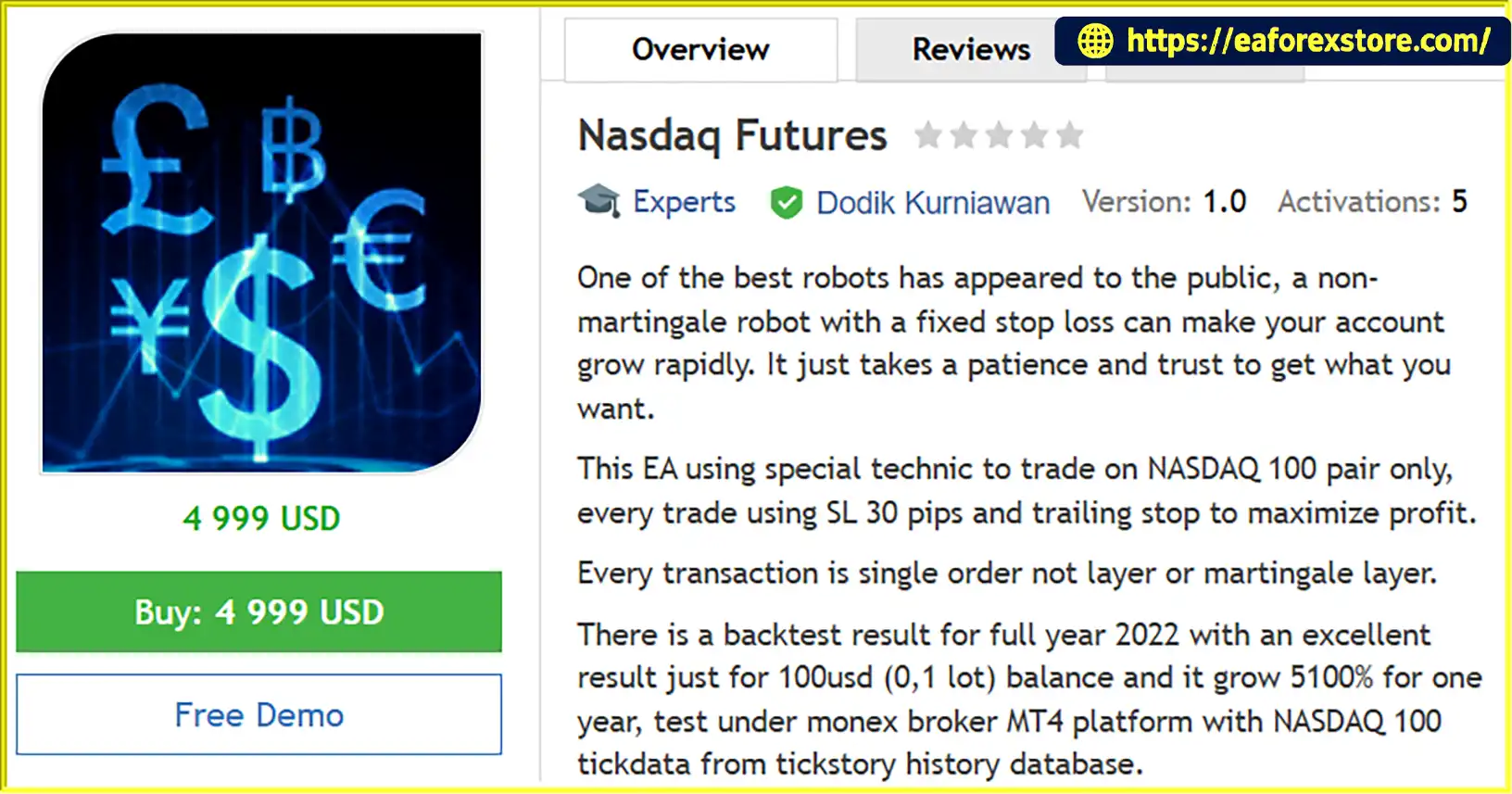
Nasdaq Futures EA MT4 is an automated trading Expert Advisor developed specifically for trading the NASDAQ 100 index through the MetaTrader 4 platform. Unlike multi-market trading robots, this EA focuses exclusively on NASDAQ 100 price movements, using a specialized algorithm designed around the index’s historical behavior, volatility, and trading characteristics.
The robot follows a single-order trading approach without relying on martingale, grid trading, or multiple recovery positions. Each trade is protected by a fixed Stop Loss of 30 pips, while a trailing-stop mechanism is used to manage profitable positions as market prices move favorably.
One of the main objectives of Nasdaq Futures EA MT4 is to provide automated index trading with predefined risk controls and a straightforward position management strategy. Instead of continuously increasing trading volume to recover losses, the system uses individual trades with protective exit levels.
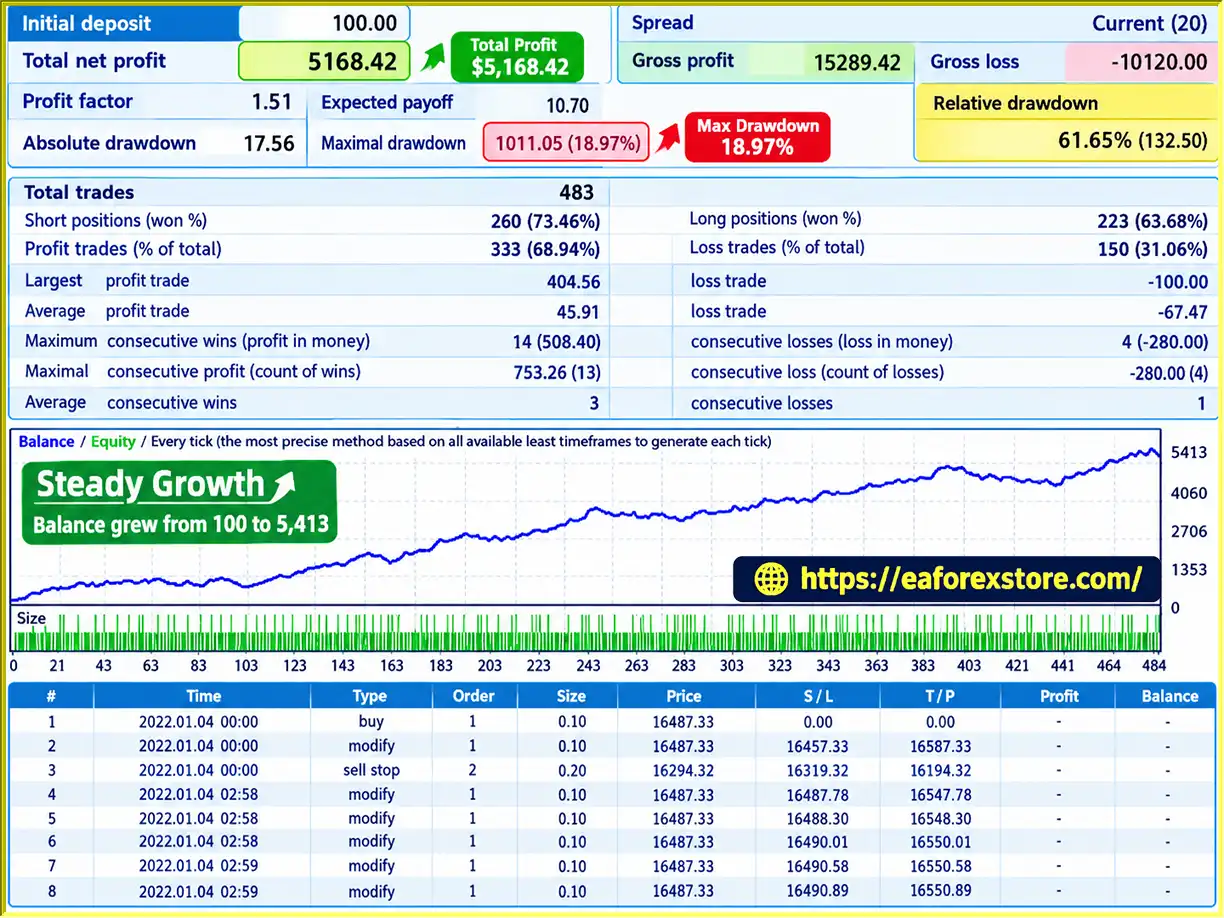
According to the developer, Nasdaq Futures EA MT4 achieved a reported 5,100% return during a full-year 2022 backtest, starting with a $100 account and using a trading volume of 0.1 lot. The historical simulation was reportedly conducted on the Monex broker’s MT4 platform using NASDAQ 100 tick data obtained from the Tickstory historical database.
Although this backtesting result is notable, it represents a developer-reported historical simulation rather than independently verified live trading performance. Such high returns may also indicate substantial risk exposure and should not be interpreted as an expected investment outcome.
With its dedicated NASDAQ 100 strategy, fixed Stop Loss, trailing-stop functionality, and non-martingale trading structure, Nasdaq Futures EA MT4 is designed for traders interested in automated NASDAQ index trading.
>>> Delivery time 24h-48h after payment.
>>> Refund if not delivered.
>>> You will receive the latest version without any limitations (ID+Time).Reviewed by Jason Stap <<<
Nasdaq Futures EA MT4 Overview
Nasdaq Futures EA MT4 is developed specifically for the NASDAQ 100 market.
Rather than applying a general Forex strategy across different instruments, the EA uses a specialized trading technique intended to account for the index’s price movements and market behavior.
The NASDAQ 100 is known for its exposure to major non-financial companies listed on the Nasdaq Stock Market, particularly businesses in technology and growth-oriented sectors.
Its volatility creates both trading opportunities and significant risks for automated systems.
The Expert Advisor is designed to automatically identify trading opportunities, execute positions, and manage exits according to its programmed algorithm.
This allows traders to participate in NASDAQ 100 price movements without manually placing every order.
However, the exact technical indicators and entry conditions used by the EA have not been disclosed in the supplied product description.
One of the main features of Nasdaq Futures EA MT4 is its non-martingale trading approach.
The robot does not increase position sizes progressively in an attempt to recover previous losses.
This avoids the specific risks associated with martingale recovery systems, although individual trades can still produce substantial losses.
The EA uses a single-order approach rather than opening multiple layered orders.
According to the developer, every transaction is executed as an individual position without martingale layers or grid-based order accumulation.
This creates a simpler position management structure and reduces exposure associated with recovery grids.
Every trade uses a predefined Stop Loss of 30 pips.
This protective exit is intended to limit the loss on each individual position if the market moves against the trade.
However, NASDAQ 100 brokers may use different point values, tick sizes, and contract specifications. Traders must verify how the EA interprets its 30-pip Stop Loss on their particular trading instrument.
Nasdaq Futures EA MT4 includes a trailing-stop mechanism designed to manage profitable positions.
As the market moves favorably, the trailing stop can adjust the protective exit level according to the EA’s internal logic.
This approach aims to capture extended market movements while reducing the amount of unrealized profit surrendered during a reversal.
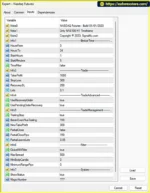
The developer reports a full-year backtest for 2022 using the following conditions:
These figures are developer-provided claims and should be evaluated alongside drawdown, leverage, margin requirements, spreads, commissions, and other trading costs.
The EA is intended specifically for NASDAQ 100 rather than multiple Forex pairs or other financial instruments.
This specialization allows the developer to focus on the characteristics of one market, although it also limits the robot’s diversification opportunities.
The robot is marketed as a trading solution designed for long-term account growth.
Its non-martingale structure and use of protective Stop Loss orders reflect an emphasis on predefined trade exits.
Nevertheless, long-term capital preservation depends on actual strategy performance, position sizing, and market conditions rather than the presence of a Stop Loss alone.
Nasdaq Futures EA MT4 operates through a dedicated algorithm developed around NASDAQ 100 market behavior.
Its general trading process includes market analysis, automatic order execution, fixed Stop Loss protection, and trailing-stop management.
The EA analyzes price movements on the NASDAQ 100 instrument available through the trader’s MT4 broker.
The developer states that the strategy was researched and developed specifically around the index’s trading characteristics.
However, the exact technical indicators or price patterns used for generating signals are not publicly specified in the supplied description.
When the robot detects conditions that satisfy its internal strategy, it generates a trading signal.
The system then prepares to open an individual position according to its programmed entry rules.
Nasdaq Futures EA MT4 opens a single trade rather than establishing multiple layered recovery positions.
This approach avoids the progressive position accumulation commonly associated with martingale and grid strategies.
A fixed Stop Loss of 30 pips is applied to each trade.
This provides a predefined protective exit distance, although the actual monetary risk depends on the trading volume, contract specifications, and broker execution.
When a trade moves in the intended direction, the EA uses its trailing-stop functionality to manage the position.
The trailing stop is intended to follow favorable price movements and protect part of the position’s unrealized profit.
A position may close when its Stop Loss or trailing-stop exit condition is triggered.
The EA can then continue monitoring NASDAQ 100 market conditions for the next potential trading opportunity.
As long as MetaTrader 4 remains operational and the trading conditions are satisfied, the EA can continue executing its automated strategy.
Trading results will depend on NASDAQ 100 volatility, market trends, trading costs, broker execution, and position sizing.
Nasdaq Futures EA MT4 offers several characteristics that may appeal to traders interested in automated NASDAQ 100 trading.
Dedicated NASDAQ 100 Strategy
The robot is designed specifically for NASDAQ 100 rather than applying the same algorithm to unrelated currency pairs or commodities.
No Martingale Position Recovery
By avoiding martingale trading, the EA does not rely on systematically increasing trade sizes after losses.
Single-Order Execution
Its single-order structure avoids the complexity of managing multiple layered recovery positions.
Fixed Stop Loss Protection
Every trade uses a predefined 30-pip Stop Loss intended to establish a protective exit level.
Trailing-Stop Functionality
The trailing-stop mechanism allows the EA to manage profitable positions as the market moves favorably.
Automated Trading Process
The robot can analyze market conditions and manage trades automatically while the MT4 platform is running.
Historical Strategy Testing
The developer provides a reported backtest covering the full year of 2022, including information about the initial balance, lot size, broker platform, and historical data source.
These characteristics may make Nasdaq Futures EA MT4 worth evaluating for traders seeking a focused, non-martingale automated index trading strategy.
Nasdaq Futures EA MT4 Backtets
Risk management is particularly important when trading the NASDAQ 100 because index price movements can be rapid and substantial.
Although Nasdaq Futures EA MT4 includes protective trading mechanisms, traders should understand their limitations before using the robot with real capital.
Every trade is configured with a 30-pip Stop Loss.
The purpose of this feature is to establish a protective exit if the market moves against the open position.
However, a fixed price-distance Stop Loss does not guarantee a fixed percentage of account risk.
The amount of capital exposed depends on lot size, contract value, leverage, and the broker’s instrument specifications.
The trailing-stop feature is designed to manage positions after favorable price movement.
By adjusting the protective exit level, the EA attempts to retain part of the unrealized profit during a price reversal.
Trailing stops do not guarantee profitable exits, particularly during rapid market movements or price gaps.
Nasdaq Futures EA MT4 does not use martingale recovery techniques.
This removes the specific risk of progressively increasing position sizes after consecutive losing trades.
However, a non-martingale strategy can still experience significant drawdowns or account liquidation if its individual position sizes are too large.
The robot uses individual trades rather than layered recovery orders.
This may simplify exposure monitoring, but it does not establish a maximum account drawdown or guarantee that the EA will never hold more than one position at a time.
The developer’s reported backtest used a 0.1-lot trading volume on a $100 starting balance.
This combination may represent aggressive exposure, depending on the broker’s NASDAQ 100 contract specifications and margin requirements.
Traders should not assume that a $100 account is sufficient for safe live trading with 0.1 lot.
The NASDAQ 100 can experience substantial price fluctuations during:
These conditions can affect trade execution, slippage, and Stop Loss performance.
The EA’s performance may vary between brokers due to differences in spreads, contract sizes, minimum trade volumes, liquidity, and execution rules.
NASDAQ 100 instruments can also have different trading symbols, including NAS100, US100, and USTEC, depending on the broker.
The supplied product description does not confirm dedicated email alerts, mobile push notifications, or other custom warning systems.
Traders can monitor open positions, execution activity, and account performance through MetaTrader 4’s standard Terminal and Journal windows.
The developer reports a 5,100% return during the 2022 backtest.
Such an exceptionally high result requires careful scrutiny, particularly regarding maximum drawdown, leverage, position size, and the accuracy of historical testing assumptions.
Backtesting does not reproduce all live market conditions, including execution delays, liquidity limitations, and variable trading costs.
Traders should evaluate independently verified forward-testing results before making any live trading decisions.
Installing Nasdaq Futures EA MT4 follows the standard procedure for adding an Expert Advisor to the MetaTrader 4 platform.
Download and install MetaTrader 4 from a trusted broker that offers a NASDAQ 100 trading instrument.
Log in to your trading account.
A demo account is recommended for initial setup and testing.
In MetaTrader 4, navigate to:
File → Open Data Folder → MQL4 → Experts
This folder stores the Expert Advisor files used by the platform.
Copy the Nasdaq Futures EA file, typically supplied in EX4 or MQ4 format, into the Experts folder.
Restart MetaTrader 4 or refresh the Expert Advisors section in the Navigator panel.
Locate the NASDAQ 100 instrument in the MT4 Market Watch window.
Depending on your broker, the instrument may appear as:
Confirm that the selected instrument matches the EA’s supported symbol requirements.
Although the product is named Nasdaq Futures EA, a broker’s MT4 NASDAQ 100 instrument may be a CFD rather than an exchange-traded futures contract. These products have different specifications and trading conditions.
Open the NASDAQ 100 chart and select the timeframe required by the EA.
The supplied product description does not specify a recommended timeframe.
Therefore, traders should verify the correct chart period through the developer’s documentation or EA instructions rather than assuming that any particular timeframe is supported.
Find Nasdaq Futures EA under Expert Advisors in the Navigator window.
Drag the EA onto the NASDAQ 100 chart.
Review the Common tab and enable the required automated trading permissions.
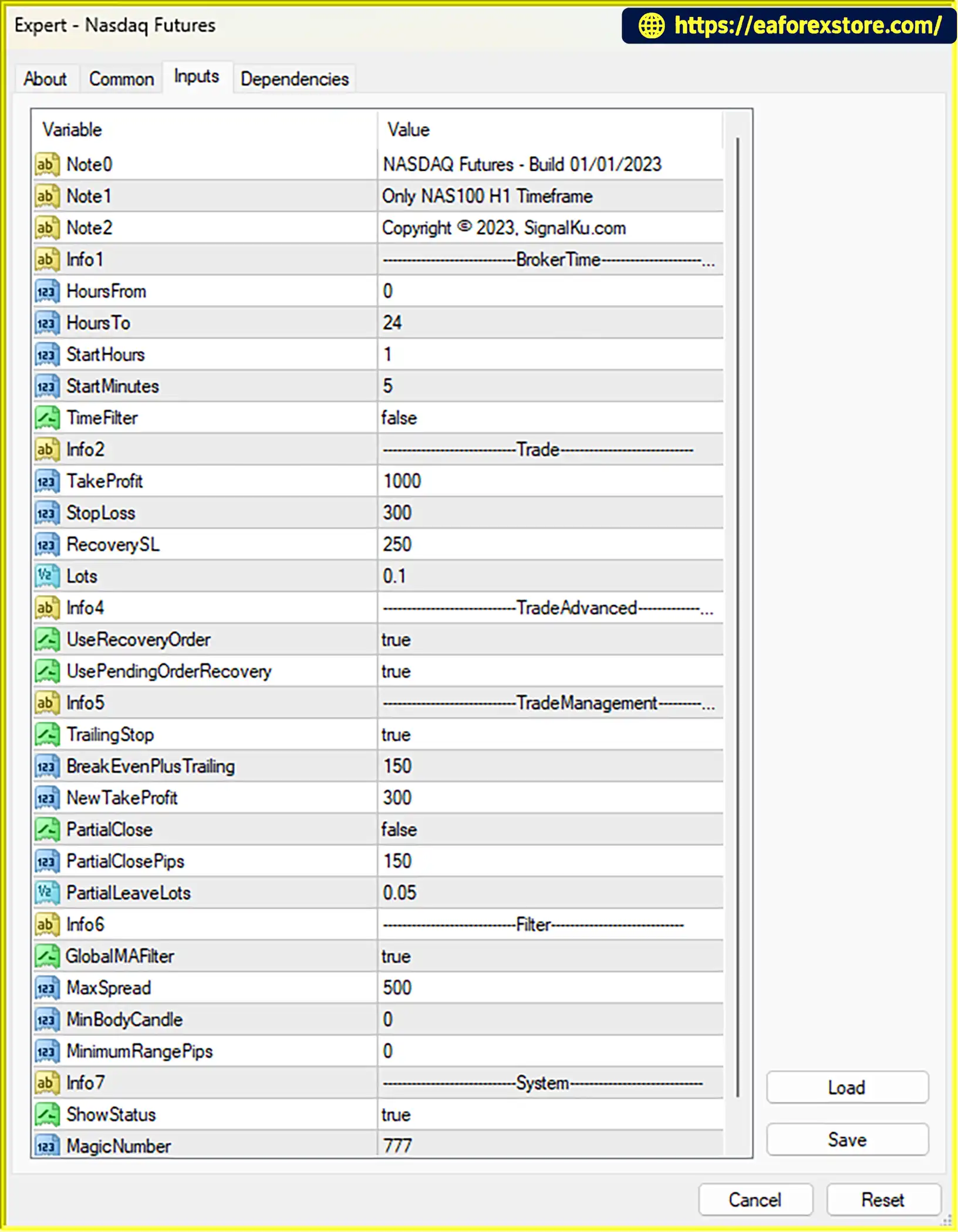
Open the Inputs tab and examine the available configuration parameters.
The developer’s supplied information confirms the following trading characteristics:
| Trading Feature | Specification |
|---|---|
| Trading Instrument | NASDAQ 100 only |
| Trading Platform | MetaTrader 4 |
| Trading Strategy | Specialized NASDAQ 100 algorithm |
| Stop Loss | Fixed 30 pips |
| Trailing Stop | Enabled as part of strategy |
| Martingale | Not used |
| Grid Trading | Not used |
| Layered Recovery Orders | Not used |
| Order Structure | Single-order transactions |
| Recommended Timeframe | Not specified |
| Minimum Live Deposit | Not verified |
| Exact Input Parameters | Not provided |
The numerical backtest conditions should not be treated as recommended live trading settings.
Before enabling automated trading, check how your broker defines NASDAQ 100 points, ticks, and contract sizes.
Confirm that the EA’s 30-pip Stop Loss is interpreted correctly.
Also review the monetary risk of each trade based on the selected position size.
Click the AutoTrading button in the MT4 toolbar.
Confirm that the EA is active and that the trading terminal is connected to the broker.
Review the Experts and Journal tabs for configuration or execution errors.
Use MetaTrader 4 Strategy Tester to evaluate the EA on NASDAQ 100 historical data.
The developer’s reported test used Tickstory data for 2022.
When conducting independent tests, examine:
Testing additional years is important because performance during one historical period may not reflect behavior in other market environments.
Test Nasdaq Futures EA on a demo account using the broker and NASDAQ 100 instrument intended for live trading.
Monitor order execution, trailing-stop behavior, lot sizing, margin usage, and drawdowns.
This helps identify differences between historical backtests and simulated live market conditions.
If the EA is eventually deployed with real capital, regularly review its trading results and account exposure.
Keep MetaTrader 4 running during the required trading periods.
A VPS may help maintain platform availability, but it cannot guarantee execution quality or prevent market losses.
>> Join VIP Membership Now <<<
Nasdaq Futures EA MT4 is a specialized automated trading robot designed exclusively for the NASDAQ 100 market.
Its trading structure focuses on individual order execution, fixed Stop Loss protection, and trailing-stop profit management without using martingale or grid recovery strategies.
These features may appeal to traders who prefer a more straightforward automated approach to index trading.
The developer’s reported 2022 backtest return of 5,100% is a notable historical claim. However, such exceptional performance should be assessed carefully because the available information does not establish independently verified live trading results, maximum drawdown, or the complete risk profile.
The reported starting balance of $100 and trading volume of 0.1 lot also raise important questions about leverage, margin requirements, and capital exposure.
Although the EA is marketed as a low-risk, long-term trading solution, its actual risk level cannot be determined without detailed performance statistics and independent testing.
Overall, Nasdaq Futures EA MT4 may be worth evaluating for traders interested in a dedicated NASDAQ 100 automated trading strategy without martingale or grid-based recovery methods.
The most sensible approach is to verify the robot’s trading conditions, conduct independent backtesting, evaluate performance on a demo account, and use carefully controlled position sizes before considering live trading.
Risk Disclaimer: Trading NASDAQ 100 futures, CFDs, and other leveraged financial instruments involves substantial risk. Fixed Stop Loss orders and non-martingale strategies do not guarantee capital protection. Historical backtesting results, including exceptionally high reported returns, do not guarantee future profits. Traders may lose some or all of their invested capital.
1. What is Nasdaq Futures EA MT4 and how does it work?
Nasdaq Futures EA MT4 is an automated trading Expert Advisor designed specifically for the NASDAQ 100 index on the MetaTrader 4 platform. It uses a specialized trading algorithm to identify market opportunities, execute individual orders, and manage positions automatically. Each trade includes a fixed 30-pip Stop Loss and a trailing-stop mechanism to manage profitable positions as market conditions change.
2. Is Nasdaq Futures EA MT4 profitable?
Nasdaq Futures EA MT4 has reported exceptional historical backtesting results. According to the developer, a 2022 NASDAQ 100 backtest generated $5,169.42 in net profit from a $100 initial deposit, with a 68.94% win rate and 18.97% maximum drawdown. However, the reported results are historical simulations rather than independently verified live trading performance. Actual profitability depends on market volatility, broker execution, trading costs, and risk management.
3. Does Nasdaq Futures EA MT4 use Martingale or Grid trading strategies?
No. Nasdaq Futures EA MT4 does not use Martingale, Grid, or layered recovery trading strategies. Instead, it follows a single-order trading approach with a predefined Stop Loss for each position. This avoids the progressive lot increases commonly associated with Martingale systems and the accumulation of recovery orders used in Grid trading. However, trading losses and significant drawdowns are still possible.
4. What is the minimum deposit required for Nasdaq Futures EA MT4?
The official minimum live deposit requirement for Nasdaq Futures EA MT4 has not been verified. The developer's reported 2022 backtest used a $100 initial balance with a trading volume of 0.1 lot. However, these backtesting conditions should not be considered recommended live trading settings. The appropriate deposit depends on your broker's NASDAQ 100 contract specifications, leverage, margin requirements, and selected position size.
5. Which trading instruments and timeframes does Nasdaq Futures EA MT4 support?
Nasdaq Futures EA MT4 is designed exclusively for trading the NASDAQ 100 index, which may appear as NAS100, US100, USTEC, or NASDAQ100 depending on the broker. It is not intended for Forex currency pairs, gold, or unrelated indices. The developer has not specified an officially recommended timeframe, so traders should verify the correct chart settings before using the EA.
6. How does Nasdaq Futures EA MT4 manage trading risk?
Nasdaq Futures EA MT4 uses a fixed 30-pip Stop Loss on every trade and a trailing-stop mechanism to manage favorable price movements. Its single-order, non-martingale structure avoids layered recovery positions. However, a fixed Stop Loss does not guarantee a fixed monetary loss because contract sizes, spreads, slippage, and broker execution conditions vary. Traders should carefully evaluate position sizing and margin exposure before live trading.
7. Can Nasdaq Futures EA MT4 run automatically on a VPS?
Yes. Nasdaq Futures EA MT4 can operate automatically on a Virtual Private Server (VPS) while MetaTrader 4 remains running and connected to the broker. A VPS allows the robot to monitor NASDAQ 100 market conditions, execute orders, and manage trailing stops without requiring a personal computer to stay switched on. However, trading activity depends on market hours, broker availability, and the EA's programmed conditions.
8. How do I install Nasdaq Futures EA MT4 on MetaTrader 4?
To install Nasdaq Futures EA MT4, copy the Expert Advisor file into the MQL4/Experts folder within your MetaTrader 4 data directory. Restart MT4, open your broker's NASDAQ 100 trading chart, and attach the EA from the Navigator panel. Verify the trading symbol, Stop Loss interpretation, contract specifications, and available settings before enabling AutoTrading. Always perform historical backtesting and demo testing before using real capital.
In stock
In stock
In stock
In stock
In stock
Out of stock
No account yet?
Create an Account












 Automatic EA
 EA Best Seller
 Expert Advisor MT4
 Expert Advisor MT5
 HFT EA


Reviews
Clear filtersThere are no reviews yet.