









-
 Unlimited Activations
-
 Instant delivery
-
 Easy to install







 Unlimited Activations
Instant delivery
Easy to install
Unlimited Activations
Instant delivery
Easy to install
 Free Update
 Free Install Support

FVG EA Pro MT5 is an advanced and highly customizable Expert Advisor designed to automate trading strategies based on Fair Value Gaps (FVG), Smart Money Concepts (SMC), ICT trading principles, and market structure analysis. Developed with input from a trading community experienced in ICT and SMC methodologies, this EA provides a flexible framework for traders who want to turn their market analysis into systematic, automated trading rules.
Unlike simple indicator-based trading robots, FVG EA Pro MT5 allows traders to configure entry conditions using market structure, higher-timeframe filters, and Fair Value Gap concepts. It can also be configured for specific trading windows, including ICT Kill Zones and Silver Bullet sessions, making it suitable for both intraday and swing trading strategies.
With extensive options for trade execution, position sizing, stop-loss and take-profit management, partial exits, trailing stops, and daily risk controls, FVG EA Pro MT5 gives experienced traders the flexibility to build and test strategies that match their individual trading styles.
This is a medium-to-advanced trading system that requires a good understanding of its settings, strategy testing, and optimization to achieve the best configuration for a particular broker and trading instrument.
>> Delivery time 24h-48h after payment.
>>> Refund if not delivered.
>>> You will receive the latest version without any limitations (ID+Time).>>Reviewed by Jason Stap <<
FVG EA Pro MT5 supports configurable entry strategies based on Fair Value Gaps and market structure. Traders can define their preferred entry criteria and combine multiple conditions to develop systematic approaches inspired by ICT and SMC trading.
The EA enables traders to incorporate market structure into their strategy and apply higher-timeframe filters to refine trade conditions. These options help users build rules for identifying potential trading opportunities in line with their preferred market bias.
The customizable trading-window settings allow the EA to operate during selected time periods, including ICT Kill Zones and Silver Bullet windows. Traders can define when the system is permitted to seek entries rather than allowing it to trade continuously throughout the day.
Users can configure how trades are entered based on their strategy requirements. Supported order types include:
Entry limits and conditions can also be customized, giving traders greater control over how the EA executes their trading plan.
FVG EA Pro MT5 supports different position-sizing methods to accommodate various account sizes and risk preferences. Volume can be configured as a fixed lot size or calculated as a percentage of account balance or equity.
Percentage-based risk settings can help traders scale position sizing according to their account value, although actual risk also depends on stop-loss distance, execution conditions, and the instrument traded.
The EA provides multiple ways to configure stop-loss and take-profit levels, allowing users to adapt trade management to different FVG, ICT, SMC, and swing-trading approaches.
The built-in break-even function can automatically adjust a trade’s stop-loss according to the configured rules. This helps traders manage open positions without needing to monitor every trade manually.
Break-even functionality does not guarantee a risk-free exit, as slippage, gaps, and execution conditions can affect the final result.
Traders can configure multiple partial take-profit levels to close portions of a position as price reaches predefined targets. This provides additional flexibility for strategies that aim to secure some profits while allowing the remaining position to continue.
The trailing-stop function helps manage open trades as price moves in the desired direction. By adjusting the stop according to the configured rules, traders can attempt to protect accumulated gains while maintaining exposure to further price movements.
Because timing is an important part of ICT trading, FVG EA Pro MT5 includes time-based exit settings. These allow traders to incorporate time restrictions into their position-management rules, complementing their entry windows and broader strategy design.
Users can select the days on which the EA is permitted to trade. This feature helps align automated execution with a preferred weekly schedule or a strategy that avoids specific trading days.
The built-in news filter allows traders to restrict trading around selected high-impact economic announcements. This can help reduce exposure to scheduled news events that may cause sudden volatility, spread widening, or unpredictable price movements.
The effectiveness of the filter depends on its configuration, available news data, and broker conditions.
FVG EA Pro MT5 includes mechanisms for managing daily drawdown limits and daily profit targets. When the configured threshold is reached, the EA is designed to stop opening new trades and close active positions according to its programmed rules.
These controls provide an additional layer of risk management, but they cannot eliminate losses or guarantee that the final account result will remain within the specified threshold under all market and execution conditions.
FVG EA Pro MT5 automates a trading strategy through a combination of market analysis, configurable entry conditions, time filters, and position-management rules.
Step 1: Define the Trading Strategy
Configure the EA’s FVG, market structure, ICT/SMC, and higher-timeframe conditions according to the strategy you want to automate.
Step 2: Select Trading Windows
Choose the permitted trading periods, such as Kill Zones or Silver Bullet windows, and configure the days on which trading is allowed.
Step 3: Configure Entry Execution
Set the entry limits, conditions, and preferred order type: market, limit, or stop orders.
Step 4: Set Position Size and Risk Parameters
Choose fixed-volume trading or percentage-based sizing using account balance or equity. Configure stop-loss, take-profit, break-even, partial exits, and trailing-stop settings.
Step 5: Apply News and Daily Risk Filters
Enable the news filter and define the daily drawdown limit or profit target to match your risk-management plan.
Step 6: Backtest and Optimize
Test the strategy using historical data and realistic trading costs. Optimize the settings for your broker, instrument, timeframe, and execution environment before considering live trading.
FVG EA Pro MT5 is designed for traders who want more than a basic automated trading strategy. Its main advantage is the flexibility to combine market structure, Fair Value Gaps, ICT-inspired timing, and comprehensive trade-management options within one Expert Advisor.
Key benefits include:
The EA is particularly suitable for traders who already understand ICT and SMC concepts and want to systematize their approach rather than rely entirely on manual execution.
🔺XAUUSD (Gold) – Trading for many years
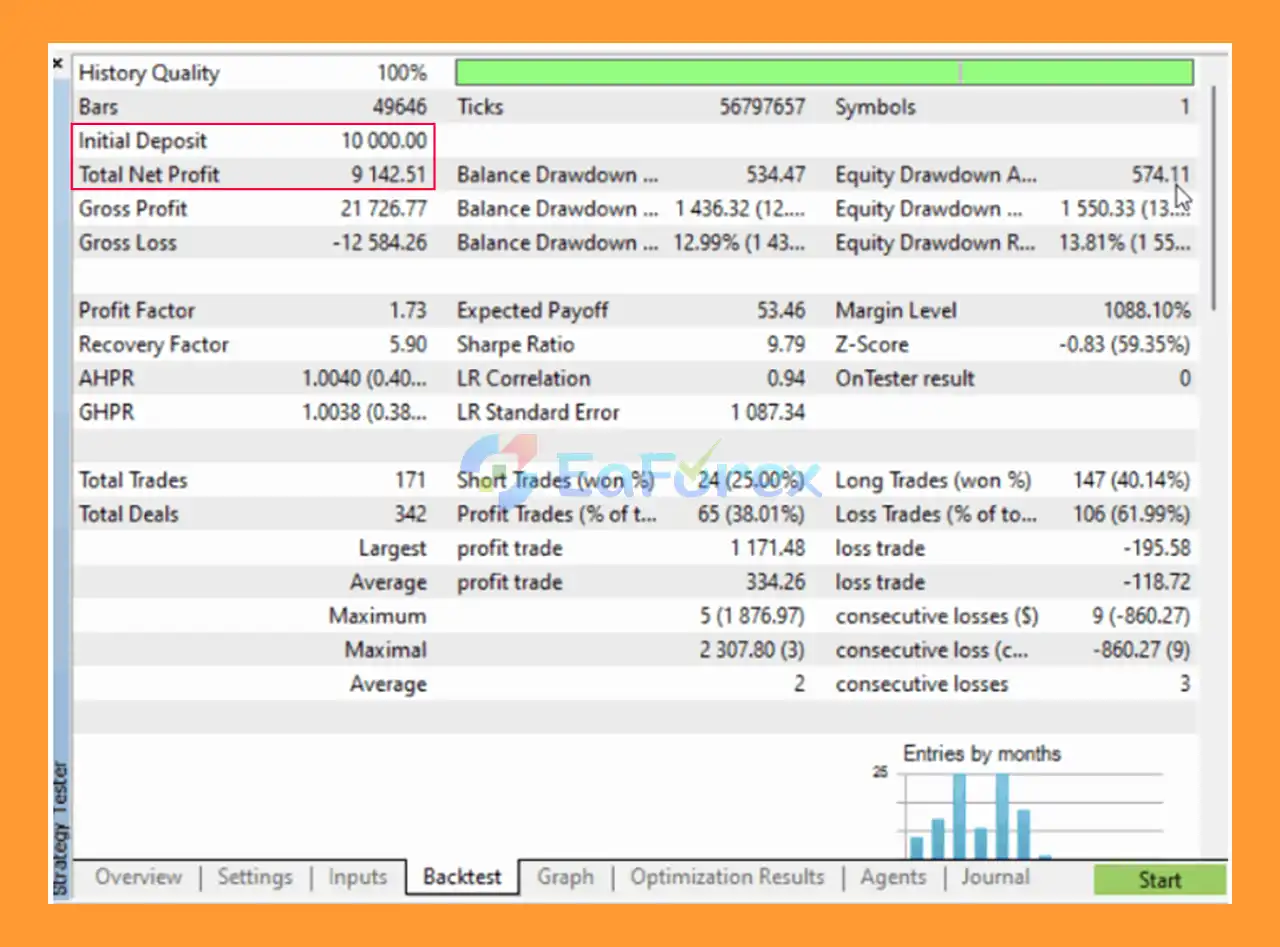
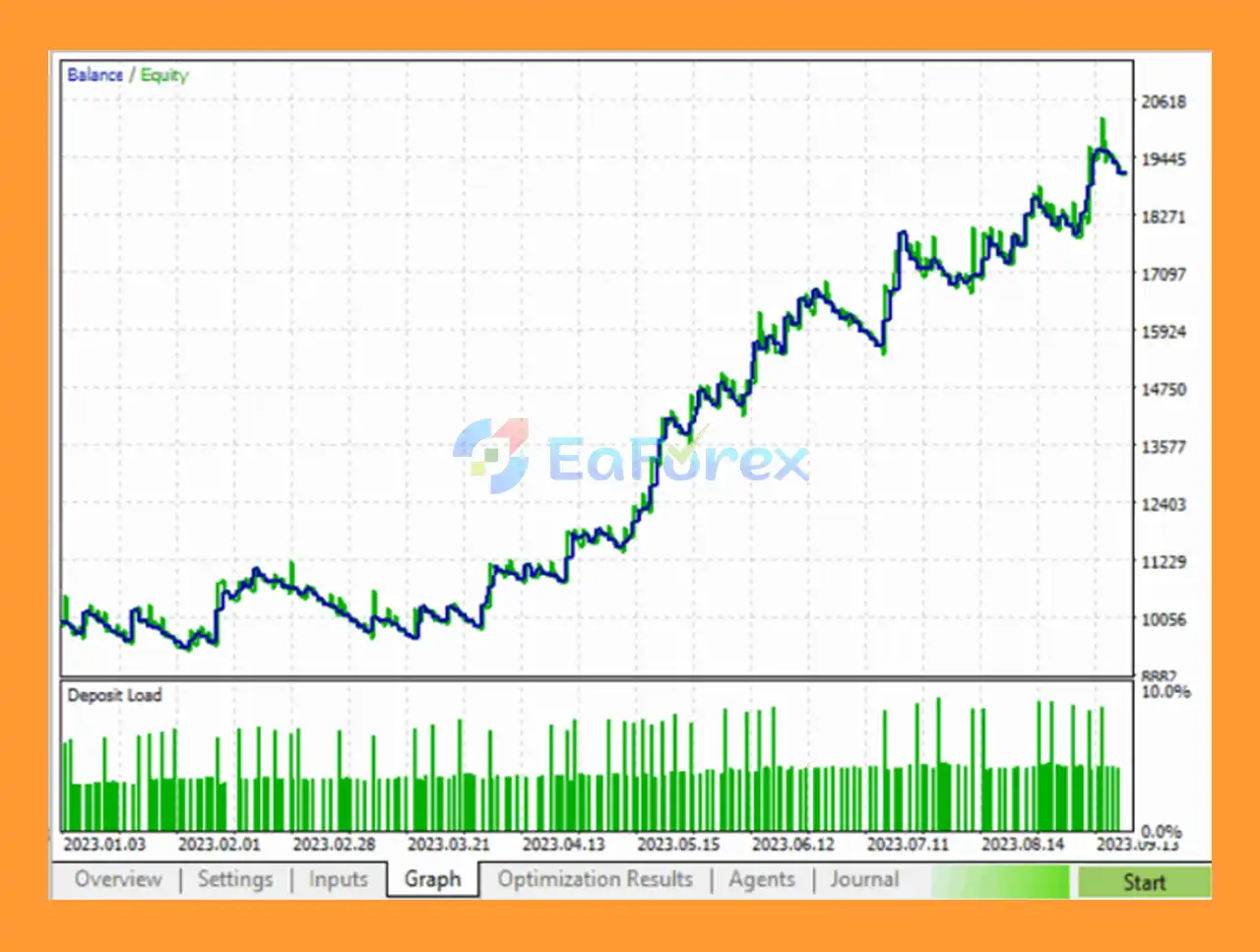
FVG EA Pro MT5 Backtest
FVG EA Pro EA Backtest
FVG EA Pro EA Reviews
FVG EA Pro MT5 offers several tools for structuring risk, including percentage-based position sizing, configurable stop-loss levels, break-even management, partial take profits, trailing stops, news filtering, and daily drawdown controls.
However, the EA’s actual performance depends on the strategy configuration and market conditions. Fair Value Gaps and market structure do not guarantee successful entries, and a profitable backtest does not ensure similar results in live trading.
For more reliable evaluation:
Broker differences can affect price delivery and FVG identification, so settings should be reviewed and adjusted for the trading environment.
Although FVG EA Pro MT5 offers extensive customization, it is not a plug-and-play solution for every trader.
Traders should understand the strategy they intend to automate and verify its behavior through backtesting and forward testing before using a live account.
For setup instructions and starter configuration files, visit the provided product guide:
FVG EA Pro MT5 – User Guide and Starter Set Files
These resources can help you understand the available parameters and establish an initial configuration for further testing.
🔺 FVG EA Pro MT5 is highly appreciated by the MQL5 community for bringing stable and reliable profits. Below are 5 star reviews from users:
FVG EA Pro MT5 is a flexible MT5 Expert Advisor for traders looking to automate strategies based on Fair Value Gaps, market structure, ICT concepts, and Smart Money Concepts. Its customizable trading windows, multiple order types, higher-timeframe filters, and extensive position-management tools make it suitable for building a range of intraday and swing-trading systems.
The EA’s greatest strength is its adaptability, but that flexibility also comes with responsibility. Traders need to understand the settings, validate their entry logic, and optimize their configuration carefully for their broker and chosen instruments.
If you are familiar with ICT and SMC trading and want to translate your methodology into an automated MT5 strategy, FVG EA Pro MT5 is worth evaluating through structured backtesting and demo forward testing. As with any automated trading system, disciplined risk management and realistic expectations remain essential.
1. What is FVG EA Pro MT5?
FVG EA Pro MT5 is an advanced Expert Advisor for MetaTrader 5 that automates trading using Smart Money Concepts (SMC) and the Fair Value Gap (FVG) strategy. It helps traders execute high-probability trades based on institutional trading logic.
2. How does FVG EA Pro MT5 work?
FVG EA Pro MT5 analyzes market structure, liquidity zones, and Fair Value Gaps to identify trading opportunities. It automatically places trades using predefined rules, including entry, stop loss, and take profit settings.
3. Is FVG EA Pro MT5 suitable for beginners?
Yes, FVG EA Pro MT5 can be used by beginners thanks to its automation features. However, basic knowledge of MetaTrader 5 and trading concepts like Smart Money Concepts (SMC) will help users optimize performance.
Smart Money Concept (SMC) Trading
ICT Kill Zones & Silver Bullet Entries
Scalping, Day Trading, and Swing Trading
Time-Based Trading Strategies
4. What trading strategies does FVG EA Pro MT5 use?
The EA uses a combination of Fair Value Gap (FVG), market structure analysis, ICT trading concepts, and multi-timeframe confirmation to generate precise trade entries.
Forex pairs: EUR/USD, GBP/USD, USD/JPY, GBP/NZD
Commodities: Gold (XAU/USD)
Indices: US30 (Dow Jones) and more
5. Can I customize FVG EA Pro MT5 settings?
Yes, FVG EA Pro MT5 is highly customizable. Traders can adjust risk management, trading sessions, stop loss, take profit, trailing stop, and entry conditions to match their trading strategy.
6. What markets can I trade with FVG EA Pro MT5?
You can trade multiple markets including Forex pairs (EURUSD, GBPUSD), commodities like Gold (XAUUSD), indices (USTEC, DAX), and stocks such as Tesla and Apple.
Break-Even Automation
Advanced Trailing Stop
Partial Take Profit Scaling
Daily Profit & Drawdown Protection
7. Does FVG EA Pro MT5 include risk management features?
Yes, it includes advanced risk management tools such as dynamic lot sizing, break-even automation, partial take profit, trailing stop, and daily drawdown limits to protect your account.
Timeframes Supported: M5, M15, M30, H1, H4
Minimum Deposit: $500 recommended
Leverage: Flexible, based on trader’s risk preference
8. What are the system requirements for FVG EA Pro MT5?
You need MetaTrader 5 (MT5), a stable internet connection, and a VPS (recommended) for 24/7 automated trading performance.
9. Are the backtest results of FVG EA Pro MT5 reliable?
Backtests show strong performance, such as consistent profits on XAUUSD with controlled drawdown. However, real trading results may vary depending on broker conditions and market volatility.
10. Is FVG EA Pro MT5 worth buying?
FVG EA Pro MT5 is a solid choice for traders looking for a professional, automated trading system based on Smart Money Concepts. Its flexibility, strong community feedback, and multi-strategy capability make it a valuable tool for serious traders.
In stock
In stock
In stock
In stock
In stock
Out of stock
No account yet?
Create an Account












 Automatic EA
 EA Best Seller
 Expert Advisor MT4
 Expert Advisor MT5
 HFT EA


Reviews
Clear filtersThere are no reviews yet.