
Product Overview
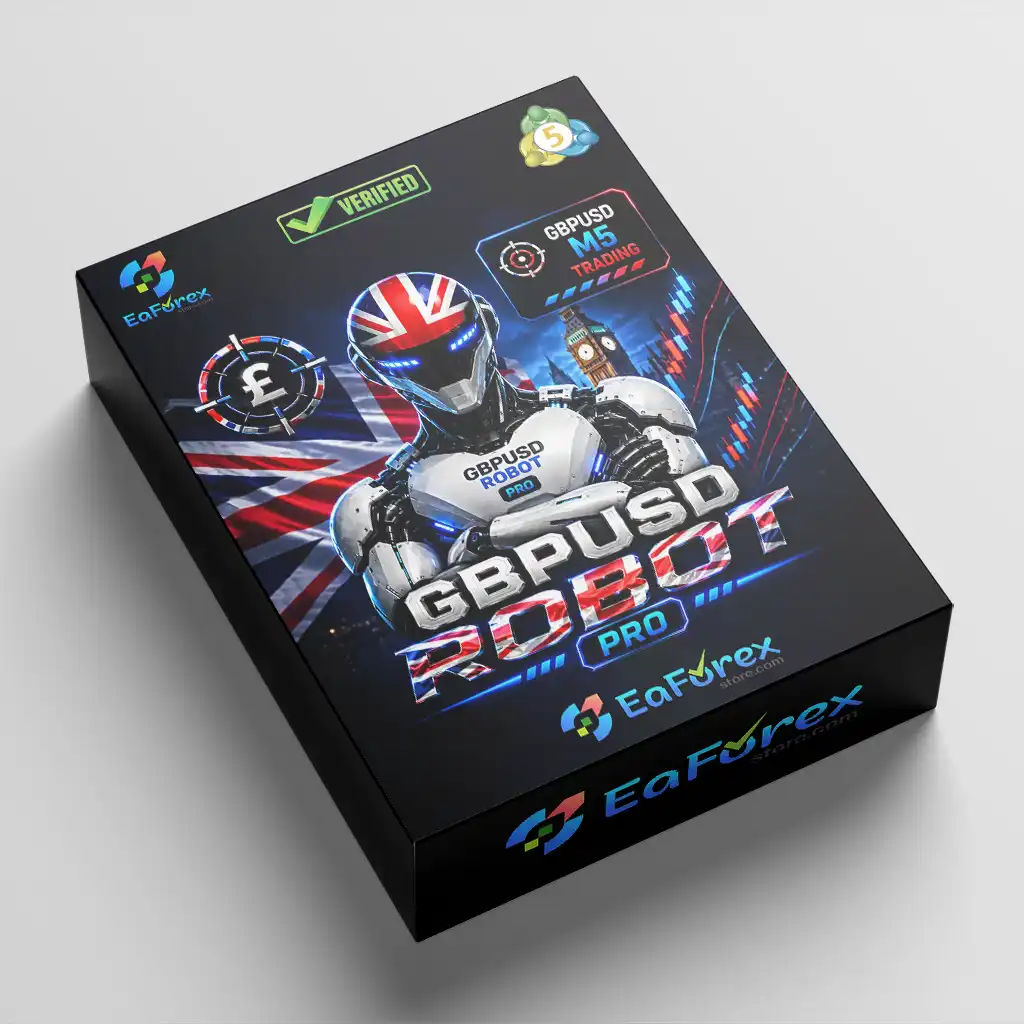
GBPUSD Robot Pro MT5 is an automated Expert Advisor developed specifically for trading the GBP/USD currency pair on the MetaTrader 5 platform. Optimized for the M5 timeframe, this trading robot analyzes price structure, momentum, support and resistance levels, volatility, and other technical conditions to identify potential trading opportunities throughout the trading week.
Unlike automated systems that rely on Grid or Martingale strategies, GBPUSD Robot Pro does not use progressive lot increases to recover previous losses. Instead, it combines automated trade execution with configurable Take Profit, Stop Loss, Trailing Stop, and Break-Even functions to support structured position management.
The Pro version also includes advanced market and volatility filters designed to help prevent new entries during unfavorable conditions, including abnormal price movements and periods surrounding high-impact economic news. Additional controls allow traders to select their preferred trade direction, limit the number of open positions, and configure daily profit and drawdown protection.
A professional on-chart trading panel displays daily profit, daily pips, current spread, and the active market session. With optimized default settings and a multilingual user manual, GBPUSD Robot Pro MT5 is designed to simplify automated trading while allowing users to customize essential risk parameters.
About the Developer
- Author: Marzena Maria Szmit
- Experience: Over +3 years of experience on MQL5.
- Notable Products: Scalping Robot Pro MT5, Price Action Robot MT5, XIRO Robot MT5, AI Prop Firms MT5, AI Prop Firms MT4, GbpUsd Robot MT5, Bitcoin Robot MT4, FX EurUsd Robot MT4 and other advisors.
- Flagship Product: is rated as the best performing product of the year.
>>> Delivery time 24h-48h after payment.
>>> Refund if not delivered.
>>> You will receive the latest version without any limitations (ID+Time).Reviewed by Jason Stap <<<
Key Features of GBPUSD Robot Pro MT5
GBPUSD-Specific Trading Strategy
GBPUSD Robot Pro is designed exclusively for the GBP/USD currency pair. Its analytical framework considers the pair's price behavior, intraday structure, momentum, and volatility to identify potential entry opportunities.
Focusing on one currency pair allows the EA's strategy and market filters to be tailored to the characteristics of GBP/USD rather than relying on a generalized approach across multiple markets.
Optimized for the M5 Timeframe
The EA is optimized for the five-minute chart, allowing it to analyze short-term price movements and evaluate trading opportunities throughout the trading week.
For the intended configuration, users should attach the robot to a GBPUSD M5 chart and follow the recommended settings in the supplied manual.
Automated Trade Management
GBPUSD Robot Pro includes several position-management tools to help control trades after entry:
- Take Profit: Defines a target for closing a profitable position.
- Stop Loss: Establishes a predefined exit level to limit losses on an individual trade.
- Trailing Stop: Adjusts the protective stop according to the configured trailing logic.
- Break-Even: Can move the protective stop toward the entry price after the market moves favorably.
These functions help automate trade management without requiring constant manual intervention.
No Grid or Martingale
One of the key characteristics of GBPUSD Robot Pro MT5 is that it does not use Grid or Martingale trading strategies.
The EA does not depend on increasing lot sizes progressively to recover previous losses. This makes it distinct from recovery-based robots that can accumulate substantial exposure when market conditions move against their positions.
However, avoiding Grid and Martingale does not eliminate trading risk. Position sizing, stop-loss settings, execution quality, and market volatility remain important factors.
Advanced Market and Volatility Filters
The Pro version includes multiple filters designed to evaluate market conditions before allowing new positions. These mechanisms can help the EA avoid entries during potentially unfavorable periods, including abnormal candle movements, sudden price acceleration, unstable volatility, and unsuitable market activity.
The system also includes spread protection and economic news filtering to help restrict new entries when trading conditions may be less favorable.
These filters are designed to improve entry selectivity, but they cannot guarantee that every trade will be profitable or prevent all losses during unexpected market events.
Economic News Protection
GBP/USD can experience sharp price movements around major economic announcements, particularly those affecting the British pound or US dollar.
GBPUSD Robot Pro includes a news filter that can temporarily block new entries around high-impact economic events. This feature is intended to reduce exposure to certain news-driven trading conditions.
Traders should still consider the possibility of slippage, spread widening, and rapid price gaps when important economic data is released.
Flexible Trading Direction
The EA allows users to choose among three trading modes:
- Buy Only: Allows buy trades only.
- Sell Only: Allows sell trades only.
- Buy and Sell: Allows both trading directions when the strategy's conditions are met.
This flexibility enables users to configure the robot according to their trading preferences and market outlook.
Adjustable MaxOrders Function
GBPUSD Robot Pro includes a MaxOrders parameter that controls the maximum number of open positions allowed by the EA.
The default setting is 5, and users can adjust it according to their preferred exposure limits. For example, setting MaxOrders to 1 restricts the EA to one open position at a time, subject to the robot's order-management rules.
A lower limit can help constrain the number of simultaneous positions, although it does not guarantee lower losses in every market situation.
Daily Profit and Drawdown Protection
The EA provides optional Daily Profit and Max Drawdown settings that allow users to define account-level trading limits.
When configured, these protections can restrict further trading after the selected thresholds are reached. This gives traders additional control over their daily trading activity and helps establish predefined risk boundaries.
Users should read the manual to understand exactly how the selected limits are calculated and how the EA behaves after a threshold is triggered.
Real-Time Trading Dashboard
GBPUSD Robot Pro displays a professional trading panel directly on the MetaTrader 5 chart. The panel provides useful information, including:
- Daily profit
- Daily pips
- Current spread
- Active market session
By keeping these metrics visible on the chart, the dashboard helps users monitor the EA's activity and current trading conditions without relying exclusively on the terminal's trade history.
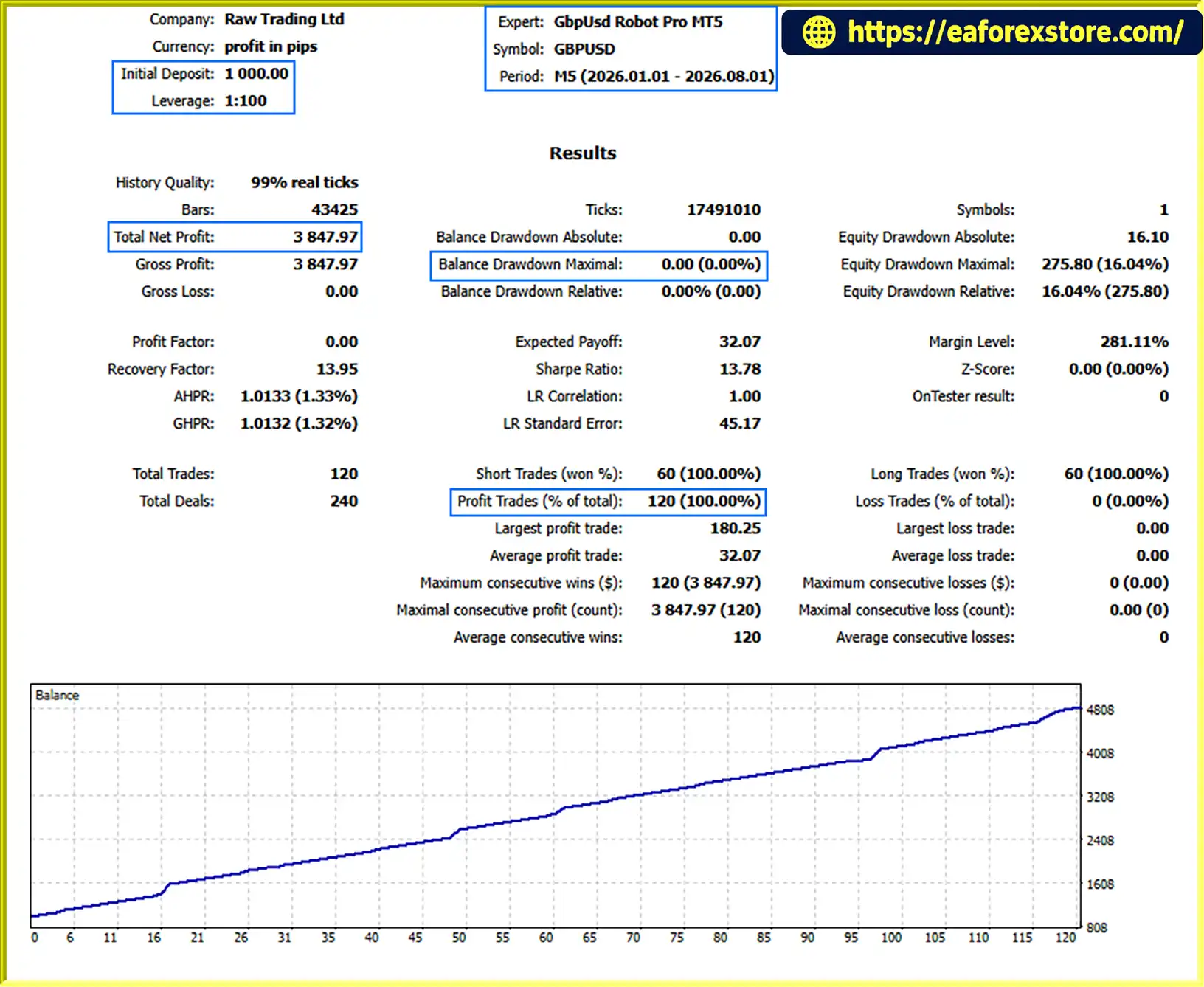
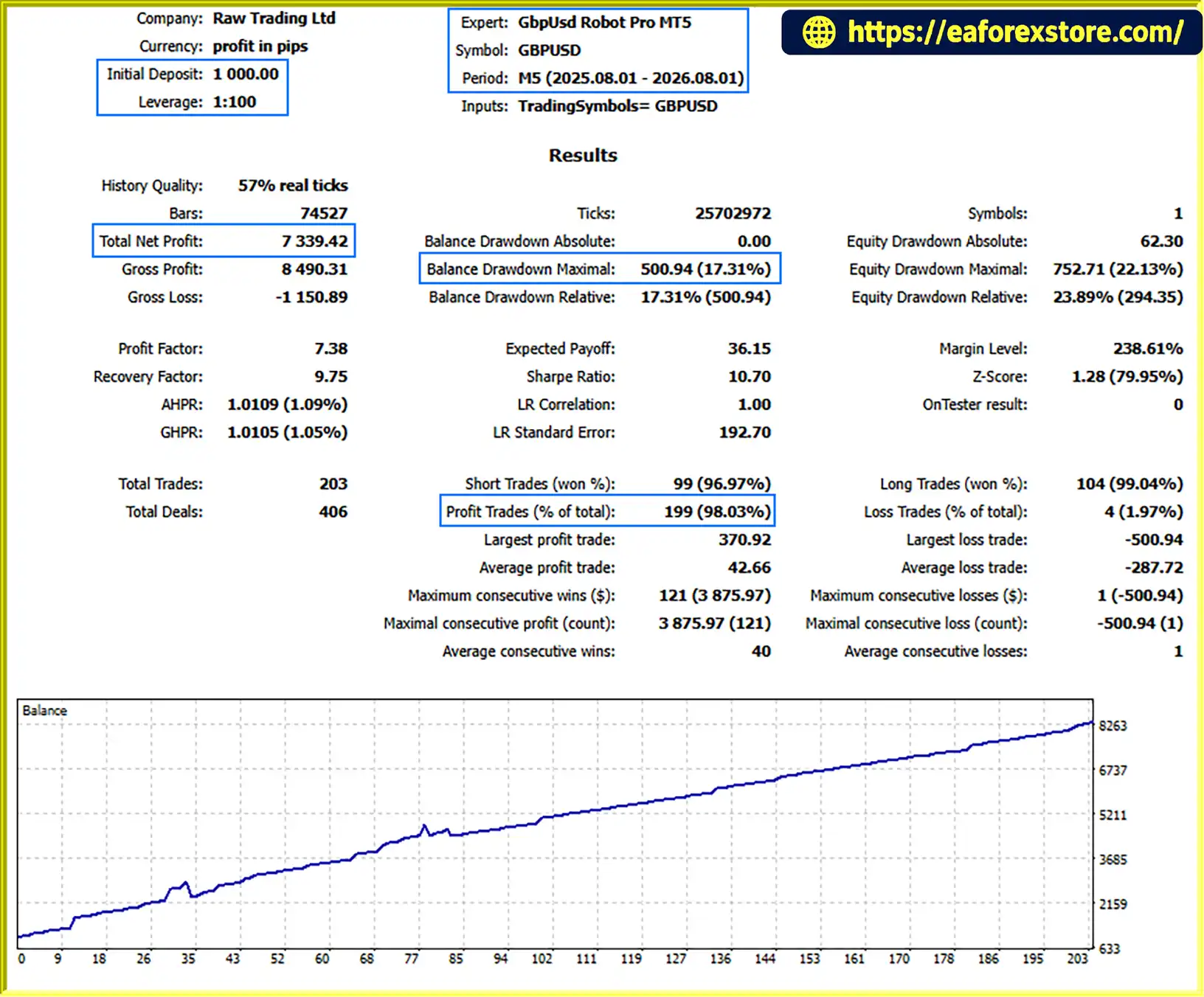
GBPUSD Robot Pro MT5 Backtest Results
- Initial Deposit: $1.000
- Total Net Profit: $3.874,97
- Win Rate: 100%
- Maximum Drawdown: 0.00%
- Initial Deposit: $1.000
- Total Net Profit: $7.339,42
- Win Rate: 98.03%
- Maximum Drawdown: 17.31%
How GBPUSD Robot Pro MT5 Works
GBPUSD Robot Pro follows an automated trading process designed around the GBP/USD market and the M5 timeframe.
Step 1: Analyze Market Conditions
The robot evaluates technical information such as price structure, momentum, support and resistance areas, and volatility to assess potential trading opportunities.
Step 2: Apply Entry Filters
Before opening a position, the EA uses its configured market filters and protections to assess whether current conditions meet its trading requirements. Depending on the settings, these checks can include spread, volatility, abnormal price movements, market activity, and economic news.
Step 3: Open Positions Automatically
When the required conditions are satisfied, the robot can open a buy or sell position according to the selected trading mode and the strategy's signals.
Step 4: Manage Open Trades
After entry, the EA manages positions using the configured Take Profit, Stop Loss, Trailing Stop, and Break-Even functions.
Step 5: Enforce Trading Limits
The MaxOrders setting helps control the number of open positions, while optional Daily Profit and Max Drawdown protections provide additional limits on trading activity.
This automated workflow is intended to reduce the need for manual trade execution while maintaining configurable controls over position management and account exposure.
Risk Management and Account Compatibility
GBPUSD Robot Pro MT5 combines trade-level protection with optional account-level controls. Nevertheless, the results of any automated trading system depend on more than its entry logic.
Important considerations include:
- Lot size: Adjust the trading volume according to account equity, risk tolerance, and stop-loss distance.
- MaxOrders: Set an appropriate limit on simultaneous positions.
- Stop Loss: Understand the potential loss associated with each trade before enabling live trading.
- Daily limits: Configure Daily Profit and Max Drawdown protection according to your risk plan.
- Broker conditions: Consider spreads, commissions, execution speed, and slippage.
- News and volatility: Recognize that filters cannot eliminate all risks associated with sudden market movements.
The product information lists a minimum deposit of 1,000, but this should not be interpreted as a guarantee that the robot is suitable for every account size. The appropriate capital and lot size depend on the account currency, leverage, broker conditions, and chosen risk level.
The EA is listed as compatible with different account types, including Hedging, Netting, Cent, Zero, Standard, Premium, RAW, and ECN accounts. Confirm compatibility with your specific broker and account configuration before live deployment.
Pros and Cons
Pros
- Specifically developed for GBPUSD trading.
- Optimized for the M5 timeframe.
- Does not use Grid or Martingale strategies.
- Includes Take Profit, Stop Loss, Trailing Stop, and Break-Even.
- Provides market, volatility, spread, and economic news filters.
- Supports Buy Only, Sell Only, and Buy and Sell modes.
- Offers adjustable MaxOrders and optional daily protection limits.
- Includes a real-time dashboard with daily profit, daily pips, spread, and session information.
- Provides a manual in 10 languages and access to a private support group.
- Future updates are advertised as free of charge.
Cons
- Designed and optimized specifically for GBPUSD, so performance on other symbols should not be assumed.
- Requires careful lot-size selection and risk configuration.
- Short-term trading can be affected by spreads, commissions, slippage, and execution quality.
- Market and news filters cannot eliminate losses or guarantee protection during extreme volatility.
- The strategy should be independently tested before being used on a live account.
How to Install GBPUSD Robot Pro MT5
After purchasing GBPUSD Robot Pro, follow the vendor's instructions to obtain the EA, manual, and support access.
- Complete the purchase. Keep a screenshot of your purchase confirmation.
- Contact the vendor. Send a private message with the purchase screenshot, as requested on the product page.
- Obtain the files and manual. Follow the vendor's instructions to access the private support group and installation guidance.
- Install the EA. Place the supplied Expert Advisor file in the appropriate MetaTrader 5 Experts directory, or follow the installation method provided by the vendor.
- Open the correct chart. Select GBPUSD and set the timeframe to M5.
- Configure the lot size. Choose a trading volume appropriate for your account and risk tolerance. Review MaxOrders and other protection settings as well.
- Enable automated trading. Confirm that the EA is attached correctly and that the platform permits automated trading.
- Test before going live. Run a Strategy Tester backtest and a demo forward test to check the EA's behavior under your broker's trading conditions.
Recommended Strategy Tester Settings
According to the vendor's instructions, the suggested MetaTrader 5 testing configuration is:
- Initial deposit: 1,000
- Symbol: GBPUSD
- Timeframe: M5
- Model: Every Tick Based on Real Ticks is not specified; the recommended mode is Every Tick Normal
- Date range: Select a custom historical period
- Parameters: Adjust the lot size and leave other settings unchanged for the vendor's baseline test
For a reproducible evaluation, record the test period, broker data, spread assumptions, commission, drawdown, trade count, and net result. A historical backtest does not guarantee future performance.
Support, Documentation, and Updates
GBPUSD Robot Pro includes a detailed user manual available in 10 languages:
English, Chinese, Japanese, German, Korean, Polish, French, Spanish, Italian, and Arabic.
After purchase, buyers can contact the vendor to request access to the private support group, where the support team can assist with installation, configuration, and product-related questions.
The advertised current version is 1.0, with future updates and improvements provided free of charge according to the product information.
The vendor also states that live results are available on its website. Review the available performance records, account history, drawdown, and trading conditions independently before making a purchase decision.
Real User Reviews and Feedback
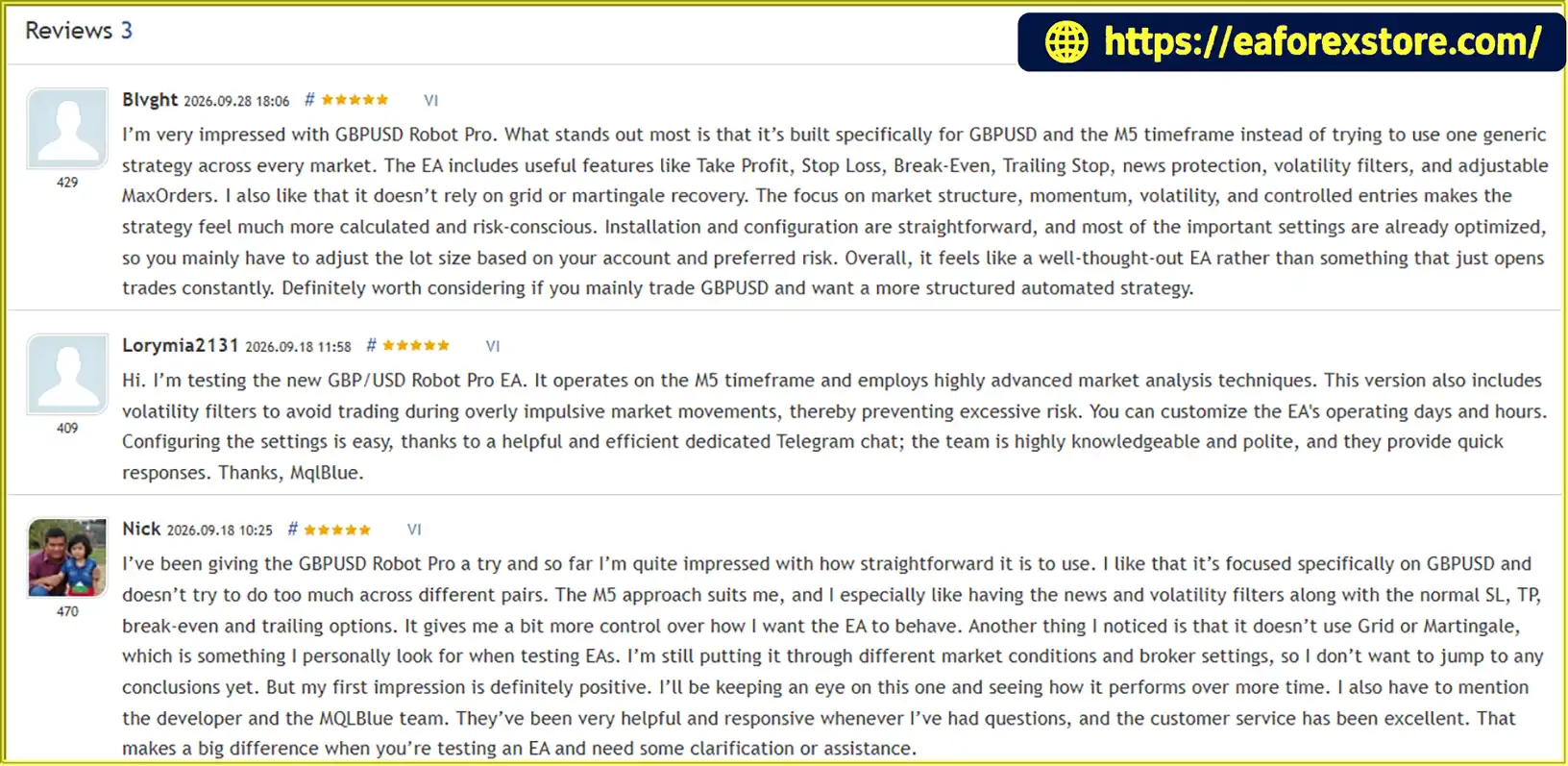
🔺GBPUSD Robot Pro MT5 is highly appreciated by the MQL5 community for bringing stable and reliable profits. Below are 5 star reviews from users:
What’s Included in the Download Package?
- Experts: GbpUsd Robot Pro MT5.ex5
>>> Join VIP Membership Now <<<
Final Thoughts
GBPUSD Robot Pro MT5 is an automated trading solution designed for traders who want a dedicated GBP/USD strategy on the M5 timeframe. Its combination of market analysis, volatility and news filters, configurable trade management, and optional daily protection limits provides several tools for structuring an automated trading setup.
Its decision not to use Grid or Martingale is another notable characteristic for traders who prefer to avoid recovery systems based on progressively increasing position sizes. At the same time, the robot remains exposed to normal market risks, including losing trades, slippage, spread changes, and unexpected volatility.
Before using GBPUSD Robot Pro MT5 with real capital, test it on historical data and a demo account, verify the broker's execution conditions, and choose a conservative lot size. Evaluate the actual drawdown and consistency of results rather than relying on marketing claims alone.
Important: Automated trading involves financial risk. No Expert Advisor can guarantee profits, and past performance does not ensure future results.