


Product Overview
Gold Vector Strategy MT5 is an automated Gold trading Expert Advisor (EA) for MetaTrader 5, specifically engineered for the highly dynamic XAUUSD (Gold) market.
The EA uses a price action breakout and scalping methodology designed to identify potential short-term market impulses. Instead of relying on Martingale or Grid Trading, Gold Vector focuses on precision breakout entries using strategically placed pending orders around nearby key price levels.
The core strategy follows a Single-Trade approach, with the system designed to maintain controlled exposure while using an explicit Stop Loss and Trailing Stop to manage open positions. Its position sizing can be calculated dynamically according to account balance and the selected risk percentage.
Gold Vector Strategy MT5 also includes an extensive collection of risk-management and trading filters, including drawdown protection, spread filtering, news filtering, ATR volatility analysis, trend filtering, slippage protection, time-based exits, and optional re-entry logic.
About the Developer
- Author: Adam Zolei.
- Experience: Over +8 years of experience on MQL5.
- Notable Products: Gold Vector Strategy MT5, Golden Nights MT5, RSI GridMaster EA MT5, Golden Thunder EA MT4, Gold Vector Strategy MT4 and others.
- Flagship Product: Gold Vector Strategy MT5 is rated as the best performing product of the year.
>>> Delivery time 24h-48h after payment.
>>> Refund if not delivered.
>>> You will receive the latest version without any limitations (ID+Time).
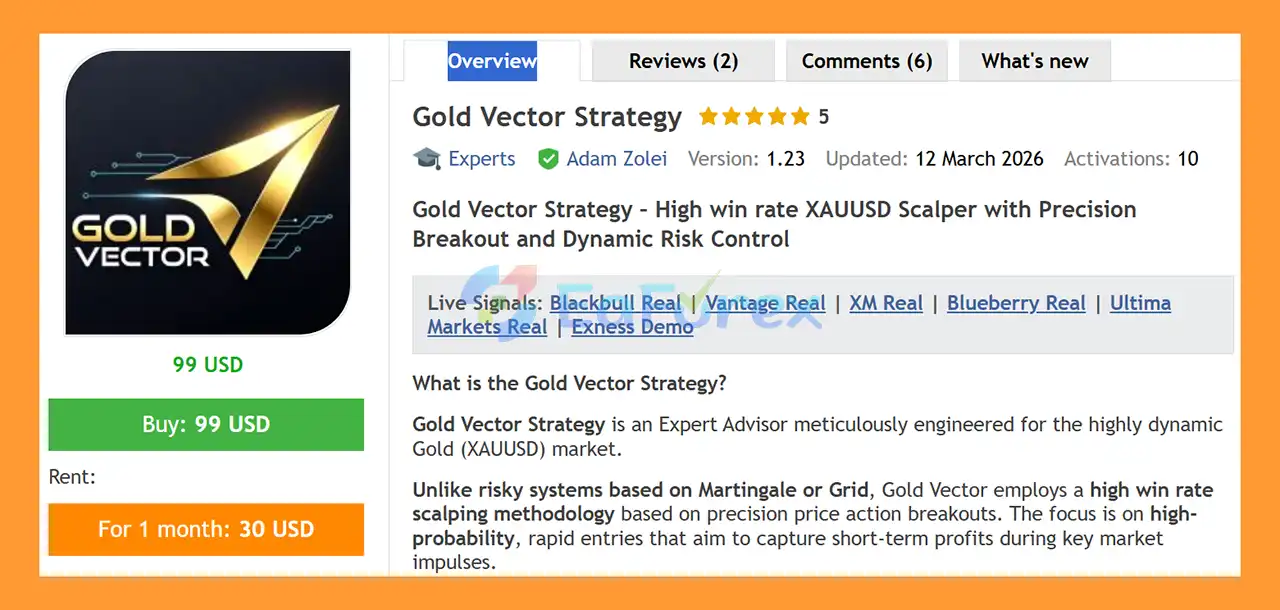
Gold Vector Strategy EA MT5 Overview
Core Features of Gold Vector Strategy MT5
- XAUUSD Breakout Strategy – Designed specifically for Gold trading.
- Price Action Breakouts – Identifies nearby key price levels and places pending orders to capture potential breakouts.
- Scalping Methodology – Focuses on short-term market movements and rapid trade opportunities.
- Single-Trade Approach – Designed around controlled market exposure.
- No Martingale – Does not use progressive Martingale position sizing.
- No Grid Trading – Does not rely on accumulating positions through a grid system.
- No Hedging Strategy – The core strategy does not use hedging as a trading method.
- Stop Loss Protection – Every trade is protected by a predefined Stop Loss.
- Trailing Stop – Helps manage profitable positions as the market moves.
- Balance-Based Risk Management – Lot size can be dynamically calculated according to account balance and risk settings.
- Dynamic Drawdown Protection – Supports daily and maximum equity drawdown controls.
- Static & Trailing Drawdown – Version 1.32 supports both initial-balance drawdown and High-Water Mark trailing drawdown models.
- Stealth Spread Filter – Can temporarily park pending orders when spreads become unusually high.
- Integrated News Filter – Can pause trading around high-impact USD economic events.
- ATR Volatility Filter – Helps filter highly extended or unusually flat market conditions.
- Moving Average Trend Filter – Optional higher-timeframe trend confirmation for breakout entries.
- Momentum Reversal / Snapback Exit – Can close a position when a sudden reversal is detected before the trailing stop is activated.
- Time-Based Exit – Automatically closes trades that remain open beyond a configurable duration.
- Slippage Protection – Helps protect against unfavorable executions caused by extreme slippage or market gaps.
- Hedging Protection – Controls opposite-side pending orders while an active position is open.
- Second Chance Re-entry – Optional re-entry mechanism after a full Stop Loss during the same session.
- Smart GMT Synchronization – Automatically detects broker time differences in live and demo trading.
- Flexible Time Filters – Allows traders to define intraday trading pauses.
- Early Friday Close – Optional feature designed to reduce weekend gap exposure.
- Weekend Trading Support – Can support Bitcoin, Ethereum, and other weekend-active instruments.
- Prop Firm Features – Includes optional entry/exit randomization and trailing-stop hold-time controls.
- Cross-Broker Compatibility – Designed to accommodate different broker timezones and instrument specifications.
How Does Gold Vector Strategy MT5 Work?
Gold Vector Strategy MT5 works by monitoring XAUUSD price action and identifying potential breakout areas around nearby key price levels.
When the required market conditions are detected, the EA can place Buy Stop or Sell Stop pending orders around the identified breakout levels. The objective is to enter the market when price confirms the anticipated breakout rather than entering randomly in the middle of a range.
The basic trading process includes:
- Market Analysis – The EA continuously monitors Gold price action.
- Key-Level Detection – The algorithm identifies nearby price levels that may act as potential breakout points.
- Pending Order Placement – Buy or Sell pending orders are positioned around the selected levels.
- Breakout Entry – When price reaches the relevant level, the pending order can be triggered.
- Stop Loss Protection – The position is immediately managed with a predefined Stop Loss.
- Profit Management – A Trailing Stop can follow favorable price movement.
- Reversal Detection – The optional Snapback Exit can close a position when strong momentum suddenly reverses.
- Time-Based Management – The Timeout function can close stagnant positions after a specified period.
- Drawdown Monitoring – Equity protection features monitor account-level risk and can close trades when configured limits are reached.
The EA can also apply additional filters before allowing trades, such as spread, ATR volatility, Moving Average trend, trading hours, and high-impact news conditions.
Why Choose Gold Vector Strategy MT5?
Gold Vector Strategy MT5 is designed for traders who want an automated XAUUSD breakout and scalping EA with multiple layers of trade and account-level risk management.
A key characteristic is that the system does not depend on Martingale or Grid Trading. Instead, it focuses on breakout entries and controlled trade management, with Stop Loss protection applied to individual positions.
The EA also provides extensive customization for traders with different requirements. Risk can be calculated based on account balance, while drawdown controls can be configured according to daily and maximum equity limits.
For traders interested in prop firm trading, Version 1.32 introduces additional tools such as entry and exit price randomization, account-specific Magic Number generation, and trailing-stop hold-time controls.
Gold Vector also incorporates automatic broker timezone handling for live and demo trading, while providing manual timezone adjustment for Strategy Tester environments.
Gold Vector Strategy MT5 Performance Review
🟢Verified Profitable By MyFxBook
🔺XAUUSD (Gold)
- Total Gain: +115.52%
- Average Daily Profit: 1.29%
- Average Monthly Profit: 48.01%
- Maximum Drawdown: 16.80%
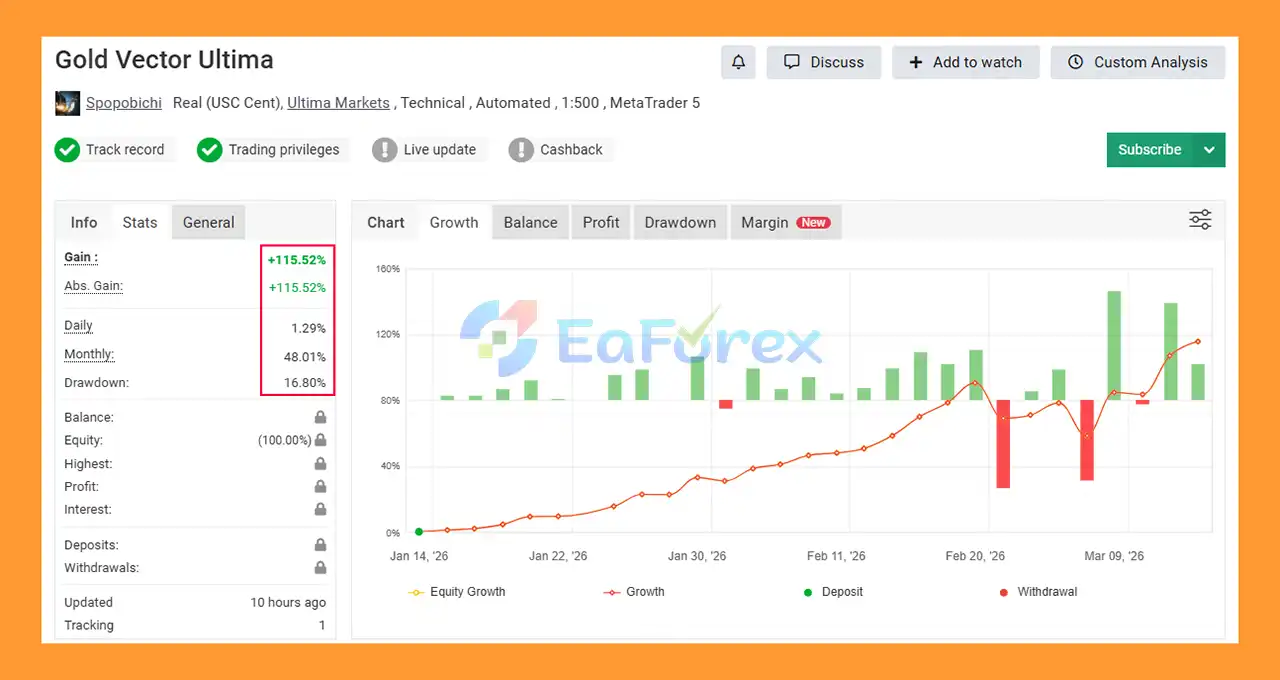
🟢Signal Results
🔺XAUUSD (Gold) - 8 consecutive trading weeks - DEFAULT - on the Vantage platform
- Initial Deposit: €50
- Growth Rate: +136%
- Win Rate (% of total): 92%
- Maximum Drawdown: 8.7%

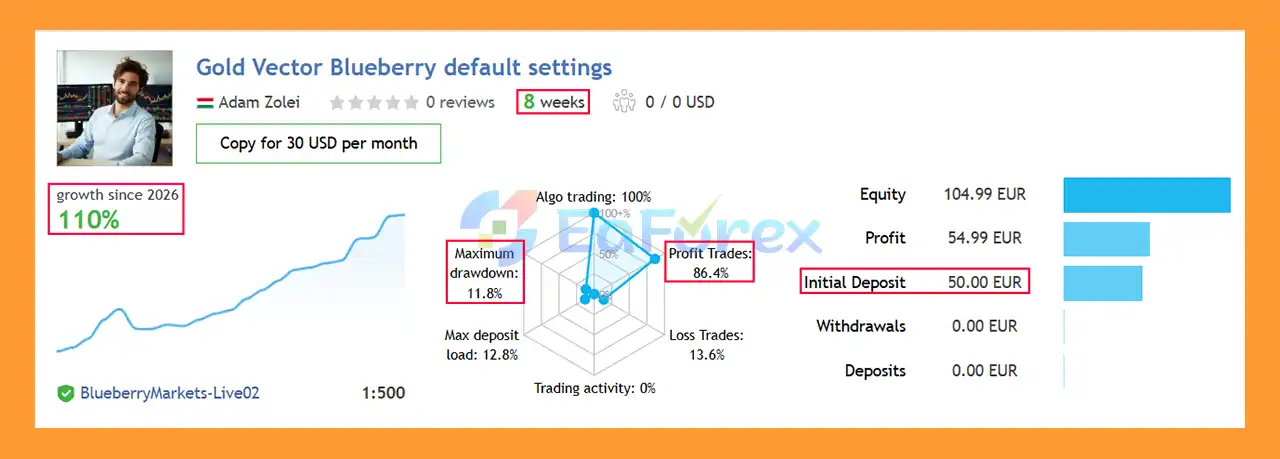
🔺XAUUSD (Gold) - 8 consecutive trading weeks - DEFAULT - on the Blueberry platform
- Initial Deposit: €50
- Growth Rate: +110%
- Win Rate (% of total): 86.4%
- Maximum Drawdown: 11.8%
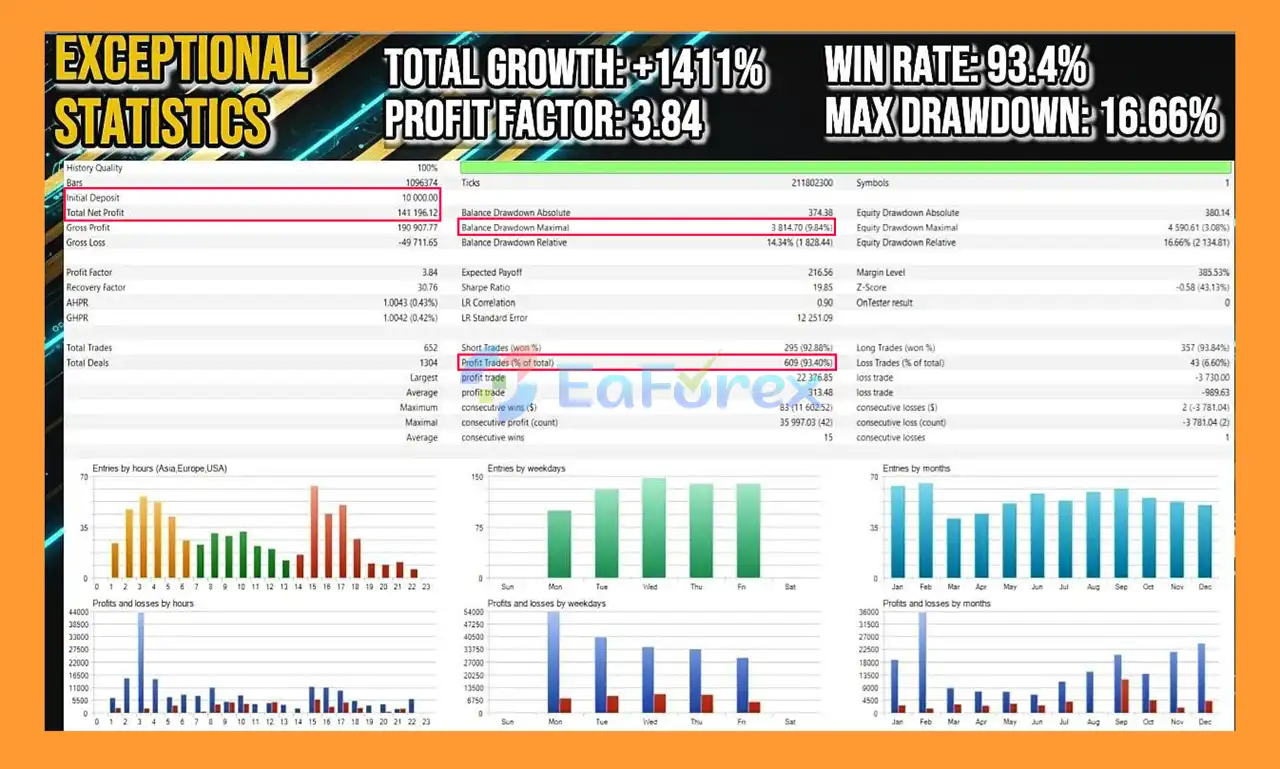
🟢Backtest Results
🔺XAUUSD pair – years of testing
- Initial Deposit: $10,000
- Total Net Profit: $141,196.12
- Win Rate (% of total): 93.40%
- Maximum Drawdown: 9.84%
Performance and Risk Management
Gold Vector Strategy MT5 is built with a strong emphasis on trade-level and account-level risk management.
The strategy's risk controls include:
Balance-Based Risk
The EA can automatically calculate position size according to the account balance and configured risk percentage. This allows exposure to adjust as account equity changes.
Stop Loss
Each trade uses a predefined Stop Loss to establish a clear maximum-loss level for the individual position.
Trailing Stop
The Trailing Stop can follow favorable price movement and adjust the protective level according to the EA's configuration.
Dynamic Drawdown Control
Gold Vector Strategy MT5 can monitor both:
- Daily Equity Drawdown
- Maximum Total Equity Drawdown
When configured limits are reached, the protection system can close active positions to limit further account-level exposure.
Static & Trailing Drawdown
Version 1.32 expands the equity protection system with:
- Static Drawdown based on the initial deposit.
- Trailing Drawdown based on the account's High-Water Mark.
This can be particularly relevant for traders who use strict account-level risk parameters.
Spread Protection
The Stealth Spread Filter can detect elevated spreads and temporarily park pending orders instead of allowing them to trigger under unfavorable spread conditions.
News Filter
The integrated news filter can temporarily suspend trading around selected high-impact USD economic events, which can be particularly relevant for XAUUSD because Gold can experience significant volatility during major economic releases.
ATR Volatility Filter
The ATR filter evaluates market volatility and can skip trading when conditions are considered excessively extended or unusually range-bound.
Recommended Environment
The developer recommends:
- Instrument: XAUUSD / Gold
- Timeframe: Any timeframe; core strategy is described as timeframe-independent
- Account: ECN or RAW spread account
- Leverage: Minimum deposit recommendations vary according to leverage
- VPS: Fast and reliable VPS recommended for lower latency and continuous operation
The provided minimum-deposit examples are $50 with 1:500 leverage or $500 with 1:20 leverage. These figures should not be interpreted as guarantees that the EA can safely trade at those balances; appropriate lot sizing and risk settings remain essential.
Weaknesses and Risk Warnings
Although Gold Vector Strategy MT5 contains multiple protection mechanisms, automated trading remains subject to significant market and execution risks.
Historical Performance Is Not Guaranteed
Any historical backtest or reported win-rate results do not guarantee future live performance. Market conditions can change, and live execution may differ from historical testing.
Gold Can Be Highly Volatile
XAUUSD can experience rapid price movements, especially during major economic announcements, geopolitical events, and periods of abnormal market volatility. Stop Losses can therefore experience slippage.
Spread and Execution Matter
The strategy relies on breakout entries, making spread, slippage, latency, and execution quality important factors. A broker with high spreads or inconsistent execution may produce different results.
Small Accounts Require Careful Risk Control
The EA can technically be configured for relatively small accounts, but a small deposit combined with high leverage can significantly increase risk. The suggested minimum deposits should therefore be treated as configuration examples rather than a recommendation.
Backtest Timezone Must Be Configured Correctly
Automatic GMT detection is intended for live and demo trading. In the MT5 Strategy Tester, the developer recommends using the appropriate manual hour shift.
The strategy is optimized around the GMT+2/+3 DST standard. If the broker's historical server time differs, such as the example given for Exness, the Manual Hour Shift must be adjusted to obtain meaningful backtest results.
Historical Tick Data Quality
The Momentum Reversal / Snapback Exit relies on rapid price movement detection. Standard historical tick data may not accurately reproduce these conditions. Higher-quality tick data may therefore produce different backtest results from lower-quality broker data.
Prop Firm Rules Can Differ
Although Gold Vector Strategy MT5 includes features intended to support prop-firm configurations, each proprietary trading firm has its own rules regarding drawdown, holding time, execution, trading frequency, news trading, and other restrictions. Traders should verify compatibility with the specific firm's current rules.
Pros and Cons
Pros
- Designed specifically for XAUUSD
- Automated breakout and scalping methodology
- No Martingale
- No Grid Trading
- No core hedging strategy
- Stop Loss on trades
- Trailing Stop management
- Balance-based risk calculation
- Daily and maximum drawdown protection
- Static and trailing equity protection
- Spread protection
- Integrated news filter
- ATR volatility filter
- Optional Moving Average trend filter
- Momentum Reversal / Snapback Exit
- Time-based exit
- Slippage protection
- Flexible trading-time controls
- Early Friday close option
- Weekend trading support for suitable instruments
- Prop firm-oriented features
- Automatic GMT synchronization for live/demo trading
- Designed for cross-broker compatibility
Cons
- XAUUSD volatility can result in significant losses
- Breakout performance can be affected by spread and slippage
- Requires careful risk configuration
- Small accounts can be highly sensitive to leverage and position sizing
- Backtest results depend heavily on timezone and historical data quality
- Premium-quality tick data may be required for more accurate testing of rapid exit logic
- Live results may differ from Strategy Tester results
- ECN/RAW conditions are recommended
- VPS is recommended for stable continuous operation
- Prop-firm compatibility depends on the specific firm's rules
How to Install Gold Vector Strategy MT5
Installing Gold Vector Strategy MT5 on MetaTrader 5 involves several basic steps.
Step 1: Download the EA
Download the Gold Vector Strategy MT5 files from your trusted source.
Step 2: Open MetaTrader 5
Launch your MetaTrader 5 platform.
Step 3: Open the Data Folder
In MT5, go to:
File → Open Data Folder
Then open:
MQL5 → Experts
Copy the Gold Vector EA file into this folder.
Step 4: Restart MetaTrader 5
Restart MT5 or right-click Expert Advisors in the Navigator and select Refresh.
Step 5: Open Your Trading Chart
Open the XAUUSD chart. Gold Vector's core logic is described as being independent of the chart timeframe, so the EA does not rely on a single mandatory timeframe.
Step 6: Attach the EA
Navigate to:
Navigator → Expert Advisors → Gold Vector Strategy MT5
Drag the EA onto the XAUUSD chart.
Step 7: Configure Risk Settings
Review the EA parameters carefully, especially:
- Risk percentage
- Lot sizing
- Stop Loss
- Take Profit
- Trailing Stop
- Drawdown limits
- Spread filter
- News filter
- ATR filter
- Moving Average filter
- Trading sessions
- GMT settings
- Friday close settings
Step 8: Check GMT Configuration
For Live and Demo trading, the EA can automatically handle broker timezone differences.
For Strategy Tester, check the broker's server time and adjust the Manual Hour Shift when necessary. The developer specifically notes the importance of the GMT+2/+3 DST configuration for accurate historical testing.
Step 9: Enable Algo Trading
Make sure Algo Trading is enabled in MetaTrader 5 and that the EA has permission to execute trades.
Step 10: Test Before Live Trading
Before using real funds, run the EA on a demo account and conduct appropriate backtests using reliable historical data.
Pay particular attention to:
- Maximum drawdown
- Spread
- Slippage
- Execution speed
- Trading frequency
- Stop Loss behavior
- News-filter behavior
- Account-level drawdown protection
Step 11: Use a VPS
For continuous automated operation, a stable and reliable VPS is recommended. This can help keep MT5 running continuously and reduce potential interruptions caused by local computer or internet problems.
Important: Start with conservative risk settings and validate the EA under your own broker's trading conditions before considering live deployment.
Real User Reviews and Feedback
🔺Gold Vector Strategy MT5 is highly appreciated by the MQL5 community for bringing stable and reliable profits. Below are 5 star reviews from users:
- SEAN (2026.03.12): “Let me put straight and short, I ran this bot for one month. It got 8 trades, all Freaking wins securing ~15% gain against entire balance. And what matters more, the author keep improving it all the time. It deserve the best rating.”
- Stefcrema (2026.03.11): “Excellent strategy if you prefer risk control and a high win rate. No overtrading; everything is planned, with pre-set, low-risk stop-loss and TP entry levels. Small trades are usually very fast and protected by trailing stops. Definitely a must-have EA at the right price. I recommend a raw spread account.”
What’s Included in the Download Package?
- Experts:
- Setting (If Any).docx
- Installation Guide.docx
- SetFiles:
- Gold_Vector_-_Standard_Broker.set
>>> Reviewed by Jason Stap <<<
Final Thoughts
In summary, Gold Vector Strategy MT5 is an automated XAUUSD Gold Trading Expert Advisor for MetaTrader 5 that combines price-action breakout entries with short-term scalping logic. Its Single-Trade approach, predefined Stop Loss, Trailing Stop, dynamic position sizing, and extensive filtering tools provide a structured framework for automated Gold trading without relying on traditional Grid or Martingale strategies.
The available performance data includes a MyFxBook-verified result of +115.52% total gain with 16.80% maximum drawdown, two eight-week signal results showing +136% and +110% growth, and a historical backtest reporting $141,196.12 net profit, 93.40% win rate, and 9.84% maximum drawdown from a $10,000 initial deposit. These figures reflect specific historical or reported trading conditions and should not be interpreted as guarantees of future live performance. Actual results can vary with spreads, slippage, execution, volatility, broker conditions, and risk settings.
For traders considering Gold Vector Strategy MT5, thorough backtesting and demo forward testing are recommended before live deployment. Particular attention should be given to drawdown limits, position sizing, XAUUSD volatility, spread and execution quality, GMT configuration, and historical tick-data quality. The EA's prop-firm features may provide additional configuration options, but compatibility should always be checked against the specific firm's current rules.
Questions about Gold Vector Strategy MT5 + Sets (Latest version) | Unbounded
1. What is Gold Vector Strategy MT5?
Gold Vector Strategy MT5 is an automated trading robot designed for the MetaTrader 5 platform that focuses on precision breakout scalping for XAUUSD (Gold). The EA uses price action analysis and pending orders to capture fast market impulses when key price levels are broken.
2. How does Gold Vector Strategy MT5 work?
The EA identifies important support and resistance breakout levels and places pending orders near those levels. When the price breaks out with strong momentum, the system automatically opens a trade and manages it using stop loss, trailing stop, and risk management rules.
3. Which trading instrument is Gold Vector Strategy MT5 designed for?
Gold Vector Strategy MT5 is specifically optimized for trading XAUUSD (Gold). The strategy is built to capture short-term breakout movements in the highly volatile gold market.
4. Does Gold Vector Strategy MT5 use Martingale or grid trading?
No. Gold Vector Strategy MT5 is designed with a no Martingale and no grid trading approach. Instead, it uses single-trade breakout execution with strict stop-loss protection to maintain disciplined risk control.
5. What risk management features are included in Gold Vector Strategy MT5?
The EA includes several built-in protection systems, such as: Predefined stop-loss levels Trailing stop profit protection Balance-based lot size calculation Maximum drawdown monitoring Spread filtering and news event protection These features help protect trading capital and control risk exposure.
6. What is the recommended minimum deposit for Gold Vector Strategy MT5?
The EA can operate on relatively small accounts, and some signal tests show usage starting from $50 or more. However, a minimum deposit of $200–$500 is generally recommended for more stable trading performance.
7. What timeframe is recommended for Gold Vector Strategy MT5?
The EA typically works best on short-term trading timeframes such as M5 or M15, which allow it to capture fast breakout movements in the gold market.
8. How do I install Gold Vector Strategy MT5 on MetaTrader 5?
To install the EA: Open MetaTrader 5. Click File → Open Data Folder. Navigate to MQL5 → Experts. Copy the EA file into the Experts folder. Restart MT5 or refresh the Navigator panel. Attach the EA to the XAUUSD chart and enable AutoTrading.
9. Do I need a VPS to run Gold Vector Strategy MT5?
Yes. Using a Forex VPS (Virtual Private Server) is recommended to ensure 24/7 operation, stable connectivity, and fast trade execution, especially since breakout scalping strategies depend on quick market reactions.
10. What makes Gold Vector Strategy MT5 different from other Gold trading EAs?
Gold Vector Strategy MT5 stands out because it focuses on precision breakout scalping with strict risk management. Unlike many gold trading robots, it avoids high-risk techniques like grid or Martingale, instead relying on pending order breakouts, price action analysis, and trailing stop profit protection.
More in Pre-Order
- Quantum Sovereign EA MT5 (Official version) | Unbounded
- Singularity AI System EA MT5 (Official version) | GroupBuy
- EA Miracolo MT5 (Official version) | Unbounded
- Hundred Egg EA MT5 (Official version) | Unbounded
- Outbreak EA MT5 (Official version) | Unbounded
- Long Short B3 Bovespa EA MT5 (Official version) | Unbounded
- Gold Smiley Master EA MT5 (Official version) | Unbounded
- Krynex EA MT5 (Official version) | Unbounded



