Product Overview
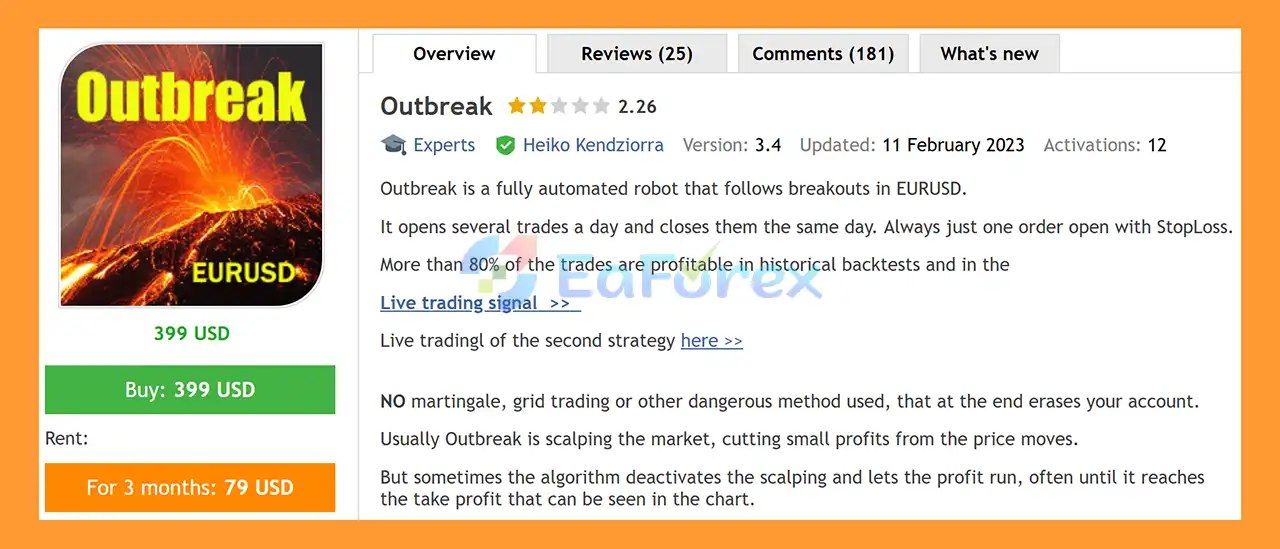
Outbreak EA MT5 is a fully automated Forex Expert Advisor (EA) for MetaTrader 5, specifically designed to trade EURUSD using a breakout-based trading approach. The EA monitors market conditions automatically, identifies potential breakout opportunities, and manages entries and exits without requiring constant manual intervention.
Outbreak EA MT5 is primarily designed for EURUSD on the M5 timeframe, with the default settings optimized for this configuration. The EA can open several trades throughout the day and is designed to close its positions within the same trading day.
According to the supplied historical backtest information, more than 80% of trades have been profitable. However, historical backtest performance should not be interpreted as a guarantee of future live trading results.
The strategy does not use martingale or grid trading, according to the developer. Instead, Outbreak EA MT5 combines short-term scalping with breakout trading logic. In normal conditions, the EA attempts to capture relatively small price movements. When market conditions provide a stronger opportunity, the algorithm can allow a profitable position to run for longer toward its configured Take Profit.
One of the main features of Outbreak EA MT5 is its automated configuration. The developer states that the EA does not require special set files or regular optimization because it is designed to adapt automatically to changing market conditions.
About the Developer
- Author: Heiko Kendziorra
- Experience: Over +12 years of experience on MQL5.
- Notable Products: Outbreak EA, Black Night mt5, Scalpelo and other advisors.
- Flagship Product: Outbreak EA MT5 is rated as the best performing product of the year.
>> Delivery time 24h-48h after payment.
>>> Refund if not delivered.
>>> You will receive the latest version without any limitations (ID+Time).
>>Reviewed by Jason Stap <<
Main Features of Outbreak EA MT5
- Fully Automated Trading – Automatically analyzes the market and executes trades without manual intervention.
- EURUSD Specialized – Designed primarily for trading EURUSD.
- Default EURUSD M5 Setup – The standard configuration is intended for the M5 timeframe.
- Breakout Trading Strategy – Identifies potential breakout opportunities in short-term market movements.
- Adaptive Scalping Logic – Usually captures smaller price movements but can allow profitable trades to run when market conditions support a larger move.
- Stop Loss Protection – Each trade is opened with a Stop Loss according to the configured parameters.
- No Martingale – The strategy does not use Martingale position sizing.
- No Grid Trading – Outbreak does not rely on grid-based trade accumulation.
- Automatic Money Management – The EA can calculate position size based on the selected account risk.
- Risk Percentage Control – The
MaximumRisk parameter allows traders to define the percentage of available account margin allocated to a trade.
- Fixed Lot Option – Traders can disable automatic money management and use a predefined lot size.
- UTC Timezone Setting –
SetUTC allows the trading schedule to be aligned with the broker’s server timezone.
- Hedging-Compatible – The trading account must support hedging, although hedging is described as an occasional rather than core component of the strategy.
- 24-Hour Operation – The EA can operate throughout the day and is therefore suitable for use on a VPS or server.
- No Mandatory Set Files – The developer states that no external set files or optimization are required for normal operation.
- December Liquidity Protection –
LastTradeDayDec can be used to stop trading after a specified day in December when market liquidity may become lower.
How Does Outbreak EA MT5 Work?
Outbreak EA MT5 combines breakout detection with adaptive short-term trading logic.
The EA continuously monitors EURUSD price movements and looks for conditions that may indicate a potential breakout. When the required conditions are detected, it can automatically open a Buy or Sell position with predefined Stop Loss and Take Profit parameters.
The trading process can be summarized as follows:
- Market Analysis – Outbreak continuously analyzes EURUSD price behavior.
- Breakout Detection – The algorithm searches for potential breakout conditions.
- Trade Entry – When its entry criteria are satisfied, the EA automatically opens a position.
- Risk Protection – A Stop Loss is applied to help limit the potential loss of each trade.
- Adaptive Profit Taking – During normal conditions, the EA may operate as a scalper and target smaller price movements.
- Profit Extension – When market conditions are considered favorable, the algorithm can deactivate its normal scalping behavior and allow a profitable position to continue toward a larger Take Profit.
- Trade Closure – Positions are automatically closed according to the strategy’s exit conditions.
The EA is designed around maintaining a relatively simple trade structure, with only one active order at a time according to the provided strategy description.
Why Choose Outbreak EA MT5?
Outbreak EA MT5 may be suitable for traders looking for an automated EURUSD breakout and scalping EA without relying on Martingale or Grid Trading.
One of its main characteristics is its adaptive trading behavior. Instead of using only fixed scalping exits, the algorithm can potentially allow profitable trades to continue when market conditions provide an opportunity for a larger movement.
Another notable feature is its automatic money-management option. Traders can configure the EA to calculate lot size based on account risk or use a fixed lot size when preferred.
The developer also states that Outbreak EA MT5 does not require regular set-file optimization for normal operation. This can make the setup process simpler, particularly for traders who prefer a more automated approach.
For execution quality, the developer recommends using a reputable ECN broker account with competitive spreads and reliable execution. Although an extremely fast internet connection is not considered necessary, running the EA on a stable VPS or server is recommended because it can operate around the clock.
Outbreak EA MT5 Backtest Results
🔺EURUSD pair – 4 years
- Initial Deposit: $100
- Total Net Profit: $190.062,01
- Win Rate (% of total): 91,60%
- Maximum Drawdown: 1.23%
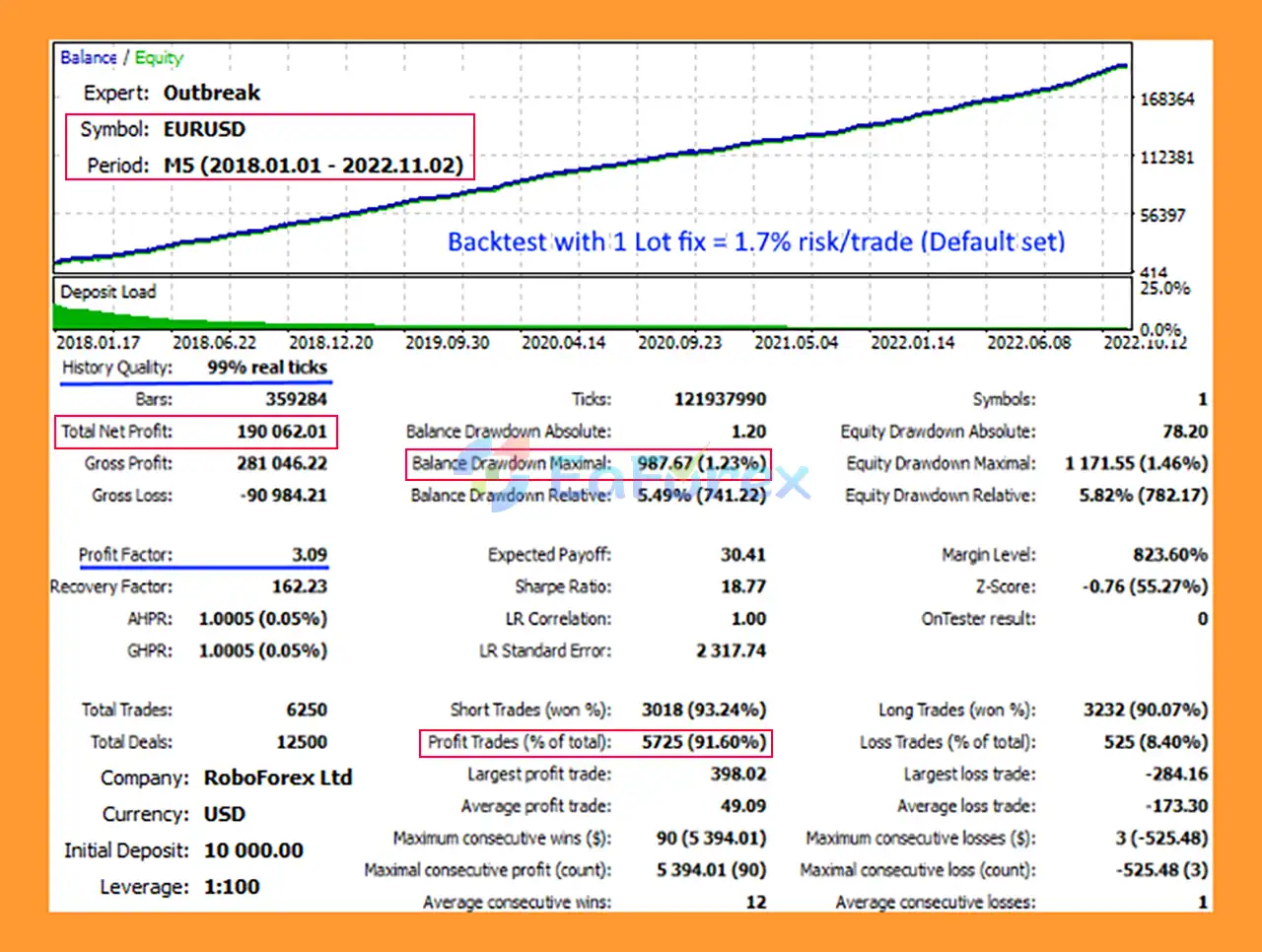
Outbreak EA MT5 Backtest
Performance and Risk Management
According to the provided historical backtest information, more than 80% of Outbreak EA’s trades were profitable. However, historical backtest performance does not guarantee future results, and actual performance can vary depending on the broker, spread, commission, execution quality, market conditions, and trading period.
The suggested starting capital is USD 100 for 0.01 lot, with the provided settings describing approximately 1.7% risk per trade. The developer also refers to approximately 1% risk for signal trades in certain contexts, so traders should verify the exact risk configuration before going live.
Outbreak provides several parameters for controlling trade size and risk:
- Auto_Moneymanage – Enables or disables automatic money management.
- MiniLots – When enabled, automatic money management can use 0.01-lot increments.
- MaximumRisk – Defines the percentage of account free margin used as the risk setting for a trade.
- Lots – Specifies the fixed lot size when automatic money management is disabled.
- StopLossBuy – Defines the Buy Stop Loss distance in points.
- TakeProfitBuy – Defines the Buy Take Profit.
- StopLossSell – Defines the Sell Stop Loss distance in points.
- TakeProfitSell – Defines the Sell Take Profit.
- SetUTC – Adjusts the EA’s timezone according to the broker/server environment.
- LastTradeDayDec – Allows trading to stop after a selected day in December to avoid potentially lower-liquidity conditions.
The developer notes that Stop Loss optimization may sometimes improve results when a broker has wider spreads or more volatile pricing. Take Profit optimization is described as having a smaller effect because the EA’s scalping Take Profit can vary according to market conditions.
For live trading, traders should use conservative risk settings, test the EA on a demo account first, and verify the behavior under their specific broker’s trading conditions.
Weaknesses and Risk Warnings
Despite its automated design and risk-management features, Outbreak EA MT5 is not risk-free.
Historical Results Are Not Guaranteed
The reported profitability and win rate come from historical testing. Backtest results cannot guarantee that the EA will achieve similar performance in live trading.
Scalping Depends on Execution
Because Outbreak EA MT5 can use scalping logic, spread, commission, slippage, latency, and order execution can have a meaningful impact on actual results.
Broker Quality Matters
The developer recommends an ECN account with competitive spreads and reliable execution. Different brokers can therefore produce different trading results.
Risk Settings Require Attention
A setting such as 1.7% risk per trade can still lead to meaningful account drawdowns during a sequence of losing trades. Traders should select risk levels according to their own risk tolerance and account size.
EURUSD Focus
Outbreak is primarily designed for EURUSD, particularly the default M5 setup. Using it on other symbols or timeframes without appropriate testing may produce different behavior.
Hedging Requirement
The trading account must support hedging. Traders should confirm that their MT5 broker account allows the required trading mode before installation.
VPS Recommended
The EA can trade 24 hours per day, so a stable VPS or server can help maintain continuous operation and reduce the possibility of interruptions caused by shutting down a personal computer.
December Trading Conditions
The LastTradeDayDec parameter exists because liquidity and market conditions can change toward the end of December. Traders should review this setting before running the EA during the holiday period.
Pros and Cons
Pros
- Fully automated EURUSD trading
- Designed for EURUSD M5
- Combines breakout and scalping logic
- Can allow profitable trades to run longer
- Uses Stop Loss protection
- No Martingale strategy
- No Grid Trading
- Automatic money-management option
- Fixed-lot trading option
- No mandatory set files according to the developer
- Can operate 24 hours per day
- Adjustable risk and trading parameters
- Suitable for beginners and experienced traders
Cons
- Primarily designed for EURUSD
- Scalping performance can be affected by spread and execution quality
- Requires a hedging-compatible MT5 account
- Live results may differ significantly from backtests
- Risk settings must be configured carefully
- VPS/server operation is recommended for continuous trading
- Broker-specific pricing conditions can affect performance
- Historical win rates do not guarantee future profitability
How to Install Outbreak EA MT5
Installing Outbreak EA MT5 on MetaTrader 5 is straightforward.
Step 1: Download the EA
Obtain the Outbreak EA MT5 installation files from your trusted source.
Step 2: Open MetaTrader 5
Launch your MetaTrader 5 trading platform.
Step 3: Open the MT5 Data Folder
From the MT5 menu, select:
File → Open Data Folder
Then navigate to:
MQL5 → Experts
Copy the Outbreak EA file into the Experts folder.
Step 4: Restart MetaTrader 5
Restart MT5 or refresh the Expert Advisors section in the Navigator window so that the EA appears.
Step 5: Open an EURUSD M5 Chart
Open an EURUSD chart and select the M5 timeframe, which is the recommended default configuration.
Step 6: Attach the EA
Find Outbreak EA MT5 under:
Navigator → Expert Advisors
Drag the EA onto the EURUSD M5 chart.
Step 7: Configure the Parameters
Review the available settings, particularly:
Auto_MoneymanageMaximumRiskMiniLotsLotsStopLossBuyTakeProfitBuyStopLossSellTakeProfitSellSetUTCLastTradeDayDec
Make sure the risk settings match your account size and trading plan.
Step 8: Enable Automated Trading
Ensure that Algo Trading / AutoTrading is enabled in MetaTrader 5 and that the EA has permission to trade.
Step 9: Test Before Going Live
Before using real funds, test Outbreak EA MT5 on a demo account under the same broker and account conditions you intend to use for live trading. This allows you to evaluate spread, commission, slippage, execution, drawdown, and overall behavior.
Step 10: Consider a VPS
Because Outbreak EA MT5 can operate continuously throughout the day, a reliable VPS can help keep MetaTrader 5 running even when your personal computer is turned off.
Real User Reviews and Feedback
🔺Outbreak EA MT5 is highly appreciated by the MQL5 community for bringing stable and reliable profits. Below are 5 star reviews from users:
- Eric Vaillancourt (2022.11.29): I’ve been using for 3 weeks now and I’m very happy with this EA. The backtest are very close to live trading. Keep up the good work!
- Yuen Pak Hei (2022.11.29): Great Live Result :)
- Pavel Kozokar (2022.11.24): Very good EA. Do not write hate comments, test it on good data, realise that we have period of losses, use MM and enjoy the future profit.
What’s Included in the Download Package?
- Setting (If Any).docx
- Installation Guide.docx
>>> Join VIP Membership Now <<<
Final Thoughts
In summary, Outbreak EA MT5 is an automated EURUSD Forex Expert Advisor for MetaTrader 5, primarily designed for the M5 timeframe. Its combination of breakout detection and adaptive scalping logic allows the EA to target shorter price movements while potentially allowing profitable trades to continue when stronger market conditions develop. The absence of traditional Grid and Martingale strategies, together with automatic money management and configurable Stop Loss and Take Profit settings, provides a structured framework for automated trading.
The supplied four-year EURUSD backtest reports $190,062.01 in net profit, a 91.60% win rate, and 1.23% maximum drawdown from a $100 initial deposit. These figures represent historical testing under specific conditions and should not be interpreted as a guarantee of future live performance. Actual results may differ because of spreads, commissions, slippage, latency, execution quality, broker conditions, market volatility, and risk settings.
For traders considering Outbreak EA MT5, demo and forward testing are recommended before live deployment. Particular attention should be given to the MaximumRisk setting, broker execution conditions, the required hedging account type, and the EURUSD M5 configuration. Because the EA uses scalping and breakout logic, a competitive-spread ECN environment and reliable VPS operation may also be important factors when evaluating its live performance.

































 Automatic EA
 EA Best Seller
 Expert Advisor MT4
 Expert Advisor MT5
 HFT EA


Reviews
Clear filtersThere are no reviews yet.