









-
 Unlimited Activations
-
 Instant delivery
-
 Easy to install







 Unlimited Activations
Instant delivery
Easy to install
Unlimited Activations
Instant delivery
Easy to install
 Free Update
 Free Install Support

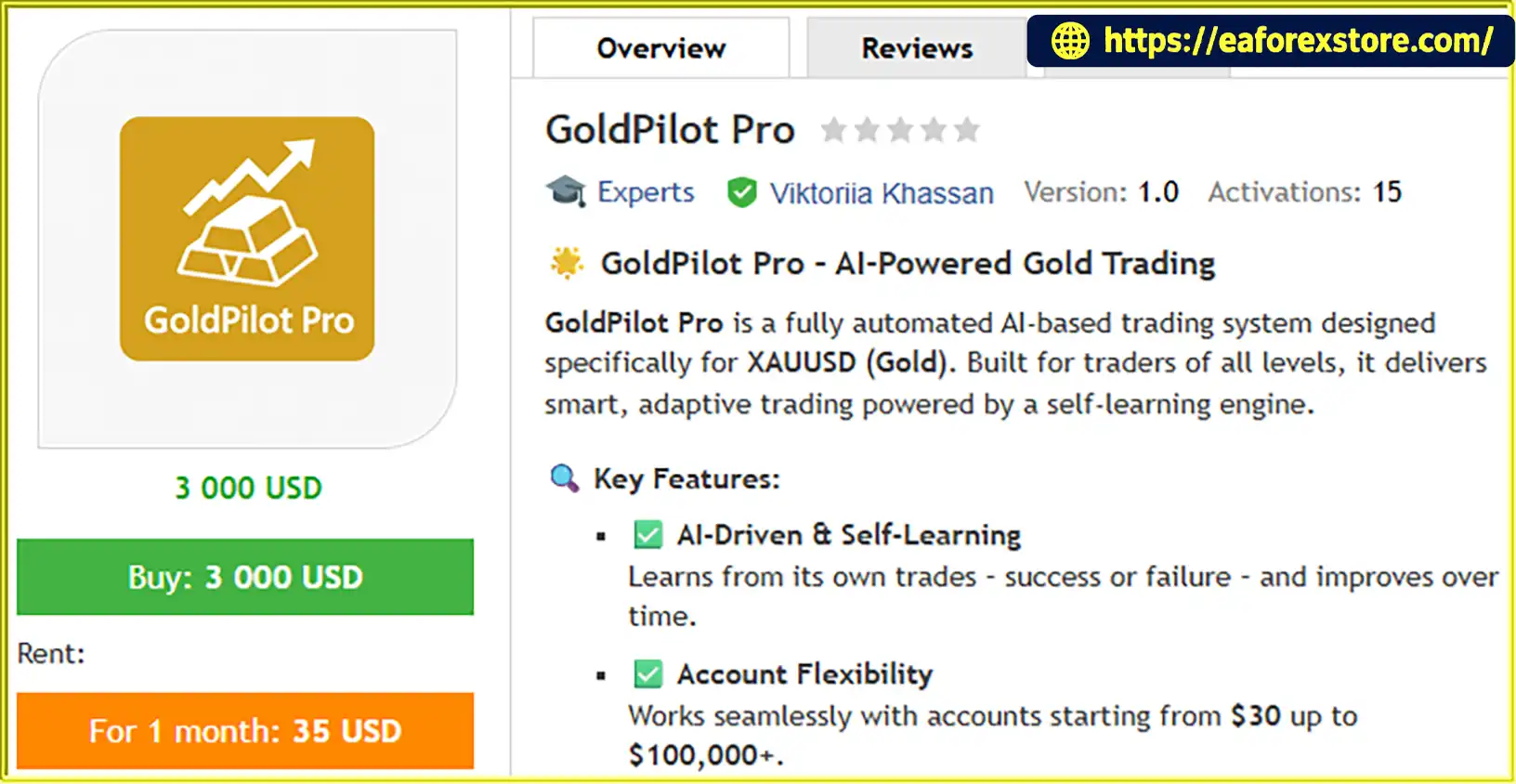
GoldPilot Pro EA MT5 is an automated trading EA developed specifically for Gold (XAUUSD) trading on the MetaTrader 5 (MT5) platform. Marketed as an AI-powered trading system, it is designed to automate trade execution while providing configurable risk management through a simple and user-friendly interface.
The developer describes GoldPilot Pro as featuring a self-learning engine that learns from previous trading outcomes. This approach is intended to support adaptive trading behavior over time. However, the exact learning mechanism and its impact on live trading performance should be verified through technical documentation and independent testing.
With automated trading, configurable risk settings, and a minimal input interface, GoldPilot Pro EA MT5 is designed for traders looking for a simplified approach to automated Gold trading.
>>> Delivery time 24h-48h after payment.
>>> Refund if not delivered.
>>> You will receive the latest version without any limitations (ID+Time).Reviewed by Jason Stap <<<
GoldPilot Pro EA MT5 Overview
RiskPercent from 0.1% to 30%, according to the supplied specifications.MagicNumber and RiskPercent.GoldPilot Pro EA MT5 is designed to automate Gold trading through its programmed trading logic and configurable risk settings. According to the supplied product description, the system incorporates an AI-based, self-learning approach, although detailed information about its entry signals, exit rules, and learning architecture has not been provided.
The EA operates on XAUUSD and evaluates market conditions according to its internal trading logic. The exact indicators, entry criteria, and market filters are not specified in the available product information.
When its programmed conditions are satisfied, the EA can initiate trades automatically. This removes the need for traders to manually identify and execute every trading opportunity.
The RiskPercent parameter allows users to define their preferred risk percentage. For example, a setting of 1.0 represents a nominal risk target of 1% if the EA calculates position size from the account balance using that percentage.
The actual monetary risk depends on how the EA calculates lot size, determines Stop Loss distance, and handles execution costs. These details should be confirmed before using the system on a live account.
After opening a position, the EA manages trading according to its programmed rules. The supplied description does not specify the exact Stop Loss, Take Profit, trailing stop, or position-closing logic, so these functions should be verified in the EA documentation or Strategy Tester.
The developer describes GoldPilot Pro as a self-learning system that learns from both successful and unsuccessful trades. To determine whether this feature genuinely changes future trading decisions, traders should review technical documentation and compare performance across separate testing periods.
GoldPilot Pro EA MT5 focuses on XAUUSD, allowing traders to evaluate a trading robot dedicated to the Gold market. Because Gold can experience rapid price movements and changing volatility, testing the EA under different market conditions is essential.
The EA uses two primary configurable inputs, making its setup relatively straightforward. Traders can assign a Magic Number and choose a Risk Percentage without navigating a long list of exposed parameters.
The RiskPercent parameter provides a configurable range from 0.1% to 30%. This gives users flexibility when selecting their intended risk level, although higher settings can substantially increase potential losses.
By automating order placement, GoldPilot Pro can reduce the need for constant manual intervention. Traders can monitor the system’s behavior and review its performance rather than manually executing each trade.
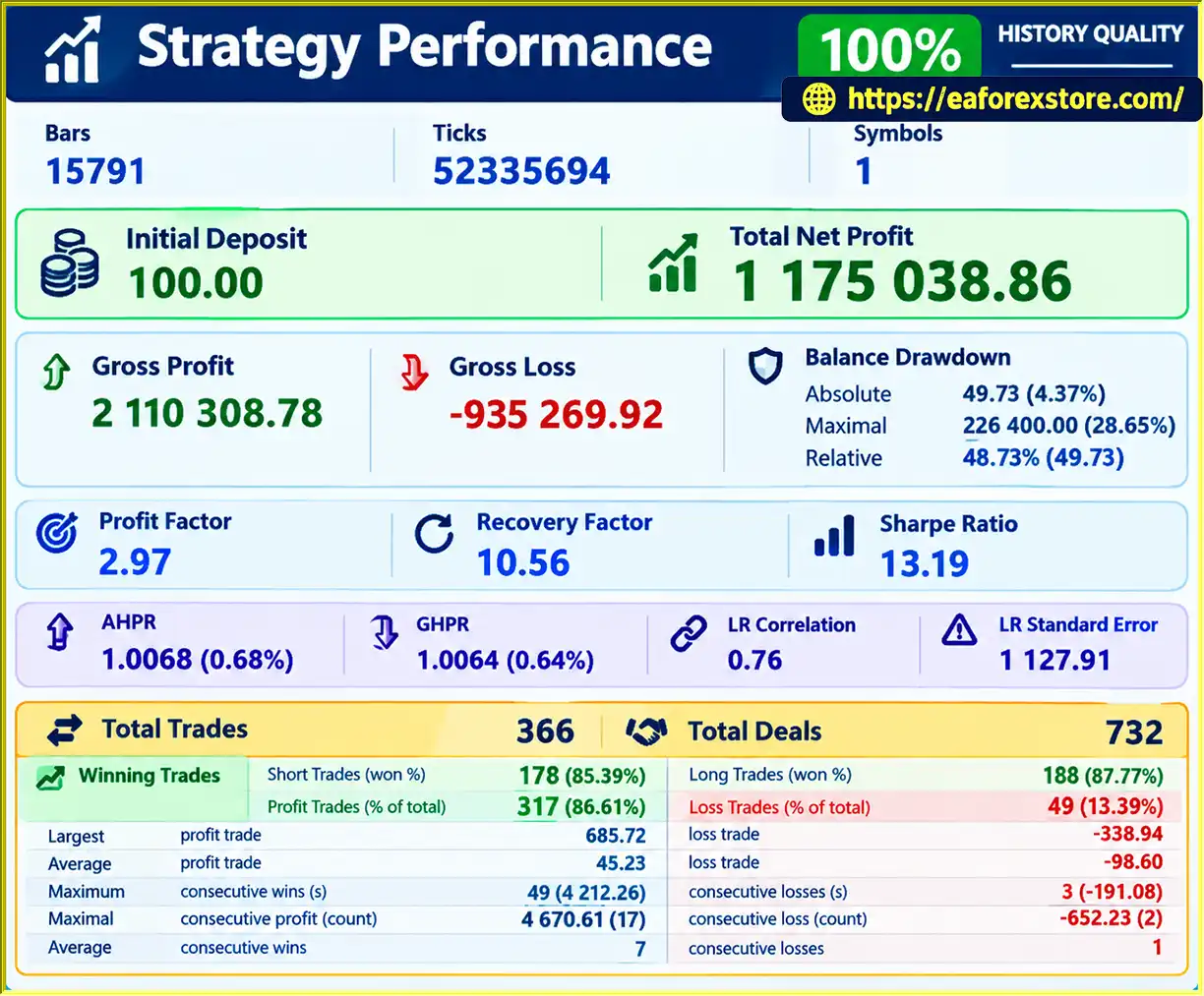
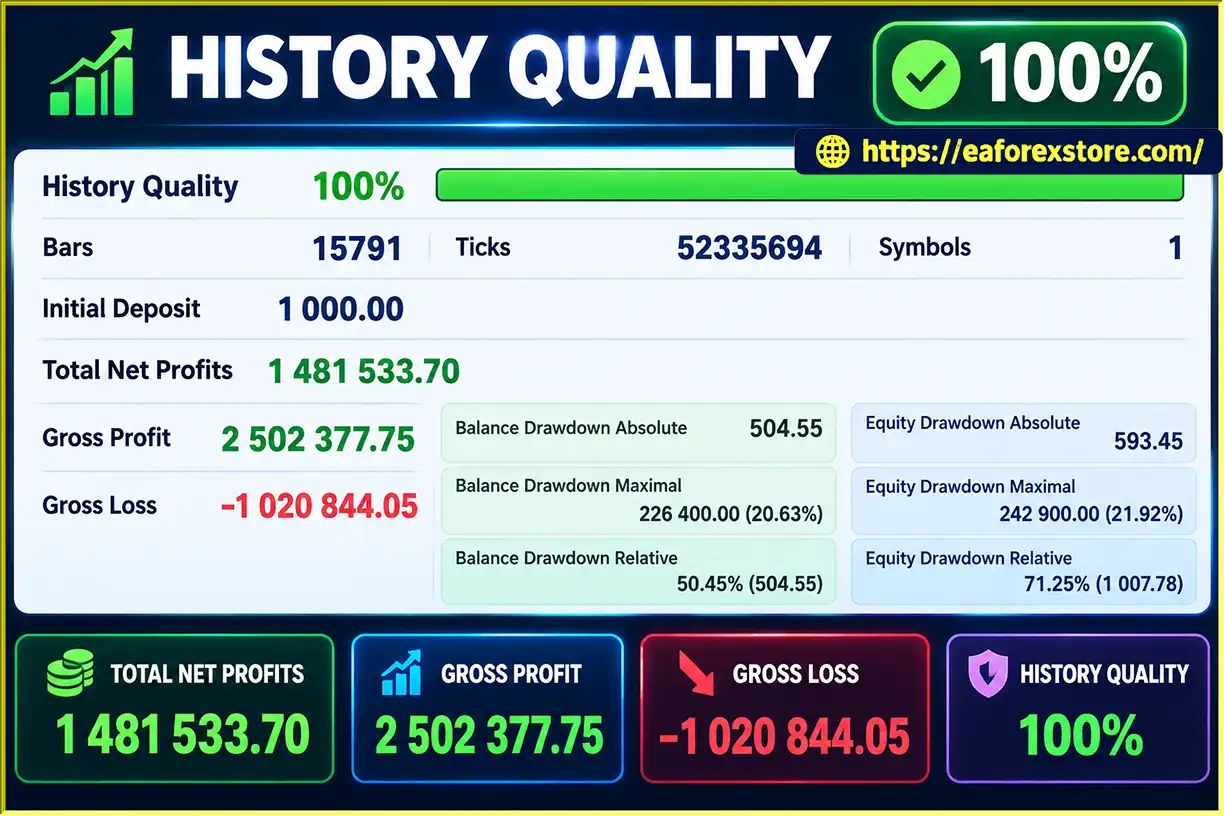
The supplied description references example results from $100 and $1,000 accounts. These examples can provide a starting point for evaluating the EA, provided the underlying reports include sufficient information about testing conditions, drawdown, trading costs, and execution.
The developer’s self-learning claim may appeal to traders interested in adaptive trading technology. Nevertheless, AI-related claims should be assessed using verifiable evidence rather than assumed to guarantee improved performance or profitability.
GoldPilot Pro EA Backtets
GoldPilot Pro EA MT5 Backtets
Risk management is particularly important when trading Gold because XAUUSD can experience significant price movements, volatility spikes, and periods of increased trading costs.
GoldPilot Pro EA MT5 exposes a configurable risk percentage, but the supplied product information does not establish the full range of its internal risk controls. Traders should verify how the EA handles Stop Loss placement, position sizing, consecutive losses, and unexpected market conditions.
The RiskPercent parameter allows users to choose a risk setting between 0.1% and 30%, according to the supplied specifications.
For illustration, the following table shows the nominal amount corresponding to different risk percentages on a $1,000 account. These figures are mathematical examples, not verified estimates of the EA’s actual trade risk.
| Risk Percentage | Nominal Risk on $1,000 |
|---|---|
| 0.1% | $1 |
| 0.5% | $5 |
| 1% | $10 |
| 2% | $20 |
| 5% | $50 |
| 10% | $100 |
| 30% | $300 |
Actual risk per trade will depend on whether the EA uses the account balance or equity, how it calculates position size, the Stop Loss distance, and whether gaps or slippage cause execution beyond the intended level.
A setting of 30% is extremely aggressive if it represents the amount risked per trade. Conservative settings are generally more appropriate for traders seeking to limit exposure, but no percentage can eliminate the possibility of losses.
The MagicNumber parameter assigns a unique identifier to trades associated with the EA. This helps distinguish its positions from those opened manually or by other trading robots.
Use a unique Magic Number for each EA configuration when appropriate, and verify that multiple robots operating on the same account do not unintentionally interfere with one another.
Although GoldPilot Pro is presented as suitable for accounts starting at $30, a small balance may restrict available position sizes and reduce the margin available to withstand adverse price movements. Minimum lot sizes, contract specifications, leverage, and broker margin requirements can materially affect suitability.
Before using GoldPilot Pro EA MT5 on a live account, traders should verify:
RiskPercent.Important: The available product information does not confirm built-in daily loss limits, account drawdown protection, profit targets, or alert notifications. These features should not be advertised as included unless they are verified in the actual EA.
Follow these steps to install GoldPilot Pro EA MT5 on MetaTrader 5.
Obtain the GoldPilot Pro EA MT5 file from the official developer or authorized source. Confirm that the file is compatible with MetaTrader 5, typically using the .ex5 or .mq5 extension.
MQL5.Experts folder.Copy the GoldPilot Pro EA MT5 file into the MQL5/Experts directory. If the developer supplies additional files or specific installation instructions, follow the accompanying documentation.
Return to MetaTrader 5 and locate the Navigator panel. Right-click Expert Advisors and select Refresh, or restart the platform if necessary.
Open an XAUUSD chart with your broker and drag GoldPilot Pro EA MT5 from the Navigator panel onto the chart.
Confirm that the symbol name matches your broker’s Gold instrument, which may use a suffix such as .m, .pro, or another broker-specific designation.
Set the two primary inputs:
Do not automatically select the maximum risk setting. Verify the EA’s position-sizing and Stop Loss logic before choosing a percentage.
Enable Algo Trading in MetaTrader 5 and confirm that automated trading is permitted in the EA’s settings. Check the platform’s connection status and review the Experts and Journal tabs for errors.
Before using real funds, test GoldPilot Pro EA MT5 in the MT5 Strategy Tester and on a demo account.
Where possible, evaluate different market conditions, spreads, trading costs, drawdown, profit factor, and position-sizing behavior. Confirm that the EA’s actual risk matches your intended risk percentage before deploying it on a live account.
>>> Join VIP Membership Now <<<
GoldPilot Pro EA MT5 is an automated Gold trading robot designed for traders who want a simple way to run an EA on XAUUSD using MetaTrader 5. Its primary selling points are automated execution, two straightforward input parameters, configurable risk percentage, and a developer-described AI-based self-learning engine.
The minimal configuration may appeal to traders who prefer a straightforward setup instead of managing numerous exposed inputs. However, simplicity should not replace proper risk management, and claims about AI-driven adaptation should be supported by technical evidence and reproducible testing.
Before choosing GoldPilot Pro EA MT5, review the supplied performance reports, verify its Stop Loss and position-sizing behavior, and test it under realistic broker conditions. Start with a demo account and a conservative risk setting while assessing its trading logic and drawdown characteristics.
For traders researching an AI Gold Trading EA for MT5, GoldPilot Pro EA MT5 may be worth evaluating as an automated trading option. Its suitability ultimately depends on verified performance, transparent risk controls, and whether its behavior aligns with your trading objectives.
1. What Is GoldPilot Pro EA MT5?
GoldPilot Pro EA MT5 is an automated trading Expert Advisor designed specifically for Gold (XAUUSD) on the MetaTrader 5 platform. It automates trade execution based on its programmed trading logic and provides configurable risk settings through two primary inputs: MagicNumber and RiskPercent.
2. Does GoldPilot Pro EA MT5 Use Artificial Intelligence (AI)?
According to the developer, GoldPilot Pro EA MT5 features an AI-powered self-learning engine designed to learn from previous trading outcomes. However, the exact learning mechanism and its impact on trading performance have not been independently verified. Traders should review the available technical documentation and conduct their own tests before relying on its adaptive trading capabilities.
3. What Is the Minimum Deposit Required for GoldPilot Pro EA MT5?
GoldPilot Pro EA MT5 is presented as suitable for accounts starting at approximately $30, with potential use on larger accounts depending on broker conditions and risk settings. However, the practical minimum deposit depends on the broker's minimum lot size, margin requirements, leverage, and the EA's position-sizing logic. A larger balance may provide more flexibility when managing trading risk.
4. Is GoldPilot Pro EA MT5 Fully Automated?
Yes. GoldPilot Pro EA MT5 is designed to automate trade execution on MetaTrader 5 when its trading conditions are met. Users must configure the EA, enable Algo Trading, and ensure that the platform remains connected. Traders should also verify its entry and exit rules, Stop Loss behavior, and position-sizing logic before running it on a live account.
5. What Risk Settings Are Available in GoldPilot Pro EA MT5?
GoldPilot Pro EA MT5 provides a configurable RiskPercent parameter ranging from 0.1% to 30%, according to the supplied specifications. This setting allows traders to adjust their intended risk exposure. However, the actual risk per trade depends on how the EA calculates position sizes and Stop Loss distances. Conservative settings are generally preferable for risk control, while higher percentages can significantly increase potential losses.
6. Are the GoldPilot Pro EA MT5 Backtest Results Reliable?
The supplied backtest screenshots report 100% history quality, with a maximum drawdown of 21.92% on a $1,000 initial deposit and 30.33% on a $100 initial deposit. These figures should be treated as reported test results rather than proof of future performance. Traders should review the complete Strategy Tester reports, testing period, trading costs, modeling settings, and execution assumptions to assess the results more accurately.
7. How Do I Install GoldPilot Pro EA MT5 on MetaTrader 5?
To install GoldPilot Pro EA MT5, download the compatible EA file, open MetaTrader 5, and select File → Open Data Folder → MQL5 → Experts. Copy the EA file into the Experts folder, refresh the Navigator panel, and attach the EA to an XAUUSD chart. Configure MagicNumber and RiskPercent, enable Algo Trading, and test the EA on a demo account before using real funds.
8. Can GoldPilot Pro EA MT5 Guarantee Profits?
No. GoldPilot Pro EA MT5 cannot guarantee profits or eliminate trading risks. Gold prices can move sharply, and actual results may differ from backtests because of market volatility, spreads, slippage, execution quality, and broker conditions. Traders should independently evaluate the EA, use appropriate risk settings, and understand that losses, including substantial drawdowns, are possible.
In stock
In stock
In stock
In stock
In stock
Out of stock
No account yet?
Create an Account












 Automatic EA
 EA Best Seller
 Expert Advisor MT4
 Expert Advisor MT5
 HFT EA


Reviews
Clear filtersThere are no reviews yet.