









-
 Unlimited Activations
-
 Instant delivery
-
 Easy to install


 Unlimited Activations
Instant delivery
Easy to install
Unlimited Activations
Instant delivery
Easy to install
 Free Update
 Free Install Support

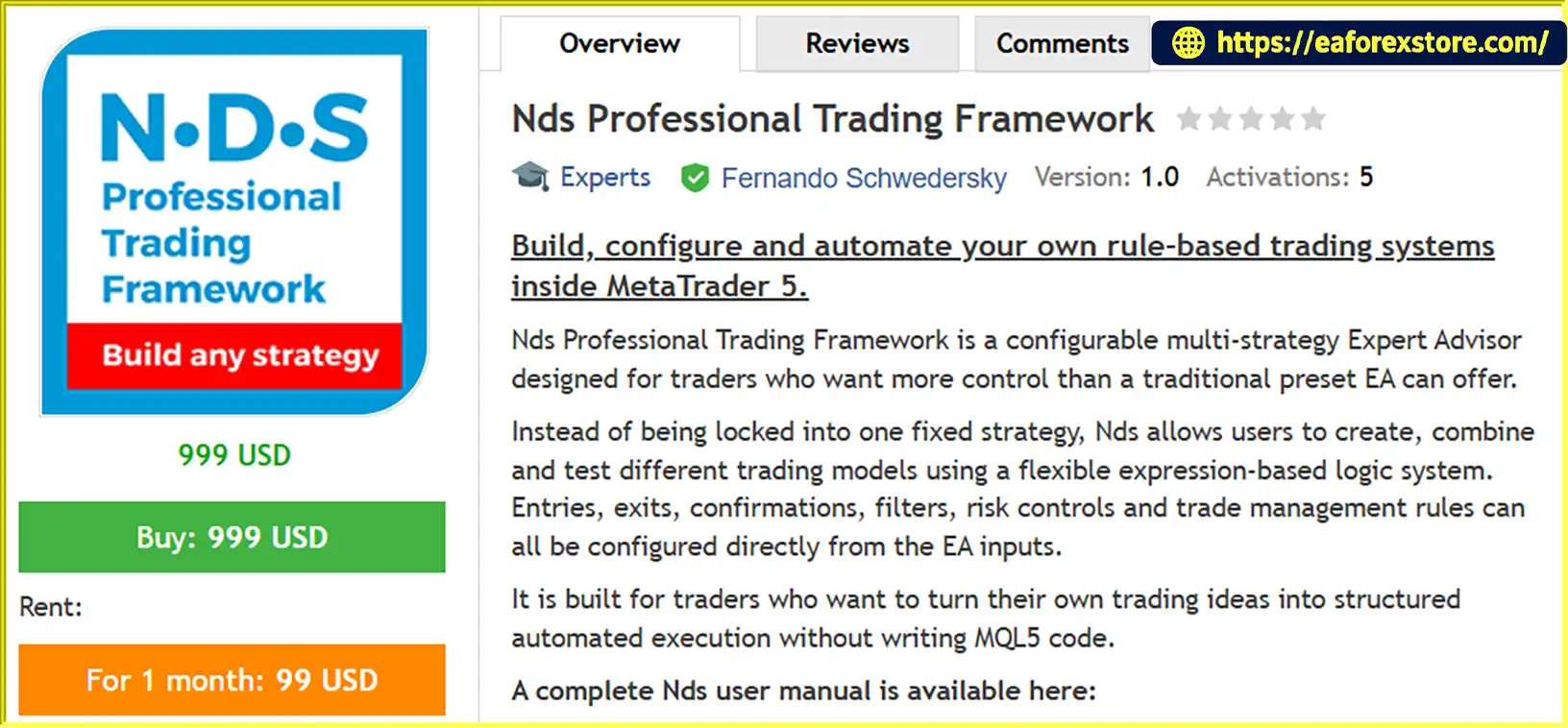
Nds Professional Trading Framework EA MT5 is a configurable multi-strategy Expert Advisor designed for traders who want greater flexibility and control over automated trading on the MetaTrader 5 platform. Unlike traditional trading robots that rely on a single predefined strategy, Nds provides a flexible framework for building, testing and executing custom trading systems through configurable trading rules.
The EA features an expression-based strategy engine that allows users to define entry conditions, exit signals, indicator confirmations, market filters and trade management rules directly through its input parameters. This enables traders to transform their own trading ideas into structured automated strategies without writing or recompiling MQL5 code.
With a built-in library of more than 50 technical analysis tools, multi-timeframe capabilities, cross-symbol analysis and advanced trade management options, Nds Professional Trading Framework EA MT5 supports a wide range of strategy configurations. Traders can combine technical indicators, price-action conditions, calculated variables and multiple confirmation layers to develop trading models that match their individual methodologies.
Whether you are experimenting with indicator-based systems, developing multi-confirmation strategies or refining an existing trading approach, Nds provides a structured environment for strategy development and automated execution within MT5.
Rather than operating as a black-box trading robot, Nds puts strategy design in the hands of the user. The EA executes the rules you configure, while you remain responsible for testing, validating and managing your trading system.
>>> Delivery time 24h-48h after payment.
>>> Refund if not delivered.
>>> You will receive the latest version without any limitations (ID+Time).Reviewed by Jason Stap <<<
Nds Professional Trading Framework EA MT5 Overview
Nds Professional Trading Framework EA MT5 allows traders to build and manage different rule-based trading models within a single Expert Advisor. Configure entry conditions, exit rules, confirmation signals and market filters to create strategies suited to different trading approaches.
The expression-based logic system enables users to define custom trading conditions through configurable text-based expressions. Modify trading rules, test alternative configurations and refine strategy logic without recompiling the EA, making the development process more flexible and efficient.
Improve the selectivity of your trading rules by combining multiple confirmation layers. Traders can configure two or three confirmation conditions using indicators, price-action signals, calculated variables and market filters.
This feature helps users develop more structured entry and exit logic rather than relying on a single technical signal.
The EA includes an extensive collection of technical analysis tools to support different strategy designs, including:
These tools can be combined with configurable conditions to create customized trading models.
Nds supports indicator configurations using different symbols and timeframes. This allows traders to incorporate higher-timeframe confirmations, analyze multiple market conditions or use signals from correlated instruments when designing their strategies.
Multi-timeframe and cross-symbol configurations should be tested carefully to ensure that the selected data, signal timing and execution behavior match the intended trading logic.
The EA provides configurable trade management options to help users define how positions are opened, managed and closed. Available controls include Stop Loss, Take Profit, Breakeven, Trailing Stop, partial exits, reversal conditions and time-based management rules.
These settings allow traders to build a complete execution framework around their chosen strategy.
Configure trading sessions, weekday restrictions, daily profit and loss limits, and other available time-based conditions. These filters help users determine when the EA can trade and which market conditions should be considered by the configured strategy.
Nds is designed for traders who regularly evaluate and refine their trading systems. Users can adjust indicator parameters, modify expressions, compare alternative rule combinations and test their configurations using the MetaTrader 5 Strategy Tester.
This workflow supports systematic strategy development without requiring users to create a separate EA for every new idea.
The EA includes a chart panel and visual trade information to help users monitor relevant trading activity and configured strategy behavior directly within the MT5 environment.
A free demo is available through the MetaTrader 5 Strategy Tester, allowing users to explore and evaluate the EA before considering live deployment. Future updates are included according to the applicable MetaTrader Market rules.
Nds Professional Trading Framework EA MT5 follows a user-defined trading logic model. Instead of relying on a fixed strategy, it evaluates the conditions configured in its inputs and executes trades according to the resulting rules.
Step 1: Define Your Trading Strategy
Start by deciding how your trading system should identify potential opportunities. You can use indicator signals, price conditions, trend filters, volatility measurements or other supported logic components.
Step 2: Configure Entry and Exit Expressions
Set the conditions for opening Buy and Sell positions, as well as the rules for closing existing trades. Depending on your strategy, you can use individual conditions or combine multiple signals through double or triple confirmation logic.
Step 3: Select Indicators and Timeframes
Choose the technical indicators required by your model and configure their parameters, symbols and timeframes. This allows you to build strategies based on a single timeframe or incorporate confirmation signals from multiple timeframes and instruments.
Step 4: Set Risk and Trade Management Rules
Configure Stop Loss, Take Profit, Breakeven, Trailing Stop, partial exits and other supported trade management parameters. You can also define trading sessions, weekday filters and daily limits to establish additional execution restrictions.
Step 5: Test the Configuration in MT5
Run your strategy in the MetaTrader 5 Strategy Tester using appropriate historical data, trading costs and execution assumptions. Review the results, including profitability, drawdown, trade frequency and consistency across different market conditions.
Step 6: Refine and Validate Your Strategy
Modify the rules and repeat the testing process to evaluate alternative configurations. After backtesting, forward-test the selected setup on a demo account before considering live trading.
The EA executes the configured logic, but the quality of the results depends on the strategy design, parameter selection, market conditions and execution environment.
Many Expert Advisors are designed around a specific entry model or trading methodology. Nds takes a different approach by providing a configurable framework that allows users to develop different strategies within one EA.
If you already have a trading methodology, Nds provides a way to translate your rules into automated execution without writing MQL5 code. This makes it useful for traders who understand their strategy but prefer to configure their logic through the EA’s available inputs.
The ability to combine indicators, price conditions and filters gives traders more options when designing entry and exit rules. Instead of relying exclusively on one indicator, users can create layered conditions that reflect their own trading methodology.
With more than 50 built-in technical analysis tools, the framework supports a wide variety of strategy concepts, from straightforward indicator-based models to more advanced combinations of technical signals.
Nds allows users to adjust their configurations and test new ideas without recompiling the EA. This can make strategy experimentation more convenient, especially when comparing different entry rules, confirmation methods or trade management settings.
Rather than maintaining multiple separate Expert Advisors for different rule combinations, traders can use one configurable framework to develop and evaluate different supported strategy designs.
Nds Professional Trading Framework EA MT5 is particularly suitable for strategy developers, experienced MT5 users and traders who value customization over preset trading logic. It is less suitable for users who expect a ready-made, fully validated strategy without needing to configure or test the system.
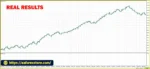
Nds Professional Trading Framework EA MT5 backtets
Risk management is an important part of any automated trading system. Nds Professional Trading Framework EA MT5 provides configurable trade management and trading restrictions that users can incorporate into their strategy design.
Define Stop Loss and Take Profit rules according to your trading methodology. These settings help establish planned exit conditions for individual positions, although actual execution prices may differ during periods of slippage or market gaps.
Configure supported Breakeven and Trailing Stop behavior to manage open positions as market prices change. Their effectiveness depends on the selected parameters, market volatility and execution conditions.
Use partial exit rules to close portions of a position at predefined conditions, or configure reversal logic when supported by your strategy. These features allow users to define more detailed position management behavior.
Configure available daily profit and loss restrictions to help control trading activity within specified limits. Such settings should be tested to verify exactly how they behave when a limit is reached, including whether new entries are blocked and how existing positions are handled.
Restrict trading to selected sessions or days of the week. These filters can help users avoid periods they do not want their strategy to trade, but they do not guarantee protection against unexpected market movements.
Use the chart panel and available visual trade information to monitor the EA’s activity. Review the applicable settings and documentation to understand which status messages, notifications or alerts are supported by your specific version.
Before live deployment, test all risk controls in the Strategy Tester and on a demo account. Confirm position sizing, Stop Loss behavior, daily limits, trade-closing rules and other critical settings under different market conditions.
Important: Risk management tools can help structure trading behavior, but they cannot eliminate market risk or guarantee a maximum loss under every execution scenario.
Follow these steps to install and configure Nds Professional Trading Framework EA MT5 on MetaTrader 5.
Obtain Nds Professional Trading Framework EA MT5 from the official product source or your authorized MetaTrader Market purchase. If a demo version is available, use it to explore the EA before deploying a trading configuration.
Launch your MT5 trading platform and log in to your trading account. For initial evaluation, using a demo account is recommended.
If the EA was purchased through the MetaTrader Market, open the platform’s Market section and locate your purchased product under the appropriate purchased-items area.
If you received an installation file separately, follow the vendor’s installation instructions. For a compatible .ex5 file, the usual process is to open File → Open Data Folder → MQL5 → Experts, place the file in the appropriate folder and restart MT5 or refresh the Navigator.
Open the Navigator panel and locate Nds Professional Trading Framework EA MT5 under Expert Advisors. If it does not appear, refresh the Navigator or restart the platform after installation.
Open the chart for the symbol you intend to trade and attach the EA. Review the available inputs carefully before enabling automated trading.
The appropriate symbol and timeframe depend on the strategy you configure. Do not assume that every configuration is suitable for every instrument or timeframe.
Set your entry and exit expressions, indicator parameters, confirmation logic, trade management rules and available trading filters. Verify that each condition reflects your intended strategy and that the selected symbols and timeframes are correct.
Review the EA’s available permissions and ensure that automated trading is enabled where required. Follow the product documentation for any additional setup requirements.
Open View → Strategy Tester or use the Strategy Tester shortcut in MT5. Select the EA, symbol, timeframe, historical testing period and appropriate testing settings.
Evaluate the results using relevant metrics such as net profit, maximum drawdown, profit factor, trade count and performance across different market periods. Include realistic trading costs where possible.
Run the selected configuration on a demo account to observe its behavior under live market conditions. Verify entries, exits, risk controls and execution behavior before considering a real-money account.
Installation tip: Refer to the official Nds documentation for exact input definitions, expression syntax and version-specific setup instructions. A successful installation does not mean that a trading strategy is profitable or properly configured.
>>> Join VIP Membership Now <<<
Nds Professional Trading Framework EA MT5 is a flexible automated trading framework designed for traders who want to build, test and execute their own trading strategies on MetaTrader 5. Its expression-based logic system, extensive technical indicator library, multi-timeframe capabilities and configurable trade management tools provide a structured environment for developing different trading models.
Rather than offering one fixed strategy, Nds gives users the ability to experiment with entry conditions, confirmation signals, exit rules and risk controls within a single framework. This makes it particularly relevant for experienced traders, strategy researchers and MT5 users who want greater control over automated execution without writing MQL5 code.
However, flexibility also creates responsibility. The EA does not guarantee profitable trades, and the quality of its performance depends on the logic you configure, the reliability of your testing process and the market conditions in which it operates.
For the most responsible approach, start with a clearly defined strategy, test it thoroughly in the MetaTrader 5 Strategy Tester, validate it on a demo account and review its drawdown and execution behavior before moving to live trading.
If your goal is to move beyond fixed-strategy robots and build a more customizable automated trading system, Nds Professional Trading Framework EA MT5 offers a configurable foundation for strategy development and systematic testing.
Risk Disclaimer: Trading financial markets involves substantial risk, and losses may exceed expectations under certain conditions. Nds Professional Trading Framework EA MT5 is a strategy-execution framework, not a guaranteed profit system or a source of financial advice. All trading rules and settings should be independently tested and validated before live use. Actual results may vary due to strategy configuration, broker conditions, spreads, commissions, slippage, execution quality and changing market behavior.
1. What Is Nds Professional Trading Framework EA MT5?
Nds Professional Trading Framework EA MT5 is a configurable Expert Advisor designed for the MetaTrader 5 platform. It allows traders to build, test, and automate their own trading strategies using customizable entry conditions, exit rules, technical indicators, and risk management settings instead of relying on a single predefined trading strategy.
2. Does Nds Professional Trading Framework EA MT5 Require MQL5 Programming Skills?
No, you do not need to write or recompile MQL5 code to configure supported trading strategies. The EA uses an expression-based strategy engine that lets you define trading conditions through its input parameters. However, understanding technical indicators, trading logic, and strategy configuration is important for achieving reliable results.
3. What Technical Indicators Does Nds Professional Trading Framework EA MT5 Support?
Nds Professional Trading Framework EA MT5 includes more than 50 technical analysis tools, including Moving Averages (MA), RSI, MACD, Bollinger Bands, ATR, Stochastic Oscillator, ADX, Ichimoku Cloud, VWAP, Volume Profile, Pivot Points, and support and resistance analysis. Traders can combine these tools to create customized trading strategies.
4. Can I Use Nds Professional Trading Framework EA MT5 for Multiple Trading Strategies?
Yes. Nds Professional Trading Framework EA MT5 is designed to support multiple configurable trading models within a single Expert Advisor. You can customize entry and exit conditions, combine multiple confirmation signals, and adjust indicator parameters to test different strategy concepts without necessarily installing a separate EA for each model.
5. Does Nds Professional Trading Framework EA MT5 Include Risk Management Features?
Yes. The EA supports configurable risk and trade management features, including Stop Loss, Take Profit, Breakeven, Trailing Stop, partial exits, reversal conditions, daily profit and loss limits, trading sessions, and weekday filters. These settings help you structure your trading rules, but they cannot eliminate market risk or guarantee a maximum loss under all execution conditions.
6. What Are the Backtest Results of Nds Professional Trading Framework EA MT5?
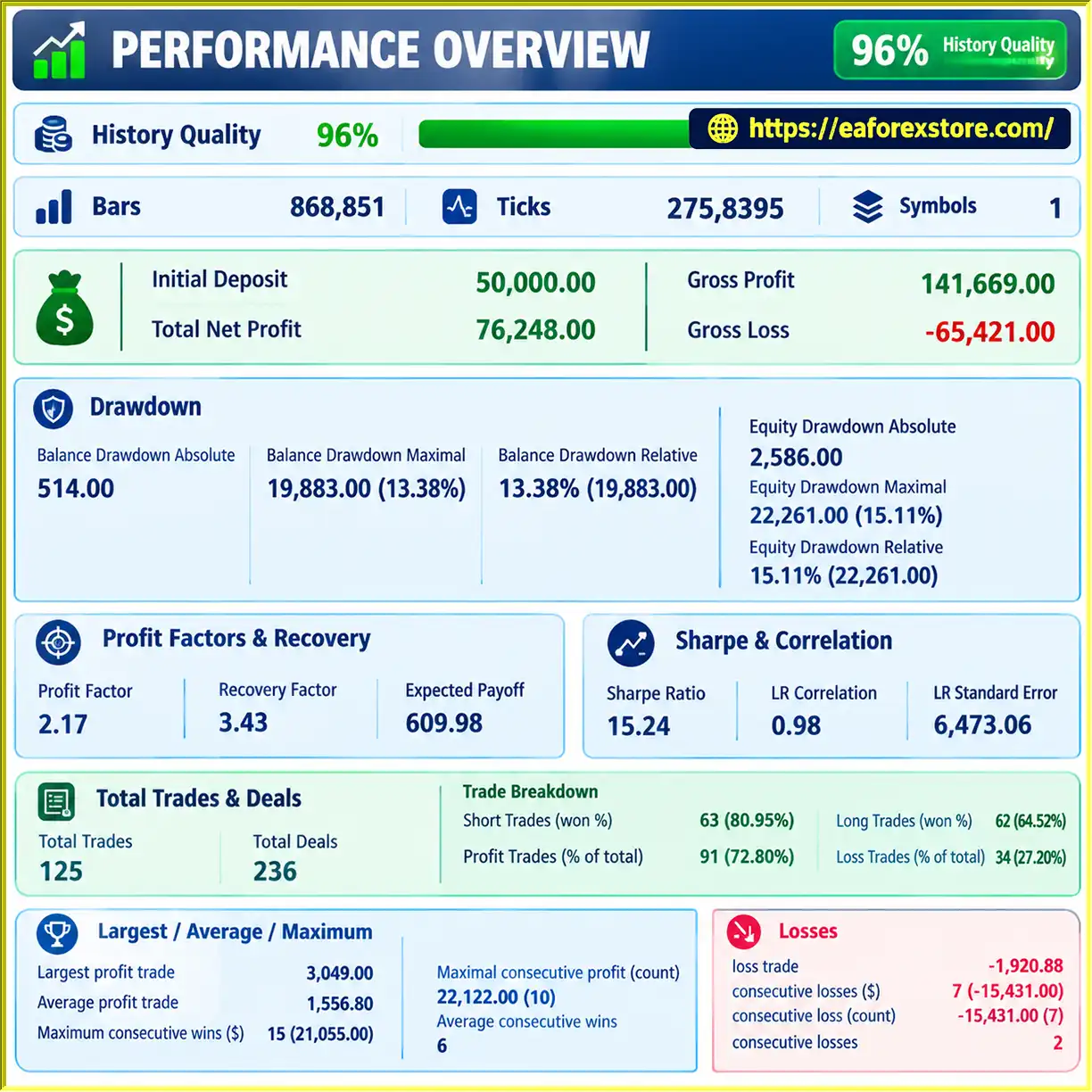
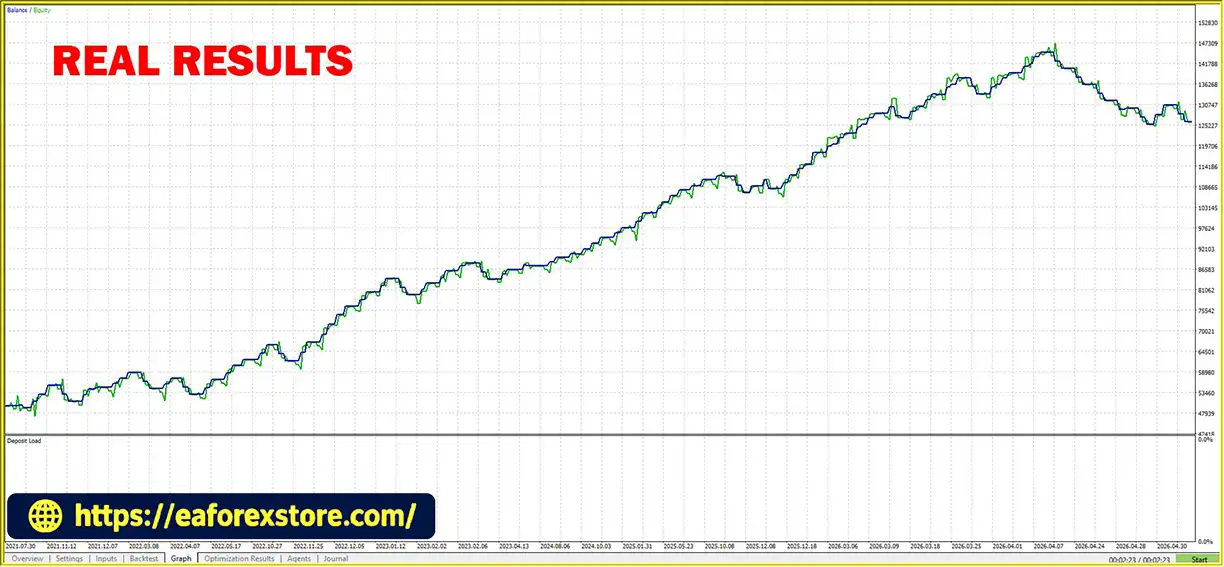
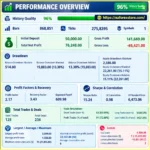
The provided backtest figures report an initial deposit of $50,000, total net profit of $76,248, a win rate of 72.80%, and a maximum drawdown of 13.38%. These figures should be evaluated alongside the testing period, trading instrument, timeframe, broker conditions, and testing methodology. Historical backtest results do not guarantee future profitability.
7. Can I Test Nds Professional Trading Framework EA MT5 Before Using It on a Live Account?
Yes. A free demo is available through the MetaTrader 5 Strategy Tester, allowing you to explore the EA and evaluate your configured trading rules using historical data. It is recommended to backtest your strategy with realistic trading costs and then forward-test it on a demo account before considering live trading.
8. How Do I Install and Set Up Nds Professional Trading Framework EA MT5?
To install Nds Professional Trading Framework EA MT5, obtain the EA from the official product source or your authorized MetaTrader Market purchase. Open MetaTrader 5, locate the EA under Expert Advisors, attach it to a suitable chart, and configure your entry rules, exit conditions, indicators, and risk management settings. Run a backtest and verify the configuration on a demo account before enabling live trading.
In stock
In stock
In stock
In stock
In stock
Out of stock
No account yet?
Create an Account












 Automatic EA
 EA Best Seller
 Expert Advisor MT4
 Expert Advisor MT5
 HFT EA


Reviews
Clear filtersThere are no reviews yet.