















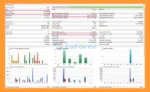




🔺Six-Mode Trading Architecture
ICT Concept PRO P EA MT5 organizes its functionality into six modular areas, allowing traders to configure the system according to different objectives.
Mode 1 – Advanced ICT Concepts
Provides the core ICT-based analysis, including:
- Liquidity Sweeps
- Fair Value Gaps
- Order Blocks
- Breaker Blocks
- OTE
- Market Structure Shift
- Displacement
- Imbalance analysis
Mode 2 – Prop Firm Tools
Focuses on account-level risk controls such as:
- Daily Profit Lock
- Basket Management
- Profit Pyramiding
- Daily Drawdown Limit
- Trailing Drawdown
- Daily Profit Close
- Global Auto Close
Mode 3 – Adaptive & AI-Style Features
Includes configurable adaptive mechanisms such as:
- Adaptive Filter Mode
- ADR Fusion
- Dynamic Kill Zones
- NY Candle Synthesis
- Momentum Filter
- Volatility Filter
These features adjust how trading conditions are evaluated rather than guaranteeing that the EA will automatically optimize itself for every market environment.
Mode 4 – T.G.I.F Strategy
A dedicated weekly-structure strategy based on Monday-to-Friday market development, Thursday delivery validation, and Friday retracement conditions.
Mode 5 – Research & Optimization
Provides tools intended for strategy testing and parameter research, including:
- Optimization period configuration
- Monte Carlo simulation
- Parameter variance testing
- Tick-by-tick backtesting
- Slippage and commission modeling
- Trade journal export
Mode 6 – ICT Macro Windows
Provides time-based ICT macro analysis with configurable trading windows and market-cycle concepts.
🔺T.G.I.F Strategy
The T.G.I.F strategy is a specialized weekly trading framework designed to track market development throughout the trading week.
The system evaluates:
- Monday–Friday weekly structure
- Thursday delivery validation
- ADR development
- Friday retracement conditions
- Weekly liquidity
- Weekly range behavior
A Thursday delivery condition can use a 60% ADR requirement, while Friday entries can be based on a retracement of approximately 25–30% of the weekly range, depending on configuration.
Three entry models are available:
- IFVG
- Breaker
- Simple
The strategy also allows weekly-specific risk-management parameters.
Because this is a rule-based interpretation of weekly ICT concepts, its actual behavior depends on the selected parameters and market conditions.
🔺ICT Macro Windows
ICT Concept PRO P EA MT5 includes a dedicated ICT Macro Windows framework for traders who want to restrict trading to specific time periods.
The system can work with:
- Multiple predefined macro windows
- Configurable time settings
- Priority levels
- 22.5-minute cycle concepts
- 90-minute quarter markers
- BSL/SSL sweep tracking
- Macro-specific statistics
Time-based trading is designed to help the EA focus its analysis around selected market windows rather than continuously searching for setups throughout the entire trading day.
Always configure the macro times according to the broker’s server time and the intended GMT/UTC offset.
🔺Smart Money Concept Analysis
The EA uses a multi-timeframe approach to ICT-based market analysis.
Higher Timeframe Analysis
The H1/H4 timeframe can be used to identify:
- Market structure
- Bullish or bearish context
- Institutional-style order-flow zones
- Major liquidity pools
- Swing highs and lows
- Higher-timeframe Points of Interest
Lower Timeframe Execution
The M15/M5 timeframe can then be used to refine potential entries around:
- Fair Value Gaps
- Order Blocks
- Breaker Blocks
- Liquidity sweeps
- Market Structure Shifts
- Displacement
This HTF-to-LTF workflow allows the EA to combine broader market context with more precise entry conditions.
🔺Multi-Strategy Trading Engine
ICT Concept PRO P EA MT5 provides multiple strategy types that can be configured through strategy slots.
Available strategies include:
Liquidity Sweep Only
Focuses primarily on liquidity-grab setups followed by potential reversal confirmation.
Turtle Soup
Detects potential failed breakouts where price moves beyond a previous high or low and then reverses.
Double Top / Bottom
Identifies reversal structures around important price levels with additional ICT confirmation.
Breakout + Retest
Looks for structural breakouts followed by a pullback toward the broken level.
Key Support / Resistance
Uses significant price levels and swing structures as potential areas of interest.
The EA can run up to three strategy slots simultaneously. Since multiple strategies require additional calculations, traders using lower-powered computers may prefer to enable fewer strategies during testing.
🔺ICT Filter Confluence
Each strategy can be combined with multiple ICT-based filters to create more selective entry conditions.
Available filters include:
- Liquidity Sweep
- Fair Value Gap
- Order Block
- Breaker Block
- OTE
- Market Structure Shift
- Displacement
- Imbalance Fill
- Mitigation
- Full ICT Confluence
The OTE configuration can use the 61.8%–78.6% Fibonacci retracement zone.
Traders can choose whether to require strict confirmation from selected filters or use more flexible configurations.
Using more filters does not automatically improve trading performance. Excessive filtering may reduce the number of opportunities and can produce different results across historical periods.
🔺Fuzzy Logic Quality Scoring
ICT Concept PRO P EA MT5 includes a Fuzzy Logic Quality Scoring concept designed to evaluate the quality of potential setups rather than treating every signal identically.
The scoring framework can consider multiple market conditions and ICT confirmations before determining whether a setup meets the configured quality threshold.
This provides an additional layer between raw pattern detection and trade execution.
The scoring system should be tested carefully because changing thresholds can significantly affect:
- Trade frequency
- Entry selectivity
- Drawdown
- Strategy behavior
🔺ICT 5-Step Flow Validation
The EA can organize signal validation through a structured five-step process:
- Market Context
- Liquidity Analysis
- Point of Interest Identification
- Entry Confirmation
- Risk and Execution Validation
This framework helps separate market-context analysis from actual trade execution.
A potential setup can therefore be rejected if the required conditions are not aligned, even when an individual pattern is detected.
🔺HTF POI Cluster System
The HTF POI Cluster System combines multiple higher-timeframe Points of Interest to identify areas where several ICT concepts overlap.
Potential components include:
- Higher-timeframe Order Blocks
- Fair Value Gaps
- Liquidity zones
- Market structure
- Premium/discount areas
- Breaker zones
- Swing levels
A clustered area may provide more contextual information than evaluating a single technical level independently.
🔺Day-Type Filter System
Market conditions can vary considerably from one trading day to another.
ICT Concept PRO P EA MT5 includes day-type filtering designed to distinguish between different market environments, such as:
- Trending conditions
- Range-bound conditions
- High-volatility sessions
- Mean-reversion environments
- Choppy market conditions
The purpose is to prevent the selected strategy from treating every trading day as identical.
🔺Volatility & Momentum Filters
The EA can incorporate volatility and momentum conditions into the signal-validation process.
Available components include:
- ATR-based volatility analysis
- ADR analysis
- Momentum filtering
- Dynamic Kill Zones
- Volatility thresholds
- NY Candle Synthesis
These filters can help adjust signal requirements according to the current market environment.
🔺Advanced ICT Concepts
ICT Concept PRO P EA MT5 incorporates a broad range of ICT and Smart Money Concepts, including:
- Liquidity Engineering
- Buy-Side Liquidity (BSL)
- Sell-Side Liquidity (SSL)
- Fair Value Gaps
- Inverse Fair Value Gaps
- Order Blocks
- Breaker Blocks
- Market Structure Shift
- Break of Structure
- Displacement
- Imbalance
- Mitigation
- Optimal Trade Entry
- Swing Structure
- Liquidity Sweeps
- Turtle Soup patterns
These concepts are translated into configurable algorithmic conditions rather than manually interpreted by a trader.
🔺Smart Stop Loss System
One of the major features of ICT Concept PRO P EA MT5 is its adaptive Smart Stop Loss framework.
Instead of relying exclusively on a fixed stop distance, the EA can calculate SL placement using several market-based factors.
Market Structure
The system can identify swing highs and lows from:
- H1
- H4
- M15
- M5
The stop can then be positioned beyond relevant structural areas.
Volatility
ATR can be used to adjust stop distance according to recent market volatility.
Price Fine-Tuning
The EA can align stop levels around:
- Round numbers
- Quarter levels
- Pip offsets
- Liquidity areas
- Psychological price levels
The objective is to create stop placement that considers structure, volatility, and price precision.
Available Smart SL approaches can include structure-based, ATR-based, liquidity-based, hybrid, round-number, and institutional-style configurations.
🔺Adaptive Position Management
ICT Concept PRO P EA MT5 provides several tools for managing open trades after entry.
Risk-Based Position Sizing
Lot size can be calculated according to account equity and the selected risk percentage.
The supplied configuration supports risk settings from approximately 0.1% to 5%, depending on the user’s configuration.
Triple Take Profit
The EA can divide a position into multiple targets:
- TP1: 1.5R
- TP2: 3R
- TP3: 5R
The percentages assigned to each target can be customized.
Breakeven
The EA can move the stop toward the entry price after a configurable profit threshold.
An example configuration moves the stop toward entry +5 pips after approximately 30% profit progression.
ATR Trailing
The trailing system can use ATR-based calculations with configurable activation and step parameters.
Prop Firm Risk Management
ICT Concept PRO P EA MT5 includes a dedicated set of tools for accounts operating under defined drawdown and trading restrictions.
Daily Drawdown
The system can monitor daily equity drawdown and stop or close trades when the configured threshold is reached.
Total Drawdown
A separate total drawdown threshold can be configured.
Trailing Drawdown
The EA can track equity growth and calculate a trailing drawdown level based on the selected configuration.
Daily Reset Water Level
The daily risk calculation can reset according to a configurable broker-server time or other selected reset time.
Trade Limits
Users can configure:
- Maximum trades per day
- Maximum trades per session
- Maximum concurrent positions
- Minimum distance between entries
The supplied example uses 3% daily drawdown and 6% total drawdown, but these should be treated as configuration examples rather than universal prop-firm requirements.
Prop-firm rules vary by company, account type, evaluation model, and date. These tools can assist with risk control but cannot guarantee compliance or successful completion of a prop-firm challenge.
🔺Profit Protection System
The EA includes several mechanisms designed to protect accumulated floating or daily profits.
Global Auto Close
Automatically closes open positions when total floating profit reaches a predefined dollar or percentage threshold.
Basket Profit Protection
Monitors combined floating profit from positions in the same direction.
Profit Floor Lock
After reaching a daily equity peak, the system can establish a configurable profit floor.
For example, if the account reaches a defined daily profit peak, the system can protect a percentage of that peak according to the selected setting.
Daily Profit Close
Once a daily target has been achieved, the EA can:
- Close open positions
- Lock a portion of accumulated profit
- Stop opening new trades
This can help limit unnecessary trading after a predefined daily objective has been reached.
🔺Kill Zone Trading
ICT Concept PRO P EA MT5 can restrict trading to selected ICT-style market sessions.
London Session
07:00–10:00 GMT
New York Open
13:00–15:00 GMT
New York Close
20:00–22:00 GMT
The sessions are configurable and should be adjusted for broker-server time, daylight-saving changes, and the trader’s preferred market schedule.
Weekday filters are also available to control trading from Monday through Friday.
🔺Broker Compatibility & Execution Controls
Before sending an order, the EA can validate important broker conditions such as:
- Stop levels
- Freeze levels
- Margin requirements
- Volume limitations
- Spread conditions
- Slippage conditions
Supported order types can include:
- Market orders
- Limit orders
- Stop orders
These checks are designed to reduce execution errors caused by incompatible broker specifications, although they cannot eliminate execution risk.
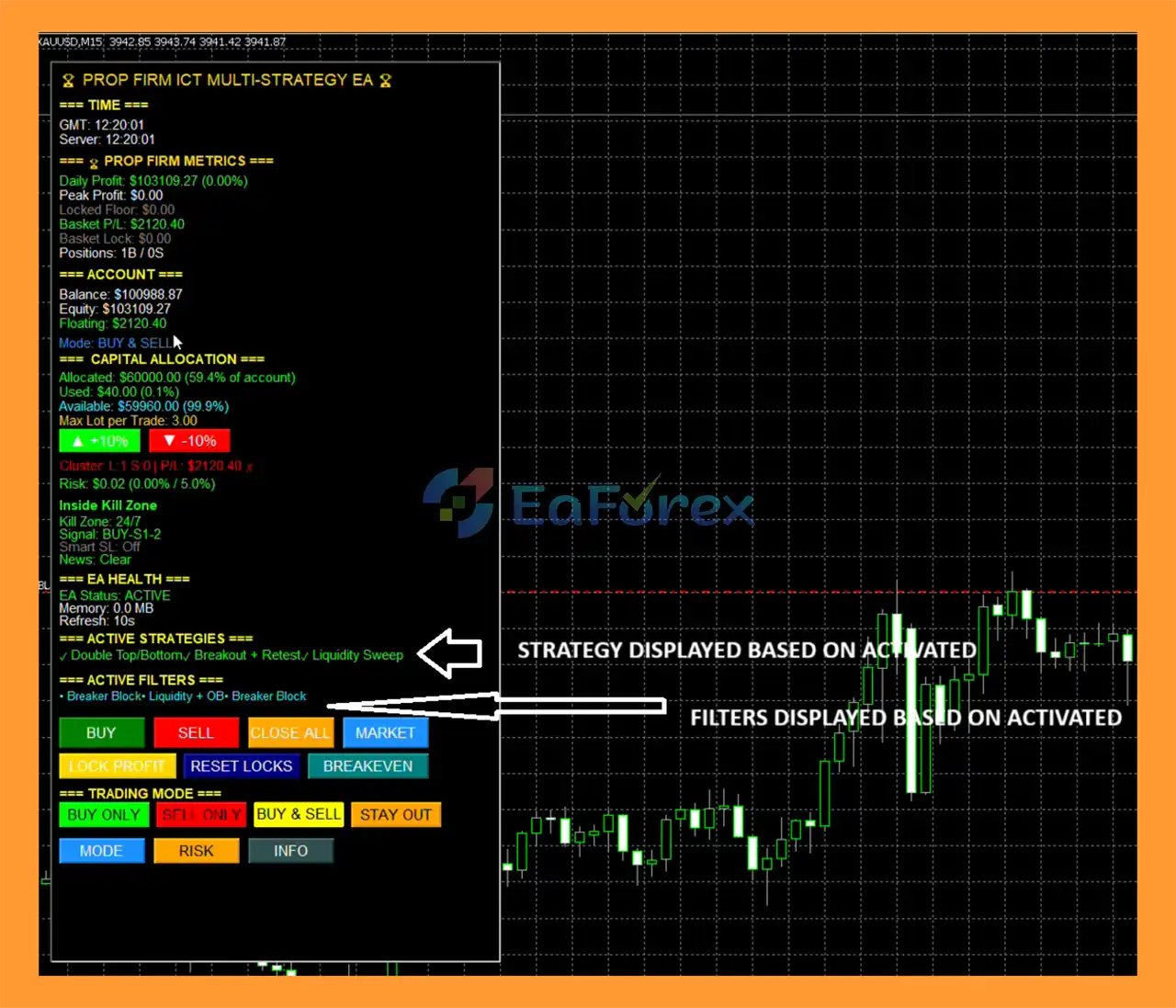
🔺Real-Time Trading Dashboard
The integrated dashboard provides a centralized view of the EA’s operating conditions.
Account Information
- Balance
- Equity
- Floating P/L
- Daily P/L
- Total drawdown
- Peak equity
Strategy Matrix
- Enabled strategies
- Active filters
- Current signal conditions
- Position information
Risk Dashboard
- Stop-loss status
- Breakeven status
- Trailing stop
- Position count
- Drawdown controls
Kill Zone Status
Displays the currently active trading session and whether trading is permitted.
Manual Controls
The panel can include:
- BUY
- SELL
- Close All
- Breakeven
- Information
- Trading mode selection
Available trading modes include:
BUY ONLY / SELL ONLY / BUY & SELL / STAY OUT
How Does ICT Concept PRO P EA MT5 Work?
The EA follows a multi-layer signal-generation process:
1. Higher-Timeframe Analysis
H1/H4 data is analyzed to determine market structure, liquidity, and potential Points of Interest.
2. Lower-Timeframe Pattern Detection
M15/M5 data is examined for potential entries using selected strategies.
3. ICT Filter Validation
The selected ICT filters evaluate liquidity, FVGs, Order Blocks, MSS, displacement, OTE, and other conditions.
4. Kill Zone Validation
The EA checks whether the signal occurs during an enabled trading session.
5. Risk Validation
Account risk, daily drawdown, total drawdown, trade limits, and position restrictions are checked.
6. Broker Pre-Check
Spread, margin, stop levels, freeze levels, and volume requirements are validated.
7. Order Execution
The EA sends the configured market, limit, or stop order.
8. Position Management
After entry, the position can be managed using partial TP, breakeven, trailing stop, basket management, and profit-protection tools.
Example Trade Workflow
Consider a hypothetical EURUSD bullish reversal setup.
Step 1 – Higher-Timeframe Context
The H1 chart identifies a potential bullish structure shift following a decline.
Step 2 – Liquidity Sweep
On M15, price moves below a recent swing low and then reverses.
Step 3 – ICT Confirmation
The EA detects selected confirmations such as:
- Liquidity Sweep
- Bullish Order Block
- Unfilled FVG
Step 4 – Kill Zone
The setup occurs during an enabled London trading window.
Step 5 – Risk Calculation
The EA calculates position size according to the configured account-risk percentage.
Step 6 – Entry and SL
A potential market entry is executed with a Smart SL based on the selected structure/volatility configuration.
Step 7 – Position Management
The trade can subsequently be managed through:
- Breakeven
- TP1
- TP2
- TP3
- ATR trailing
This example illustrates the workflow only and does not represent a guaranteed trading result.
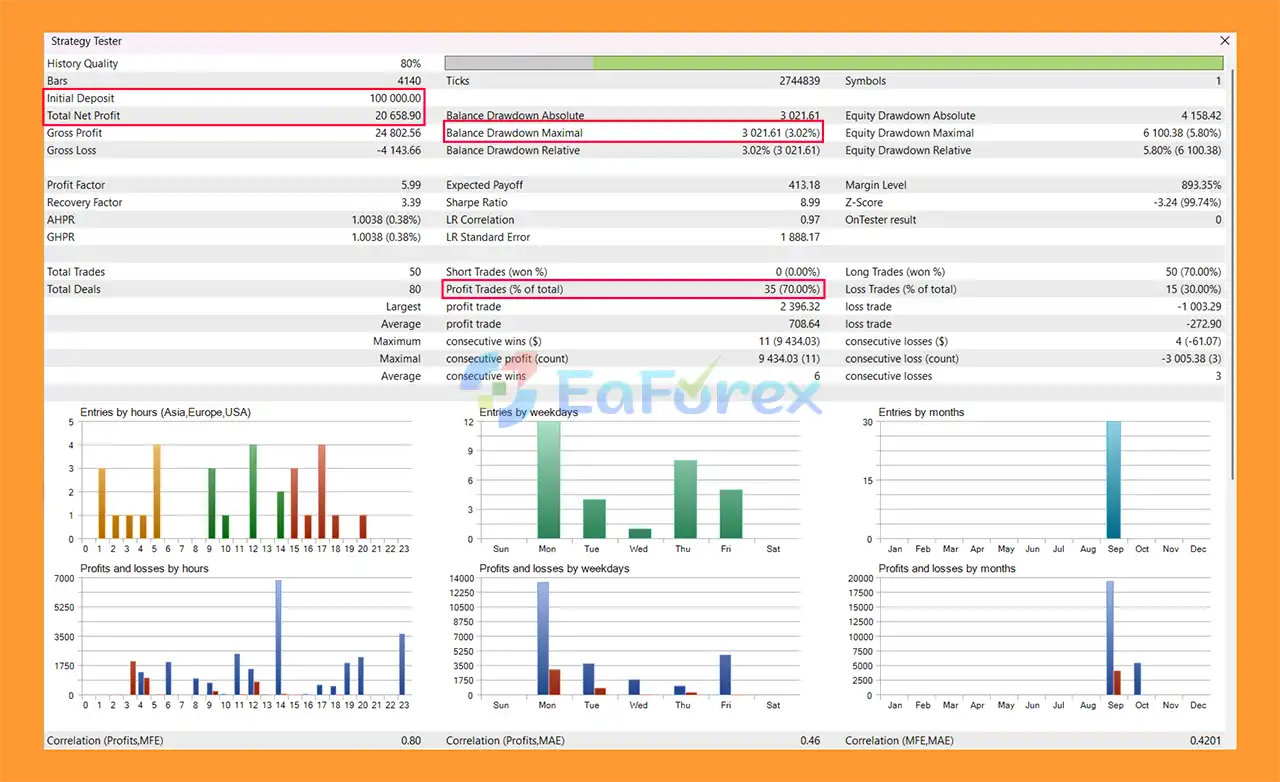
Research & Backtesting Tools
For algorithmic traders, ICT Concept PRO P EA MT5 provides a dedicated research-oriented framework.
Potential testing functions include:
- Strategy Tester configuration
- Optimization periods
- Parameter variation
- Monte Carlo simulation
- Tick-by-tick testing
- Commission modeling
- Slippage modeling
- Trade journal export
These tools can help users examine how strategy parameters behave across different historical conditions.
Backtest results remain dependent on the quality of historical data, broker modeling, spread assumptions, commissions, execution assumptions, and selected parameters.













 Automatic EA
 EA Best Seller
 Expert Advisor MT4
 Expert Advisor MT5
 HFT EA


Reviews
Clear filtersThere are no reviews yet.