









-
 Unlimited Activations
-
 Instant delivery
-
 Easy to install






 Unlimited Activations
Instant delivery
Easy to install
Unlimited Activations
Instant delivery
Easy to install
 Free Update
 Free Install Support

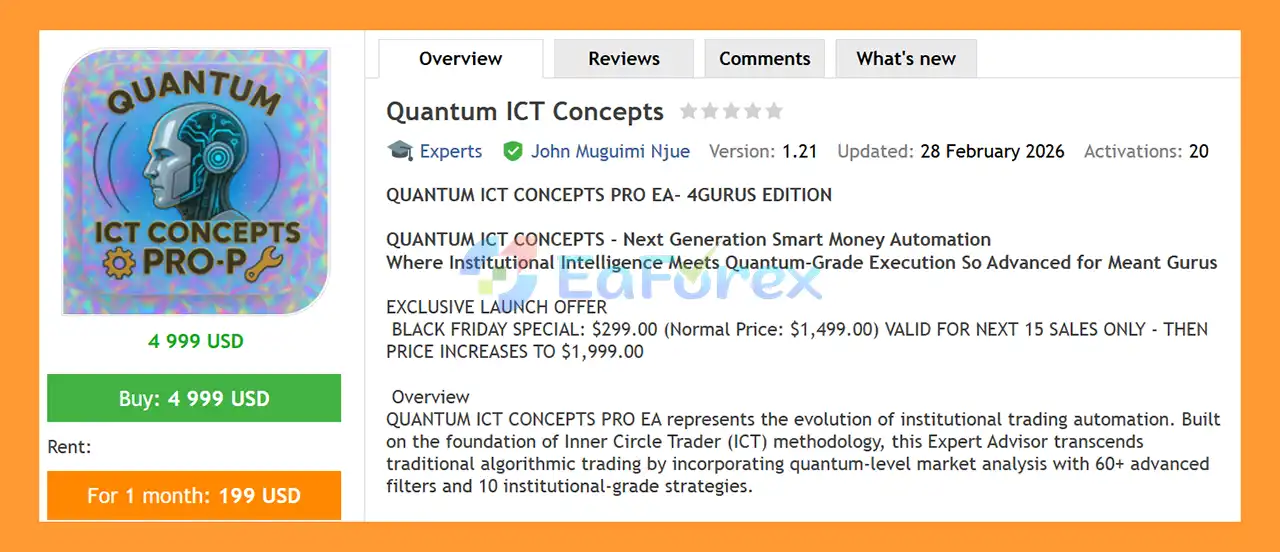
Quantum ICT Concepts EA MT5 is an advanced automated trading Expert Advisor for MetaTrader 5, built around the principles of Inner Circle Trader (ICT) methodology, Smart Money Concepts (SMC), liquidity analysis, market structure, and institutional-style trading logic.
The EA combines more than 60 advanced market filters with a framework of 10 trading strategies, allowing traders to select and combine different approaches according to their preferred market conditions.
Quantum ICT Concepts is designed for a wide range of markets, including Forex, Gold, Silver, indices, and commodities. Supported instruments include EURUSD, GBPUSD, USDJPY, AUDUSD, USDCAD, NZDUSD, XAUUSD, XAGUSD, US30, NAS100, S&P500, GER40, Oil, and Natural Gas.
Its architecture includes adaptive Stop Loss technology, multi-layer profit protection, automated drawdown controls, configurable session filters, and a dedicated risk-management framework for traders operating under prop firm rules.
The system is particularly focused on traders interested in ICT trading automation, institutional market structure, liquidity sweeps, Fair Value Gaps, Order Blocks, Break of Structure, CHOCH, and multi-timeframe confluence.
>> Delivery time 24h-48h after payment.
>>> Refund if not delivered.
>>> You will receive the latest version without any limitations (ID+Time).>>Reviewed by Jason Stap <<
Quantum ICT Concepts EA MT5 Overview
One of the core components of Quantum ICT Concepts EA MT5 is its extensive multi-filter analysis engine.
The filters are organized into eight major categories.
The system analyzes key ICT concepts including:
The EA can evaluate:
Additional analysis can include:
The system can combine multiple structural conditions, including:
The EA includes configurable trading-session logic covering:
Quantum ICT Concepts EA MT5 can classify market conditions using:
The system can evaluate Points of Interest (POIs) using:
The CRT component includes:
Quantum ICT Concepts EA MT5 provides a collection of 10 configurable trading strategies, with multiple strategies capable of being deployed simultaneously.
The strategy framework includes:
Synchronizes Weekly, Daily, and H4 market bias to identify situations where multiple timeframes point in the same direction.
The EA includes 10 pre-configured professional templates designed to simplify strategy selection.
Traders can start with a predefined configuration or customize the filters according to their preferred trading methodology.
This makes the system suitable for both traders who prefer ready-made configurations and advanced users who want to build their own filter combinations.
Quantum ICT Concepts EA MT5 uses a multi-factor approach to determine Stop Loss placement instead of relying exclusively on a fixed percentage or distance.
The adaptive SL framework can consider:
The system is also designed to maintain a minimum 1:2 risk-to-reward ratio within its configured risk-management framework.
Quantum ICT Concepts EA MT5 includes multiple layers of automated profit protection.
The system can close positions when a predefined overall profit target is reached, such as:
BUY and SELL positions can be monitored separately, allowing the EA to manage basket-level profitability.
The system can lock a percentage of peak daily profit as a protected equity floor.
For example, if the configured mechanism locks 70% of a $800 daily peak, the protected floor would be $560.
The EA can monitor equity relative to the session’s opening balance and restrict additional trading after predefined profit objectives are reached.
Quantum ICT Concepts EA MT5 includes configurable controls intended for prop firm and funded-account environments.
The risk engine can monitor:
Preset configurations are provided for certain prop-firm rule structures, while custom limits can also be defined.
Because prop-firm rules can change and differ between providers, traders should always verify the current rules before using an EA on a funded account.
The EA includes automated trade-management functionality designed to control entries, exits, and exposure.
Features include:
The example TP structure includes:
These settings are configurable according to the EA’s available parameters.
Quantum ICT Concepts EA MT5 follows a multi-layered market-analysis process.
The EA can be used across supported Forex, metals, indices, and commodity instruments.
The system’s ICT and institutional concepts can operate across multiple timeframes, while its deployment matrix should be selected according to the specific strategy and market.
The EA evaluates broader market context using higher-timeframe information.
Depending on the selected strategy, this can include Weekly, Daily, H4, H1, and lower-timeframe analysis.
The system searches for ICT and SMC conditions such as:
The chosen strategy determines which filters are required.
Instead of using every filter for every trade, the EA can apply strategy-specific combinations from its broader filter matrix.
The EA can verify whether current conditions match the selected session and market-regime requirements.
This can include London, New York, or Asian session logic, together with trend, choppy-market, or mean-reversion filters.
Before entering, the system can calculate Stop Loss placement using market structure and volatility information.
The adaptive SL system is designed to place protection around relevant structural levels rather than relying exclusively on a fixed distance.
Once the required conditions are satisfied, the EA executes the position automatically.
After entry, its management engine can use:
If predefined daily profit or drawdown thresholds are reached, the corresponding protection mechanisms can restrict trading or close positions according to the configured settings.
Quantum ICT Concepts EA MT5 is designed for traders who want to automate advanced ICT and Smart Money Concepts rather than relying on a simple indicator-based strategy.
Key characteristics include:
The extensive filter and strategy architecture also gives experienced traders the ability to build configurations around specific ICT concepts rather than being limited to a single trading model.
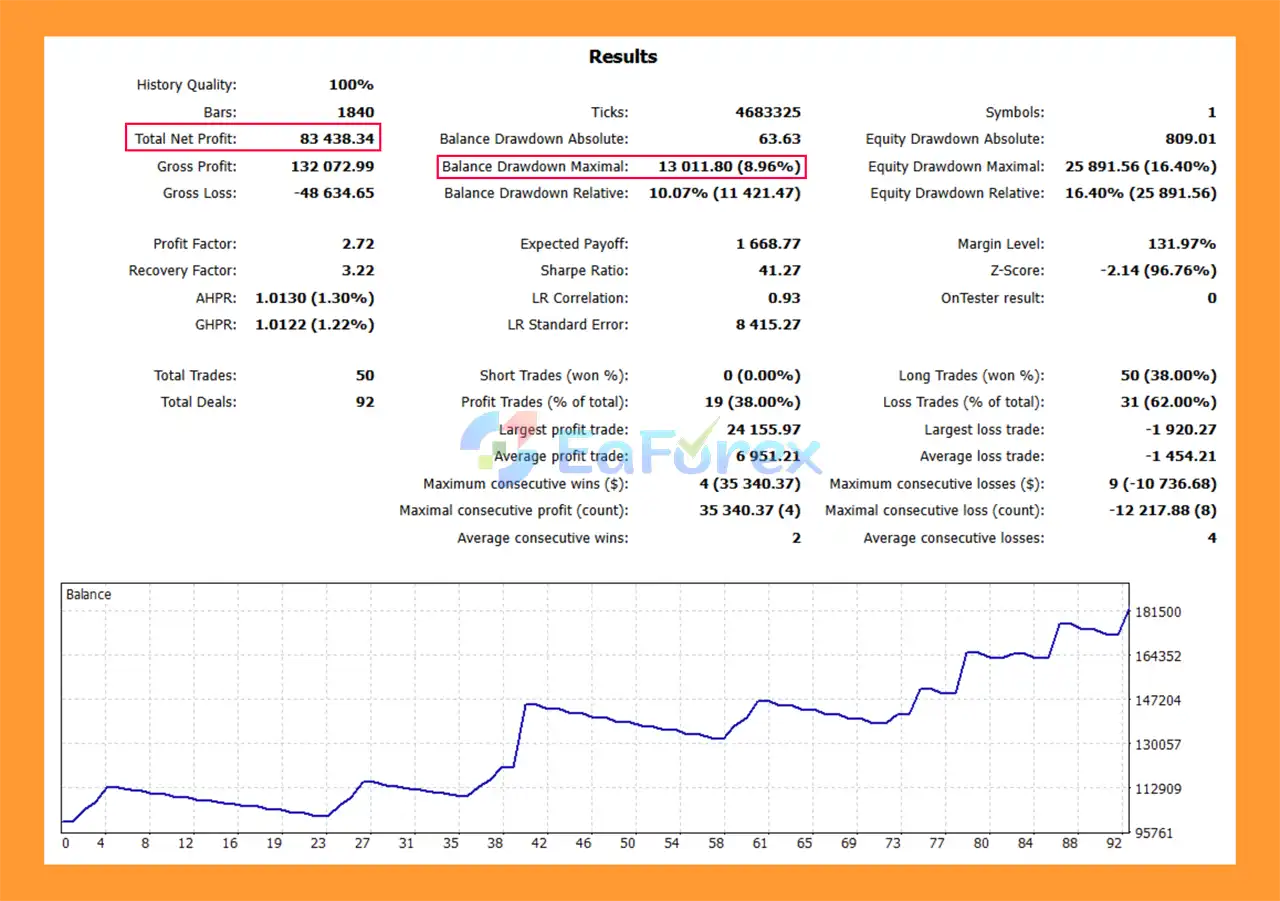
Quantum ICT Concepts EA MT5 Backtests
Quantum ICT Concepts EA MT5 is designed with risk management as a major component of its automated trading architecture.
The EA can adjust Stop Loss placement according to market structure and volatility.
Instead of using one static distance for every market condition, the system can consider swing levels, liquidity areas, ATR, session volatility, and price-level positioning.
The adaptive Stop Loss system is designed to maintain a minimum 1:2 risk-to-reward relationship within the configured strategy.
Actual realized risk-to-reward can vary because of slippage, spread, gaps, execution, and market conditions.
The three-level TP structure allows positions to be reduced progressively.
The example configuration closes:
This approach can allow part of a position to be secured while leaving another portion available for a larger move.
The EA can automatically move Stop Loss toward the entry price after the trade reaches a configured profit level.
The example setting activates breakeven at approximately 30% profit and moves the stop to entry plus a configurable offset.
An ATR-based trailing mechanism can adapt to changing volatility and progressively adjust the protective level as a trade develops.
The EA can monitor daily equity drawdown and restrict trading when configured limits are reached.
For suitable account configurations, maximum drawdown can be adjusted according to account growth.
This can be particularly relevant for funded accounts with trailing drawdown requirements.
The Profit Protection Fortress can lock part of accumulated daily gains and prevent the system from continuing to trade after specified profit objectives are reached.
Despite its extensive filter matrix and risk-management features, Quantum ICT Concepts EA MT5 cannot eliminate trading risk.
Important considerations include:
The recommended deployment process is to thoroughly test the selected strategy, broker conditions, risk parameters, and trading sessions before using the EA with real capital.
Download and open your MetaTrader 5 trading platform and log in to your trading account.
For initial evaluation, using a demo account is recommended.
In MetaTrader 5, select:
File → Open Data Folder
Navigate to:
MQL5 → Experts
Copy the Quantum ICT Concepts EA MT5 file into the Experts folder.
If the package includes additional indicators, libraries, or supporting files, place each file in the corresponding MT5 directory specified by the developer.
Restart MetaTrader 5 or right-click the Expert Advisors section in the Navigator and select Refresh.
The EA should then appear in the Navigator window.
Open the chart and timeframe required by the selected strategy.
Because Quantum ICT Concepts EA MT5 supports multiple markets and strategies, traders should follow the recommended symbol/timeframe matrix supplied with the EA.
Drag Quantum ICT Concepts EA MT5 from the Navigator onto the selected chart.
Open the EA settings and review:
Make sure the London, New York, and Asian session settings match your broker’s server time.
Incorrect GMT or broker-time configuration can cause session-based strategies to operate outside their intended trading windows.
Set the risk percentage according to your account size and risk tolerance.
If using a funded account, configure the daily and maximum drawdown limits according to the current rules of your specific prop firm rather than relying blindly on a preset.
The developer’s recommended deployment process is to initially enable only 2–3 strategies, rather than immediately activating the entire strategy framework.
Monitor the EA’s behavior before gradually adding additional strategies.
Before deploying the EA on a live account:
Run the selected configuration on a demo account for approximately 3–4 weeks before considering live deployment.
Monitor execution, drawdown, trading frequency, session behavior, and the interaction between multiple strategies.
Backtest → Broker Compatibility Test → 3–4 Week Demo Test → Start with 2–3 Strategies → Monitor → Gradually Expand
This staged approach can help traders understand how the EA behaves before increasing strategy complexity or live-market exposure.
1. What is Quantum ICT Concepts EA MT5?
Quantum ICT Concepts EA MT5 is a next-generation Expert Advisor for MetaTrader 5 that automates Inner Circle Trader (ICT) Smart Money strategies with high precision. It integrates advanced filters and multiple strategies for professional and prop firm traders.
2. How does Quantum ICT Concepts EA MT5 work?
The EA uses a Quantum Filter Matrix™ with 60+ ICT filters across 8 categories to identify high-probability trades. It executes strategies like Turtle Soup, Double Top/Bottom, and multi-timeframe confluence with institutional-level precision.
3. Can Quantum ICT Concepts EA MT5 help with prop firm challenges?
Yes, it is prop firm ready with a Prop Firm Compliance Engine™, including daily and total drawdown management tailored for FTMO, MyForexFunds, and The5ers trading rules.
4. What trading strategies are included in Quantum ICT Concepts EA MT5?
The EA integrates 10 battle-tested strategies, such as Turtle Soup, Double Top/Bottom, HTF/LTF confluence, mitigation zones, and POI interaction for high-probability entries across multiple markets.
5. Does Quantum ICT Concepts EA MT5 manage risk effectively?
Yes. It includes adaptive stop-loss systems, breakeven automation, ATR trailing stops, multi-layer profit protection, and basket management to ensure disciplined and safe trading.
6. Which markets and timeframes are supported?
Quantum ICT Concepts EA MT5 works on Forex majors, metals, indices, and commodities. Optimal chart timeframes include M15, H1, and H4 for reliable performance.
7. Is Quantum ICT Concepts EA MT5 suitable for beginners?
While the EA is automated and comes with pre-configured templates, a basic understanding of MetaTrader 5 and trading concepts is recommended to adjust settings and manage risk effectively.
8. What results can traders expect from Quantum ICT Concepts EA MT5?
Backtests show strong performance with controlled drawdowns. For example, an initial deposit of $100,000 yielded $83,438.34 net profit with a maximum drawdown of 8.96%, though actual results vary with market conditions.
9. What comes in the Quantum ICT Concepts EA MT5 download package?
The package includes the EA file, professional setting templates, and a detailed installation guide to help users set up and start trading quickly.
10. Why should traders choose Quantum ICT Concepts EA MT5?
The EA offers institutional-grade execution, multi-strategy automation, prop firm readiness, advanced risk management, emotion-free trading, and full customization, making it ideal for professional traders and portfolio managers seeking consistent high-probability results.
In stock
In stock
In stock
In stock
In stock
Out of stock
No account yet?
Create an Account












 Automatic EA
 EA Best Seller
 Expert Advisor MT4
 Expert Advisor MT5
 HFT EA


Reviews
Clear filtersThere are no reviews yet.