



Product Overview
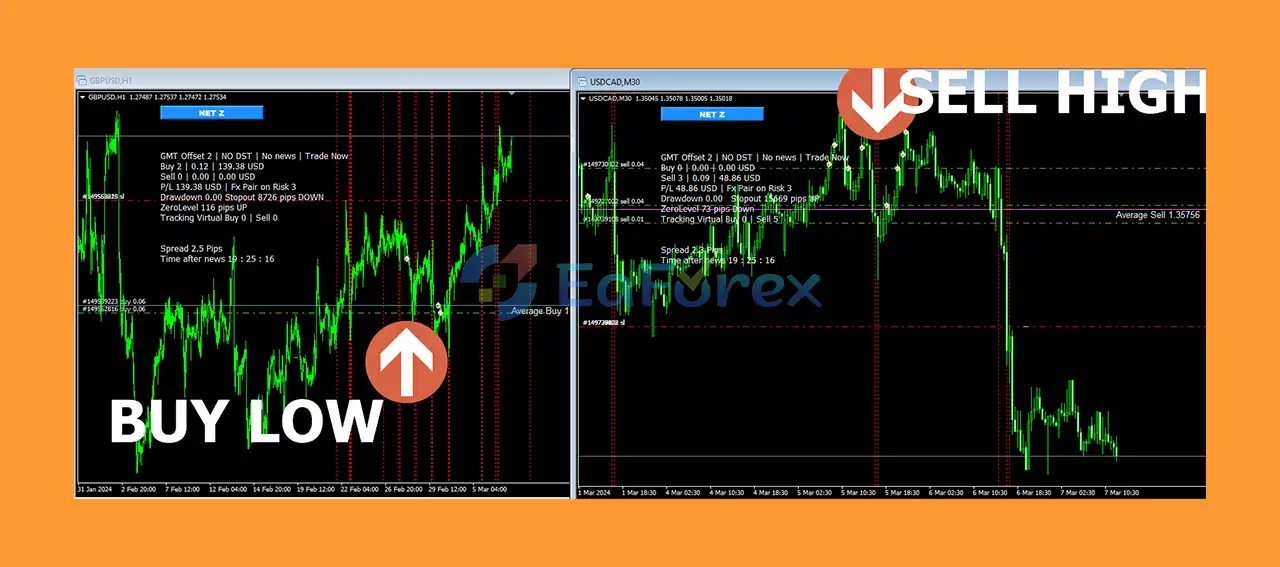
Net Z EA MT5 is an advanced automated trading system for MetaTrader 5 that combines a well-known trend reversal strategy with virtual trading technology and virtual pending orders to improve entry timing.
Unlike a conventional Grid or Martingale Expert Advisor that may enter positions immediately after a signal, Net Z uses Virtual Trade and Virtual Pending Order techniques to help avoid entering trades too early or too late. The system is designed to identify potential reversal opportunities while applying multiple layers of risk management to control exposure during unfavorable market conditions.
Net Z EA MT5 supports a wide range of Forex currency pairs, as well as XAUUSD (Gold) and XAGUSD (Silver). Ready-made setfiles are available for multiple currency pairs, allowing users to configure the EA without complicated manual optimization.
The EA is designed for traders who want an automated Grid and controlled Martingale trading system with advanced drawdown protection, multi-symbol management, news filtering, virtual order technology, and account protection features.
About the Developer
• Author: Sugianto
• Experience: Over 9 years of experience on MQL5.
• Notable Products: Net Z EA MT5, DuniaMaya EA, NetZ EA, Bitcoin Wizard MT5, South East EA MT5, Gold Hype MT5, Neuron Net GOLD MT5 and other advisors.
• Flagship Product: Net Z EA MT5 is rated as the best performing product of the year.
>>> Delivery time 24h-48h after payment.
>>> Refund if not delivered.
>>> You will receive the latest version without any limitations (ID+Time).
>>Reviewed by Jason Stap <<
Key Features of Net Z EA MT5
Trend Reversal Strategy
Net Z EA MT5 is based on a recognized trend reversal trading technique, enhanced with virtual trading logic. The strategy seeks to identify potential market reversals while using additional virtual conditions to improve entry timing.
Virtual Trade
The Virtual Trade system allows the EA to monitor potential trades virtually before committing to an actual market position. This is designed to help refine entries and avoid premature trade execution.
Virtual Pending Orders
Net Z also uses Virtual Pending Orders to improve entry precision. Instead of relying solely on immediate order execution, the EA can monitor virtual price levels before opening actual positions.
Controlled Martingale
The EA uses a mild Martingale lot-sizing approach to accelerate recovery after losing positions while incorporating several risk-control mechanisms.
Because Martingale strategies can significantly increase exposure, the built-in drawdown and account-protection features are particularly important when using this trading mode.
Grid Trading
Net Z uses Grid Averaging to manage unfavorable trades and attempt to recover positions as the market moves. The system includes additional controls designed to prevent excessive position accumulation.
Maximum Drawdown Limitation
The Max Drawdown Limitation feature stops the EA from opening additional positions once a predefined drawdown threshold is reached.
This is designed to limit further exposure during unfavorable market conditions and reduce the risk of excessive margin usage.
Change Step
The Change Step feature allows the EA to widen the distance between subsequent positions. This can help reduce the number of positions opened too close to each other during adverse price movements.
Close Partial
The Close Partial function can close positions that are significantly in loss to reduce the amount of margin being used by the account.
Virtual Stop Loss & Take Profit
Net Z provides Virtual Stop Loss and Take Profit functionality. These virtual levels are designed to manage trades without necessarily placing conventional stop-loss or take-profit orders directly at the broker.
Trailing Stop
The built-in Trailing functionality is designed to help protect accumulated profits by dynamically managing profitable positions.
News Filter
The News Filter is designed to prevent the EA from opening new trades around selected high-impact economic events. This can help reduce exposure to sudden volatility caused by major fundamental announcements.
Money Management
Net Z supports different position-sizing approaches, including:
- Fixed lot trading
- Automatic lot sizing
- Risk-based transaction sizing
This gives traders greater flexibility when adapting the EA to different account sizes and risk profiles.
Smart Multi-Symbol Control
The Smart Multi Symbol Control allows the EA to manage multiple currency pairs simultaneously while controlling overall exposure.
This feature is particularly useful for Grid and Martingale systems because correlated or simultaneous positions across multiple symbols can significantly increase account risk.
Holiday Control
Holiday Control allows traders to prevent the EA from trading during selected dates or periods when market conditions may be less predictable.
Account Protection
Net Z includes account-level protection based on both:
- Maximum drawdown in monetary value
- Maximum drawdown in percentage terms
When the predefined protection threshold is reached, the EA can activate its cut-loss mechanism to help protect the remaining account capital.
Manual Intervention Buttons
For critical situations, Net Z provides manual trading controls, including:
- Buy
- Sell
- Buy Stop
- Sell Stop
- Buy Limit
- Sell Limit
These functions allow traders to intervene manually when necessary.
How Does Net Z EA MT5 Work?
Net Z EA MT5 combines trend reversal analysis, virtual trading, grid averaging, controlled Martingale, and account-level risk management.
The general trading process works as follows:
- Market Analysis
The EA analyzes the selected currency pair or trading instrument to identify potential trend reversal conditions. - Virtual Trade Evaluation
Instead of immediately opening a real position, the EA can use virtual trade logic to monitor whether the potential entry develops as expected. - Virtual Pending Order Monitoring
Virtual pending orders help define potential entry levels and improve trade timing. - Real Trade Execution
When the required conditions are met, the EA converts the trading opportunity into an actual market position. - Grid Management
If the market moves against the position, the Grid mechanism can add positions according to predefined distance and trading rules. - Controlled Martingale
Position sizing can increase moderately according to the configured recovery strategy, with risk controls designed to limit excessive exposure. - Drawdown Monitoring
The EA continuously monitors account and trading conditions. If the maximum permitted drawdown is reached, it can stop opening additional positions. - Partial Loss Reduction
The Close Partial function can be used to reduce heavily losing positions and decrease margin consumption. - Account Protection
Monetary and percentage-based drawdown limits can trigger the account cut-loss mechanism. - News and Time Filtering
News Filter and Time Control can restrict new trades during selected periods.
This multi-layered architecture is intended to make the Grid recovery process more controlled than a basic Grid or Martingale system.
Why Choose Net Z EA MT5?
Easy Setfile-Based Configuration
Net Z is designed to minimize complicated manual configuration. Users can apply the appropriate ready-made setfile rather than manually optimizing every parameter from scratch.
Multiple Currency Pair Support
The EA supports a broad selection of Forex pairs, including:
AUDUSD, AUDCHF, AUDNZD, AUDCAD, AUDJPY, CADCHF, CADJPY, CHFJPY, EURUSD, EURCAD, EURCHF, EURGBP, EURJPY, EURAUD, EURNZD, GBPUSD, GBPCAD, GBPCHF, GBPJPY, GBPAUD, GBPNZD, NZDCAD, NZDCHF, NZDUSD, NZDJPY, USDCHF, USDCAD, USDJPY, XAUUSD and XAGUSD.
Advanced Grid Risk Controls
Grid and Martingale strategies inherently carry elevated risk. Net Z attempts to address this through features such as Max Drawdown Limitation, Change Step, Close Partial, and Account Protection.
Multi-Symbol Exposure Management
Smart Multi Symbol Control can help manage multiple instruments from an overall account perspective rather than treating every chart completely independently.
Virtual Trading Technology
The use of virtual trades and virtual pending orders is one of the core differentiators of Net Z, providing an additional layer between signal detection and actual trade execution.
Manual Control When Needed
Although Net Z is designed for automated trading, the included manual order buttons provide additional flexibility for traders who want to intervene during exceptional market conditions.
Experience-Based Risk Management
The product is accompanied by guidance relating to daily management, risk control, and practical operation based on the developer's experience managing the EA.
Net Z EA MT5 Performance Results and Review
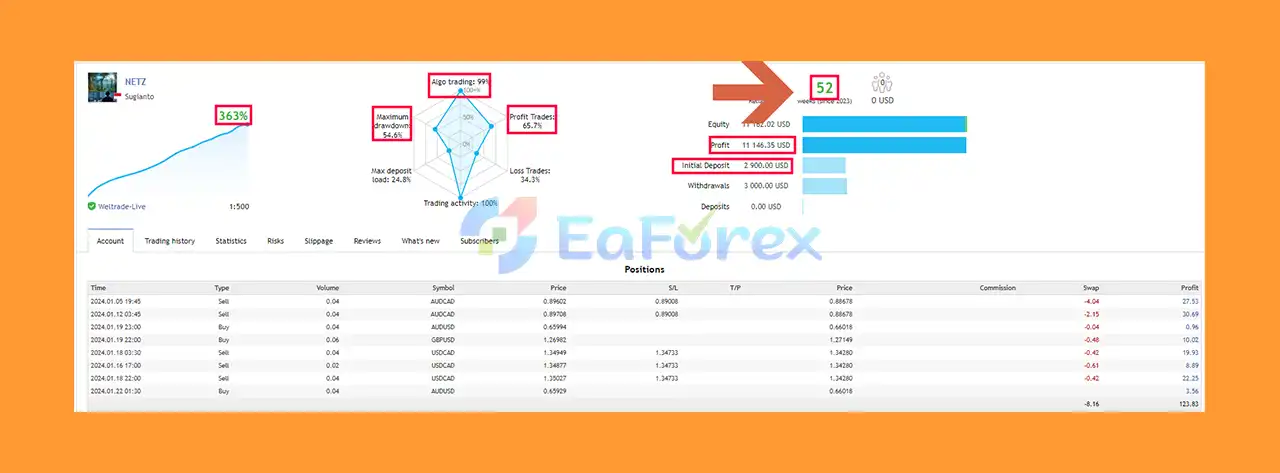
- Verified live account results since 2023:
- Total growth: +363%
- Total profit: $11,147
- Win rate: 65.7%
- Maximum drawdown: 54.4%
Performance and Risk Management
Net Z EA MT5 is designed with an extensive risk-management framework because Grid and Martingale trading can generate significant exposure during prolonged market trends.
The principal risk-management tools include:
- Maximum Drawdown Limitation
- Monetary drawdown cut-loss
- Percentage drawdown cut-loss
- Change Step
- Close Partial
- Smart Multi Symbol Control
- News Filter
- Holiday Control
- Time Control
- Virtual Stop Loss
- Virtual Take Profit
- Trailing functionality
- Money Management controls
Recommended Account Setup
According to the provided specifications:
| Parameter | Recommended Setup |
|---|---|
| Trading Symbols | Multiple Forex pairs, XAUUSD, XAGUSD |
| Timeframes | M15, M30, H1 |
| Settings | Requires appropriate setfile |
| Broker | Any compatible broker |
| Minimum Deposit | $500 – High Risk |
| Recommended Deposit | $2,000 – Medium Risk |
| Account Type | Standard / Hedging |
| Recommended Leverage | 1:500 |
| VPS | Minimum 1 GB RAM |
The $500 minimum deposit is explicitly categorized as high risk, while the $2,000 recommended deposit is categorized as medium risk. These figures should not be interpreted as guarantees of safety or profitability.
Backtest Periods
The supplied setfiles have been tested over:
- 2010–2023
- 2015–2023
The long historical testing periods are intended to expose the strategy to different market environments and help evaluate the robustness of the provided settings.
Important Backtest Limitations
A critical characteristic of Net Z EA MT5 is that live trading results can differ substantially from backtest results.
Several important features do not operate in the same way during historical backtesting:
1. Virtual Trade Technology
Net Z relies on virtual trades using MetaTrader global variables. These functions are designed to operate during live trading and therefore may not be fully represented in conventional backtests.
2. Smart Multi-Symbol Control
The Smart Multi Symbol Control manages positions and exposure across multiple charts. Its complete functionality is intended for live trading environments and may not be accurately reproduced in standard historical testing.
3. News Filter
The News Filter is designed to prevent the EA from opening positions during high-impact economic news events. This live-market functionality may not be fully reflected in historical backtest results.
Therefore, traders should not compare the backtest results directly with expected live performance.
Weaknesses and Risk Warnings
Despite its extensive risk-management features, Net Z EA MT5 has important risks that traders should understand before using it.
Grid and Martingale Risk
The combination of Grid Averaging and Martingale position sizing can cause exposure to increase when the market moves continuously in one direction.
A prolonged trend against the Grid can result in:
- Increasing floating losses
- Higher margin requirements
- Larger position sizes
- Significant drawdowns
- Forced liquidation or stop-out if account protection is insufficient
No Grid EA Is Risk-Free
Every Grid or Martingale Expert Advisor can eventually encounter unfavorable market conditions. Risk controls can reduce exposure but cannot eliminate market risk.
High Leverage Increases Risk
The recommended leverage of 1:500 provides substantial trading capacity but can also magnify both profits and losses. High leverage should be used cautiously.
Small Accounts Are More Vulnerable
Although $500 is listed as a minimum deposit, it is specifically classified as high risk. Traders should not assume that the minimum deposit represents an appropriate account size.
Backtests May Not Reflect Live Trading
Because several key features are live-trading dependent, historical results may differ considerably from real-market performance.
Broker Conditions Matter
Spread, commission, slippage, execution speed, margin requirements, swap costs, and trading conditions can all affect the EA's real-world performance.
Market Correlation Risk
Running multiple currency pairs simultaneously can increase overall exposure when several instruments move together. Smart Multi Symbol Control is designed to help manage this risk, but correlation cannot be eliminated.
Risk Disclaimer: Forex and CFD trading involves substantial risk of loss. Past performance and backtest results do not guarantee future results. Always test the EA on a demo account and use risk settings appropriate for your financial situation.
Pros and Cons
Pros
- Advanced trend reversal trading strategy
- Virtual Trade technology for more precise entries
- Virtual Pending Orders
- Grid averaging functionality
- Controlled Martingale approach
- Maximum Drawdown Limitation
- Monetary and percentage-based account protection
- Close Partial feature for reducing margin usage
- Change Step for managing Grid spacing
- Virtual Stop Loss and Take Profit
- Trailing functionality
- Integrated high-impact News Filter
- Smart Multi Symbol Control
- Holiday and Time Control
- Fixed lot and automatic money-management options
- Manual Buy/Sell and pending-order controls
- Supports numerous Forex pairs
- Supports XAUUSD and XAGUSD
- Ready-made setfiles available
- Long historical backtest periods
- Designed for Standard and Hedging accounts
Cons
- Grid and Martingale strategies carry inherently high risk
- Prolonged trends can generate substantial floating losses
- Larger position sizes may increase margin requirements
- $500 minimum deposit is classified as high risk
- Live performance may differ significantly from backtests
- Some important features are designed primarily for live trading
- Requires appropriate setfiles
- Multiple-symbol trading can increase overall exposure
- High leverage can magnify losses
- VPS with at least 1 GB RAM is recommended
- Requires careful account and drawdown management
How to Install Net Z EA MT5
Follow these steps to install Net Z EA MT5 on MetaTrader 5.
Step 1: Install MetaTrader 5
Install MetaTrader 5 through your preferred compatible broker and log in to a Standard or Hedging account.
Step 2: Open the MT5 Data Folder
In MetaTrader 5, select:
File → Open Data Folder
Then navigate to:
MQL5 → Experts
Step 3: Install the EA
Copy the Net Z EA MT5 Expert Advisor file into the Experts folder.
If additional files are supplied with the product, copy them to their appropriate MQL5 directories.
Step 4: Restart MetaTrader 5
Restart MT5 or refresh the Expert Advisors section in the Navigator window.
Step 5: Select the Trading Symbols
Open the currency-pair charts you intend to trade.
Net Z supports multiple Forex pairs as well as XAUUSD and XAGUSD. Only use symbols for which the appropriate setfile is available.
Step 6: Select the Appropriate Timeframe
The supported timeframes are:
- M15
- M30
- H1
Use the timeframe specified by the corresponding setfile.
Step 7: Load the Setfile
Net Z is designed to use predefined settings. Load the appropriate setfile for your selected currency pair and configuration.
Avoid changing important parameters unless you understand their impact on Grid, Martingale, drawdown, and money management.
Step 8: Configure Risk Management
Before enabling automated trading, carefully review:
- Maximum drawdown
- Monetary cut-loss
- Percentage cut-loss
- Lot size
- Auto lot settings
- Grid spacing
- Change Step
- Maximum exposure
- Multi-symbol controls
- News Filter
- Trading time
Step 9: Enable AutoTrading
Enable Algo Trading / AutoTrading in MetaTrader 5 and verify that the EA is running correctly.
Step 10: Use a VPS
A VPS with at least 1 GB RAM is recommended for stable continuous operation, particularly when running multiple symbols simultaneously.
Step 11: Start With Demo or Conservative Risk
Before deploying the EA with significant capital, conduct forward testing on a demo account or use conservative risk settings to evaluate the EA under your broker's real trading conditions.
What’s Included in the Download Package?
- Setting (If Any).docx
- Installation Guide.docx
Final Thoughts
Net Z EA MT5 is a feature-rich automated trading system that combines trend reversal analysis, Virtual Trade technology, Virtual Pending Orders, Grid Averaging, and controlled Martingale position management.
Its main strength is not simply the Grid strategy itself, but the extensive collection of tools designed to manage the risks associated with Grid and Martingale trading. Features such as Maximum Drawdown Limitation, Change Step, Close Partial, Smart Multi Symbol Control, Account Protection, News Filter, and Virtual Stop Loss/Take Profit provide multiple layers of automated risk control.
Net Z also stands out through its support for a large number of Forex pairs, Gold, and Silver, together with ready-made setfiles intended to simplify installation and configuration.
However, traders should clearly understand that Grid and Martingale systems can experience substantial drawdowns during prolonged adverse market conditions. Risk controls can help manage these situations but cannot guarantee that an account will avoid losses.
Another important consideration is that several Net Z features rely on live-trading functionality, meaning backtest results may not accurately represent actual live performance. The 2010–2023 and 2015–2023 tests provide historical information, but they should be used as a reference rather than a prediction of future returns.
For traders seeking an advanced MT5 Grid EA with trend reversal logic, virtual trading technology, multi-symbol management, and comprehensive drawdown controls, Net Z EA MT5 offers a sophisticated automated trading framework.
The best approach is to use the correct setfile, maintain conservative risk parameters, run the EA on a stable VPS, monitor total account exposure, and conduct sufficient forward testing before moving to live trading.
Trade responsibly. No Expert Advisor can guarantee profits, and past performance does not guarantee future results.



