


Product Overview
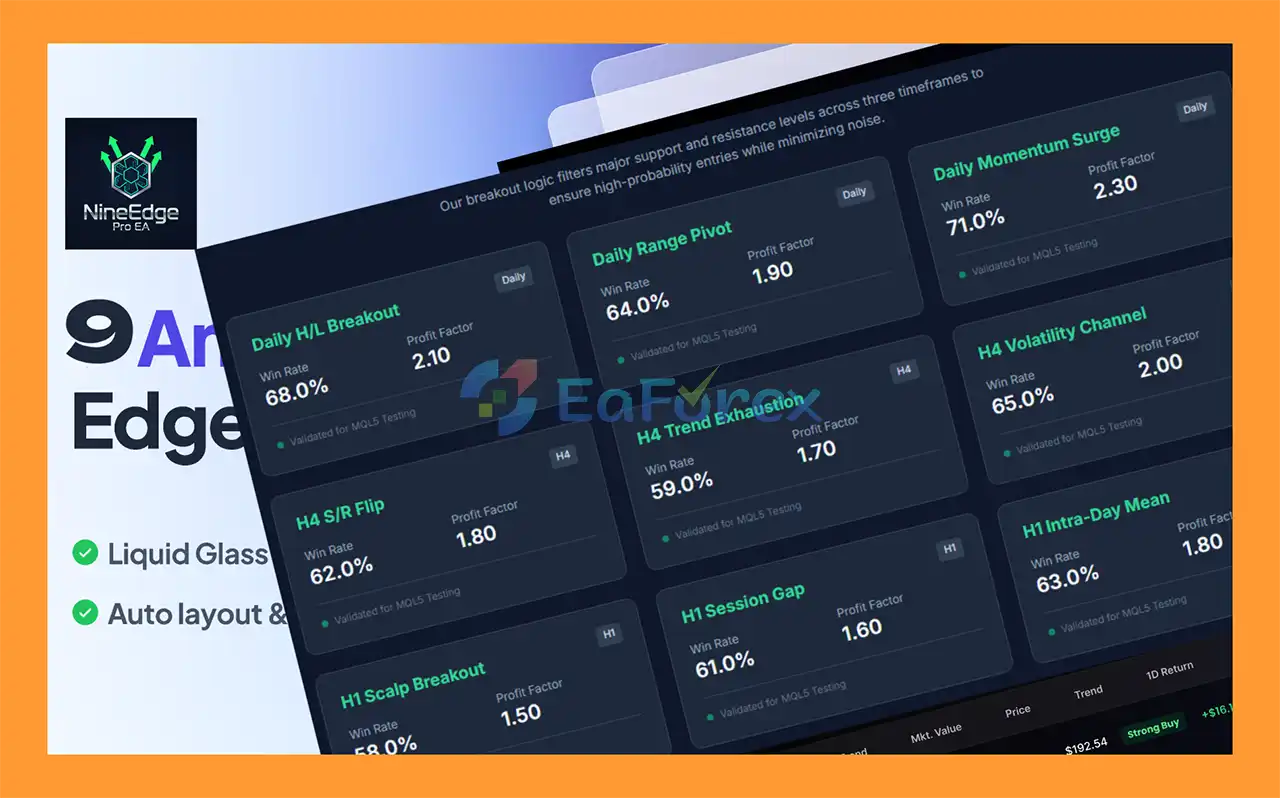
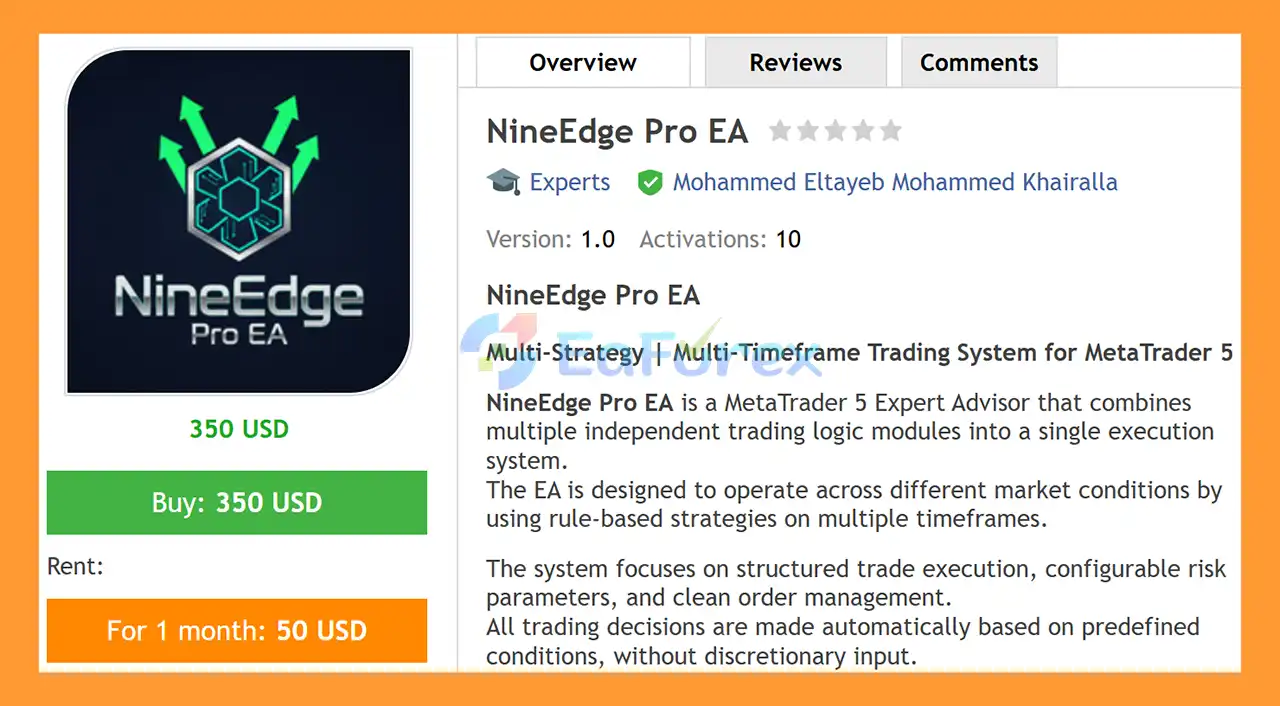
NineEdge Pro EA MT5 is a professional MetaTrader 5 Expert Advisor that combines nine independent trading strategy modules into one automated execution system.
Instead of relying on a single trading method, NineEdge Pro EA MT5 uses a multi-strategy and multi-timeframe approach designed to respond to different types of market behavior, including breakouts, momentum movements, volatility changes, mean reversion, and support/resistance reactions.
The EA operates automatically according to predefined rules, eliminating discretionary decision-making from the trade execution process. Each strategy module can be individually enabled or disabled, giving traders greater flexibility when configuring the system.
Designed primarily for XAUUSD (Gold) and also suitable for major Forex pairs, NineEdge Pro EA combines structured signal generation with configurable risk management, position sizing, spread filtering, and drawdown protection.
Importantly, the system does not use Martingale, Grid, Averaging, or trade stacking, making its trading architecture focused on structured and independent trade execution.
About the Developer
- Author: Mohammed Eltayeb Mohammed Khairalla
- Experience: Over +1 years of experience on MQL5.
- Notable Products: NineEdge Pro EA MT5 and other advisors.
- Flagship Product: NineEdge Pro EA MT5 is rated as the best performing product of the year.
>> Delivery time 24h-48h after payment.
>>> Refund if not delivered.
>>> You will receive the latest version without any limitations (ID+Time).>>Reviewed by Jason Stap <<
Main Features of NineEdge Pro EA MT5
Nine Independent Trading Modules
NineEdge Pro EA MT5 integrates nine strategy modules across three major timeframes:
Daily Timeframe
- Daily High/Low Breakout Logic
- Daily Range Pivot Logic
- Daily Momentum Conditions
H4 Timeframe
- H4 Support and Resistance Reaction
- H4 Trend Exhaustion Conditions
- H4 Volatility Channel Logic
H1 Timeframe
- H1 Breakout Conditions
- H1 Session-Based Price Logic
- H1 Mean Reversion Conditions
Each module is logically separated and can be individually activated or disabled through the EA's input settings.
Multi-Timeframe Trading Logic
The EA does not depend on a single timeframe. Its strategy architecture covers H1, H4, and Daily market conditions, allowing the system to evaluate different types of price behavior.
This multi-timeframe structure provides flexibility when configuring the EA for different trading styles and market environments.
Breakout Strategy
Several modules are designed to identify potential breakout conditions, including Daily and H1 breakout logic.
These strategies are intended to detect situations where price moves beyond important levels or established ranges.
Momentum Trading Logic
The Daily timeframe includes momentum conditions designed to identify periods when price demonstrates stronger directional movement.
Momentum-based logic can complement the other strategy modules when market conditions favor continuation.
Mean Reversion Logic
The H1 strategy set includes a mean reversion component, allowing the EA to respond to market conditions where price moves away from a reference range and potentially returns toward a previous equilibrium area.
Support and Resistance Analysis
The H4 module includes Support and Resistance Reaction Logic, allowing the EA to evaluate price behavior around potentially significant market levels.
Volatility-Based Logic
NineEdge Pro EA MT5 also includes volatility-related strategies, including H4 Volatility Channel Logic.
This allows the system to incorporate changes in market volatility into its trading decisions.
Flexible Risk Management
The EA provides configurable risk and execution controls, including:
- Fixed lot sizing
- Risk-based position sizing
- Maximum spread filter
- Execution filters
- Trade frequency limits
- Equity protection
- Drawdown protection
All available parameters are user-configurable.
No Martingale or Grid
NineEdge Pro EA MT5 is designed without several aggressive recovery mechanisms.
The system does not use:
- Martingale
- Grid trading
- Averaging
- Trade stacking
This creates a cleaner order-management structure and avoids automatically increasing exposure through traditional Martingale or Grid recovery systems.
Automatic Broker GMT Handling
The EA includes automatic broker GMT handling, helping its time-dependent strategies operate according to the relevant broker server-time environment.
Netting and Hedging Compatibility
NineEdge Pro EA MT5 is designed to support both netting and hedging account types, providing flexibility when selecting a compatible MetaTrader 5 trading environment.
How Does NineEdge Pro EA MT5 Work?
NineEdge Pro EA MT5 follows a structured automated trading process.
Step 1: Market Analysis
The EA continuously evaluates market conditions using its available strategy modules across the H1, H4, and Daily timeframes.
Depending on the selected configuration, the system can analyze:
- Breakouts
- Momentum
- Support and resistance
- Volatility
- Mean reversion
- Session-based price behavior
- Daily range conditions
Step 2: Strategy Module Evaluation
Each enabled module operates according to its own predefined rules.
For example, one module may evaluate a breakout condition while another evaluates support/resistance behavior or mean reversion.
This modular architecture allows traders to customize the strategy combination instead of using a fixed configuration.
Step 3: Trade Qualification
When the conditions required by an enabled strategy are satisfied, the EA evaluates its configured trading and risk parameters before placing an order.
Factors such as spread, position sizing, and trade-frequency restrictions can influence whether an order is executed.
Step 4: Automated Order Execution
Once all required conditions are satisfied, NineEdge Pro EA automatically executes the trade through MetaTrader 5.
No discretionary manual decision is required.
Step 5: Risk and Trade Management
The EA manages positions according to the selected configuration and available protection parameters.
This can include position sizing, equity protection, drawdown controls, spread filtering, and trade-frequency limitations.
Why Choose NineEdge Pro EA MT5?
Diversified Strategy Architecture
NineEdge Pro EA MT5 combines nine different strategy modules, reducing dependence on a single trading concept.
Multi-Timeframe Approach
The combination of H1, H4, and Daily strategies allows the EA to address different market conditions and trading environments.
Fully Automated Execution
All trading decisions are generated from predefined rules, helping reduce emotional and discretionary intervention.
Highly Configurable
Users can individually enable or disable strategy modules and adjust risk and execution parameters according to their preferred configuration.
No Martingale or Grid
The EA does not rely on Martingale, Grid, Averaging, or trade stacking mechanisms.
Designed for Gold and Forex
The primary recommended symbol is XAUUSD, while major Forex pairs can also be considered depending on testing and configuration.
Structured Order Management
The EA uses a unified risk and trade-management framework to maintain consistent execution across its different strategy modules.
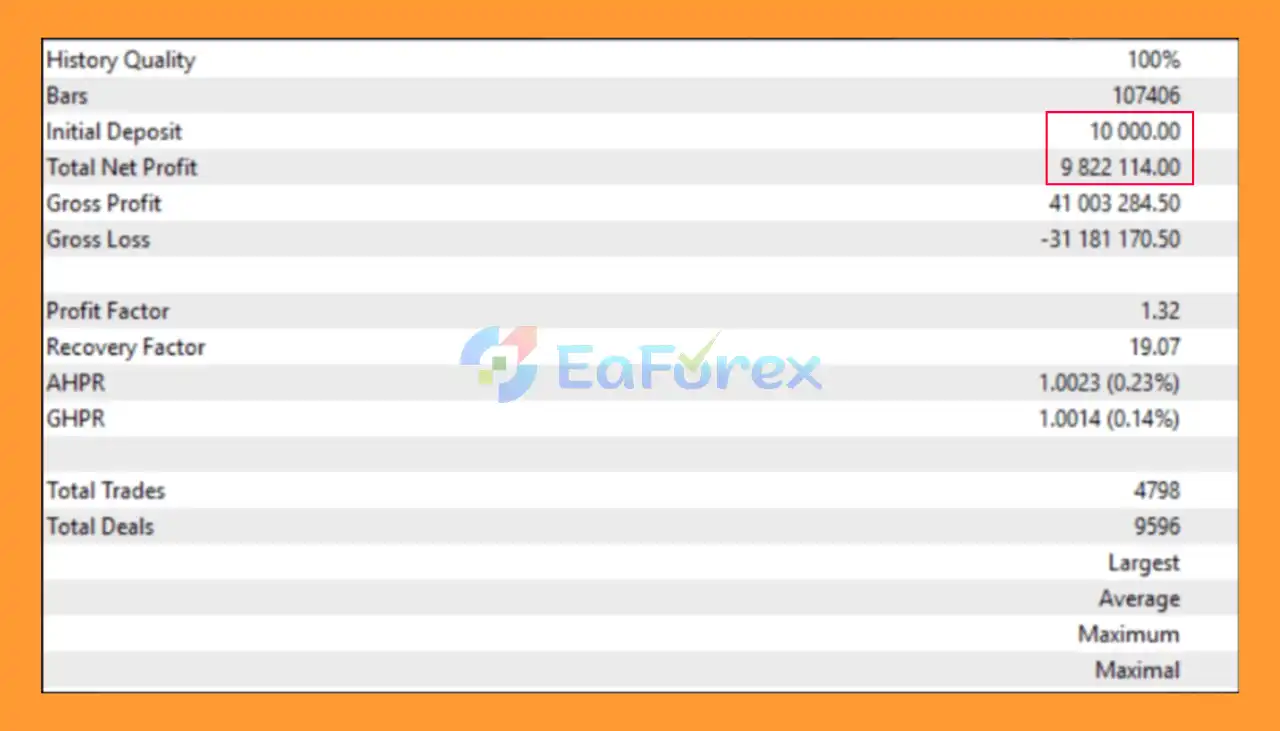
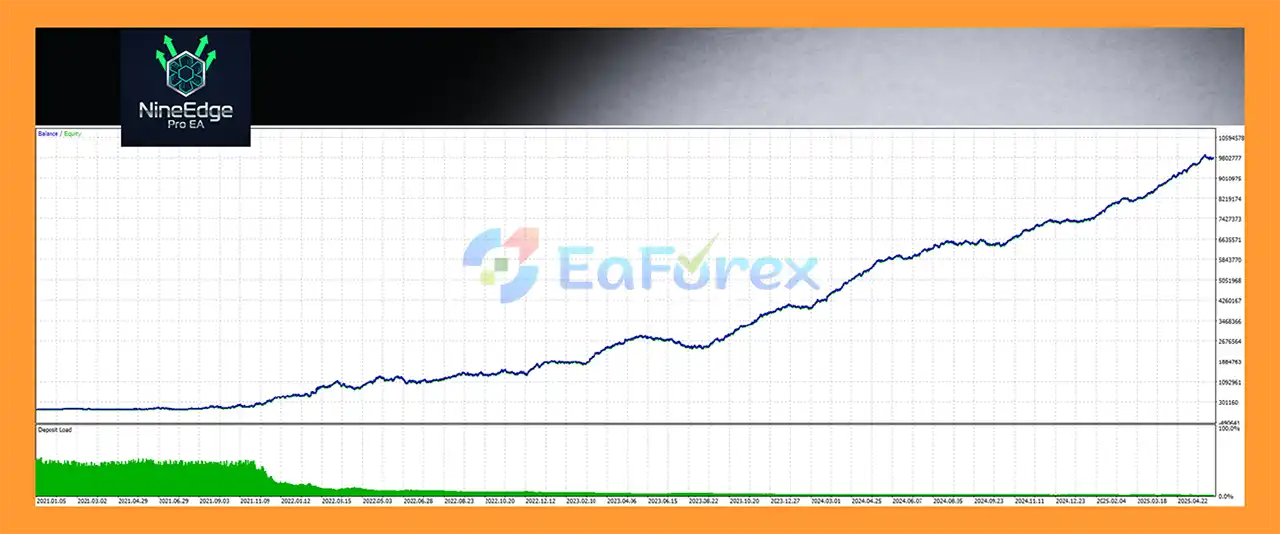
NineEdge Pro EA MT5 Backtest Results
- Initial Deposit: $10.000
- Total Net Profit: $9.822 million
Performance and Risk Management
NineEdge Pro EA MT5 is designed with configurable risk controls so traders can determine how much exposure the automated system should take.
Position Sizing
Users can choose between:
- Fixed Lot
- Risk-Based Position Sizing
Risk-based sizing can adjust the position according to the configured account-risk parameters, while fixed-lot mode keeps the trading volume constant.
Spread Protection
The EA includes a maximum spread filter that can help prevent trading when market execution costs become excessive.
This can be particularly relevant when trading instruments such as XAUUSD, where spreads may change significantly during certain market conditions.
Trade Frequency Controls
Trade-frequency limitations can be configured to help prevent excessive trading activity.
Equity and Drawdown Protection
Optional equity and drawdown protection parameters provide additional controls for managing account exposure.
These features should be configured according to account size, trading objectives, and acceptable risk.
Important Performance Considerations
The performance of an automated trading system can vary depending on:
- Broker execution
- Spread
- Slippage
- Commission
- Market volatility
- Trading session
- Account leverage
- Symbol specifications
- Strategy configuration
- Risk settings
Backtest results should therefore be treated as historical analysis rather than a guarantee of future performance.
Recommended Trading Conditions
The supplied configuration recommendations for NineEdge Pro EA MT5 include:
| Parameter | Recommendation |
|---|---|
| Primary Symbol | XAUUSD / Gold |
| Additional Symbols | Major Forex Pairs |
| Main Timeframes | H1, H4, Daily |
| Platform | MetaTrader 5 |
| Account Types | Netting & Hedging |
| Broker | Low-Spread Broker Recommended |
| Testing | Demo Testing Before Live Trading |
| Risk | Conservative Settings Recommended |
For XAUUSD, traders should pay particular attention to spread, volatility, leverage, and execution conditions.
Weaknesses and Risk Warnings
Multi-Strategy Complexity
NineEdge Pro EA MT5 contains nine independent modules. Having more strategies does not automatically mean better performance. Some modules may perform differently depending on market conditions.
Parameter Dependency
The EA is highly configurable, which provides flexibility but also means that inappropriate settings can negatively affect trading results.
Market Regime Changes
Breakout, momentum, mean-reversion, and support/resistance strategies can behave differently as market conditions change.
A strategy that performs well during a trending market may behave differently during a range-bound or highly volatile environment.
XAUUSD Volatility
Gold can experience rapid price movements, especially around major economic announcements and changes in market sentiment.
This can result in increased spread, slippage, and drawdown.
Spread and Execution Risk
Automated trading performance can be affected by broker execution quality, spread, commissions, latency, and slippage.
Backtest Limitations
Historical backtests cannot perfectly reproduce future market conditions. Differences between historical and live execution are possible.
No Guaranteed Profit
NineEdge Pro EA MT5 does not guarantee profits and cannot eliminate trading losses. Even with risk-management features and no Martingale or Grid strategy, the account remains exposed to market risk.
Live Testing Is Essential
Users should test the EA on a demo account before deploying it with real capital and should avoid using excessive leverage or risk.
Pros and Cons
Pros
- Nine independent trading strategy modules
- Multi-timeframe architecture
- Supports H1, H4, and Daily strategies
- Breakout and momentum logic
- Mean reversion strategy
- Support and resistance analysis
- Volatility-based logic
- Fully automated execution
- Fixed-lot and risk-based position sizing
- Maximum spread filtering
- Trade-frequency controls
- Optional equity and drawdown protection
- No Martingale
- No Grid
- No Averaging
- No trade stacking
- Compatible with MT5 netting and hedging accounts
- Automatic broker GMT handling
- Fully configurable inputs
Cons
- Multiple parameters may require careful configuration
- Different strategy modules may behave differently across market conditions
- XAUUSD can experience significant volatility
- Spread and slippage can affect live performance
- Requires testing before live deployment
- Historical performance does not guarantee future results
- Incorrect risk settings can increase account exposure
How to Install NineEdge Pro EA MT5
Step 1: Download the EA
Download the NineEdge Pro EA MT5 file to your computer.
Step 2: Open MetaTrader 5
Launch your MetaTrader 5 trading platform.
Step 3: Open the Data Folder
From the MT5 menu, select:
File → Open Data Folder
Step 4: Open the Experts Folder
Navigate to:
MQL5 → Experts
Copy the NineEdge Pro EA file into this folder.
Step 5: Refresh MetaTrader 5
Restart MetaTrader 5 or right-click the Expert Advisors section in the Navigator window and select Refresh.
Step 6: Attach the EA
Find NineEdge Pro EA in the Navigator and drag it onto the desired trading chart.
For the recommended configuration, consider starting with XAUUSD and the relevant H1, H4, or Daily strategy settings.
Step 7: Configure the Inputs
Adjust the available parameters, including:
- Strategy modules
- Fixed lot or risk-based sizing
- Maximum spread
- Trade frequency
- Equity protection
- Drawdown protection
- Other execution settings
Only enable strategies and settings that have been properly tested.
Step 8: Enable Algo Trading
Make sure Algo Trading is enabled in MetaTrader 5 so the EA can execute trades automatically.
Step 9: Test Before Going Live
Use the MT5 Strategy Tester and then run the EA on a demo account before deploying it on a live account.
Start with conservative risk parameters and monitor the EA's behavior under realistic market conditions.
What’s Included in the Download Package?
- Setting (If Any).docx
- Installation Guide.docx
>>> Join VIP Membership Now <<<
Final Thoughts
In summary, NineEdge Pro EA MT5 is a multi-strategy automated trading system designed to combine nine independent trading modules across H1, H4, and Daily timeframes.
Its architecture covers several market behaviors, including breakouts, momentum, mean reversion, support and resistance reactions, volatility conditions, and session-based price movements.
The ability to enable or disable individual modules gives traders considerable flexibility, while fixed-lot and risk-based position sizing, spread filtering, trade-frequency controls, and optional equity protection provide additional tools for managing automated trading risk.
Another notable characteristic is the absence of Martingale, Grid, Averaging, and trade stacking, resulting in a more structured order-management approach.
However, diversification across multiple strategies does not eliminate market risk. NineEdge Pro EA should be thoroughly tested on the MT5 Strategy Tester and a demo account, particularly when trading volatile instruments such as XAUUSD.
With appropriate configuration, realistic expectations, and disciplined risk management, NineEdge Pro EA MT5 can be used as a systematic tool for traders seeking a multi-strategy, multi-timeframe Expert Advisor for MetaTrader 5.



