Product Overview
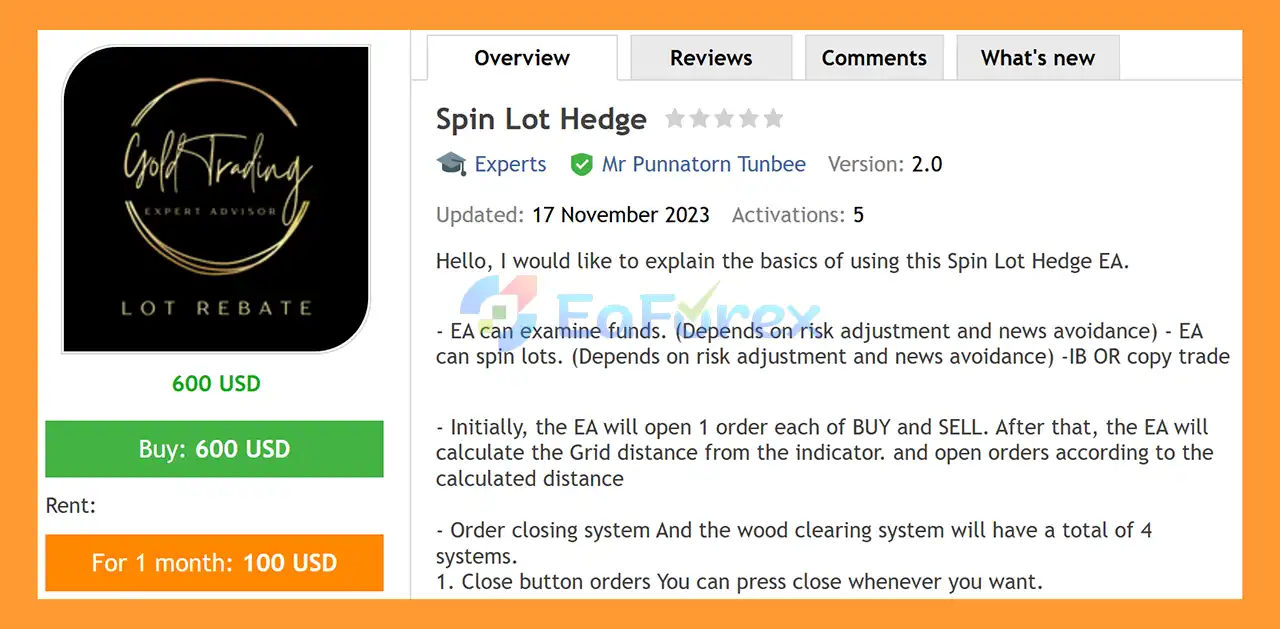
Spin Lot Hedge EA MT5 is an automated trading system for MetaTrader 5 that combines Hedging, Grid-based order placement, dynamic lot calculation, and multiple profit-management systems.
The EA is designed to initially open both a Buy and Sell position, creating a hedged market exposure from the beginning of the trading cycle. After the initial positions are opened, the system calculates the appropriate Grid distance using its configured indicator and can automatically place additional orders as price moves through the calculated levels.
Spin Lot Hedge EA also includes several position-closing mechanisms designed to manage profitable and losing orders according to predefined conditions.
The EA supports multiple lot-management approaches, allowing traders to choose between a more conservative Plus Lot system or higher-risk Sum Lot and Martingale Lot systems.
Depending on the configuration, the EA can also be used alongside IB or Copy Trading workflows.
About the Developer
- Author: Mr Punnatorn Tunbee
- Experience: Over +3 years of experience on MQL5.
- Notable Products: Spin Lot Hedge EA MT5, Super Highspeed volume, Scalping Calculate Drawdawn, Super Rebate Mix System, Scalping HFT, Reverse Scalping, Lot Master Rebate Scalper MT5, BS Smart Hedge Trailing EA and other advisors.
- Flagship Product: Spin Lot Hedge EA MT5 is rated as the best performing product of the year.
>> Delivery time 24h-48h after payment.
>>> Refund if not delivered.
>>> You will receive the latest version without any limitations (ID+Time).
>>Reviewed by Jason Stap <<
Main Features of Spin Lot Hedge EA MT5
Initial Buy & Sell Hedge
At the beginning of a trading cycle, Spin Lot Hedge EA MT5 can automatically open:
This creates an initial hedge and allows the EA to respond to subsequent price movements from either direction.
Indicator-Based Grid Distance
After the initial Buy and Sell positions are opened, the EA calculates the required Grid distance using its configured indicator.
When price reaches the calculated levels, the system can automatically open additional positions according to the selected trading and lot-management settings.
Multiple Order Management Systems
Spin Lot Hedge EA MT5 provides four primary mechanisms for managing and closing positions.
These systems allow traders to choose different approaches depending on their trading objectives and risk settings.
Manual Close Button
The manual close function allows the trader to close positions whenever desired.
This provides direct control over active trading cycles and allows the trader to intervene when market conditions change.
Balance-Based Profit Close
The EA can calculate a target profit as a percentage of account balance.
When the configured profit target is reached, the system can automatically close the relevant trading cycle.
Negative Order Clearing System
The EA includes a mechanism designed to manage losing or negative positions.
When the overall trading cycle reaches the configured profit condition, the system can automatically close the relevant orders according to its clearing logic.
This allows profitable positions to be used as part of the overall basket-management process.
Trailing Stop System
A Trailing Stop mechanism can be used to protect floating profits as price moves favorably.
The trailing function can automatically adjust the protective exit level according to the configured parameters.
Lot Calculation System
One of the main features of Spin Lot Hedge EA MT5 is its flexible lot-management architecture.
Traders can select different lot calculation methods according to their preferred risk profile.
Plus Lot System – Lower Risk Approach
The Plus Lot System is designed for traders who prefer a more conservative approach to position sizing.
Lot sizes can be increased according to the system’s configured calculation rather than relying on aggressive recovery methods.
This approach may help reduce exposure compared with more aggressive lot-management methods, although it does not eliminate trading risk.
Sum Lot System – Higher Risk Approach
The Sum Lot System is intended for traders who are comfortable with greater exposure.
The system calculates subsequent lot sizes using a cumulative approach, potentially increasing overall position volume as additional orders are opened.
Because exposure can increase significantly, this method requires careful risk management and sufficient account margin.
Martingale Lot System – High-Risk Approach
The Martingale Lot System is designed for traders who accept substantially higher risk.
Under a Martingale-style approach, position size may increase after unfavorable trades in an attempt to recover previous losses through subsequent profitable positions.
This can significantly increase drawdown and margin requirements, particularly during prolonged one-directional market movements.
Important: Martingale strategies can expose an account to rapid and substantial losses. Conservative settings and extensive demo testing are strongly recommended.
How Does Spin Lot Hedge EA MT5 Work?
Spin Lot Hedge EA MT5 follows a structured trading cycle.
Step 1: Initial Hedge
When the trading cycle starts, the EA opens one Buy and one Sell position.
This establishes the initial hedged exposure.
Step 2: Market Monitoring
The EA continuously monitors price movement and the configured indicator used to determine Grid distance.
Step 3: Grid Distance Calculation
The system calculates the required distance between additional orders.
Instead of using only a fixed Grid distance, the EA uses its indicator-based calculation to determine when additional positions should be considered.
Step 4: Additional Order Placement
When price reaches the relevant Grid level, the EA can open another position according to the configured direction and lot-calculation method.
Depending on the selected mode, the position size may follow the:
- Plus Lot method
- Sum Lot method
- Martingale Lot method
Step 5: Basket Monitoring
The EA monitors the combined performance of the active trading cycle.
Rather than evaluating every position independently, the system can use overall profit conditions to determine when positions should be closed.
Step 6: Profit Target
If the configured profit percentage based on account balance is reached, the EA can automatically close the relevant orders.
Step 7: Negative Position Clearing
When the configured conditions are met, the system can also use its negative-order clearing mechanism to close selected losing positions as part of the overall basket-management process.
Step 8: Trailing Stop
The Trailing Stop system can continue managing positions as the market moves in a favorable direction.
Step 9: Manual Intervention
At any point, the trader can use the manual close function to close active orders when desired.
Why Choose Spin Lot Hedge EA MT5?
Automated Hedging
The initial Buy and Sell structure allows the EA to establish a hedged trading cycle automatically.
Dynamic Grid Management
The EA calculates Grid distance using its indicator-based system, allowing additional orders to be placed according to market conditions and configured parameters.
Multiple Lot Strategies
Traders can select from three different approaches:
- Plus Lot – lower-risk approach
- Sum Lot – higher-risk approach
- Martingale Lot – high-risk recovery approach
This provides flexibility for different trading styles, although each method has different exposure characteristics.
Multiple Exit Mechanisms
The EA provides several ways to manage positions:
- Manual Close
- Balance-percentage Profit Close
- Negative Order Clearing
- Trailing Stop
This allows traders to configure a broader position-management framework.
Suitable for Automated Trading
Once configured, Spin Lot Hedge EA can monitor the market and execute its trading logic automatically without requiring constant manual order placement.
IB and Copy Trading Compatibility
The EA can also be incorporated into workflows involving IB or Copy Trading, depending on the broker, account structure, and specific configuration.
Spin Lot Hedge EA MT5 Backtest Results
- Initial Deposit: $10.000
- Total Net Profit: $194.600,75
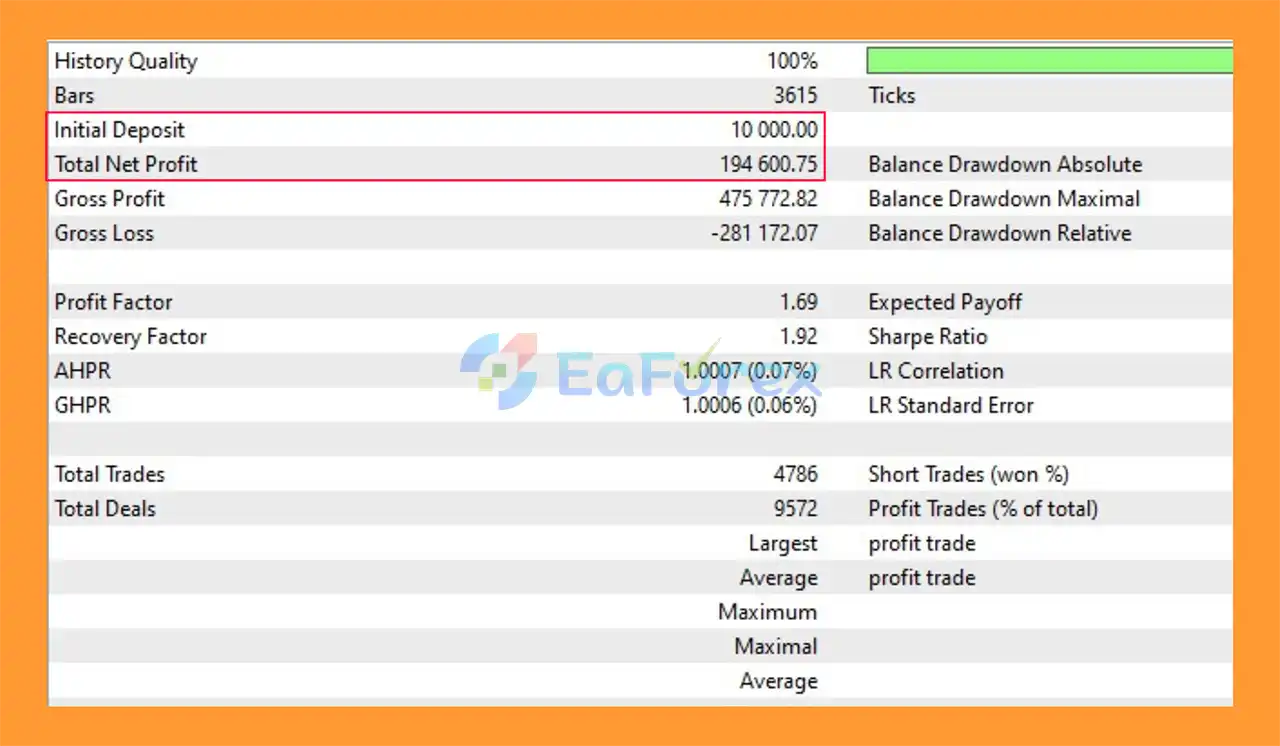
Spin Lot Hedge EA MT5 backtets
Performance and Risk Management
Spin Lot Hedge EA MT5 uses a combination of hedging, Grid order placement, basket management, and configurable lot calculation.
However, the risk level can vary substantially depending on the selected lot-management method.
Relative Risk Characteristics
| Lot Method |
General Approach |
Risk Consideration |
| Plus Lot |
More conservative lot progression |
Lower relative exposure |
| Sum Lot |
Cumulative position sizing |
Higher exposure |
| Martingale Lot |
Increasing lots for recovery |
Very high risk |
These descriptions represent the general characteristics of the respective lot-management approaches and should not be interpreted as guarantees of specific drawdown or profitability.
Important Risk Factors
The EA’s results can be influenced by:
- Account balance
- Leverage
- Lot calculation method
- Grid distance
- Market volatility
- Spread
- Slippage
- Swap costs
- Broker execution
- News events
- Maximum number of open positions
- Available margin
Hedging and Grid strategies can accumulate multiple positions. During a strong one-directional market movement, the account may experience significant floating drawdown and increased margin requirements.
Weaknesses and Risk Warnings
Grid Trading Can Accumulate Exposure
As additional orders are opened at different price levels, total market exposure can increase.
A prolonged market movement in one direction can result in a large number of open positions and substantial floating losses.
Hedging Does Not Eliminate Risk
Opening Buy and Sell positions at the same time can reduce directional exposure in certain circumstances, but it does not remove trading costs or guarantee profitable outcomes.
Spread, commission, swap, and execution costs continue to affect account performance.
Martingale Mode Has Significant Risk
The Martingale Lot System is particularly important to understand before use.
Increasing position sizes after unfavorable trades can cause exposure to grow rapidly. A sufficiently long adverse market movement may exceed available margin and cause significant account losses.
Margin Requirements Can Increase
Multiple Grid and hedge positions require additional margin.
Traders should ensure their account has sufficient free margin to withstand adverse market movements.
News Events Can Cause Extreme Volatility
Major economic announcements can cause rapid price movements, spread expansion, and slippage.
Any news-avoidance or risk-adjustment feature should be treated as a risk-control mechanism rather than a guarantee against losses.
Broker Conditions Matter
Performance can vary significantly between brokers due to differences in:
- Spread
- Commission
- Execution speed
- Slippage
- Swap
- Margin requirements
- Hedging rules
No Guaranteed Profit
Automated trading systems cannot guarantee profits. Historical or backtested performance does not guarantee future results.
Always test the EA on a demo account before deploying it with real capital.
Pros and Cons
Pros
- Automated MetaTrader 5 Expert Advisor
- Initial Buy and Sell hedging structure
- Indicator-based Grid distance
- Automated additional order placement
- Multiple basket-management mechanisms
- Manual Close function
- Balance-percentage profit target
- Negative-order clearing system
- Trailing Stop
- Three lot-management methods
- Plus Lot option for more conservative trading
- Sum Lot option for higher exposure
- Martingale Lot option for aggressive recovery
- Supports automated position monitoring
- Can be used in IB or Copy Trading workflows
- Flexible risk configuration
- Automated trade-cycle management
Cons
- Grid trading can increase total market exposure
- Hedging does not eliminate losses
- Multiple positions can increase margin requirements
- Martingale mode carries very high risk
- Prolonged one-way trends can create substantial floating drawdown
- Spread and commission can accumulate across multiple orders
- Swap costs may become significant when positions remain open for extended periods
- News events can cause slippage and rapid market movements
- Requires careful configuration and monitoring
- Results depend heavily on broker and market conditions
How to Install Spin Lot Hedge EA MT5
Step 1: Download the EA
Obtain the Spin Lot Hedge EA MT5 installation file from the official source or purchase provider.
Step 2: Open MetaTrader 5
Launch MetaTrader 5 and log in to the trading account where you want to use the EA.
Step 3: Open the Data Folder
In MetaTrader 5, select:
File → Open Data Folder
Then navigate to:
MQL5 → Experts
Step 4: Copy the EA File
Place the Spin Lot Hedge EA .ex5 file inside the Experts folder.
If the package contains additional files, indicators, libraries, or presets, place them in the appropriate MetaTrader 5 directories according to the developer’s instructions.
Step 5: Restart or Refresh MT5
Restart MetaTrader 5 or right-click the Navigator window and select Refresh.
The EA should appear under:
Navigator → Expert Advisors
Step 6: Enable Algo Trading
Make sure the Algo Trading button is enabled in MetaTrader 5.
Also check:
Tools → Options → Expert Advisors
and confirm that automated trading is permitted.
Step 7: Open the Trading Chart
Open the symbol and timeframe recommended by the EA developer.
The appropriate symbol may depend on the specific broker and configuration.
Step 8: Attach Spin Lot Hedge EA
Find Spin Lot Hedge EA in the Navigator and drag it onto the selected chart.
Step 9: Configure Lot Management
Select the desired lot calculation method:
Plus Lot – for a more conservative approach.
Sum Lot – for higher exposure.
Martingale Lot – for aggressive recovery and significantly higher risk.
Review all available risk, Grid, and position-management parameters before enabling automated trading.
Step 10: Configure Exit Settings
Review and configure:
- Profit percentage target
- Negative-order clearing
- Trailing Stop
- Grid distance
- Maximum exposure
- Risk settings
- News avoidance settings
- Lot limits
Step 11: Test on a Demo Account
Before using real funds, test Spin Lot Hedge EA MT5 on a demo account under the same broker and account conditions you intend to use for live trading.
Pay particular attention to maximum floating drawdown, margin usage, number of open positions, and behavior during strong one-directional market movements.
Step 12: Consider VPS Hosting
For continuous automated trading, a reliable VPS can help keep MetaTrader 5 running and connected to the broker with minimal interruption.
Risk Disclaimer: Spin Lot Hedge EA MT5 uses Hedging and Grid-based trading logic, and its risk can increase substantially when multiple positions are opened. Martingale mode carries particularly high risk. Never assume that hedging or automated recovery guarantees profit. Always test the EA thoroughly and use risk settings appropriate for your account.
What’s Included in the Download Package?
- Setting (If Any).docx
- Installation Guide.docx
>>> Join VIP Membership Now <<<
Final Thoughts
In summary, Spin Lot Hedge EA MT5 is a feature-rich automated trading system that combines hedging, Grid trading, dynamic lot calculation, and basket-based profit management within MetaTrader 5. Its initial Buy and Sell structure gives the EA a distinctive approach to managing market exposure, while the indicator-based Grid distance allows additional positions to be opened according to configured price levels rather than relying solely on a simple fixed-distance model.
One of the main advantages of Spin Lot Hedge EA is its flexibility in lot-management and position management. Traders can choose between the Plus Lot, Sum Lot, and Martingale Lot systems, providing different approaches to position sizing and exposure. The EA also includes multiple exit and management mechanisms such as balance-percentage profit closing, negative-order clearing, Trailing Stop, and manual position closing. These features allow users to configure the trading cycle according to their preferred strategy and risk parameters.
The supplied backtest started with a $10,000 initial deposit and generated $194,600.75 in net profit under the tested conditions. While this result may demonstrate how the EA performed in the specific historical test, it should not be interpreted as a guarantee of future performance. Actual results can vary considerably depending on lot settings, Grid distance, leverage, broker execution, spreads, commissions, slippage, swap costs, available margin, and market volatility.
The most important consideration is the EA’s exposure profile. Grid and hedging strategies can accumulate multiple positions, particularly when the market moves strongly in one direction. The Martingale Lot System carries substantially higher risk because position sizes can increase as the trading cycle develops. Traders should therefore understand the difference between the available lot-management methods and avoid selecting aggressive settings without sufficient capital, margin, and risk tolerance.
Overall, Spin Lot Hedge EA MT5 provides a broad set of automated tools for traders interested in combining Hedging, Grid order placement, basket management, and flexible lot calculation. However, its performance and risk characteristics are highly dependent on configuration and market conditions. Before deploying the EA with real funds, traders should conduct extensive Strategy Tester and demo-account testing, monitor maximum floating drawdown and margin usage, and use conservative parameters where appropriate. Historical backtest results are useful for evaluation, but they should always be considered alongside the substantial risks associated with automated Grid, Hedging, and Martingale-based trading.

















 Unlimited Activations
 Instant delivery
 Easy to install
















 Automatic EA
 EA Best Seller
 Expert Advisor MT4
 Expert Advisor MT5
 HFT EA


Reviews
Clear filtersThere are no reviews yet.