
Product Overview
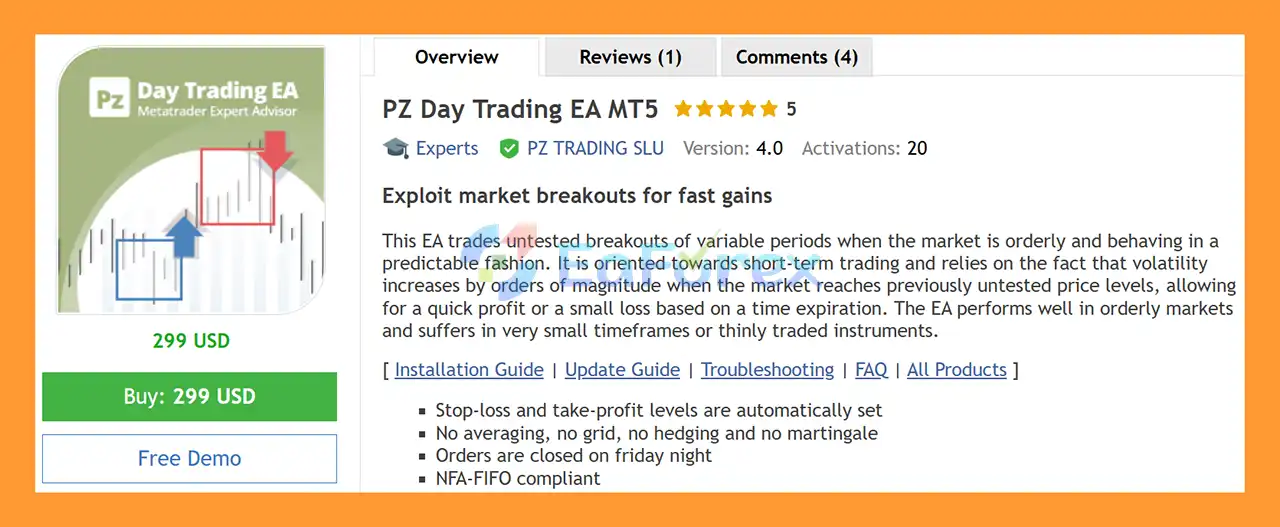
PZ Day Trading EA MT5 is an automated breakout trading Expert Advisor for MetaTrader 5, designed for traders who want to take advantage of short-term price movements when the market breaks through previously untested levels.
The EA focuses on market breakout opportunities that occur when price is moving in an orderly and relatively predictable environment. Its trading concept is based on the observation that volatility can increase significantly when the market reaches new price levels, creating opportunities for quick trades with either a predefined profit target or a controlled loss.
Unlike strategies based on averaging down, grid systems, or martingale position sizing, PZ Day Trading EA MT5 does not use averaging, grid, hedging, or martingale techniques. The system automatically places pending orders and manages stop-loss and take-profit levels according to detected market structures.
The EA is designed primarily for short-term and day trading, while its performance can depend heavily on market liquidity, spread conditions, volatility, timeframe, and the characteristics of the traded instrument.
About the Developer
- Author: Arturo Lopez Perez.
- Experience: Over +12 years of experience on MQL5.
- Notable Products: PZ Day Trading EA MT5, PZ Hedging EA MT5, PZ Grid Trading EA MT5 and other advisors.
- Flagship Product: PZ Day Trading EA MT5 is rated as the best performing product of the year.
>> Delivery time 24h-48h after payment.
>>> Refund if not delivered.
>>> You will receive the latest version without any limitations (ID+Time).>>Reviewed by Jason Stap <<
Main Features of PZ Day Trading EA MT5
Automated Breakout Trading
PZ Day Trading EA MT5 identifies potential breakout areas and uses pending orders around relevant price levels. This allows the EA to participate when the market moves beyond a previously established range.
No Grid or Martingale
The trading system does not rely on grid trading, martingale, or averaging strategies. This can make its trade management structure easier to understand compared with systems that continuously add positions when the market moves against them.
Automatic Stop-Loss and Take-Profit
The EA automatically determines appropriate stop-loss and take-profit levels based on market structure and detected trading ranges.
Multiple Trading Behaviors
Users can select different breakout behaviors:
- Most Breakouts – attempts to trade a wider range of detected breakout opportunities.
- Detected Ranges – trades when a suitable trading range is identified.
- Confirmed Ranges – waits for stronger confirmation before entering, potentially resulting in fewer trades.
Configurable Trading Direction
The EA can be configured to:
- Trade Buy positions
- Trade Sell positions
- Trade both Buy and Sell positions
Multi-Timeframe Filtering
PZ Day Trading EA MT5 can use multiple timeframes to confirm relevant trading levels. Increasing the number of confirmation timeframes can reduce trading frequency while applying stricter market validation.
Break-Even and Trailing Stop
The EA includes configurable break-even and trailing-stop functionality. Once a trade reaches a specified profit level, the stop-loss can be moved toward the entry price or adjusted to protect part of the accumulated profit.
Session Filters
Traders can configure the EA to operate during different market sessions, including:
- Asian Session
- European Session
- American Session
Gap Protection
The Gap Protection feature can prevent new trades until a detected daily or weekly gap has been closed.
Automatic Friday Closing
The EA can automatically close positions and pending orders on Friday night, allowing the trading week to finish flat according to the selected settings.
Money Management
PZ Day Trading EA MT5 supports both:
- Manual lot sizing
- Automatic lot calculation based on risk allocation
When automatic money management is enabled, traders can specify the percentage of free margin allocated to individual trades.
NFA/FIFO Support
The EA includes an NFA/FIFO-compliant trading option, which is intended to support compatible U.S. brokers and netting-account environments.
How Does PZ Day Trading EA MT5 Work?
PZ Day Trading EA MT5 is built around a breakout trading methodology.
The EA analyzes historical price bars to identify potential consolidated ranges and relevant price levels. When the required market conditions are detected, it can place pending orders around the range boundaries.
The general trading process can be summarized as follows:
- Market Analysis
The EA analyzes recent price action and searches for suitable trading ranges. - Range Detection
It evaluates the market using parameters such as Lookback, Entry Range, and Exit Range. - Breakout Validation
Depending on the selected Trading Behavior, the EA can trade more breakouts or wait for stronger range confirmation. - Pending Order Placement
Pending orders are placed around relevant breakout levels, normally at bar closing. - Trade Protection
Stop-loss and take-profit levels are automatically calculated according to market structure. - Position Management
Break-even and trailing-stop functions can manage an open position after it reaches the required profit level. - Expiration Management
Losing trades can be subject to a configurable expiration period. - Weekly Protection
The EA can close pending orders and open trades on Friday night, depending on the selected configuration.
The EA also includes a gap filter that can prevent trading when a daily or weekly gap remains open.
Why Choose PZ Day Trading EA MT5?
PZ Day Trading EA MT5 may be suitable for traders interested in automated breakout trading on MetaTrader 5 without relying on traditional martingale or grid mechanics.
One of its main characteristics is its focus on selective market conditions rather than attempting to trade continuously. The EA is designed to wait for a suitable breakout scenario before opening a position.
Another useful feature is its extensive configuration system. Traders can adjust trading direction, breakout behavior, market sessions, risk allocation, break-even settings, trailing stops, gap protection, and other parameters according to their preferred trading environment.
The system also provides several options for controlling trade frequency. For example, more selective range-confirmation settings can be used when a trader wants the EA to require additional market confirmation before entering.
However, configuration should always be validated through historical testing and, where possible, forward testing before being used with real capital.
PZ Day Trading EA MT5 Backtest Results
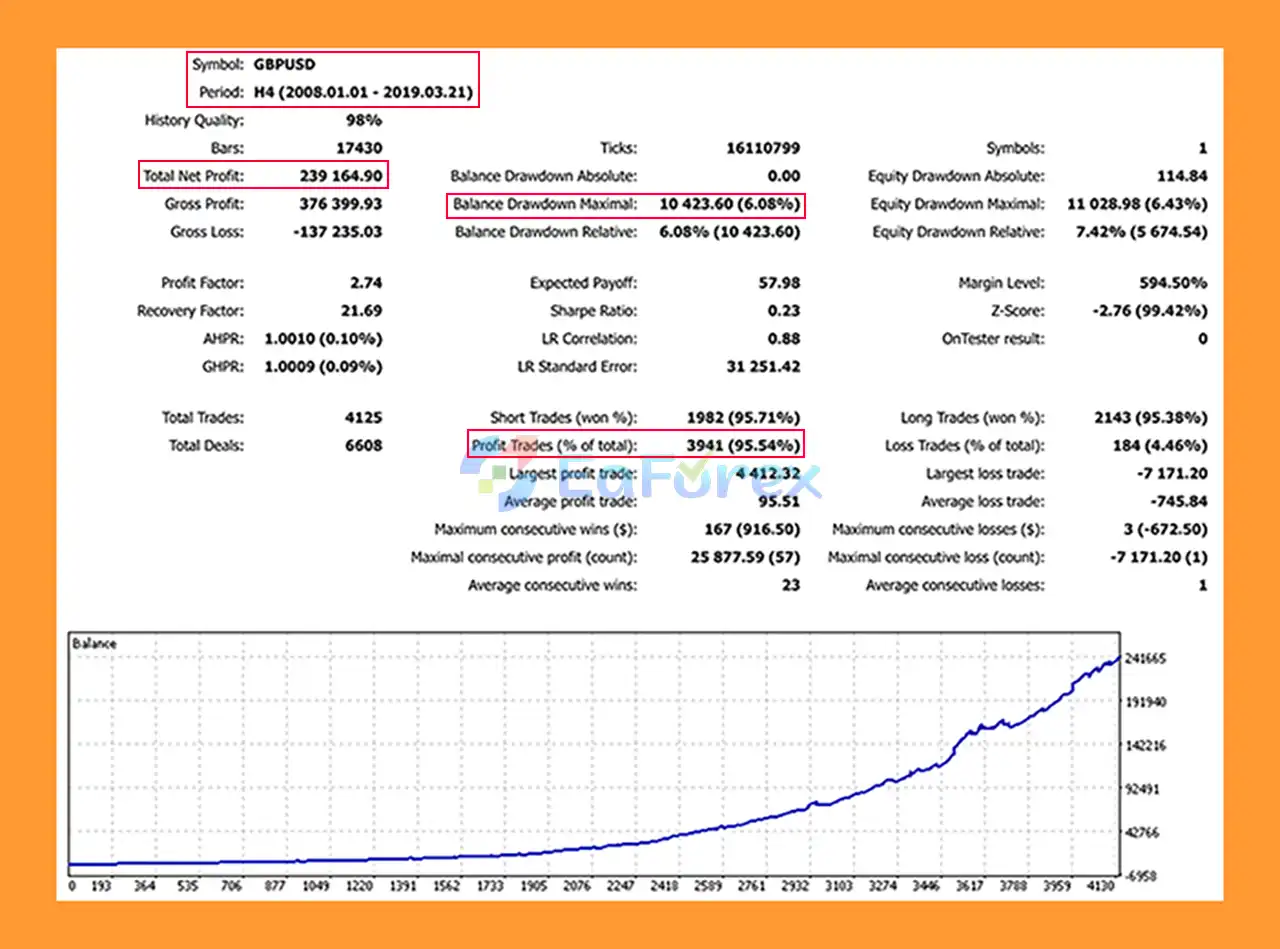
🔺GBPUSD pair - 11 years
- Total Net Profit: $239,164.90
- Win Rate (% of total): 95.54%
- Maximum Drawdown: 6.08%
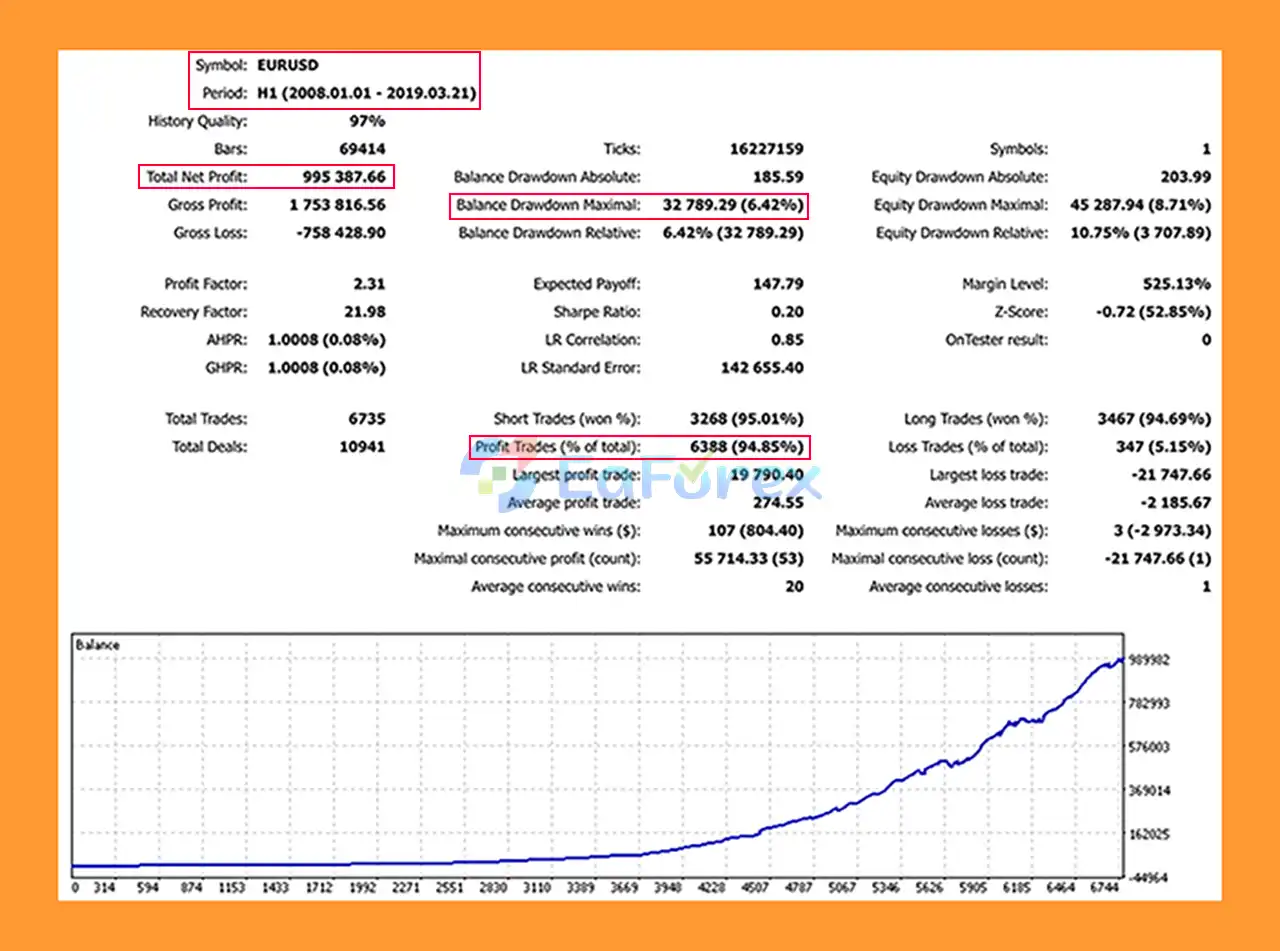
🔺EURUSD pair - 11 years
- Total Net Profit: $995,387.66
- Win Rate (% of total): 94.85%
- Maximum Drawdown: 6.42%
Performance and Risk Management
The performance of PZ Day Trading EA MT5 can vary significantly depending on the trading instrument, broker conditions, spread, execution quality, timeframe, market volatility, and selected parameters.
The EA provides several built-in tools for risk and trade management.
Stop-Loss Protection
Each trade can have an automatically calculated stop-loss based on relevant market levels. This helps define the potential loss of individual positions.
Take-Profit Management
Suitable take-profit levels can be calculated according to detected market structures and the selected trading behavior.
Break-Even
Once a trade reaches the configured break-even threshold, the EA can move the stop-loss toward the entry price or secure a portion of the existing profit.
Trailing Stop
The trailing-stop function can progressively adjust the protective stop as a trade moves into profit.
Risk Allocation
Automatic money management allows traders to specify a percentage of available free margin to allocate to each trade.
Spread Considerations
High spreads can reduce trading frequency and may negatively affect breakout execution. For this reason, broker conditions should be considered carefully when evaluating the EA.
Backtesting
The developer recommends backtesting in M1 HLOC mode. Historical testing should be performed across different market periods rather than relying on a single favorable test period.
Past backtest results should not be interpreted as a guarantee of future performance.
Weaknesses and Risk Warnings
Although PZ Day Trading EA MT5 has several configurable risk-management features, breakout trading has inherent limitations.
Breakout False Signals
A market can temporarily break through a range and then reverse. Such false breakouts can result in losing trades.
Market Conditions Matter
The EA is intended to work in relatively orderly market conditions. Its performance may deteriorate in unsuitable environments, particularly when market behavior becomes unpredictable.
Very Small Timeframes
The developer notes that the EA can suffer when used on very small timeframes. Traders should therefore avoid assuming that lower timeframes automatically produce better results.
Thinly Traded Instruments
Instruments with low liquidity may produce less suitable trading conditions. Wider spreads and poor execution can also affect breakout strategies.
Spread and Slippage
Breakout systems can be sensitive to execution conditions. High spreads or excessive slippage may affect entry and exit prices.
No Strategy Guarantees Profit
Even though the EA uses stop-loss, take-profit, break-even, and trailing-stop functions, losing trades remain possible. Automated trading does not eliminate market risk.
Parameter Optimization Risk
Aggressively optimizing settings against historical data can create overfitting. A configuration that performs well in one historical period may behave differently in live market conditions.
VPS Requirement
For continuous automated operation, traders should consider using a reliable VPS or keeping the trading computer connected and running during the required trading hours.
One EA Per Symbol
The developer recommends not running another EA on the same symbol. Conflicting automated strategies can interfere with trade management and make performance analysis more difficult.
Pros and Cons
Pros
- Designed for automated breakout trading on MetaTrader 5
- Uses pending orders for breakout entries
- No martingale strategy
- No grid trading
- No averaging
- No hedging
- Automatic stop-loss and take-profit
- Break-even functionality
- Trailing-stop functionality
- Multiple breakout behavior modes
- Multi-timeframe filtering
- Daily and weekly gap protection
- Configurable trading sessions
- Manual or automated money management
- Optional Friday-night position closing
- NFA/FIFO-compliant option
Cons
- Breakout strategies can experience false breakouts
- Results depend heavily on market conditions
- High spreads can reduce trading opportunities
- Thinly traded instruments may provide less favorable conditions
- Very small timeframes may be unsuitable
- Requires careful parameter selection
- Backtest results may differ from live trading
- Continuous operation may require a VPS or always-on computer
- No automated trading system can eliminate the risk of financial loss
How to Install PZ Day Trading EA MT5
Installing PZ Day Trading EA MT5 on MetaTrader 5 generally follows the standard Expert Advisor installation process.
Step 1: Download the EA
Obtain the PZ Day Trading EA MT5 files from the official source or your licensed purchase.
Step 2: Open MetaTrader 5
Launch your MetaTrader 5 trading platform.
Step 3: Open the Data Folder
Go to:
File → Open Data Folder
Then navigate to:
MQL5 → Experts
Copy the EA files into the Experts directory.
Step 4: Restart MetaTrader 5
Restart MT5 or refresh the Expert Advisors section in the Navigator window.
Step 5: Attach the EA
Find PZ Day Trading EA MT5 under:
Navigator → Expert Advisors
Drag the EA onto the desired chart.
Step 6: Configure the Parameters
Review the available settings, including:
- Trading Direction
- Trading Behavior
- Gap Protection
- Lookback
- Entry Range
- Exit Range
- Expiration
- Filter
- Break-Even
- Trailing Stop
- Trading Sessions
- Money Management
- Risk Allocation
- Manual Lot Size
- Friday Closing
- NFA/FIFO Compliance
- Magic Number
- Slippage
Step 7: Enable Automated Trading
Make sure Algo Trading is enabled in MetaTrader 5 and that the EA has the necessary permissions to trade.
Step 8: Backtest Before Live Trading
Use the MT5 Strategy Tester to evaluate the EA under historical market conditions. The developer recommends M1 HLOC mode for backtesting.
It is also advisable to test different periods and market conditions before considering live deployment.
What’s Included in the Download Package?
- Setting (If Any).docx
- Installation Guide.docx
>>> Join VIP Membership Now <<<
Final Thoughts
In summary, PZ Day Trading EA MT5 is an automated breakout Expert Advisor designed for traders who want to explore short-term opportunities when price moves beyond previously established market ranges.
Its strategy focuses on breakout detection, pending-order execution, and structured trade management rather than relying on martingale, grid, or averaging techniques. Features such as automatic stop-loss and take-profit placement, break-even, trailing stops, gap protection, session filters, and configurable money management provide traders with a range of tools for controlling how the EA operates.
However, breakout trading remains dependent on market conditions. False breakouts, spread, slippage, liquidity, and unexpected volatility can all affect results. Therefore, traders should evaluate the EA through comprehensive backtesting and forward testing and use risk settings appropriate to their account.
For traders researching PZ Day Trading EA MT5, the most important consideration is not simply historical profitability, but whether the EA's breakout methodology, risk controls, trading frequency, and execution requirements are compatible with their own trading objectives and risk tolerance.



