Product Overview
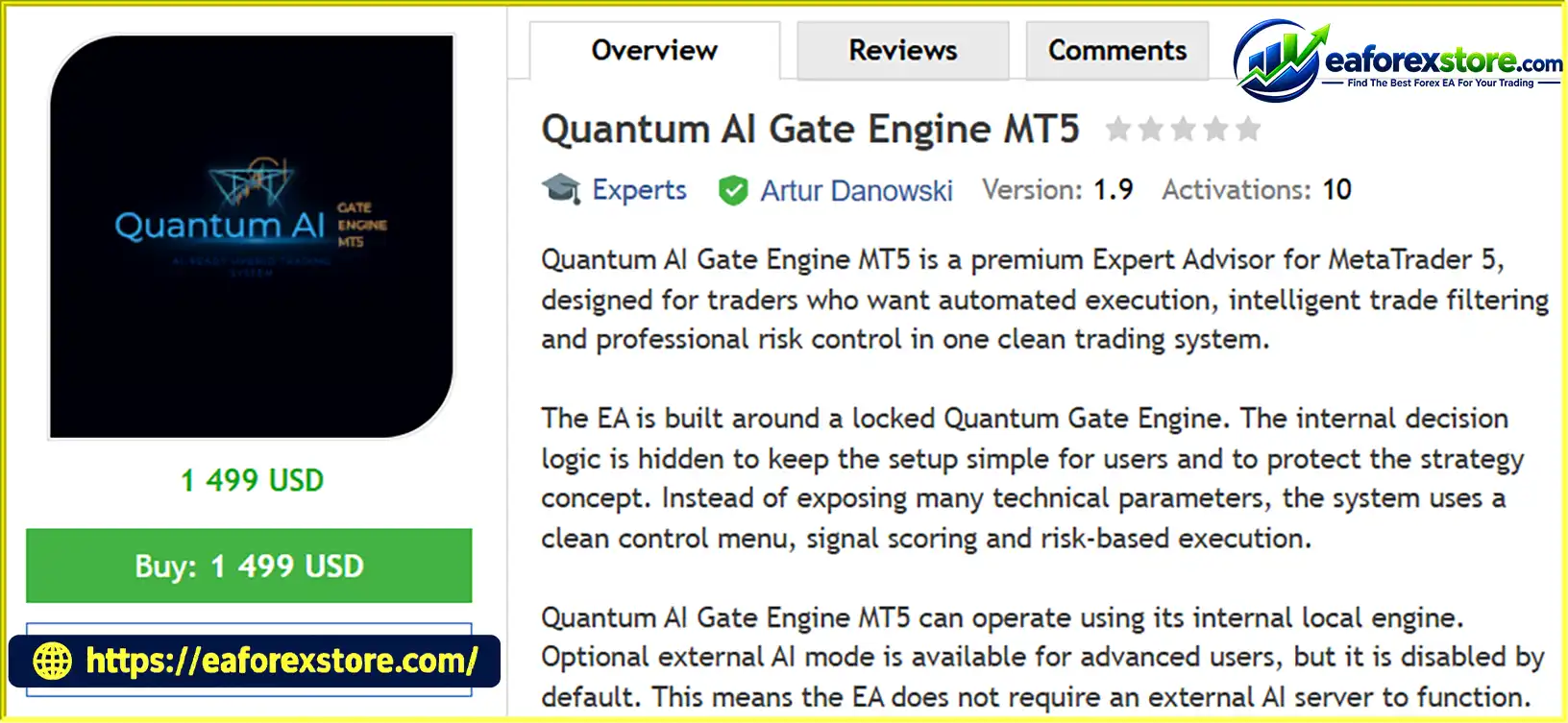
Quantum AI Gate Engine MT5 is a premium Expert Advisor (EA) for MetaTrader 5, designed for traders seeking automated trade execution, intelligent signal filtering, and structured risk management in one streamlined trading system.
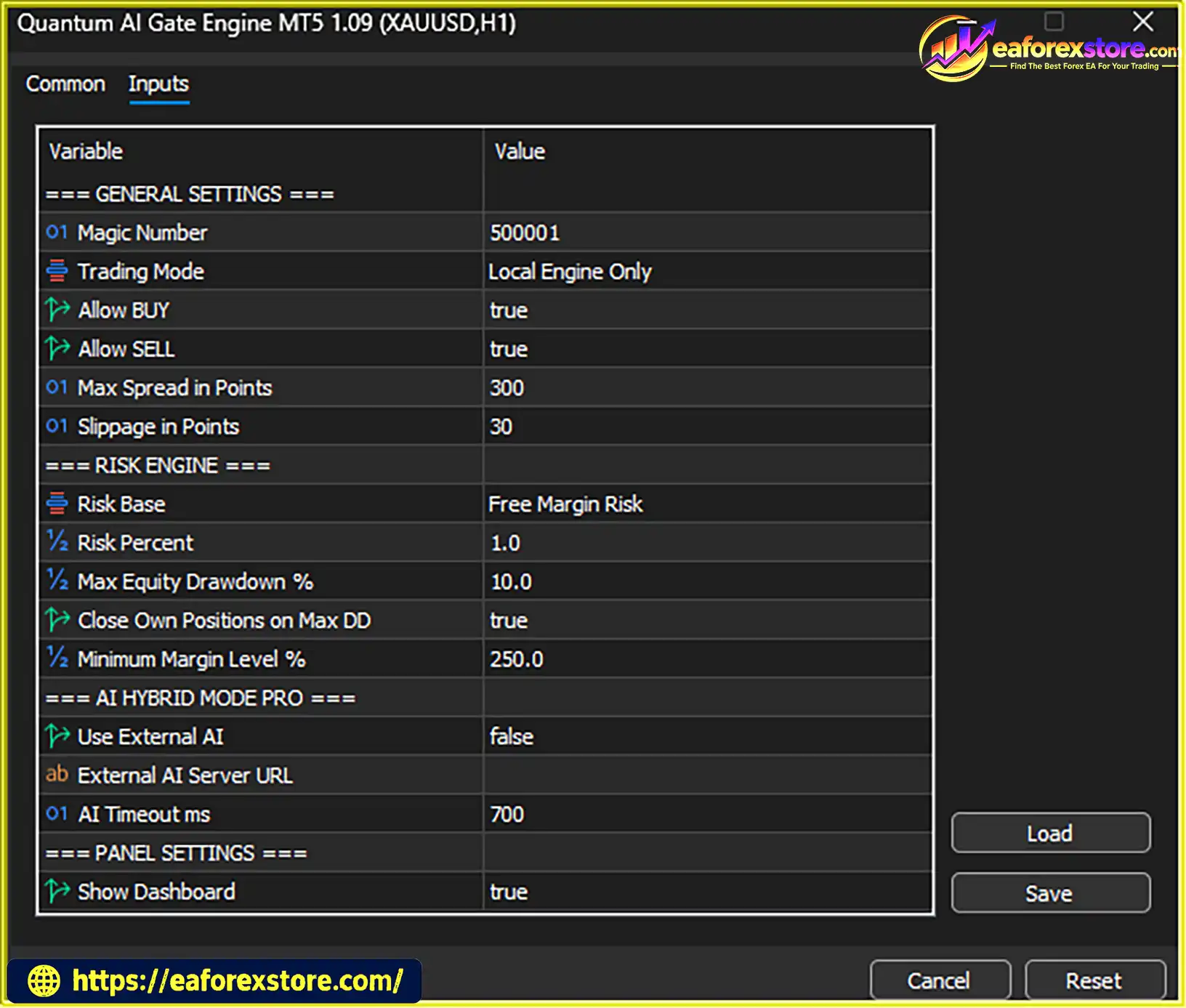
Built around a locked Quantum Gate Engine, this EA keeps its internal decision-making logic hidden while providing a simplified control interface. Instead of requiring users to configure numerous technical parameters, it focuses on essential settings such as trading mode, signal score, risk allocation, and account protection.
Quantum AI Gate Engine MT5 uses its internal local engine for standard operation. An optional external AI confirmation mode is available for advanced users, but it is disabled by default. Therefore, an external AI server is not required for the EA's normal operation.
With automated BUY and SELL execution, a Signal Score ranging from 0 to 100, internal Stop Loss and Take Profit management, and a professional chart dashboard, Quantum AI Gate Engine MT5 aims to provide a more structured and accessible automated trading experience.
About the Developer
- Author: Artur Danowski
- Experience: Over 1 years of experience on MQL5.
- Notable Products: Quantum AI Gate Engine MT5, Quantum Gold Algos 5K and other advisors.
- Flagship Product: Quantum AI Gate Engine MT5 is rated as the best performing product of the year.
> Delivery time 24h-48h after payment.
>>> Refund if not delivered.
>>> You will receive the latest version without any limitations (ID+Time).Reviewed by Jason Stap <<<
Key Features of Quantum AI Gate Engine MT5
- Premium MT5 Expert Advisor: Designed for automated trading through MetaTrader 5.
- AI-Ready Hybrid Architecture: Combines a local trading engine with an optional external AI confirmation mode.
- Local Engine Operation: Works without requiring an external AI server for standard operation.
- Locked Quantum Gate Engine: Keeps internal decision logic hidden and simplifies user configuration.
- Signal Score from 0 to 100: Displays a numerical overview of the EA's current signal assessment.
- Automated BUY and SELL Execution: Executes trades according to its internal decision logic and configured settings.
- Risk-Based Lot Calculation: Supports position sizing based on selected risk settings.
- Flexible Risk Base Selection: Allows users to configure the basis used for risk calculations.
- Spread Protection: Helps restrict trading when spreads exceed configured limits.
- Slippage Control: Provides a mechanism for managing execution slippage.
- Minimum Margin Level Protection: Helps prevent trading when account margin conditions do not meet configured requirements.
- Equity Drawdown Protection: Monitors account equity against configured drawdown limits.
- Optional Close-on-Max-Drawdown Function: Can be configured to close positions when the specified maximum drawdown condition is reached.
- One-Position-Per-Symbol Logic: Designed to limit exposure by allowing one position per symbol under its trading logic.
- Internal SL/TP Management: Handles Stop Loss and Take Profit through the EA's internal management system.
- Professional Trading Dashboard: Displays important system information and protection status directly on the chart.
- Simplified Settings Menu: Focuses on practical controls instead of exposing a large number of technical parameters.
How Does Quantum AI Gate Engine MT5 Work?
Quantum AI Gate Engine MT5 is designed to automate trading through its internal decision engine, signal assessment, and risk-management framework.
1. Internal Quantum Gate Engine
The EA uses a locked internal engine to process its trading decisions. The underlying strategy details are not exposed through the standard user interface, allowing traders to operate the system without manually configuring a complex collection of technical indicators.
Because the internal algorithm is proprietary and not fully disclosed, users should evaluate its behavior through forward testing rather than assuming how individual signals are generated.
2. Signal Score Analysis
The EA displays a Signal Score between 0 and 100 to provide a simplified visual representation of its current market assessment.
This score can help users monitor the system's decision state without needing to inspect its internal logic. However, a higher score should not automatically be interpreted as a guaranteed probability of winning a trade unless the developer provides independently verified evidence supporting that interpretation.
3. Automated Trade Execution
When the internal engine identifies a qualifying trading opportunity, Quantum AI Gate Engine MT5 can automatically execute BUY or SELL orders according to its trading logic and configured controls.
The one-position-per-symbol design is intended to limit simultaneous exposure on each symbol. Actual behavior should be verified in a demo account, particularly when using multiple chart instances or trading correlated instruments.
4. Optional External AI Confirmation
Advanced users can enable the optional external AI confirmation mode if they want to integrate additional confirmation logic.
This feature is disabled by default. Standard operation relies on the local engine, so users do not need to maintain an external AI server for the EA's normal functionality.
Before enabling an external service, traders should review its connection requirements, operating costs, data handling, and potential impact on execution reliability.
5. Automated Risk Management
The EA provides several configurable protections, including risk-based position sizing, spread limits, slippage control, minimum margin requirements, and equity drawdown monitoring.
These features are intended to support more controlled execution. Nevertheless, no protection system can eliminate trading risk, prevent every execution problem, or guarantee that losses remain within a specified limit during extreme market conditions.
Why Choose Quantum AI Gate Engine MT5?
Simple Configuration for Different Experience Levels
Quantum AI Gate Engine MT5 is designed for traders who prefer a streamlined interface rather than a large collection of technical settings. Users can focus on trading mode, risk allocation, account protection, and dashboard options.
Automated Execution Without a Mandatory External AI Server
The internal local engine allows the EA to operate without requiring an external AI server for standard use. This may simplify setup and reduce dependence on third-party AI infrastructure.
Clearer Trading-System Monitoring
The built-in dashboard presents key information, including system status, Signal Score, trading mode, and protection state. This provides a convenient way to monitor the EA directly from the chart.
Multiple Risk-Protection Mechanisms
Risk-based lot calculation, spread protection, margin-level checks, and equity drawdown controls provide several layers of exposure management.
Their effectiveness depends on correct configuration, broker conditions, account leverage, and the EA's actual implementation.
Potential Use Across Different CFD Markets
The EA can be tested on Forex pairs, Gold (XAUUSD), indices, and cryptocurrency CFDs supported by the user's broker. Compatibility and trading suitability should be confirmed for each symbol because spreads, contract specifications, margin requirements, and volatility vary significantly.
Quantum AI Gate Engine MT5 Backtest Results
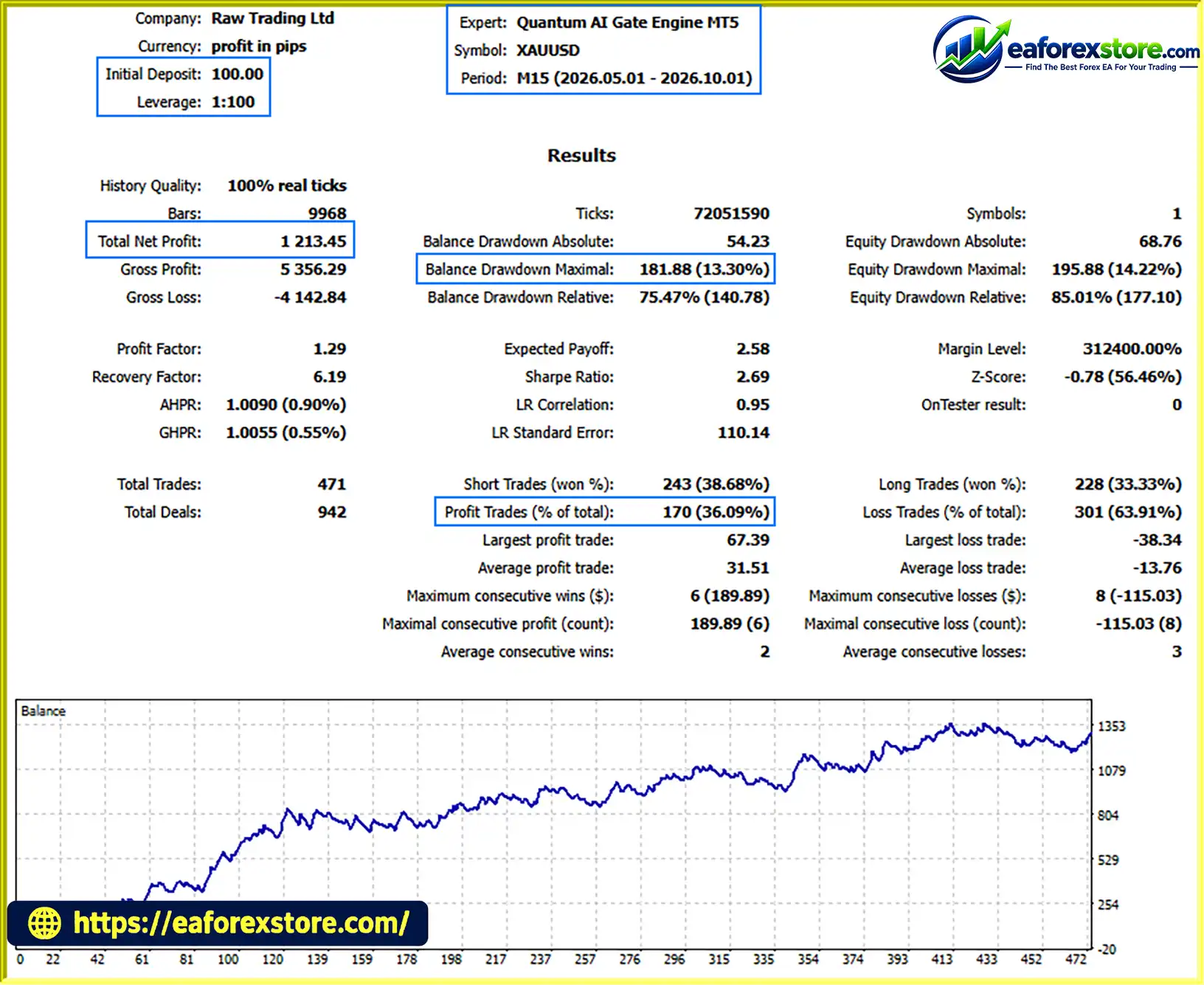
🔺XAUUSD (Gold) – 5 Months
- Initial Deposit: $100.00
- Total Net Profit: $1.213,45
- Win Rate (% of total): 36,09%
- Maximum Drawdown: 13,30%
Performance and Risk Management
Quantum AI Gate Engine MT5 includes a range of settings intended to help traders control position sizing and monitor account risk.
Risk-Based Position Sizing
The EA supports risk-based lot calculation and risk base selection. Traders should begin with a low risk setting and verify that calculated position sizes match their intended exposure before allowing the system to trade a live account.
A nominal risk percentage does not guarantee the final loss will remain within that amount. Gaps, slippage, spread expansion, and execution delays can result in larger losses than expected.
Spread and Slippage Protection
Spread protection can help restrict entries during unfavorable trading conditions, while slippage control is intended to manage differences between expected and actual execution prices.
These protections are especially relevant when trading Gold, indices, or cryptocurrency CFDs, where trading costs and price movements can change quickly.
Equity Drawdown Protection
The EA includes equity drawdown protection and an optional function to close positions when a configured maximum drawdown condition is reached.
Before live deployment, users should determine how drawdown is calculated, whether it uses balance or equity, which positions are included, and what happens if a closing order cannot be executed immediately.
Minimum Margin Level Protection
Minimum margin level protection is intended to restrict trading when available margin conditions fall below a configured threshold. Traders should still monitor leverage, free margin, and the broker's margin-call and stop-out rules.
Recommended Starting Setup
| Setting | Suggested Starting Point |
|---|---|
| Trading platform | MetaTrader 5 |
| Initial symbols | Major Forex pairs or Gold (XAUUSD) |
| Timeframe | M15, M30, or H1 for initial testing |
| Risk level | Low to moderate |
| External AI mode | OFF by default |
| Testing environment | Demo account first |
| VPS | Recommended for continuous operation |
These are starting suggestions rather than verified optimal settings. The most suitable configuration depends on the EA's actual requirements, broker specifications, and the symbol being traded.
Backtesting and Forward Testing
Before using Quantum AI Gate Engine MT5 with real funds, traders should:
- Confirm that the EA supports the intended symbol and account type.
- Backtest using suitable historical data and realistic trading costs, where supported.
- Run a demo forward test to evaluate entries, exits, position sizing, and protection behavior.
- Test spread, slippage, and margin protections under different market conditions.
- Verify drawdown calculations and the optional close-on-max-drawdown behavior.
- Monitor performance across trending, ranging, and volatile market environments.
No verified backtest figures, live-account results, win rate, profit factor, or maximum drawdown statistics were provided in the supplied product information. Traders should review independently verifiable results before making investment decisions.
Weaknesses and Risk Warnings
Although Quantum AI Gate Engine MT5 offers a simplified interface and multiple risk controls, several limitations should be considered.
- Hidden Trading Logic: The locked engine makes configuration easier but limits transparency into how trading signals are generated.
- Signal Score Limitations: A score from 0 to 100 is a monitoring feature, not proof of a corresponding win probability or expected return.
- Unverified Performance: Without independently verified trading results, profitability and consistency cannot be established from the feature list alone.
- Broker Dependency: Spreads, slippage, execution speed, leverage, and contract specifications may affect results.
- Market-Specific Risk: Forex, Gold, indices, and cryptocurrency CFDs have different volatility profiles and may require different configurations.
- External AI Dependency When Enabled: Optional external confirmation may introduce connectivity, latency, service availability, or additional cost considerations.
- Drawdown Protection Limitations: Market gaps and execution failures may prevent positions from closing at the expected price or time.
- Automated Trading Risk: An EA can experience losing periods, unexpected behavior, and technical interruptions.
Users should never assume that an AI-ready architecture, a high Signal Score, or built-in risk controls guarantee profitable or low-risk trading.
Pros and Cons
Pros
- Automated BUY and SELL execution on MetaTrader 5.
- Local engine operation without a mandatory external AI server.
- Optional external AI confirmation for advanced users.
- Simplified settings menu with a locked internal engine.
- Signal Score display from 0 to 100.
- Risk-based lot calculation and risk base selection.
- Spread, slippage, and minimum margin level protection.
- Equity drawdown monitoring with an optional close-on-limit function.
- Internal Stop Loss and Take Profit management.
- Professional dashboard for monitoring system status.
Cons
- Internal decision logic is not fully transparent.
- No verified profitability statistics were supplied.
- The Signal Score's predictive meaning is not independently established.
- Results may vary substantially between brokers and symbols.
- Optional external AI mode may require additional setup and infrastructure.
- Risk controls cannot eliminate market or execution risk.
How to Install Quantum AI Gate Engine MT5
Follow these general installation steps, and check the developer's documentation for any product-specific requirements.
- Obtain the EA file: Download Quantum AI Gate Engine MT5 from the authorized provider.
- Open MetaTrader 5: Launch the MT5 terminal on your computer.
- Open the Data Folder: Select File → Open Data Folder.
- Locate the Experts directory: Open
MQL5 → Experts. - Copy the EA file: Place the supplied EA file in the appropriate Experts folder. If the provider supplies a compiled
.ex5file, use that file as instructed. - Refresh the Navigator: Return to MT5 and refresh the Expert Advisors section, or restart the terminal.
- Attach the EA to a chart: Open a supported symbol, such as a major Forex pair or XAUUSD, and select the recommended timeframe.
- Configure the settings: Start with low risk, keep external AI mode disabled, and review the spread, slippage, margin, and drawdown controls.
- Enable automated trading: Allow automated trading in MT5 and confirm that the EA has the required permissions.
- Test before going live: Run the EA on a demo account and verify order execution, position sizing, Stop Loss/Take Profit behavior, and dashboard status.
A VPS is recommended if the EA needs to operate continuously. Keep the terminal, EA, and operating environment updated, and monitor the system regularly.
What’s Included in the Download Package?
- Experts: Quantum AI Gate Engine MT5.ex5
>>> Join VIP Membership Now <<<
Final Thoughts
Quantum AI Gate Engine MT5 is designed for traders who want an automated trading system with a simplified interface, local execution logic, signal scoring, and multiple risk-management controls. Its optional external AI confirmation mode offers an additional configuration path for advanced users, while standard operation does not require an external AI server.
The locked Quantum Gate Engine may appeal to users who prefer straightforward configuration over detailed strategy customization. However, limited transparency into the internal logic makes independent testing particularly important.
Before using the EA on a live account, verify its compatibility with your broker, test the risk controls, and evaluate its performance under realistic trading conditions. Start with a demo account and conservative risk settings, and only consider live deployment after the results meet your own risk and reliability requirements.
Automated trading involves a risk of loss, and no Expert Advisor can guarantee profits. Treat Quantum AI Gate Engine MT5 as a system that requires testing and ongoing monitoring rather than a source of assured returns.