









-
 Unlimited Activations
-
 Instant delivery
-
 Easy to install






 Unlimited Activations
Instant delivery
Easy to install
Unlimited Activations
Instant delivery
Easy to install
 Free Update
 Free Install Support

SMC Liquidity Core EA MT5 is a fully automated Expert Advisor for MetaTrader 5, designed specifically for trading Gold (XAUUSD) using Smart Money Concepts (SMC) and price-action analysis. The EA focuses on identifying liquidity sweeps, confirming potential market reversals through Change of Character (CHoCH), and filtering trade entries using a higher-timeframe Exponential Moving Average (EMA).
Unlike strategies that rely primarily on conventional technical indicators, SMC Liquidity Core EA MT5 emphasizes liquidity behavior and market structure to identify potential trading opportunities. Its entry framework aims to detect situations where price moves beyond a liquidity level before showing signs of a possible reversal.
The EA also includes basket trade management, dynamic basket trailing, daily drawdown protection, spread filtering, and configurable trading sessions. An optional recovery system provides additional control over grid distance, lot multipliers, and maximum trade levels.
Designed for the XAUUSD M1 timeframe, SMC Liquidity Core EA MT5 is recommended for MetaTrader 5 Cent Hedging accounts under the developer’s specified trading conditions. The supplied configuration is optimized for RoboForex Gold symbols with two-digit pricing.
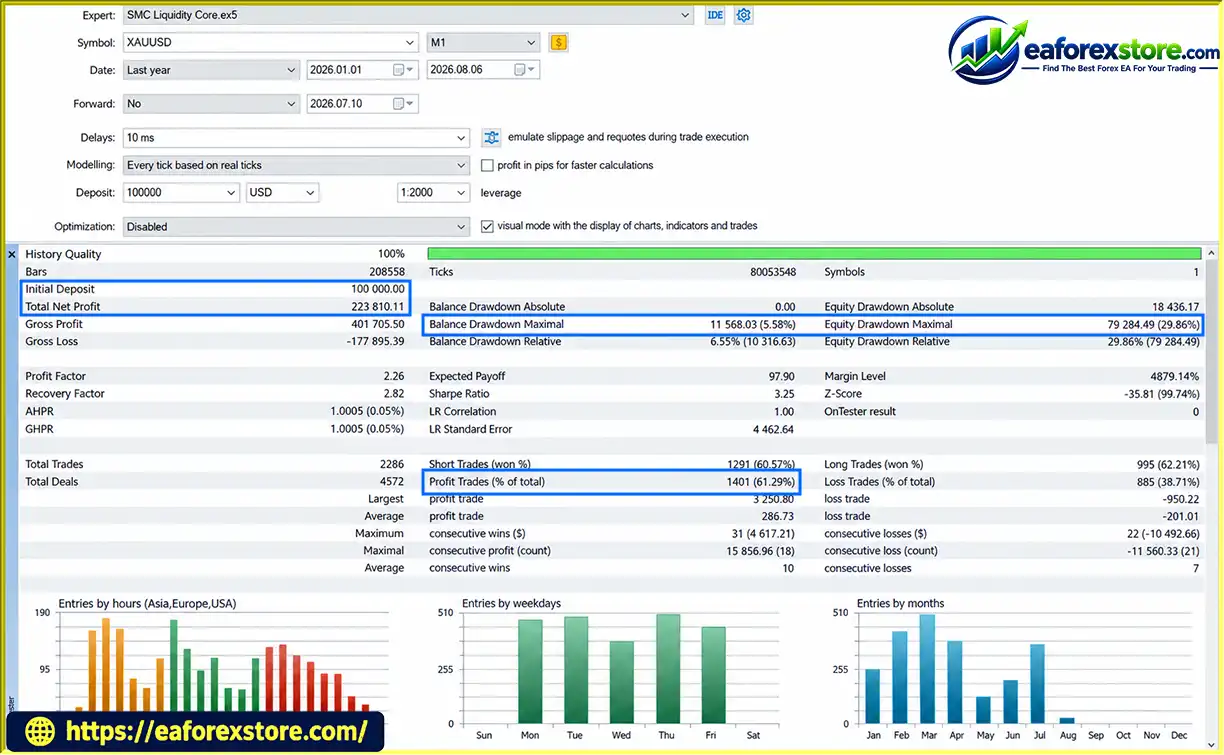
According to the supplied Strategy Tester results, the EA achieved a profit factor of 2.26 and a maximum balance drawdown of 5.58% under the tested conditions. These figures are historical test results and do not guarantee future profitability or equivalent live-account performance.
> Delivery time 24h-48h after payment.
>>> Refund if not delivered.
>>> You will receive the latest version without any limitations (ID+Time).Reviewed by Jason Stap <<<
SMC Liquidity Core EA MT5 Overview
SMC Liquidity Core EA MT5 applies Smart Money Concepts to automated gold trading. SMC analysis focuses on liquidity levels, price structure, and potential changes in market direction.
The EA is designed to evaluate these price-action conditions before entering a trade. Its objective is to identify potential opportunities based on market behavior rather than relying exclusively on traditional lagging indicators.
However, SMC interpretations can vary between trading systems, and no market-structure pattern guarantees a successful trade.
Liquidity sweeps are a central component of the EA’s entry framework.
A liquidity sweep generally occurs when price moves beyond a previous high or low, potentially triggering stop orders or breakout entries, before reversing back toward the prior price area.
SMC Liquidity Core EA MT5 is designed to detect these events as potential indications of a reversal opportunity.
Liquidity sweeps can also lead to genuine breakouts or continued directional movement. Therefore, identifying a sweep alone is not sufficient to establish that price will reverse.
The EA uses Change of Character (CHoCH) as a market-structure confirmation concept.
In SMC terminology, CHoCH describes a potential shift in the prevailing price structure. For example, a break of a relevant swing level may suggest that the market’s previous directional behavior is weakening.
By combining liquidity sweep detection with CHoCH confirmation, the EA aims to avoid entering solely because price has crossed a previous high or low.
The effectiveness of this filter depends on how the EA defines swing points, structural breaks, and confirmation conditions.
SMC Liquidity Core EA MT5 includes a higher-timeframe EMA filter intended to align trade entries with the broader market direction.
An Exponential Moving Average gives greater weight to more recent price data and is commonly used to assess directional trends.
The trend filter may help the EA distinguish between potential reversal setups that align with the dominant trend and those that go against it. However, moving averages lag price movements and may provide misleading signals during sideways or rapidly changing markets.
The EA is designed to automate trade execution after its programmed entry conditions are satisfied.
This reduces the need for manual monitoring of every potential setup and allows the strategy to operate within its configured parameters.
Automated execution still depends on MT5 connectivity, broker execution, market liquidity, and correct configuration. Traders should regularly review the Experts and Journal logs to confirm that the EA is operating as intended.
The basket management system coordinates multiple positions according to the EA’s configured trade-management rules.
Basket-based management can help evaluate combined open-position results rather than treating each position in isolation.
When multiple trades are active, however, the basket may experience significant floating losses before its profit target or exit condition is reached. Users should understand the basket closing logic and its interaction with any recovery settings.
The EA includes dynamic basket trailing designed to manage a basket’s profit as market conditions change.
Trailing logic generally aims to protect accumulated gains by adjusting an exit threshold as the basket becomes more profitable.
The exact activation conditions, trailing distance, and closing rules should be checked in the EA’s settings. Trailing mechanisms cannot guarantee that a basket will close at its highest unrealized profit, particularly during fast market movements or slippage.
SMC Liquidity Core EA MT5 offers an optional recovery system with configurable grid distance, lot multiplier, and maximum trade settings.
These parameters allow users to control how additional positions may be added when existing trades move against the strategy.
Recovery and grid mechanisms can increase the potential for a basket to recover during favorable price movements, but they can also increase exposure and drawdown. A lot multiplier greater than 1.0 may cause position sizes to grow rapidly as additional trades are opened.
Traders should understand and test the recovery system before enabling it on a live account.
The daily drawdown protection feature is designed to restrict trading when a configured daily loss threshold is reached.
This provides a mechanism for limiting continued trading after unfavorable results. However, the precise response to reaching the threshold should be verified, including whether the EA closes existing positions, removes pending orders, or only stops opening new trades.
Daily protection cannot guarantee that losses will remain below the selected threshold under all execution conditions.
The maximum spread filter is designed to prevent entries when the current spread exceeds a configured limit.
This can be useful for gold trading because transaction costs may rise during news releases, market transitions, or periods of reduced liquidity.
The spread filter’s effectiveness depends on the configured threshold and broker conditions. A setting appropriate for one broker may be unsuitable for another.
The EA includes trading-session and day filters that allow users to restrict when trades may be initiated.
These controls can help avoid selected trading periods when spreads, volatility, or execution quality may be less favorable.
Users should verify the EA’s time reference and confirm that the session settings correspond to the broker’s server time.
The EA provides an on-chart dashboard displaying relevant account and trading information, including floating profit, spread, trend status, and active trade statistics.
This interface helps users monitor the strategy without manually reviewing every individual position.
Dashboard values should be treated as monitoring information rather than evidence that the strategy will achieve a particular result.
The custom Magic Number feature helps distinguish the EA’s trades from positions opened by other Expert Advisors or manually.
This is particularly useful when running several automated strategies on the same account. Users should configure unique Magic Numbers where appropriate and verify how the EA identifies and manages its own positions.
According to the supplied description, SMC Liquidity Core EA MT5 does not require external DLL files.
This simplifies installation by avoiding an additional DLL dependency and its associated permissions.
Users should still obtain the EA from a trusted source and follow the developer’s official installation instructions.
SMC Liquidity Core EA MT5 combines liquidity analysis, market-structure confirmation, trend filtering, and automated trade management. Its general workflow can be explained in the following stages.
The EA analyzes Gold price movements on the recommended M1 timeframe.
The purpose is to identify relevant highs, lows, and potential liquidity areas that may become important during subsequent price movements.
The EA looks for a price movement beyond a relevant liquidity level that may indicate a sweep of previous highs or lows.
Such a movement can precede a reversal, but it can also represent a legitimate breakout. Further confirmation is therefore important.
After identifying a potential sweep, the EA evaluates market structure for a possible Change of Character.
This stage aims to determine whether price behavior provides evidence of a potential shift in direction rather than treating every liquidity sweep as an immediate entry signal.
The EA evaluates the higher-timeframe EMA condition to help determine whether a potential entry aligns with the broader directional trend.
The exact relationship between the EMA signal and the reversal confirmation depends on the EA’s implementation and input settings.
When the programmed entry conditions are satisfied and trading filters permit an order, the EA can execute a BUY or SELL trade.
The final entry price depends on market conditions, spread, slippage, and broker execution.
After entry, the EA applies its configured basket-management rules and, if enabled, the optional recovery system.
Basket profit management and dynamic trailing are intended to coordinate exits, while grid distance, lot multiplier, and maximum trade settings govern recovery behavior.
The EA uses the daily drawdown protection, maximum spread filter, and trading-session settings to regulate trading activity.
These features help structure the strategy’s operation but cannot remove all market or execution risks.
The on-chart dashboard displays information about account equity, floating profit, spread, trend status, and active trades.
Users should regularly evaluate actual results, equity drawdown, trade frequency, and execution quality to ensure the EA behaves as expected.
The EA is designed specifically for XAUUSD and is optimized for the M1 timeframe under the developer’s recommended conditions.
This specialization may appeal to traders seeking an automated gold strategy based on price action and market structure.
Using liquidity sweep detection together with market-structure confirmation aims to provide a more selective entry process than relying on a liquidity event alone.
The quality of this approach depends on the EA’s exact detection rules and how reliably they perform under different market conditions.
The EMA filter provides an additional directional assessment that may help the strategy avoid some entries that conflict with the broader trend.
Daily drawdown protection, spread filtering, trading-session controls, and configurable recovery settings offer several ways to manage how the EA operates.
Their actual protective effect depends on the settings, implementation, and broker execution conditions.
Basket profit management and dynamic basket trailing help coordinate the handling of multiple positions when the strategy has more than one active trade.
The optional recovery system lets users adjust grid distance, multiplier, and maximum trade settings. This flexibility is useful for testing different configurations, but more aggressive recovery settings can increase account risk.
The supplied Strategy Tester results provide several useful metrics, including profit factor, recovery factor, Sharpe ratio, trade count, and maximum balance drawdown.
These figures offer a starting point for further evaluation, but the full test report, date range, settings, and independent reproducibility should be reviewed before drawing conclusions about likely live performance.
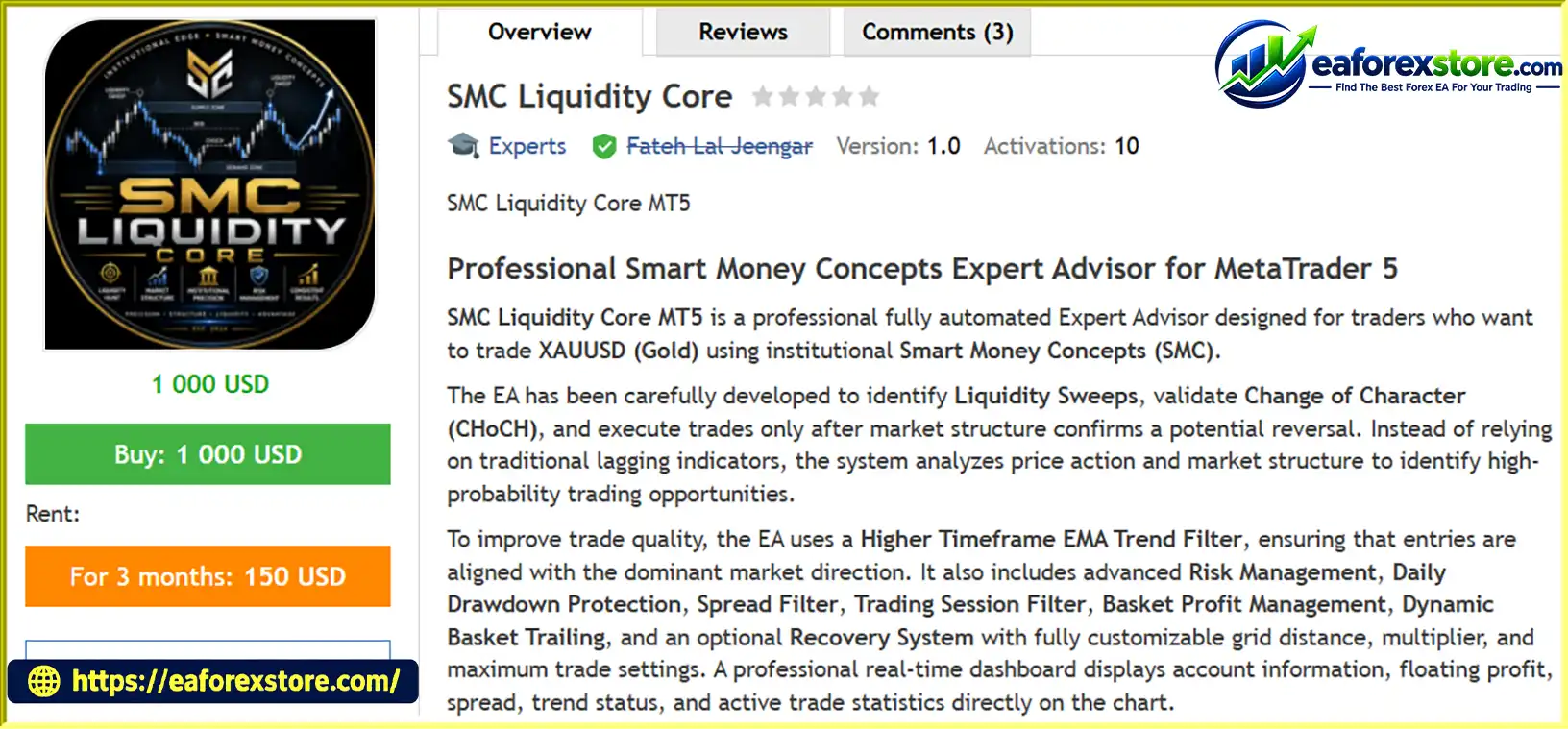
According to the supplied description, SMC Liquidity Core MT5 is available free on the MQL5 Market. Users should verify the current listing and download the EA through the official marketplace.
🔺XAUUSD (Gold) – 7 Months
SMC Liquidity Core EA MT5 backtets
The supplied Strategy Tester results indicate that SMC Liquidity Core EA MT5 was tested in MetaTrader 5 using 100% real tick data under the recommended trading conditions.
| Performance Metric | Reported Result |
|---|---|
| History quality | 100% |
| Initial deposit | 100,000 Cent |
| Total net profit | 223,810.11 Cent |
| Profit factor | 2.26 |
| Recovery factor | 2.82 |
| Sharpe ratio | 3.25 |
| Total trades | 2,286 |
| Winning trades | 1,401 |
| Win rate | 61.29% |
| Maximum balance drawdown | 5.58% |
These figures are reproduced from the supplied product information and have not been independently verified here.
The reported initial deposit of 100,000 Cent is approximately $1,000 USD under the stated account denomination. The reported net profit of 223,810.11 Cent is approximately $2,238.10 USD if 100 Cent equals $1 USD. The exact account currency and cent-account conversion should be confirmed with the broker.
A reported profit factor of 2.26 means that the gross profit was approximately 2.26 times the gross loss in the tested results, based on the standard profit-factor calculation.
This can be a useful historical performance measure, but it does not establish that the same ratio will continue in live trading. Results depend on the test period, data quality, trading costs, and parameter selection.
The reported recovery factor of 2.82 describes the relationship between net profit and a drawdown measure in the test report. The precise interpretation depends on the tester’s calculation method.
A favorable historical recovery factor does not guarantee that future losses will recover within a similar period.
The reported Sharpe ratio of 3.25 suggests a favorable historical relationship between return and measured variability under the test’s methodology.
However, Sharpe ratios depend on calculation assumptions, return frequency, and testing conditions. They should not be interpreted as a prediction of future performance.
The reported maximum balance drawdown is 5.58%. This is specifically identified as balance drawdown, which may differ from maximum equity drawdown.
Balance drawdown generally reflects changes in the account balance after trades close, while equity drawdown can also include floating losses on open positions. For a strategy with basket management or an optional recovery system, equity drawdown is particularly important.
Before relying on the reported figure, review the complete test report and confirm the maximum equity drawdown, drawdown duration, and exposure reached during the test.
The optional recovery system can change the EA’s risk profile substantially. Grid distance, lot multiplier, and maximum trade count affect the number and size of positions that may accumulate.
A strategy can show attractive historical results while still carrying significant tail risk if a strong market move produces a large basket of losing positions.
For initial testing, users should consider leaving the recovery system disabled until they understand the core entry and exit behavior. If recovery is enabled, evaluate its impact on maximum equity drawdown, margin requirements, and total lot exposure.
Before deploying the EA on a live account:
Important: Backtest results are historical and do not guarantee future returns. Real trading results may differ because of market conditions, execution quality, broker specifications, and parameter changes.
XAUUSD can move sharply in response to economic releases, central-bank announcements, interest-rate expectations, and geopolitical events.
On the M1 timeframe, rapid price changes and spread fluctuations can affect entry quality and execution. A spread filter can help avoid some unfavorable conditions, but it cannot eliminate all volatility-related risks.
A move beyond a previous high or low can indicate a potential liquidity sweep, but it can also be the beginning of a sustained breakout.
If the EA misinterprets a genuine breakout as a reversal setup, the resulting trade may move into loss.
Market-structure analysis can involve different definitions of swing highs, swing lows, and structural breaks. The EA’s performance depends on the precision and consistency of its programmed CHoCH rules.
Users should understand the settings and test whether the resulting entries are consistent with the intended strategy.
If the optional recovery system opens additional positions during adverse price movements, the combined basket may accumulate significant floating losses.
Higher lot multipliers and larger maximum trade counts can increase total exposure and margin requirements. Recovery does not guarantee that a losing basket will return to profit.
The presence of a daily drawdown setting does not guarantee that losses cannot exceed the configured threshold. Gaps, slippage, delays, and the handling of existing positions can affect the final result.
Users should verify exactly how the EA responds when the daily limit is reached.
The EA is described as optimized for RoboForex XAUUSD symbols with two-digit pricing. Other brokers may use different symbol specifications, spreads, execution conditions, and contract sizes.
Using an unsupported symbol configuration may lead to different results or unexpected behavior. Confirm compatibility before deployment.
The reported 5.58% maximum balance drawdown should not be treated as the maximum possible loss or assumed to represent maximum equity drawdown.
Open positions may carry floating losses that are not reflected in the balance figure. Review the complete report and live-equity behavior before making risk decisions.
Real-tick backtesting can provide a detailed historical simulation, but it cannot perfectly reproduce every aspect of live execution. Slippage, latency, spreads, broker conditions, and changing market behavior can all affect results.
Risk Disclaimer: Trading Gold, Forex, CFDs, and other leveraged financial instruments involves substantial risk and may result in the loss of invested capital. Past performance does not guarantee future results. No Expert Advisor can eliminate market risk or guarantee profits.
Follow these steps to install SMC Liquidity Core EA MT5 on MetaTrader 5.
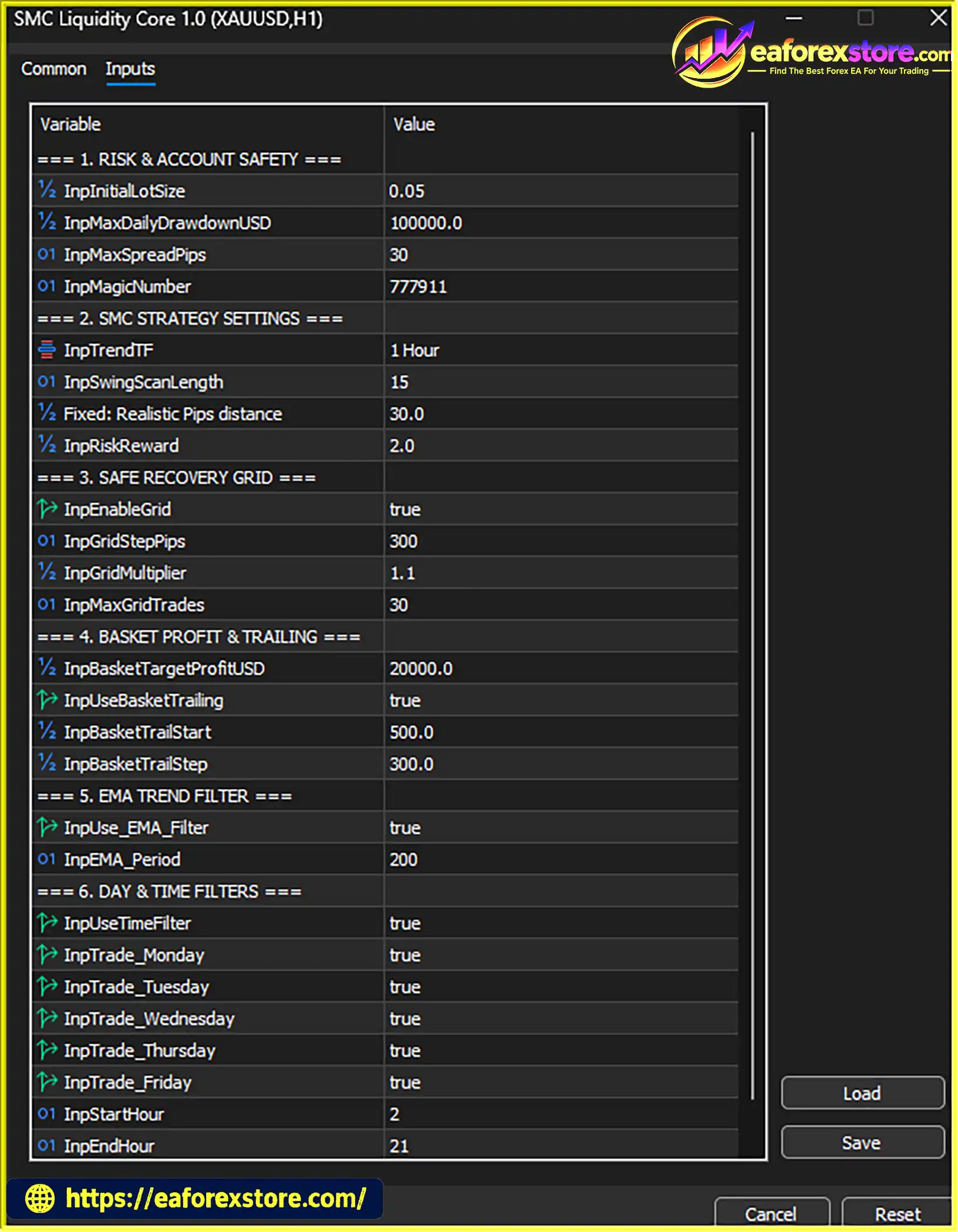
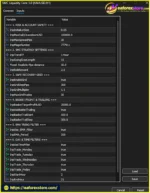
setting
According to the supplied information, SMC Liquidity Core MT5 is available free on the MQL5 Market. Search for the exact product name in the official marketplace and confirm the current listing before downloading.
Launch MT5 and log in to your trading account.
If you obtain the EA through the MQL5 Market, follow the marketplace’s installation process.
For a locally supplied .ex5 file, open:
File → Open Data Folder → MQL5 → Experts
Copy the file into the Experts folder if the provider’s instructions require manual installation.
Refresh the Expert Advisors section in the Navigator panel or restart MT5 if necessary.
Select the Gold instrument and open the M1 (1 Minute) timeframe.
The recommended configuration specifies RoboForex XAUUSD with two-digit pricing. Confirm the exact symbol name, digits, contract specifications, and account compatibility before proceeding.
The supplied recommendation is:
These are the developer’s stated recommendations, not a guarantee that the configuration is suitable for every trader.
Review the entry settings, higher-timeframe EMA filter, spread threshold, trading session, daily drawdown limit, basket management, and Magic Number.
If the recovery system is optional, understand its grid distance, lot multiplier, and maximum trade settings before enabling it.
Enable Algo Trading in MT5 and verify that the EA initializes successfully. Check the Experts and Journal tabs for error messages or configuration issues.
Confirm that the dashboard displays the expected account information, floating profit, spread, trend status, and trade statistics.
Test the daily drawdown protection, spread filter, and basket management on a demo account before live use.
A VPS is recommended for uninterrupted automated trading. Ensure MT5 remains connected and that the EA is attached to the correct chart.
A VPS can improve operational continuity but cannot guarantee successful execution or prevent trading losses.
>>> Join VIP Membership Now <<<
SMC Liquidity Core EA MT5 is a Gold-focused automated trading system that combines Smart Money Concepts, liquidity sweep detection, CHoCH confirmation, and a higher-timeframe EMA filter. It also provides basket profit management, dynamic basket trailing, daily drawdown protection, spread filtering, and an optional recovery system.
The supplied Strategy Tester results report a profit factor of 2.26, a Sharpe ratio of 3.25, and a maximum balance drawdown of 5.58% across 2,286 trades using 100% real tick data. These figures may make the EA worth investigating, but they should be assessed alongside maximum equity drawdown, test duration, recovery-system settings, and realistic trading costs.
The most important considerations are its focus on XAUUSD M1, its recommended RoboForex two-digit symbol configuration, and the risks associated with optional grid recovery. Liquidity sweeps and market-structure confirmation cannot guarantee reversals, and basket strategies can accumulate substantial floating losses during strong directional movements.
For traders interested in an SMC-based MT5 Gold EA with automated trade management and configurable risk controls, SMC Liquidity Core EA MT5 offers a framework to evaluate through careful backtesting and demo forward testing.
Verify broker compatibility, understand every risk setting, and review the complete test report before using real funds.
Trade responsibly. Historical backtest results do not guarantee future performance, and no automated trading system can eliminate financial risk.
1. What Is SMC Liquidity Core EA MT5?
SMC Liquidity Core EA MT5 is a fully automated Expert Advisor for MetaTrader 5, designed for trading Gold (XAUUSD) on the M1 timeframe. It uses Smart Money Concepts (SMC), liquidity sweep detection, Change of Character (CHoCH) confirmation, and a higher-timeframe EMA filter to identify potential trading opportunities.
2. How Does SMC Liquidity Core EA MT5 Work?
The EA monitors XAUUSD price action for potential liquidity sweeps around previous highs and lows. It then evaluates market structure for a possible CHoCH confirmation and applies a higher-timeframe EMA filter. When its programmed entry conditions are met, the EA can execute trades automatically and manage open positions using its configured basket-management rules.
3. Which Broker and Account Type Are Recommended for SMC Liquidity Core EA MT5?
According to the supplied product description, the EA is optimized for RoboForex Gold symbols with two-digit pricing and is recommended for a MetaTrader 5 Cent Hedging account. Traders should confirm symbol specifications, account compatibility, spread conditions, and execution settings with their broker before using the EA on a live account.
4. What Risk Management Features Does SMC Liquidity Core EA MT5 Offer?
SMC Liquidity Core EA MT5 includes daily drawdown protection, a maximum spread filter, trading-session and day filters, basket profit management, and dynamic basket trailing. It also provides an optional recovery system with configurable grid distance, lot multiplier, and maximum trade levels. These features help organize trade management but cannot eliminate market risk or guarantee a maximum loss limit.
5. Does SMC Liquidity Core EA MT5 Use a Grid or Recovery Strategy?
Yes. The EA offers an optional recovery system that can use grid distance, lot multipliers, and maximum trade levels to manage additional positions. Although recovery may help a basket respond to favorable price movements, it can also increase floating losses, total exposure, and margin requirements when the market moves against the strategy. Users should test the recovery system carefully before enabling it on a live account.
6. What Are the Backtest Results of SMC Liquidity Core EA MT5?
According to the supplied seven-month XAUUSD backtest summary, the EA recorded a reported net profit of 223,810.11, a 61.29% win rate, and maximum drawdown of 5.58%, starting from a stated initial deposit of 100,000. The detailed Strategy Tester report also lists a profit factor of 2.26, recovery factor of 2.82, Sharpe ratio of 3.25, and 2,286 total trades using 100% real tick data. These results have not been independently verified here, and the account denomination should be confirmed before interpreting the monetary figures.
7. Is SMC Liquidity Core EA MT5 Free to Download?
According to the supplied description, SMC Liquidity Core EA MT5 is available free on the MQL5 Market. Visit the official MQL5 product page to check current availability, product details, and download instructions.
8. Is SMC Liquidity Core EA MT5 Suitable for Beginners?
The EA automates trade execution and includes several monitoring and risk-management features, but beginners should understand its settings before using it. Gold trading on the M1 timeframe can involve rapid price changes, and optional recovery settings can increase exposure. Demo testing, review of maximum equity drawdown, and confirmation of broker compatibility are recommended before trading with real money.
Risk Disclaimer: Trading Gold, Forex, CFDs, and other leveraged financial instruments involves substantial risk and may result in the loss of invested capital. Historical backtest results do not guarantee future performance. Always test an Expert Advisor carefully and use appropriate risk management.
In stock
In stock
In stock
In stock
In stock
Out of stock
No account yet?
Create an Account












 Automatic EA
 EA Best Seller
 Expert Advisor MT4
 Expert Advisor MT5
 HFT EA


Reviews
Clear filtersThere are no reviews yet.