









-
 Unlimited Activations
-
 Instant delivery
-
 Easy to install







 Unlimited Activations
Instant delivery
Easy to install
Unlimited Activations
Instant delivery
Easy to install
 Free Update
 Free Install Support

Quantum Basket EA MT5 is a professional automated Expert Advisor for MetaTrader 5, designed around a multi-signal trading architecture that combines the Trader Dynamics Index (TDI), trend filters, market structure, Supply and Demand zones, Fibonacci Premium/Discount analysis, and basket-level trade management.
Unlike conventional Expert Advisors that manage every position independently, Quantum Basket focuses on managing trades as individual baskets. Each trading signal has its own basket, magic number, entry logic, and risk-management framework.
The system supports three independent signal types:
Each signal can generate and manage its own basket independently.
Quantum Basket also includes a controlled grid system. The grid is activated only after a confirmed trading signal and is subject to configurable limits such as maximum orders, grid spacing, and position-sizing methods.
Importantly, the system is not based on blind Martingale. Instead, it uses configurable basket-level risk management and controlled position expansion.
>> Delivery time 24h-48h after payment.
>>> Refund if not delivered.
>>> You will receive the latest version without any limitations (ID+Time).
>>Reviewed by Jason Stap <<
Quantum Basket EA MT5 uses several independent trading signals rather than relying on a single market condition.
The primary signal modules include:
Each signal operates as a separate trading basket.
Every basket has its own:
This architecture allows different signals to be monitored and managed independently.
The Trader Dynamics Index (TDI) is a core component of the EA.
The system can use TDI-based conditions to identify potential changes in momentum and market direction.
The MBL Cross module provides another independent signal source and can operate as its own basket.
This helps diversify the entry logic instead of forcing all trades to depend on one signal.
The TDI Sharkfin setup provides an additional TDI-based trading approach designed to identify specific market behavior and potential reversals or momentum changes.
Quantum Basket includes multiple optional filters that can be enabled or disabled independently.
This allows traders to customize the level of market confirmation required before a basket is activated.
The EA can use a Fast EMA / Slow EMA crossover to evaluate the prevailing market trend.
This filter can help restrict trades according to the selected directional conditions.
An internal Hull Moving Average (HMA) filter is available without requiring an external iCustom indicator.
This provides another optional trend-confirmation layer.
The EA can use RSI levels to filter potential entries.
Available configurations include:
The system can identify Supply and Demand areas using market structure and ATR-based calculations.
These zones can be used as an additional confluence filter when enabled.
Quantum Basket supports automatic detection of Fibonacci Premium and Discount zones, including the 50%–61.8% area.
This allows traders to incorporate Fibonacci-based market positioning into the overall entry-filtering process.
The filters are modular.
Traders can enable or disable individual components depending on their preferred strategy.
If the Supply & Demand and Fibonacci filters are disabled, the EA can continue operating in its standard trading mode.
Quantum Basket follows a structured basket-based trading process.
The EA monitors the selected market and evaluates its available signal modules:
When a valid signal appears, the corresponding basket can be activated.
Depending on the user’s configuration, the EA can apply additional filters such as:
The filters help determine whether the initial signal meets the required market conditions.
When the configured signal and filter conditions are satisfied, the EA opens the initial trade for the relevant basket.
If the market moves against the initial position and the configured conditions for grid expansion are met, the EA can add positions according to the selected grid settings.
The grid is not activated blindly. It requires a confirmed initial trading signal.
Users can configure:
Quantum Basket supports several lot-sizing approaches, including:
Instead of managing each order as a completely independent trade, the EA evaluates the combined basket result.
The overall basket can then be closed according to its configured Take Profit or Stop Loss conditions.
Quantum Basket EA MT5 is designed for traders who want a more structured basket trading system rather than a conventional single-order Expert Advisor.
The architecture provides several layers of control:
The system also provides flexibility for traders who want to optimize different components rather than using a completely fixed strategy.
Its modular design allows users to experiment with different combinations of signals and filters through testing and optimization.
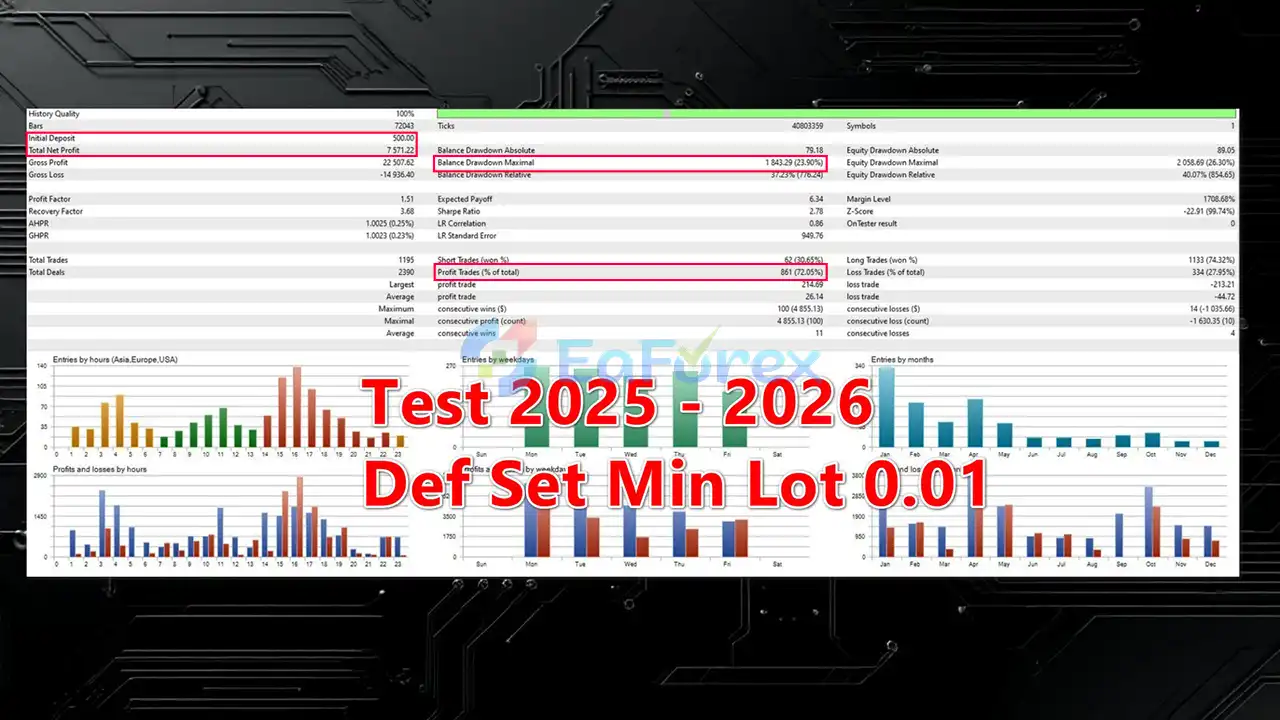
🔺XAUUSD (Gold) – 1 Year
Quantum Basket EA MT5 backtetsQuantum Basket’s risk-management framework operates primarily at the basket level.
Instead of evaluating only the result of an individual order, the EA considers the combined result of positions belonging to the same basket.
The Take Profit can be configured using several methods:
Dynamic TP can adapt when the grid expands.
The system provides multiple Stop Loss options:
This allows traders to establish a defined exit framework for the overall basket.
The Grid system includes configurable controls such as:
These controls are designed to prevent unlimited order accumulation.
However, a controlled grid is still a form of position expansion and can increase exposure when the market moves against the basket.
The absence of blind Martingale does not mean that grid trading is low risk.
When several positions accumulate in an adverse market, the total basket exposure can increase substantially.
Traders should therefore evaluate maximum basket size, margin usage, drawdown, and worst-case market movement before using the EA on a live account.
One of the key characteristics of Quantum Basket EA MT5 is its modular filtering architecture.
EMA Fast / EMA Slow
The EA can compare fast and slow EMA conditions to determine whether market direction supports a potential trade.
Internal HMA
The internal Hull Moving Average filter provides another trend-oriented confirmation mechanism without requiring an external custom indicator.
RSI can be used to restrict entries according to selected levels.
Traders can configure standard levels such as 50 or custom zones such as 30/70.
Supply and Demand zones can be calculated using market structure and ATR-related information.
This filter can help traders focus on specific areas of the market rather than allowing signals to operate without location-based confirmation.
The EA can automatically identify Fibonacci Premium and Discount areas within the configured market structure.
The supplied system focuses on the 50%–61.8% range as part of this filtering concept.
Although Quantum Basket does not use blind Martingale, its controlled grid feature can still increase total market exposure when additional positions are opened.
A strong one-directional market movement can cause multiple positions to accumulate and produce substantial drawdown.
The EA does not guarantee a fixed return or a specific monthly profit.
Actual performance depends on market conditions, settings, broker execution, and risk management.
Managing positions at basket level can result in several trades remaining open simultaneously.
The overall basket result may therefore differ significantly from the result of individual trades.
The supplied recommendation mentions leverage from approximately 1:100. Higher leverage can increase available buying power, but it also increases the potential impact of excessive position sizing.
Grid expansion can increase margin requirements. Traders must ensure that sufficient free margin is available under unfavorable market conditions.
TDI, EMA, RSI, HMA, Supply & Demand, and Fibonacci filters can all generate false signals.
Using multiple filters does not guarantee a successful trade.
A configuration optimized for trending markets may behave differently during sideways or highly volatile conditions.
Spread, commission, slippage, execution speed, contract specifications, and leverage can affect live trading performance.
Manual optimization can improve historical results but may also lead to over-optimization or curve fitting.
Always validate optimized settings on unseen data and forward-test them on a demo account.
The supplied recommended conditions for Quantum Basket EA MT5 are:
The $300 figure should not be treated as a guarantee that the EA can safely operate with every broker, symbol, or configuration. The appropriate starting capital depends on position size, leverage, grid limits, Stop Loss settings, and overall risk exposure.
Download the Quantum Basket EA MT5 Expert Advisor file from your authorized source.
Launch MetaTrader 5.
In MT5, select:
File → Open Data Folder → MQL5 → Experts
Copy the Quantum Basket EA file into the Experts folder.
Restart MetaTrader 5 or refresh the Expert Advisors section in the Navigator panel.
For initial testing, open the desired Forex or Metals symbol using the recommended M5 or M15 timeframe.
For XAUUSD, use the appropriate Gold-specific preset when available.
Drag Quantum Basket EA MT5 from the Navigator window onto the selected chart.
Select and configure the desired signal modules:
Enable or disable the desired confluence filters:
Carefully configure:
Run the EA through the MT5 Strategy Tester and conduct forward testing on a demo account.
Pay particular attention to:
Only consider live deployment after thoroughly understanding the EA’s behavior under adverse market conditions.
>>> Join VIP Membership Now <<<
Quantum Basket EA MT5 is a multi-signal basket trading Expert Advisor for MetaTrader 5 that combines TDI-based strategies with trend filtering, RSI, HMA, Supply & Demand, Fibonacci analysis, and controlled grid management.
Its defining feature is the ability to manage positions at the basket level rather than treating every order as an isolated trade. This allows Take Profit and Stop Loss decisions to be based on the combined performance of the basket.
The EA also avoids blind Martingale, while providing configurable controls for grid size, position spacing, lot calculation, basket TP, and basket SL.
For traders interested in automated TDI trading, basket trading, and controlled grid strategies, Quantum Basket provides a flexible framework that can be manually optimized and tested across different market conditions.
However, controlled grid trading still carries meaningful risk. Additional positions can increase exposure and margin requirements when the market moves against a basket. Careful risk management, conservative settings, thorough backtesting, and forward testing are therefore essential before using the EA with real capital.
1. What is Quantum Basket EA MT5?
Quantum Basket EA MT5 is a professional basket trading Expert Advisor for MetaTrader 5. It manages trades at the basket (portfolio) level instead of individual positions, using a multi-signal TDI-based system to improve risk control and adaptability.
2. How does Quantum Basket EA MT5 work?
The EA opens and manages trades as grouped baskets, combining multiple independent trading signals such as TDI Cross, MBL Cross, and TDI Sharkfin. Each signal operates with its own rules and magic number, while overall risk is controlled at the basket level.
3. What trading strategy does Quantum Basket EA MT5 use?
Quantum Basket EA MT5 is built on Trader Dynamics Index (TDI) logic, enhanced with EMA, HMA, RSI filters, Supply & Demand zones, and Fibonacci premium/discount areas. This creates a structured, institutional-style portfolio trading approach.
4. Is Quantum Basket EA MT5 a martingale or grid EA?
No blind martingale is used. The EA applies controlled grid activation only after confirmed signals, with strict order limits and flexible lot sizing to protect capital and avoid uncontrolled drawdowns.
5. How does Quantum Basket EA MT5 manage risk?
Risk management is handled at the basket level, not per trade. The EA supports basket Take Profit and Stop Loss in points, currency value, percentage, or dynamic mode, offering advanced portfolio-level risk control.
6. Can I control lot size and risk settings?
Yes. Quantum Basket EA MT5 supports fixed lot, risk-based lot calculation, or controlled multiplier logic. Traders can fine-tune grid spacing, order limits, and basket exposure according to their risk tolerance.
7. Which markets and symbols does Quantum Basket EA MT5 support?
The EA is multi-market compatible, working on Forex pairs, Metals, and Gold (XAUUSD). Dedicated presets and adaptive logic allow it to perform across different market conditions.
8. Is Quantum Basket EA MT5 suitable for beginners?
Quantum Basket EA MT5 is best suited for intermediate to advanced traders who understand basket trading and portfolio risk management. However, it is also manual-optimization friendly, making it suitable for traders who want transparency and control.
9. Has Quantum Basket EA MT5 been backtested?
Yes. The EA has been backtested on XAUUSD (Gold) over a 1-year period with a $500 initial deposit, achieving a 72.05% win rate and consistent basket-level performance across changing market conditions.
In stock
In stock
In stock
In stock
In stock
Out of stock
No account yet?
Create an Account












 Automatic EA
 EA Best Seller
 Expert Advisor MT4
 Expert Advisor MT5
 HFT EA


Reviews
Clear filtersThere are no reviews yet.