



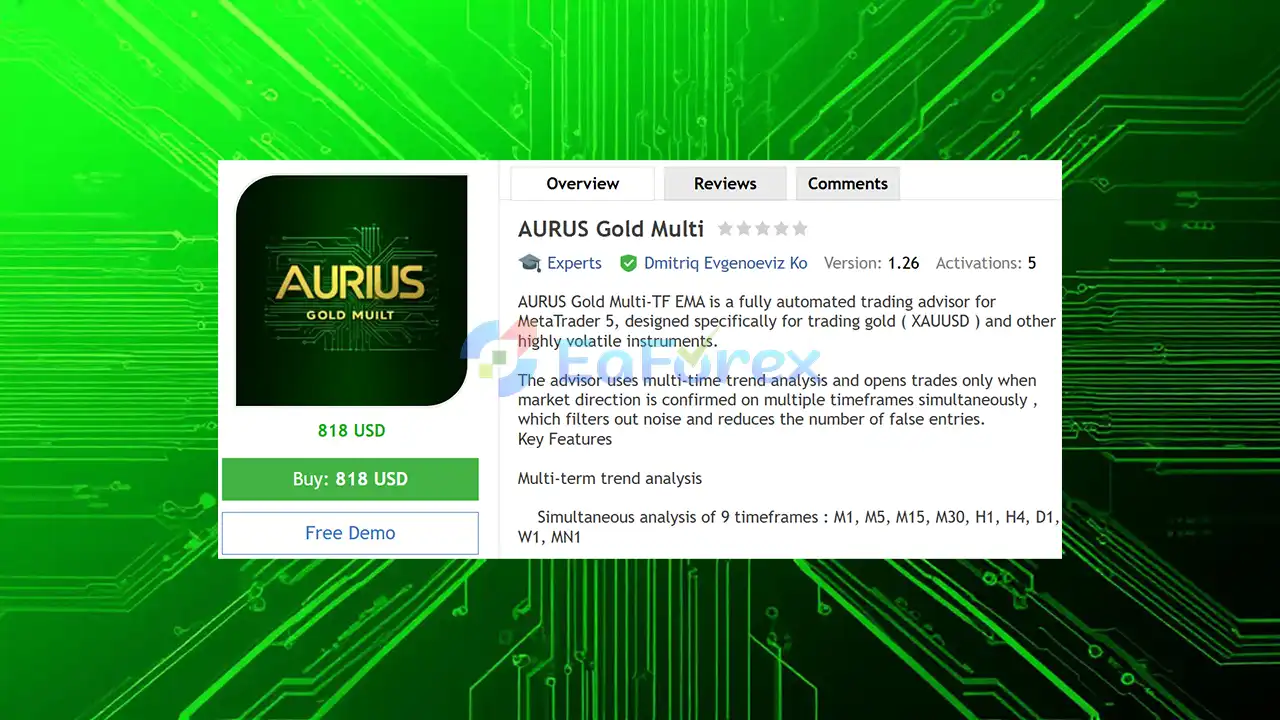
Product Overview
AURUS Gold Multi EA MT5 is a fully automated MetaTrader 5 Expert Advisor (EA) specifically designed for trading XAUUSD (Gold) and other highly volatile financial instruments. The system uses advanced multi-timeframe trend analysis to identify market direction and only opens trades when a predefined level of confirmation is achieved across multiple timeframes.
By analyzing market conditions from M1 through MN1, AURUS Gold Multi EA attempts to reduce short-term market noise and filter out lower-quality trading opportunities. The strategy combines a Triple Exponential Moving Average (EMA) system, ATR-based risk management, price-action filters, momentum confirmation, and flexible position management.
Unlike traditional recovery-based systems, AURUS Gold Multi EA does not use Martingale, Grid, averaging, or hedging strategies. This makes the EA suitable for traders looking for a structured trend-following approach with configurable risk controls.
About the Developer
- Author: Dmitriq Evgenoeviz Ko
- Experience: Over +4 years of experience on MQL5.
- Notable Products: AURUS Gold Multi EA, Golden Scythe EA, Aurum Fade EA MT5, Gold Lady V EA, Golden Talent EA, Golden Snow V, Gold Brick Pro EA, White Horse MT5, Gold Flow MT5, Pure Gold Algo EA, Aurum Path EA Gold Medalist EA, Golden Suite EA, Gold x25 MT4, Golden Harmony MT4, Infinity Gold Impulse MT4, Pharaoh Gold EA, Apex Gold MT4 and other advisors.
- Flagship Product: AURUS Gold Multi EA MT5 is rated as the best performing product of the year.
>> Delivery time 24h-48h after payment.
>>> Refund if not delivered.
>>> You will receive the latest version without any limitations (ID+Time).
>>Reviewed by Jason Stap <<
Main Features of AURUS Gold Multi EA MT5
Multi-Timeframe Trend Analysis
AURUS Gold Multi EA analyzes up to 9 different timeframes simultaneously:
- M1
- M5
- M15
- M30
- H1
- H4
- D1
- W1
- MN1
This multi-timeframe approach allows the EA to evaluate both short-term price movements and broader market direction before opening a position.
Triple EMA Trend System
The EA uses a Triple Exponential Moving Average (EMA) system as part of its primary trend analysis.
The EMA structure helps identify directional market conditions and provides the foundation for determining whether the system should consider Buy or Sell opportunities.
Configurable Confirmation Level
AURUS Gold Multi EA does not necessarily require every timeframe to agree.
The trader can specify how many timeframe confirmations are required before a trade is allowed. This provides flexibility between more frequent entries and more selective trading conditions.
Optional Reverse Mode
An optional Reverse Mode allows the EA to operate with counter-trend logic when configured accordingly.
This feature provides additional flexibility for traders who want to test alternative approaches to market direction rather than relying exclusively on conventional trend-following entries.
Adaptive Risk Management
ATR-Based Stop Loss and Take Profit
The EA uses Average True Range (ATR) to dynamically calculate Stop Loss and Take Profit levels.
Because ATR measures market volatility, this approach can allow trade protection and profit targets to adapt to changing market conditions rather than relying exclusively on fixed distances.
Automatic Position Sizing
AURUS Gold Multi EA can automatically calculate trading volume according to a specified percentage of account capital.
This allows traders to configure risk-based position sizing instead of manually assigning a fixed lot size.
Fixed Lot Mode
For traders who prefer direct control over position volume, the EA also supports Fixed Lot trading.
Minimum Stop-Loss Protection
The system includes an intelligent check for the minimum acceptable Stop Loss distance, helping prevent invalid or excessively close protective levels under broker-specific trading conditions.
Spread Protection
A built-in spread protection mechanism can prevent new trades when the current spread becomes excessively high.
This is particularly relevant when trading XAUUSD, where spreads can expand significantly during volatile market periods, low-liquidity conditions, or major economic events.
How Does AURUS Gold Multi EA MT5 Work?
AURUS Gold Multi EA follows a structured process to evaluate and manage potential trades.
Multi-Timeframe Market Analysis
The EA begins by analyzing trend conditions across its configured timeframes, ranging from M1 to MN1.
This provides a broader view of market direction and helps the system distinguish between short-term movements and larger trends.
EMA Confirmation
The Triple EMA system evaluates the directional structure of the market.
The EA then checks whether the required number of timeframe confirmations has been achieved.
Signal Filtering
Before opening a trade, additional filters can be applied to evaluate candle structure, price patterns, momentum, RSI, and ADX conditions.
These filters are configurable and can be enabled or disabled individually.
Entry Decision
A trade is opened only when the main trend logic and the selected confirmation requirements are satisfied.
This selective approach is designed to reduce unnecessary entries during uncertain market conditions.
ATR-Based Risk Calculation
Once an entry is approved, the EA calculates Stop Loss and Take Profit according to the configured ATR parameters.
Position size can then be determined using either percentage-based risk management or fixed lot settings.
Position Management
After entering a trade, the EA can manage the position using:
- ATR-based trailing stop
- Stop Loss
- Take Profit
- Maximum open-position limits
- Daily trade limits
Conflict Management
The system can automatically close conflicting positions according to its configured trading logic.
A unique Magic Number is used to identify and manage the EA's own trades.
Advanced Trading Signal Filters
One of the main strengths of AURUS Gold Multi EA MT5 is its flexible multi-level signal filtering architecture.
Each filter can be configured independently, allowing traders to build a more selective trading setup.
Spark Plug Filter
The Spark Plug Filter evaluates the most recently closed candle, including:
- Candle body direction
- Body-to-total-range ratio
- Price-action strength
- Confirmation of market intent
The objective is to avoid entries when the latest price movement appears weak or indecisive.
Price Pattern Filter
The Price Pattern Filter identifies classic price-action formations, including:
- Engulfing patterns
- Pin Bars
The patterns are evaluated using closed candles rather than future data and are designed to avoid repainting behavior.
Pulse Filter
The Pulse Filter evaluates current market momentum by comparing candle ranges with prevailing volatility.
It is designed to filter periods characterized by:
- Low market activity
- Flat conditions
- Weak directional movement
RSI Confirmation Filter
RSI can be used as an additional confirmation layer to evaluate directional pressure.
Importantly, RSI does not necessarily generate the primary trading signal. Instead, it can function as a resolving filter within the broader trend-confirmation system.
ADX Strength Filter
ADX can be used to evaluate the strength of the current market movement.
This allows traders to filter out situations where the market direction may be present but lacks sufficient momentum.
Flexible Filter Architecture
Each filter can be independently enabled or disabled.
Traders can therefore choose to use:
- Only the main trend system
- Trend + candle filter
- Trend + price pattern filter
- Trend + RSI/ADX
- Multiple filters simultaneously
The filter architecture is designed to remain compatible with the MetaTrader 5 Strategy Tester.
Why Choose AURUS Gold Multi EA MT5?
Designed for Gold Trading
AURUS Gold Multi EA is specifically optimized for XAUUSD, one of the most actively traded and volatile instruments in the financial markets.
Multi-Timeframe Confirmation
Instead of relying on a single timeframe, the EA evaluates market direction across multiple timeframes, helping traders create more selective entry conditions.
Flexible Signal Filtering
The combination of trend analysis, candle structure, price patterns, ATR volatility, RSI, and ADX gives traders substantial flexibility when configuring their trading strategy.
No Martingale or Grid
AURUS Gold Multi EA does not use:
- Martingale
- Grid trading
- Averaging
- Hedging
This makes its trading architecture fundamentally different from recovery systems that increase exposure after losing trades.
Automated Risk Management
ATR-based SL/TP, percentage-based position sizing, spread protection, and trading limits provide multiple layers of automated risk control.
Suitable for Strategy Testing
The EA is optimized for the MetaTrader 5 Strategy Tester, making it possible to backtest and optimize settings before considering live deployment.
AURUS Gold Multi EA MT5 Reviews
- Advanced Multi-Timeframe Trend Accuracy: AURUS Gold Multi EA MT5 reviews highlight its powerful 9-timeframe confirmation engine combined with a Triple EMA system, helping traders filter market noise and enter only high-probability XAUUSD trades aligned across multiple timeframes.
- Professional Risk & Trade Management: According to many AURUS Gold Multi EA MT5 reviews, the EA stands out with adaptive risk management, ATR-based Stop Loss & Take Profit, trailing stop, and spread protection—designed to handle Gold’s high volatility safely without martingale or grid strategies.
- Stable, Long-Term Trading Performance: AURUS Gold Multi EA MT5 reviews often praise its disciplined, consistency-focused strategy, advanced signal filters (RSI, ADX, price patterns), and full MT5 compatibility, making it suitable for both netting and hedging accounts across brokers.
Performance and Risk Management
AURUS Gold Multi EA MT5 is designed around configurable risk management rather than fixed performance expectations.
The recommended risk level is approximately 0.5%–1% per trade, although the appropriate setting depends on account size, broker conditions, trading strategy, and individual risk tolerance.
Recommended Configuration
| Parameter | Recommended Setting |
|---|---|
| Primary Symbol | XAUUSD |
| Recommended Timeframe | M5 – M15 |
| Trading Platform | MetaTrader 5 |
| Recommended Risk | 0.5% – 1% per trade |
| Lot Calculation | Risk % or Fixed Lot |
| Stop Loss | ATR-Based |
| Take Profit | ATR-Based |
| Trailing Stop | ATR-Based |
| Account Type | Netting or Hedging |
| Spread Protection | Supported |
| Strategy Tester | Supported |
Position Management Controls
The EA provides several controls designed to limit excessive trading activity:
- Maximum number of open positions
- Daily trade limit
- Spread protection
- ATR-based Stop Loss
- ATR-based Take Profit
- ATR trailing stop
- Automatic conflict-position closure
- Unique Magic Number
These controls can help create a more disciplined automated trading environment.
However, risk management features cannot eliminate market risk. Gold can experience rapid price movements, particularly around major economic announcements, unexpected geopolitical events, and periods of abnormal volatility.
Weaknesses and Risk Warnings
Although AURUS Gold Multi EA MT5 includes multiple filters and risk-management mechanisms, traders should understand its limitations before using it on a live account.
Gold Can Be Highly Volatile
XAUUSD can move rapidly within short periods. Sudden price movements may result in slippage or execution prices that differ from expected levels.
Multiple Confirmations Can Reduce Trade Frequency
The more timeframe confirmations and filters that are required, the more selective the EA becomes. This may significantly reduce the number of trades.
Over-Optimization Risk
Because the EA offers many configurable filters and parameters, excessive optimization against historical data may produce settings that perform well in backtests but are less robust in future market conditions.
Broker Conditions Matter
Actual trading results can vary depending on:
- Spread
- Commission
- Slippage
- Execution speed
- Swap costs
- Liquidity
- Broker Stop Level requirements
News Events Can Affect Execution
Even with spread protection and configurable filters, major economic releases can cause extreme volatility, spread expansion, and slippage.
No Guaranteed Profits
No Expert Advisor can guarantee profitable results. Historical backtests and optimized settings should not be interpreted as guarantees of future performance.
Risk Settings Require Careful Configuration
Using excessively high risk percentages or large fixed lots can significantly increase account drawdown. Traders should test the EA on a demo account before deploying it with real capital.
Pros and Cons
Pros
- Designed specifically for XAUUSD and volatile instruments
- Multi-timeframe analysis across 9 timeframes
- Triple EMA trend system
- Configurable timeframe confirmation level
- Optional reverse trading mode
- ATR-based Stop Loss and Take Profit
- ATR-based trailing stop
- Percentage-based automatic lot sizing
- Fixed lot support
- Spread protection
- Maximum open-position limit
- Daily trade limit
- Spark Plug candle filter
- Engulfing and Pin Bar pattern filters
- RSI confirmation filter
- ADX trend-strength filter
- Supports Netting and Hedging accounts
- Compatible with MetaTrader 5 Strategy Tester
- No Martingale
- No Grid
- No averaging
- No traditional hedging recovery system
Cons
- Primarily focused on XAUUSD and volatile markets
- Gold trading can involve substantial volatility
- Multiple filters may reduce trading frequency
- Extensive optimization can increase the risk of curve fitting
- Results depend heavily on broker execution conditions
- High-impact news can cause slippage and spread expansion
- No automated strategy can eliminate market losses
- Requires careful risk configuration before live deployment
How to Install AURUS Gold Multi EA MT5
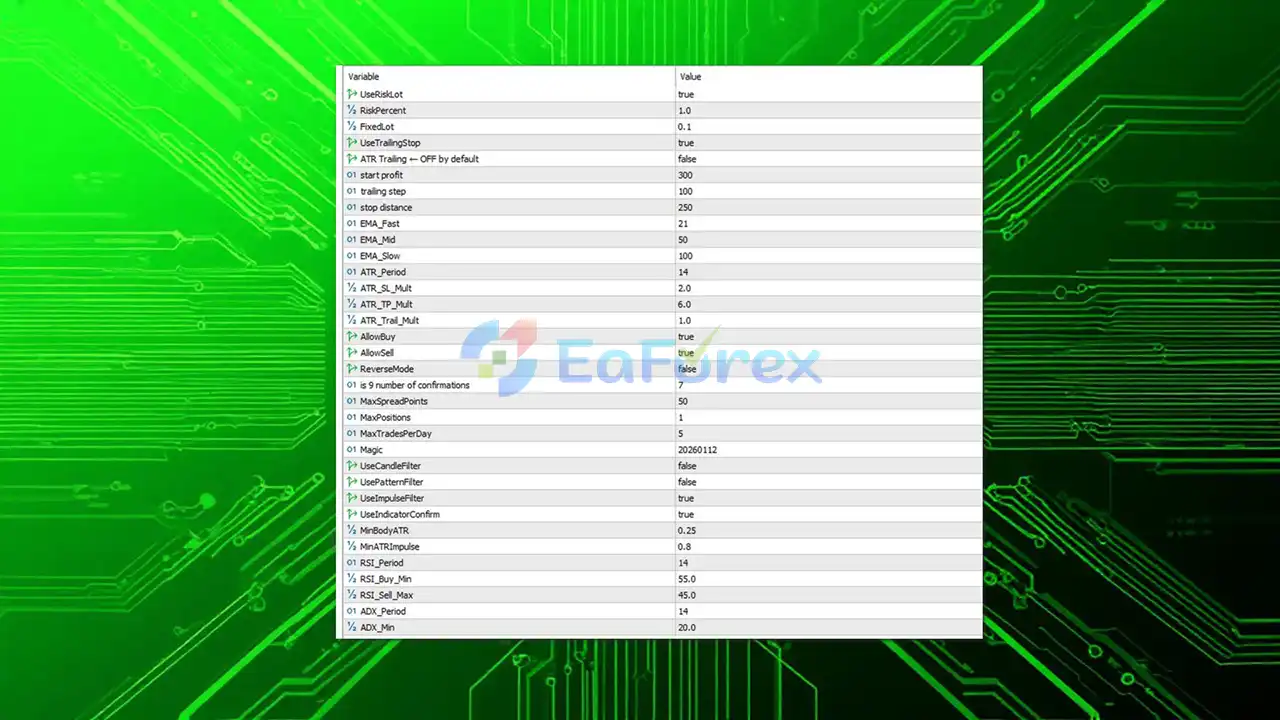 AURUS Gold Multi EA MT5 setting
Step 1: Download the EA
Obtain the AURUS Gold Multi EA MT5 installation file from the official source or your purchase provider.
Step 2: Open MetaTrader 5
Launch MetaTrader 5 and log in to the trading account where you want to install the Expert Advisor.
Step 3: Open the Data Folder
In MetaTrader 5, select:
File → Open Data Folder
Then navigate to:
MQL5 → Experts
Step 4: Copy the EA File
Place the AURUS Gold Multi EA file inside the Experts folder.
If the package includes additional indicators, libraries, presets, or configuration files, place each file in its corresponding MetaTrader 5 directory according to the developer's instructions.
Step 5: Restart or Refresh MetaTrader 5
Restart MetaTrader 5 or refresh the Navigator window so the EA becomes visible under:
Navigator → Expert Advisors
Step 6: Enable Algo Trading
Make sure the Algo Trading button is enabled.
When attaching the EA to a chart, also verify that automated trading permissions are enabled in the Expert Advisor settings.
Step 7: Open the Recommended Chart
For the recommended configuration, open an XAUUSD chart and select the M5 or M15 timeframe.
Step 8: Attach the EA
Locate AURUS Gold Multi EA under the Expert Advisors section and drag it onto the XAUUSD chart.
Step 9: Configure the Parameters
Review and configure the available settings, including:
- Risk percentage
- Fixed lot size
- Required timeframe confirmations
- ATR Stop Loss
- ATR Take Profit
- Trailing Stop
- Maximum open positions
- Daily trade limit
- Spread protection
- Spark Plug Filter
- Price Pattern Filter
- Pulse Filter
- RSI Filter
- ADX Filter
- Reverse Mode
Step 10: Backtest Before Live Trading
Use the MetaTrader 5 Strategy Tester to evaluate the EA under historical market conditions.
Test different settings using realistic spread, commission, and execution assumptions. After backtesting, it is recommended to conduct forward testing on a demo account before considering live deployment.
Important Note
Trading financial markets involves substantial risk. Past performance does not guarantee future results. Always use appropriate risk management and consider testing AURUS Gold Multi EA MT5 under your own broker conditions before using real funds.
What’s Included in the Download Package?
- Setting (If Any).docx
- Installation Guide.docx
>> Join VIP Membership Now <<<
Final Thoughts
In summary, AURUS Gold Multi EA MT5 is a feature-rich automated trading system designed primarily for XAUUSD (Gold) and other highly volatile markets on MetaTrader 5. Its core strength is the combination of 9-timeframe trend analysis, Triple EMA confirmation, ATR-based risk management, and multiple configurable trading filters, allowing traders to build a more selective and structured automated trading approach. The availability of M5 and M15 configurations, automatic risk-based lot sizing, fixed lot mode, spread protection, trailing stop, and daily trade limits also provides considerable flexibility for different trading environments.
One of the notable characteristics of AURUS Gold Multi EA is that it operates without Martingale, Grid, averaging, or traditional recovery hedging strategies. Instead, the system focuses on identifying directional market conditions through multi-timeframe confirmation and filtering potential entries using candle structure, price patterns, momentum, RSI, and ADX. This architecture may appeal to traders who prefer a trend-oriented EA with configurable confirmation requirements rather than an exposure-recovery approach.
However, traders should also recognize the limitations of such a highly configurable system. Requiring more timeframe confirmations and filters can reduce trading frequency, while excessive optimization may increase the risk of curve fitting. Furthermore, XAUUSD remains a highly volatile instrument, and actual results can vary significantly depending on spreads, commissions, slippage, liquidity, broker execution, and market conditions. The EA's risk-management features can help structure trading decisions, but they cannot eliminate market risk or guarantee profitable results.
Overall, AURUS Gold Multi EA MT5 provides a comprehensive framework for automated Gold trading, combining multi-timeframe trend confirmation with adaptive volatility-based trade management and extensive signal filters. Traders interested in using this MT5 Gold EA should first conduct thorough backtesting and forward testing with their own broker conditions, while maintaining conservative risk settings. Historical testing can provide useful insight into how the strategy behaved under specific conditions, but it should always be viewed as historical evidence rather than a guarantee of future performance.



