









-
 Unlimited Activations
-
 Instant delivery
-
 Easy to install






 Unlimited Activations
Instant delivery
Easy to install
Unlimited Activations
Instant delivery
Easy to install
 Free Update
 Free Install Support

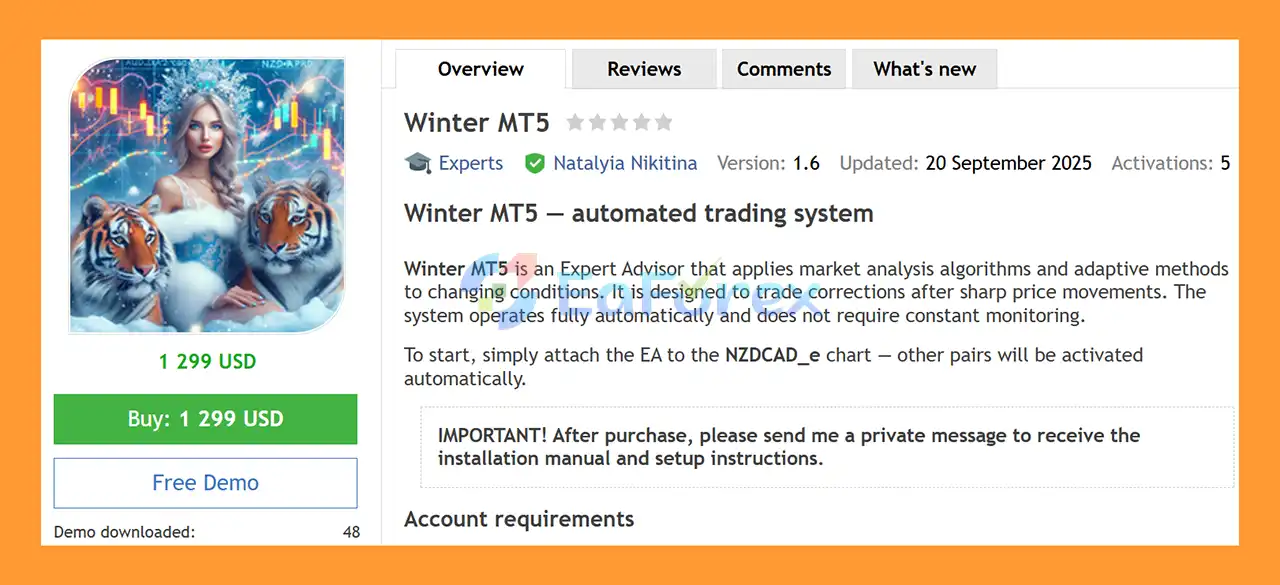
Winter MT5 is a fully automated Expert Advisor for MetaTrader 5, designed to analyze market conditions using advanced analytical algorithms and adaptive methods.
The EA focuses on trading price corrections following sharp market movements, allowing it to seek potential opportunities after significant short-term price displacement.
Winter MT5 operates automatically and does not require constant manual monitoring. According to the developer, traders can simply attach the EA to the NZDCAD_e M15 chart, while the other supported currency pair is activated automatically.
After purchasing the EA, users should contact the developer to receive the official installation and setup instructions.
• Author: Natalyia Nikitina
• Experience: Over +5 years of experience on MQL5.
• Notable Products: Winter MT5, Requiem MT5, Pelagia MT5, Solaris Imperium MT5, PropSurge One MT5, BaLLzProtector MT5, TradeRanger MT5, Duramax MT5, Ride the wind MT5, Force Strategy MT5 and other advisors.
• Flagship Product: Winter MT5 is rated as the best performing product of the year.
>> Delivery time 24h-48h after payment.
>>> Refund if not delivered.
>>> You will receive the latest version without any limitations (ID+Time).>>Reviewed by Jason Stap <<
Winter MT5 Overview
Winter MT5 is designed around the concept of trading corrections that can occur after sharp market movements.
The EA analyzes market conditions and looks for predefined opportunities rather than requiring the trader to manually identify potential correction setups.
The system uses analytical algorithms and adaptive methods intended to respond to changing market conditions.
Its trading activity is therefore based on the internal assessment of the current market environment rather than requiring continuous manual intervention.
Once properly installed and configured, Winter MT5 is designed to operate automatically.
The EA can:
This allows the strategy to operate without constant chart monitoring.
Winter MT5 includes dedicated sniper-related settings:
These settings are designed to control how the EA approaches its trade-entry logic and risk configuration.
Winter MT5 monitors the selected M15 currency-pair environment and analyzes significant market movements.
When a sharp price movement occurs, the EA evaluates whether the subsequent market conditions meet its internal criteria for a potential correction trade.
The EA then determines whether a position should be opened based on its analytical algorithms and configured risk parameters.
The recommended launch chart is NZDCAD_e, while AUDCAD_e is also supported. Other supported pairs can be activated automatically according to the EA’s configuration.
The system is designed to operate continuously once the appropriate MetaTrader 5 environment is established.
Winter MT5 is designed for traders who want an automated system focused on price corrections following strong market movements.
Key characteristics include:
The system also keeps its main configuration relatively focused, allowing traders to adjust important risk and trading parameters without managing an excessively large number of settings.
The developer recommends the following setup:
| Parameter | Recommended Setting |
|---|---|
| Currency Pairs | NZDCAD_e, AUDCAD_e |
| Launch Chart | NZDCAD_e |
| Account Type | ECN |
| Leverage | 1:500 |
| Minimum Deposit | $1,000 |
| Timeframe | M15 |
| VPS | Recommended |
| Recommended Broker | FreshForex |
The EA is intended to be launched on NZDCAD_e, while the other supported pair is activated automatically.
The ECN account requirement is particularly relevant because broker spreads and execution conditions can influence automated trading results.
A VPS is recommended for stable operation, especially when the EA is expected to remain active continuously.
Winter MT5 provides several configurable parameters for identification, position sizing, and risk management.
Displays a custom comment in the MetaTrader journal and account history, helping traders identify trades generated by the EA.
Defines the list of active trading pairs on the M15 timeframe.
The exact symbols may depend on the broker’s symbol suffix configuration.
Provides a unique identifier for positions generated by Winter MT5.
This is useful when multiple Expert Advisors or strategies are running on the same MetaTrader 5 account.
Determines how trading volume is calculated based on the selected risk level.
Controls the initial lot-size calculation according to the configured deposit-load setting.
The default setting is:
Virtual TP = false
The default setting is:
Sniper Mode = true
Defines the percentage-based risk setting applied per trade.
The precision sniper feature is enabled by default.
These parameters should be configured according to account size, broker conditions, and the trader’s acceptable risk level.
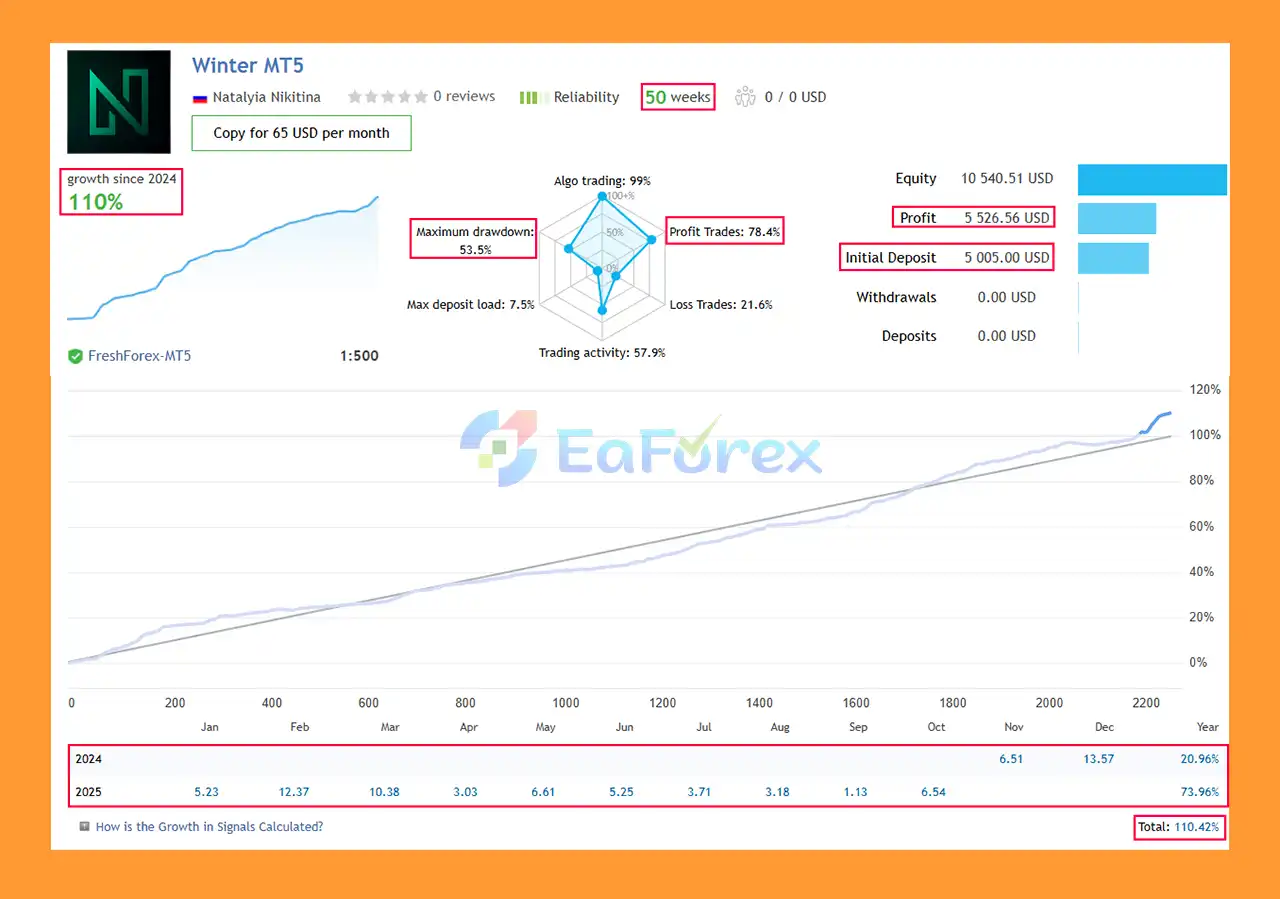
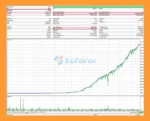
Winter MT5 live Results
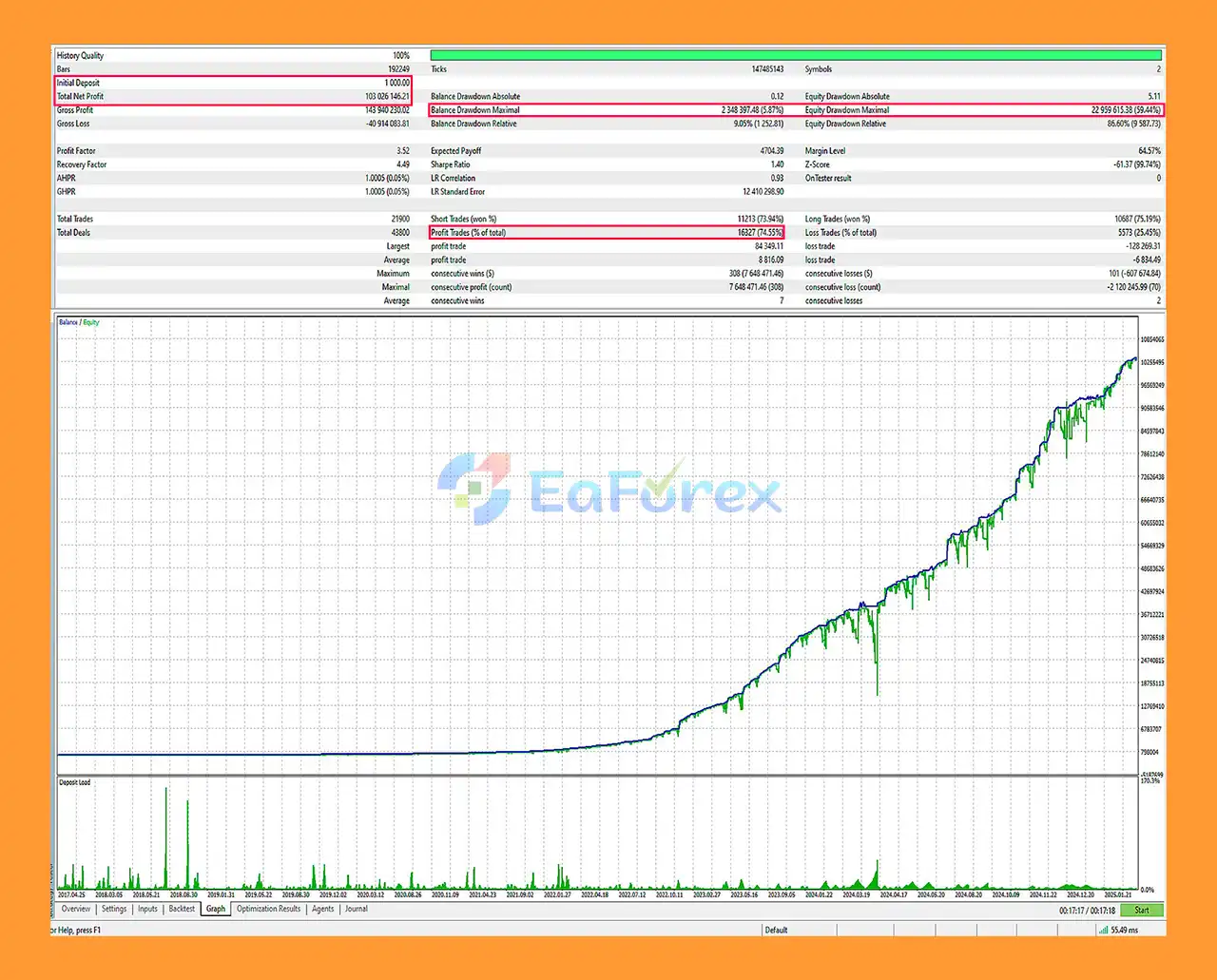
Winter MT5 Backtests
Winter MT5 includes risk-based position sizing rather than requiring traders to use only a fixed lot size.
The Risk Percentage setting allows the trader to determine the intended risk level per trade, while the lot calculation method uses the configured risk settings to determine trading volume.
The developer recommends a minimum deposit of $1,000 for the intended configuration. This should be viewed as a starting recommendation rather than a guarantee that the account will be able to withstand every market condition.
The suggested 1:500 leverage provides greater margin flexibility but can also allow significantly greater market exposure. Higher leverage can therefore amplify both potential gains and potential losses.
Because the strategy trades corrections following sharp price movements, sudden continuation of the original move remains an important risk factor. A market that does not correct as expected can result in adverse price movement against the position.
Trading price corrections can be challenging because a sharp market movement does not necessarily mean that a reversal or correction will follow.
Important risks include:
The EA’s Sniper Mode and Precision Sniper settings should not be interpreted as guarantees of more accurate trades.
The recommended $1,000 deposit is a developer guideline, not a guarantee of safe operation or a maximum drawdown level.
Traders should test Winter MT5 on a demo account before deploying significant live capital.
After purchasing Winter MT5, contact the developer to receive the official setup instructions.
The general installation process is:
The developer recommends launching the EA on NZDCAD_e, with the other supported pair activated automatically.
A stable VPS is recommended when running the EA continuously.
🔺 Experts:
In summary, Winter MT5 is an automated MetaTrader 5 Expert Advisor focused on identifying potential price corrections after sharp market movements.
The system combines adaptive market analysis with automated execution and risk-based position sizing. Its recommended environment is NZDCAD_e and AUDCAD_e on M15, using an ECN account, with 1:500 leverage, a suggested minimum deposit of $1,000, and a VPS for stable operation.
The inclusion of Sniper Mode and Precision Sniper provides additional configuration options for the strategy, while risk percentage and lot-calculation settings allow traders to adjust position sizing according to their account.
However, price-correction strategies remain exposed to situations where a strong market move continues instead of reversing. Leverage, spread, slippage, execution quality, and broker conditions can also materially affect live results.
Winter MT5 should therefore be tested under the trader’s actual broker conditions before significant capital is allocated. Past examples and test results are not guarantees of future performance, and traders should use only funds they can afford to lose.
1. What is Winter MT5?
Winter MT5 is a fully automated Expert Advisor (EA) that trades AUDCAD and NZDCAD pairs using adaptive algorithms to capture price corrections after sharp market moves.
2. How does Winter MT5 work?
The EA analyzes market trends using advanced algorithms, identifies short-term reversals, and executes trades automatically — no manual intervention required.
3. Which currency pairs does Winter MT5 support?
Winter MT5 is optimized for AUDCAD and NZDCAD pairs, and automatically activates both when attached to one chart.
4. Is Winter MT5 suitable for beginners?
Yes. It’s 100% hands-free, easy to install, and comes with a detailed setup guide — ideal for both new and experienced traders.
5. What are the key benefits of using Winter MT5?
Main benefits include adaptive strategy, sniper-precision entries, automatic lot sizing, risk management tools, and consistent profit opportunities.
6. What do I need to run Winter MT5 effectively?
For best results, use an ECN broker (like FreshForex) with a stable VPS to ensure fast execution and reliable performance.
In stock
In stock
In stock
In stock
In stock
Out of stock
No account yet?
Create an Account












 Automatic EA
 EA Best Seller
 Expert Advisor MT4
 Expert Advisor MT5
 HFT EA


Reviews
Clear filtersThere are no reviews yet.