









-
 Unlimited Activations
-
 Instant delivery
-
 Easy to install





 Unlimited Activations
Instant delivery
Easy to install
Unlimited Activations
Instant delivery
Easy to install
 Free Update
 Free Install Support

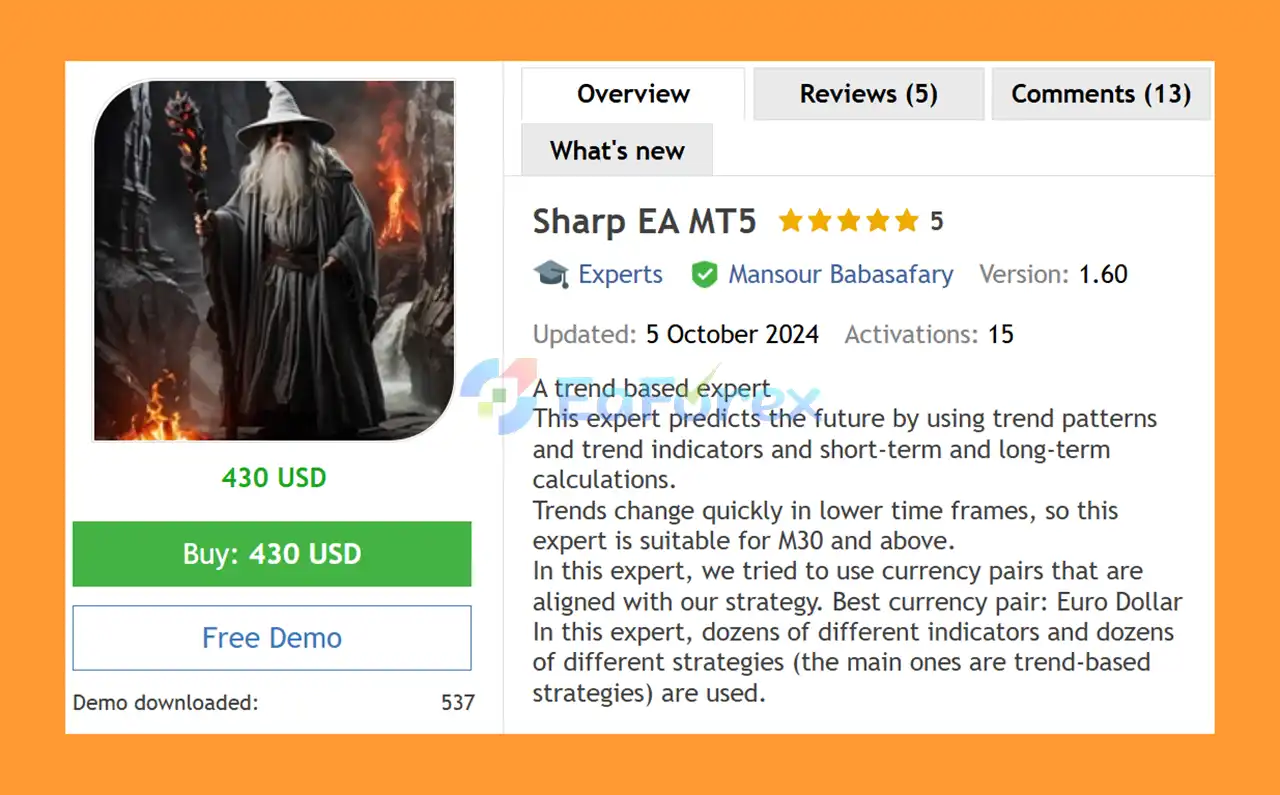
Sharp EA MT5 is a trend-based Expert Advisor for MetaTrader 5 designed to identify and trade potential market trends using multiple trend patterns, technical indicators, and short-term and long-term calculations.
The EA analyzes different aspects of market behavior to identify potential directional movements and trading opportunities. Its strategy combines dozens of technical indicators and multiple trading strategies, with trend-following techniques forming the core of its methodology.
Because trends can change rapidly on lower timeframes, Sharp EA MT5 is designed for M30, H1, and H4 timeframes, allowing the strategy to focus on broader market movements rather than very short-term price fluctuations.
The EA supports several major and cross-currency pairs, with EURUSD (Euro Dollar) identified as the preferred currency pair.
Sharp EA MT5 also includes configurable risk and trade-management options such as Take Profit, Stop Loss, Trailing Stop, risk-based lot sizing, manual lot sizing, trading direction controls, and trading-day filters.
• Author: Mansour Babasafary
• Experience: Over +1 years of experience on MQL5.
• Notable Products: Sharp EA MT5, Ai Multi Trend MT5, Dragon Multi EA MT5 and other advisors.
• Flagship Product: Sharp EA MT5 is rated as the best performing product of the year.
>> Delivery time 24h-48h after payment.
>>> Refund if not delivered.
>>> You will receive the latest version without any limitations (ID+Time).>>Reviewed by Jason Stap <<
Sharp EA MT5 is primarily built around trend-following strategies. The EA analyzes trend patterns and technical indicators to identify potential market direction and determine when trading conditions may be favorable.
The EA uses dozens of different indicators as part of its market analysis. Combining multiple indicators can provide a broader view of market conditions rather than depending on a single technical signal.
Sharp EA MT5 incorporates dozens of strategies, with the main strategies focused on trend-based market analysis.
The combination of different calculations and trading approaches is designed to help the EA evaluate both short-term and long-term market conditions.
The EA uses both short-term and long-term calculations to analyze market trends. This allows Sharp EA MT5 to focus on broader directional movements while still considering more recent price behavior.
Sharp EA MT5 can be used with:
Among these pairs, EURUSD is recommended as the best currency pair according to the supplied specifications.
The EA is designed for:
These higher timeframes are intended to reduce the impact of rapid trend changes commonly seen on lower timeframes.
Sharp EA MT5 supports configurable Take Profit and Stop Loss settings. Traders can manually specify their preferred profit and loss limits using point-based values.
The built-in Trailing Stop function can be used to help protect accumulated profits as the market moves in a favorable direction.
The EA includes a configurable Risk setting for automatic position sizing. According to the supplied recommendations, a risk level of approximately 2% can be considered a starting point, particularly for traders who are new to automated trading.
Traders can disable automatic risk-based position sizing and manually specify a fixed lot size if they prefer the same trade volume for every position.
The Order Long and Order Short settings allow traders to control trading direction.
Users can:
The EA allows users to select the days of the week on which it is permitted to trade. This can be useful for traders who prefer to avoid certain market sessions or days.
The Magic Number setting allows multiple Expert Advisors to operate on the same MT5 account while keeping their trades identifiable.
Each EA should use a different Magic Number to prevent trade-management conflicts.
The Comment setting can be used to distinguish Sharp EA MT5 trades from positions opened by other Expert Advisors or manually opened trades.
Sharp EA MT5 works primarily by analyzing market trends, trend patterns, and technical indicators to identify potential future price direction.
The system uses a combination of short-term and long-term calculations together with multiple indicators and strategies.
A simplified process can be described as:
Market Data → Trend Analysis → Indicator Confirmation → Short/Long-Term Calculation → Trading Signal → Risk Management → Trade Execution
The EA evaluates the current market environment and looks for conditions that align with its trend-based strategy.
When sufficient conditions are met, Sharp EA MT5 can open a Buy or Sell position depending on the detected market direction and the user’s configuration.
The strategy is designed for M30 and higher timeframes because lower timeframes can experience frequent and rapid trend changes that may produce less reliable directional signals.
EURUSD is identified as the best currency pair for Sharp EA MT5.
The EA can also be used with GBPUSD, USDCHF, and NZDUSD, but traders should evaluate each pair individually because trading performance can vary according to market conditions and broker execution.
Sharp EA MT5 may be suitable for traders looking for a trend-following MT5 Expert Advisor that combines multiple technical indicators and strategies.
One of its key advantages is its focus on trend analysis across M30, H1, and H4, rather than relying on extremely short-term signals.
The EA also provides flexible trade management. Users can control risk, manually set lot sizes, define Take Profit and Stop Loss levels, enable Trailing Stop, and select which trading days are allowed.
Another advantage is the absence of aggressive strategies such as Martingale and Hedging, making the system more straightforward from a strategy-structure perspective.
Sharp EA MT5 can also be considered for traders using prop firm accounts, subject to the specific rules and risk limits of each prop firm.
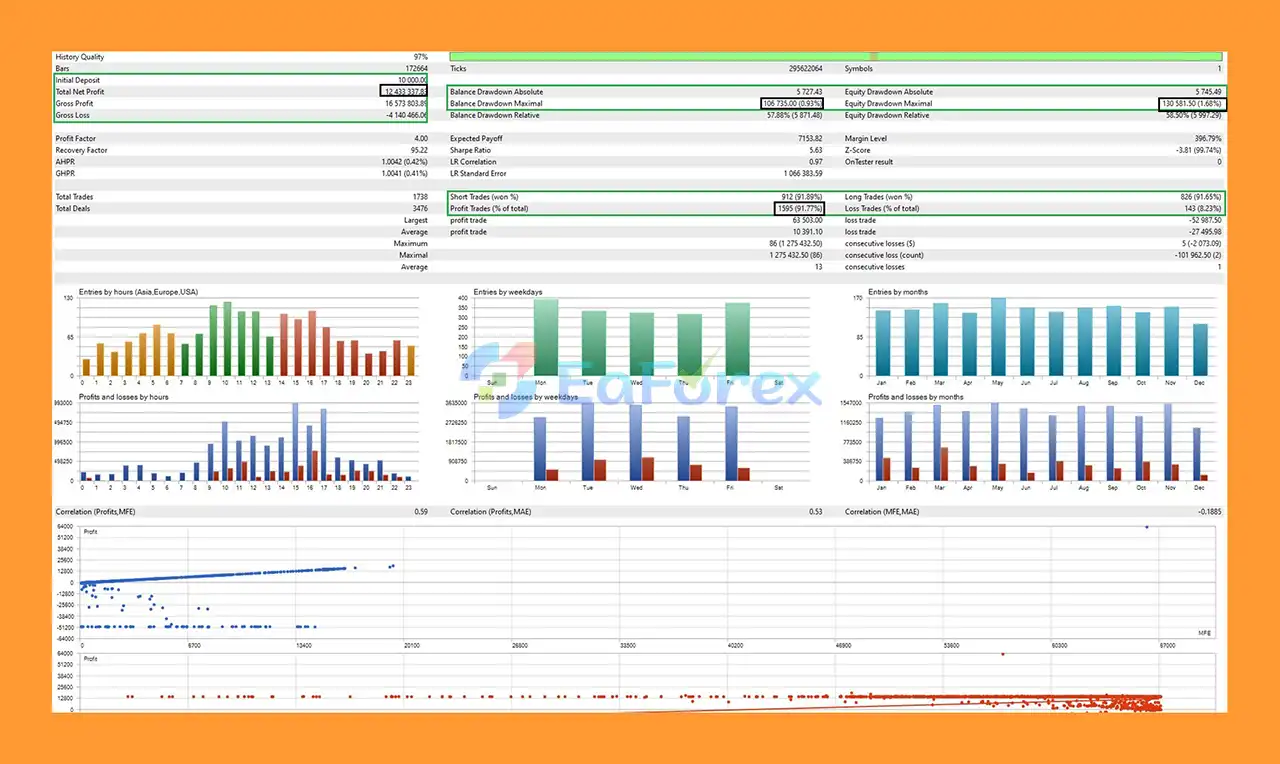
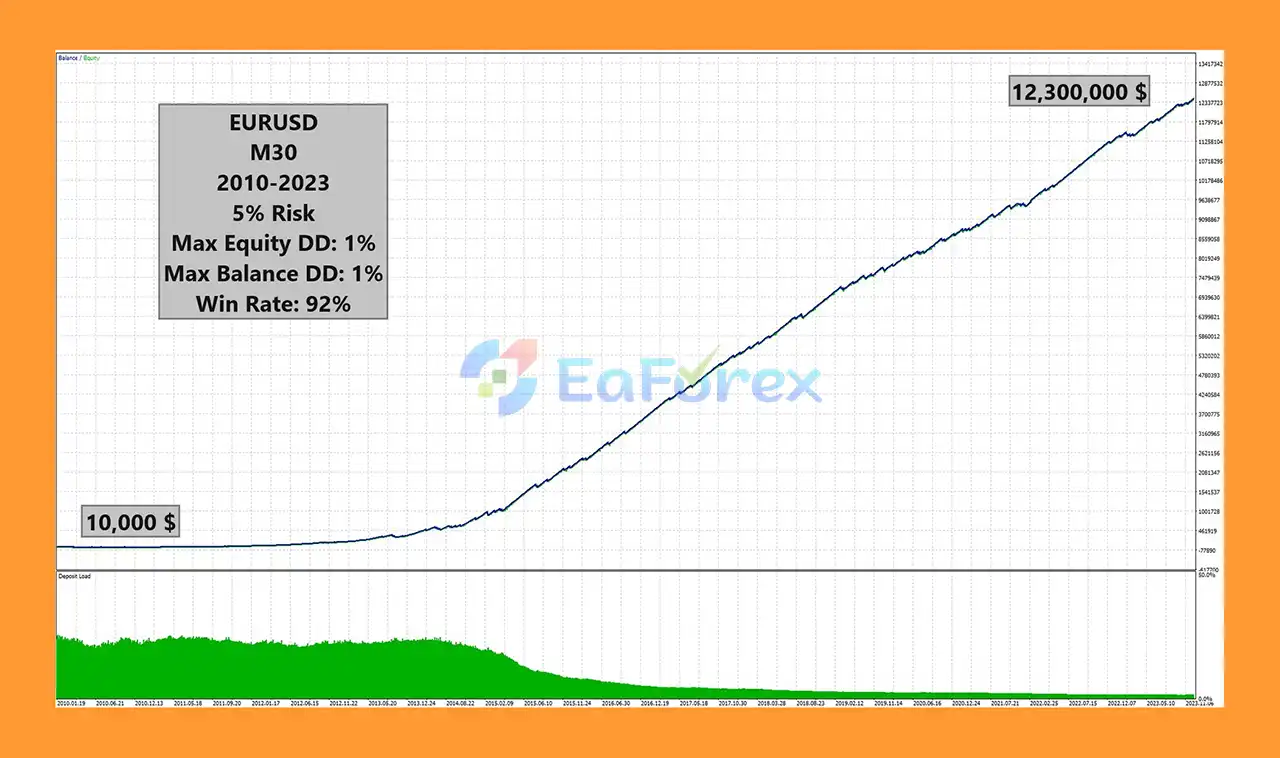
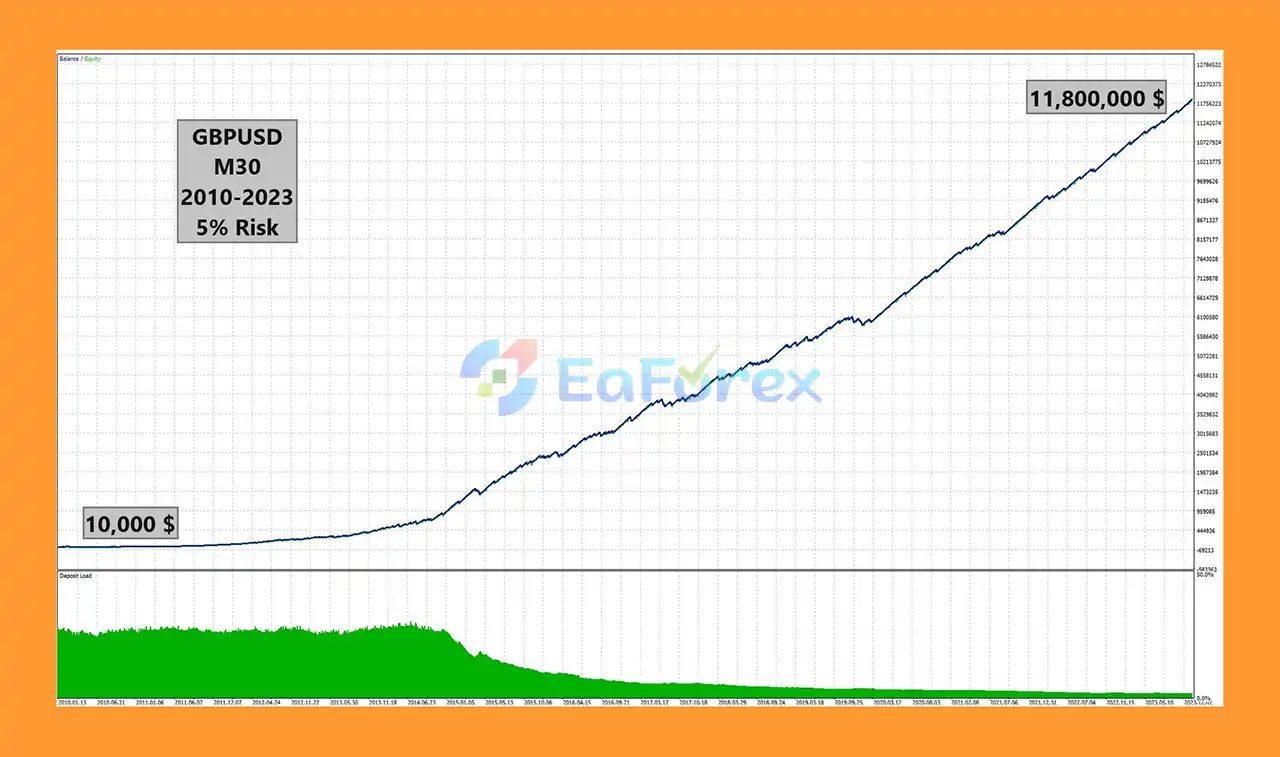
🔺 Performance Metrics:
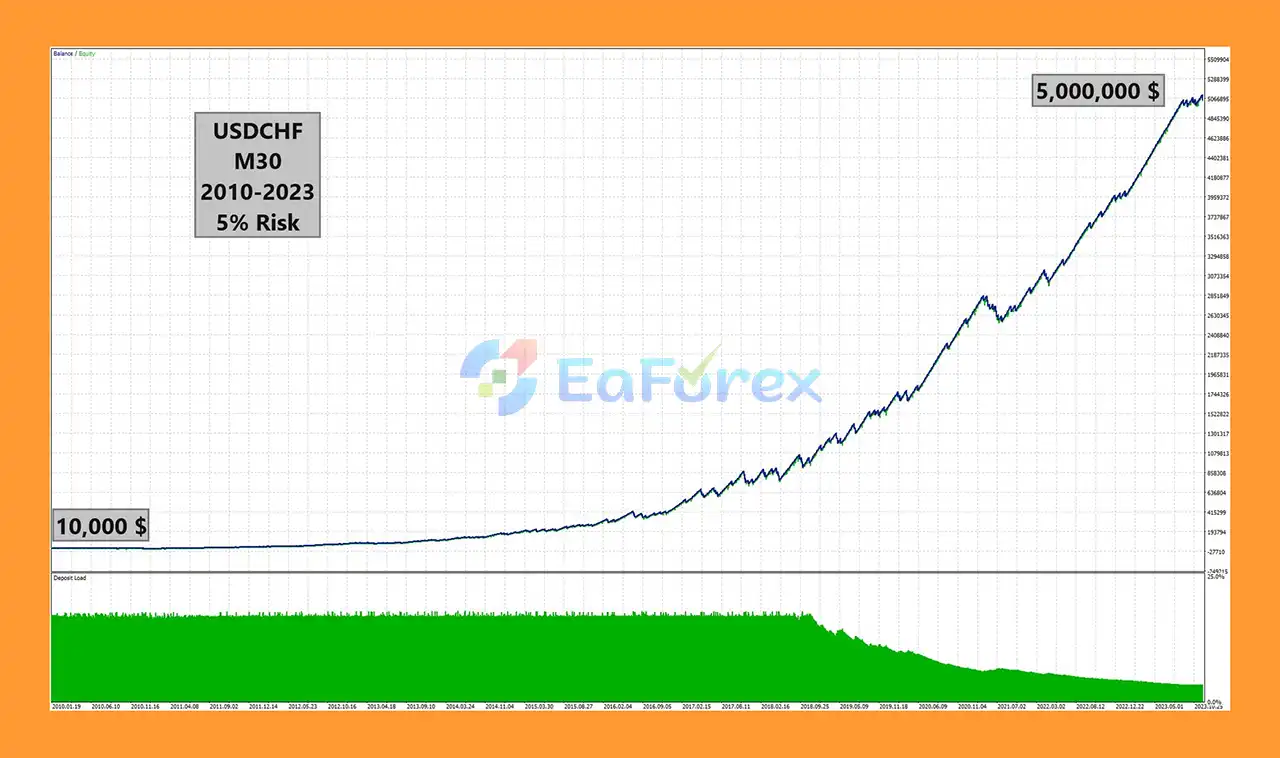
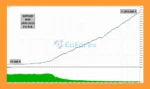
Sharp EA MT5 Backtests Results
Sharp EA MT5 Backtest Results
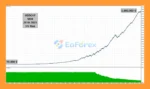
Sharp EA MT5 Backtest Trading Results
Sharp EA MT5 Backtests Trading Results
Sharp EA MT5 includes several tools designed to give traders greater control over account risk.
The Risk parameter allows the EA to automatically calculate trade volume based on the selected risk level. The supplied recommendation is to start conservatively, with 2% risk presented as a suggested level.
Alternatively, traders can manually specify a fixed lot size.
The EA also provides:
These features allow users to adapt the EA to different account sizes and trading preferences.
The minimum tested capital is $100, with minimum tested leverage of 1:50. However, a minimum tested deposit should not be interpreted as a guarantee that $100 is appropriate for live trading.
Actual risk depends on lot size, leverage, Stop Loss distance, broker conditions, spread, slippage, and market volatility.
For new users, starting with lower risk and testing the EA on a demo account is strongly recommended.
Sharp EA MT5 is a trend-based system, meaning its performance can depend heavily on the presence of clear and sustained market trends.
During sideways or highly choppy markets, trend-following strategies may generate false signals or experience consecutive losing trades.
Technical indicators also cannot predict future market movements with certainty. Even when multiple indicators agree, unexpected economic events or rapid changes in market sentiment can cause the market to move against an open position.
Other risks include:
Although Sharp EA MT5 does not use Martingale or Hedging, it is still an automated trading system and cannot eliminate market risk.
Traders should use appropriate risk settings and test the EA under their own broker conditions before deploying it with real capital.
Installing Sharp EA MT5 on MetaTrader 5 is straightforward:
For multiple instances of Sharp EA MT5 or other Expert Advisors on the same account, make sure every EA uses a different Magic Number to avoid trade identification conflicts.
It is recommended to test the EA on a demo account before using it on a live account.
🔺Sharp EA MT5 is highly appreciated by the MQL5 community for bringing stable and reliable profits. Below are 5 star reviews from users:
In summary, Sharp EA MT5 is a trend-following Expert Advisor for MetaTrader 5 that combines multiple technical indicators, trend patterns, and short-term and long-term calculations to identify potential market opportunities.
Designed for M30, H1, and H4, the EA focuses on broader market trends rather than extremely short-term price movements. It supports EURUSD, GBPUSD, USDCHF, and NZDUSD, with EURUSD identified as the preferred trading pair.
The EA also provides a comprehensive set of risk and trade-management features, including Take Profit, Stop Loss, Trailing Stop, automatic risk-based lot sizing, manual lot sizing, trading direction controls, and trading-day filters.
With no Martingale or Hedging and compatibility with FIFO-style requirements and prop firm environments, Sharp EA MT5 can be an interesting option for traders looking for a structured trend-based automated trading system.
However, trend-following systems can perform differently across market conditions. Traders should maintain realistic expectations, use conservative risk settings, and thoroughly test Sharp EA MT5 before committing real capital.
1. What is Sharp EA MT5?
Sharp EA MT5 is a trend-based Expert Advisor designed for major Forex pairs such as EURUSD, GBPUSD, USDCHF, and NZDUSD. Optimized for the M30, H1, and H4 timeframes, it predicts future price movements by analyzing trend indicators and market patterns, delivering accurate and consistent trade signals.
2. Is Sharp EA MT5 safe to use?
Yes. Sharp EA MT5 includes built-in stop loss, take profit, and trailing stop functions, ensuring strict risk management. It does not use risky methods like martingale, grid, or hedge systems, making it suitable for both retail traders and professional prop firm evaluations.
3. What are the key features of Sharp EA MT5?
Sharp EA MT5 offers:
Multi-pair compatibility (EURUSD, GBPUSD, USDCHF, NZDUSD)
FIFO compliance for prop firms
Flexible risk settings (default 2%)
Manual lot options & customizable SL/TP levels
Order management (disable long/short trades)
VPS compatibility for 24/7 trading
4. How profitable is Sharp EA MT5?
Backtests show extraordinary performance. With an initial deposit of $10,000, Sharp EA MT5 generated $12,433,837.78 net profit, while maintaining a 91.77% win rate and a maximum drawdown of less than 2%. These results demonstrate its ability to deliver high growth with strict risk control.
5. What makes Sharp EA MT5 different from other Forex robots?
Unlike scalpers that rely on volatile short timeframes, Sharp EA MT5 focuses on trend-following strategies across M30 and higher charts. It is prop firm friendly, beginner-friendly with a $100 minimum deposit, and regularly updated every 1–2 months, ensuring long-term adaptability and reliability.
6. Does Sharp EA MT5 provide support and updates?
Yes. Buyers receive installation guides, setting files, and ongoing developer support. Updates are released regularly (every 1–2 months), ensuring Sharp EA MT5 continues performing effectively in changing market conditions.
In stock
In stock
In stock
In stock
In stock
Out of stock
No account yet?
Create an Account












 Automatic EA
 EA Best Seller
 Expert Advisor MT4
 Expert Advisor MT5
 HFT EA


Reviews
Clear filtersThere are no reviews yet.