









-
 Unlimited Activations
-
 Instant delivery
-
 Easy to install





 Unlimited Activations
Instant delivery
Easy to install
Unlimited Activations
Instant delivery
Easy to install
 Free Update
 Free Install Support

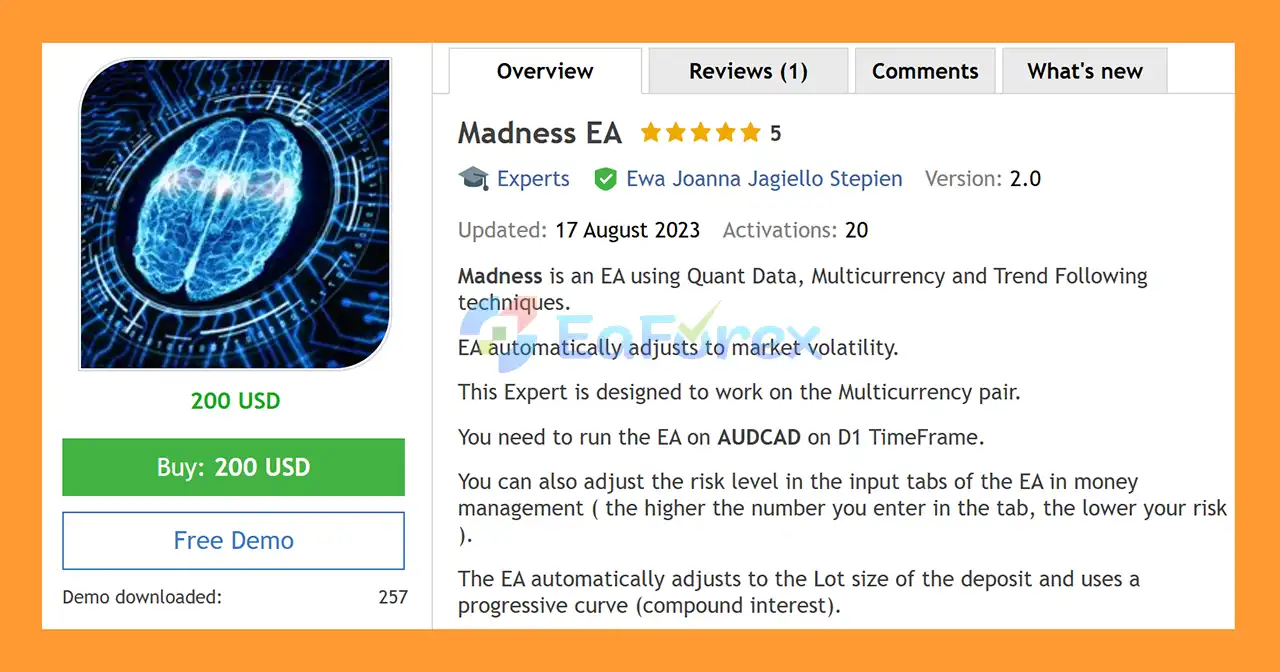
Madness EA MT5 is a fully automated Expert Advisor for MetaTrader 5 that combines Quant Data analysis, multicurrency trading, and trend-following techniques to identify and manage trading opportunities across multiple currency pairs.
The EA is designed to automatically adapt its trading behavior to changing market volatility. Rather than relying on a single fixed market condition, Madness EA MT5 dynamically adjusts its approach according to the current volatility environment.
Although the EA manages multiple currency pairs, it is operated from a single AUDCAD Daily (D1) chart. This makes the setup relatively simple while allowing the Expert Advisor to manage its multicurrency strategy internally.
Madness EA MT5 also features automatic lot-size adjustment based on the account deposit and uses a progressive money-management curve, allowing position sizing to increase as account equity or balance grows.
>> Delivery time 24h-48h after payment.
>>> Refund if not delivered.
>>> You will receive the latest version without any limitations (ID+Time).>>Reviewed by Jason Stap <<
Madness EA MT5 incorporates quantitative market data into its trading logic, helping the system evaluate market conditions and identify potential opportunities.
The EA is specifically designed as a multicurrency Expert Advisor. It does not operate as a single-pair system even though it is attached to an AUDCAD D1 chart.
The strategy uses trend-following techniques to participate in market movements when suitable directional conditions are detected.
One of the key characteristics of Madness EA MT5 is its ability to automatically adjust to changing market volatility.
This allows the Expert Advisor to adapt its trading behavior rather than relying entirely on static parameters.
The EA automatically calculates its lot size according to the available account deposit.
This allows position sizes to scale as the account grows, while the money-management settings provide additional control over the level of exposure.
Madness EA MT5 uses a progressive curve, meaning position sizing can increase as the account balance or equity increases.
This is similar to a compounding approach where trading exposure grows alongside account growth.
Risk can be adjusted directly from the EA’s Money Management input settings.
According to the developer, a higher number entered in the relevant money-management parameter corresponds to lower risk.
Traders should therefore understand the exact relationship between the selected value and position sizing before using the EA on a live account.
Madness EA MT5 can accommodate brokers that use non-standard symbol names.
For example:
The required prefix and postfix can be entered manually in the EA’s input parameters.
Madness EA MT5 combines quantitative data analysis, trend-following logic, multicurrency trading, volatility adaptation, and automated money management.
The general process works as follows:
The user does not need to attach the EA individually to every currency pair managed by the system. The multicurrency architecture is controlled from the main AUDCAD D1 chart.
Madness EA MT5 is designed from the beginning as a multicurrency trading system, providing exposure to multiple currency markets rather than relying on a single instrument.
The EA automatically adjusts to market volatility, which can help the strategy respond to changing market environments.
Position sizing is handled automatically according to the account and selected risk configuration, reducing the need for manual lot calculations.
The progressive curve allows the trading size to adapt as the account grows, supporting a compounding-style money-management approach.
Despite being a multicurrency EA, the primary installation is straightforward: run the Expert Advisor on AUDCAD D1.
Prefix and postfix settings make it possible to configure the EA for brokers that use customized symbol names.
The system focuses on identifying directional market movements rather than relying exclusively on short-term price fluctuations.
🔺XAUUSD (Gold) – 3Year
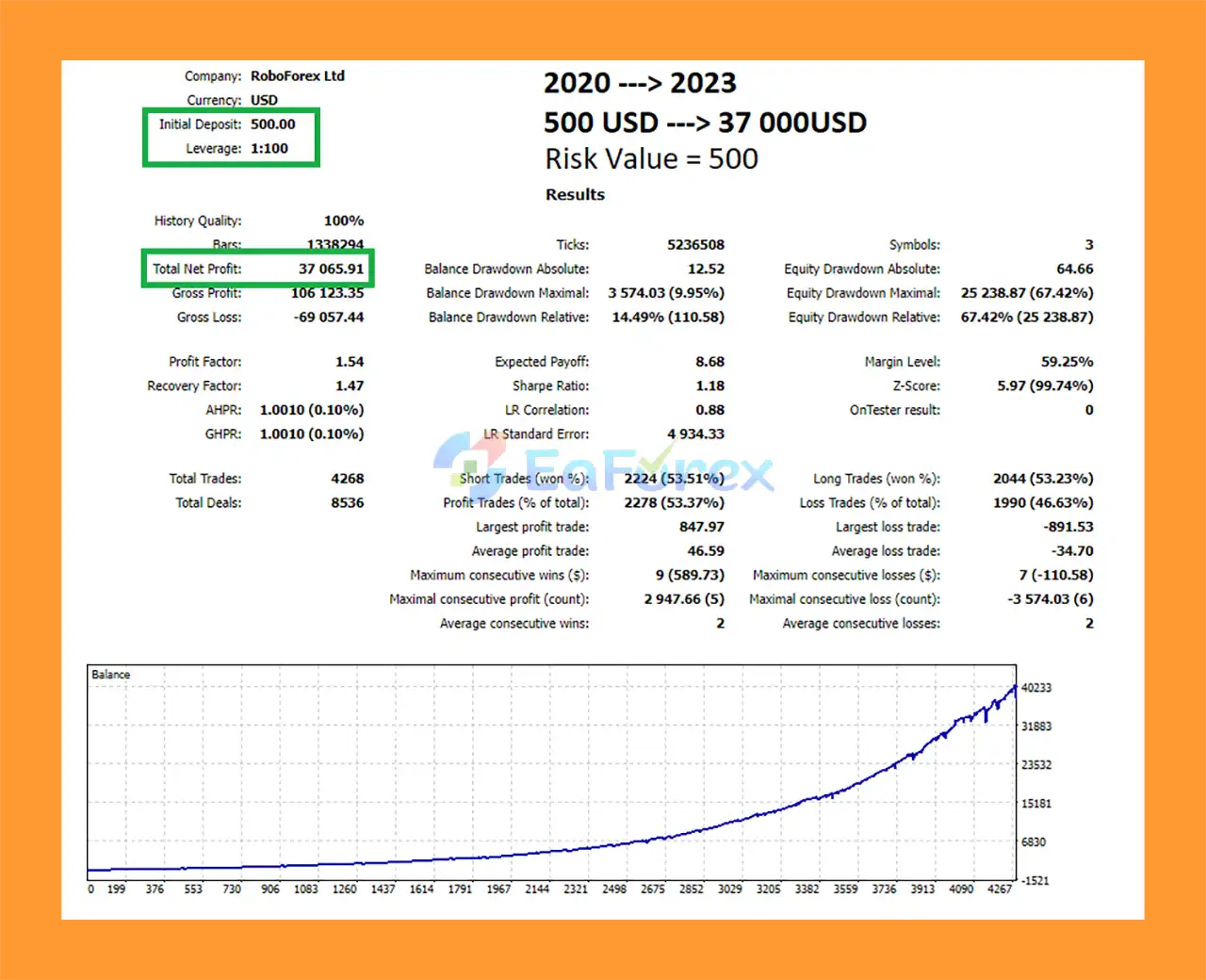
Madness EA MT5 Backtest Trading Results
Madness EA MT5 includes configurable money-management controls that allow traders to adjust the level of trading exposure.
The EA automatically adjusts its lot size according to the account deposit and uses a progressive curve.
The money-management inputs include a risk-level parameter. According to the developer:
A higher value entered in the relevant money-management setting means lower trading risk.
Because different EAs implement money-management parameters differently, traders should verify the relationship between the selected value and actual lot size through backtesting or demo trading before going live.
The stated minimum deposit is:
$500
However, the developer recommends:
$1,000 or more
A larger account can provide more flexibility in managing position sizes and drawdowns.
Minimum recommended environment:
1:50 leverage
Preferred:
1:100 leverage or higher
Higher leverage does not make a strategy safer. It simply provides greater flexibility in margin requirements and can also increase the potential for excessive exposure if position sizing is not controlled properly.
Madness EA MT5 requires a Hedging account.
Traders should confirm that their MT5 broker provides a hedging account before purchasing or deploying the EA.
Because Madness EA MT5 is a multicurrency Expert Advisor, backtesting requires additional preparation compared with a conventional single-pair EA.
Use:
After pressing the Start button in the MT5 Strategy Tester, allow the terminal several minutes to download the historical data required for the multicurrency system.
The initial test may take longer because the Expert Advisor needs historical data for the additional instruments it analyzes and trades.
For faster testing, the developer recommends using:
M1 OHLC
This can significantly reduce testing time compared with more detailed tick-based modeling.
However, traders should still validate important configurations using appropriate high-quality historical data before making conclusions about live performance.
When evaluating Madness EA MT5 backtests, do not use the “Profit in Pips” function.
According to the developer, this calculation is incorrect for the multicurrency strategy.
Instead, evaluate performance using:
Profit in Money
This is particularly important when multiple currency pairs are being traded because pip-based aggregation may not accurately represent the overall monetary result.
Madness EA MT5 is an automated trading system and therefore carries the normal risks associated with algorithmic Forex trading.
Because the EA can trade multiple currency pairs simultaneously, total exposure may be significantly higher than what is visible from the AUDCAD chart alone.
The progressive curve can increase position sizes as the account grows. While this can amplify gains during favorable periods, it can also increase monetary losses during unfavorable periods.
Although the EA is designed to adapt to volatility, no volatility-adjustment mechanism can guarantee correct positioning under every market condition.
Unexpected news, market gaps, liquidity changes, or extreme volatility can produce results that differ significantly from historical tests.
Using leverage of 1:100 or higher can increase the amount of market exposure available relative to account capital. Traders should avoid assuming that higher leverage automatically means better performance.
The EA is designed for Hedging accounts. It may not operate correctly on brokers or account types that use the Netting model.
Brokers using custom symbols such as AUDCADm or a.AUDCAD may require manual prefix/postfix configuration.
Incorrect symbol configuration can prevent the multicurrency system from functioning correctly.
Backtest results are historical simulations and do not guarantee future performance.
Live trading can differ because of:
Madness EA MT5 should not be considered a guaranteed-profit system. Any automated trading strategy can experience losing trades, drawdowns, and extended periods of underperformance.
Copy the Madness EA MT5 file into the appropriate:
MetaTrader 5 → MQL5 → Experts
folder.
Restart MetaTrader 5 or refresh the Expert Advisors section in the Navigator.
Open:
AUDCAD → D1
This is the required main chart for the EA.
Drag Madness EA MT5 onto the AUDCAD Daily chart.
Make sure automated trading is enabled in MetaTrader 5.
Open the EA’s input parameters and configure the money-management settings according to your preferred risk level.
Remember that, according to the developer, a higher value in the relevant risk parameter means lower risk.
Start conservatively and verify the actual position sizing on a demo account before moving to live trading.
If your broker uses a customized symbol name, enter the required prefix and postfix in the EA settings.
Examples include:
AUDCADma.AUDCADUse the exact symbol format provided by your broker.
Make sure the MT5 account is a Hedging account.
For backtesting or initial operation, give MT5 sufficient time to download historical data for the multicurrency instruments used by the EA.
Before using real funds, run the EA on a demo account and monitor:
>> Join VIP Membership Now <<<
Madness EA MT5 is a multicurrency Expert Advisor built around quantitative data, trend-following techniques, adaptive volatility management, and progressive money management.
Its distinctive feature is the ability to manage multiple currency pairs while being operated from a single AUDCAD D1 chart. The automatic lot-sizing system and configurable money-management settings provide additional flexibility for traders with different risk preferences.
The EA is relatively simple to deploy, but its multicurrency architecture means traders should pay particular attention to historical-data availability, total portfolio exposure, leverage, and account type.
For backtesting, use AUDCAD D1, allow sufficient time for MT5 to download the required multicurrency data, and evaluate results using profit in money rather than profit in pips.
As with any automated Forex strategy, Madness EA MT5 should be tested thoroughly on a demo account before live deployment. Historical performance is not a guarantee of future results, and conservative risk management remains essential.
1. What is Madness EA MT5?
Madness EA MT5 is an advanced automated trading system for MetaTrader 5, built on quantitative data analysis, multicurrency trading, and trend-following strategies. It adapts to market volatility and applies smart money management to maximize growth.
2. Which currency pairs does Madness EA MT5 support?
While Madness EA MT5 is designed for multicurrency trading, it is fully optimized for the AUDCAD pair on the D1 timeframe. Traders can also explore other pairs depending on their strategy.
3. Does Madness EA MT5 require manual trading or monitoring?
No, Madness EA MT5 is a fully automated Expert Advisor. Once installed and configured, it runs 24/7 without manual intervention, making it ideal for both beginners and professional traders.
4. How does Madness EA MT5 manage risk?
The EA includes flexible risk settings that can be customized in the input tab. It uses progressive lot-sizing and compound interest principles to balance growth and drawdown control.
5. Can I backtest Madness EA MT5 before using it live?
Yes. Madness EA MT5 is backtest-ready on MetaTrader 5, including M1 OHLC testing for faster simulations. This allows traders to verify strategies and performance before going live.
6. What results can I expect from Madness EA MT5?
Backtests from 2020–2023 with a $500 initial deposit showed $37,065.91 net profit and a maximum drawdown of only 9.95%, demonstrating its potential for consistent and low-risk growth.
In stock
In stock
In stock
In stock
In stock
Out of stock
No account yet?
Create an Account












 Automatic EA
 EA Best Seller
 Expert Advisor MT4
 Expert Advisor MT5
 HFT EA

