









-
 Unlimited Activations
-
 Instant delivery
-
 Easy to install






 Unlimited Activations
Instant delivery
Easy to install
Unlimited Activations
Instant delivery
Easy to install
 Free Update
 Free Install Support

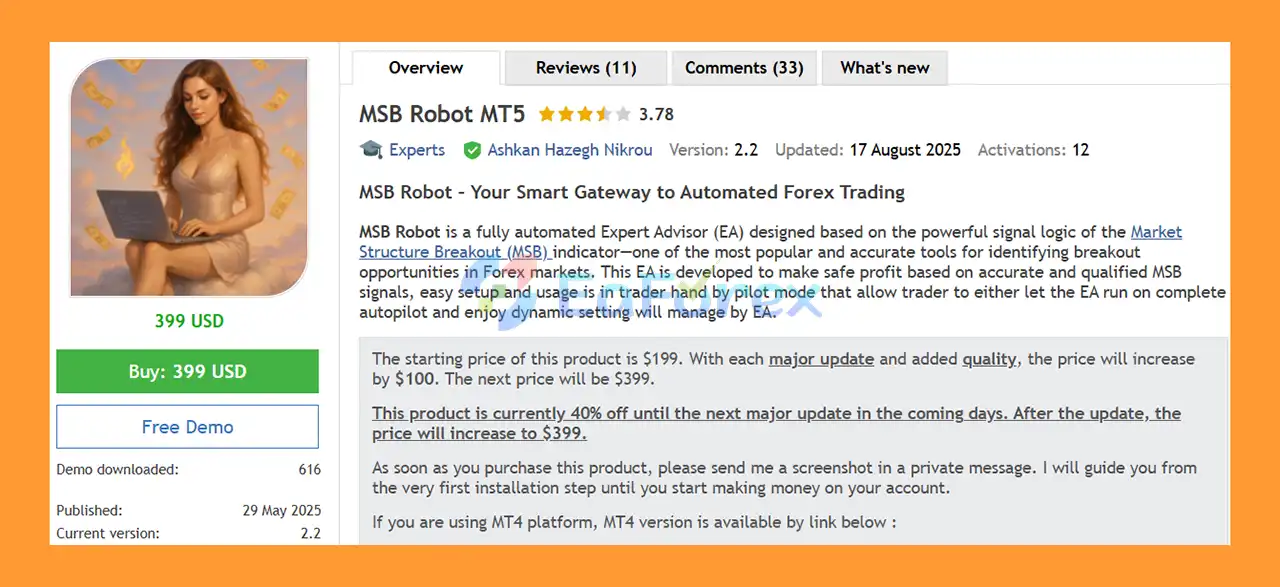
MSB Robot MT5 is a fully automated Expert Advisor for MetaTrader 5 designed around the trading logic of the Market Structure Breakout (MSB) strategy. The system is built to identify potential breakout opportunities by analyzing changes in market structure and applying multiple confirmation filters before entering trades.
The EA is designed for traders who want a combination of automated trading, market structure analysis, flexible risk management, and easy setup. With its Auto-Pilot Mode, users can allow MSB Robot MT5 to manage trading automatically without constantly changing parameters.
For more experienced traders, the EA also provides a Manual Mode and a customizable chart-based interface. This allows users to experiment with their own configurations and develop trading approaches based on the MSB strategy.
According to the provided recommendations, the EA is particularly suitable for XAUUSD and USDJPY on the H1 timeframe, although it is designed to support a wide range of MT5 account types and brokers.
• Author: Ashkan Hazegh Nikrou
• Experience: Over +6 years of experience on MQL5.
• Notable Products: MSB Robot MT5, Market Structure Break Out, Currency Meter Pro and other advisors.
• Flagship Product: MSB Robot MT5 is rated as the best performing product of the year.
>> Delivery time 24h-48h after payment.
>>> Refund if not delivered.
>>> You will receive the latest version without any limitations (ID+Time).>>Reviewed by Jason Stap <<
MSB Robot MT5 is based on the Market Structure Breakout (MSB) trading concept. The strategy focuses on identifying potential breakout conditions in the market and using qualified signals to determine possible trade entries.
The Auto-Pilot Mode is designed for traders who prefer fully automated execution.
Once the EA is configured and enabled, traders can allow the robot to manage its trading parameters dynamically without needing to make frequent manual adjustments.
To improve trade-entry quality, MSB Robot MT5 combines the MSB signal logic with additional filters, including:
These filters are intended to help the EA identify more qualified trading opportunities rather than relying on a single market signal.
The built-in Equity Guard is a capital-protection feature designed to monitor account equity and help control trading activity when predefined equity conditions are reached.
This can provide an additional layer of protection during unfavorable market conditions.
The Gap Guard is another security feature included in the EA. It is designed to help manage trading risks associated with market gaps and abnormal price movements.
MSB Robot MT5 provides three primary risk profiles:
These settings can be adjusted directly through the chart interface, giving traders more control over their preferred risk level.
Professional traders can use Manual Mode to test their own configurations and customize the EA’s trading parameters.
This makes the robot suitable not only for fully automated trading but also for traders who want to experiment with different MSB-based strategies.
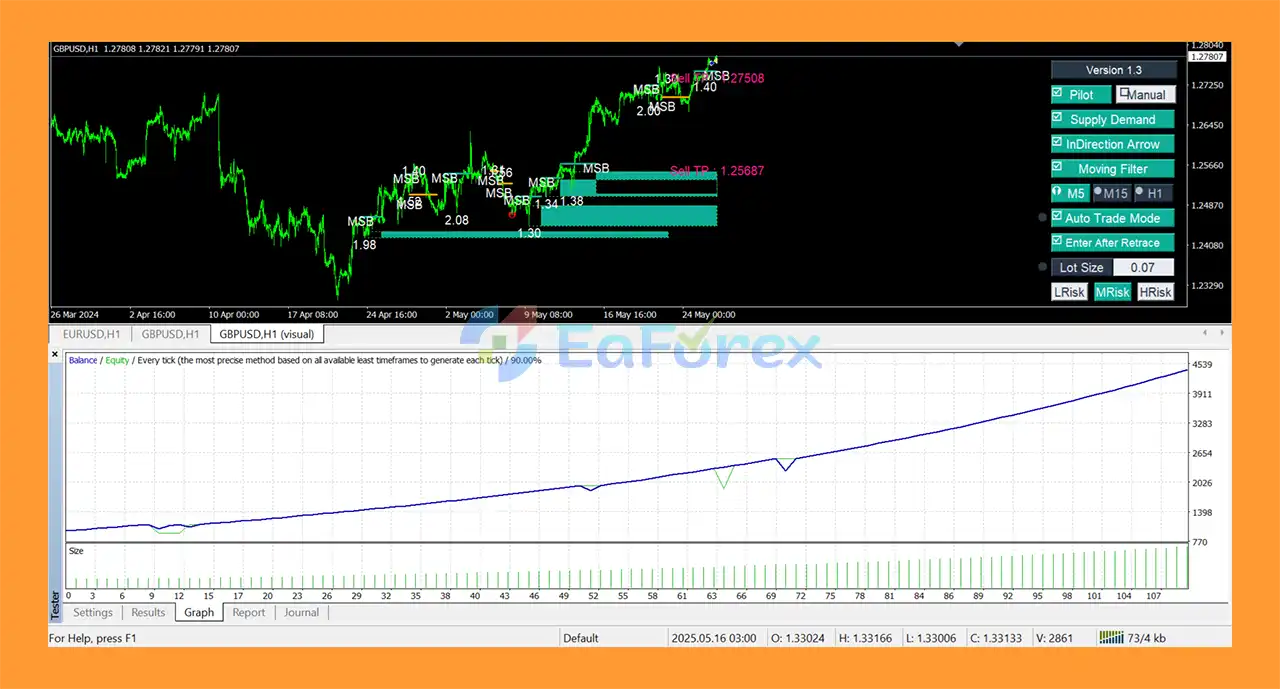
The EA includes a customizable GUI on the MT5 chart, allowing users to view and adjust important settings directly from the trading interface.
According to the provided product information, MSB Robot MT5 can operate with various brokers and MT5 account types, including:
This provides flexibility for traders with different account structures.
MSB Robot MT5 works by combining Market Structure Breakout signals with multiple technical confirmation filters.
The general trading process can be summarized as:
Market Structure Analysis → Breakout Detection → Signal Confirmation → Risk Assessment → Trade Entry → Position Management → Exit
The EA first analyzes the market to identify potential changes or breakouts in market structure.
When a potential MSB signal is detected, additional filters such as Moving Average, Stochastic, and Volume can be used to confirm the trading opportunity.
After the signal meets the configured conditions, the EA can automatically execute a Buy or Sell position.
In Pilot Mode, traders can allow the EA to manage its trading process automatically. The system is designed to dynamically manage relevant settings according to its internal trading logic.
This makes the Auto-Pilot mode particularly useful for traders who prefer a simplified setup and do not want to manually adjust numerous parameters.
More experienced traders can switch to Manual Mode and test their own configurations through the chart-based interface.
This allows users to explore different risk levels and strategy settings instead of relying exclusively on the default automated configuration.
MSB Robot MT5 is built around the Market Structure Breakout strategy, a trading approach focused on identifying potential changes in market structure and breakout opportunities.
The Auto-Pilot Mode allows traders to automate the trading process and reduce the need for constant manual intervention.
The combination of MSB signals, Moving Average, Stochastic, and Volume filters provides a multi-layer approach to trade confirmation.
The inclusion of Equity Guard and Gap Guard provides additional risk-control mechanisms designed to help protect trading capital during unfavorable conditions.
Traders can choose between Low, Medium, and High risk settings depending on their account size and preferred trading style.
MSB Robot MT5 is designed to work with a wide range of MT5 account configurations, including Hedging, Netting, Cent, Micro, Standard, ECN, and other supported account types.
The combination of Auto-Pilot Mode and Manual Mode gives both hands-off traders and experienced strategy testers more flexibility.
The provided recommendations highlight XAUUSD and USDJPY on the H1 timeframe as suitable starting markets for the EA.
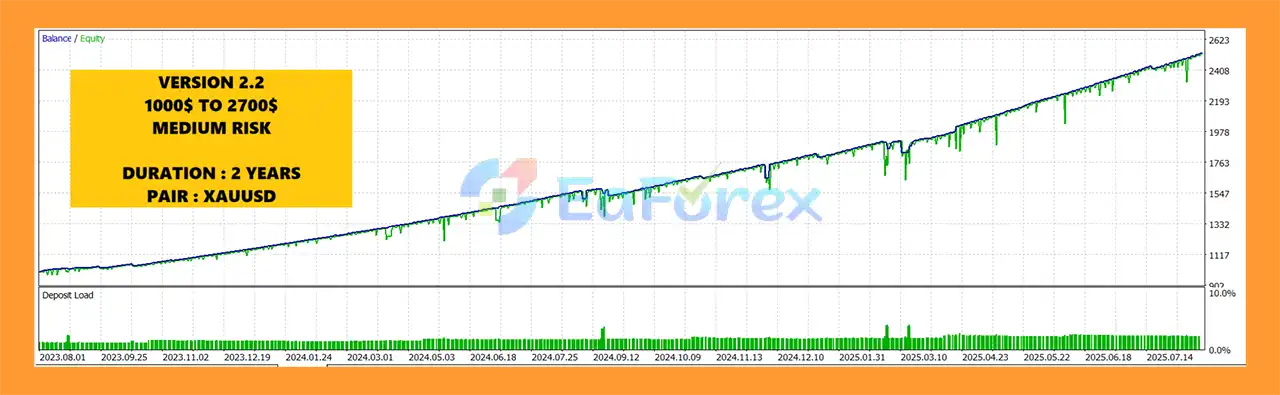
🔺 XAUUSD (Gold) – MEDIUM RISK (2 years)
MSB Robot MT5 Backtests Results
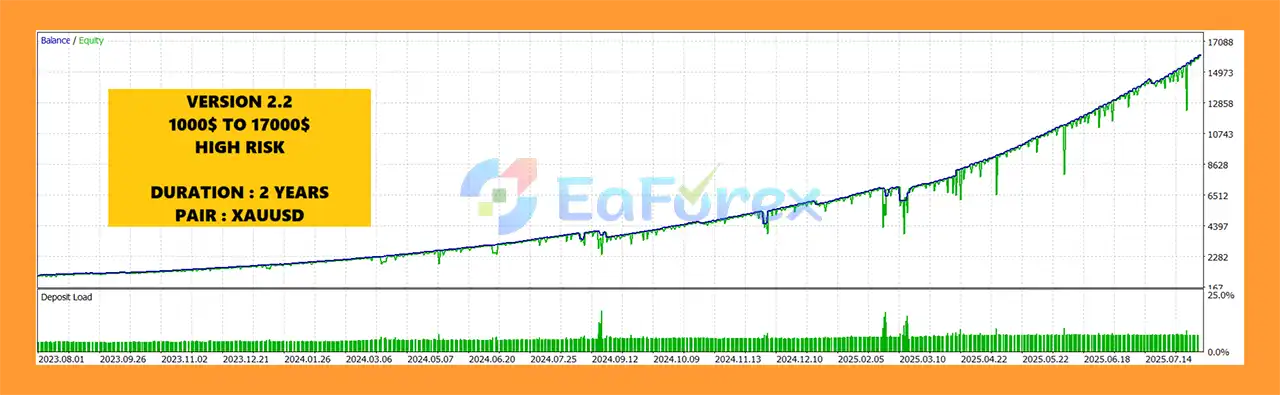
🔺 XAUUSD (Gold) – HIGH RISK (2 years)
MSB Robot MT5 Backtest Results
MSB Robot MT5 is designed with several features intended to help manage trading risk.
The primary risk-management tools include:
The developer recommends starting with a minimum deposit of $1,000 and leverage of 1:10 or higher.
For users who want to operate the EA with approximately $100, the provided recommendation is to use a Cent account rather than a conventional Standard account.
| Setting | Recommendation |
|---|---|
| Minimum Deposit | $1,000 |
| Leverage | 1:10 or higher |
| Recommended Pairs | XAUUSD, USDJPY |
| Recommended Timeframe | H1 |
| Recommended Mode | Pilot |
| Account Types | Hedging, Netting, Zero, Cent, Micro, Standard, Premium, ECN |
These recommendations should be treated as starting points rather than guarantees of performance.
Actual results can vary depending on broker conditions, spreads, execution speed, leverage, account balance, market volatility, and risk settings.
Although MSB Robot MT5 includes several risk-management features, automated Forex trading still involves significant financial risk.
A Market Structure Breakout does not guarantee that price will continue in the expected direction. False breakouts can occur, particularly during volatile or uncertain market conditions.
Even with multiple confirmation filters, Moving Average, Stochastic, Volume analysis, Equity Guard, and Gap Guard, the EA cannot eliminate trading risk or guarantee consistent profits.
Using the High Risk configuration can significantly increase exposure and potential drawdown compared with a more conservative setup.
New users should consider starting with lower-risk settings and testing the EA on a demo or Cent account before moving to larger live capital.
Gold (XAUUSD) can experience rapid price movements, especially around major economic news, central-bank announcements, and unexpected geopolitical events.
Traders should carefully consider this volatility when determining account size and risk settings.
Spread, slippage, execution speed, commissions, trading sessions, and account conditions can influence the real-world performance of an Expert Advisor.
Backtest or historical results should therefore not be interpreted as a guarantee of future live performance.
Higher leverage can increase both potential returns and potential losses. Traders should select leverage and position sizing according to their risk tolerance and available capital.
Installing MSB Robot MT5 on MetaTrader 5 generally follows the standard Expert Advisor installation process.
Obtain the MSB Robot MT5 files from the official product source.
Launch your MT5 trading terminal and log in to the desired trading account.
Go to:
File → Open Data Folder
Then navigate to the appropriate MQL5 → Experts directory.
Copy the MSB Robot MT5 Expert Advisor files into the Experts folder.
Restart the MT5 terminal or refresh the Expert Advisors section in the Navigator window.
For the recommended setup, open:
Then locate MSB Robot MT5 under Navigator → Expert Advisors and attach it to the chart.
Choose the preferred operating mode:
Select the appropriate risk profile and review the EA’s parameters before enabling live trading.
For beginners, a conservative risk configuration and demo or Cent account testing are recommended.
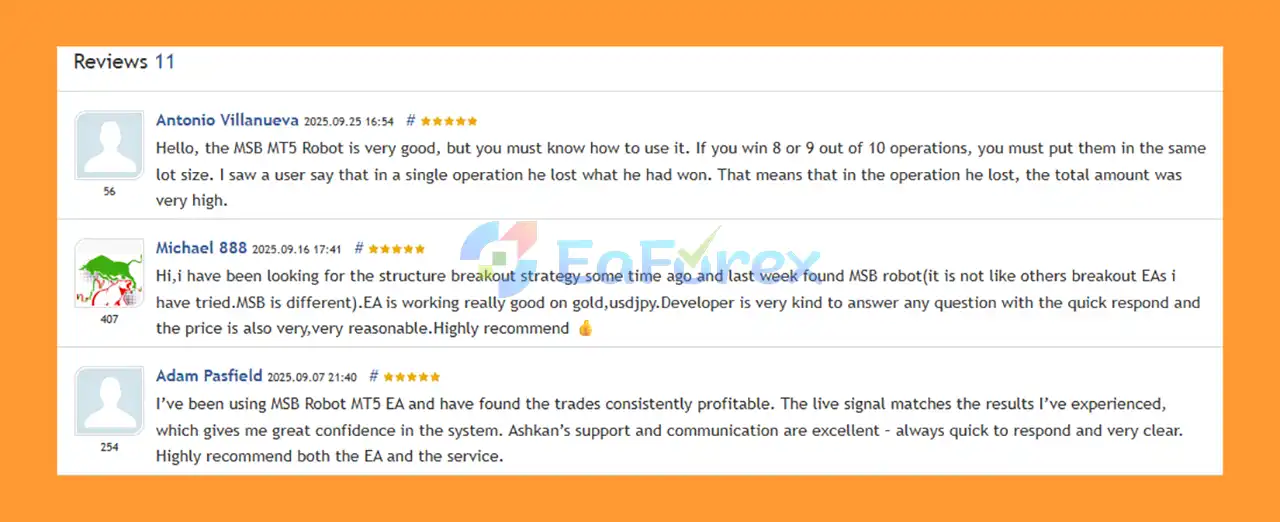
🔺MSB Robot MT5 is highly appreciated by the MQL5 community for bringing stable and reliable profits. Below are 5 star reviews from users:
User Reviews
🔺 Experts:
MSB Robot MT5 is a market-structure-based Expert Advisor for MetaTrader 5 designed to automate breakout trading using the Market Structure Breakout concept together with Moving Average, Stochastic, and Volume confirmation filters.
Its strongest advantages are the combination of Auto-Pilot trading, Manual Mode, flexible risk settings, Equity Guard, Gap Guard, and a chart-based interface. The recommended starting markets are XAUUSD and USDJPY on H1, with a suggested minimum deposit of $1,000 for standard trading conditions.
For traders who prefer a more hands-off approach, Pilot Mode can simplify the setup and allow the EA to manage its trading logic automatically. More experienced traders can instead use Manual Mode to test customized configurations.
However, MSB Robot MT5 should not be considered a guaranteed-profit system. Breakout strategies can produce false signals, while gold and other volatile instruments can experience rapid price movements. Proper position sizing, conservative risk settings, adequate capital, and thorough demo testing remain essential.
Overall, MSB Robot MT5 can be considered a flexible solution for traders looking for an automated Market Structure Breakout EA for MT5, particularly for XAUUSD and USDJPY trading on the H1 timeframe.
1. What is MSB Robot MT5?
MSB Robot MT5 is a fully automated trading system based on the powerful Market Structure Breakout (MSB) indicator. It identifies genuine breakout opportunities with high precision and executes trades automatically — delivering consistent and safe profits in all market conditions.
2. How does MSB Robot MT5 work?
The EA follows the MSB breakout logic, detecting true market structure breaks and filtering out false signals using advanced technical tools such as moving averages, stochastic analysis, and volume filters. It adapts dynamically to live market movements for optimized entries and exits.
3. Which trading pairs and timeframes are best for MSB Robot MT5?
MSB Robot MT5 is optimized for XAUUSD (Gold) and USDJPY on the H1 timeframe. However, it also performs well on other Forex pairs, with future updates expanding its compatibility for additional instruments.
4. Is MSB Robot MT5 safe to use for automated trading?
Yes. The EA includes Equity Guard and Gap Guard features to protect your account from extreme volatility or gaps. These systems ensure controlled risk exposure and preserve capital even during unpredictable market conditions.
5. What kind of account and broker does MSB Robot MT5 support?
MSB Robot MT5 works with all broker types and account structures, including Hedging, Netting, ECN, Cent, Micro, and Standard accounts. It offers full compatibility with the MT5 platform and runs efficiently on all major broker environments.
6. Why should traders choose MSB Robot MT5?
Traders choose MSB Robot MT5 for its proven MSB signal accuracy, true automation, and built-in protection systems. It’s beginner-friendly yet powerful enough for experienced traders, offering flexible risk settings, high profitability, and real-time adaptability without manual intervention.
In stock
In stock
In stock
In stock
In stock
Out of stock
No account yet?
Create an Account












 Automatic EA
 EA Best Seller
 Expert Advisor MT4
 Expert Advisor MT5
 HFT EA


Reviews
Clear filtersThere are no reviews yet.