









-
 Unlimited Activations
-
 Instant delivery
-
 Easy to install








 Unlimited Activations
Instant delivery
Easy to install
Unlimited Activations
Instant delivery
Easy to install
 Free Update
 Free Install Support

Wave Master EA MT5 is a multi-strategy and multi-asset MetaTrader 5 Expert Advisor designed to identify and trade impulsive and corrective price waves across Gold (XAUUSD), Bitcoin (BTCUSD), US30, NAS100, EURUSD, and other major and minor Forex pairs.
The EA combines 10 selectable wave-based trading strategies with a dedicated M1 scalping engine, giving traders the flexibility to adapt their automated trading approach to different markets, sessions, and trading conditions.
Wave Master EA MT5 focuses on structured market movement rather than relying on grid or martingale techniques. Its signal engine combines wave structure, momentum, volatility, divergence, fractal extremes, breakout conditions, and continuation logic to identify potential trading opportunities.
For risk control, the EA includes percentage-based position sizing, Stop Loss and Take Profit settings, ATR-based protection, Break-Even, and Trailing Stop functionality. A built-in session filter also allows traders to restrict trading to specific hours, which can help avoid periods of low liquidity or potentially unfavorable market conditions.
With support for multiple assets and configurable strategies, Wave Master EA MT5 is designed for traders looking for an automated Gold, BTC, indices, and Forex scalping solution with flexible risk management and no-grid/no-martingale logic.
>> Delivery time 24h-48h after payment.
>>> Refund if not delivered.
>>> You will receive the latest version without any limitations (ID+Time).>>Reviewed by Jason Stap <<
Wave Master EA MT5 includes 10 built-in strategies within a single MT5 Expert Advisor. Depending on the selected strategy, the EA can analyze different combinations of market structure and price behavior, including:
Having multiple strategies allows traders to test different approaches without needing to install separate EAs for each trading concept.
The EA is optimized for M1 scalping, making it suitable for traders interested in capturing shorter-term market movements.
Although M1 is the recommended timeframe, Wave Master can also be used on other timeframes depending on the selected strategy and trading setup.
Wave Master EA MT5 is designed to work across several markets, including:
This multi-market capability allows traders to test the same EA framework across different instruments and market environments.
The RiskPercentage parameter can automatically calculate position size according to the selected risk level.
This provides a more structured approach to position sizing than using the same fixed lot size across different account balances or instruments.
Wave Master EA MT5 supports configurable Stop Loss and Take Profit settings, including percentage-based risk parameters.
An ATR fallback mechanism can also provide volatility-based protection when applicable.
The EA includes optional:
These tools are designed to manage open positions after entry and potentially reduce exposure as the trade develops.
Wave Master EA MT5 uses a no-grid and no-martingale approach.
It does not depend on continuously adding positions or increasing lot sizes to recover previous losses. This can make the trading structure easier to monitor and risk-manage compared with strategies that rely heavily on position accumulation.
The built-in Start Hour / End Hour settings allow traders to define when the EA is permitted to trade.
For example, users can configure the EA to operate during selected London or New York trading sessions rather than running continuously throughout the day.
Wave Master’s parameters are organized to make configuration, optimization, and forward testing easier.
Traders can select their preferred strategy, asset, risk level, trading session, and trade-management settings without needing to modify the EA’s source code.
The EA is designed for environments where fast execution and competitive spreads are important.
An ECN broker with tight spreads and a reliable low-latency VPS can be particularly useful for M1 scalping strategies.
Wave Master EA MT5 uses a multi-stage trading process to evaluate market conditions and manage trades.
The EA analyzes price behavior using its selected wave-based strategy.
Depending on the strategy, the system can evaluate elements such as wave structure, momentum, volatility, breakouts, divergence, fractal extremes, and continuation patterns.
When the required conditions are aligned, the signal engine identifies a potential entry opportunity.
The exact entry logic depends on the selected strategy from the available 10 strategy options.
After an entry signal is generated, the EA calculates the appropriate position size using the configured RiskPercentage.
This allows traders to define risk as a percentage rather than relying exclusively on a fixed lot size.
Once a position is opened, the EA can apply the configured Stop Loss and Take Profit parameters.
An ATR fallback can also be used for volatility-based protection where applicable.
During the trade, optional Break-Even and Trailing Stop functions can manage the position as price moves.
The objective is to maintain predefined risk parameters while allowing potentially profitable trades to develop.
The session filter determines whether the EA is currently allowed to open new trades.
This provides greater control over trading hours and can help users avoid periods they consider unsuitable for their strategy.
Wave Master EA MT5 is designed for traders who want one automated MT5 system capable of operating across multiple markets and strategies.
One of its main advantages is flexibility. Instead of focusing exclusively on one symbol or one trading concept, the EA provides 10 selectable strategies and support for Gold, Bitcoin, indices, and Forex.
The M1 scalping engine also makes Wave Master suitable for traders interested in short-term automated trading, while its risk-management features provide greater control over position sizing and trade protection.
Another important characteristic is its no-grid and no-martingale structure. Rather than relying on increasing exposure to recover losses, the EA is built around predefined risk and trade-management rules.
For traders using VPS or ECN-style execution environments, the EA’s focus on low-spread and fast-execution conditions can also be useful, particularly when operating on lower timeframes.
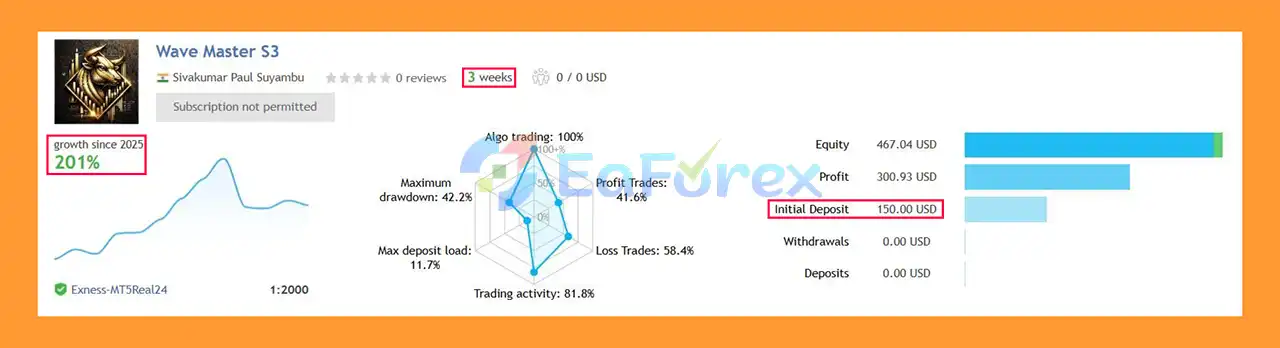
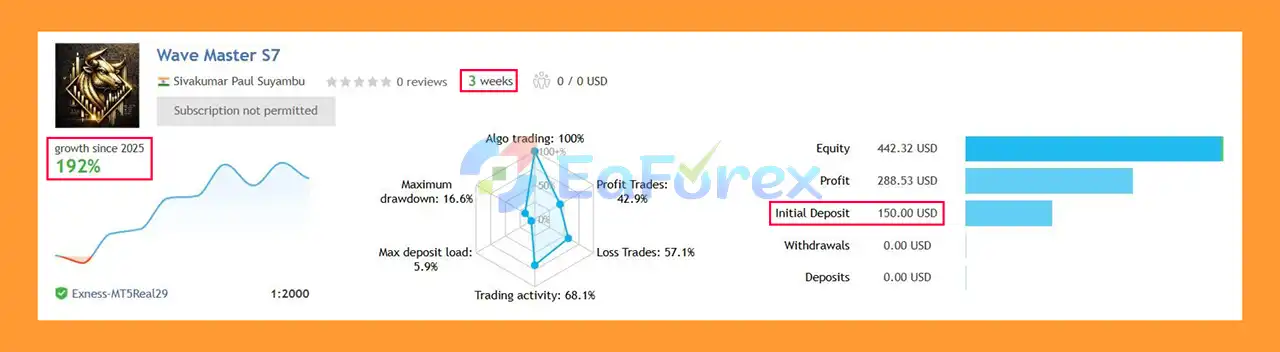
Wave Master EA Signal Results
Wave Master EA MT5 Signal Results
Wave Master EA MT5 is equipped with several features designed to help traders control risk during automated trading.
The RiskPercentage parameter can automatically determine the position size based on the trader’s selected risk level.
This provides a more flexible approach than using one fixed lot size across different account sizes.
Stop Loss settings are available to define the maximum planned loss for individual positions.
Traders should configure Stop Loss levels according to the volatility and characteristics of the selected market.
The RiskRewardRatio parameter allows traders to configure their preferred relationship between potential risk and reward.
An ATR fallback can provide a volatility-sensitive approach to trade protection, which may be useful because market volatility can differ significantly between instruments such as XAUUSD, BTCUSD, US30, and Forex pairs.
Break-Even can move protection toward the entry price after a predefined condition is met, while Trailing Stop can dynamically adjust the protective level as the market moves.
The trading-hour filter allows users to restrict the EA to selected sessions and avoid periods that may have wider spreads, reduced liquidity, or undesirable trading conditions.
The provided configuration recommends starting with approximately 1–3% risk per trade and conducting forward testing before increasing exposure.
However, the appropriate risk level depends on the selected asset, broker conditions, strategy, account size, and individual risk tolerance. Past backtest or simulated results should not be interpreted as a guarantee of future performance.
Despite its extensive features, Wave Master EA MT5 is not risk-free and should be evaluated carefully before being used with real capital.
M1 strategies can be particularly sensitive to spread, slippage, latency, and execution speed.
Poor broker execution or unstable VPS performance can materially affect trading results.
A strategy that performs well during a particular market environment may behave differently when volatility, liquidity, trends, or price structure change.
The 10 strategies provide flexibility, but they do not eliminate market risk.
BTCUSD, US30, and NAS100 can experience rapid price movements.
These instruments may require different risk settings compared with traditional Forex pairs.
Because Wave Master EA MT5 provides multiple strategies and configurable parameters, excessive optimization against historical data can create overfitted settings.
A configuration that looks strong in backtesting may not necessarily perform similarly in live trading.
Spreads, commissions, execution speed, swaps, minimum lot sizes, and trading conditions can differ significantly between brokers.
Therefore, the same EA settings may produce different results across different trading accounts.
The absence of grid and martingale logic can reduce certain types of exposure, but every automated trading strategy remains subject to losses and drawdowns.
Proper position sizing and forward testing remain essential.
Installing Wave Master EA MT5 follows the standard MetaTrader 5 Expert Advisor installation process.
Open MetaTrader 5 and go to:
File → Open Data Folder → MQL5 → Experts
Copy the Wave Master EA file into the Experts folder.
Restart MT5 or refresh the Expert Advisors section in the Navigator window.
Wave Master should then appear in your list of available Expert Advisors.
Open the chart for your preferred market, such as:
For the recommended scalping setup, start with the M1 timeframe.
Drag the EA onto the selected chart and open its input settings.
Choose the desired Strategy 1–10 according to your testing plan.
Set the main parameters, including:
Avoid using aggressive risk settings before completing adequate forward testing.
Make sure Algo Trading is enabled in MetaTrader 5 and that the EA has the required permissions to operate.
For M1 scalping, an ECN/low-spread broker and reliable low-latency VPS are recommended.
Before using the EA with real money, test the selected strategy on a demo account or suitable forward-testing environment.
In summary, Wave Master EA MT5 is a flexible multi-strategy Expert Advisor designed for traders who want automated access to Gold, Bitcoin, indices, and Forex markets from a single MT5 trading system.
Its combination of 10 wave-based strategies, an M1 scalping engine, percentage-based risk management, ATR protection, Break-Even, Trailing Stop, and session filtering provides traders with a broad range of configuration options.
The no-grid and no-martingale approach is another defining characteristic, while multi-asset support allows users to experiment with different instruments and market conditions.
However, flexibility also means that proper configuration and testing are important. M1 scalping requires attention to spread, slippage, latency, and execution quality, while different assets may require different settings.
For traders considering Wave Master EA MT5, a sensible approach is to start with conservative risk, select one strategy and market at a time, backtest it under realistic trading conditions, and then forward-test the configuration before considering live deployment.
Overall, Wave Master provides a structured framework for exploring automated multi-asset scalping and wave-based trading on MetaTrader 5, while leaving traders control over strategy selection, risk, trading hours, and trade-management parameters.
1. What is Wave Master EA MT5 and how does it work?
Wave Master EA MT5 is a multi-asset, multi-strategy scalping Expert Advisor for MetaTrader 5. It uses wave-based market structure analysis to identify impulsive and corrective price movements, executing high-precision trades with strict risk control.
2. Which markets can Wave Master EA MT5 trade?
Wave Master EA MT5 supports multiple asset classes, including:
Gold (XAUUSD)
Bitcoin (BTCUSD)
Indices (US30, NAS100)
Major and minor Forex pairs
All assets are traded using one unified trading system.
3. What trading timeframe is Wave Master EA MT5 optimized for?
The EA is primarily optimized for M1 (1-minute) scalping, allowing ultra-fast trade execution. It can also be adapted to higher timeframes if needed, depending on the selected strategy.
4. How many strategies are included in Wave Master EA MT5?
Wave Master EA MT5 includes 10 built-in wave-based trading strategies, such as:
Trend breakouts
Impulse–correction continuations
Momentum reversals
Divergence confluence
Fractal extreme setups
Traders can choose the strategy that best fits current market conditions.
5. Does Wave Master EA MT5 use grid or martingale?
No. Wave Master EA MT5 uses no grid, no martingale, and no averaging strategies. Each trade has predefined risk, ensuring transparent behavior and controlled exposure.
6. How does Wave Master EA MT5 manage risk?
Risk management features include:
Risk-percentage-based auto lot sizing
Stop Loss and Take Profit defined in percentages
ATR safety fallback protection
Break-Even and Trailing Stop mechanisms
This structure helps maintain consistent risk across all assets.
7. Can I control when Wave Master EA MT5 trades?
Yes. The EA includes a session filter, allowing you to trade only during selected sessions such as London or New York, avoiding low-liquidity or high-risk periods.
8. Is Wave Master EA MT5 suitable for prop firm trading?
Yes. With no grid, no martingale, disciplined risk control, and clean execution, Wave Master EA MT5 is considered prop-firm friendly, depending on the firm’s specific rules.
9. Does Wave Master EA MT5 require a VPS?
While not mandatory, a low-latency VPS is highly recommended, especially for M1 scalping. The EA is optimized for ECN brokers and VPS environments to ensure fast execution and minimal slippage.
In stock
In stock
In stock
In stock
In stock
Out of stock
No account yet?
Create an Account












 Automatic EA
 EA Best Seller
 Expert Advisor MT4
 Expert Advisor MT5
 HFT EA


Reviews
Clear filtersThere are no reviews yet.