Product Overview
Exp5 The xCustomEA for MT5 is a flexible and powerful MetaTrader 5 Expert Advisor designed to turn custom indicator signals into a fully automated trading workflow. Instead of developing a new Expert Advisor for every trading idea, traders can connect their preferred custom indicator, define the required signal buffers, and allow the EA to handle trade execution and management automatically.
Exp5 The xCustomEA for MT5 is built around the broader The X Universal EA framework, giving users access to an extensive trading architecture for entries, exits, filters, Stop Loss, Take Profit, and position management.
The EA supports both custom signal models and arrow-based indicators, making it suitable for traders who want to automate indicator-based strategies without creating an entirely new trading robot from scratch.
Importantly, the xCustomEA does not open trades automatically by itself by default. A compatible custom indicator or properly configured trading strategy must first be connected to provide the required trading signals.
About the Developer
- Author: Vladislav Andruschenko
- Experience: Over +13 years of experience on MQL5.
- Notable Products: Exp5 The xCustomEA for MT5, Exp5 AI Sniper for MT5, Exp TickSniper PRO FULL MT5 and others.
- Flagship Product: Exp5 The xCustomEA for MT5 is rated as the best performing product of the year.
>> Delivery time 24h-48h after payment.
>>> Refund if not delivered.
>>> You will receive the latest version without any limitations (ID+Time).
>>Reviewed by Jason Stap <<
Main Features of Exp5 The xCustomEA for MT5
Custom Indicator Integration
The main purpose of Exp5 The xCustomEA for MT5 is to connect external custom indicators to an automated trading engine.
Users can specify:
- Custom indicator name
- Signal type
- Indicator timeframe
- Signal bar
- BUY buffer
- SELL buffer
- External indicator inputs
This allows traders to build automated strategies around their existing indicator systems.
BUY and SELL Signal Buffer Support
The EA can read trading signals directly from indicator buffers.
Important parameters include:
- SignalBuferforBUY – BUY signal buffer
- SignalBuferforSELL – SELL signal buffer
- OWNSIGNAL_shift – signal bar used for reading
- SignalNameIndicator – custom indicator name
This structure allows different custom indicators to be connected to the EA according to their buffer configuration.
xArrow Mode
Exp5 The xCustomEA for MT5 supports xArrow mode, which is designed for custom indicators that generate BUY and SELL signals through arrow buffers.
This provides a relatively simple way to connect a ready-made arrow indicator to an automated execution framework.
xCustomEA Mode
The Exp5 The xCustomEA for MT5 mode is intended for users who want to work with their own indicator format and define their own strategy logic.
This makes the EA useful for traders and developers who are experimenting with proprietary indicator-based systems.
Advanced Trade Management
Exp5 The xCustomEA for MT5 inherits a broad range of functionality from The X Universal EA framework.
Depending on configuration, users can work with:
- Entry logic
- Exit logic
- Signal filters
- Stop Loss
- Take Profit
- Position management
- Additional trade-management rules
More Than 20 Built-In Strategies
Exp5 The xCustomEA for MT5 is based on the wider The X EA framework, which includes access to more than 20 built-in strategies.
This gives traders additional options beyond simple custom-indicator signal execution.
Extensive Configuration
The EA provides access to a large configuration framework with more than 200 settings inherited from The X.
This allows users to customize the trading engine for different strategy concepts and execution requirements.
Multiple Indicator Sources
The xCustomEA can work with custom indicators installed from different sources, including:
- MetaTrader 5 terminal folders
- Downloaded custom indicators
- MQL5 Market indicators
- Other compatible indicator installations
For MQL5 Market indicators, the documentation specifies using the appropriate Market\IndicatorName path format.
How Does Exp5 The xCustomEA for MT5 Work?
Exp5 The xCustomEA for MT5 acts as a bridge between a custom indicator and the MetaTrader 5 trading environment.
The general workflow is:
Custom Indicator → Signal Buffer → xCustomEA → Trade Filter → Order Execution → Trade Management
Step 1: Connect the Indicator
The trader enters the custom indicator name using:
SignalNameIndicator
The appropriate signal type and timeframe are then configured.
Step 2: Define the Signal Bar
The parameter:
OWNSIGNAL_shift
determines which bar the EA uses when reading the indicator signal.
This allows users to control whether signals are evaluated from a specific historical bar or another configured position.
Step 3: Assign BUY and SELL Buffers
The trader identifies which indicator buffers represent BUY and SELL signals.
These are entered into:
- SignalBuferforBUY
- SignalBuferforSELL
Correct buffer identification is essential because different indicators can use different buffer structures.
Step 4: Configure Indicator Inputs
External parameters can be entered through:
SIGNALStrategyInputs
The documentation specifies that these custom indicator parameters are entered as a string with values separated by commas.
Step 5: Apply Trading Management
After the signal source is connected, traders can configure the broader EA framework, including:
- Entry filters
- Exit conditions
- Stop Loss
- Take Profit
- Trade management
- Additional strategy settings
The EA can then process the custom indicator’s signals according to the configured rules.
How to Launch a Custom Arrow Indicator
One of the simpler ways to use Exp5 The xCustomEA for MT5 is with an arrow-based indicator.
Configuration Steps
- Enter the custom indicator name in SignalNameIndicator.
- If the indicator comes from the MQL5 Market, use the required Market\IndicatorName format.
- Set SignalTypeIndicator = xArrow.
- Enter the BUY buffer number into SignalBuferforBUY.
- Enter the SELL buffer number into SignalBuferforSELL.
- Configure the desired timeframe and signal bar.
- Configure the available trade-management parameters.
- Attach the EA to the appropriate MT5 chart.
- Enable automated trading.
The exact buffer numbers depend on the custom indicator being used, so users should check the indicator’s documentation or buffer configuration before enabling live trading.
Why Choose The xCustomEA for MT5?
Automate Existing Indicator Strategies
If you already have a custom indicator that produces trading signals, The xCustomEA provides an execution framework without requiring you to develop a separate Expert Advisor from the beginning.
Flexible Customization
The EA allows traders to define signal sources, timeframes, buffer assignments, external inputs, and trade-management rules.
Suitable for Traders and Developers
The xCustomEA can be useful for:
- Strategy developers
- Indicator creators
- Algorithmic traders
- MT5 traders testing new ideas
- Traders with proprietary indicators
Reusable Trading Framework
Instead of creating a new EA for every indicator strategy, users can reuse the xCustomEA framework with different compatible signal sources.
Extended The X Architecture
Because Exp5 The xCustomEA for MT5 is based on The X Universal EA, users gain access to a broader set of trading and management features rather than using a simple signal-to-order bridge.
Exp5 The xCustomEA for MT5 Rviews
- Signal-Based Automated Trade Execution: Automatically opens BUY or SELL trades only when custom indicator signals are confirmed, ensuring precise and rule-based trading decisions.
- Arrow & Buffer Indicator Compatibility: Fully supports arrow-type and buffer-based indicators without requiring any modification, allowing seamless integration with existing trading tools.
- Flexible Multi-Strategy Signal Control: Offers configurable signal timing using closed-bar or current-bar logic and supports multiple standard indicator strategies combined with custom trading rules.
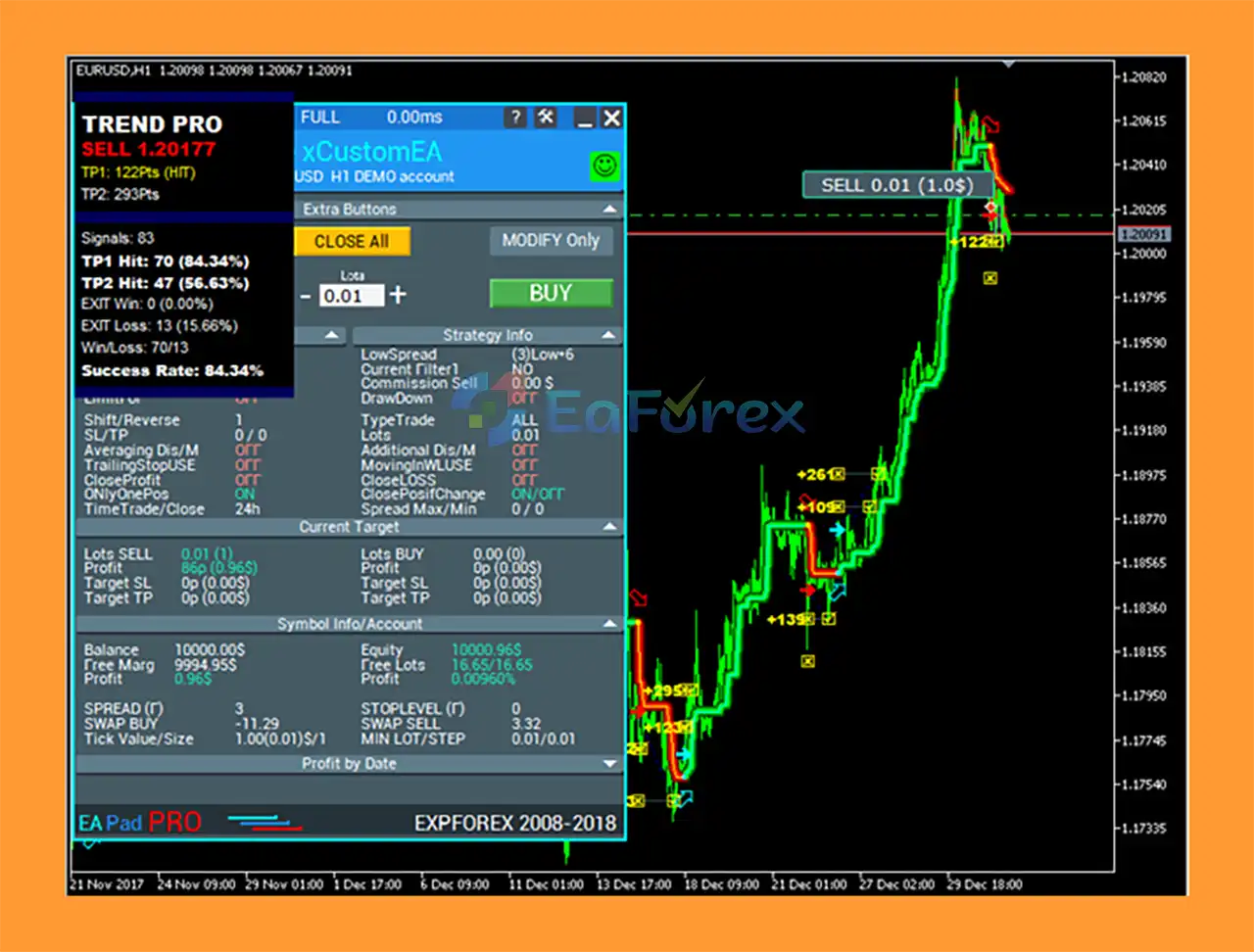
Exp5 The xCustomEA for MT5 Reviews
Performance and Risk Management
Exp5 The xCustomEA for MT5itself does not represent a single fixed trading strategy. Its performance depends largely on the custom indicator, signal logic, configuration, market, timeframe, and trade-management settings selected by the user.
This is an important distinction from traditional EAs that have a predefined strategy.
Potential performance factors include:
- Quality of the custom indicator signals
- BUY and SELL buffer configuration
- Signal timeframe
- Signal bar selection
- Stop Loss settings
- Take Profit settings
- Entry filters
- Exit conditions
- Spread and slippage
- Broker execution
- Position sizing
- Market volatility
Because different indicators and strategies can be connected to the xCustomEA, there is no single universal win rate, drawdown figure, or profit expectation that applies to every configuration.
Risk Management Considerations
Users should carefully configure:
- Position size
- Stop Loss
- Take Profit
- Maximum exposure
- Entry filters
- Exit conditions
- Trading hours
- Spread conditions
It is strongly recommended to test each custom indicator configuration on a demo account and through historical backtesting or forward testing before using real capital.
Weaknesses and Risk Warnings
Requires a Compatible Signal Source
Exp5 The xCustomEA for MT5 does not automatically generate a trading strategy by default. Users must connect a custom indicator or configure an appropriate strategy.
Correct Buffer Configuration Is Essential
Incorrect BUY or SELL buffer numbers can cause the EA to misinterpret indicator signals.
Before live deployment, traders should verify exactly which buffers represent BUY and SELL signals.
Performance Depends on the Indicator
Exp5 The xCustomEA for MT5 is an execution framework rather than a guarantee of profitable signals. A poorly designed or unreliable custom indicator can produce poor trading results even when the EA executes correctly.
High Configuration Complexity
With more than 200 available settings inherited from The X framework, the EA provides extensive flexibility but may require considerable configuration knowledge.
Over-Optimization Risk
Because the EA can be configured in many ways, traders may be tempted to optimize settings excessively against historical data. Over-optimized configurations can perform differently in live markets.
Broker and Market Conditions
Live performance may vary due to:
- Spread
- Slippage
- Execution speed
- Liquidity
- Commission
- Market volatility
- Broker-specific contract specifications
No Guaranteed Results
Automated trading involves financial risk. Exp5 The xCustomEA for MT5 cannot eliminate market risk, and past testing results do not guarantee future performance.
Pros and Cons
Pros
- Designed for MetaTrader 5
- Connects custom indicators to automated execution
- Supports BUY and SELL signal buffers
- Supports arrow-based indicators
- Flexible timeframe configuration
- Custom indicator input support
- Separate entry and exit logic
- Supports Stop Loss and Take Profit
- Extensive trade-management framework
- More than 20 built-in strategies from The X framework
- More than 200 configuration settings
- Reusable across different indicator-based strategies
- Suitable for traders and strategy developers
Cons
- Requires a compatible custom indicator or configured strategy
- Does not generate standalone entry signals by default
- Correct buffer numbers must be identified
- Extensive settings can be complex for beginners
- Results depend heavily on the connected indicator
- Different configurations can produce very different results
- Requires testing before live deployment
- No guaranteed profitability
How to Install The xCustomEA for MT5
Step 1: Install MetaTrader 5
Download and install MetaTrader 5 and log in to your trading account.
Step 2: Open the MT5 Data Folder
Inside MetaTrader 5, go to:
File → Open Data Folder
Then locate:
MQL5 → Experts
Step 3: Copy the EA File
Copy the xCustomEA EX5 file into the Experts folder.
If your custom indicator is not already installed, place the required indicator in the appropriate:
MQL5 → Indicators
folder.
Step 4: Restart or Refresh MT5
Restart MetaTrader 5 or refresh the Navigator window so that the EA and indicator appear.
Step 5: Attach the xCustomEA
Open the desired trading chart and timeframe.
From:
Navigator → Expert Advisors
select The xCustomEA and attach it to the chart.
Step 6: Configure the Custom Indicator
Enter the required indicator parameters, including:
- SignalNameIndicator
- SignalTypeIndicator
- TF_IndSigToTrade1
- OWNSIGNAL_shift
- SignalBuferforBUY
- SignalBuferforSELL
- SIGNALStrategyInputs
Step 7: Configure Trading Parameters
Set your desired:
- Stop Loss
- Take Profit
- Entry filters
- Exit rules
- Position-management settings
- Risk parameters
Step 8: Enable Automated Trading
Enable Algo Trading in MetaTrader 5.
Before using a live account, verify that the EA correctly receives the custom indicator’s signals and that BUY/SELL buffers are functioning as expected.
What’s Included in the Download Package?
- Setting (If Any).docx
- Installation Guide.docx
>>> Join VIP Membership Now <<<
Final Thoughts
In summary, The xCustomEA for MT5 is a flexible automation framework designed for traders who want to transform custom indicator signals into automated trading strategies on MetaTrader 5.
Its main advantage is flexibility: instead of building a completely new Expert Advisor for every indicator-based trading idea, users can connect compatible custom indicators, assign BUY and SELL signal buffers, configure timeframes and external inputs, and use the broader The X Universal EA framework for trade execution and management.
The xCustomEA supports both xCustomEA and xArrow working modes, making it suitable for different types of custom indicator systems. Its extensive configuration framework also provides traders and developers with numerous options for filters, entries, exits, Stop Loss, Take Profit, and position management.
However, the xCustomEA should be viewed as a trading automation framework rather than a standalone profitable strategy. Its results depend heavily on the quality of the connected indicator, signal configuration, market conditions, broker execution, and risk-management settings.
For traders and developers looking to automate custom indicator strategies on MetaTrader 5, The xCustomEA provides a reusable environment for converting indicator-based ideas into systematic automated trading workflows.















 Unlimited Activations
 Instant delivery
 Easy to install
















 Automatic EA
 EA Best Seller
 Expert Advisor MT4
 Expert Advisor MT5
 HFT EA


Reviews
Clear filtersThere are no reviews yet.