









-
 Unlimited Activations
-
 Instant delivery
-
 Easy to install







 Unlimited Activations
Instant delivery
Easy to install
Unlimited Activations
Instant delivery
Easy to install
 Free Update
 Free Install Support

TradersRock EA MT5 is a professional automated trading system for MetaTrader 5 (MT5), specifically engineered for high-volatility markets including XAUUSD (Gold), US30, and NAS100. Rather than relying on aggressive Grid or Martingale techniques, the EA focuses on price action structure, volatility analysis, breakout conditions, liquidity behavior, and disciplined trade management.
TradersRock EA MT5 is designed to identify potential breakout opportunities around the London trading session, analyze market volatility, and dynamically manage entries and exits. Its internal logic processes market information with M1 precision, while the recommended chart timeframes are M15 and H1.
The EA also includes advanced protective features such as Hard Stop Loss, Soft Stop management, News Filter, Daily Loss Limit, Global Loss Limit, Auto-Fallback margin protection, and dynamic risk-based position sizing.
>> Delivery time 24h-48h after payment.
>>> Refund if not delivered.
>>> You will receive the latest version without any limitations (ID+Time).>>Reviewed by Jason Stap <<
TradersRock EA MT5 Overview
TradersRock EA MT5 focuses on market structure and volatility rather than random entries. It analyzes price behavior and attempts to participate when a meaningful breakout develops.
The EA uses a DST-aware London Time Engine to identify the London session accurately during both summer and winter time. It analyzes the Asian trading range and looks for potential liquidity and volatility expansions around the London session.
The EA is designed for three major high-volatility instruments:
This allows traders to deploy the same trading framework across multiple markets while maintaining individual risk controls.
Take Profit levels are calculated dynamically using Fibonacci expansion concepts combined with daily market range information, rather than relying exclusively on a fixed TP distance.
In addition to its hard protective stop, the EA can monitor momentum and price action. When a breakout loses momentum or fails according to its internal conditions, the system can close a position earlier rather than simply waiting for the full Stop Loss.
One of the distinctive features of Traders Rock EA MT5 is its Auto-Fallback margin management system.
If a manually specified lot size cannot be opened because the account does not have sufficient free margin, the EA can automatically switch to a risk-percentage calculation and attempt to place the trade using a position size compatible with available margin.
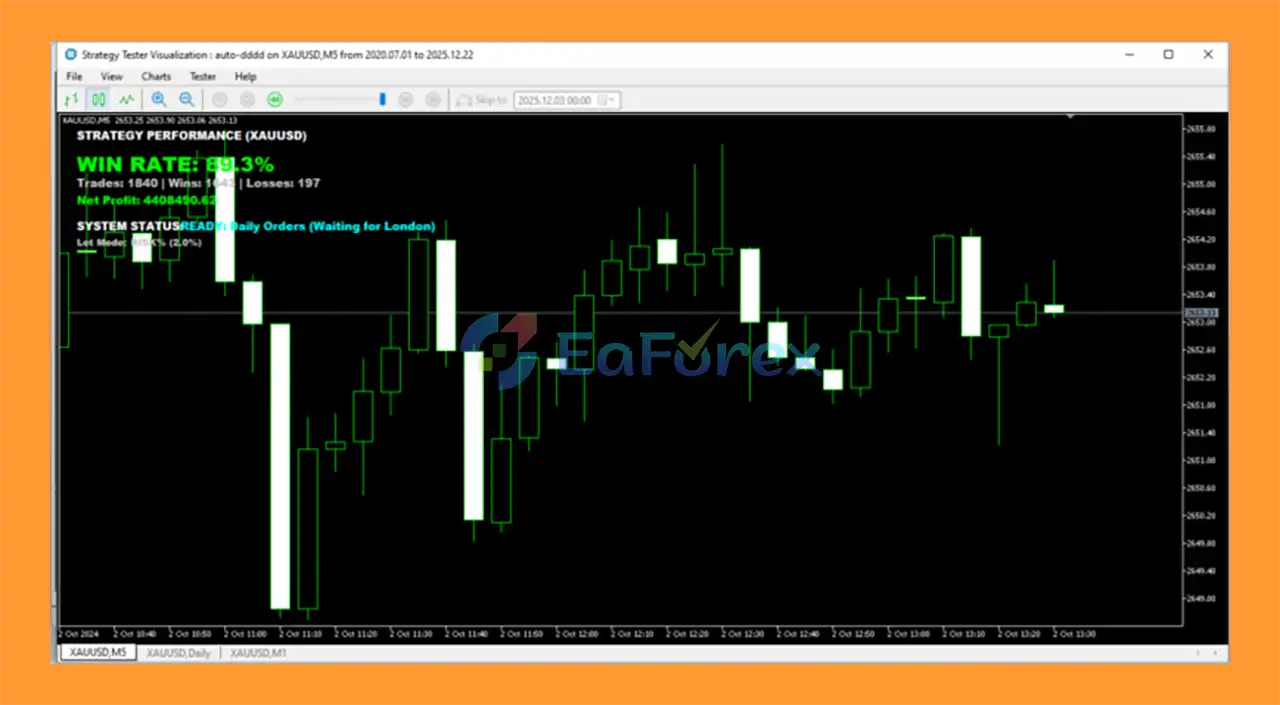
The on-chart dashboard provides real-time information about what the EA is currently doing, such as:
This provides traders with greater visibility into the EA’s current operating state.
TradersRock EA MT5 is designed without Martingale or Grid-based recovery strategies, reducing reliance on continuously increasing exposure after losing trades.
The EA includes configurable loss-control mechanisms that can stop further trading after reaching a predefined daily or global loss threshold.
The News Filter is designed to detect scheduled economic events and can pause trading around potentially high-impact news periods.
TradersRock EA MT5 follows a structured trading process rather than continuously opening positions.
Step 1 – Market Analysis
The EA continuously analyzes price action, volatility, market structure, and trading-session conditions.
Step 2 – Asian Range Analysis
Before the London session, the system evaluates the Asian trading range and identifies important liquidity and price levels.
Step 3 – London Session Detection
Using its DST-aware time engine, the EA identifies the relevant London trading window and monitors the potential increase in volatility.
Step 4 – Breakout Confirmation
When the market demonstrates suitable breakout and momentum conditions, the EA evaluates whether the setup satisfies its internal trading rules.
Step 5 – Risk & Margin Calculation
Depending on the configuration, the EA can use either:
If the selected manual lot cannot be opened because of insufficient margin, the Auto-Fallback Protocol can switch to risk-based sizing.
Step 6 – Trade Execution
Once the required conditions are satisfied, the EA executes the trade automatically.
Step 7 – Position Management
The system manages the position using its Stop Loss, dynamic profit targets, trailing/management logic, and Soft Stop conditions.
Step 8 – Capital Protection
Daily Loss Limit, Global Loss Limit, News Filter, and other protective mechanisms can restrict additional trading when predefined risk conditions are reached.
TradersRock EA MT5 is designed for traders looking for a structured, automated approach to Gold and US index trading.
Its main advantages include:
For traders who prefer a system with visible operating information and configurable risk controls, the Deep Thought Status Engine can also make it easier to understand what the EA is currently processing.
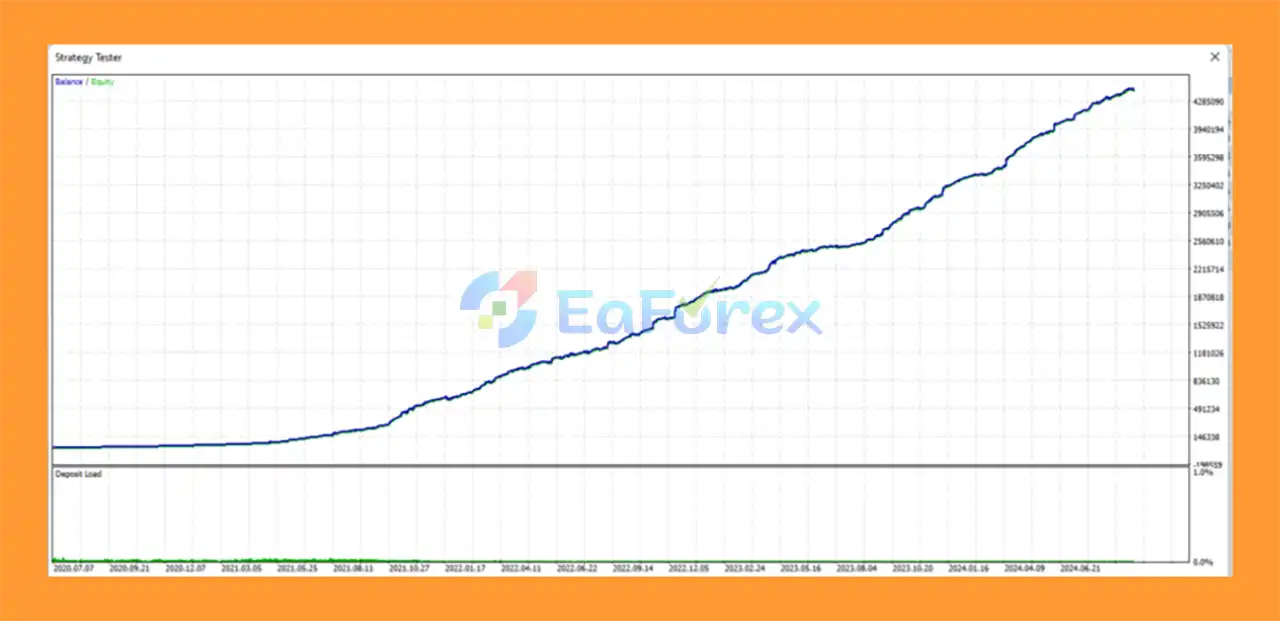
TradersRock EA MT5 backtets
TradersRock EA MT5 reviews
TradersRock EA MT5 is built around risk management and controlled exposure, rather than simply maximizing the number of trades.
The EA supports two primary position-sizing approaches:
When enabled, the system calculates the position size according to a predefined percentage of the account balance.
This can provide more consistent risk sizing as the account balance changes.
Traders can alternatively specify a fixed lot size.
However, fixed-lot trading should be used carefully because the actual monetary exposure can vary significantly between instruments such as XAUUSD, US30, and NAS100.
The Auto-Fallback feature is particularly relevant when using fixed lots. If the requested position size requires more margin than is currently available, the EA can switch to a risk-based position size instead of simply abandoning the trading opportunity.
The Global Loss Limit can be used when the EA is deployed across multiple instruments. Once the configured daily loss threshold is reached, the system can stop opening additional trades for the remainder of the trading day.
According to the provided settings:
These figures should be treated as configuration guidance rather than a guarantee of trading performance.
Although TradersRock EA MT5 includes multiple risk-control features, automated trading remains inherently risky.
Past backtests or previous trading performance do not guarantee future results. Market conditions can change significantly.
XAUUSD, US30, and NAS100 can experience rapid price movements. Slippage, spreads, gaps, and execution delays can affect actual trading results.
The EA is designed with ECN, Raw Spread, or low-spread brokers in mind. High spreads can negatively affect entry and exit execution, particularly during short-term volatility.
Because the EA is intended to operate continuously and includes session, news, and market-monitoring functions, a stable VPS connection is strongly recommended.
The Auto-Fallback feature can adapt position sizing when a manual lot encounters a margin limitation, but it does not eliminate market risk. Traders should still use conservative risk settings.
Although the minimum suggested deposit is $200, a small account has limited capacity to absorb losses and margin fluctuations. The recommended $500+ account size may provide more flexibility for risk management, but it does not guarantee safer or profitable trading.
Economic news can produce rapid price movements that exceed expected execution conditions. A News Filter can reduce exposure around selected events, but it cannot guarantee protection from every market shock.
Different brokers may use different spreads, commissions, contract specifications, execution speeds, symbol names, and margin requirements. Results may therefore differ between brokers.
| Pros | Cons |
|---|---|
| Designed for XAUUSD, US30 & NAS100 | High-volatility markets carry substantial risk |
| No Martingale | Requires suitable broker conditions |
| No Grid strategy | VPS is strongly recommended |
| London volatility strategy | Performance can vary with market conditions |
| DST-aware London session engine | News can cause slippage |
| Auto-Fallback margin protection | Fixed-lot trading requires careful risk control |
| Risk % position sizing | Small accounts have limited risk capacity |
| Hard Stop Loss | No automated system guarantees profits |
| Soft Stop mechanism | Broker execution can affect results |
| News Filter | Requires proper configuration |
| Daily & Global Loss Limits | Backtest results may differ from live trading |
| Deep Thought status dashboard | Multiple assets require careful exposure management |
Install and log in to your MetaTrader 5 trading account with a compatible broker.
After purchasing or renting Traders Rock EA MT5, contact the provider privately to receive the installation manual and exclusive setup files.
In MetaTrader 5, go to:
File → Open Data Folder
Then navigate to:
MQL5 → Experts
Copy the Traders Rock EA files into the Experts folder.
Restart MT5 or refresh the Navigator → Expert Advisors section so that TradersRock EA appears.
Open a chart for one of the supported instruments:
Make sure your broker’s symbol name is compatible with the EA.
Attach the EA to the recommended M15 or H1 timeframe.
The system handles additional market analysis internally.
Choose between:
If using Risk Percentage, define the percentage you are comfortable risking per trade.
If using Manual Lot, make sure the selected lot size is appropriate for your account balance and available margin.
Review the following settings before enabling live trading:
Enable Algo Trading / AutoTrading in MT5 and make sure the EA is active on the chart.
For continuous operation, install the EA on a reliable MetaTrader 5 VPS or dedicated VPS environment.
Important: Always test the EA on a demo account before using real funds and verify that the broker’s symbol specifications, spread, contract size, margin requirements, and execution conditions are compatible.
>>> Join VIP Membership Now <<<
In summary, TradersRock EA MT5 is a specialized automated trading system built around price action structure, volatility analysis, breakout trading, and disciplined risk management.
Its focus on XAUUSD, US30, and NAS100 makes it particularly relevant to traders interested in high-volatility markets. Instead of relying on Grid or Martingale recovery, the system combines London session analysis, dynamic Fibonacci targets, Soft Stop management, Hard Stop Loss protection, News Filtering, Daily Loss Limits, and Auto-Fallback position sizing.
Another notable component is the Deep Thought Status Engine, which provides real-time information about the EA’s current operating state directly on the MT5 chart.
However, TradersRock EA MT5 should still be treated as a high-risk automated trading tool, not a guaranteed profit system. Proper position sizing, broker selection, VPS stability, testing, and conservative risk parameters remain essential.
For traders searching for a professional MT5 Gold and index EA with structured breakout logic, multi-asset support, and integrated risk-management features, Traders Rock EA MT5 offers a comprehensive framework for automated market participation.
1. What is TradersRock EA MT5 and how does it work?
TradersRock EA MT5 is an institutional-grade automated trading system designed for MetaTrader 5. It trades Gold (XAUUSD), US30, and NAS100 using pure price action structure, volatility analysis, and liquidity behavior instead of high-risk strategies like grid or martingale.
2. Which markets does TradersRock EA MT5 trade?
TradersRock EA MT5 is optimized specifically for:
XAUUSD (Gold)
US30 (Dow Jones Index)
NAS100 (Nasdaq Index)
Each asset uses its own volatility and price-action logic for more accurate execution.
3. What trading strategy does TradersRock EA MT5 use?
The EA is built on price action structure, focusing on liquidity traps, real breakouts, volatility expansion, and session-based behavior. A key component is the London Volatility Box Engine, which trades breakouts from the Asian range during the London session.
4. Does TradersRock EA MT5 use martingale, grid, or averaging strategies?
No. TradersRock EA MT5 does not use martingale, grid trading, hedging, or risk averaging. Every trade is executed independently with predefined risk controls and professional-grade stop-loss management.
5. How does TradersRock EA MT5 manage risk?
TradersRock EA MT5 includes a comprehensive risk framework:
Hard stop loss on every trade
Soft stop protection to exit weak momentum early
Daily global loss limit across all symbols
News event detection to avoid high-impact releases
Dynamic or fixed risk modes for position sizing
6. What is the Auto-Fallback Margin Protocol in TradersRock EA MT5?
The Auto-Fallback Margin Protocol automatically switches from manual lot sizing to percentage-based risk execution when margin is insufficient. This helps prevent broker rejections and allows even small accounts (from ~$200) to trade safely.
7. What is the Deep Thought Status Engine™?
The Deep Thought Status Engine™ is a real-time on-chart dashboard that shows the EA’s current logic state, such as Scanning, Ready, Warning, or Managing. This feature provides unmatched transparency into how the EA is “thinking.”
8. Is TradersRock EA MT5 suitable for small accounts?
Yes. TradersRock EA MT5 is designed to be small-account friendly, thanks to its Auto-Fallback Margin Protocol, strict risk controls, and disciplined execution. It scales efficiently from small retail accounts to professional setups.
9. Does TradersRock EA MT5 require a VPS?
A VPS is strongly recommended. TradersRock EA MT5 continuously monitors volatility, liquidity, and session conditions, and a VPS ensures 24/7 stability, low latency, and uninterrupted execution—especially on ECN or raw-spread brokers.
In stock
In stock
In stock
In stock
In stock
Out of stock
No account yet?
Create an Account












 Automatic EA
 EA Best Seller
 Expert Advisor MT4
 Expert Advisor MT5
 HFT EA


Reviews
Clear filtersThere are no reviews yet.