Product Overview
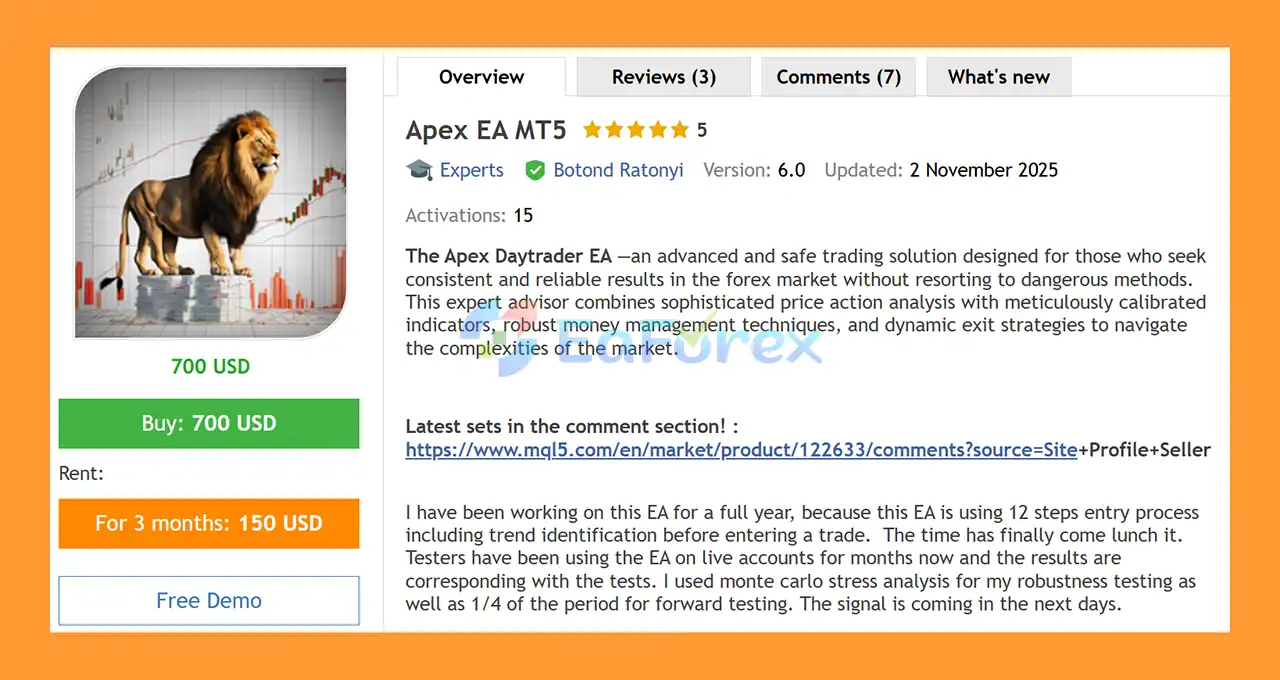
Apex EA MT5 is an automated Forex Expert Advisor designed for traders looking for a structured approach to currency trading based on price action, technical indicators, trend confirmation, money management, and dynamic trade exits.
The EA has been developed over a full year with a 12-step entry process that evaluates market conditions and trend direction before initiating a trade. Rather than relying on a single indicator or simple entry condition, Apex EA MT5 combines multiple confirmation stages to filter potential trading opportunities.
The strategy is designed without Martingale or Grid trading, instead using predefined Stop Loss and Take Profit settings, adjustable position sizing, maximum drawdown controls, and dynamic exit management.
The developer also reports using Monte Carlo stress analysis and approximately one-quarter of the testing period for forward testing as part of the robustness evaluation. According to the supplied product information, testers have also been running the EA on live accounts for several months.
The default configuration is EURUSD H1, while additional set files are provided for USDJPY H1, USDCAD H1, NZDUSD H1, and GBPUSD H1.
About the Developer
>> Delivery time 24h-48h after payment.
>>> Refund if not delivered.
>>> You will receive the latest version without any limitations (ID+Time).
>>Reviewed by Jason Stap <<
Key Features of Apex EA MT5
12-Step Trade Entry Process
Apex EA MT5 uses a structured 12-step entry process before opening a position.
The process includes trend identification, price action analysis, indicator confirmation, and additional market filters. This multi-stage approach is designed to prevent trades from being triggered solely by a single technical signal.
Sophisticated Price Action Analysis
Price action is a central component of the EA’s trading logic.
The system analyzes different candle formations and market structures across relevant timeframes to identify potential trading opportunities.
By combining price behavior with additional confirmation conditions, the EA attempts to distinguish stronger setups from random short-term market fluctuations.
Trend Confirmation
Before entering a trade, Apex EA MT5 evaluates the broader market direction.
Moving Average settings and other confirmation conditions can be used to determine whether a potential setup is aligned with the prevailing trend.
RSI Confirmation
The EA includes RSI-based confirmation as an additional filtering mechanism.
RSI parameters can be configured to help validate whether market momentum supports a potential Buy or Sell setup.
No Martingale or Grid Strategy
Apex EA MT5 does not rely on Martingale or Grid trading.
Instead, the strategy uses predefined risk parameters, Stop Loss settings, Take Profit levels, position sizing, and trade-management rules.
This makes its risk structure fundamentally different from systems that increase exposure after losing trades.
Dynamic Money Management
The EA provides configurable money-management options for Buy and Sell positions.
Traders can adjust volume-related parameters and Stop Loss settings according to their preferred risk profile and account conditions.
Dynamic Exit Management
The system includes dynamic exit functionality designed to respond to changing market conditions.
Parameters such as order duration and pip targets can be used to control how long trades remain open and when positions should be closed.
Maximum Drawdown Protection
The MaxDD setting allows traders to define a maximum drawdown threshold for the trading system.
This provides an additional layer of account-level risk control.
However, MaxDD should be considered a risk-management mechanism rather than a guarantee that actual drawdown can never exceed the selected value, since market gaps, slippage, execution conditions, and other factors can affect real trading results.
Maximum Spread Filter
The Max Spread parameter controls the maximum spread permitted before a new trade can be opened.
This can help prevent entries when transaction costs become unusually high.
Trading Time Filters
Apex EA MT5 includes configurable time filters that allow traders to specify when the EA is permitted to open trades.
Specific trading-day settings can also be configured to avoid periods that may not suit the strategy.
Multiple Currency Pair Set Files
The EA is supplied with configurations for several major Forex pairs:
- EURUSD H1
- USDJPY H1
- USDCAD H1
- NZDUSD H1
- GBPUSD H1
The default EA configuration is EURUSD H1.
How Does Apex EA MT5 Work?
Apex EA MT5 follows a multi-stage process before opening a position.
Step 1 – Market and Trend Identification
The EA first evaluates the broader market direction using its trend-identification logic and configured Moving Average parameters.
Step 2 – Price Action Analysis
The system examines candle formations and price action conditions to identify potential trading structures.
Step 3 – Technical Confirmation
Additional indicators, including RSI and Moving Averages, are used to provide confirmation for potential trade entries.
Step 4 – Trading Condition Filtering
The EA checks additional conditions such as:
- Maximum spread
- Trading hours
- Trading days
- Market conditions
- Configured entry parameters
If the required conditions are not satisfied, the EA can reject the setup.
Step 5 – Trade Entry
When the complete entry process confirms a valid setup, the EA can automatically execute the corresponding Buy or Sell trade.
Step 6 – Risk Management
After entering a position, the EA manages the trade using configured Stop Loss, Take Profit, position sizing, and drawdown-control parameters.
Step 7 – Dynamic Exit
The dynamic exit system evaluates the open position according to parameters such as pip targets and order duration.
The objective is to avoid keeping trades open longer than required by the strategy.
Why Choose Apex EA MT5?
Apex EA MT5 is designed for traders who prefer a structured Forex strategy rather than a simple indicator-based trading robot.
One of its main characteristics is the 12-step entry process, which combines multiple conditions before a trade is opened.
The EA also focuses on controlled exposure rather than recovery-based trading techniques. It does not use Martingale or Grid strategies, and instead incorporates Stop Loss, Take Profit, money management, spread filtering, time filters, and maximum drawdown controls.
Another practical advantage is its support for several major currency pairs through dedicated set files. Traders can therefore configure the EA for EURUSD, USDJPY, USDCAD, NZDUSD, or GBPUSD, depending on the supplied settings and their own testing.
The developer also reports using Monte Carlo stress analysis and forward testing during development, providing additional testing information beyond a single historical backtest.
Apex EA MT5 Backtest Results
🔺EURUSD pair – 4.5 years
- Initial Deposit: $3,000
- Total Net Profit: $12,188.07
- Win Rate (% of total): 81.38%
- Maximum Drawdown: 15.57%
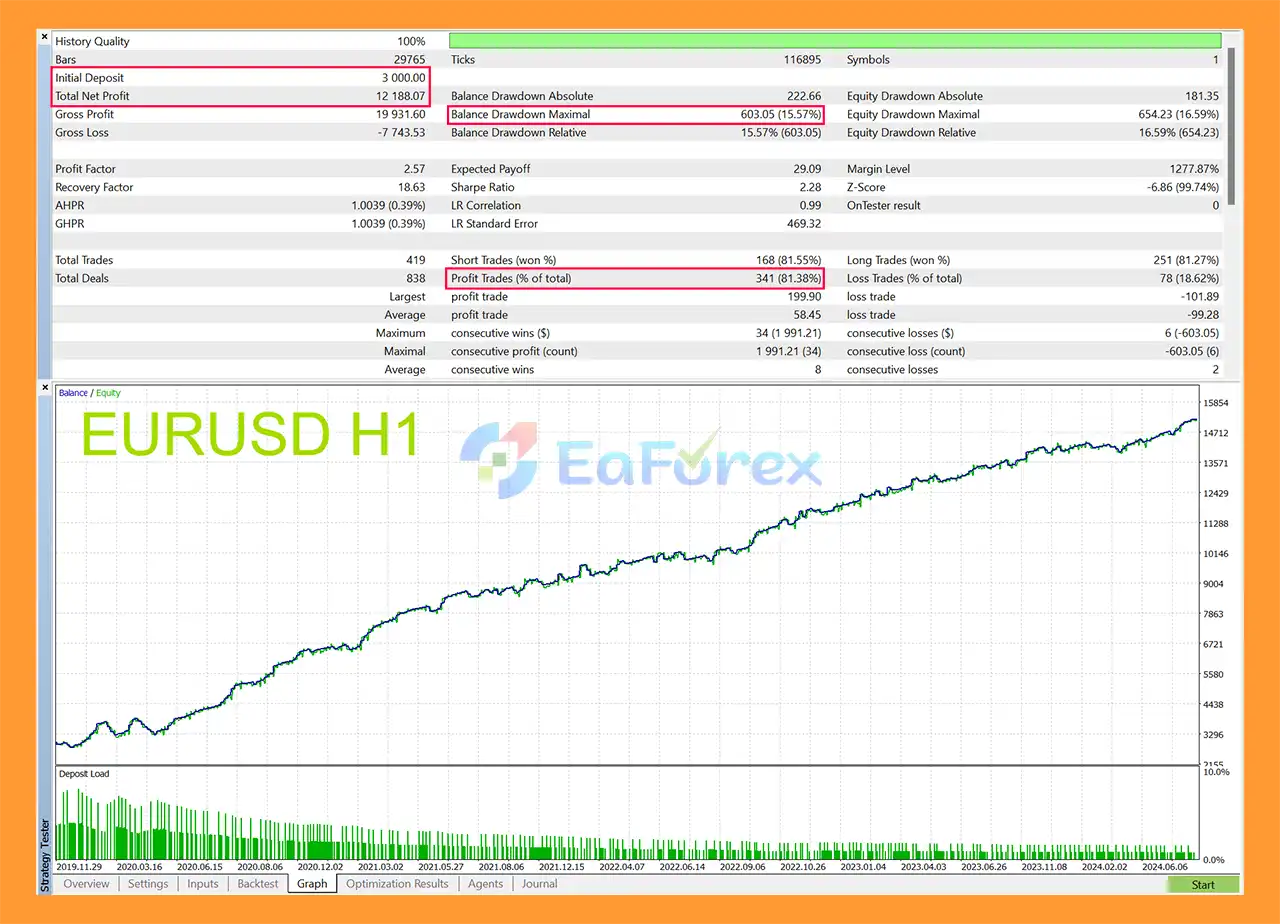
Apex EA MT5 Backtests
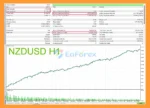
🔺NZDUSD pair – 4.5 years
- Initial Deposit: $3,000
- Total Net Profit: $19,118.66
- Win Rate (% of total): 83.28%
- Maximum Drawdown: 4.60%
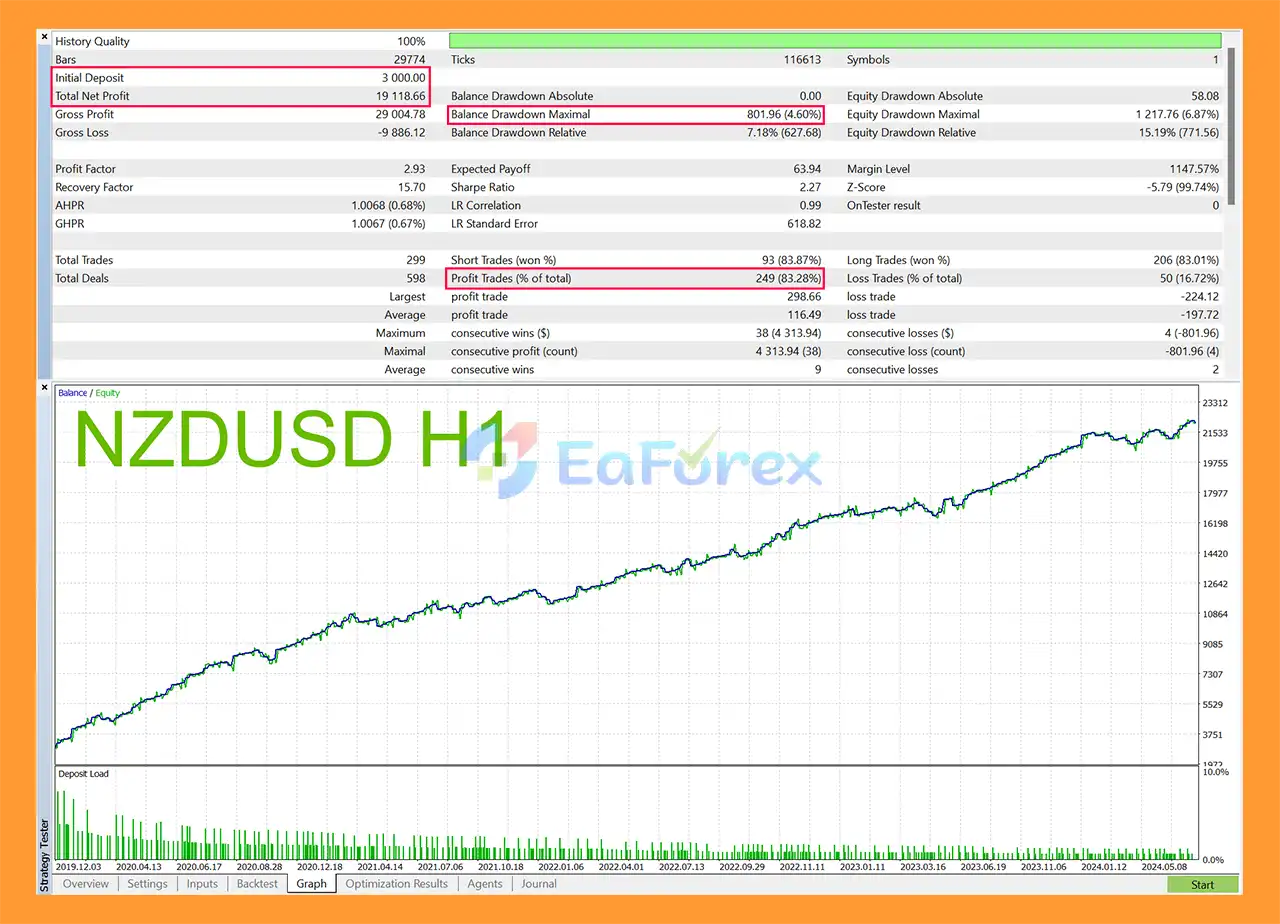
Apex EA MT5 Backtest
Performance and Risk Management
Apex EA MT5 includes several features designed to structure risk during automated Forex trading.
Maximum Spread
The Max Spread parameter prevents the EA from initiating trades when the spread exceeds the configured threshold.
This can help reduce exposure to unfavorable transaction costs.
Stop Loss
Predefined Stop Loss parameters are available for Buy and Sell trades.
Using a defined Stop Loss can help establish a maximum planned loss for individual trades, although actual losses can differ because of slippage, gaps, and execution conditions.
Take Profit
Take Profit settings allow traders to establish predefined profit targets for individual positions.
Dynamic Exit
The dynamic exit system can manage positions based on configured pip targets and order-duration parameters.
This allows the EA to respond to the development of an open trade rather than relying exclusively on a fixed exit condition.
Money Management
The EA provides adjustable volume and risk-related settings so traders can configure position sizes according to their account size and risk tolerance.
Maximum Drawdown Setting
The MaxDD parameter provides an additional account-level risk-control mechanism.
Traders should carefully test the setting because overly aggressive position sizing can still expose an account to substantial losses.
Profit Check Mode
The Profit Check Mode monitors account performance based on equity.
This allows the EA’s trading logic to take current account performance into consideration when managing its operation.
Time and Day Filters
Trading hours and days can be customized to restrict the EA’s activity to selected periods.
This may help traders avoid specific sessions or periods that they consider unsuitable for the strategy.
Testing and Robustness
According to the supplied developer information, Apex Daytrader EA was developed over approximately one year and uses a multi-stage entry process.
The developer states that the system was evaluated using:
- Historical strategy testing
- Forward testing
- Approximately one-quarter of the testing period reserved for forward testing
- Monte Carlo stress analysis
- Several months of testing by users on live accounts
The developer reports that tester results have corresponded with the testing results.
These statements describe the reported testing process and should not be interpreted as a guarantee of future profitability. Actual performance can differ because of market conditions, broker execution, spreads, slippage, liquidity, and account configuration.
Weaknesses and Risk Warnings
Forex Trading Involves Significant Risk
Apex EA MT5 is an automated trading system, not a guarantee of profit. Forex markets can move rapidly and unexpected price movements can produce losses.
No Strategy Is Completely Safe
Although the EA avoids Martingale and Grid strategies and includes multiple risk controls, it remains exposed to normal market risks.
Stop Loss and drawdown controls cannot completely eliminate the possibility of losses.
Broker Conditions Matter
Results may vary between brokers because of differences in:
- Spread
- Slippage
- Execution speed
- Liquidity
- Price feeds
- Trading hours
- Commission
- Swap conditions
News Events Can Affect Performance
Major economic announcements can produce rapid market movements and spread expansion.
Even with time filters and trading restrictions, unexpected market volatility cannot be completely eliminated.
Multiple Pairs Require Individual Testing
Although set files are available for five currency pairs, performance on one pair should not automatically be assumed to apply to another.
Each configuration should be tested separately on the intended broker.
Backtesting Has Limitations
Historical backtests and Monte Carlo analysis can provide useful information about strategy behavior, but they cannot perfectly reproduce future market conditions.
Forward testing on the intended broker remains important before deploying the EA with real capital.
Risk Settings Must Be Configured Carefully
Higher volume or aggressive risk settings can increase both potential returns and potential losses.
Traders should avoid selecting risk parameters solely based on historical performance.
Pros and Cons
Pros
- 12-step entry process
- Trend identification before trade entry
- Price action-based trading logic
- RSI and Moving Average confirmation
- No Martingale strategy
- No Grid strategy
- Predefined Stop Loss and Take Profit
- Dynamic exit management
- Adjustable money management
- Maximum drawdown setting
- Maximum spread filter
- Configurable trading hours
- Configurable trading days
- Profit Check Mode
- Multiple Forex pair configurations
- EURUSD H1 default setup
- Set files for five major currency pairs
- Developer reports Monte Carlo stress testing
- Developer reports forward testing
- Designed for fully automated MetaTrader trading
Cons
- Primarily designed around H1 configurations
- Requires appropriate broker conditions
- Results may differ between currency pairs
- Results may differ between brokers
- No trading system can eliminate market risk
- Monte Carlo and backtesting cannot guarantee future performance
- Aggressive risk settings can significantly increase drawdown
- News events and unexpected volatility can affect execution
- Each supplied set file should be independently tested
How to Install Apex Daytrader EA MT5
Step 1: Download the EA
Download the Apex EA MT5 package and extract the files if they are provided in a ZIP archive.
Locate the EA file, normally provided in EX5 format.
Step 2: Open MetaTrader 5
Open your MetaTrader 5 platform.
Select:
File → Open Data Folder
Then navigate to:
MQL5 → Experts
Copy the EA file into the Experts folder.
Step 3: Restart or Refresh MT5
Restart MetaTrader 5 or right-click the Expert Advisors section in the Navigator and select Refresh.
The Apex Daytrader EA should then appear in the list.
Step 4: Open the Trading Chart
For the default configuration, open:
EURUSD → H1
The supplied set files also support:
- USDJPY H1
- USDCAD H1
- NZDUSD H1
- GBPUSD H1
Step 5: Attach the EA
Drag Apex EA MT5 from the Navigator onto the selected chart.
Make sure Algo Trading is enabled in MetaTrader 5.
Step 6: Load the Appropriate Set File
If a set file is supplied for your chosen currency pair, load the corresponding configuration through the EA’s input settings.
For example:
EURUSD H1 → EURUSD set file
Avoid using a set file intended for one currency pair on a different pair unless you have independently tested the configuration.
Step 7: Configure Risk Parameters
Review and configure the available parameters, including:
- Max Spread
- Risk / Volume settings
- Stop Loss
- Take Profit
- MaxDD
- RSI settings
- Moving Average settings
- Candle pattern parameters
- Trading hours
- Trading days
- Dynamic exit settings
Use conservative settings during initial testing.
Step 8: Start With Demo Testing
Before using the EA on a live account, run it on a demo account with the broker you intend to use.
Monitor execution, spread, drawdown, trading frequency, and behavior during different market conditions.
Step 9: Forward Test Before Live Trading
Allow sufficient time for forward testing rather than relying exclusively on historical backtest results.
Once the EA has been evaluated under your specific broker and account conditions, you can make an informed decision about whether its risk profile is appropriate for your trading objectives.
Risk Disclaimer: Forex trading involves substantial risk of loss. Past backtest or forward-test performance does not guarantee future results. Only trade with capital you can afford to lose.
Real User Reviews and Feedback
🔺Apex EA MT5 is highly appreciated by the MQL5 community for bringing stable and reliable profits. Below are 5 star reviews from users:
- Michael Arthur Schor (2025.02.22): “Very active and good dev, the ea does what it says but its hard to optimize and use it to its full potential in the ccurrent market.”
- Torsten (2024.09.16): “APEX EA is ideal for those seeking a dependable coding partner and an EA grounded in sound trading logic. It does NOT employ MARTINGALE, GRID, or BREAKOUT trading strategies.”
- Brainiacz (2024.09.06): “After testing many EAs with various methods of achieving profits, i think this one has so far best chance to be long-term profitable without using any dangerous methods like grid, martingale and others. Its also better to use more currency pairs to diversify and catch more trades.”
What’s Included in the Download Package?
- Experts:
- Setting (If Any).docx
- Installation Guide.docx
- SetFiles:
- APEX_EA_NZDUSD_M5_V1.set
- APEX_EA_AUDUSD_M5_V1.set
- APEX_EA_USDCAD_M5_V1.set
- APEX_EA_GBPUSD_M5_V1.set
- APEX_EA_USDJPY_M5_V1.set
- APEX_EA_EURUSD_M5_V1.set
- APEX_EA_USDJPY_M5_V2.set
- APEX_EA_GBPUSD_M5_V2.set
- APEX_EA_AUDUSD_M5_V2.set
- APEX_EA_USDCAD_M5_V2.set
- APEX_EA_USDCHF_M5_V2.set
- APEX_EA_NZDUSD_M5_V2.set
- APEX_EA_EURUSD_M5_V2.set
- APEX_EA_EURUSD_M15_V1.set
- APEX_EA_NZDUSD_M15_V1.set
- APEX_EA_USDCAD_M15_V1.set
- APEX_EA_USDJPY_M15_V1.set
- APEX_EA_GBPUSD_M15_V1.set
- APEX_EA_USDJPY_H1_V1.set
- APEX_EA_GBPUSD_H1_V1.set
- APEX_EA_EURUSD_H1_V1.set
- APEX_EA_AUDUSD_H1_V1.set
- APEX_EA_USDCHF_H1_V1.set
- APEX_EA_USDCAD_H1_V1.set
>>> Join VIP Membership Now <<<
Final Thoughts
In summary, Apex EA MT5 is a structured automated Forex Expert Advisor for MetaTrader 5, built around a 12-step entry process that combines trend identification, price action, RSI, Moving Average confirmation, market filters, and automated trade management. The system is designed without traditional Martingale or Grid strategies, instead relying on predefined Stop Loss, Take Profit, position sizing, drawdown controls, and dynamic exits.
The supplied 4.5-year backtest reports $12,188.07 net profit, an 81.38% win rate, and 15.57% maximum drawdown on EURUSD from an initial $3,000 deposit. The NZDUSD test reports $19,118.66 net profit, an 83.28% win rate, and 4.60% maximum drawdown from the same initial deposit. These historical results, along with the reported Monte Carlo and forward-testing process, do not guarantee future live performance.
A key consideration is that different currency pairs and set files can produce substantially different results. Broker conditions, spread, slippage, execution quality, liquidity, leverage, and market volatility can also affect actual performance. The MaxDD setting provides an additional risk-control mechanism, but it cannot guarantee that real-world drawdown will remain below a selected threshold.
Overall, Apex EA MT5 offers a multi-confirmation approach to automated Forex trading with several built-in risk-management features. Traders should independently test each supplied configuration, use realistic broker conditions, apply conservative position sizing, and conduct extended demo and forward testing before considering live deployment.

















 Unlimited Activations
 Instant delivery
 Easy to install
















 Automatic EA
 EA Best Seller
 Expert Advisor MT4
 Expert Advisor MT5
 HFT EA


Reviews
Clear filtersThere are no reviews yet.