Product Overview
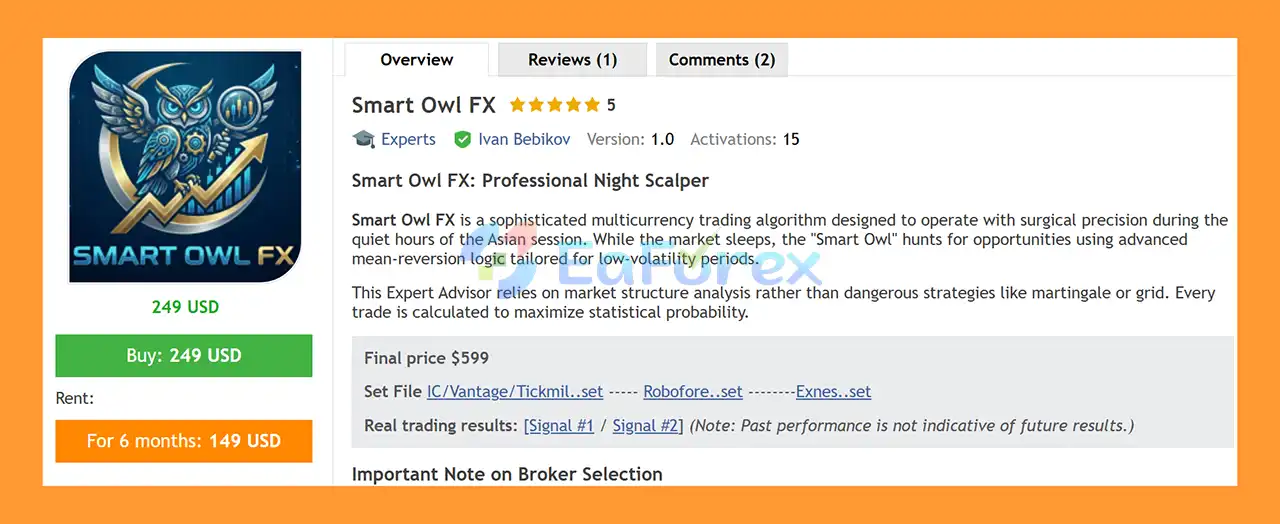
Smart Owl FX EA MT5 is a fully automated multicurrency Forex Expert Advisor for MetaTrader 5, designed specifically for trading during periods of relatively low market volatility, particularly the Asian trading session.
The EA is built around a mean-reversion and night scalping strategy, analyzing market structure, price levels, and short-term price behavior to identify potential trading opportunities.
Unlike many recovery-based Forex robots, Smart Owl FX EA MT5 does not use Martingale, Grid, or Averaging strategies. Each individual trade is protected by a fixed Stop Loss, providing a clearly defined loss limit for every position.
The EA operates from a single USDCHF M5 chart while automatically scanning and trading the supported currency pairs. This multi-currency architecture allows traders to run the system without manually attaching separate instances to every pair.
Smart Owl FX EA MT5 is designed for traders looking for an automated approach to quieter market sessions, with particular attention to execution quality, spread conditions, risk management, and broker connectivity.
About the Developer
- Author: Ivan Bebikov.
- Experience: Over +10 years of experience on MQL5.
- Notable Products: Smart Owl FX MT5, King Sniper EA MT5, AlgoTradingNightEA MT5, Smart Owl FX MT4 and others.
- Flagship Product: Smart Owl FX EA MT5 is rated as the best performing product of the year.
>> Delivery time 24h-48h after payment.
>>> Refund if not delivered.
>>> You will receive the latest version without any limitations (ID+Time).
>>Reviewed by Jason Stap <<
Key Features of Smart Owl FX EA MT5
Multicurrency Automated Trading
Smart Owl FX EA MT5 is designed to monitor and trade multiple Forex pairs automatically from a single chart.
Supported pairs include:
- EURUSD
- GBPUSD
- AUDUSD
- USDCAD
- USDCHF
- AUDCAD
- EURAUD
- EURCHF
- CADCHF
- AUDCHF
The EA scans these instruments automatically, reducing the need to install multiple copies of the robot on different charts.
Asian Session Night Scalping
The system is specifically designed for periods associated with relatively lower market volatility, particularly the Asian session.
Its trading logic is intended to take advantage of short-term price movements and potential reversion toward established market levels.
Mean-Reversion Strategy
The core strategy is based on mean reversion.
Instead of primarily attempting to follow strong directional trends, the EA analyzes price behavior and market structures to identify situations where price may move back toward a previous or statistically relevant level.
This approach can be particularly relevant during quieter market periods when price frequently moves within defined ranges.
M5 Trading Timeframe
The EA operates using the M5 timeframe, allowing it to analyze relatively short-term market movements.
The recommended base chart for installation is USDCHF.
Importantly, the EA does not limit trading to USDCHF. From the single installation chart, it automatically scans the supported currency pairs.
No Martingale
Smart Owl FX EA MT5 does not use a Martingale money-management strategy.
This means the system is not designed to systematically increase position size after losing trades in an attempt to recover previous losses.
No Grid
The EA does not rely on a conventional Grid trading structure.
This avoids intentionally accumulating a sequence of positions at progressively different price levels as part of a grid recovery system.
No Averaging
The strategy also avoids averaging down or adding positions simply to improve the average entry price of a losing trade.
Each trade is treated as an individual setup with its own predefined protection.
Fixed Stop Loss
Every trade opened by the EA is protected by a fixed Stop Loss.
This provides a predefined exit level if the market moves against the position and is an important component of the system’s risk-control structure.
Multiple Risk Modes
Smart Owl FX EA MT5 provides predefined risk allocation modes:
- Very Low Risk
- Low Risk
- Medium Risk
- High Risk
These presets allow traders to choose an exposure level according to their account size and risk tolerance.
For traders who require more control, Advanced Risk Settings can be used for custom Fixed Lot or Risk-based configuration.
Economic News Filter
The EA includes a built-in News Filter that can be enabled or disabled.
When activated, the filter can pause trading around selected high-impact economic events, helping reduce exposure to sudden volatility caused by major news releases.
11. Daylight Saving Time Adjustment
The Use US DST parameter allows traders to enable or disable automatic time-shift adjustments.
This is useful for broker environments where trading-session times change because of daylight-saving adjustments.
How Does Smart Owl FX EA MT5 Work?
Smart Owl FX EA MT5 follows a relatively straightforward automated trading process.
Step 1 – Market Scanning
The EA is installed on the recommended USDCHF M5 chart.
From this single chart, it automatically scans the supported currency pairs instead of requiring a separate EA instance for every symbol.
Step 2 – Market Structure Analysis
The algorithm evaluates price behavior, market structures, and relevant price levels.
The purpose is to identify situations where short-term price movement may have deviated from an established trading range or reference level.
Step 3 – Mean-Reversion Signal
When the required conditions are satisfied, the EA searches for a potential mean-reversion opportunity.
The strategy is primarily designed around the assumption that certain short-term price deviations may revert during suitable market conditions.
Step 4 – Automated Trade Execution
Once a valid setup is identified, the EA automatically executes the trade according to its programmed rules.
No manual entry is required after the system has been configured correctly.
Step 5 – Stop Loss Protection
Each individual position is protected by a fixed Stop Loss.
This means the system does not depend on unlimited recovery or progressively adding positions to a losing trade.
Step 6 – News and Session Management
Depending on the selected settings, the EA can use its economic news filter to avoid trading around important events.
The strategy is primarily intended for the Asian/night session, where execution conditions and spreads become particularly important.
Why Choose Smart Owl FX EA MT5?
Smart Owl FX EA MT5 may be interesting for traders looking for a multi-currency night scalping system without conventional recovery techniques.
Its key characteristics include:
- Automated multicurrency Forex trading
- Asian-session/night scalping approach
- Mean-reversion strategy
- M5 trading timeframe
- Single-chart installation
- Automatic scanning of multiple currency pairs
- No Martingale
- No Grid
- No Averaging
- Fixed Stop Loss on every trade
- Multiple predefined risk modes
- Advanced Fixed Lot/Risk settings
- Built-in economic news filter
- DST adjustment option
- Designed for ECN/Raw Spread environments
The combination of multiple currency pairs and a single-chart architecture can also simplify installation and monitoring compared with systems that require separate EA instances on every supported symbol.
Smart Owl FX EA MT5 Performance Review
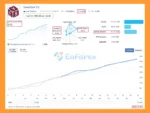
🟣Signal Results
🔺EURUSD, GBPUSD, AUDUSD, EURAUD, AUDCAD, USDCAD pairs over 133 trading weeks:
- Initial Deposit: $49.54
- Growth Rate: +315%
- Win Rate (% of total): 89.2%
- Maximum Drawdown: 24.6%
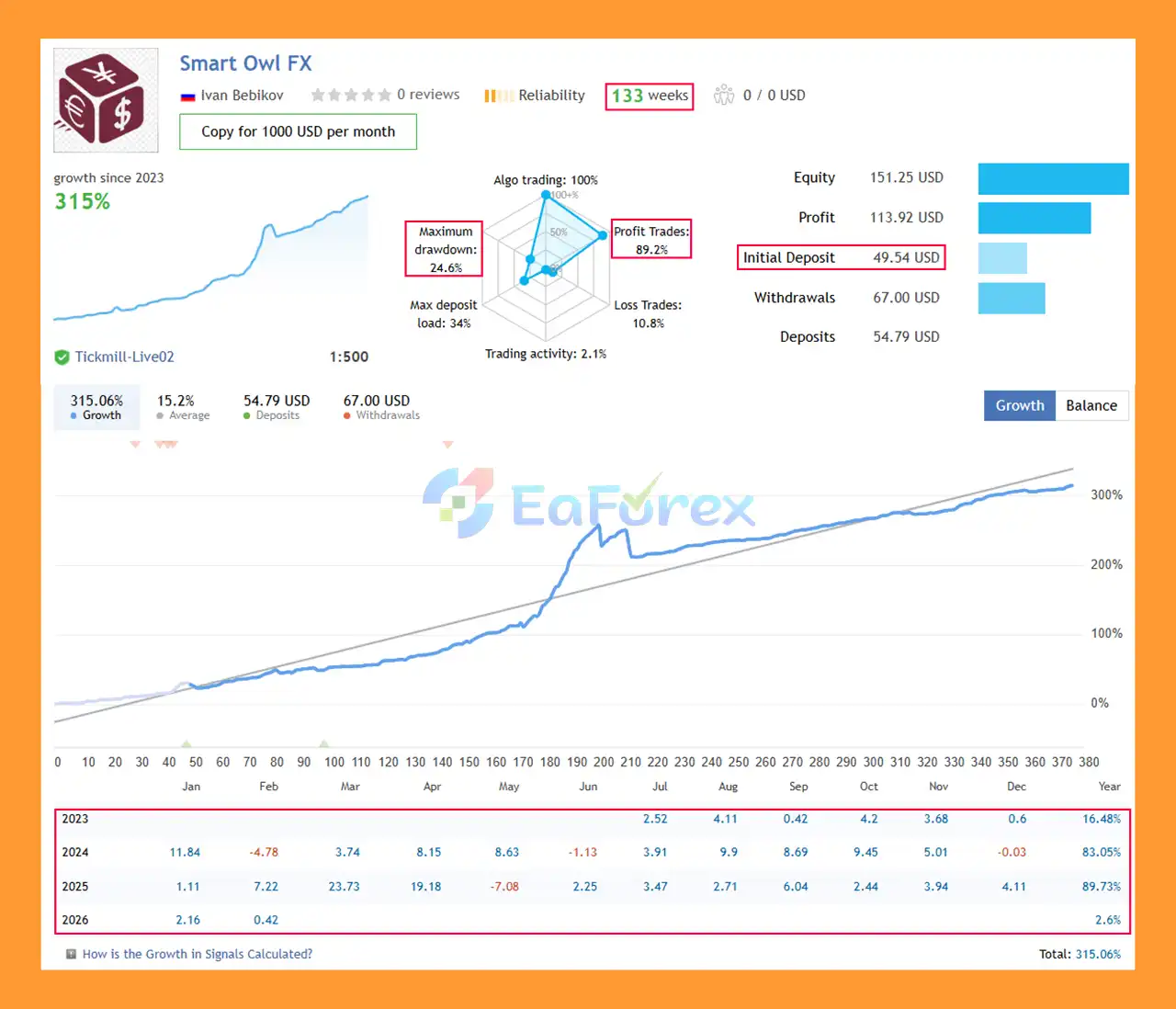
Smart Owl FX EA Signal Results
🔺EURCHF, USDCHF, AUDCHF, CADCHF, AUDCHF pairs over 3 trading weeks:
- Initial Deposit: $91.42
- Growth Rate: +54%
- Win Rate (% of total): 94.1%
- Maximum Drawdown: 44.8%
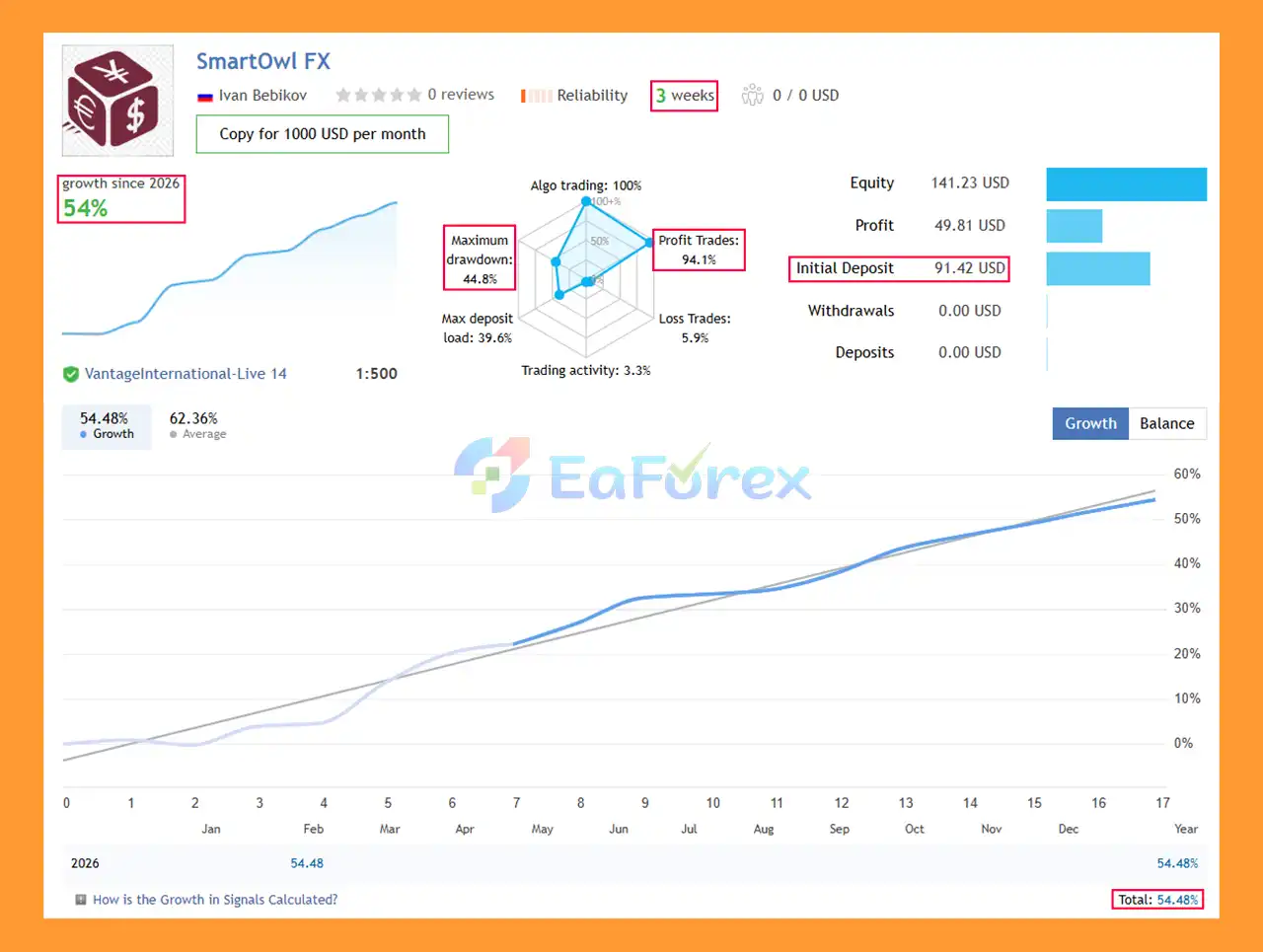
Smart Owl FX MT5 Signal Results
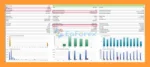
🟣Backtest Results
🔺USDCHF pair – 6 years
- Initial Deposit: $1,000
- Total Net Profit: $1.5 million
- Win Rate (% of total): 95.14%
- Maximum Drawdown: 3.53%
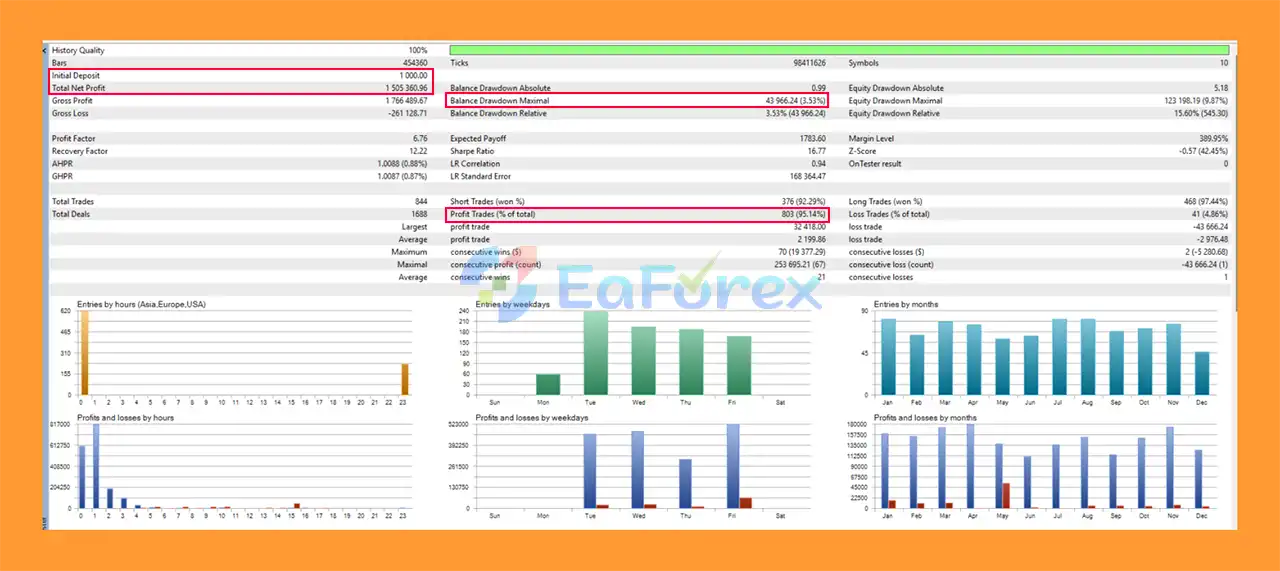
Smart Owl FX EA MT5 Backtest
Performance and Risk Management
Smart Owl FX EA MT5 uses several structural features to control trading risk.
Fixed Stop Loss
Every trade has a fixed Stop Loss, providing a predefined maximum loss level for the individual position under normal execution conditions.
No Martingale
The absence of Martingale means the EA does not rely on progressively increasing lots after losses as a primary recovery mechanism.
No Grid
The EA does not use a traditional grid structure to accumulate multiple positions as price moves against an initial trade.
No Averaging
The system does not depend on repeatedly adding to losing positions to change the average entry price.
Risk Presets
The four predefined risk levels allow users to select different exposure settings:
| Risk Mode |
Intended Use |
| Very Low Risk |
More conservative exposure |
| Low Risk |
Lower-risk automated trading |
| Medium |
Moderate exposure |
| High |
Higher trading risk and exposure |
For accounts subject to strict 1:30 leverage, the developer recommends the Very Low Risk preset.
Advanced Risk Settings
Users who want greater control can use Advanced Risk Settings for Fixed Lot or Risk-based position sizing.
Recommended Trading Environment
Smart Owl FX EA MT5 is particularly sensitive to execution conditions because its strategy focuses on short-term trading during the night session.
| Parameter |
Recommendation |
| Platform |
MetaTrader 5 |
| Timeframe |
M5 |
| Base Chart |
USDCHF |
| Trading Style |
Night Scalping / Mean Reversion |
| Instruments |
10 supported Forex pairs |
| Session |
Asian / Night Session |
| Account |
ECN / Raw Spread / Low Spread |
| VPS |
Mandatory |
| Leverage |
1:30 or higher |
| Low-Leverage Setting |
Very Low Risk recommended for 1:30 accounts |
ECN / Raw Spread Account
A low-spread account is strongly recommended.
During the Asian session, spreads can widen, particularly around the daily broker rollover period. Because the EA uses short-term trading logic, increased spreads and commissions can have a significant impact on the outcome of individual trades.
VPS Requirement
A VPS is mandatory for the intended deployment.
The trading terminal should remain connected 24/5, with low network latency between the VPS and broker server.
A stable connection helps reduce potential execution problems caused by terminal downtime, disconnections, or excessive network latency.
Weaknesses and Risk Warnings
Despite its risk-control features, Smart Owl FX EA MT5 is not risk-free.
Mean Reversion Can Fail
Mean-reversion strategies can perform differently when the market enters a strong directional trend.
A price movement that initially appears temporary can develop into a sustained breakout, potentially causing the Stop Loss to be triggered.
Asian Session Conditions Can Change
The Asian session is not always characterized by stable or low volatility. Unexpected economic developments, geopolitical events, or market-specific factors can create rapid movements.
Spread Is Critical
Night trading can involve wider spreads, particularly around broker rollover.
Higher transaction costs can reduce the effectiveness of short-term strategies.
Slippage and Execution
Even with a fixed Stop Loss, actual execution may differ from the requested level during fast markets or poor liquidity.
Correlated Exposure
Because the EA can trade multiple currency pairs simultaneously, several positions may be exposed to related market factors, particularly USD movements.
Multiple trades therefore do not necessarily represent completely independent risks.
VPS Dependency
Since continuous operation is required, VPS reliability and broker connectivity are important parts of the trading environment.
Leverage Risk
Higher leverage can increase both potential returns and potential losses. Users should select position sizing appropriate for their account rather than assuming that the EA’s predefined risk modes eliminate account-level risk.
Pros and Cons
| Pros |
Cons |
| Fully automated multicurrency trading |
Requires a VPS |
| Designed for Asian/night sessions |
Night spreads can widen |
| Mean-reversion strategy |
Can struggle during strong trends |
| M5 timeframe |
Short-term trading is sensitive to execution |
| Trades multiple supported pairs from one chart |
Multiple positions can create correlated exposure |
| No Martingale |
Does not eliminate trading losses |
| No Grid |
Market conditions can change |
| No Averaging |
Slippage can affect Stop Loss execution |
| Fixed Stop Loss on every trade |
ECN/Raw Spread conditions are strongly recommended |
| Multiple risk presets |
High Risk mode can increase exposure |
| Built-in News Filter |
News filters cannot prevent every unexpected move |
| DST adjustment |
Broker/server time must be configured correctly |
How to Install Smart Owl FX EA MT5
Step 1 – Install MetaTrader 5
Install MetaTrader 5 and log in to your trading account.
Step 2 – Install the EA
Copy the Smart Owl FX EA MT5 file into the appropriate MQL5/Experts directory or install it through the official distribution method.
Restart MetaTrader 5 or refresh the Navigator panel after installation.
Step 3 – Open the USDCHF M5 Chart
Open a USDCHF chart and select the M5 timeframe.
This is the recommended base chart for the EA.
Step 4 – Attach Smart Owl FX EA
Drag Smart Owl FX EA MT5 onto the USDCHF M5 chart.
Because the EA scans the supported instruments automatically, additional copies on every currency pair are not required under the recommended setup.
Step 5 – Select the Risk Mode
Choose the appropriate risk setting:
- Very Low Risk
- Low Risk
- Medium
- High
For a 1:30 leverage account, the developer recommends Very Low Risk.
Alternatively, use Advanced Risk Settings if you want to configure Fixed Lot or custom Risk settings.
Step 6 – Configure the News Filter
Enable or disable the News Filter according to your preferred trading configuration.
Step 7 – Configure DST
Use the Use US DST setting when appropriate for your broker’s server-time and daylight-saving configuration.
Step 8 – Enable Algo Trading
Enable Algo Trading/AutoTrading in MetaTrader 5.
Ensure that the terminal remains connected to the broker through the recommended VPS.
Step 9 – Test Before Going Live
Before using real money, test the EA in the Strategy Tester using real tick data and run it on a demo account under the same broker conditions you intend to use for live trading.
Monitor spreads, commissions, execution, drawdown, margin usage, and trading frequency.
Real User Reviews and Feedback
🔺Smart Owl FX EA is highly appreciated by the MQL5 community for bringing stable and reliable profits. Below are 5 star reviews from users:
- Nguyen An Nguyen (2026.02.04): “I’ve been using Smart Owl for a while now and I’m impressed with its logic. The entries are precise, and the risk management is better than most EAs I’ve tried. It’s a reliable tool for anyone looking for consistent growth.”
What’s Included in the Download Package?
- Experts:
- Setting (If Any).docx
- Installation Guide.docx
- SetFiles:
- Exness_Smart_Owl_FX.set
- Robo_Smart_Owl_FX.set
- IC_Vantage_Tickmill_Smart_Owl_FX.set
>>> Join VIP Membership Now <<<
Conclusion
In summary,














 Unlimited Activations
 Instant delivery
 Easy to install
















 Automatic EA
 EA Best Seller
 Expert Advisor MT4
 Expert Advisor MT5
 HFT EA


Reviews
Clear filtersThere are no reviews yet.