









-
 Unlimited Activations
-
 Instant delivery
-
 Easy to install





 Unlimited Activations
Instant delivery
Easy to install
Unlimited Activations
Instant delivery
Easy to install
 Free Update
 Free Install Support

MT5Phoenix EA is a rule-based MetaTrader 5 Expert Advisor (EA) designed to combine higher-timeframe market bias with lower-timeframe entry triggers. The system uses structured technical rules rather than opaque trading logic, allowing traders to configure how market direction, entries, Stop Loss, Take Profit, and trade management are handled.
The long and short trading systems operate independently, meaning Buy and Sell conditions can be configured separately according to the trader’s preferred strategy.
MT5Phoenix EA is primarily tested on XAUUSD (Gold) and is designed for traders looking for a structured Gold trading system with configurable trend filters, Break of Structure entries, EMA-based signals, ATR-based risk management, trailing stops, partial profit taking, and BreakEven functionality.
The EA does not use Grid or Martingale strategies, and every trade is protected by a hard Stop Loss.
MT5Phoenix is a configurable trading tool rather than a guaranteed-profit system. The developer recommends thoroughly backtesting the EA using your own broker, symbol, spread, commission, account type, and risk settings before considering live trading.
>> Delivery time 24h-48h after payment.
>>> Refund if not delivered.
>>> You will receive the latest version without any limitations (ID+Time).>>Reviewed by Jason Stap <<
MT5Phoenix EA uses clearly defined technical rules for determining market bias, entry conditions, Stop Loss, Take Profit, and trade management.
The system can be configured according to different combinations of:
Buy and Sell trading logic can be configured independently.
This provides greater flexibility for traders who want different settings for bullish and bearish market conditions.
The higher timeframe can be used to determine the overall market direction.
Available bias options include:
The recommended configuration supplied by the developer is:
Bias Timeframe: H1
The lower timeframe provides the actual trade-entry trigger.
Available entry methods include:
The default tested configuration uses:
Entry Timeframe: M30
MT5Phoenix EA does not use:
This makes the trading logic more structured and easier to analyze compared with strategies that continuously add positions during adverse price movement.
Every trade uses a defined Stop Loss.
Available Stop Loss methods include:
This allows traders to adapt the Stop Loss methodology to different market conditions and trading approaches.
MT5Phoenix EA uses a multi-timeframe trading structure in which a higher timeframe establishes market bias and a lower timeframe searches for an entry trigger.
The EA can analyze the higher timeframe using:
For the recommended configuration, the H1 timeframe is used for the broader market bias.
Once the market bias is established, the EA analyzes the lower timeframe.
The entry can be based on:
The default tested setup uses M30 for entries.
After an entry condition is confirmed, the EA determines the Stop Loss according to the selected method.
Possible methods include ATR, swing structure, candle high/low, fast EMA, or a custom EMA period.
Take Profit can be configured using several different approaches:
This allows traders to choose between fixed targets and more dynamic exit conditions.
After a trade is opened, optional trade-management features can include:
The EA can therefore continue managing an open position according to the selected rules rather than simply closing it at a fixed target.
Before and during trading, MT5Phoenix can apply account-level restrictions such as:
These controls are designed to help prevent excessive trading and uncontrolled risk exposure.
MT5Phoenix combines higher-timeframe bias with lower-timeframe entry signals, providing a structured approach to market analysis.
The EA is based on configurable technical rules rather than a black-box system. Traders can select the methods used for bias, entry, Stop Loss, Take Profit, and trade management.
Long and short strategies can be configured separately, giving traders more control over directional trading conditions.
MT5Phoenix has been tested primarily on XAUUSD, making it particularly relevant for traders interested in automated Gold trading on MetaTrader 5.
Other symbols may be possible, but they should be independently validated before live use.
The EA does not rely on Grid or Martingale techniques to recover losing trades.
The system includes configurable:
MT5Phoenix respects important broker trading restrictions, including:
This helps the EA adapt its order parameters to the actual trading environment provided by the broker.
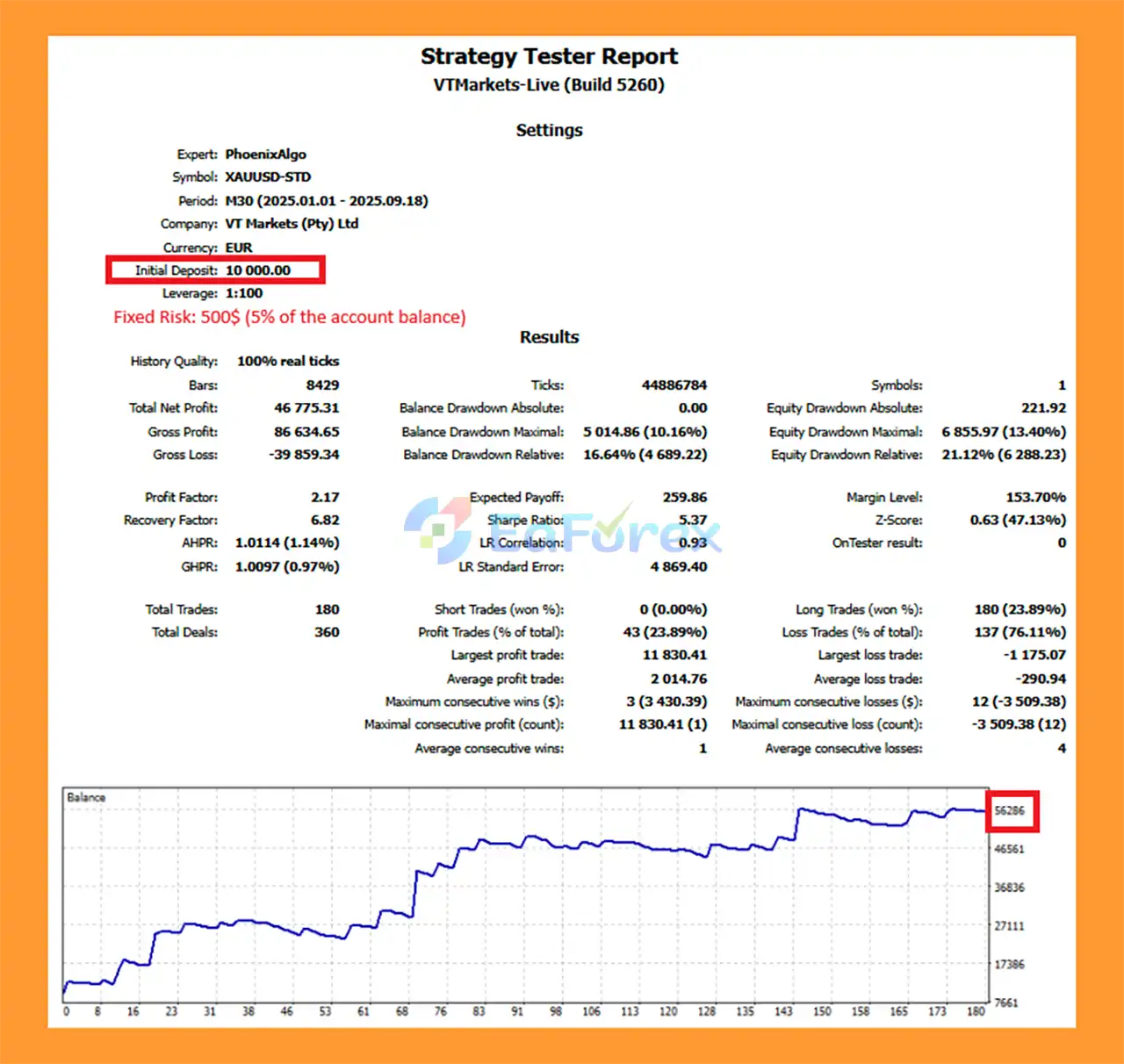
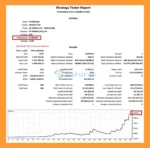
🔺XAUUSD (Gold) pair – 9 months on the M30 chart timeframe.
MT5Phoenix EA Backtest
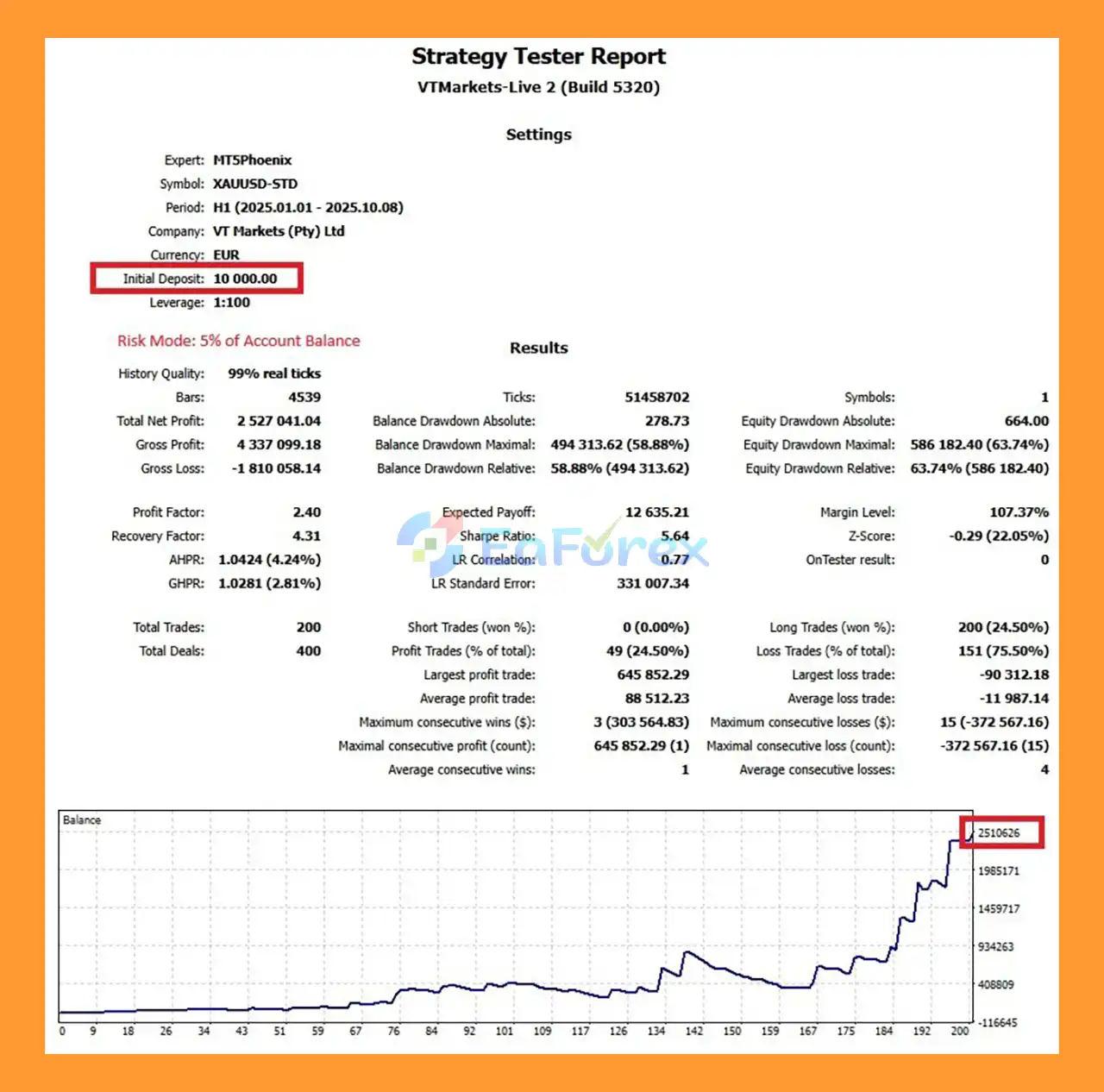
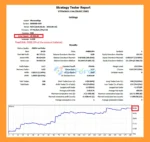
🔺XAUUSD (Gold) pair – 10 months on the H1 chart timeframe.
MT5Phoenix EA Backtest Results
MT5Phoenix EA includes several layers of risk and exposure management.
The EA can stop trading after reaching a predefined daily loss percentage based on account balance.
Traders can limit the number of trades the EA is allowed to open during a trading day.
This can help prevent excessive activity during unfavorable market conditions.
A consecutive-loss pause can be configured to temporarily stop new trades after a specified sequence of losing positions.
The EA can wait for a defined number of bars after a closed trade before considering another entry.
This can reduce immediate re-entry after a completed position.
Users can optionally restrict the EA to specific trading sessions based on broker server time.
Risk sizing is configurable through parameters such as:
Position sizing should be selected carefully according to account size, Stop Loss distance, leverage, broker specifications, and personal risk tolerance.
The EA can close a selected percentage of a position after a predefined R-multiple is reached.
The remaining position can continue running under the configured trade-management rules.
The BreakEven feature can automatically move the Stop Loss to the entry price once a selected R-multiple has been reached.
Trailing Stop can be configured using:
This gives traders multiple approaches to protecting open positions while allowing profitable trades to continue.
The available screenshots include strategy tester reports and equity curves from backtests performed on Bybit TradeFi MT5.
However, historical backtest results should be interpreted carefully.
Results can vary significantly depending on:
For this reason, traders should run the EA through the MetaTrader 5 Strategy Tester using their own broker and intended configuration before using it on a live account.
Backtest performance is historical information and does not guarantee future trading results.
MT5Phoenix EA requires an account leverage of 1:100 or higher.
The EA may not function correctly with lower-leverage accounts such as 1:20 or 1:30, because higher margin requirements can prevent positions from being opened at the intended size.
The EA supports MetaTrader 5 hedging account mode.
Before installation, verify that your trading account uses the appropriate account type.
The EA has been tested primarily on:
XAUUSD – Gold
Other symbols may be compatible, but they require independent testing and validation.
The default tested configuration is:
These settings should not be interpreted as a guarantee of optimal performance across every broker or market environment.
Accounts below the required 1:100 leverage may experience margin restrictions that prevent the EA from opening positions at the intended volume.
Although other symbols may be possible, the available testing is primarily focused on Gold.
Using the EA on other instruments without adequate testing introduces additional uncertainty.
XAUUSD can experience rapid price movements, spread expansion, and sudden changes in volatility.
Even with a hard Stop Loss, actual execution can differ from theoretical backtest results.
MT5Phoenix is a trading tool, not a guaranteed-profit system.
Historical performance, backtests, and previous signal behavior cannot guarantee future results.
The trader is responsible for configuring:
Incorrect risk settings can significantly affect account exposure.
Spreads, commissions, swaps, execution speed, minimum lot size, volume steps, and stop-level requirements differ between brokers.
These differences can produce materially different live results.
Optional HIGH_RISK.set and MEDIUM_RISK.set configuration files are available through the seller’s MQL5 private chat.
However, preset files should not be treated as universally suitable settings. Each profile should be backtested using the trader’s own broker, symbol, leverage, and account configuration.
Market structure and EMA conditions can behave differently across market regimes.
A strategy that performs well during one volatility environment may produce different results during another.
MT5Phoenix EA supports optional MQL5 mobile push notifications.
Notifications can be configured for events such as:
Each notification category can be controlled independently through the EA inputs.
The product does not include automatic chat functionality, an external messenger integration, or an external communication panel.
MT5Phoenix EA does not include permanent built-in trading profiles.
However, optional preset files are available:
After purchasing MT5Phoenix, traders can request these configuration files through the MQL5 private chat on the product page. The seller can also provide instructions for loading the presets into MetaTrader 5.
Even when using these files, traders should backtest the exact configuration with their own broker and account before live trading.
Make sure your MT5 account meets the basic requirements:
Obtain the MT5Phoenix EA files after purchase.
In MetaTrader 5, go to:
File → Open Data Folder → MQL5 → Experts
Copy the MT5Phoenix EA file into the Experts folder.
Restart MT5 or refresh the Expert Advisors section in the Navigator window.
For the default tested configuration, use:
XAUUSD
Configure the relevant charts for:
Drag the EA from the Navigator → Expert Advisors section onto the appropriate MT5 chart.
Make sure automated trading is enabled.
Review and configure:
If you have received the HIGH_RISK.set or MEDIUM_RISK.set file, load it through the EA’s input settings.
Do not use a preset on a live account without first validating it through the MT5 Strategy Tester with your own broker and account conditions.
Run a comprehensive backtest using:
After satisfactory testing, consider beginning with a conservative risk level and a small live allocation.
Increase risk only after you are comfortable with how the EA behaves under real market conditions.
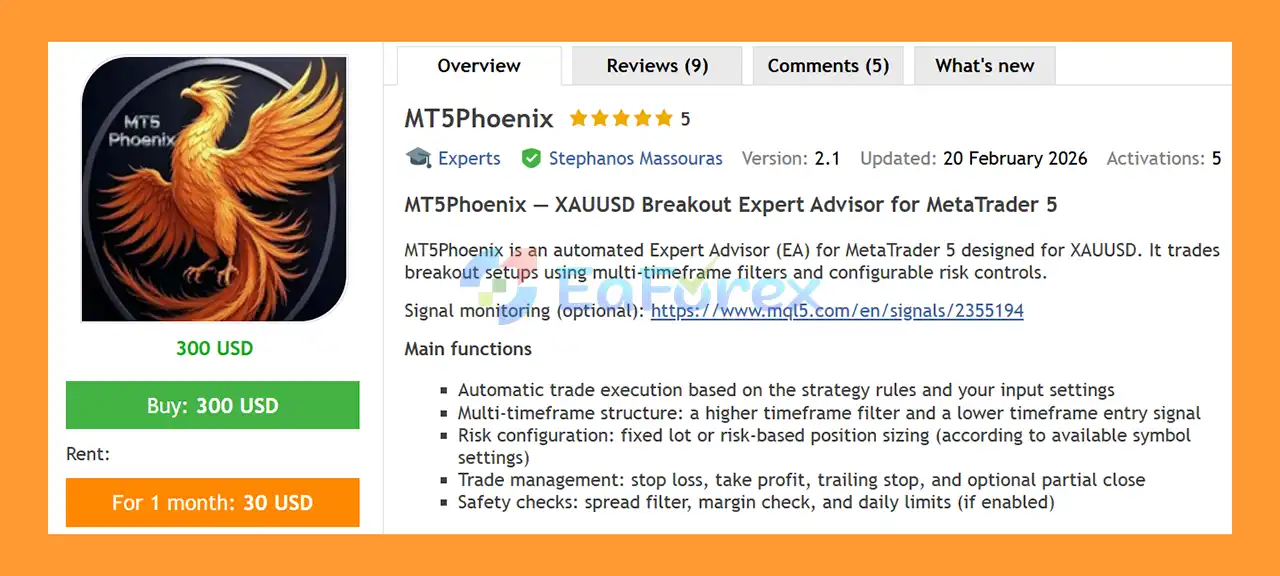
🔺 MT5Phoenix EA is highly appreciated by the MQL5 community for bringing stable and reliable profits. Below are 5 star reviews from users:
In summary, MT5Phoenix EA is a structured, rule-based MT5 Expert Advisor that combines higher-timeframe market bias with lower-timeframe entry signals. Its configurable EMA, Break of Structure, ATR, swing-based and Risk-to-Reward components provide traders with considerable control over how the strategy identifies and manages trades.
The EA is particularly focused on XAUUSD, while its independent long and short configurations allow traders to customize bullish and bearish trading logic separately. With hard Stop Losses, optional Trailing Stop, Partial Profit, BreakEven, daily loss limits, trade limits, cooldown controls, and session filters, MT5Phoenix provides a broad set of tools for structured trade and risk management.
At the same time, the EA should be treated as a trading tool rather than a guaranteed-profit solution. Leverage requirements, broker conditions, Gold volatility, execution quality, and risk configuration can all have a significant impact on actual results.
For the most reliable evaluation, traders should backtest MT5Phoenix using their own broker, account type, XAUUSD specification, spread, commission, and exact risk settings before moving to live trading.
1. What is MT5Phoenix EA?
MT5Phoenix EA is a professional automated breakout trading system developed for MetaTrader 5. It is specifically optimized for trading XAUUSD (Gold) and combines multi-timeframe trend filtering, swing-based breakout logic, and configurable risk management to deliver structured gold trading.
2. How does MT5Phoenix EA work?
MT5Phoenix EA uses a higher timeframe EMA trend filter to identify overall market direction and a lower timeframe breakout trigger to enter trades. It executes positions when price breaks recent swing highs or lows, confirming momentum before entry.
3. What currency pair is MT5Phoenix EA optimized for?
MT5Phoenix EA is specifically designed for trading XAUUSD (Gold). The strategy is built to capture gold’s volatility using breakout and momentum-based logic.
4. What timeframes are recommended for MT5Phoenix EA?
Backtests were conducted on:
M30 timeframe (9 months test)
H1 timeframe (10 months test)
Both timeframes demonstrated strong performance, allowing traders to choose based on their preferred trade frequency and risk profile.
5. What risk management features does MT5Phoenix EA include?
MT5Phoenix EA includes:
Fixed lot or percentage-based risk
ATR-based Stop Loss and Take Profit
Trailing stop functionality
Partial close at defined R-multiples
Daily drawdown limits
Spread and margin safety filters
These features help balance growth potential with capital protection.
6. Does MT5Phoenix EA support partial profit taking?
Yes. The EA includes a partial profit function that allows traders to close a percentage of the position at a predefined R-multiple (for example, 1.5R), helping to secure gains while keeping the remaining trade active.
7. What are the backtest results of MT5Phoenix EA?
Reported backtest results on XAUUSD:
M30 – 9 months
Initial Deposit: $10,000
Total Net Profit: $46,775.31
Maximum Drawdown: 10.16%
H1 – 10 months
Initial Deposit: $10,000
Total Net Profit: $2.53 million
Traders should always validate results under their broker conditions before live trading.
8. Does MT5Phoenix EA include safety protections?
Yes. The EA includes built-in spread control, margin checks, cooldown between trades, and optional daily loss limits to prevent excessive exposure during unfavorable market conditions.
9. Is MT5Phoenix EA suitable for different risk profiles?
Yes. The EA provides preset configurations (Higher Risk and Lower Risk) and flexible lot sizing options, making it suitable for both conservative and aggressive traders.
10. Why choose MT5Phoenix EA for trading Gold?
Traders choose MT5Phoenix EA because it offers:
Structured breakout strategy for XAUUSD
Multi-timeframe EMA trend confirmation
ATR-based adaptive stop management
Partial profit and trailing stop features
Controlled drawdown (10.16% on M30 test)
Fully automated execution on MT5
It is designed for traders seeking a configurable, momentum-driven, and risk-managed automated Gold trading solution.
In stock
In stock
In stock
In stock
In stock
Out of stock
No account yet?
Create an Account












 Automatic EA
 EA Best Seller
 Expert Advisor MT4
 Expert Advisor MT5
 HFT EA


Reviews
Clear filtersThere are no reviews yet.