









-
 Unlimited Activations
-
 Instant delivery
-
 Easy to install







 Unlimited Activations
Instant delivery
Easy to install
Unlimited Activations
Instant delivery
Easy to install
 Free Update
 Free Install Support

Oneiroi EA MT5 is an automated Expert Advisor for MetaTrader 5 designed to identify strong oversold and overbought market conditions and use them as potential entry opportunities.
The system combines three technical indicators — RSI, Stochastic, and Money Flow Index (MFI) — to identify conditions where the market may be reaching an extreme zone.
Oneiroi is designed to be selective rather than trade continuously. Because all three indicator conditions need to align before an entry is considered, the EA may generate fewer trades while focusing on specific market conditions.
The primary recommended timeframe is M15, although the actual signal timeframe can be configured through the EA’s settings and should match the timeframe specified in the supplied set file.
Oneiroi can be used across different Forex pairs and brokers, although trading conditions such as spread, commission, execution, and liquidity can influence results.
>> Delivery time 24h-48h after payment.
>>> Refund if not delivered.
>>> You will receive the latest version without any limitations (ID+Time).>>Reviewed by Jason Stap <<
Oneiroi EA MT5 Overview
Oneiroi EA MT5 focuses on identifying extreme market conditions rather than continuously entering trades.
The system uses three technical indicators to confirm whether the market has reached an oversold or overbought condition.
The Relative Strength Index (RSI) is used to identify potential market extremes.
For a potential Buy signal, the RSI must be below the configured RSI_Below level.
For a potential Sell signal, the RSI must be above the configured RSI_Above level.
The Stochastic oscillator provides a second confirmation layer.
For a Buy signal, the Stochastic value must be below the configured Stochastic_Below level.
For a Sell signal, it must be above the configured Stochastic_Above level.
The Money Flow Index (MFI) provides an additional confirmation of market pressure.
For a Buy signal, MFI must be below the configured MFI_Below level.
For a Sell signal, MFI must be above the configured MFI_Above level.
The core concept of Oneiroi is that multiple conditions must align before a trade is considered.
A simplified Buy setup requires:
A simplified Sell setup requires:
Because these conditions can be relatively restrictive, the EA is designed to trade selectively rather than continuously.
Oneiroi EA MT5 does not rely on a single indicator. RSI, Stochastic, and MFI work together to identify potential oversold and overbought conditions.
The requirement for multiple conditions to align can reduce the number of potential entries and keeps the system focused on specific market situations.
The indicators used by the strategy are visible during backtesting, providing greater transparency into the technical conditions behind potential entries.
The Signal_Timeframe parameter allows users to select the timeframe from which the indicator signals are generated.
When using a supplied set file, the EA should be attached to the corresponding timeframe specified by that configuration.
Martingale functionality can be enabled when desired. Traders who do not want to use Martingale can operate with individual Stop Loss and Take Profit controls for each position.
The EA provides several tools for managing positions, including trailing stops, partial closing, floating P/L targets, and configurable Stop Loss and Take Profit distances.
Oneiroi EA MT5 can work with different Forex pairs and brokers, but the supplied recommendations include:
| Parameter | Recommended Configuration |
|---|---|
| Platform | MetaTrader 5 |
| Primary Timeframe | M15 |
| Recommended Pairs | EURNZD, NZDCHF, USDJPY, GBPAUD, USDCAD |
| Minimum Account Balance | $100 |
| Recommended Starting Capital | $1,000 on a cent account |
| Recommended Account Type | 100K cent account |
| Recommended Leverage | 1:500 or higher |
| Broker | Compatible with different brokers |
| Signal Timeframe | Match the timeframe specified in the set file |
The developer recommends using a 100K cent account, while the stated minimum account balance is $100.
The recommended starting capital and leverage should not be interpreted as guarantees of performance or safety. Traders should consider their own risk tolerance, broker conditions, margin requirements, and position sizing.
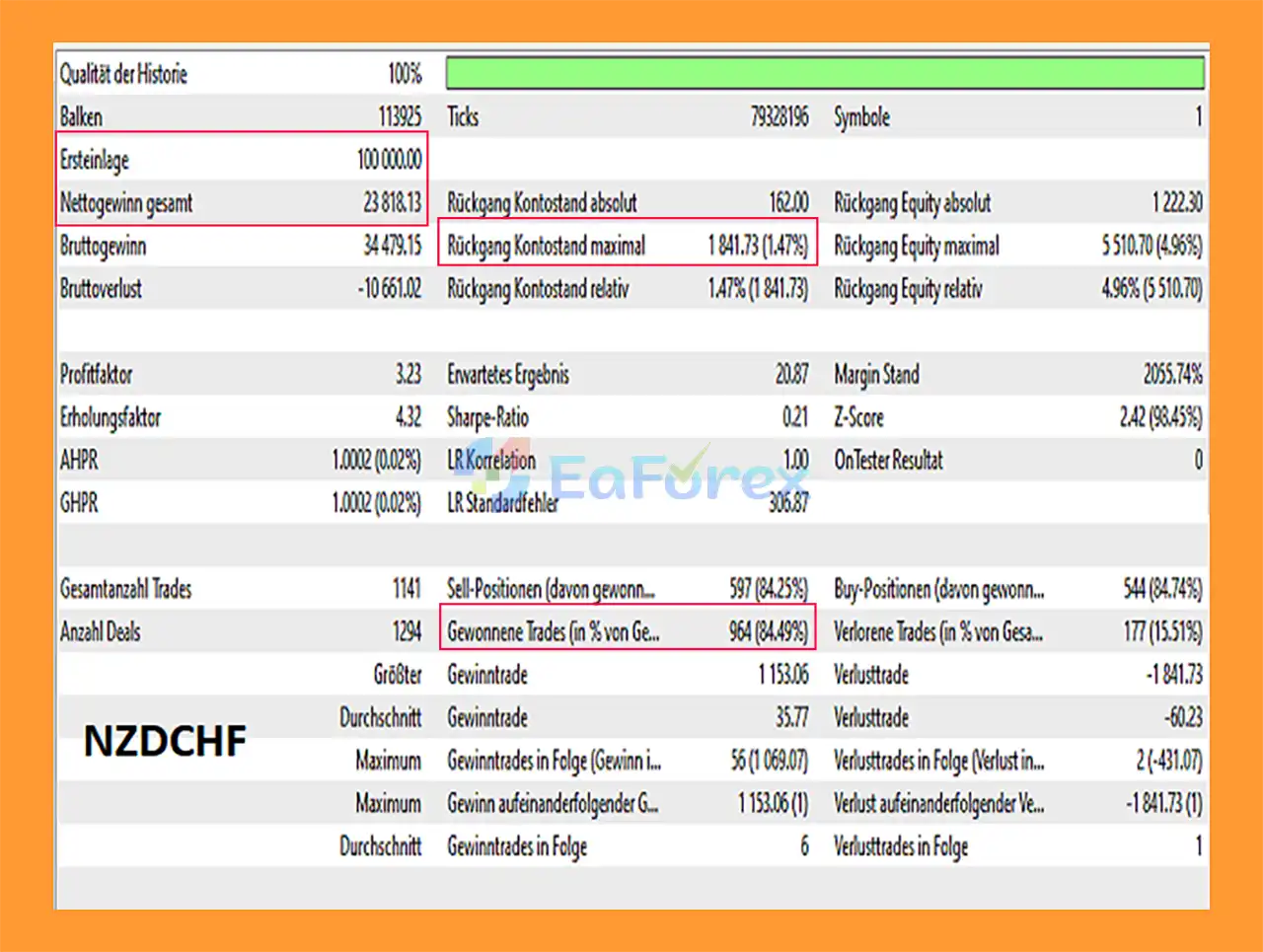
🔺NZDCHF pair – 4 years
Oneiroi MT5 Backtest
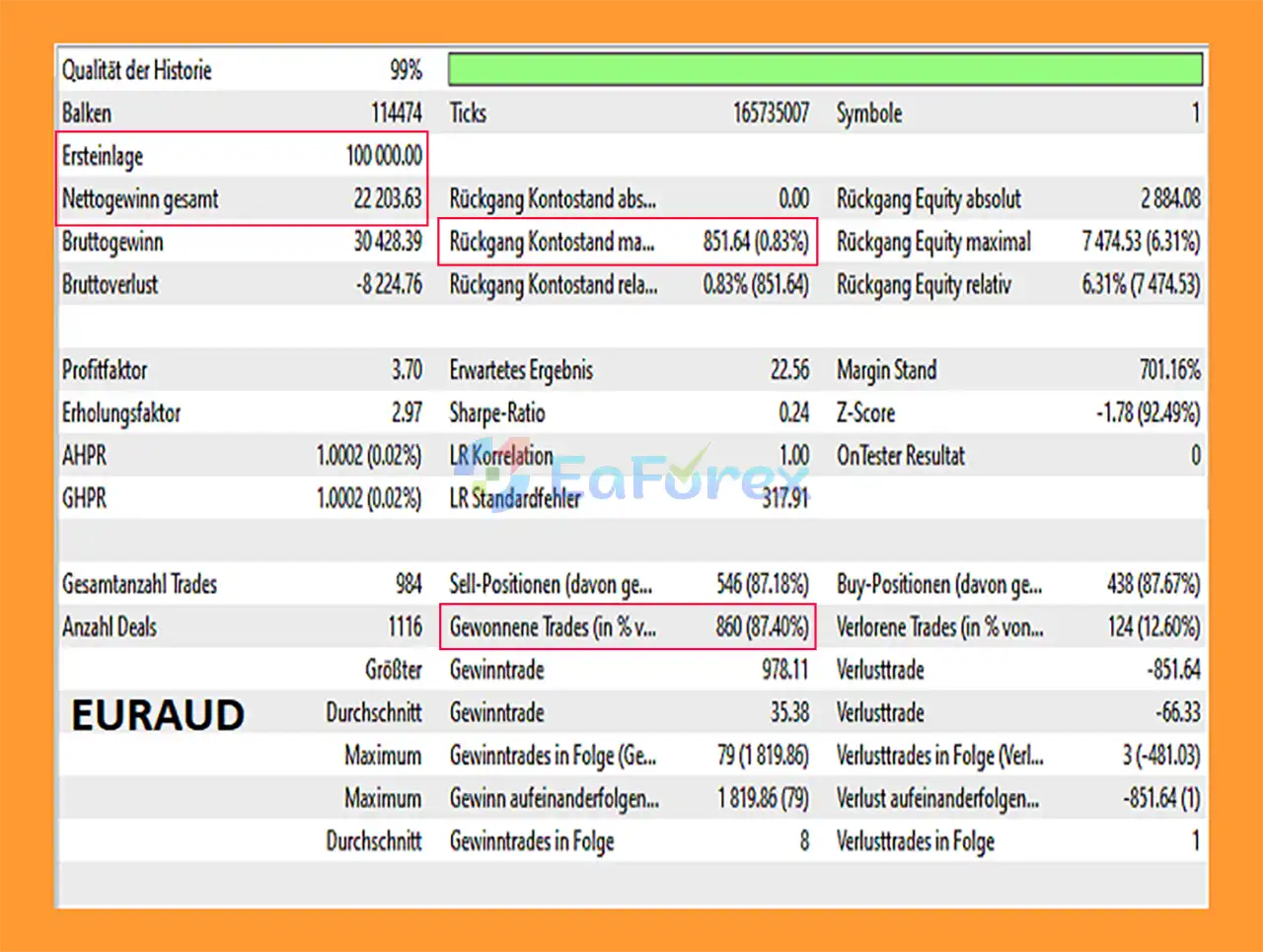
🔺EURAUD pair – 4 years
Oneiroi EA MT5 Backtest
Oneiroi EA MT5 includes several position-management and risk-control parameters that allow traders to customize how trades are sized and managed.
The MM_PositionSizing parameter determines how much account capital is associated with opening a 1.00-lot position.
For example, the supplied description explains that a value of 100,000 would correspond to approximately 0.01 lot per $1,000.
Actual position sizing can also depend on broker specifications and account conditions.
The Multiplier parameter controls the lot increase applied to subsequent orders.
When Martingale is enabled, this can increase position size after additional entries.
Because increasing position sizes can significantly increase exposure, Martingale should be treated as a higher-risk feature rather than a guaranteed recovery mechanism.
SL_Points determines the Stop Loss distance in points/pips according to the EA’s configuration.
TP_Points determines the Take Profit distance.
When Martingale is not used, the system can use hard Stop Loss and Take Profit levels for individual positions.
The EA includes:
These parameters allow users to customize how protective stops follow favorable price movement.
Close_Position_Percent determines how much of the open position is closed when a target is reached.
For example:
The CloseAtPL parameter can close positions when the combined floating Profit/Loss reaches a configured dollar amount.
For example:
This provides a portfolio-level position management mechanism.
The Hedging parameter determines whether the EA can trade in both directions.
The next open trade after time parameter determines how many bars the EA waits before opening another trade.
This can help control trading frequency and prevent positions from being opened too close together.
The Commission_per_Lot parameter allows users to account for trading commission per 1.00 lot and can also be incorporated into the EA’s target calculations.
The TPdevider parameter calculates a target based on account balance:
Balance ÷ TPdevider = Target Profit
The target can also account for commission and swap according to the EA’s configuration.
An oversold market can remain oversold while price continues falling. Similarly, an overbought market can remain overbought during a strong upward trend.
Therefore, indicator extremes should not be interpreted as guaranteed reversal signals.
When Martingale is enabled, subsequent orders can use larger position sizes according to the configured multiplier.
During prolonged adverse market movements, this can lead to:
Users should fully understand the Martingale mechanism before enabling it.
Because multiple conditions must align, Oneiroi may not trade frequently.
Periods without suitable oversold or overbought conditions can result in extended periods without new entries.
Strong trends, unexpected news, volatility changes, and abnormal liquidity conditions can affect the behavior of an oversold/overbought strategy.
Spread, commission, slippage, execution speed, and liquidity can influence actual trading results.
The recommended leverage of 1:500 or higher can provide greater margin flexibility but also allows substantial market exposure relative to account equity.
Higher leverage should therefore be combined with careful position sizing and risk management.
The system description refers to the potential for a high hit rate when the required conditions align. However, no indicator combination can guarantee a particular win rate or profitable results in future markets.
Backtest results can differ from live trading due to differences in spread, slippage, execution, liquidity, commissions, and market conditions.
Always evaluate the EA using realistic trading assumptions.
Install MetaTrader 5 and log in to your trading account.
Copy the Oneiroi EA MT5 files into the appropriate MQL5 → Experts directory.
Restart the MT5 terminal or refresh the Navigator window so that Oneiroi appears under Expert Advisors.
Open one of the recommended Forex pairs, such as:
The recommended timeframe is M15.
However, the EA’s Signal_Timeframe can be configured separately. When using a supplied set file, make sure the chart timeframe matches the timeframe specified in that set file.
Drag Oneiroi EA MT5 onto the selected chart and enable automated trading.
Contact Fleischflöte to obtain the appropriate set files for the intended pair and configuration.
Correct settings are important because different currency pairs may require different parameters.
Review:
If you do not fully understand the Martingale settings, consider testing the EA without Martingale first.
Run the EA on a demo account before using real funds. A cent account can also be used to test the system with relatively small monetary exposure.
🔺Oneiroi EA MT5 is highly appreciated by the MQL5 community for bringing stable and reliable profits. Below are 5 star reviews from users:
In summary, Oneiroi EA MT5 is an automated Forex Expert Advisor for MetaTrader 5 that focuses on identifying potential oversold and overbought conditions through a three-indicator confirmation system using RSI, Stochastic, and Money Flow Index (MFI). By requiring multiple conditions to align before entering a trade, the EA is designed to trade selectively rather than continuously.
Oneiroi provides flexible position-management features, including configurable Stop Loss and Take Profit, Trailing Stop, partial position closing, floating Profit/Loss protection, adjustable position sizing, hedging, and trade-interval controls. Martingale functionality is also available as an option, but enabling it can substantially increase position exposure during prolonged adverse market movements and should therefore be evaluated carefully.
The supplied 4-year backtests report a 84.49% win rate and 1.47% maximum drawdown on NZDCHF, with $23,818.13 net profit from a $100,000 initial deposit. The EURAUD test reports a 87.40% win rate, 6.31% maximum drawdown, and $22,203.63 net profit. These historical results do not guarantee future performance, and live results can differ because of spread, slippage, commissions, execution, liquidity, leverage, and changing market conditions.
Overall, Oneiroi EA MT5 offers a structured indicator-based approach to automated Forex trading with flexible risk and position-management options. Traders should use the correct set files, thoroughly demo test each selected currency pair, and apply conservative position sizing before considering live deployment.
1. What is Oneiroi EA MT5?
Oneiroi EA MT5 is an automated forex trading Expert Advisor designed for the MetaTrader 5. It focuses on identifying overbought and oversold market conditions using multiple technical indicators to execute high-probability trades automatically.
2. How does Oneiroi EA MT5 work?
Oneiroi EA MT5 analyzes the market using a combination of technical indicators, including:
Relative Strength Index (RSI)
Stochastic Oscillator
Money Flow Index
These indicators help the EA detect extreme price conditions and trigger trades only when strict signal confirmation criteria are met.
3. What timeframe is Oneiroi EA MT5 optimized for?
The EA is primarily optimized for the M15 timeframe, where it aims to capture short-term market reversals during overbought or oversold conditions. However, traders can also test it on other timeframes depending on their strategy preferences.
4. Which currency pairs work best with Oneiroi EA MT5?
The EA is optimized for several forex pairs, including:
EURNZD
NZDCHF
USDJPY
GBPAUD
USDCAD
These pairs were selected based on historical performance and favorable volatility conditions.
5. Does Oneiroi EA MT5 use a martingale strategy?
Yes, the EA includes an optional martingale system. Traders can choose to enable or disable this feature depending on their risk tolerance and money management strategy.
6. What is the minimum deposit required to use Oneiroi EA MT5?
Oneiroi EA MT5 can operate with a minimum starting balance of around $100, making it accessible for traders with small accounts or cent accounts.
7. What risk management features does Oneiroi EA MT5 include?
The EA includes several built-in risk control features, such as:
Hard Stop Loss and Take Profit levels
Trailing stop system
Floating profit/loss protection
Partial position closing
Automatic lot size calculation
These tools help traders manage risk and protect capital during market volatility.
8. Can Oneiroi EA MT5 trade multiple pairs simultaneously?
Yes. Oneiroi EA MT5 supports multi-pair trading, allowing traders to run the EA on several currency pairs at the same time for better diversification.
9. What are the reported backtest results for Oneiroi EA MT5?
Backtest results show strong historical performance, including:
Win Rate: up to 87.40%
Maximum Drawdown: as low as 1.47% on some tests
Test Period: up to 4 years of historical data
However, traders should remember that past results do not guarantee future performance.
10. Can I test Oneiroi EA MT5 before trading live?
Yes. Traders can test the EA using the Strategy Tester in MetaTrader 5 or run it on a demo account to analyze performance, evaluate settings, and ensure compatibility with their broker before using it on a live trading account.
In stock
In stock
In stock
In stock
In stock
Out of stock
No account yet?
Create an Account












 Automatic EA
 EA Best Seller
 Expert Advisor MT4
 Expert Advisor MT5
 HFT EA


Reviews
Clear filtersThere are no reviews yet.