Product Overview
Omni Core EA MT5 is an automated Expert Advisor for MetaTrader 5, designed for traders who want a structured, low-maintenance approach to algorithmic trading.
The EA combines a range-based trading engine with integrated risk management to identify potential reversal opportunities around established market boundaries. Its core strategy is designed to recognize sideways market conditions and trade potential reversals from significant range levels.
Omni Core is built around a simple single-chart setup, with the primary configuration using NZDCAD on the M30 timeframe. The EA manages the complete trading process automatically, from entry to exit, without requiring constant manual intervention.
The system includes built-in Stop Loss, Take Profit, and Trailing Stop functionality and does not use Martingale or Grid trading.
With a maximum holding period of up to approximately 6 hours, Omni Core focuses on relatively short-term trading opportunities while maintaining a structured and automated execution process.
About the Developer
- Author: Subandriah
- Experience: Over +1 years of experience on MQL5.
- Notable Products: Omni Core EA MT5, Omni Core EA MT4, Obsidian Path MT5, Silver Echo Bot MT5 and others.
- Flagship Product: Omni Core EA MT5 is rated as the best performing product of the year.
>> Delivery time 24h-48h after payment.
>>> Refund if not delivered.
>>> You will receive the latest version without any limitations (ID+Time).
>>Reviewed by Jason Stap <<
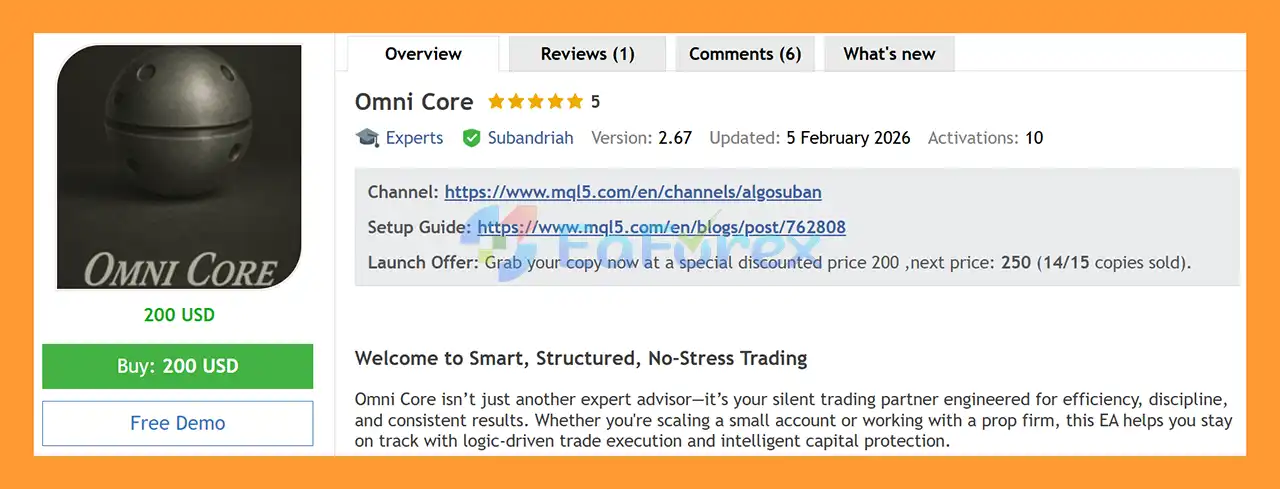
Omni Core EA MT5 Overview
Key Features of Omni Core EA MT5
- Automated trading for MetaTrader 5
- Primary setup: NZDCAD M30
- Range-based reversal trading strategy
- Range Bouncer trading engine
- Identifies sideways market conditions
- Trades potential reversals from range boundaries
- Fully automated trade management
- Built-in Stop Loss
- Built-in Take Profit
- Trailing Stop functionality
- No Martingale
- No Grid
- Single-chart deployment
- Adjustable risk settings
- Configurable trading times
- Maximum holding period of up to 6 hours
- Suitable for Standard and ECN accounts
- Can be configured for selected Prop Firm accounts
- Additional free EA available after purchase
- Correct settings file available from the developer
How Does Omni Core EA MT5 Work?
Omni Core EA MT5 is built around a Range Bouncer strategy combined with a dedicated risk management layer.
🔺Range Bouncer Strategy
The core engine identifies market conditions where price is moving within a relatively defined range.
Instead of attempting to chase every directional movement, the EA looks for potential reversal opportunities near important range boundaries.
When price approaches a strong area within the identified range, the system can evaluate whether conditions are suitable for a reversal trade.
This makes the EA particularly focused on sideways or range-bound market conditions.
🔺Range Boundary Analysis
The EA analyzes the market to identify relevant range boundaries and potential reversal zones.
When the internal conditions are satisfied, Omni Core can automatically execute a trade without requiring manual confirmation.
🔺Integrated Risk Layer
Once a trade is opened, the EA uses its built-in risk management system to manage the position.
The risk layer includes:
- Stop Loss
- Take Profit
- Trailing Stop
This allows the EA to manage the trade from entry through exit automatically.
🔺Fully Autonomous Trade Management
Omni Core is designed to operate without constant manual intervention.
The EA can manage:
Entry → Position Management → Exit
automatically according to its programmed trading logic and configured parameters.
🔺Controlled Holding Time
The maximum holding period is capped at approximately 6 hours, helping keep the strategy focused on shorter-term trading opportunities rather than long-term position holding.
Why Choose Omni Core EA MT5?
Simple Single-Chart Setup
Omni Core is designed to run from one chart, with the primary configuration being:
NZDCAD → M30
This makes deployment straightforward without requiring multiple charts or complicated templates.
Range-Based Trading Approach
The Range Bouncer engine is designed to identify sideways market conditions and potential reversals around established range boundaries.
No Martingale or Grid
Omni Core does not use Martingale or Grid trading, avoiding strategies based on continuously increasing lot sizes or accumulating grid positions.
Fully Automated
From trade entry to position management and exit, the EA operates automatically according to its internal logic.
Built-In Risk Management
Stop Loss, Take Profit, and Trailing Stop functionality are integrated directly into the trading system.
Suitable for Different Account Types
The EA can be used with standard trading accounts and ECN environments and may also be configured for selected Prop Firm accounts, subject to the firm’s specific trading rules.
Omni Core EA MT5 Backtest Results
🔺NZDCAD – years of testing
- Initial Deposit: $2,000
- Total Net Profit: $4.02 million
- Win Rate (% of total): 85.39%
- Maximum Drawdown: 1.26%
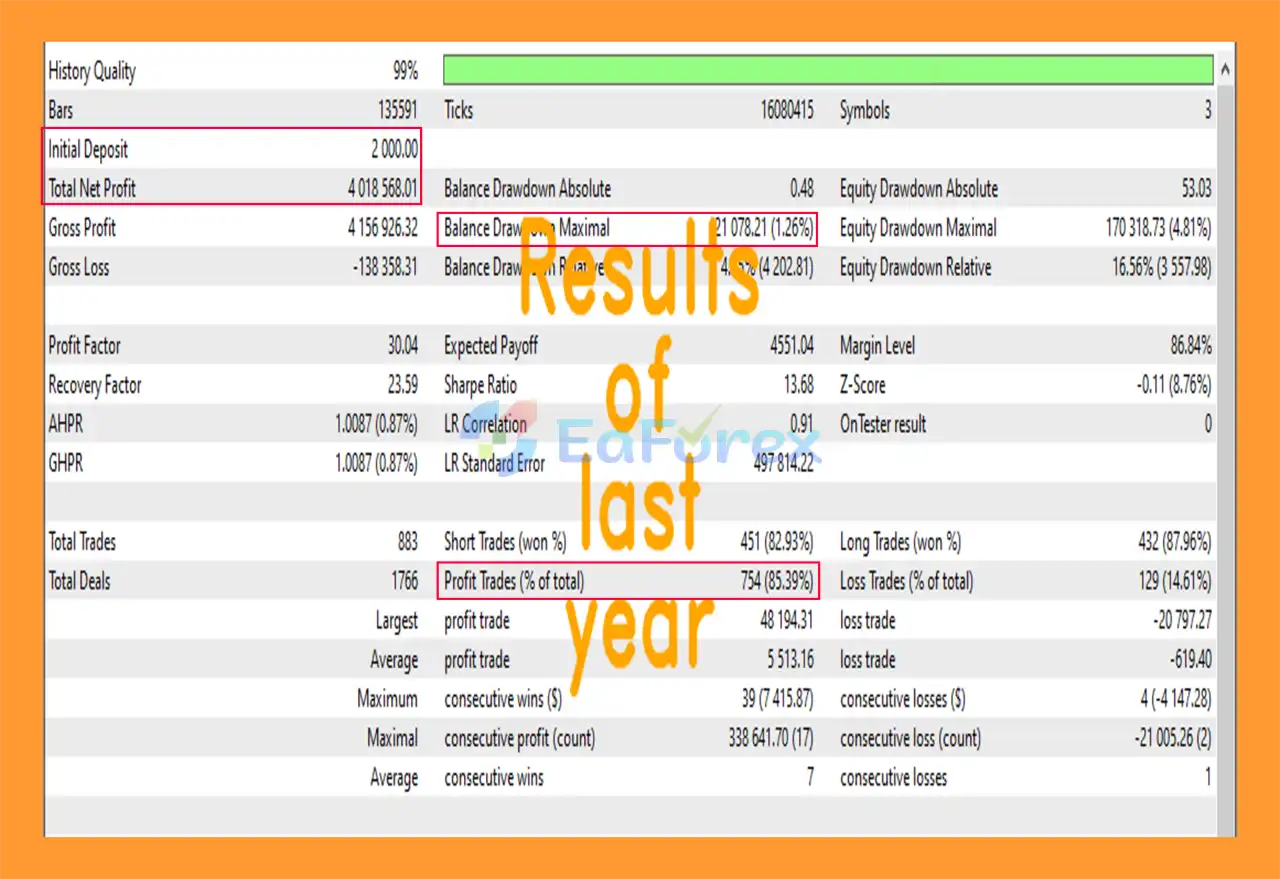
Omni Core EA MT5 Backtest
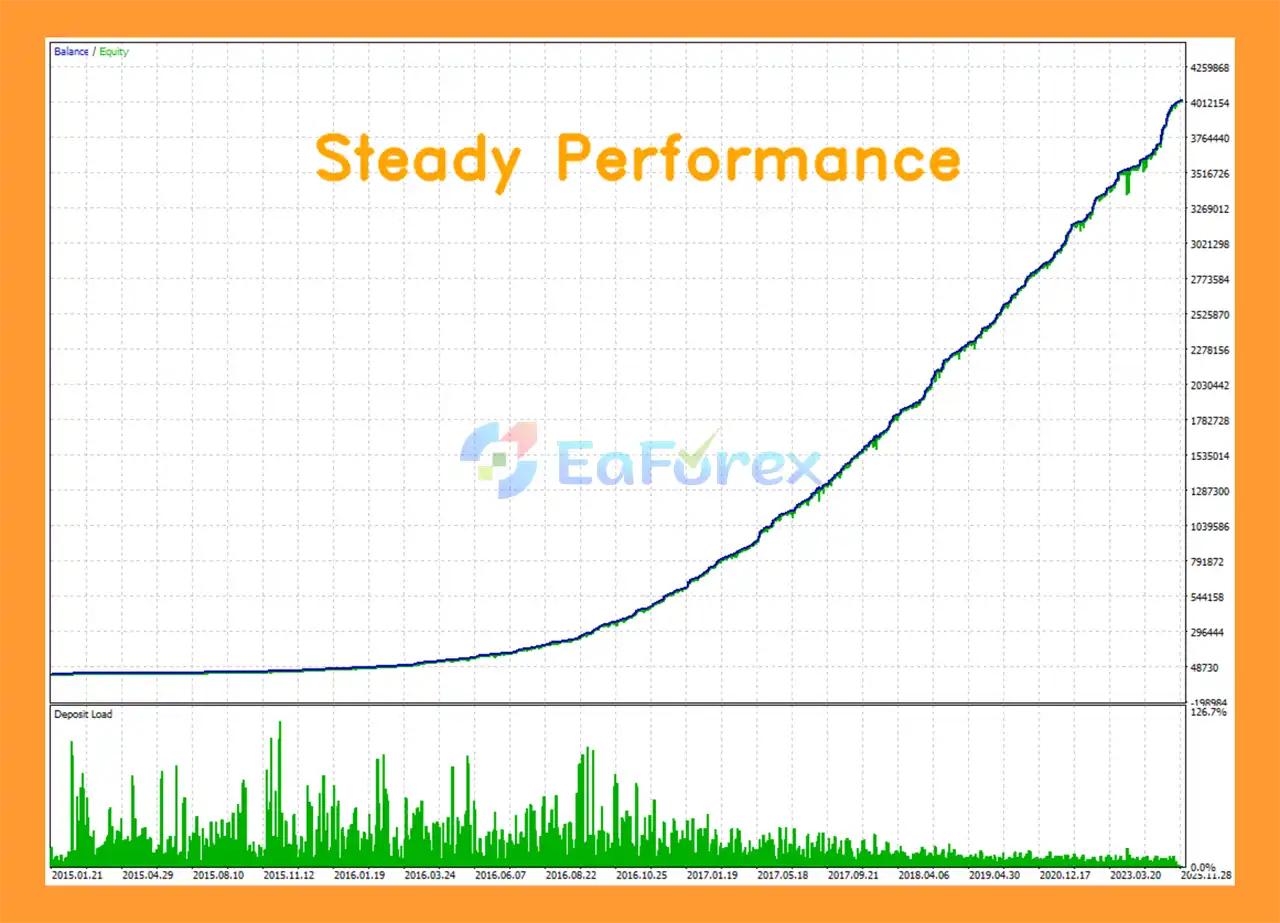
Omni Core EA Backtest
Performance and Risk Management
Omni Core is designed around structured trade execution and integrated capital protection rather than uncontrolled position accumulation.
The EA’s risk layer includes:
Stop Loss
A predefined Stop Loss mechanism is used to help control downside exposure on individual trades.
Take Profit
The EA uses Take Profit logic to automatically close positions when the programmed profit objective is reached.
Trailing Stop
Trailing Stop functionality can be used to adjust the protective stop as the trade develops in a favorable direction.
No Martingale
The EA does not rely on Martingale position sizing or progressively increasing lot sizes to recover previous losses.
No Grid
Omni Core does not use a Grid system that continuously adds positions at multiple price levels.
Adjustable Risk
Users can configure their desired risk settings according to their account size and trading preferences.
Trading Schedule
The EA also allows users to configure trading times according to their preferred operating schedule.
Recommended Setup
| Parameter |
Recommended Configuration |
| Platform |
MetaTrader 5 |
| Primary Symbol |
NZDCAD |
| Timeframe |
M30 |
| Minimum Deposit |
$100 |
| Best Symbols |
NZDCAD, EURCHF, AUDNZD |
| Account Types |
Standard, ECN, selected Prop Firm accounts |
| Maximum Holding Time |
Up to approximately 6 hours |
| Strategy |
Range Bouncer |
| Martingale |
No |
| Grid |
No |
The recommended minimum deposit of $100 should not be interpreted as a guarantee that this capital level is appropriate for every broker, account type, or risk setting. Traders should select risk parameters according to their own account conditions.
Backtest Settings and Configuration
Correct configuration is particularly important when testing Omni Core EA MT5.
The developer states that using the EA without the correct settings file may produce inaccurate or misleading backtest results.
For this reason, users should contact the developer to receive the appropriate settings file and backtest configuration before evaluating historical performance.
A backtest should also use realistic spread, commission, and execution assumptions whenever possible.
Historical testing does not guarantee future live trading performance.
Weaknesses and Risk Warnings
Range Strategies Depend on Market Conditions
Omni Core’s primary trading concept is based on range and reversal conditions. Strong directional trends or unexpected market movements can behave differently from the conditions the strategy is designed to target.
NZDCAD Is the Primary Setup
The main recommended configuration is NZDCAD on M30. Results can differ when using alternative symbols such as EURCHF or AUDNZD.
Market Breakouts Can Create Risk
When price breaks strongly through a previously established range boundary, a reversal-based strategy can face unfavorable conditions.
Broker Execution Matters
Spread, slippage, execution speed, liquidity, and trading-server stability can influence the results of an automated EA.
Prop Firm Rules Vary
Prop firms can have different requirements regarding drawdown, daily loss limits, trading hours, news trading, holding periods, and other restrictions. Users should contact the developer before deploying Omni Core on a Prop Firm account.
Backtest Results Are Not Guaranteed
Historical backtests are simulations based on historical market data and assumptions. They do not guarantee future live trading results.
Risk Settings Matter
Even with integrated Stop Loss and other risk controls, inappropriate position sizing can increase account risk. Traders should use conservative settings and test the EA on a demo account before live deployment.
Pros and Cons
Pros
- Automated MetaTrader 5 Expert Advisor
- Simple single-chart setup
- Primary configuration on NZDCAD M30
- Range Bouncer trading strategy
- Designed for range/reversal opportunities
- Fully automated trade management
- Built-in Stop Loss
- Take Profit functionality
- Trailing Stop
- No Martingale
- No Grid
- Adjustable risk settings
- Configurable trading schedule
- Short-term holding approach
- Supports Standard and ECN environments
- Can be configured for selected Prop Firm accounts
- Additional free EA available after purchase
Cons
- Primarily designed around range-based market conditions
- Strong breakouts can challenge reversal strategies
- NZDCAD is the main recommended setup
- Results depend on broker execution conditions
- Incorrect settings can affect backtest results
- Prop Firm accounts may require customized configuration
- Minimum deposit does not guarantee suitability for every risk profile
- Historical performance cannot guarantee future results
Who Is Omni Core EA MT5 For?
Omni Core may be suitable for traders who are looking for:
- A fully automated trading solution
- A simple single-chart EA setup
- A range-based trading strategy
- A hands-off automated trading tool
- An EA without Martingale or Grid logic
- A system that can complement discretionary trading
- A relatively low-maintenance introduction to algorithmic trading
- A trading system that can potentially be configured for selected Prop Firm environments
How to Install Omni Core EA MT5
Step 1 – Install MetaTrader 5
Install MetaTrader 5 and log in to a compatible trading account.
Step 2 – Install the EA
Copy the Omni Core EA MT5 files into the appropriate MT5 Experts directory.
Step 3 – Restart MetaTrader 5
Restart the MT5 terminal or refresh the Navigator window so the EA becomes visible.
Step 4 – Open the Recommended Chart
Open:
NZDCAD → M30
This is the primary recommended setup for Omni Core.
Step 5 – Attach the EA
Drag Omni Core EA MT5 onto the NZDCAD M30 chart and enable automated trading.
Step 6 – Configure Risk and Trading Times
Set your preferred:
- Risk level
- Trading schedule
- Other available EA parameters
Avoid using excessive risk simply because the minimum recommended deposit is $100.
Step 7 – Load the Correct Settings File
Before performing serious backtests, contact the developer and request the correct settings file and backtest configuration.
Using incorrect settings may result in inaccurate backtest results.
Step 8 – Test on Demo
Run the EA on a demo account first to evaluate its behavior under current market and broker conditions.
Step 9 – Consider Prop Firm Requirements
If you intend to use Omni Core on a Prop Firm account, contact the developer first so the settings can be reviewed according to the firm’s specific rules.
Real User Reviews and Feedback
🔺Omni Core EA MT5 is highly appreciated by the MQL5 community for bringing stable and reliable profits. Below are 5 star reviews from users:
- Remero1980 (2026.01.21): “Omni Core EA has a solid trading logic and well-designed risk management. The trades opened so far have been profitable, which gives me confidence in the strategy. Support is very helpful, responsive, and quick to answer questions. Overall, a well-built EA with professional support behind it.”
What’s Included in the Download Package?
- Setting (If Any).docx
- Installation Guide.docx
>>> Join VIP Membership Now <<<
Final Thoughts
In summary, Omni Core EA MT5 is an automated range-based Expert Advisor for MetaTrader 5, primarily configured for NZDCAD on the M30 timeframe. Its Range Bouncer strategy is designed to identify sideways market conditions and potential reversal opportunities around established range boundaries rather than continuously following short-term price movements.
The EA provides a straightforward single-chart setup and fully automated trade management, with Stop Loss, Take Profit, and Trailing Stop functionality handling positions from entry through exit. Its maximum holding period of approximately six hours also keeps the strategy focused on relatively short-term opportunities. Importantly, Omni Core does not use Martingale or Grid trading, although appropriate position sizing remains essential for managing account exposure.
The supplied NZDCAD backtest reports $4.02 million total net profit, an 85.39% win rate, and 1.26% maximum drawdown from an initial deposit of $2,000. These historical results should not be interpreted as a guarantee of future performance. The developer also emphasizes the importance of using the correct settings file and backtest configuration, making proper setup particularly important when evaluating the reported results.
Because range-reversal strategies can behave differently during strong directional breakouts, traders should consider market conditions, spread, slippage, execution quality, liquidity, and broker specifications. Prop Firm users should also verify compatibility with the firm’s individual trading rules.
Overall, Omni Core EA MT5 provides a structured automated framework for NZDCAD M30 range trading, with integrated trade management and no Grid or Martingale logic. Demo testing, correct configuration, and conservative risk management are recommended before live deployment.


































 Automatic EA
 EA Best Seller
 Expert Advisor MT4
 Expert Advisor MT5
 HFT EA


Reviews
Clear filtersThere are no reviews yet.