









-
 Unlimited Activations
-
 Instant delivery
-
 Easy to install






 Unlimited Activations
Instant delivery
Easy to install
Unlimited Activations
Instant delivery
Easy to install
 Free Update
 Free Install Support

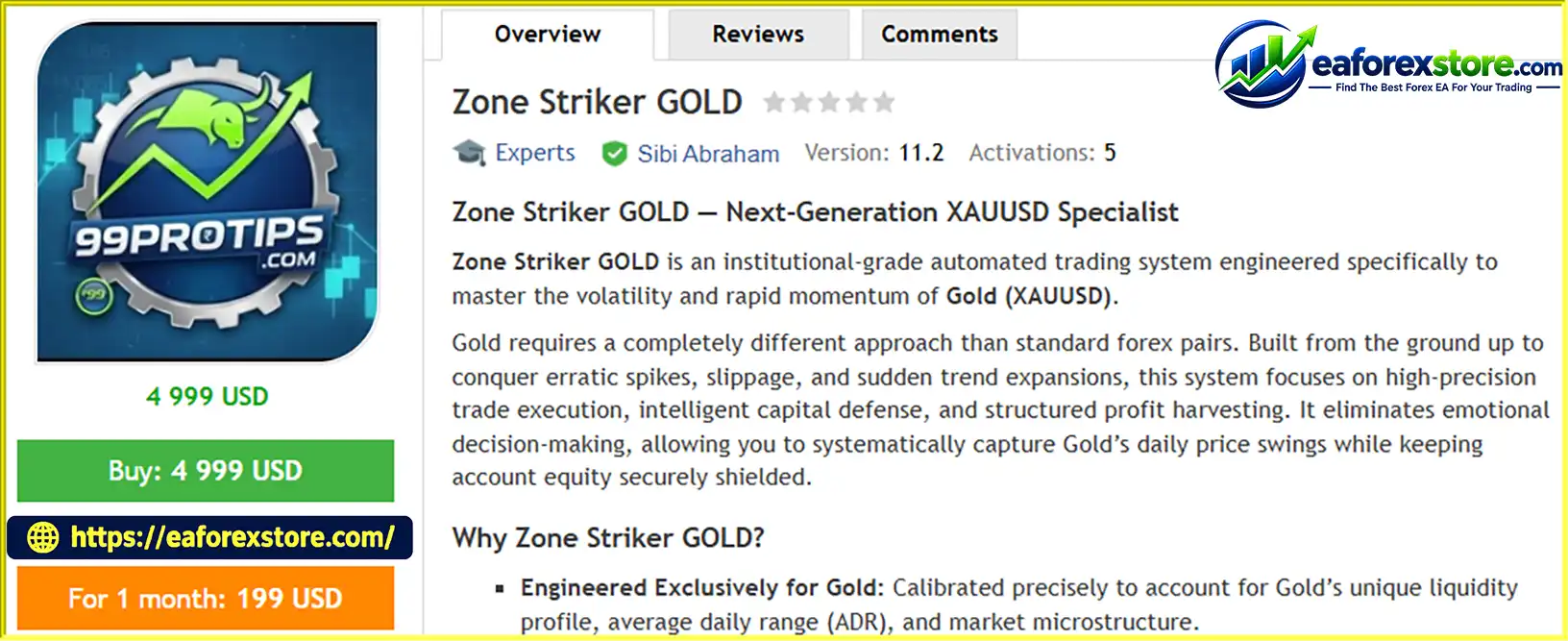
Zone Striker GOLD EA MT5 is an automated trading Expert Advisor designed specifically for Gold (XAUUSD) on the MetaTrader 5 platform. Built around the characteristics of the gold market, the EA aims to help traders manage volatile price movements, identify trading opportunities, and automate trade execution and position management.
Gold is known for its rapid price fluctuations, sudden momentum shifts, and sensitivity to economic news. Zone Striker GOLD EA MT5 is designed to address these conditions through structured trade management, multiple profit targets, trailing mechanisms, and configurable risk controls.
One of its main features is the Daily Net Profit Lock, which is designed to close open trades and stop trading for the day once the configured daily profit target is reached. The EA also includes spread protection around broker rollover periods, drawdown controls, weekend risk-management functionality, and a visual dashboard for monitoring trading activity.
Designed for use on the M15 timeframe, Zone Striker GOLD EA MT5 is intended for traders who want to automate their gold trading strategy while maintaining visibility over account performance and risk exposure.
The EA is recommended for hedging accounts, preferably with ECN or RAW spread conditions. A low-latency VPS is also recommended for continuous operation.
Although its features are designed to support structured risk management, no automated trading system can guarantee profits, eliminate market risk, or ensure that account equity remains protected under every market condition.
>>> Delivery time 24h-48h after payment.
>>> Refund if not delivered.
>>> You will receive the latest version without any limitations (ID+Time).
>> Reviewed by Jason Stap <<<
Zone Striker GOLD EA MT5 Overview
Zone Striker GOLD EA MT5 is designed specifically for XAUUSD rather than being marketed as a universal Forex trading robot. Its intended configuration focuses on the volatility, price range, liquidity conditions, and momentum characteristics associated with gold.
This specialized approach may appeal to traders who prefer an EA dedicated to a single instrument.
The EA includes multi-tier profit targets and trailing mechanisms designed to manage profitable trades as market conditions change.
These features aim to help the system capture gains during favorable price movements while managing open positions according to its configured exit rules.
Actual results depend on market conditions, execution costs, and the EA’s underlying trading logic.
The Daily Net Profit Lock is designed to stop trading when a user-defined daily profit target is reached.
The relevant settings include:
InpUseDailyTarget: Enables or disables the daily target functionality.InpDailyNetProfitUSD: Sets the desired daily net profit target in account currency, typically USD for a USD-denominated account.According to the product description, once the target is reached, the EA closes open trades and pauses trading until the next trading day.
Traders should verify how daily net profit is calculated, including whether commissions, swaps, realized profit, and floating profit are included.
Zone Striker GOLD EA MT5 includes configurable drawdown controls intended to help limit account exposure during unfavorable trading conditions.
The InpMaxDrawdownPct parameter is described as an emergency equity guardrail, with a default value of 25% stated in the supplied information.
This setting should be reviewed carefully before live deployment. Traders need to confirm whether it measures drawdown from starting equity, peak equity, balance, or another reference point, and what action the EA takes when the threshold is reached.
A drawdown setting is a risk-control mechanism, not a guarantee that losses will stop at the exact configured percentage.
Gold spreads can widen around broker rollover periods when liquidity conditions change. Zone Striker GOLD EA MT5 includes the InpBlockRolloverSpread feature, which is designed to restrict trading during the specified rollover window of approximately 23:50–00:20.
The purpose is to avoid initiating trades under potentially unfavorable spread conditions.
The exact window should be checked against the broker’s server time because rollover timing varies between brokers and may be affected by daylight-saving changes.
The InpFridayNeutralize setting is described as automatically hedging open risk before the weekend close.
This feature aims to reduce exposure to unexpected price gaps when markets reopen after the weekend. However, hedging does not eliminate all risk. Opposing positions can incur additional spreads, commissions, swaps, and margin requirements, and price gaps may still create losses.
Users should confirm the exact neutralization logic and whether positions are hedged, reduced, or closed under different conditions.
The EA includes a dark-mode visual dashboard displayed directly on the chart. It is designed to provide convenient access to important trading information, including:
This dashboard can help traders monitor activity without repeatedly navigating through account history and trade-management windows.
The EA includes position-sizing parameters that allow users to define minimum and maximum lot sizes.
InpMinInitialLot: Sets the minimum initial order volume.InpMaxLotSize: Defines the upper lot-size boundary.InpRiskPerTradePct: Provides a configurable risk-related parameter.These settings can help tailor position sizing to account size and risk preferences. Their exact calculation and interaction should be confirmed in the official EA documentation before use.
The InpBasketTargetUSD parameter sets a global monetary profit target for a group of orders or a trading cycle, according to the product description.
A basket-level target may be useful when an EA manages multiple positions as a combined strategy. Traders should verify which positions are included in the basket and how the target interacts with individual trade exits and daily profit protection.
Zone Striker GOLD EA MT5 operates within MetaTrader 5 and is intended to automate trading and trade management on the XAUUSD market using the configured parameters.
Its general workflow can be summarized in the following stages.
The EA is designed to run on an XAUUSD chart using the M15 timeframe. It monitors market conditions according to its programmed strategy and identifies opportunities that meet its internal entry criteria.
The exact entry signals are not fully described in the supplied product information, so traders should consult the official documentation for details about its strategy logic.
When its entry conditions are met, the EA can place orders automatically through MT5. The InpMagicNumber parameter identifies the EA’s orders, helping distinguish its positions from those opened by other Expert Advisors or manually.
The EA uses its configured lot-sizing parameters and available risk controls to manage trade volume. Users can define minimum and maximum lot sizes and configure risk-related settings according to the supported inputs.
Incorrect settings can increase exposure, so all position-sizing parameters should be tested before live trading.
The EA uses its configured profit targets, basket target, and trailing mechanisms to manage positions as prices move.
Its daily profit functionality is designed to close open trades and pause trading when the configured daily net profit target is reached.
The rollover spread protection is designed to restrict trading during the configured high-spread window. The weekend neutralization feature is intended to manage open risk before the weekend market closure.
These mechanisms depend on correct configuration, broker time, platform availability, and the EA’s implementation.
The integrated dashboard displays information about daily performance, basket profit, drawdown, and operating status. Traders can use this information to monitor the EA and investigate unexpected behavior.
Even with automation enabled, regular supervision remains important.
The following specifications are based on the supplied product description.
| Parameter | Recommended specification |
|---|---|
| Trading instrument | XAUUSD (Gold) |
| Trading platform | MetaTrader 5 |
| Timeframe | M15 |
| Account type | Hedging account |
| Preferred execution conditions | ECN or RAW spread |
| Minimum balance stated by provider | $500 for 0.01 micro-lots |
| Suggested balance | $1,000 or more |
| Recommended leverage | 1:100 to 1:500 |
| Hosting | Low-latency VPS recommended |
| Default drawdown setting stated | 25% |
| Rollover protection window | Approximately 23:50–00:20, subject to broker time |
The product description lists $500 as a minimum balance for a 0.01 lot starting volume and recommends $1,000 or more.
These figures should be treated as starting guidelines rather than guarantees of suitability. The actual capital required depends on the broker’s gold contract specifications, minimum lot size, leverage, margin requirements, stop-loss distance, and the EA’s maximum potential exposure.
A small lot size does not automatically make an account safe, particularly when gold prices move rapidly or several positions are open simultaneously.
A hedging account is recommended by the provider. Traders should confirm that their broker supports the account structure required by the EA and that the account’s margin rules are compatible with its position-management logic.
ECN or RAW spread accounts may offer competitive spreads, but commissions and execution quality must also be considered when assessing total trading costs.
The suggested leverage range is 1:100 to 1:500. Higher leverage can reduce the margin required to open a position, but it can also allow substantially larger exposure relative to account equity.
Traders should select leverage based on their risk limits and account requirements rather than assuming that higher leverage improves profitability.
Understanding the EA’s key inputs is essential before using it on a live account.
| Parameter | Purpose |
|---|---|
InpSymbols |
Specifies the gold symbol used by the EA, such as XAUUSD or a broker-specific variation. |
InpMagicNumber |
Assigns a unique identifier to the EA’s orders. |
InpRiskPerTradePct |
Risk-related setting; its exact calculation should be confirmed in the documentation. |
InpMinInitialLot |
Defines the minimum initial trade volume. |
InpMaxLotSize |
Sets the maximum permitted lot size according to the EA’s implementation. |
InpBasketTargetUSD |
Defines the monetary profit target for a basket or trading cycle. |
InpMaxSpreadPoints |
Sets the maximum spread permitted for trading, measured in broker points. |
InpUseDailyTarget |
Enables or disables the daily profit-target functionality. |
InpDailyNetProfitUSD |
Sets the daily net profit target. |
InpMaxDrawdownPct |
Configures the stated maximum drawdown threshold. |
InpBlockRolloverSpread |
Enables or disables the rollover spread protection feature. |
InpFridayNeutralize |
Enables or disables the advertised Friday risk-neutralization feature. |
For example, a trader might configure InpDailyNetProfitUSD to 30.00, as shown in the product instructions.
This means the EA is configured around a $30 daily target, assuming the account currency and profit calculation match the setting. It does not mean the EA is expected to earn $30 every day or that the target will be reached consistently.
The daily target should be considered a trading rule rather than an income forecast.
The supplied description lists 25% as the default value for InpMaxDrawdownPct. Before relying on this setting, verify how the EA calculates drawdown and whether reaching the threshold triggers position closure, trading suspension, or another action.
A 25% drawdown can represent a substantial loss of capital. Traders who need tighter risk limits should determine whether the EA supports a lower threshold and test the behavior before live use.
The EA is developed specifically for XAUUSD, making it relevant to traders who want an automated system focused on gold rather than a multi-currency strategy.
Its profit targets, trailing mechanisms, basket-level target, and daily profit lock are designed to reduce the need for manual position management.
Position-sizing parameters, spread restrictions, drawdown settings, and weekend risk-management functionality provide several tools for configuring how the EA operates.
The effectiveness of these controls depends on the EA’s implementation and the settings selected by the user.
The rollover spread filter and Friday neutralization feature are designed to address specific risks associated with trading gold around broker rollover and weekend closures.
These functions may be useful additions to a risk-management plan, but they cannot eliminate slippage, gaps, or all adverse market movements.
The integrated on-chart dashboard is designed to provide a quick view of trading performance and risk-related information, helping users monitor the EA while it operates.
Zone Striker GOLD EA MT5 may appeal to traders who prefer a defined trading configuration, automated execution, and built-in monitoring tools. Its intended M15 setup also provides a clear starting point for testing.
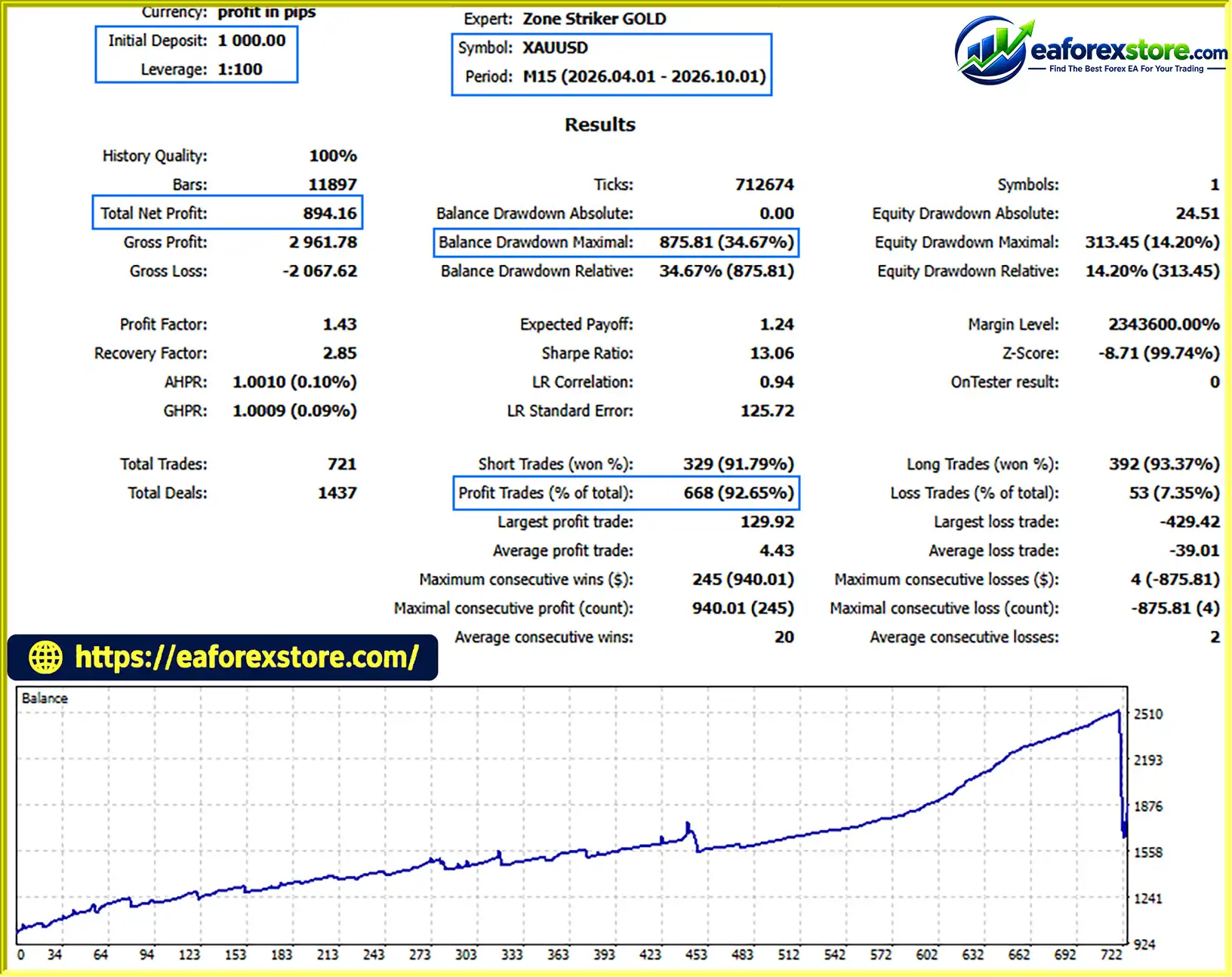
🔺XAUUSD (Gold) – 6 Months
Zone Striker GOLD EA MT5 backtets
Zone Striker GOLD EA MT5 advertises several features intended to manage trading exposure. However, the supplied description does not provide independently verified backtest results, live trading statistics, historical returns, or maximum drawdown reports.
Traders should evaluate the strategy using realistic testing rather than assuming that the presence of protective features establishes profitability.
A daily net profit target can help establish a stopping rule once a target is reached. It does not guarantee that the target will be achieved, and it cannot prevent losses that occur before the target is reached.
Traders should also confirm whether the daily target accounts for commissions, swaps, and all relevant open positions.
A drawdown threshold can provide a predefined response to account losses. However, fast market movements, gaps, slippage, and execution delays may cause the realized drawdown to exceed the configured value.
The EA’s actual response at the drawdown threshold should be verified in a demo environment.
XAUUSD can experience sharp movements during economic announcements, geopolitical events, changes in interest-rate expectations, and periods of reduced liquidity.
Even with a maximum spread filter, an EA may experience unfavorable fills or slippage. Traders should assess its performance during both normal and volatile market conditions.
Rollover can involve wider spreads and changing liquidity. Weekend market closures can also expose positions to gaps when trading resumes.
The EA’s rollover protection and Friday neutralization features are designed to address these conditions, but traders should confirm their exact behavior. Hedging an open position does not eliminate all financial risk or guarantee protection from a market gap.
Before trading live with Zone Striker GOLD EA MT5:
No EA can guarantee returns or completely protect an account from trading losses.
Despite its specialized design and automated management features, Zone Striker GOLD EA MT5 has limitations that prospective users should consider.
Gold prices can move rapidly, particularly during high-impact news events. Sudden movements may cause losses, slippage, or unexpected changes in account equity.
Daily profit locking, drawdown limits, spread filters, and weekend neutralization may help manage risk, but none can ensure that losses remain within a predetermined amount under all market conditions.
The advertised Friday neutralization mechanism may use hedging to offset open exposure. Hedged positions can still incur spreads, commissions, financing costs, and additional margin requirements.
Different brokers can offer different spreads, execution speeds, contract sizes, server times, and margin policies. A configuration that works under one broker’s conditions may behave differently with another.
A visual dashboard helps display information, but traders should independently verify important account metrics through MT5’s Trade, History, and account information panels.
The supplied description does not include independently verified performance data. Prospective buyers should request backtests, forward-testing records, and details of the EA’s trading logic before relying on its advertised features.
A VPS can help keep MT5 running, but internet interruptions, platform failures, broker outages, and server problems can still affect automated trading.
Follow these steps to install and configure the Expert Advisor on MetaTrader 5.
Open MetaTrader 5 and navigate to Tools → Options → Expert Advisors. Enable algorithmic trading and confirm the settings.
You may also need to enable the main Algo Trading control in the MT5 toolbar.
Open a chart for your broker’s gold symbol, such as XAUUSD, XAUUSD+, or GOLD. Set the timeframe to M15.
Use the exact symbol supported by your broker rather than assuming all brokers use the same name.
Locate Zone Striker GOLD EA in the Navigator panel under Expert Advisors. Drag it onto the gold chart.
Under the Common tab, verify that algorithmic trading is allowed for the EA.
Set InpSymbols to the exact gold symbol used by your broker. An incorrect symbol configuration may prevent the EA from finding the intended instrument or executing trades correctly.
Review InpRiskPerTradePct, InpMinInitialLot, and InpMaxLotSize. The supplied product instructions mention 0.01 as a suggested starting volume for accounts below $2,000, but this should not be interpreted as a universally safe lot size.
Choose position sizing based on your account equity, stop-loss exposure, margin requirements, and risk tolerance.
Set InpBasketTargetUSD according to the intended basket-level target, and configure InpUseDailyTarget and InpDailyNetProfitUSD if you want to use daily profit protection.
Ensure you understand how the EA calculates profit and handles open positions when a target is reached.
Review InpMaxSpreadPoints, InpBlockRolloverSpread, and InpMaxDrawdownPct. Confirm the spread units and drawdown calculation in the official documentation.
Avoid relying on default values without first testing their behavior.
Check InpFridayNeutralize and confirm how the EA handles open trades before the weekend. Test this feature on a demo account to understand its effect on positions, margin, and exposure.
Click OK and confirm that Algo Trading is enabled in MT5. The supplied product instructions state that the dashboard should appear in the top-left corner of the chart after initialization.
Check the Experts and Journal tabs for error messages and verify that the EA is operating as expected.
Run the EA on a demo account before committing real capital. Verify its entry logic, stop-loss behavior, daily profit lock, spread restrictions, and drawdown protection under realistic market conditions.
>> Join VIP Membership Now <<<
Zone Striker GOLD EA MT5 is an automated gold trading Expert Advisor designed to combine trade execution, profit management, and configurable risk controls in one MT5 system. Its key advertised features include multi-tier profit targets, trailing mechanisms, daily net profit locking, drawdown protection, rollover spread filtering, weekend risk management, and a visual monitoring dashboard.
The EA’s gold-focused design and range of configurable inputs may appeal to traders who want a structured approach to XAUUSD trading without manually managing every position.
However, its risk-management features should not be mistaken for guaranteed capital protection. Gold can move sharply, execution conditions can change quickly, and hedging or stop-loss mechanisms cannot eliminate all potential losses. Its actual performance must be established through reliable backtesting, demo forward testing, and ongoing monitoring.
Overall, Zone Striker GOLD EA MT5 may be worth evaluating for traders seeking an automated XAUUSD solution with integrated monitoring and risk-control features. Before using it live, confirm its strategy logic, test all protective mechanisms, and choose settings appropriate for your account size and financial risk tolerance.
Risk Disclaimer: Trading gold and other financial instruments involves substantial risk. You may lose some or all of your invested capital. Past performance does not guarantee future results. Daily profit targets, drawdown controls, spread filters, hedging, and stop-loss orders cannot eliminate all trading risks. Always test the EA thoroughly and use only capital you can afford to lose.
1. What Is Zone Striker GOLD EA MT5?
Zone Striker GOLD EA MT5 is an automated trading Expert Advisor designed specifically for XAUUSD (Gold) on the MetaTrader 5 platform. It features automated trade execution, multi-tier profit targets, trailing mechanisms, and configurable risk controls to help manage gold trading volatility.
2. Which Trading Platform and Timeframe Does Zone Striker GOLD EA Support?
Zone Striker GOLD EA is developed for MetaTrader 5 (MT5) and is intended to operate on the M15 (15-minute) timeframe. Traders should attach the EA to their broker's compatible gold chart, such as XAUUSD or a supported symbol variation, and verify the correct configuration before trading.
3. What Are the Main Features of Zone Striker GOLD EA MT5?
The main features include a Daily Net Profit Lock, configurable drawdown protection, rollover spread filtering, Friday risk neutralization, basket profit targets, trailing mechanisms, flexible position sizing, and an integrated on-chart dashboard. These functions are designed to automate trade management and provide greater visibility into account performance and exposure.
4. How Does the Daily Net Profit Lock Work?
The Daily Net Profit Lock is designed to close open trades and pause trading for the remainder of the day when the configured daily net profit target is reached. Traders can enable this feature using InpUseDailyTarget and set the target with InpDailyNetProfitUSD. However, reaching the target is not guaranteed, and users should verify how commissions, swaps, and floating profits are calculated.
5. What Is the Recommended Minimum Deposit for Zone Striker GOLD EA MT5?
According to the supplied product information, the suggested minimum balance is $500 for a starting volume of 0.01 lots, while a balance of $1,000 or more is recommended. These figures are guidelines rather than guarantees of safety. The appropriate capital depends on broker margin requirements, gold contract specifications, position sizing, and potential drawdown.
6. Which Broker and Account Type Are Recommended for Zone Striker GOLD EA?
Zone Striker GOLD EA MT5 is recommended for hedging accounts, preferably with ECN or RAW spreads. The suggested leverage range is 1:100 to 1:500, and a low-latency VPS is recommended for continuous operation. Before installation, verify that your broker supports the EA's required account structure, gold symbol, spread settings, and execution conditions.
7. Does Zone Striker GOLD EA MT5 Guarantee Profits or Protect Against All Losses?
No. Although the EA includes daily profit locking, drawdown controls, spread protection, and weekend risk-management functionality, these features cannot eliminate trading risk or guarantee profits. Gold prices can move rapidly, and slippage, market gaps, execution delays, and hedging costs can affect results. Always backtest and forward-test the EA on a demo account before using real funds.
8. How Do I Install and Configure Zone Striker GOLD EA MT5?
To install Zone Striker GOLD EA MT5, open MetaTrader 5, place the compatible EA file in the appropriate MQL5/Experts directory if required, and refresh the Navigator panel. Open your broker's gold chart on the M15 timeframe, attach the EA, and configure the symbol, lot size, profit targets, spread filter, and drawdown settings. Enable Algo Trading, check the Experts and Journal tabs for errors, and thoroughly test all risk-management features on a demo account before live deployment.
In stock
In stock
In stock
In stock
In stock
Out of stock
No account yet?
Create an Account












 Automatic EA
 EA Best Seller
 Expert Advisor MT4
 Expert Advisor MT5
 HFT EA


Reviews
Clear filtersThere are no reviews yet.