









-
 Unlimited Activations
-
 Instant delivery
-
 Easy to install






 Unlimited Activations
Instant delivery
Easy to install
Unlimited Activations
Instant delivery
Easy to install
 Free Update
 Free Install Support

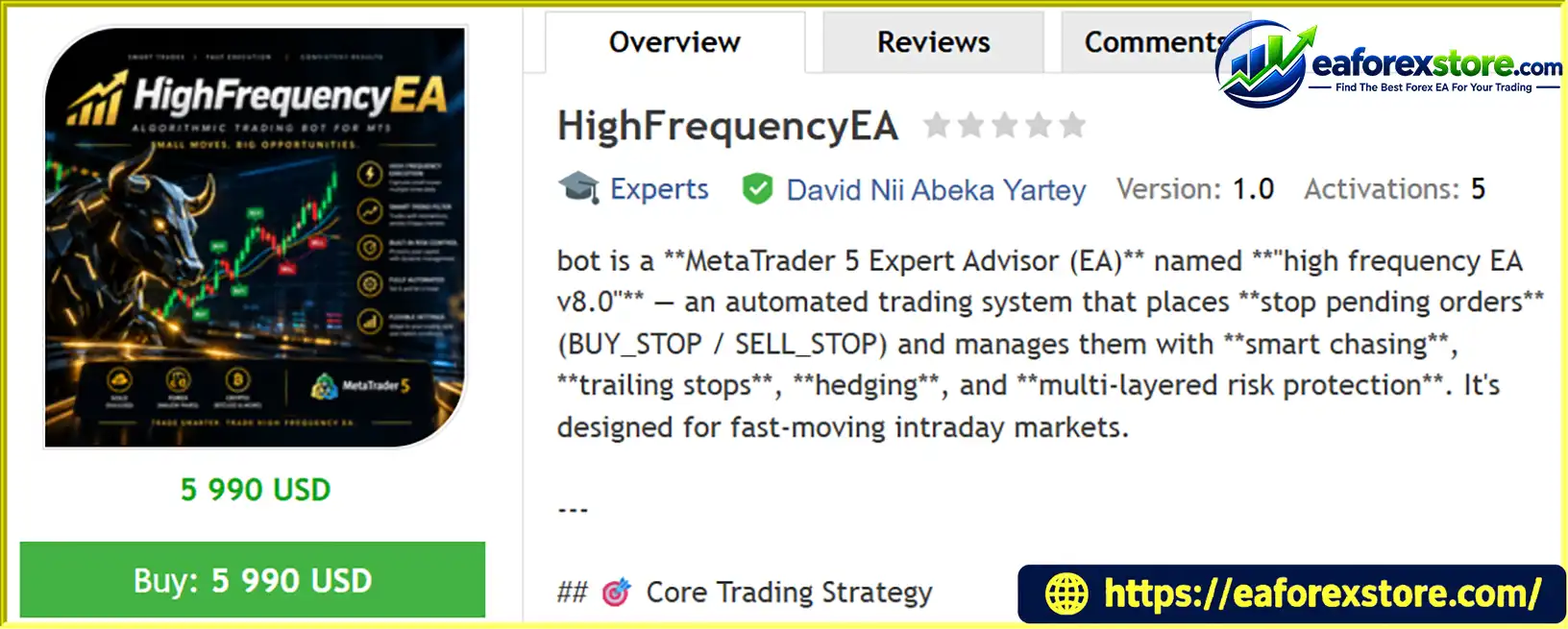
HighFrequencyEA MT5, also known as High Frequency EA v8.0, is an automated trading robot designed for MetaTrader 5 (MT5). It focuses on intraday breakout trading, using dynamic BUY STOP and SELL STOP pending orders to identify potential momentum opportunities without entering positions directly at the current market price.
The EA continuously monitors price movements and adjusts pending orders through an intelligent order-chasing mechanism. When the market reaches a pending order’s trigger price, a trade is opened automatically. The system then manages the position using configurable stop-loss settings, trailing stops, margin checks, spread monitoring, and optional hedging functionality.
Version 8.0 emphasizes more controlled order chasing, improved hedge-pair tracking, and anti-cycling trailing-stop logic. These features are intended to reduce unnecessary order modifications and provide a more structured approach to automated trading.
Designed primarily for fast-moving intraday markets, HighFrequencyEA MT5 may be suitable for traders who want to automate breakout strategies on liquid instruments with competitive spreads. However, its actual performance depends on market conditions, broker execution, trading costs, and the user’s risk settings.
>>> Delivery time 24h-48h after payment.
>>> Refund if not delivered.
>>> You will receive the latest version without any limitations (ID+Time).
>> Reviewed by Jason Stap <<<
HighFrequencyEA MT5 Overview
HighFrequencyEA MT5 uses pending stop orders to capture potential breakouts. It can place one BUY STOP order above the current price and one SELL STOP order below it, allowing the system to prepare for price movements in either direction.
When price reaches a pending order’s trigger level, the order is activated automatically. This approach seeks to participate in emerging momentum rather than relying on immediate market entries.
The EA can modify pending orders as market prices change. Its order-chasing mechanism is designed to keep entry levels aligned with the current trading environment while avoiding excessively aggressive modifications.
Key order-management functions include:
These mechanisms help organize order placement, although frequent modifications may still be affected by broker restrictions, latency, and execution costs.
HighFrequencyEA MT5 supports four money-management modes:
When percentage-based sizing is selected, the EA can calculate lot size according to the configured risk percentage and stop-loss distance. It also accounts for broker-defined minimum, maximum, and incremental lot sizes.
A margin check is performed before order placement to help prevent orders that exceed available margin. Nevertheless, position-sizing calculations do not eliminate the possibility of losses, slippage, or stop-loss execution at unfavorable prices.
The EA provides two stop-loss approaches to accommodate different trading preferences.
Fixed Stop Loss
Traders can define a fixed stop-loss distance. The supplied configuration lists 20 pips as the default value.
Dynamic ATR-Based Stop Loss
The EA can use the Average True Range (ATR) indicator to estimate market volatility and adjust the stop-loss distance accordingly. The supplied default multiplier is ATR × 2, with configurable minimum and maximum boundaries of 10 and 100 pips.
Additional safeguards are designed to account for broker stop-level requirements and unusual spread conditions. The described system can also freeze certain stop-loss adjustments during spread spikes and use a fallback fixed distance.
These controls aim to make stop-loss management more adaptable, but they cannot guarantee that every position will close at the intended price during rapid market movements or execution gaps.
HighFrequencyEA MT5 includes trailing-stop functionality designed to protect open positions as they move into profit.
The supplied default settings include:
The minimum adjustment threshold helps reduce repeated stop-loss modifications when prices fluctuate around a narrow range. The EA is also designed to prevent trailing-stop changes from crossing the configured take-profit level.
These rules may help reduce unnecessary updates, but they do not prevent all losing trades or guarantee that profits will be locked in.
The EA supports an optional hedging mode that allows BUY and SELL positions to coexist, depending on the account type and broker’s rules.
Its hedge-management functionality can track related positions, remove the opposite pending order after one side is triggered, and clean up hedge-pair records when they are no longer active.
An optional setting can close both positions when their combined profit exceeds a configured monetary threshold, with $5 given as an example.
Hedging should not be interpreted as eliminating risk. Holding opposing positions can increase trading costs, and combined profitability depends on execution prices, spreads, commissions, swap charges, and the behavior of both positions.
The EA includes configurable trading-hour restrictions and order-management timing options.
Available controls include:
These settings allow traders to limit when the EA operates and how frequently it updates its orders. Session filters can be particularly useful when avoiding periods with unfavorable spreads or liquidity conditions.
HighFrequencyEA MT5 incorporates several protective mechanisms intended to improve order handling and risk control, including spread monitoring, stop-loss adjustments, margin checks, volatility-related safeguards, and maximum-loss protection.
The effectiveness of these features depends on their implementation and configuration. Traders should verify the precise behavior of global loss limits, spread-spike handling, and emergency position management before using the EA on a live account.
HighFrequencyEA MT5 follows a structured trading process designed around pending-order breakouts and automated trade management.
Step 1: Monitor the Market
The EA monitors price movements and can use technical indicators, including fast and slow Exponential Moving Averages (EMAs) and ATR, as part of its trading and risk-management framework.
Step 2: Prepare Breakout Orders
The robot places a BUY STOP above the current price and a SELL STOP below it, subject to its configured entry logic and broker restrictions.
Step 3: Adjust Pending Orders
As the market moves, the EA may modify pending-order levels to maintain the intended entry distance. Order-chasing controls and minimum modification intervals are designed to prevent overly frequent updates.
Step 4: Activate a Position
When price reaches a pending order’s trigger level, the order can be executed. The EA manages the resulting position according to its configured limits and trading rules.
Step 5: Apply Stop-Loss Protection
The EA applies either a fixed stop loss or an ATR-based stop loss, depending on the selected configuration. Broker stop-level requirements and abnormal spread conditions may influence the final distance.
Step 6: Manage Open Trades
When the position moves sufficiently into profit, the trailing stop can activate. The anti-cycling mechanism limits unnecessary stop-loss changes, while optional hedging rules manage opposing positions when enabled.
Step 7: Maintain Order and Risk Controls
The EA continues monitoring pending orders, trading sessions, margin availability, spreads, and position-management conditions. Pending orders can expire automatically, and configured protection rules may restrict further trading or manage exposure.
Although this process is automated, traders should continue monitoring the account and periodically review execution quality, drawdown, and the EA’s behavior under different market conditions.
HighFrequencyEA MT5 may appeal to traders who prefer systematic breakout trading and configurable automated risk management.
Structured Pending-Order Strategy: The EA prepares entries around potential breakouts instead of relying exclusively on immediate market execution.
Adaptive Stop-Loss Options: Fixed and ATR-based settings allow traders to choose between a predefined distance and a volatility-sensitive approach.
Controlled Order Chasing: Version 8.0 is described as incorporating less aggressive order chasing, helping limit unnecessary pending-order modifications.
Flexible Position Sizing: Four sizing modes provide options for traders with different account-management preferences.
Anti-Cycling Trailing Logic: Minimum adjustment thresholds help reduce repeated stop-loss updates caused by small price fluctuations.
Optional Hedging: Traders can enable opposing positions and configure certain hedge-management rules, subject to broker and account limitations.
Session-Based Operation: Trading-hour and order-expiry controls help users define when orders may be placed and how long pending orders remain active.
Automated Order Management: The EA combines entry placement, position monitoring, and several protective mechanisms within one MT5 trading system.
These features offer flexibility, but the number of safeguards alone does not establish profitability. A robust evaluation should include realistic transaction costs, out-of-sample testing, and forward testing on the intended broker.
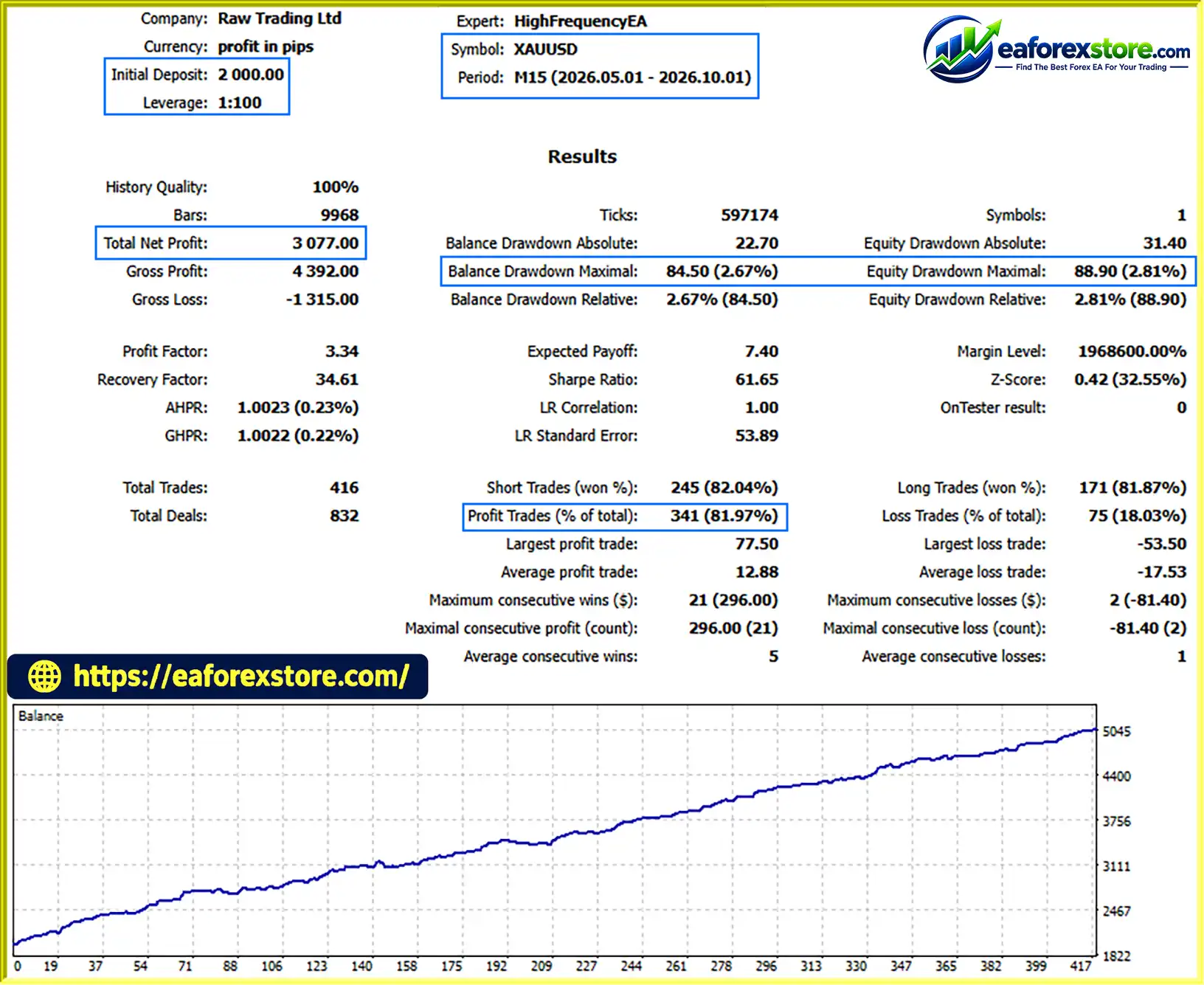
🔺XAUUSD (Gold) – 5 Months
HighFrequencyEA MT5 backtets
HighFrequencyEA MT5 is designed for breakout-oriented intraday trading. Its potential suitability varies according to market structure, volatility, spread, execution speed, and the trading instrument.
The EA should not be assumed to perform consistently across all market conditions. A breakout strategy can experience losing streaks when the market repeatedly reverses after triggering orders.
To evaluate HighFrequencyEA MT5 responsibly, traders should consider the following practices:
Risk-percentage settings should be selected according to the trader’s tolerance for losses and account size. Even a small risk setting may produce substantial cumulative losses during an extended adverse period.
Despite its extensive automation features, HighFrequencyEA MT5 has limitations that traders should understand before deployment.
False Breakouts: Stop-order strategies can enter positions when price briefly breaks a level before reversing. Sideways markets can be particularly challenging.
Spread Sensitivity: Wider spreads may reduce the quality of breakout entries and affect stop-loss distances, especially during less liquid sessions.
Slippage and Execution Delays: Pending orders are not guaranteed to execute at their exact trigger prices. Fast markets, broker latency, and gaps may cause unfavorable fills.
Order Modification Restrictions: Brokers may impose minimum stop distances, freeze levels, or other trading restrictions that prevent requested order changes.
Hedging Costs: Maintaining BUY and SELL positions can increase commissions, spread costs, and overnight financing charges. Hedging does not automatically reduce total account risk.
Configuration Complexity: Position sizing, ATR multipliers, order-chasing distances, session hours, and hedge rules must be configured carefully. Incorrect settings can produce unexpected exposure.
News-Related Volatility: Economic announcements may cause sharp price movements, spread expansion, and gaps that reduce the effectiveness of normal protective rules.
No Guaranteed Profit: Automated execution and multiple protection mechanisms do not guarantee profitable results. Market conditions can change, and losses can exceed expectations.
Traders should independently verify the EA’s actual implementation and backtest results. Features described in product documentation should not be treated as independently confirmed performance claims.
Follow these general steps to install and test the Expert Advisor in MetaTrader 5.
Step 1: Obtain the EA File
Download HighFrequencyEA MT5 from the official developer or a trusted source. Confirm that the file is compatible with MetaTrader 5.
Step 2: Open the MT5 Data Folder
Launch MetaTrader 5 and navigate to File → Open Data Folder.
Step 3: Copy the EA File
Open the MQL5 folder, then open Experts. Copy the EA file into this directory.
Step 4: Refresh the Navigator
Return to MT5 and refresh the Expert Advisors section in the Navigator panel, or restart the platform if necessary.
Step 5: Attach the EA to a Chart
Open a chart for the intended trading instrument and timeframe. Drag HighFrequencyEA MT5 onto the chart and review its input parameters.
Step 6: Configure Trading and Risk Settings
Select the preferred position-sizing method, risk percentage or fixed lot size, stop-loss mode, trailing-stop parameters, session hours, order-expiry settings, and hedging options. Confirm that the settings are compatible with your broker.
Step 7: Enable Automated Trading
Enable the platform’s Algo Trading function and ensure the EA has the required trading permissions. Review the Experts and Journal tabs for initialization or execution errors.
Step 8: Test Before Live Trading
Run a backtest using realistic historical data and transaction costs. Then conduct forward testing on a demo account to verify pending-order behavior, stop-loss management, trailing stops, and risk controls.
The exact installation and configuration process may vary depending on the file format and the developer’s instructions. Do not deploy the EA on a live account until its behavior has been checked.
>> Join VIP Membership Now <<<
HighFrequencyEA MT5 (High Frequency EA v8.0) is an automated breakout trading system built around dynamic stop pending orders, configurable position sizing, fixed or ATR-based stop losses, trailing-stop management, and optional hedging.
Its most notable design elements include controlled order chasing, anti-cycling trailing logic, trading-session controls, and several mechanisms intended to manage execution and account risk. These capabilities may make it worth evaluating for traders interested in systematic intraday breakout strategies.
However, the EA is not suitable for every market environment. False breakouts, spread expansion, slippage, execution delays, and hedging costs can all affect results. Traders should test its configuration with realistic data and evaluate drawdown as carefully as profitability.
For anyone considering HighFrequencyEA MT5, a sensible approach is to begin with conservative settings, validate its behavior on a demo account, and only consider live deployment after a thorough assessment of its risk profile.
Important Risk Disclaimer: HighFrequencyEA MT5 is a trading automation tool, not a guarantee of income. Forex and CFD trading involve substantial risk and may result in the loss of some or all of your trading capital. Past backtest results do not guarantee future performance. Always understand the EA’s settings and risks before using it with real money.
1. What Is HighFrequencyEA MT5?
HighFrequencyEA MT5, also known as High Frequency EA v8.0, is an automated trading Expert Advisor designed for MetaTrader 5. It uses an intraday breakout strategy with BUY STOP and SELL STOP pending orders to capture potential market momentum. The EA also includes automated trade management, configurable stop losses, trailing stops, and optional hedging functionality.
2. How Does HighFrequencyEA MT5 Work?
HighFrequencyEA MT5 monitors market movements and places pending stop orders above and below the current price according to its trading rules. Its dynamic order-chasing mechanism adjusts pending orders as prices change. When an order is triggered, the EA manages the resulting position using configured stop-loss, trailing-stop, position-sizing, and risk-management settings.
3. What Are the Main Features of HighFrequencyEA MT5?
The main features include dynamic pending-order chasing, four money-management modes, fixed and ATR-based stop losses, anti-cycling trailing stops, optional hedging, trading-session filters, automatic pending-order expiration, spread monitoring, and margin checks. These features are designed to automate breakout trading and provide flexible trade-management options.
4. Which Trading Instruments and Markets Are Suitable for HighFrequencyEA MT5?
HighFrequencyEA MT5 is designed for intraday breakout trading and may be suitable for liquid instruments with competitive spreads and reliable execution. The supplied product description highlights fast-moving markets but does not specify an exclusive trading instrument. Traders should test the EA on their intended currency pairs or other supported instruments and verify compatibility with their broker.
5. Does HighFrequencyEA MT5 Support Fixed and ATR-Based Stop Losses?
Yes. HighFrequencyEA MT5 supports both fixed and Average True Range (ATR)-based stop losses. The supplied default configuration specifies a fixed stop-loss distance of 20 pips or an ATR-based distance using a multiplier of 2, with configurable minimum and maximum boundaries of 10 and 100 pips. These settings can be adjusted according to the selected configuration, but stop losses cannot guarantee execution at the intended price during volatile market conditions.
6. Can HighFrequencyEA MT5 Use Hedging and Multiple Position-Sizing Methods?
Yes. The EA offers optional hedging functionality, allowing BUY and SELL positions to coexist when supported by the broker and account type. It also provides four position-sizing methods: Fixed Lots, Percentage of Balance, Percentage of Equity, and Percentage of Free Margin. Hedging does not eliminate risk, and percentage-based sizing should be tested carefully to ensure that potential losses remain within acceptable limits.
7. What Are the Backtest Results of HighFrequencyEA MT5?
According to the supplied product description, a five-month XAUUSD backtest reported an initial deposit of $2,000, total net profit of $3,077, a win rate of 81.97%, and maximum drawdown of 2.67%. These figures are reported backtest results and have not been established as independently verified performance. Actual trading results may differ because of spreads, commissions, slippage, market conditions, and broker execution. Historical performance does not guarantee future profits.
8. How Do I Install and Configure HighFrequencyEA MT5?
To install HighFrequencyEA MT5, copy the compatible EA file into the MQL5/Experts directory within your MetaTrader 5 data folder. Refresh the Navigator panel, open your preferred trading chart, and attach the EA. Configure the position-sizing method, stop-loss settings, trailing-stop parameters, trading hours, pending-order expiration, and optional hedging features. Enable Algo Trading, check the Experts and Journal tabs for errors, and backtest the EA before conducting demo forward testing. Only consider live trading after evaluating its execution behavior and risk profile.
In stock
In stock
In stock
In stock
In stock
Out of stock
No account yet?
Create an Account












 Automatic EA
 EA Best Seller
 Expert Advisor MT4
 Expert Advisor MT5
 HFT EA


Reviews
Clear filtersThere are no reviews yet.