









-
 Unlimited Activations
-
 Instant delivery
-
 Easy to install






 Unlimited Activations
Instant delivery
Easy to install
Unlimited Activations
Instant delivery
Easy to install
 Free Update
 Free Install Support

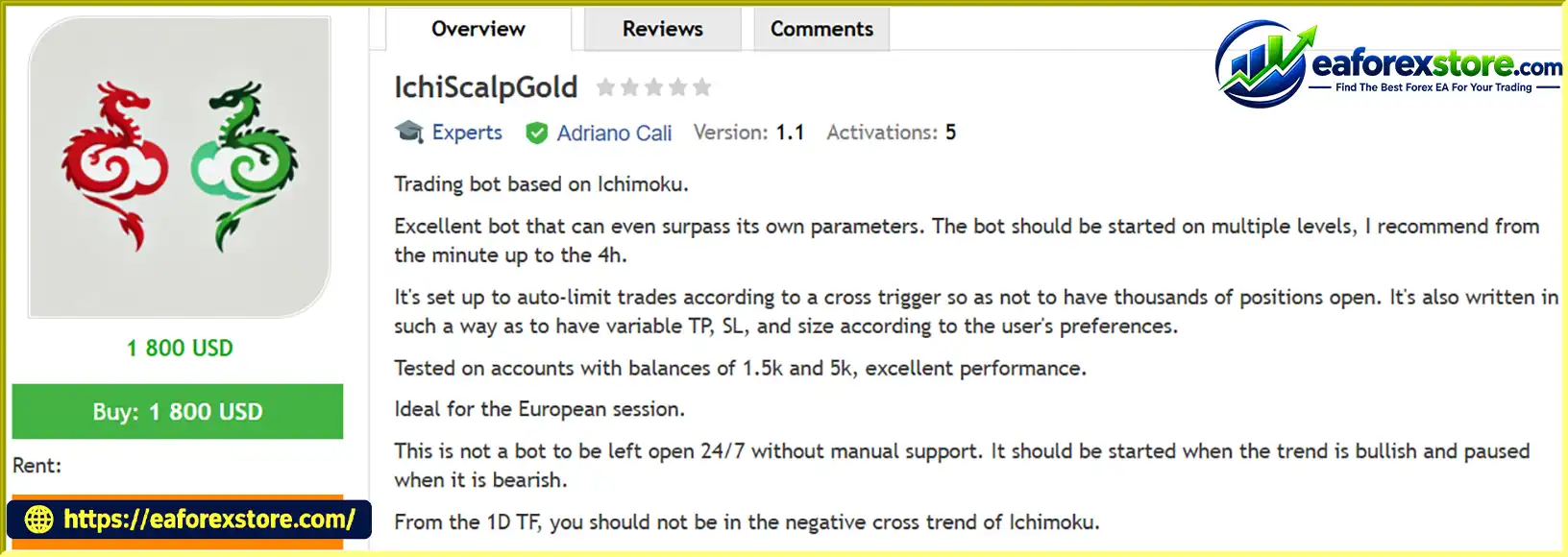
IchiScalpGold EA MT5 is an automated trading robot for MetaTrader 5 built around the Ichimoku indicator, designed for traders looking to capitalize on gold market trends and short-term trading opportunities.
The EA combines Ichimoku-based entry logic with configurable Take Profit (TP), Stop Loss (SL), and lot size settings. Its trade-limiting mechanism uses cross-trigger conditions to help control the number of open positions and reduce the risk of excessive trade accumulation.
IchiScalpGold EA MT5 is particularly suited to traders who actively monitor market conditions and prefer to operate during the European trading session. Rather than running continuously without supervision, the developer recommends using the EA when the broader market trend is bullish and pausing it during bearish conditions.
The EA can be configured across multiple timeframes, from M1 to H4, allowing traders to adapt their setup to different trading styles and market conditions.
> Delivery time 24h-48h after payment.
>>> Refund if not delivered.
>>> You will receive the latest version without any limitations (ID+Time).Reviewed by Jason Stap <<<
The EA uses the Ichimoku indicator as the foundation of its trading logic. Ichimoku helps traders assess trend direction, momentum, and potential support and resistance areas.
The developer recommends checking the broader trend before activating the EA, particularly the Ichimoku trend conditions on the daily (D1) timeframe.
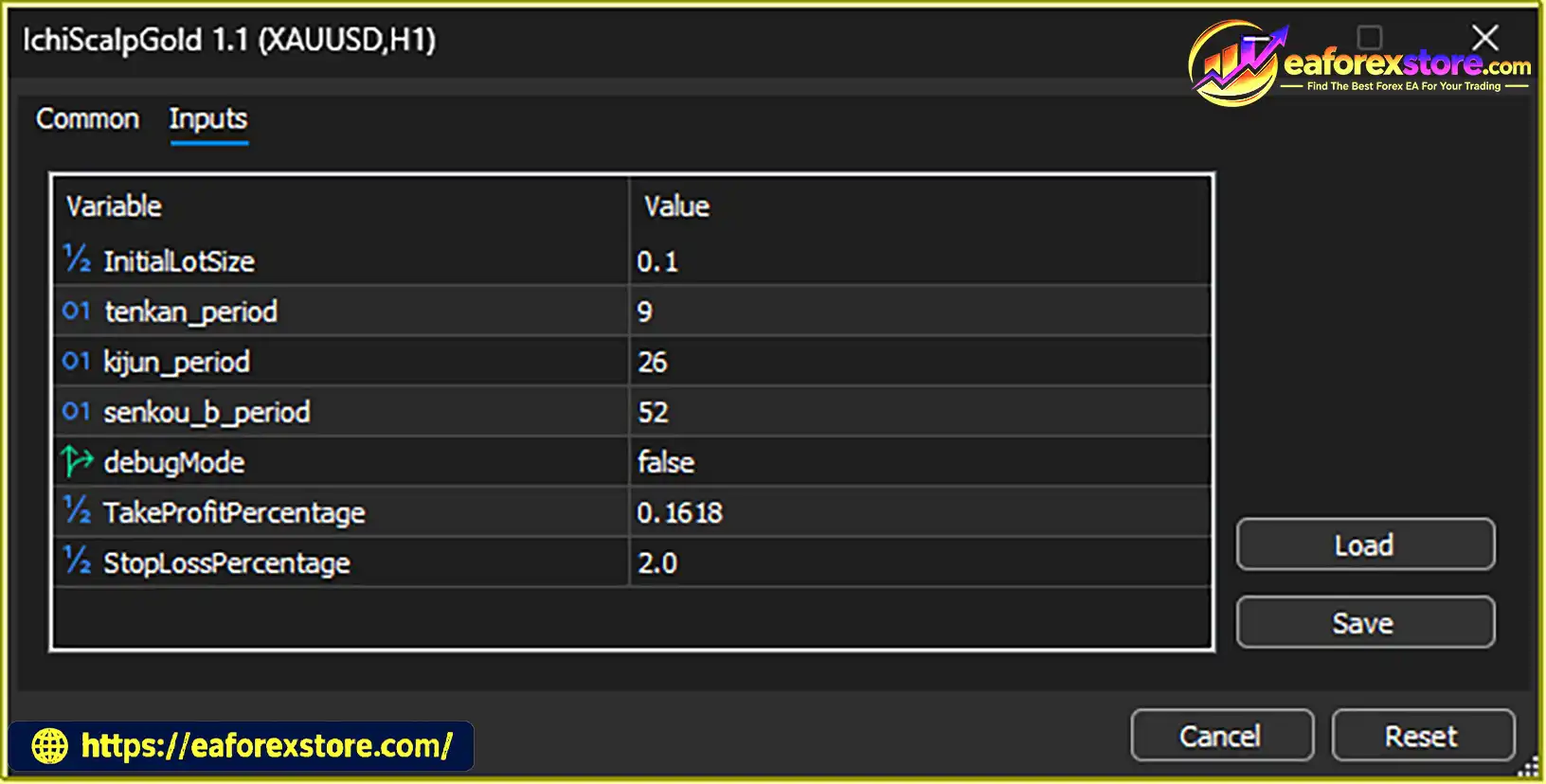
IchiScalpGold EA MT5 allows users to adjust key trade-management parameters according to their preferences, including:
These options provide flexibility for traders who want to tailor the EA to their account and trading approach.
The EA includes a trade-limiting system based on cross-trigger conditions. This feature is designed to regulate trade entries and help prevent an excessive number of positions from accumulating.
Although this mechanism can help control trade frequency, it should not be interpreted as a guarantee against large drawdowns or trading losses.
According to the developer, IchiScalpGold EA MT5 can be configured for use across several timeframes, from M1 to H4.
Different timeframes can produce different trading frequencies and exposure to market noise. Traders should test each configuration individually rather than assume that results will be identical across all timeframes.
The developer identifies the European trading session as the preferred operating period. Gold volatility, liquidity, spreads, and execution conditions can change throughout the day, making session selection an important part of the setup.
Traders should verify their broker’s server time and determine the corresponding European session hours before configuring any trading schedule.
IchiScalpGold EA MT5 is not intended to be left running unattended around the clock. The developer recommends activating it during favorable bullish conditions and pausing it when market conditions become bearish.
This operating approach requires the user to monitor the broader trend and manage when the EA is active.
The EA’s trading approach is based on Ichimoku cross signals and trend conditions. A practical operating workflow is as follows:
Step 1: Analyze the Higher-Timeframe Trend
Before activating the EA, review the daily chart using Ichimoku. The developer advises avoiding operation when the D1 chart shows a bearish cross trend.
Step 2: Identify Favorable Bullish Conditions
Activate the EA when the broader market structure and Ichimoku signals support a bullish environment, in accordance with the developer’s recommended approach.
Step 3: Configure Trading Parameters
Set the desired lot size, Take Profit, and Stop Loss. These values should reflect your account size, risk tolerance, broker conditions, and testing results.
Step 4: Select the Trading Timeframe
Choose a timeframe between M1 and H4 and test the configuration with your broker’s data. Shorter timeframes may generate more signals and can be more sensitive to spread and execution delays.
Step 5: Monitor and Pause When Conditions Change
Monitor the broader trend while the EA is operating. If the market turns bearish or the higher-timeframe Ichimoku conditions no longer meet your criteria, pause the EA as recommended by the developer.
Important: The precise entry rules, cross definitions, and internal trade-management logic should be verified against the EA’s documentation and observed behavior. Ichimoku signals can lag or produce false signals in ranging and rapidly changing markets.
The following recommendations are based on the developer’s stated guidance. They are starting points for testing, not guarantees of profitability.
| Setting | Recommendation |
|---|---|
| Trading platform | MetaTrader 5 |
| Preferred market | Gold (XAUUSD), subject to the EA’s supported-symbol specifications |
| Suggested timeframe range | M1 to H4 |
| Preferred session | European trading session |
| Higher-timeframe filter | Review Ichimoku conditions on D1 |
| Take Profit | Configure and validate through testing |
| Stop Loss | Configure according to account risk |
| Lot size | Select based on equity and risk tolerance |
| Operating style | Active monitoring; avoid unattended 24/7 operation |
The developer reports testing the EA on accounts with balances of approximately $1,500 and $5,000, describing the results as excellent. However, no independently verified performance figures, drawdown statistics, test reports, or live-account records were provided with this description.
These account balances should therefore be treated as reported testing examples, not as minimum capital requirements or evidence that the EA will perform similarly on another account.
Before using real funds, test the EA on your own broker’s data and evaluate its performance under different market conditions.
IchiScalpGold EA MT5 may suit traders who understand Ichimoku analysis and are comfortable monitoring market conditions instead of relying entirely on unattended automation.
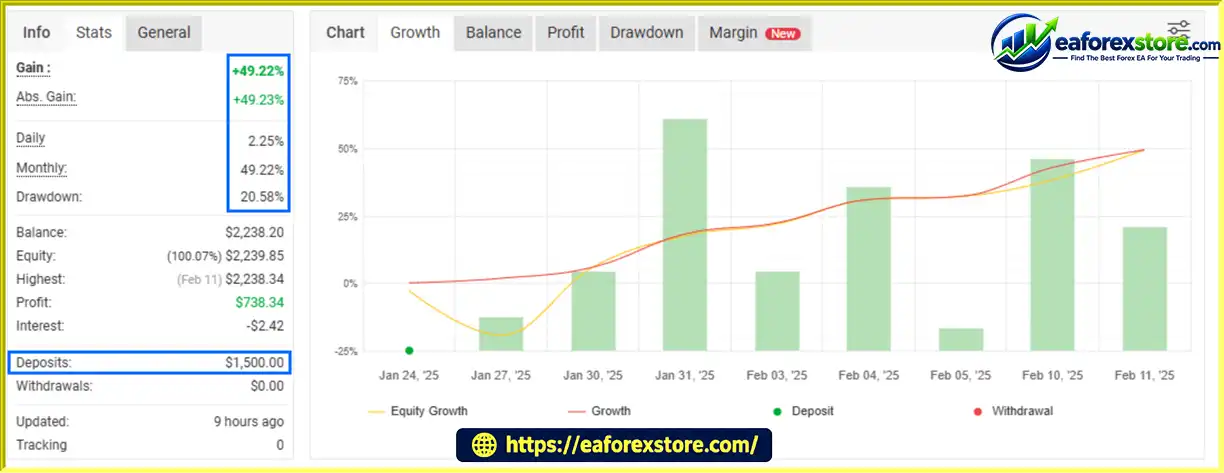
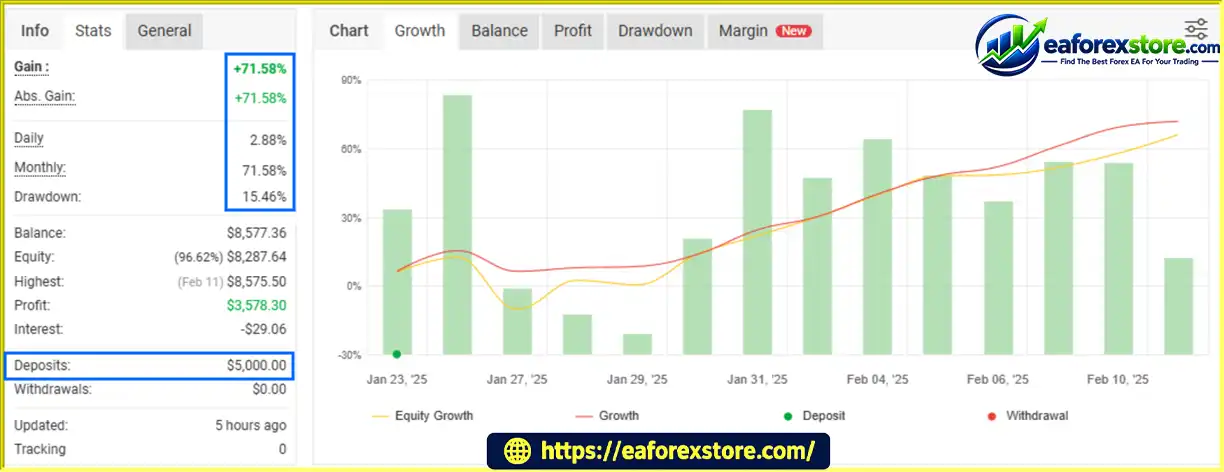
IchiScalpGold EA MT5 Myfxbook
IchiScalpGold EA MT5 Myfxbook Results
The developer reports positive testing results on accounts of approximately $1,500 and $5,000. These claims should be evaluated alongside detailed testing data before any purchase or live deployment decision.
To assess the EA more thoroughly, review:
A profitable backtest or a positive result on one account does not establish that the EA will remain profitable in the future. Test with realistic trading costs and consider forward testing on a demo account before moving to live trading.
Risk-management reminder: Configurable Stop Loss and lot size can help manage exposure, but they do not eliminate the possibility of losses. Choose position sizes based on the amount you can afford to lose, and avoid increasing lot size simply to pursue higher returns.
The developer explicitly states that the EA should not be left running 24/7 without manual support. Traders who want a completely unattended system may find this operating requirement inconvenient.
The recommended approach favors bullish conditions and advises pausing during bearish conditions. Incorrect trend assessments or sudden reversals may lead to unfavorable entries.
Like other technical-analysis methods, Ichimoku can produce false signals, especially in sideways markets or during abrupt volatility changes. No indicator can predict market direction with certainty.
The EA is described as suitable for multiple timeframes, but trading frequency, signal quality, transaction costs, and drawdown can vary substantially between M1 and H4. Each timeframe should be evaluated separately.
The stated tests on $1,500 and $5,000 accounts are developer-reported results. Without detailed reports and verified live trading history, future profitability cannot be established.
Pros
Cons
setting
MQL5 → Experts.Menu names and file formats may vary slightly depending on the MetaTrader 5 installation and the file supplied by the seller.
>>> Join VIP Membership Now <<<
IchiScalpGold EA MT5 is an Ichimoku-based automated trading tool intended for traders who want configurable trade management and a trend-focused operating approach. Its cross-trigger trade limits, adjustable TP and SL, and multiple timeframe options offer flexibility for testing different setups.
However, this EA is not presented as a fully unattended, always-on trading solution. The developer recommends focusing on favorable bullish conditions, reviewing the daily Ichimoku trend, and pausing the system when bearish conditions develop.
For the best evaluation, test the EA using realistic broker conditions, examine drawdown as carefully as profit, and confirm that its behavior matches your trading plan before deploying it on a live account.
Trading involves risk. Automated systems can lose money, and historical or developer-reported results do not guarantee future performance.
1. What Is IchiScalpGold EA MT5?
IchiScalpGold EA MT5 is an automated trading robot for MetaTrader 5 that uses the Ichimoku indicator to identify potential gold trading opportunities. It offers configurable Take Profit (TP), Stop Loss (SL), and lot size settings, along with a trade-limiting mechanism designed to help control position accumulation.
2. How Does IchiScalpGold EA MT5 Work?
The EA uses Ichimoku-based cross signals and trend conditions to guide its trading decisions. The developer recommends checking the daily (D1) Ichimoku trend before activating the EA, operating it during favorable bullish conditions, and pausing it when bearish conditions develop. Its exact entry and exit logic should be confirmed through the product documentation and testing.
3. Which Timeframes Does IchiScalpGold EA MT5 Support?
According to the developer, IchiScalpGold EA MT5 can be configured for timeframes ranging from M1 to H4. Trading frequency, signal behavior, transaction costs, and drawdown may vary across timeframes, so each configuration should be tested separately before live deployment.
4. What Are the Recommended Trading Conditions for IchiScalpGold EA MT5?
The developer recommends focusing on the European trading session and checking the broader market trend using the daily Ichimoku chart. Users can configure lot size, Take Profit, and Stop Loss according to their account and risk tolerance. The EA is intended for active monitoring rather than continuous, unattended operation. Confirm the supported trading symbol and broker specifications before use.
5. Does IchiScalpGold EA MT5 Include Risk Management Features?
Yes. IchiScalpGold EA MT5 provides configurable Take Profit, Stop Loss, and lot size settings. It also includes a cross-trigger mechanism intended to limit excessive trade entries. These features can help structure trade management, but they do not eliminate market risk or guarantee that losses will remain within a specific amount.
6. What Are the Reported Myfxbook Results of IchiScalpGold EA MT5?
The supplied product description reports two account results:
$1,500 initial deposit: Total gain of 49.22% and maximum drawdown of 20.58%.
$5,000 initial deposit: Total gain of 71.58% and maximum drawdown of 15.46%.
The description also lists average daily profits of 2.25% and 2.88%, respectively. These figures are reproduced from the supplied information and have not been independently verified here. Review the linked Myfxbook records, reporting period, and account history before drawing conclusions about expected performance.
7. Is IchiScalpGold EA MT5 Suitable for Beginners?
IchiScalpGold EA MT5 may appeal to traders familiar with technical indicators, but its recommended operating approach requires users to monitor market direction and decide when to activate or pause the EA. Beginners should learn the available settings, test the EA on a demo account, and understand the risks of gold trading before using real funds.
8. Where Can I Download IchiScalpGold EA MT5?
You can view the product details and current availability on the official MQL5 Market listing. Check the vendor's instructions for the latest version, installation requirements, and supported configurations before downloading.
Risk Disclaimer: Trading Gold, Forex, CFDs, and other leveraged financial instruments involves substantial risk and may result in the loss of invested capital. Historical and developer-reported results do not guarantee future performance. Always test an Expert Advisor carefully and use appropriate risk management.
In stock
In stock
In stock
In stock
In stock
Out of stock
No account yet?
Create an Account












 Automatic EA
 EA Best Seller
 Expert Advisor MT4
 Expert Advisor MT5
 HFT EA


Reviews
Clear filtersThere are no reviews yet.