









-
 Unlimited Activations
-
 Instant delivery
-
 Easy to install






 Unlimited Activations
Instant delivery
Easy to install
Unlimited Activations
Instant delivery
Easy to install
 Free Update
 Free Install Support

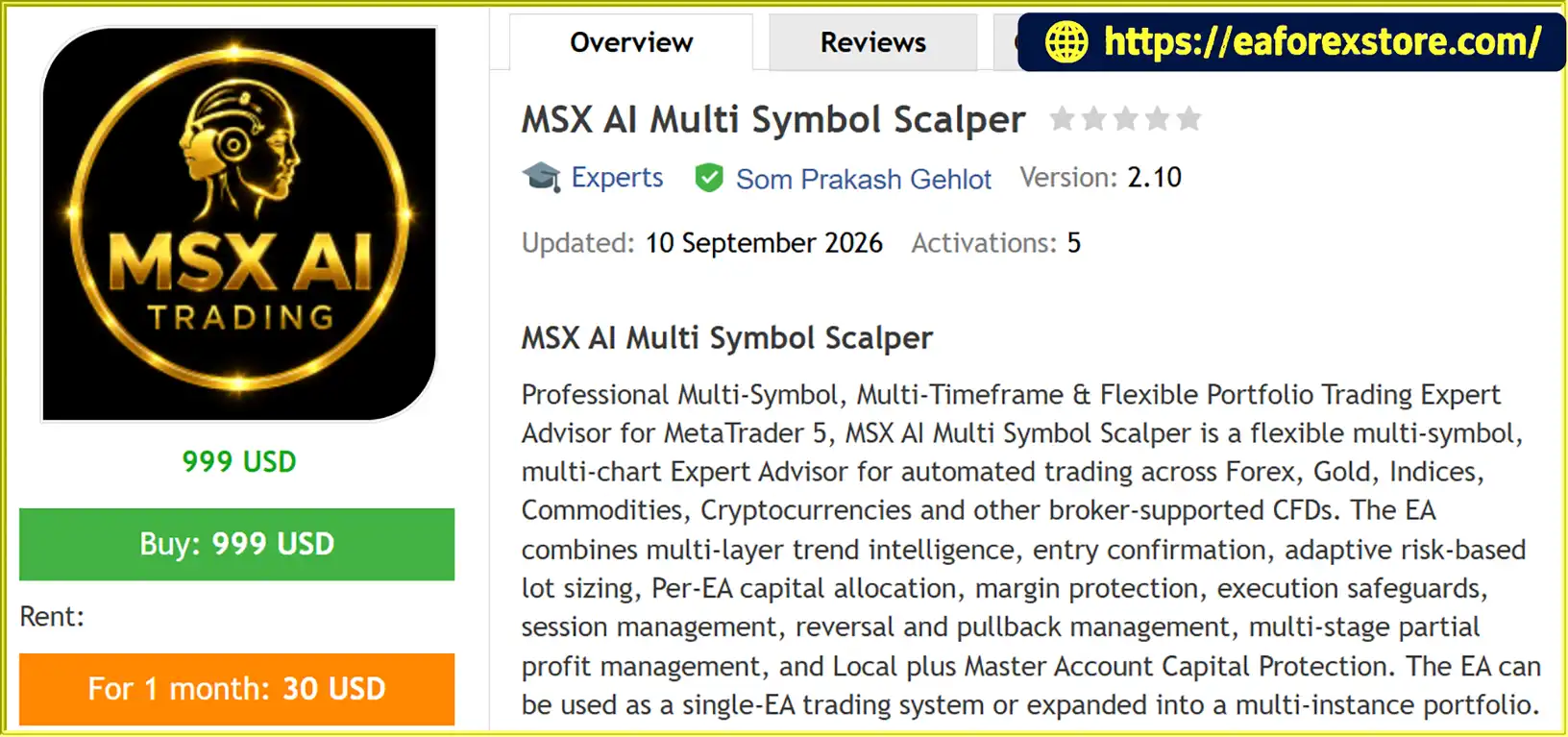
MSX AI Multi Symbol Scalper MT5 is a flexible, multi-symbol Expert Advisor (EA) developed for MetaTrader 5 (MT5). It is designed to automate trading across multiple financial markets, including Forex, Gold (XAUUSD), indices, commodities, cryptocurrencies, and other broker-supported Contracts for Difference (CFDs).
Unlike trading robots restricted to a single currency pair or timeframe, MSX AI Multi Symbol Scalper MT5 supports independent configurations for different symbols, timeframes, trading directions, risk parameters, and trading sessions. Traders can deploy it as a single-market trading system or expand it into a multi-chart portfolio operating through one MT5 trading account.
The EA combines triple-layer trend intelligence, five-term entry confirmation, reversal detection, pullback management, ATR-based risk controls, adaptive lot sizing, and multi-stage partial profit management. It also includes execution safeguards, dynamic capital allocation, margin protection, and local and master account capital-protection mechanisms.
The system supports timeframes ranging from M1 to M5, M15, M30, H1, H4, D1, W1, and MN. Despite the word “Scalper” in its name, the EA is not restricted to one-minute or five-minute charts. Its actual trading style depends on the selected timeframe, entry settings, exit rules, and risk configuration.
Another important feature is its portfolio architecture. Multiple EA instances can operate independently while sharing the same account balance, equity, free margin, and overall capital resources. This makes MSX AI Multi Symbol Scalper MT5 suitable for traders who want to manage several trading strategies within a centralized account environment.
However, automation does not eliminate market risk. Actual results depend on market conditions, broker execution, spreads, slippage, leverage, and the user’s configuration.
>>> Delivery time 24h-48h after payment.
>>> Refund if not delivered.
>>> You will receive the latest version without any limitations (ID+Time).Reviewed by Jason Stap <<<
MSX AI Multi Symbol Scalper MT5 can be configured for multiple supported markets and timeframes. Traders can run one EA instance on a single symbol or deploy several instances across different instruments and chart periods.
Supported market categories include:
Each instance can use its own trading parameters, risk settings, trading direction, and session schedule.
The EA combines three trend-analysis components to evaluate market direction:
Additional filters include trend strength, reversal strength, and ATR volatility-spike conditions. These configurable components help traders build a more structured approach to market analysis.
The five-term entry framework is designed to require agreement between configured trend, price or Heiken Ashi, HMA or DSHA, and SuperTrend conditions before a new position is permitted.
Instead of relying exclusively on one indicator or a single signal, the EA evaluates several conditions according to the selected configuration.
The exact confirmation requirements remain adjustable, allowing traders to adapt the entry logic to different markets and timeframes.
The EA supports three trading-direction settings:
These options allow traders to deploy a complete two-direction strategy or separate directional engines for specific market conditions.
The One Trade Per Trend feature can restrict repeated entries during the same confirmed trend cycle.
This control is designed to reduce unnecessary re-entry activity and distinguish a new trend cycle from continued movement within an existing trend.
Its effectiveness depends on the selected trend settings and the market’s behavior.
Trend Birth Protection is an optional entry-control mechanism based on confirmed SuperTrend direction changes.
The EA synchronizes its trend state with the current market environment after initialization, terminal restarts, VPS restarts, chart reloads, or EA reattachment.
This helps maintain a consistent reference for trend-state evaluation rather than automatically treating every restart as a completely new trading environment.
The Hard Reversal Exit engine uses independently configurable exit conditions rather than simply reusing the entry configuration.
Its core confirmation framework includes:
The EA evaluates the confirmed last closed candle, with an optional independent Exit Reversal Strength filter for additional confirmation.
This separation allows entry and exit logic to be configured independently.
The multi-stage partial profit system can progressively reduce an open position when configured profit triggers are reached.
Its controls include:
By reducing position volume progressively, the system can retain part of a trade while managing realized profits. Closing part of a position may also release some of the margin previously used by that position, subject to broker and account conditions.
The EA supports Fixed Lot and Equity-Based Risk position sizing, together with several capital and margin controls.
These include:
Before opening a position, the EA can evaluate whether the proposed volume satisfies the configured margin and capital requirements.
If the initial lot is too large, the EA may reduce it progressively. If the necessary reduction exceeds the permitted threshold, the trade can be blocked.
MSX AI Multi Symbol Scalper MT5 includes individual EA protection and account-wide protection options.
Local protection can include:
Master Account Protection can include Master Daily Loss, Master Daily Profit Target, and Master Account Drawdown controls.
When applicable protection thresholds are reached, the configured system can restrict new trades and activate the relevant protection behavior. Exact actions depend on the selected settings.
The EA supports four configurable broker-server-time sessions:
Session controls can enable or disable trading during selected periods, block new entries near session end, close positions at specified times, and apply weekend restrictions.
These features help traders align automated execution with their preferred trading schedule.
Before opening a position, the EA can evaluate several execution conditions, including:
These safeguards are designed to reject or adjust trades that fail the configured conditions. They cannot guarantee successful execution under every broker or market condition.
MSX AI Multi Symbol Scalper MT5 follows a structured trading process that combines market analysis, entry confirmation, position sizing, trade execution, and ongoing position management.
The EA evaluates the configured trend engines, including Master Smoothed HMA, Hybrid Heiken Ashi, and MSX SuperTrend Advanced.
Trend strength, reversal strength, and ATR volatility filters can provide additional conditions for determining whether the current market environment is suitable for trading.
The five-term entry framework evaluates the selected confirmation conditions before permitting a new position.
Depending on the configuration, the EA can require alignment between trend direction, price behavior, Heiken Ashi, HMA or DSHA, and SuperTrend conditions.
The system can also apply Trend Birth Protection and One Trade Per Trend controls to manage when new entries are permitted.
The EA calculates the proposed lot size using the selected Fixed Lot or Equity-Based Risk method.
It then evaluates the relevant capital and margin restrictions, including free margin, reserve requirements, Per-EA Capital Allocation, and projected Margin-Level requirements.
If the proposed volume is unsuitable, Adaptive Lot Reduction may reduce the lot until the configured conditions are satisfied. If the required reduction exceeds the allowed limit, the trade can be rejected.
Before submitting an order, the EA checks the applicable spread, slippage, trading-session, broker-volume, stop-level, and margin requirements.
This validation process is intended to reduce avoidable execution problems and prevent orders that do not meet the configured restrictions.
Once a position is open, the EA can manage it using:
The precise behavior depends on the enabled features and selected parameters.
Local protection can restrict the activity of an individual EA instance when its configured loss, profit, or drawdown thresholds are reached.
Master Account Protection can apply broader restrictions across the account’s trading activity.
The EA can also enter Daily Sleep Mode when the applicable local daily protection condition is triggered, remaining inactive until the next genuine broker server day according to the configured protection architecture.
For portfolio deployments, multiple EA instances can operate across different symbols, timeframes, and trading directions.
Although each instance has its own trading decision context, all instances share the same real MT5 account resources. Capital allocation and margin checks are therefore important when several positions compete for available funds.
MSX AI Multi Symbol Scalper MT5 is not limited to one currency pair, one asset class, or one timeframe. Its flexible configuration allows traders to choose supported instruments and build a trading setup that matches their objectives.
This flexibility can be useful for users who want to explore Forex, Gold, indices, commodities, or cryptocurrencies through one automated trading framework.
The combination of multiple trend engines, entry confirmation, trend-cycle restrictions, and dedicated reversal exits provides a structured approach to automated trading.
Rather than depending on one isolated signal, the EA allows multiple technical conditions to participate in trading decisions.
However, additional filters do not automatically produce better performance. Their effectiveness must be evaluated through testing.
The EA includes multiple layers of position-sizing, margin-validation, and capital-protection controls.
Adaptive lot reduction, Free Margin Reserve, Per-EA Capital Allocation, and projected Margin-Level protection can help prevent certain trades from exceeding the configured resource limits.
These features are especially relevant when operating multiple strategies on the same account.
Traders can begin with one EA instance and expand to multiple symbols as their testing and operational requirements develop.
A reference deployment can use 12 symbols, but the actual number of instances depends on account capital, broker conditions, MT5 and VPS resources, margin requirements, and the selected configuration.
The published 12-Symbol Strategy Tester Analysis Series uses one EA instance per symbol with Trade Both Side enabled. A separate architecture using BUY-only and SELL-only instances can support a different deployment structure.
The EA offers several adjustable risk and protection parameters, allowing users to configure position sizing, drawdown limits, daily loss thresholds, and capital allocation.
This flexibility is useful for traders with different account sizes and risk preferences, although selecting appropriate settings remains the user’s responsibility.
Free reference .SET files are available for the published 12-Symbol/Asset Strategy Tester Analysis Series.
These files are intended to reproduce or study the specific configurations used in the corresponding published reports. Users can request the relevant file through MQL5 Private Chat by specifying the symbol or asset they want to test.
The bundled default inputs distributed with the free demo are not necessarily the same as the symbol-specific reference configurations used in the published reports.
For meaningful comparisons, users should load the corresponding reference .SET file and use the applicable symbol, timeframe, and Strategy Tester conditions.
The free reference files are not tailor-made optimization services. Custom configurations prepared according to individual requirements may be available as a separate paid service.
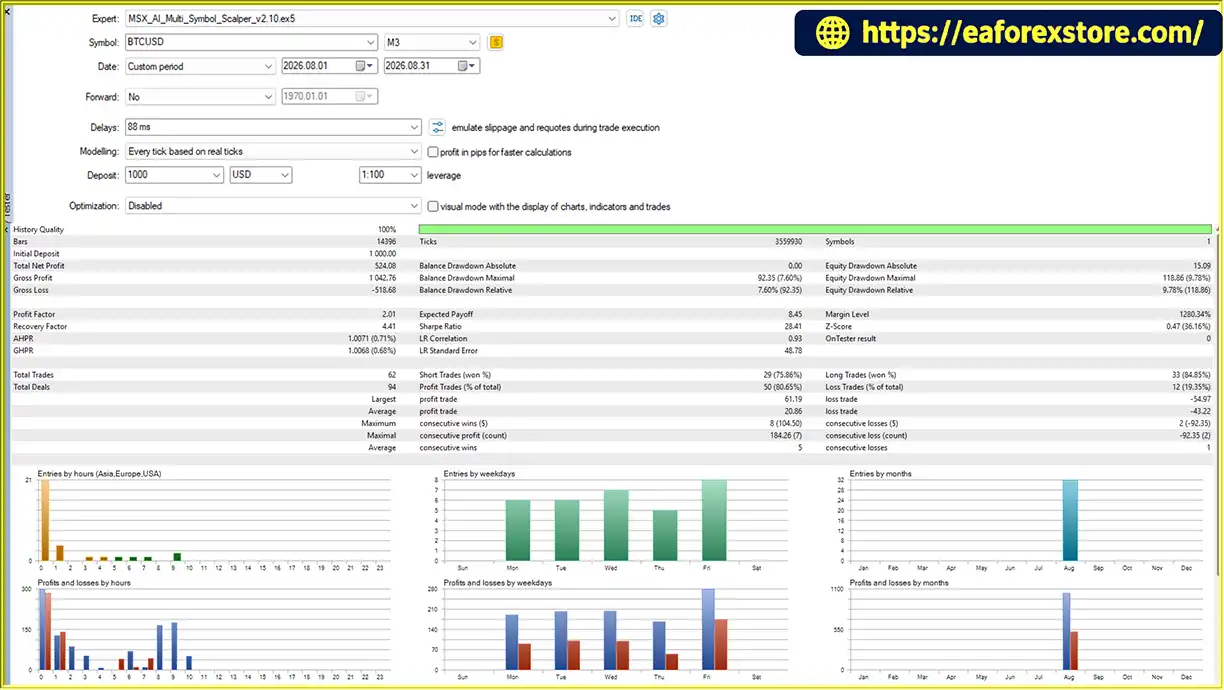
MSX AI Multi Symbol Scalper MT5 backtets
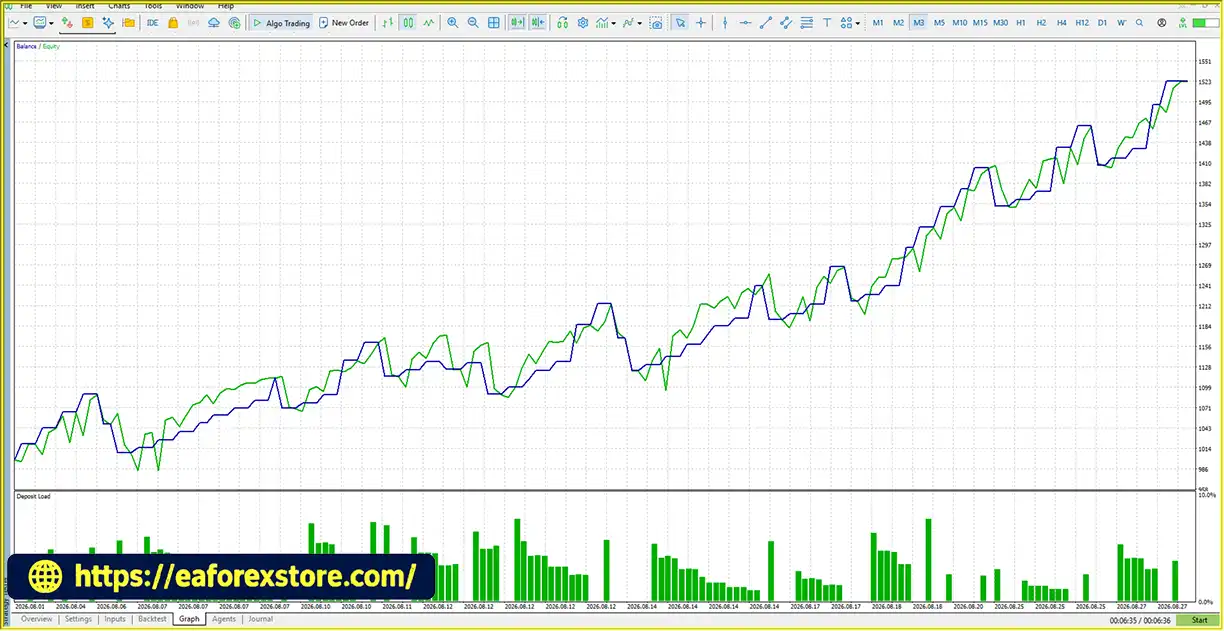
MSX AI Multi Symbol Scalper MT5 EA backtets
The performance of MSX AI Multi Symbol Scalper MT5 depends on the chosen symbol, timeframe, risk settings, entry parameters, exit rules, and testing environment.
The published 12-Symbol/Asset Strategy Tester Analysis Series uses specific reference configurations for each tested instrument. These configurations may include different timeframes, risk percentages, capital-protection limits, and other EA inputs.
Consequently, testing the free demo with its bundled default inputs may produce results that differ from the published reports.
A fair evaluation should use the corresponding reference .SET file and applicable testing conditions. Traders should also conduct independent testing rather than relying exclusively on published results.
The EA supports equity-based risk sizing, allowing the initial lot calculation to be linked to the selected risk settings.
Actual monetary risk can differ from the intended level because of gaps, slippage, spread changes, execution delays, and other market conditions. Risk-based lot sizing should therefore be treated as a calculation framework rather than a guarantee of a fixed maximum loss.
Consider a hypothetical example:
If the EA’s reduction limit is configured at 50%, the proposed trade can be blocked because the required reduction exceeds the permitted threshold.
This mechanism is intended to prevent the EA from opening positions when the initial volume cannot be adjusted sufficiently to meet the configured capital and margin restrictions.
The example illustrates the intended logic and does not represent a verified live-trading result.
MSX AI Multi Symbol Scalper MT5 uses Per-EA Capital Allocation to limit the share of available account resources considered for an individual EA instance.
For example, a 20% allocation setting on a $1,000 balance represents an approximate $200 capital-allocation reference. It does not mean that $200 is permanently reserved as margin or that each EA instance has a separate $1,000 account.
The actual executable margin budget changes according to free margin, the configured reserve, allocation settings, current positions, broker margin requirements, and other account conditions.
When a position is partially closed or fully closed, some previously occupied margin may become available for other valid trades. This dynamic allocation process is often described as margin recycling.
Although it can improve the flexibility of shared capital resources, margin recycling does not create additional equity or eliminate the risk of simultaneous losses across correlated positions.
Local protection can limit the activity of an individual EA instance after a configured daily loss, profit target, or drawdown threshold is reached.
Master Account Protection provides additional controls for account-level daily loss, daily profit targets, and drawdown.
These mechanisms are intended to restrict further trading when the relevant conditions are triggered. Their effectiveness depends on the configured thresholds, implementation behavior, and execution conditions.
They should not be interpreted as guaranteed account-level loss limits under all circumstances.
For a more reliable evaluation:
A stable VPS is recommended for continuous automated operation, particularly when running multiple charts and EA instances.
Despite its extensive configuration options, MSX AI Multi Symbol Scalper MT5 has limitations that traders should understand before using it on a live account.
The EA includes numerous entry, exit, money-management, session, and capital-protection parameters.
Inexperienced users may find it difficult to understand how these settings interact. Incorrect combinations can produce unexpected trading behavior or prevent trades from being opened.
Starting with one symbol and a documented reference configuration can make the learning process more manageable.
No Expert Advisor can guarantee consistent profits under all market conditions.
Trend-following and reversal-based strategies can experience losses during choppy markets, sudden price movements, low-liquidity periods, and unexpected market events.
Historical Strategy Tester performance does not guarantee future results.
Trading several instruments can increase diversification opportunities, but it can also increase total exposure.
Multiple positions may move in the same direction during periods of market stress. For example, several currency pairs or risk-sensitive instruments may experience correlated losses at the same time.
Users should evaluate total portfolio exposure rather than assessing each EA instance in isolation.
Multiple EA instances operate within the same MT5 account environment. They do not have completely separate balances or independent pools of free margin.
Opening too many positions can consume available margin and increase the risk of margin calls or forced liquidation.
Per-EA Capital Allocation and Adaptive Lot Reduction help manage resource usage, but they do not remove the risks associated with leverage and insufficient capital.
Results can vary between brokers because of differences in spreads, commissions, swaps, execution speed, slippage, margin requirements, and contract specifications.
Spread filters and execution safeguards may reject unsuitable trades, but they cannot eliminate all execution-related risks.
A stable VPS or trading environment is recommended for continuous automated operation.
Internet interruptions, terminal shutdowns, VPS failures, broker-server issues, and technical disruptions may affect automated trading. The EA cannot control external infrastructure failures.
The free demo’s bundled default inputs are not necessarily the same as the reference configurations used in the published Strategy Tester reports.
Testing the default demo settings and comparing the result directly with a report generated using different inputs may lead to misleading conclusions.
Reference .SET files should be used for the corresponding published tests. Any changes to the risk percentage, timeframe, capital-protection limits, or trading parameters should be tested independently.
Although the EA includes configurable risk, drawdown, and daily protection controls, these features do not guarantee compliance with proprietary trading firm rules.
Users must verify the firm’s current restrictions on drawdown calculations, news trading, overnight positions, weekend exposure, automated trading, and other relevant requirements.
Trading leveraged Forex, metals, indices, commodities, cryptocurrencies, and CFDs involves substantial financial risk. Losses can occur rapidly, and leverage can magnify both gains and losses.
The EA’s technical features and capital-protection mechanisms cannot eliminate trading risk or guarantee that losses will remain within configured thresholds.
Users should test the EA on a demo account, understand the settings, and use only risk capital they can afford to lose.
Follow these steps to install and configure the Expert Advisor in MetaTrader 5.
Download MSX AI Multi Symbol Scalper MT5 from its authorized distribution source.
Ensure that the file is compatible with MetaTrader 5 and comes from a trustworthy provider.
Copy the EA file into the appropriate Experts directory.
If the EA is supplied as a compiled .ex5 file, place it in the appropriate folder without attempting to compile it as source code.
If the package includes source files or additional installation instructions, follow the provider’s documentation.
Return to MT5 and open the Navigator panel.
Right-click Expert Advisors and select Refresh. Alternatively, restart the terminal.
MSX AI Multi Symbol Scalper MT5 should appear in the Expert Advisors list if the installation is successful.
Open the symbol you want to trade and select the intended timeframe.
Drag the EA onto the chart or double-click its name in the Navigator panel.
For multi-symbol operation, configure each instance according to the intended symbol, timeframe, trading direction, and risk settings.
Check the EA’s settings and ensure that automated trading is enabled in MT5.
Review any permissions required by the EA and confirm that the broker supports trading on the selected instrument.
For users evaluating the published Strategy Tester results, obtain the corresponding free reference .SET file through MQL5 Private Chat.
Specify the symbol or asset you want to test, then load the relevant configuration into the MT5 Strategy Tester or the applicable EA input interface.
Do not assume that the bundled demo defaults will reproduce results generated with different reference settings.
Review the following settings before running the EA:
Avoid increasing risk simply to obtain more trades or larger backtest profits.
Select the appropriate symbol, timeframe, testing period, and modeling settings.
Run the test using the corresponding reference configuration when comparing results with a published report.
Review total profit, drawdown, trade frequency, average trade outcomes, and other relevant performance statistics.
After backtesting, run the EA on a demo account to observe its behavior under current market and broker conditions.
Verify that orders, exits, partial closes, daily protection, and margin-related controls behave as expected.
Only consider live deployment after understanding the system’s limitations and determining whether its risk profile is appropriate for your circumstances.
A VPS is recommended when the EA needs to operate continuously, particularly in multi-chart or multi-symbol configurations.
Choose an environment with adequate resources, reliable connectivity, and sufficient performance for the intended number of EA instances.
>>> Join VIP Membership Now <<<
MSX AI Multi Symbol Scalper MT5 is a configurable automated trading system for MetaTrader 5 that combines multi-symbol trading, multiple trend-analysis engines, structured entry confirmation, adaptive position sizing, partial profit management, and layered capital protection.
Its main advantage is flexibility. Traders can configure a single-market strategy or expand the system across multiple instruments, timeframes, and trading directions. Features such as One Trade Per Trend, Hard Reversal Exit, Adaptive Lot Reduction, Per-EA Capital Allocation, and Master Account Protection provide a broad framework for managing trading activity and shared account resources.
However, a sophisticated EA is not automatically a profitable EA. The number of indicators, available parameters, and capital-protection features should not replace careful testing and realistic expectations.
For the most meaningful initial evaluation, users should obtain the free reference .SET file associated with the published Strategy Tester report they want to reproduce. They should then test the EA using the applicable symbol, timeframe, and configuration before experimenting with their own parameters.
Ultimately, MSX AI Multi Symbol Scalper MT5 may be worth evaluating for traders who need a flexible, multi-market trading framework with configurable risk and portfolio-management tools. Its suitability depends on independent testing, appropriate capital allocation, broker compatibility, and the user’s ability to understand and manage the risks of leveraged automated trading.
Important: Historical backtests are not guarantees of future performance. Always evaluate the EA on a demo account before considering live trading, and never risk money you cannot afford to lose.
1. What Is MSX AI Multi Symbol Scalper MT5?
MSX AI Multi Symbol Scalper MT5 is an automated trading Expert Advisor (EA) designed for MetaTrader 5. It supports multiple markets, including Forex, Gold (XAUUSD), indices, commodities, cryptocurrencies, and other broker-supported CFDs. The EA combines multiple trend-analysis engines, entry confirmation filters, automated trade management, and configurable risk controls to help traders manage their trading strategies.
2. Which Markets and Timeframes Does MSX AI Multi Symbol Scalper MT5 Support?
MSX AI Multi Symbol Scalper MT5 supports multiple financial instruments, depending on broker availability. These include Forex currency pairs, Gold, metals, stock indices, commodities, and cryptocurrencies. Supported timeframes range from M1 and M5 to M15, M30, H1, H4, D1, W1, and MN. Traders can configure different symbols and timeframes according to their trading objectives and testing results.
3. How Does MSX AI Multi Symbol Scalper MT5 Work?
The EA analyzes market direction using three trend-analysis engines: Master Smoothed HMA, Hybrid Heiken Ashi, and MSX SuperTrend Advanced. It then evaluates configurable entry confirmation conditions before opening a trade. Once a position is active, the EA can manage stop-loss and take-profit levels, reversal exits, partial profit-taking, position sizing, and capital protection. Its actual trading behavior depends on the selected settings and market conditions.
4. Does MSX AI Multi Symbol Scalper MT5 Support Automatic Risk Management?
Yes. MSX AI Multi Symbol Scalper MT5 includes several risk-management features, such as Fixed Lot and Equity-Based Risk position sizing, ATR-based risk controls, Free Margin Reserve, Per-EA Capital Allocation, Adaptive Lot Reduction, and projected margin-level protection. It also supports configurable daily loss limits, daily profit targets, maximum drawdown controls, and Master Account Protection. These features help manage trading exposure but cannot guarantee a fixed maximum loss or eliminate financial risk.
5. Can MSX AI Multi Symbol Scalper MT5 Trade Multiple Symbols Simultaneously?
Yes. The EA supports multi-symbol and multi-timeframe deployment through multiple EA instances on a single MT5 trading account. Each instance can use its own symbol, timeframe, trading direction, and risk settings. However, all instances share the account's balance, equity, free margin, and available capital. Traders should therefore consider total portfolio exposure, correlated positions, margin requirements, and VPS performance before running multiple strategies simultaneously.
6. Are the Backtest Results of MSX AI Multi Symbol Scalper MT5 Guaranteed to Be Repeated in Live Trading?
No. Historical backtest results do not guarantee future profitability or identical live-trading performance. Results can vary because of market conditions, broker pricing, spreads, commissions, slippage, execution delays, and configuration differences. To evaluate the published Strategy Tester reports more accurately, traders should obtain the corresponding reference .SET file and reproduce the relevant symbol, timeframe, and testing conditions. Independent backtesting and demo forward-testing are recommended before live deployment.
7. How Do I Install MSX AI Multi Symbol Scalper MT5 on MetaTrader 5?
To install MSX AI Multi Symbol Scalper MT5, download the EA file from an authorized source, open MetaTrader 5, and select File → Open Data Folder → MQL5 → Experts. Copy the supplied .ex5 file into that directory, refresh the Navigator panel, and attach the EA to the desired chart. Enable automated trading and configure the appropriate trading parameters, position sizing, and capital-protection settings. Test the EA on a demo account before considering live trading.
8. Does MSX AI Multi Symbol Scalper MT5 Include Free Reference .SET Files?
Yes. Free reference .SET files are available for the published 12-Symbol/Asset Strategy Tester Analysis Series. Users can request the relevant configuration through MQL5 Private Chat by specifying the symbol or asset they want to test. These files are intended to help reproduce or study the corresponding published backtests. The default inputs bundled with the free demo may differ from the reference settings, and the files do not guarantee profitable results or provide personalized optimization services.
In stock
In stock
In stock
In stock
In stock
Out of stock
No account yet?
Create an Account












 Automatic EA
 EA Best Seller
 Expert Advisor MT4
 Expert Advisor MT5
 HFT EA


Reviews
Clear filtersThere are no reviews yet.