









-
 Unlimited Activations
-
 Instant delivery
-
 Easy to install




 Unlimited Activations
Instant delivery
Easy to install
Unlimited Activations
Instant delivery
Easy to install
 Free Update
 Free Install Support

Gold Storm PRO EA MT5 is an automated Gold Trading Expert Advisor developed by Berylis for the MetaTrader 5 platform. Designed exclusively for XAUUSD, this trading robot operates on the M5 timeframe and focuses on confirmed price impulses to identify potential trading opportunities during the London session and the beginning of the New York session.
Unlike trading robots that continuously open positions or rely on grid and martingale strategies, Gold Storm PRO EA MT5 uses volatility-based pending orders to capture potential market movements. It places Buy Stop and Sell Stop orders at distances calculated using the Average True Range (ATR), allowing entry levels to adapt to current market volatility.
The EA operates within a fixed trading window from 10:00 to 16:00 UTC and does not open new trades outside this period. Every trade is opened with a Stop Loss and Take Profit, while trailing stop functionality and impulse-based exit rules help manage open positions.
Gold Storm PRO EA MT5 is designed for traders seeking a structured approach to automated gold trading without grid trading, martingale, averaging, or hedging. It also offers configurable risk settings, making it possible to adapt the trading setup to different account sizes and trading requirements.
>>> Delivery time 24h-48h after payment.
>>> Refund if not delivered.
>>> You will receive the latest version without any limitations (ID+Time).Reviewed by Jason Stap <<<
Gold Storm PRO EA MT5 follows a structured trading process that combines market volatility analysis, pending-order execution, and automated position management.
The EA monitors XAUUSD on the M5 timeframe during its configured trading window. Its trading activity is restricted to 10:00–16:00 UTC, helping define when the system can initiate new trades.
The Expert Advisor uses the Average True Range (ATR) to determine pending-order distances based on current market volatility. This allows its entry levels to respond to changing market conditions rather than relying entirely on a fixed distance.
The EA places Buy Stop and Sell Stop pending orders at calculated levels. These orders are designed to enter the market when the price moves toward the specified entry levels, potentially capturing strong directional price impulses.
Several pending orders may be active simultaneously. Consequently, traders should monitor their combined potential exposure rather than evaluating risk based on a single position alone.
When a pending order is triggered, the resulting trade includes a Stop Loss and Take Profit. These predefined levels establish the initial loss limit and profit target for each position, although actual execution can differ because of slippage, gaps, and market conditions.
After entry, Gold Storm PRO EA MT5 manages positions using its configured Take Profit, trailing stop, and impulse-based closing rules. These mechanisms are intended to manage exits as market conditions evolve.
The EA does not open new trades outside its 10:00–16:00 UTC trading window. Traders should distinguish this restriction from the management of existing positions, which may remain open after the entry window ends depending on the EA’s exit rules.
Gold Storm PRO EA MT5 focuses exclusively on XAUUSD, allowing its trading logic and recommended operating conditions to be tailored to the characteristics of the gold market.
The combination of ATR-based pending orders, Stop Loss, Take Profit, trailing stops, and impulse-based exit conditions provides a defined framework for automated trade execution and management.
The EA does not depend on grid trading, martingale, or averaging strategies to manage losing positions. This makes its approach different from systems that increase exposure by repeatedly adding positions as the market moves against them.
However, the absence of these strategies does not eliminate the possibility of substantial losses, particularly when multiple orders are active or gold prices move sharply.
The 10:00–16:00 UTC schedule restricts new entries to a specific period of the trading day. This gives traders a clearly defined operating window and avoids opening new trades throughout the entire 24-hour market cycle.
Traders can configure the risk settings to suit their account size, trading objectives, and risk tolerance. The developer recommends 1–2% risk per trade for retail accounts and 1% or less for prop-firm accounts.
These figures are recommendations rather than guarantees of maximum account loss, especially when multiple pending orders or positions overlap.
The EA is developed for MetaTrader 5, enabling automated execution without requiring traders to monitor every potential entry manually. Its performance will still depend on broker execution, platform availability, spreads, and the selected settings.
Berylis provides support through MQL5 private messages, with a stated response time of within 24 hours. Buyers also receive 10 activations and can request the Bitcoin Storm PRO bonus after purchase.
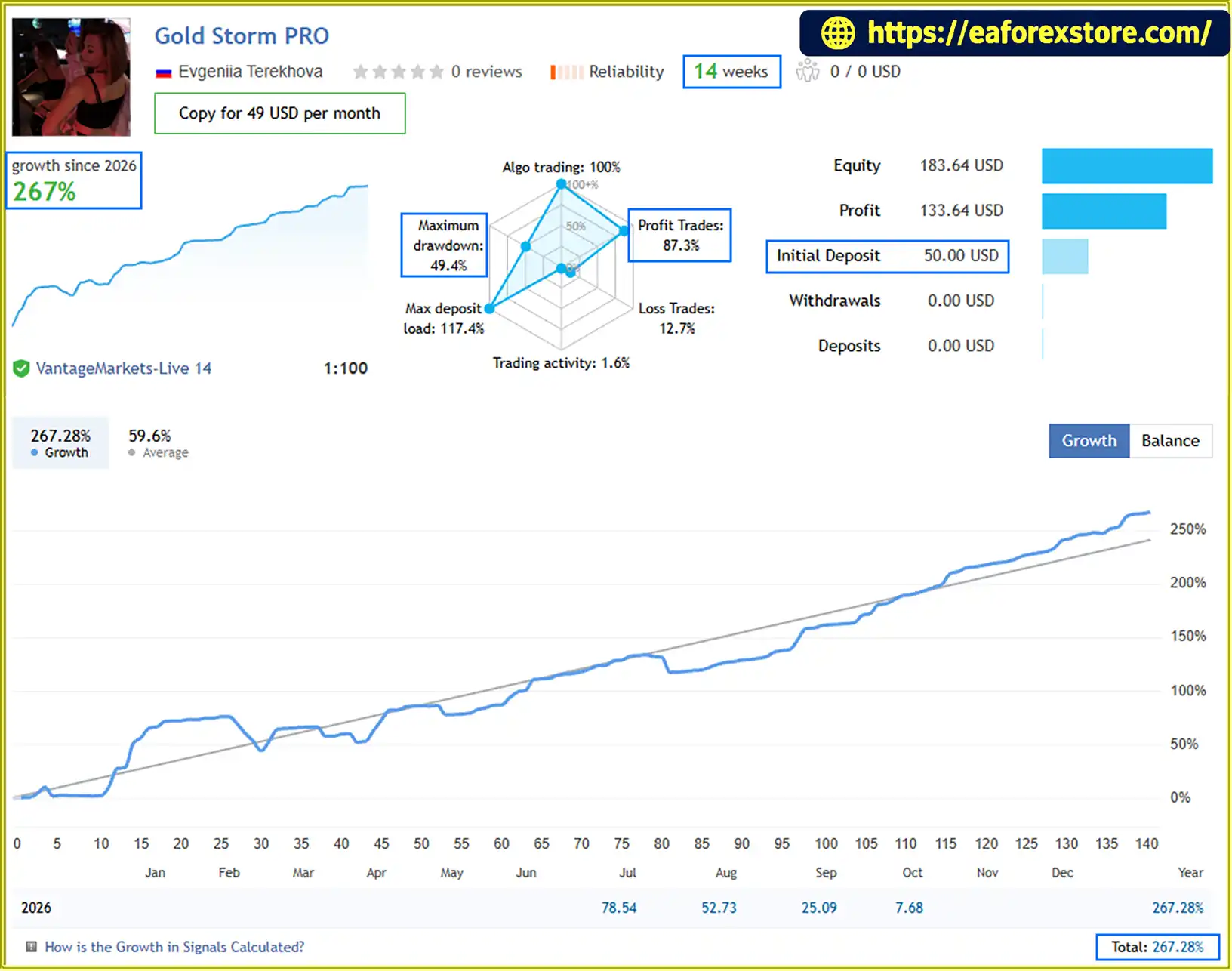
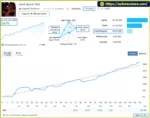
🔺Gold Storm PRO –14 consecutive weeks
Gold Storm PRO EA MT5 Live Signal
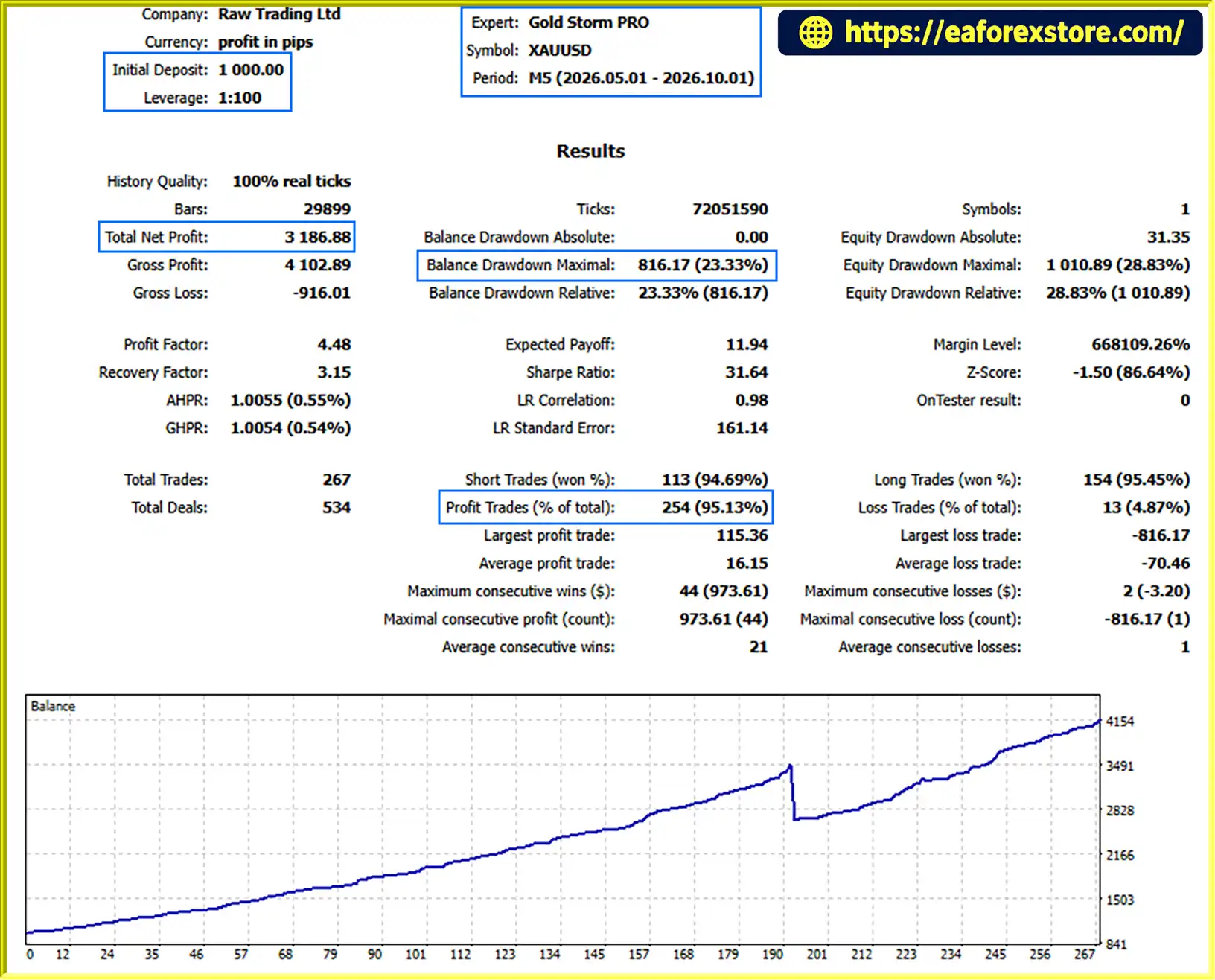
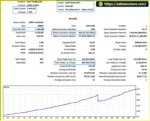
Gold Storm PRO EA MT5 Backtets
Risk management is an important consideration when using Gold Storm PRO EA MT5 because gold can experience rapid price movements, spread fluctuations, and periods of elevated volatility.
Although the EA places a Stop Loss on every trade, this does not guarantee that losses will always be limited to the exact amount initially expected. Execution conditions, slippage, gaps, and simultaneous orders can affect the final outcome.
For the intended operating environment, the developer recommends the following conditions:
These are developer-provided recommendations, not independent guarantees of compatibility or profitability. Lower leverage, larger spreads, higher StopLevel restrictions, commissions, and execution differences can affect trading results. A smaller deposit may also leave less room to withstand drawdowns.
Gold Storm PRO EA MT5 may be considered by traders evaluating automated strategies for proprietary trading challenges because it uses a Stop Loss on every trade and does not rely on grid or martingale methods.
Before using the EA on a prop-firm account, traders should:
Compliance depends on the specific firm’s rules and the EA’s actual behavior under the selected configuration.
Follow these steps to install and configure Gold Storm PRO EA MT5 on MetaTrader 5.
Purchase Gold Storm PRO EA MT5 through its official product listing or the authorized sales channel provided by Berylis. Complete the activation process and confirm that your account has access to the product.
The purchase includes 10 activations. Review the applicable activation terms before installing the EA on multiple devices.
Download the Gold Storm PRO EA MT5 files supplied with your purchase. Ensure that the files are intended for MetaTrader 5 rather than MetaTrader 4.
Launch MetaTrader 5 and navigate to File → Open Data Folder.
Open the following directory:
MQL5 → Experts
Copy the supplied EA file into the appropriate Experts folder. If the product is distributed through the MQL5 Market, follow the platform’s built-in installation and activation instructions instead.
Return to MetaTrader 5 and open the Navigator panel. Right-click the Expert Advisors section and select Refresh, or restart the platform if necessary.
Locate Gold Storm PRO EA MT5 in the Expert Advisors list.
Open your broker’s XAUUSD chart and set the timeframe to M5.
Check the broker’s exact symbol name because some brokers use suffixes or prefixes, such as XAUUSD.a or GOLD. Confirm that the product supports the symbol format used by your account before trading.
Drag Gold Storm PRO EA MT5 onto the XAUUSD M5 chart and review the available inputs.
Configure the risk settings according to your account size and risk tolerance. Set a unique Magic Number and order comment, particularly when running multiple EAs or using a prop-firm account.
Confirm the trading window and verify that the platform’s displayed server time is correctly understood relative to the EA’s 10:00–16:00 UTC schedule. Do not assume broker server time and UTC are identical.
Enable the platform’s Algo Trading function and confirm that automated trading is permitted in the EA’s settings.
Check the Experts and Journal tabs for initialization errors, permission issues, or order-placement problems.
Run the EA on a demo account or through the MT5 Strategy Tester where supported. Check pending-order behavior, Stop Loss and Take Profit placement, broker trading restrictions, and the effect of spread and execution costs.
Only consider live trading after confirming that the EA operates correctly under your broker’s conditions and that the potential risk is acceptable.
>>> Join VIP Membership Now <<<
Gold Storm PRO EA MT5 by Berylis is an automated gold trading robot for traders who want a structured XAUUSD strategy on MetaTrader 5. Its approach combines ATR-based pending orders, a fixed trading window, predefined Stop Loss and Take Profit levels, trailing stops, and impulse-based exit rules.
One of its main distinctions is that it does not rely on grid trading, martingale, averaging, or hedging. Instead, it focuses on defined entry conditions and automated position management during the London session and the beginning of the New York session.
However, the ability to maintain multiple pending orders means that traders must evaluate total exposure carefully. Broker conditions are equally important, particularly spreads, StopLevel restrictions, commissions, and execution quality.
For traders considering this Expert Advisor, the most sensible starting point is to test it on a demo account, review its historical performance under realistic trading costs, and use conservative risk settings before moving to a live account.
Overall, Gold Storm PRO EA MT5 may be worth evaluating for traders seeking an automated, gold-focused trading system with a defined operating schedule and explicit risk-management mechanisms. As with any Forex trading robot, its suitability should be assessed through independent testing and disciplined risk management rather than expectations of guaranteed profits.
1. What Is Gold Storm PRO EA MT5?
Gold Storm PRO EA MT5 is an automated Expert Advisor developed by Berylis for trading Gold (XAUUSD) on MetaTrader 5. It operates on the M5 timeframe and uses ATR-based pending orders to identify potential price impulses during a fixed trading window from 10:00 to 16:00 UTC. The EA includes Stop Loss, Take Profit, trailing stops, and configurable risk settings.
2. How Does Gold Storm PRO EA MT5 Work?
Gold Storm PRO EA MT5 calculates pending-order distances using the Average True Range (ATR), allowing entry levels to adapt to market volatility. It places Buy Stop and Sell Stop orders around potential price movements. When an order is triggered, the EA manages the position using predefined Stop Loss and Take Profit levels, trailing-stop functionality, and impulse-based exit rules.
3. What Trading Hours Does Gold Storm PRO EA MT5 Use?
Gold Storm PRO EA MT5 opens new trades between 10:00 and 16:00 UTC, covering the London session and the beginning of the New York session. It does not initiate new trades outside this period. Traders should distinguish the entry schedule from the management of existing positions, which may remain open after the trading window ends.
4. Does Gold Storm PRO EA MT5 Use Martingale or Grid Trading?
No. According to the supplied product description, Gold Storm PRO EA MT5 does not use grid trading, martingale position sizing, averaging, or a hedging strategy. Instead, it relies on ATR-based pending orders and predefined trade-management rules. However, multiple pending orders may be active simultaneously, so traders should evaluate total potential exposure rather than assuming that each trade's risk is independent.
5. What Risk Settings Does Gold Storm PRO EA MT5 Offer?
Gold Storm PRO EA MT5 provides configurable risk settings designed to accommodate different account sizes and trading requirements. The developer recommends 1–2% risk per trade for retail accounts and 1% or less for prop-firm accounts. Actual risk depends on position sizing, Stop Loss distance, simultaneous orders, broker conditions, and the selected configuration. These recommendations do not guarantee a maximum account loss.
6. What Are the Backtest Results of Gold Storm PRO EA MT5?
The supplied five-month XAUUSD backtest reports an initial deposit of $1,000, net profit of $3,186.88, a win rate of 95.13%, and maximum drawdown of 23.33%.
The supplied 14-week live signal reports a $50 initial deposit, growth of 276%, a win rate of 87.3%, and maximum drawdown of 49.4%. These are reported historical figures, not guarantees of future performance. The signal's reported drawdown is substantial relative to the initial deposit and should be carefully evaluated before considering live trading.
7. What Broker Conditions Are Recommended for Gold Storm PRO EA MT5?
The developer recommends a Raw or ECN account, an average XAUUSD spread of up to $0.20, a StopLevel of up to $0.30, and leverage of 1:100 or higher. The stated minimum deposit is $200, with $500 recommended at 1:100 leverage. Vantage and FxPro are listed as suggested brokers in the supplied product information. Traders should independently verify broker availability, regional eligibility, contract specifications, spreads, and execution conditions before choosing an account.
8. How Do You Install Gold Storm PRO EA MT5?
To install Gold Storm PRO EA MT5, obtain the EA files, open MetaTrader 5, and navigate to File → Open Data Folder → MQL5 → Experts. Copy the EA file into the appropriate folder, refresh the Navigator, and attach the EA to an XAUUSD M5 chart. Configure the risk settings, verify the 10:00–16:00 UTC trading schedule, and enable Algo Trading. Test the EA on a demo account before using it with real funds.
In stock
In stock
In stock
In stock
In stock
Out of stock
No account yet?
Create an Account












 Automatic EA
 EA Best Seller
 Expert Advisor MT4
 Expert Advisor MT5
 HFT EA


Reviews
Clear filtersThere are no reviews yet.