









-
 Unlimited Activations
-
 Instant delivery
-
 Easy to install






 Unlimited Activations
Instant delivery
Easy to install
Unlimited Activations
Instant delivery
Easy to install
 Free Update
 Free Install Support

Only Wif EA MT5 is a flexible Expert Advisor (EA) developed for the MetaTrader 5 platform. It provides traders with extensive control over automated order execution, position sizing, pending-order management, economic-news filtering, and configurable risk protection.
Designed for traders who want greater control over their automated trading environment, Only Wif EA MT5 supports three money management modes: Fixed Lot, Balance Step, and Risk Percentage Based on Stop Loss Distance. These options allow users to select a position-sizing approach that aligns with their account size, trading preferences, and risk-management objectives.
The EA also supports real or virtual pending orders, an optional MT5 economic calendar filter for high-impact USD news, prop-firm protection, cluster-risk management, and randomized trading parameters. Additional controls, including virtual balance calculations and pending-order placement delays, provide further flexibility when configuring execution behavior.
Rather than relying on a single predefined configuration, Only Wif EA MT5 allows traders to customize how orders are prepared, how position sizes are calculated, and when new trades should be restricted. However, the effectiveness of these features depends on the selected settings, broker conditions, market volatility, and the correct configuration of optional protection modules.
Only Wif EA MT5 offers three position-sizing methods to accommodate different trading approaches.
The Risk % method can help traders align planned trade risk with their account balance and stop-loss placement. Actual monetary risk may still vary due to slippage, gaps, commissions, and execution conditions.
The EA supports two approaches to pending-order handling:
This flexibility allows traders to choose an order-management approach suited to their strategy and execution requirements. Virtual pending-order logic depends on the EA remaining active and connected, while broker-side orders are subject to broker rules and order execution conditions.
Only Wif EA MT5 includes an optional economic calendar filter for high-impact USD news events.
When enabled and supported by the trading environment, users can configure periods during which new trading activity is blocked before and after relevant economic releases. This feature is intended to help reduce exposure to selected news-driven market conditions.
A news filter cannot eliminate volatility, slippage, or unexpected price movements. Traders should also verify that the MT5 economic calendar is available and that the filter settings match their intended restrictions.
The optional prop-firm protection module provides controls for managing daily loss limits and restricting new trades when configured risk thresholds are reached.
The module can use day-start equity to calculate daily loss limits, helping traders establish rules that reflect their intended drawdown boundaries.
Its usefulness depends on the accuracy of the configuration and how the EA calculates and enforces the relevant limits. Traders should verify the settings against their specific prop firm’s rules, including daily drawdown, overall loss limits, equity-based restrictions, and any other applicable requirements.
Only Wif EA MT5 can evaluate combined exposure from open positions and pending orders when the relevant cluster-risk protection is enabled.
Instead of considering each pending order in isolation, this feature is designed to assess projected combined risk and prevent additional pending orders when the configured risk threshold would be exceeded.
This can be useful when several orders may be triggered under similar market conditions. However, actual exposure can change quickly, and the protection should not be treated as a guarantee against excessive losses.
The EA supports optional randomization of selected trading parameters within user-defined point ranges, including:
These controls allow advanced users to introduce variation into specified order parameters rather than applying identical offsets to every eligible order.
Randomization does not inherently improve trading performance. Its effect depends on the strategy, selected ranges, market conditions, and execution environment, so the settings should be tested carefully before live deployment.
Only Wif EA MT5 allows traders to select either the real account balance or a custom virtual balance for supported money-management calculations.
A virtual balance can provide an alternative reference for calculating position sizes without requiring the calculation to follow the full account balance directly.
Traders should understand exactly how the selected virtual balance affects lot sizing and how it interacts with the chosen money management mode before enabling the EA on a live account.
For supported real broker pending orders, the EA offers configurable placement delays.
These controls provide additional flexibility over when orders are submitted to the broker. Their practical effect depends on the selected delay settings, broker execution rules, and current market conditions.
Only Wif EA MT5 combines configurable order management, position-sizing calculations, and optional risk filters into a customizable automated trading framework.
Configure the EA according to your preferred trading approach and select whether pending orders should be managed as real broker orders or through virtual in-memory logic.
Review the available order settings and confirm that they are compatible with your broker and account type.
Choose Fixed Lot, Balance Step, or Risk Percentage Based on Stop Loss Distance.
If you select a risk-based approach, configure the intended risk percentage and Stop Loss parameters carefully. Confirm the resulting lot size and ensure that it falls within your acceptable exposure limits.
If you want to restrict trading around important economic releases, enable the MT5 economic news filter and define the applicable pre-news and post-news blocking periods.
Check that the relevant calendar events and currency filters are supported and configured correctly.
Configure the available prop-firm protection and cluster-risk management options according to your risk objectives.
Review daily drawdown thresholds, order-blocking conditions, and combined exposure limits. Optional risk modules should not be assumed to be active unless you have explicitly enabled and verified them.
Adjust supported entry, Stop Loss, Take Profit, and trailing offsets. If you use randomized parameters or pending-order placement delays, select conservative ranges and test their effect on order behavior.
Run the EA in the MetaTrader 5 Strategy Tester where applicable, then forward-test it on a demo account under realistic trading conditions.
Evaluate position sizing, pending-order behavior, risk-limit enforcement, equity drawdown, and execution quality before considering live trading.
The three money management modes give traders a choice between straightforward fixed-volume execution, balance-based adjustments, and risk-based sizing linked to Stop Loss distance.
This flexibility makes the EA adaptable to different trading plans, provided the selected calculation method is understood and configured correctly.
The ability to choose between real broker orders and virtual pending-order logic provides additional control over order handling.
Placement delays for supported broker orders offer another configurable element for traders who want to customize their execution process.
Optional daily-loss protection, prop-firm controls, and cluster-risk management address different aspects of trading exposure.
When correctly configured, these features can help establish clearer boundaries for new trading activity. Their availability does not eliminate risk, and traders should test each module rather than assuming every protection is active by default.
Randomized offsets, pending-order controls, and selectable money management settings allow advanced users to tailor the EA to their preferred operating conditions.
The benefit of this flexibility depends on whether the resulting configuration suits the underlying strategy and performs reliably under the intended broker conditions.
Virtual balance support provides another option for managing how position sizing is calculated. Combined with the available lot-sizing modes, it gives traders greater control over the reference values used by supported money-management functions.
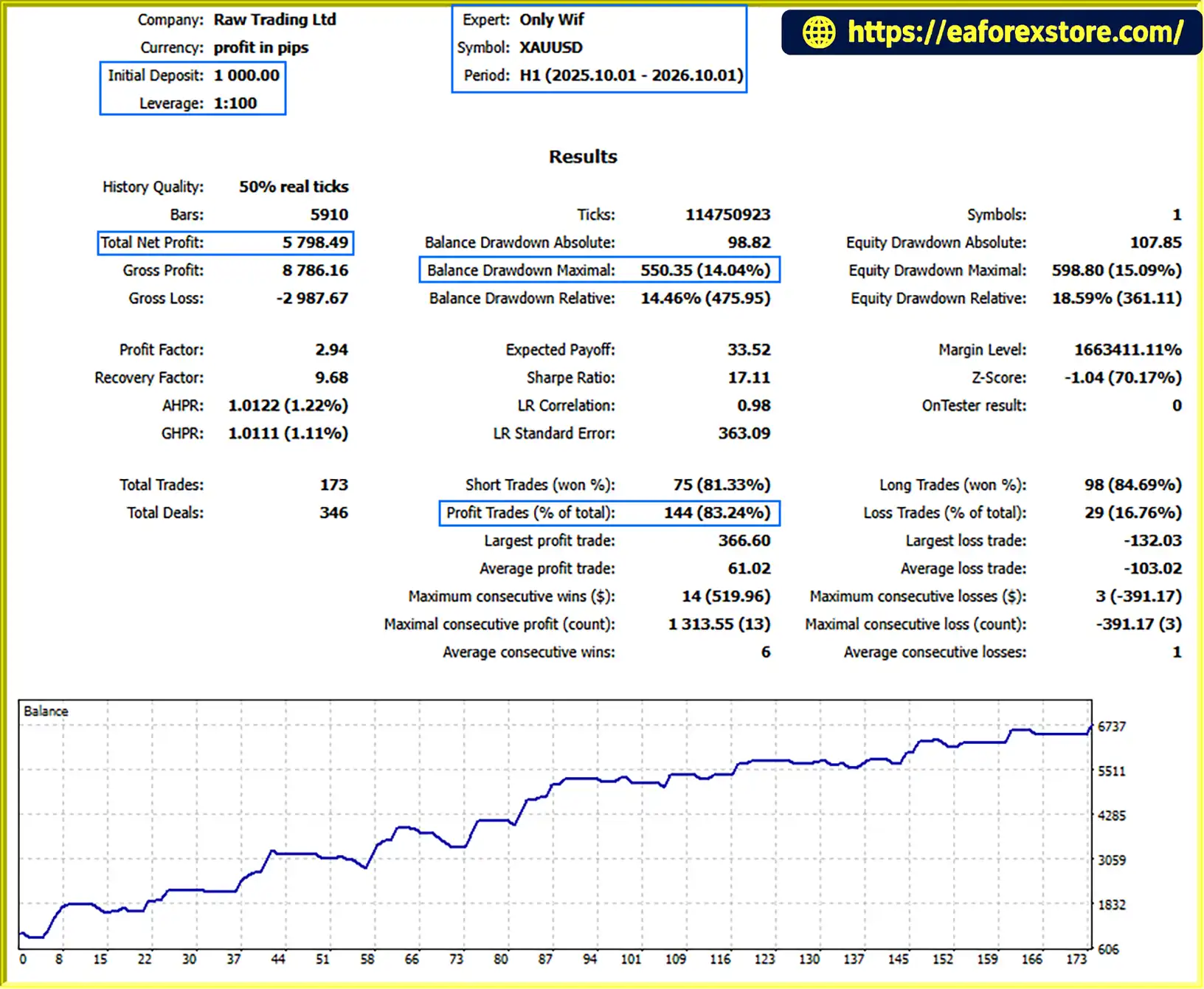
Only Wif EA MT5 Backtets
Risk management is an important part of using Only Wif EA MT5, particularly when trading volatile instruments such as Gold (XAUUSD). The EA offers several configurable controls, but their effectiveness depends on correct settings and real-world execution conditions.
Risk-Based Position Sizing: The Risk % mode calculates position size based on the selected risk percentage and Stop Loss distance. Traders should verify the resulting volume, tick value, contract specifications, and monetary risk before allowing the EA to trade.
Daily Drawdown Protection: The optional prop-firm module can use day-start equity to calculate daily loss limits and restrict new trades after a configured threshold is reached. Verify the calculation method against the rules of the relevant account provider.
Cluster-Risk Controls: When enabled, cluster-risk management can evaluate combined risk from open positions and pending orders. This can help limit additional exposure, but it cannot guarantee that actual losses remain below a specified threshold during fast markets or unexpected execution events.
Economic News Filtering: The optional MT5 calendar filter can block trading around selected high-impact USD events. It should be tested to confirm that the intended events and blocking periods are recognized correctly.
Pending-Order Management: Real broker orders and virtual pending orders behave differently. Virtual orders depend on the EA’s continued operation, while broker-side orders are subject to the broker’s execution rules and may remain subject to market risk after placement.
Randomized Parameters: Randomized entry, Stop Loss, Take Profit, and trailing offsets can produce variation in order parameters. Traders should assess the impact of the selected ranges on risk and consistency instead of assuming randomization improves performance.
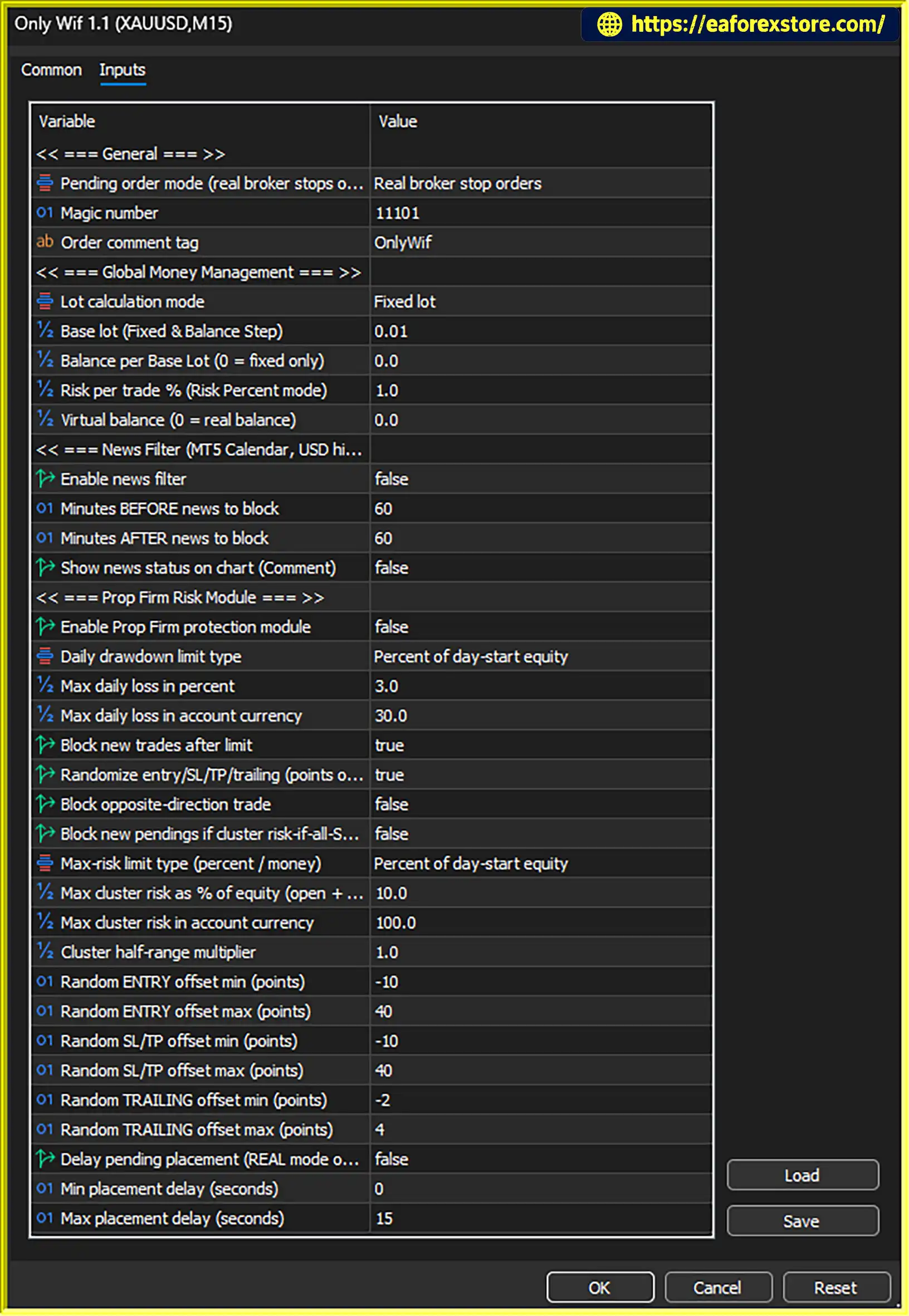
Optional Modules: The supplied settings indicate that the news filter, prop-firm protection, and cluster-risk blocking are disabled. Traders should review and enable the relevant controls deliberately rather than assuming the EA will automatically apply these protections.
Market and Execution Risk: Gold can experience rapid price movements, spreads can widen, and slippage can affect actual entry and exit prices. Stop Loss settings and risk calculations cannot guarantee a specific final loss under all conditions.
Before deploying Only Wif EA MT5 on a live account, test the configuration, review the resulting exposure, and evaluate maximum equity drawdown alongside realized profit. The supplied backtests show materially different profitability and equity drawdown, highlighting the importance of configuration and risk exposure. Historical or simulated results do not guarantee future performance.
Follow these general steps to install and configure Only Wif EA MT5 on MetaTrader 5.
setting
For exact installation paths, input definitions, and supported broker configurations, consult the official documentation supplied with the EA.
>>> Join VIP Membership Now <<<
Only Wif EA MT5 is a configurable automated trading tool for MetaTrader 5 that emphasizes control over position sizing, pending orders, execution parameters, and optional risk-management modules.
Its three money management modes allow traders to choose how trading volume is determined, while virtual pending orders, economic-news filtering, prop-firm protection, and cluster-risk management provide additional configuration options. Randomized parameters and virtual balance support further expand the available controls for experienced users.
The main advantage of Only Wif EA MT5 is its flexibility. However, that flexibility also means traders must understand the settings they enable. Disabled protection modules will not provide their intended safeguards, and neither risk-based sizing nor daily drawdown controls can eliminate all losses.
For the most responsible approach, begin with a simple configuration, verify the position-sizing calculations, enable only the risk modules you understand, and test the EA under realistic conditions before using real capital. Pay close attention to maximum equity drawdown, combined exposure, execution quality, and differences between backtest configurations.
Only Wif EA MT5 provides a flexible framework for automated trading and risk control, but consistent results depend on careful configuration, disciplined risk management, and ongoing performance evaluation.
1. What Is Only Wif EA MT5?
Only Wif EA MT5 is a configurable Expert Advisor for MetaTrader 5 that provides automated order management, flexible position sizing, pending-order controls, and optional risk-management features. It supports three money management modes, an economic news filter for high-impact USD events, prop-firm protection, cluster-risk management, virtual balance calculations, and randomized trading parameters. Its performance depends on the selected configuration, market conditions, and broker execution.
2. What Money Management Modes Does Only Wif EA MT5 Offer?
Only Wif EA MT5 supports three money management modes:
Fixed Lot: Uses a predefined lot size for eligible trades.
Balance Step: Adjusts trading volume according to configured account balance thresholds.
Risk Percentage Based on Stop Loss Distance: Calculates position size using the selected risk percentage and Stop Loss distance.
These options let traders customize position sizing to suit their trading plans. However, actual losses may differ from the intended risk because of slippage, price gaps, commissions, and execution conditions.
3. Does Only Wif EA MT5 Support Real and Virtual Pending Orders?
Yes. Only Wif EA MT5 supports real broker pending orders and virtual pending orders. Real pending orders are submitted to the broker and remain subject to broker rules and execution conditions. Virtual pending orders are managed by the EA's internal logic and depend on the EA remaining active and connected. The EA also provides configurable placement delays for supported real broker pending orders.
4. Does Only Wif EA MT5 Include a News Filter and Prop-Firm Protection?
Yes. The EA offers an optional MT5 economic calendar filter for selected high-impact USD news events, along with prop-firm protection settings designed to restrict new trading when configured daily-loss thresholds are reached. Traders can also enable cluster-risk management to evaluate combined exposure from open positions and pending orders. These modules must be configured and tested; the supplied configuration indicates that the news filter, prop-firm protection, and cluster-risk blocking are disabled.
5. What Are the Backtest Results of Only Wif EA MT5?
The supplied product description reports the following XAUUSD backtest over five months:
Initial deposit: $1,000
Total net profit: $5,798.49
Win rate: 83.24%
Maximum drawdown: 14.04%
These are reported backtest figures, not guaranteed future results. Actual performance can vary with the EA's settings, spread, slippage, market volatility, and broker execution. Traders should also evaluate equity drawdown and overall exposure rather than relying on net profit or win rate alone.
6. What Is Cluster-Risk Management in Only Wif EA MT5?
Cluster-risk management is designed to assess combined exposure from open positions and pending orders instead of evaluating each pending order in isolation. When enabled, it can block additional pending orders if projected combined risk would exceed the configured threshold. This may help limit additional exposure when multiple orders could trigger under similar market conditions, but it cannot guarantee that losses will remain within a specific limit during fast markets or unexpected execution events.
7. Can I Customize Trading Parameters and Use a Virtual Balance?
Yes. Only Wif EA MT5 supports a custom virtual balance for supported money-management calculations, allowing position sizing to use a selected reference balance instead of directly following the full real account balance. It also allows users to randomize selected entry, Stop Loss, Take Profit, and trailing-stop offsets within configured point ranges. These features provide additional flexibility, but traders should understand their effects on lot sizing and trade behavior and test them carefully before live deployment. Randomization does not inherently improve profitability.
8. How Do I Install Only Wif EA MT5 on MetaTrader 5?
To install Only Wif EA MT5, obtain the official EA files, open MetaTrader 5, and copy the files into the appropriate directories according to the developer's instructions. Refresh the Navigator panel or restart MT5 if necessary, then attach the EA to the intended chart and enable the required automated trading permissions. Configure the money management mode, pending-order behavior, and any required protection modules. Finally, test the setup in the Strategy Tester where applicable and on a demo account before trading live. Consult the official documentation for exact installation paths and input settings.
In stock
In stock
In stock
In stock
In stock
Out of stock
No account yet?
Create an Account












 Automatic EA
 EA Best Seller
 Expert Advisor MT4
 Expert Advisor MT5
 HFT EA


Reviews
Clear filtersThere are no reviews yet.