









-
 Unlimited Activations
-
 Instant delivery
-
 Easy to install






 Unlimited Activations
Instant delivery
Easy to install
Unlimited Activations
Instant delivery
Easy to install
 Free Update
 Free Install Support

The Gold Ayon EA MT5 is a multi-strategy Expert Advisor developed exclusively for Gold (XAUUSD) trading on the MetaTrader 5 platform. Unlike trading robots that rely on a single entry method, The Gold Ayon EA MT5 operates multiple independent trading modules in parallel, each configured with its own timeframe, trading session, and entry logic.
This multi-module architecture is designed to respond to different market conditions throughout the trading day. By combining proprietary momentum and reversal signals, the EA aims to identify potential trading opportunities during predefined market sessions rather than depending on one fixed strategy.
The Gold Ayon EA MT5 also features distance-based averaging and weighted basket closing. Instead of relying exclusively on a single fixed Take Profit for every position, its position management system evaluates how trades develop and manages groups of positions according to the EA’s programmed rules.
Risk management is another central component of the system. The EA offers three lot-sizing modes, configurable drawdown responses, broker-specific trading profiles, spread filtering, and margin checks before new entries. Additional controls allow traders to manage trading days, Friday-night sessions, high-impact economic news, and optional year-end trading pauses.
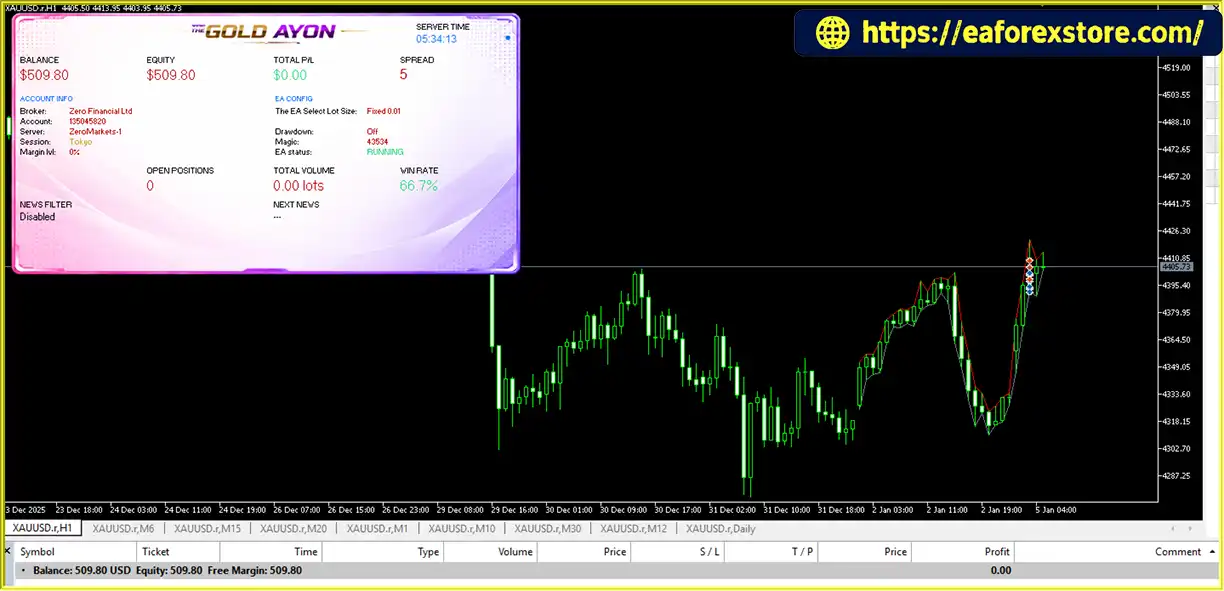
A real-time visual panel provides an overview of account performance, open positions, trading conditions, active strategies, and news filter status. This gives users convenient access to important system information while the EA operates.
Designed for XAUUSD and MetaTrader 5, The Gold Ayon EA MT5 is intended for traders seeking a configurable automated Gold trading system that combines multiple trading strategies with basket management and account monitoring.
The Gold Ayon EA MT5 reviews
The Gold Ayon EA MT5 combines multiple independent trading modules with automated position management and risk controls. Its proprietary entry logic is not publicly disclosed, but the supplied product description outlines the following high-level workflow.
The EA evaluates XAUUSD using its configured trading modules. Each module has its own timeframe and trading session, allowing the system to respond to different market phases during the day.
The internal decision engine combines proprietary momentum and reversal signals to identify potential trading opportunities. The specific indicators, signal weights, and entry criteria remain part of the system’s proprietary logic.
Each strategy module operates only within its predefined session window. This allows the EA to restrict trading to the periods assigned to each module instead of opening trades indiscriminately throughout the day.
Additional controls can restrict activity on selected trading days, during Friday-night sessions, around NFP Fridays, and during an optional year-end pause.
When positions develop, the EA can apply distance-based averaging according to its programmed rules. This approach adjusts position management in response to price movement rather than relying exclusively on an isolated entry and a single fixed exit.
Averaging can increase total exposure when additional positions are added. Traders should therefore understand the applicable spacing, lot-sizing, and maximum exposure rules before live deployment.
The Gold Ayon EA MT5supports weighted basket closing, allowing the system to manage a group of positions according to its internal exit logic.
This differs from managing every position solely through an independent fixed Take Profit. However, basket closing does not guarantee that a group of trades will close at a profit, particularly during strong adverse price movements.
Before opening new positions, the EA supports spread filtering and margin checks. It also provides configurable drawdown responses and lot-sizing modes to help users define their preferred trading risk parameters.
The EA uses MetaTrader 5’s native economic calendar to restrict new entries around relevant high-impact economic releases. Traders can configure the filtering window before and after each event.
The filter’s effectiveness depends on calendar availability, event classification, currency relevance, and the EA’s implementation. It does not eliminate all market volatility or execution risk.
The Gold Ayon EA MT5 is designed to run multiple independent trading modules rather than relying on a single fixed entry method. This architecture allows the system to apply different trading logic during different sessions and across different timeframes.
Because the EA is developed exclusively for XAUUSD, its trading logic is intended specifically for Gold’s price behavior. Traders can evaluate the system without needing to configure it for a broad range of unrelated instruments.
The three lot-sizing modes provide flexibility for different account management preferences:
The actual risk associated with each mode depends on its implementation, Stop Loss or basket exit behavior, and the EA’s position-sizing rules.
Distance-based averaging and weighted basket closing provide a structured approach to managing multiple positions. These features may appeal to traders who prefer position management based on the development of a group of trades rather than individual fixed profit targets.
However, averaging and basket management can increase exposure and drawdown, so these functions require careful testing.
The Gold Ayon EA MT5 provides three drawdown response modes, allowing users to choose how the EA reacts when its configured threshold is reached.
Depending on the selected mode, the EA can close positions and continue, close positions and remove itself from the chart, or issue an alert without automatically closing positions.
The native MT5 economic calendar integration allows the EA to restrict new entries around selected high-impact events. This can help traders apply a consistent news-related trading policy without manually monitoring every scheduled release.
The visual panel displays important trading and account metrics in one place. Users can monitor balance, equity, floating P/L, spread, open positions, total volume, active strategy count, and news filter status while the EA is running.
The Gold Ayon EA MT5 backtets
The Gold Ayon EA backtets
Risk management is especially important for Gold trading because XAUUSD can experience rapid price changes, spread widening, and substantial drawdowns. Gold Ayon EA MT5 includes several configurable controls designed to manage position sizing, trading conditions, and account exposure.
The EA supports three position-sizing approaches:
Before using automatic sizing, confirm whether risk is calculated from balance or equity and how the EA accounts for position distance, basket exposure, and margin requirements.
The EA offers three drawdown response modes:
The exact response depends on the configured threshold and the EA’s implementation. In alert-only mode, traders must understand that the EA may leave open positions exposed to further losses.
The spread filter helps prevent new entries when trading costs exceed the configured limit. This is particularly relevant during periods of lower liquidity, market transitions, and important economic announcements.
A spread filter does not guarantee a particular execution price or prevent slippage after an order is submitted.
The EA checks margin conditions before opening new positions. This can help restrict entries when available margin is insufficient under the EA’s implemented rules.
Margin checks do not eliminate the possibility of margin calls or stop-outs if existing positions move significantly against the account.
The economic calendar filter can restrict new entries around relevant high-impact releases, with configurable pre-event and post-event windows.
Additional session controls include trading-day restrictions, Friday-night session management, an NFP-Friday filter, and an optional year-end pause.
These controls help define when the EA is permitted to initiate trades, but they cannot predict every unexpected event or prevent all volatility-related losses.
Distance-based averaging and weighted basket closing are important features to evaluate carefully. When an averaging strategy adds positions during adverse market movement, total exposure and floating losses can increase.
Before live trading, establish how the EA handles maximum positions, total lot exposure, adverse trends, margin utilization, and basket exits. Do not assume that basket management guarantees recovery or limits losses to a predetermined amount.
The visual panel provides information about balance, equity, floating P/L, spread, account details, open positions, total volume, active strategies, and news filter status.
These metrics help traders monitor the EA’s behavior, but a dashboard alone does not guarantee that every risk event will be detected or prevented.
Important: No automated trading system can guarantee profits or eliminate trading risk. Test the EA’s drawdown controls, averaging behavior, news filtering, and basket closing logic on a demo account before committing real capital.
Follow these steps to install The Gold Ayon EA MT5 on MetaTrader 5.
Download The Gold Ayon EA MT5 from the official developer or authorized product source. Confirm that the supplied file is compatible with MetaTrader 5, typically using the .ex5 or .mq5 extension.
MQL5 directory.Experts folder.Copy the The Gold Ayon EA MT5 file into the MQL5/Experts folder. Follow the developer’s documentation if the installation package includes additional files or specific requirements.
Return to MetaTrader 5, open the Navigator panel, and right-click Expert Advisors. Select Refresh, or restart the terminal if necessary.
Open your broker’s Gold trading symbol. Confirm that the symbol is compatible with the EA and that the broker provides the necessary trading permissions and contract specifications.
Drag The Gold Ayon EA MT5 onto the chart and review the available input parameters.
Configure the lot-sizing mode, risk level, drawdown settings, broker profile, spread filter, trading sessions, news filter, and other available options according to your account and trading preferences.
The exact parameter names and available settings may vary by version. Refer to the actual product documentation for the final input list.
Check that the MetaTrader 5 economic calendar is available and functioning correctly in your trading environment. Review the EA’s news filter status and verify that the event restrictions behave as expected.
Enable Algo Trading in MetaTrader 5 and confirm that automated trading permissions are enabled in the EA settings. Check the Experts and Journal tabs for initialization errors or rejected orders.
Use the MT5 Strategy Tester to evaluate the EA over different historical market conditions. Where supported, test the complete configuration of its strategy modules and assess trade frequency, drawdown, profit factor, basket behavior, and transaction costs.
After backtesting, use a demo account to verify the EA’s real-time operation, position sizing, drawdown responses, news filtering, and basket exits before considering live deployment.
The supplied product information specifies the following trading requirements and recommendations.
| Requirement | Specification |
|---|---|
| Platform | MetaTrader 5 |
| Main Trading Symbol | XAUUSD (Gold) |
| Minimum Deposit | USD 500 |
| Recommended Account | ECN/RAW or low-spread account |
| Recommended Leverage | 1:500 |
| Trading Style | Multi-strategy automated trading |
| Position Management | Distance-based averaging and weighted basket closing |
| News Filter | MetaTrader 5 economic calendar |
| Testing | Backtesting and demo testing recommended |
The minimum deposit and leverage are product recommendations, not guarantees of suitability. Actual requirements depend on the broker’s contract specifications, margin rules, minimum lot size, and the EA’s total position exposure.
>>> Join VIP Membership Now <<<
The Gold Ayon EA MT5 is a multi-strategy automated Gold trading system for MetaTrader 5 that combines independent trading modules, session-based entries, distance-based averaging, and weighted basket management. Its additional features include configurable drawdown responses, multiple lot-sizing modes, broker presets, spread filtering, margin checks, and economic news protection.
The system’s multi-module design may appeal to traders seeking a more configurable approach than a single-strategy EA. Its visual dashboard also provides a convenient overview of account performance and trading activity.
However, averaging and basket-based position management require particular attention because they can increase aggregate exposure during prolonged adverse market movements. Traders should thoroughly evaluate the EA’s risk controls and understand how it behaves when several modules hold positions simultaneously.
For traders looking for a Gold Multi-Strategy EA MT5, The Gold Ayon EA MT5 offers a broad set of configurable trading and monitoring features worth evaluating through realistic backtesting and demo trading. Its suitability ultimately depends on verified performance, the transparency of its risk behavior, and compatibility with the trader’s account and risk tolerance.
1. What Is The Gold Ayon EA MT5?
The Gold Ayon EA MT5 is an automated trading Expert Advisor designed specifically for Gold (XAUUSD) on MetaTrader 5. It combines multiple independent trading strategies, session-based entry rules, distance-based averaging, and weighted basket closing. The EA also includes configurable risk management, spread filtering, margin checks, and a real-time trading dashboard.
2. How Does The Gold Ayon EA MT5 Work?
The Gold Ayon EA MT5 operates multiple trading modules, each with its own timeframe, trading session, and entry logic. It uses proprietary momentum and reversal signals to identify potential trading opportunities. The EA can then manage positions through distance-based averaging and weighted basket closing according to its programmed rules. The exact entry algorithms are proprietary and should be evaluated through backtesting and demo trading.
3. What Is the Minimum Deposit for The Gold Ayon EA MT5?
The supplied product specifications recommend a minimum deposit of $500. However, the appropriate starting balance depends on the selected lot-sizing mode, broker conditions, leverage, margin requirements, and the EA's total position exposure. Traders should assess the risks associated with averaging and multiple strategy modules before choosing an account size.
4. Does The Gold Ayon EA MT5 Use Martingale or Grid Trading?
The supplied product description identifies distance-based averaging and weighted basket closing as core position management features but does not explicitly confirm whether the EA uses martingale or grid trading. Averaging may involve opening additional positions as prices move, potentially increasing exposure and floating losses. Traders should review the EA's position-sizing rules, maximum position limits, and recovery behavior before using it on a live account.
5. What Risk Management Features Does The Gold Ayon EA MT5 Offer?
The Gold Ayon EA MT5 provides three lot-sizing modes: automatic risk-based sizing, fixed lots, and balance-scaled fixed lots. It also supports configurable drawdown responses, spread filtering, pre-trade margin checks, and economic news filtering. These features help users manage trading parameters, but they cannot eliminate losses or guarantee that account drawdown will remain within a particular limit.
6. Does The Gold Ayon EA MT5 Have a Built-In News Filter?
Yes. According to the supplied specifications, The Gold Ayon EA MT5 uses the native MetaTrader 5 economic calendar to filter new entries around relevant high-impact economic events. Users can configure the time window before and after an announcement. The filter's effectiveness depends on calendar availability, event classification, and the EA's implementation, and it cannot prevent all volatility or execution risks.
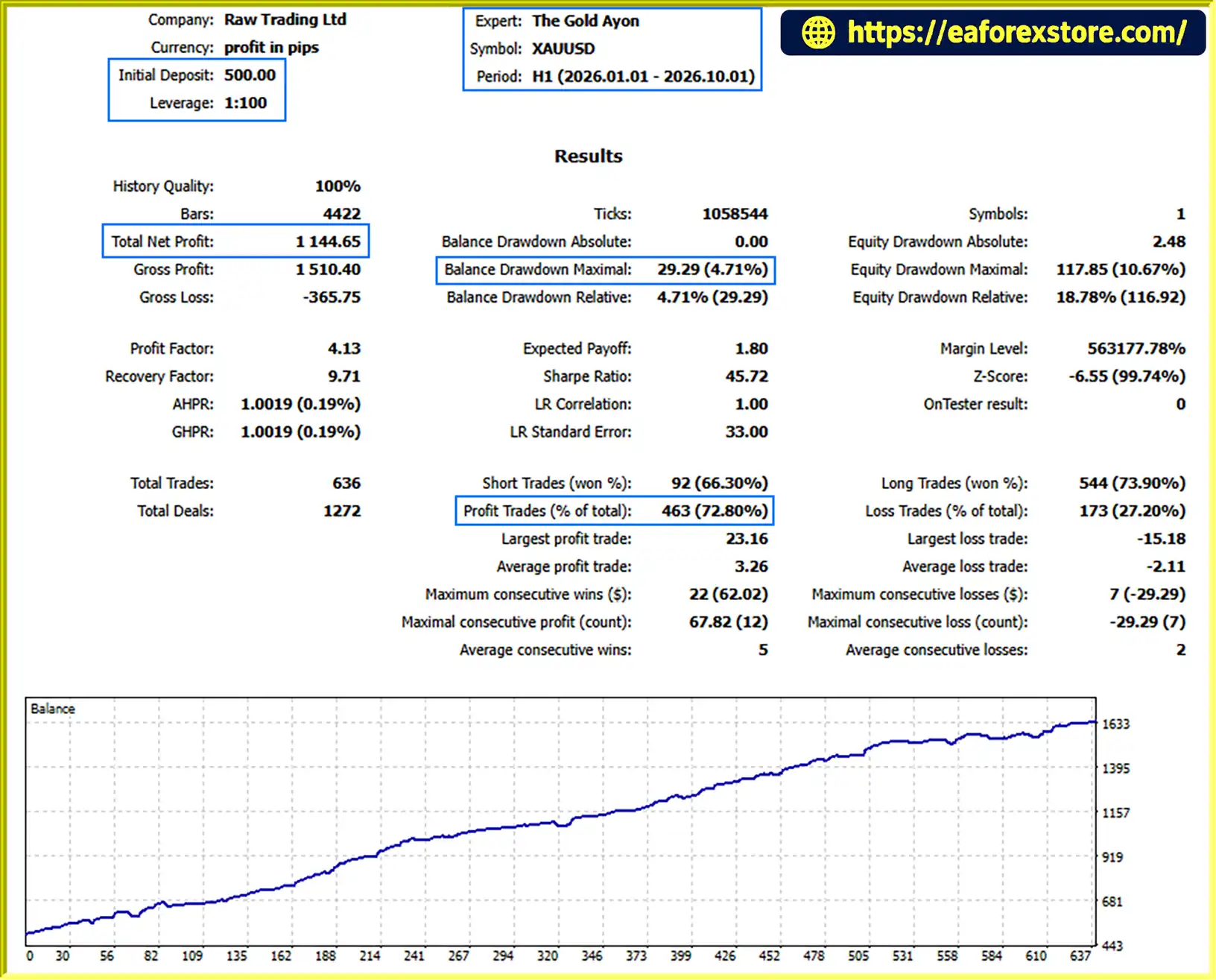
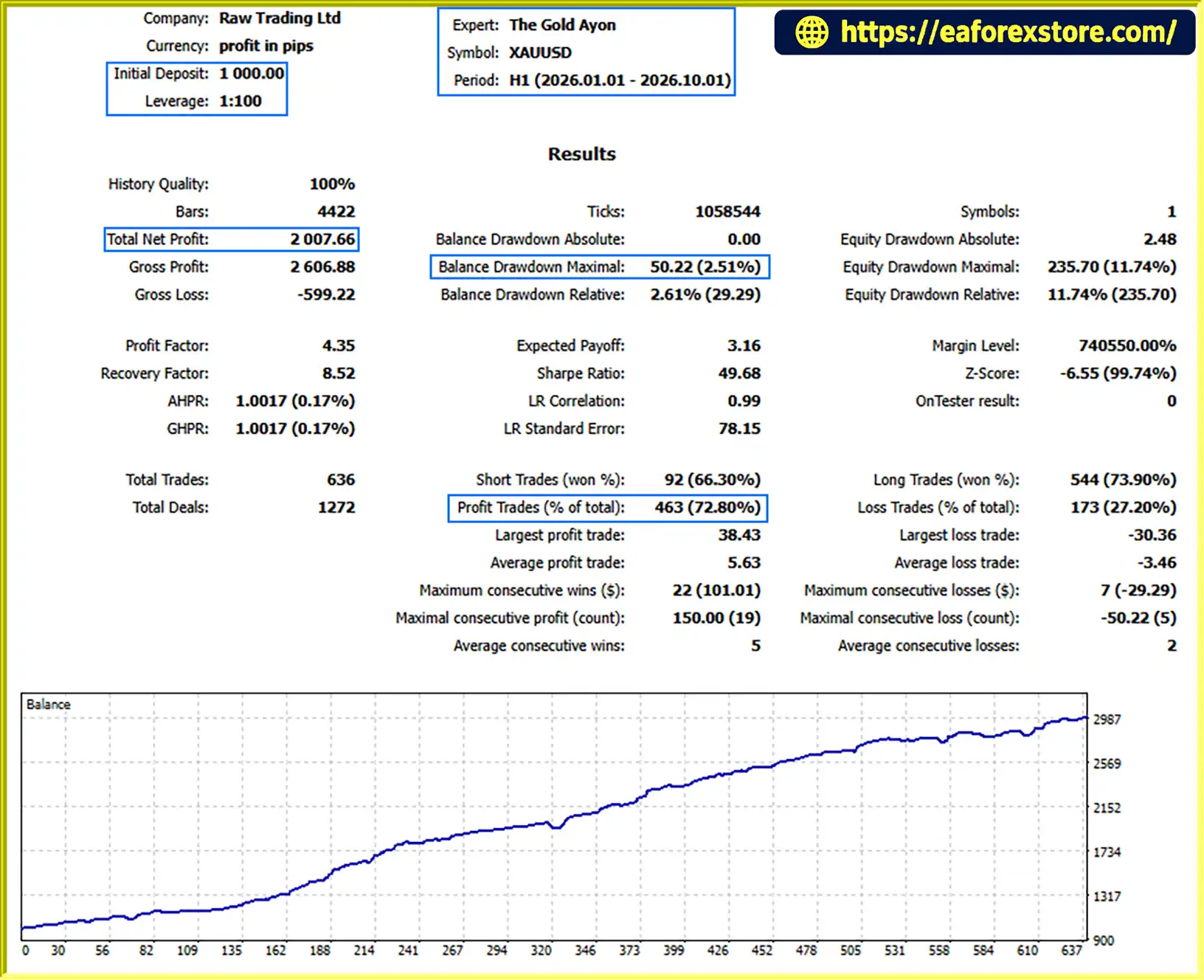
7. What Are the Backtest Results of The Gold Ayon EA MT5?
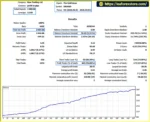
The supplied nine-month XAUUSD backtests report the following results:
$500 initial deposit: $1,144.65 net profit, 72.80% win rate, and 4.71% maximum drawdown.
$1,000 initial deposit: $2,007.66 net profit, 72.80% win rate, and 2.51% maximum drawdown.
These are reported historical test results, not guarantees of future performance. Traders should review the original Strategy Tester reports, testing dates, trade history, transaction costs, and modeling quality before evaluating the EA's reliability.
8. Is The Gold Ayon EA MT5 Suitable for Beginners?
The Gold Ayon EA MT5 offers a visual dashboard and configurable trading controls, but its multi-strategy architecture, averaging mechanism, and basket management can make risk management more complex. Beginners should first learn how the EA handles multiple positions, drawdown thresholds, and adverse market conditions. Testing on a demo account with conservative settings is recommended before considering live trading.
In stock
In stock
In stock
In stock
In stock
Out of stock
No account yet?
Create an Account












 Automatic EA
 EA Best Seller
 Expert Advisor MT4
 Expert Advisor MT5
 HFT EA


Reviews
Clear filtersThere are no reviews yet.