









-
 Unlimited Activations
-
 Instant delivery
-
 Easy to install




 Unlimited Activations
Instant delivery
Easy to install
Unlimited Activations
Instant delivery
Easy to install
 Free Update
 Free Install Support

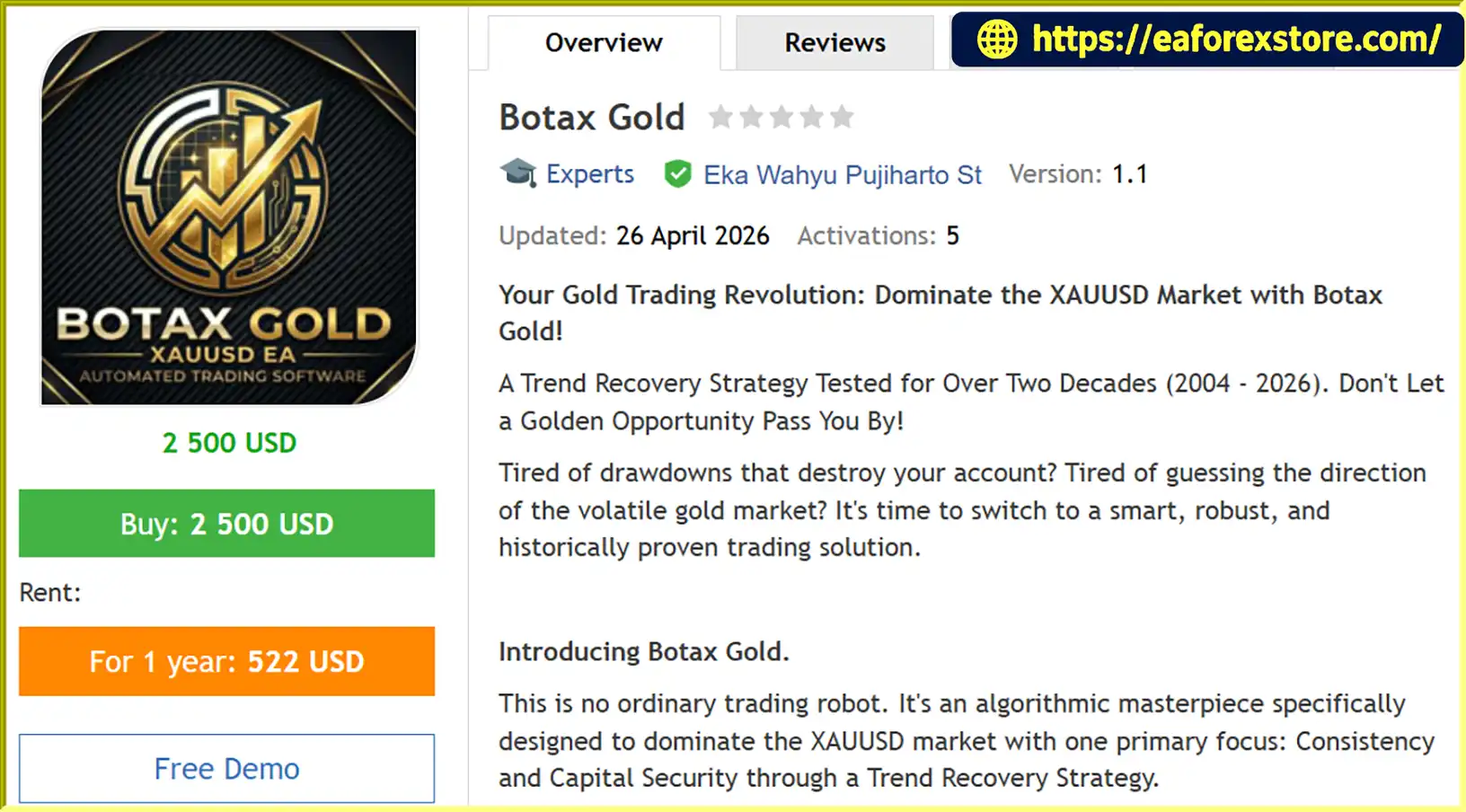
Botax Gold EA MT5 is an automated Expert Advisor designed for Gold (XAUUSD) trading on the MetaTrader 5 platform. The system uses a trend recovery strategy intended to manage changing market conditions, respond to price movements against open positions, and seek opportunities to recover floating losses through its programmed trading logic.
Unlike conventional trading robots that rely exclusively on predicting market tops and bottoms, Botax Gold EA MT5 focuses on trend-based trading and recovery management. According to the product description, the EA is designed to handle adverse price movements by applying a recovery mechanism intended to close positions or trading cycles with a net profit when market conditions permit.
Botax Gold is promoted with historical testing covering two overlapping periods: 2004–2012 and 2010–2026. These testing periods are presented as evidence that the strategy has been evaluated across different market environments, including financial crises, periods of heightened volatility, and long-term market trends. However, the supplied description does not include independently verified backtest reports, detailed drawdown statistics, or audited live trading results.
The latest stated version, Botax Gold EA MT5 v1.1, introduces a monitoring dashboard designed to make it easier to review the EA’s trading activity and track individual position progress.
Botax Gold also offers flexible licensing options, including lifetime licenses and monthly or yearly rentals, along with free consultation after purchase, according to the provider.
With configurable lot size, grid spacing, stop loss, and target profit parameters, Botax Gold EA MT5 may appeal to traders interested in automated Gold trading and trend recovery strategies. Nevertheless, recovery systems can experience substantial drawdowns, and no trading algorithm can guarantee profits or ensure that every losing position will be recovered.
>>> Delivery time 24h-48h after payment.
>>> Refund if not delivered.
>>> You will receive the latest version without any limitations (ID+Time).Reviewed by Jason Stap <<<
Botax Gold EA MT5 Overview
The primary feature of Botax Gold EA MT5 is its trend recovery strategy, which is designed to manage positions when the market moves against the original trade direction.
According to the product description, the EA uses a recovery mechanism to respond to adverse price movements and attempt to close floating losses while generating a net profit across the trading cycle.
This approach aims to manage unfavorable market conditions without relying solely on accurately predicting market reversals.
However, the ability to recover losses depends on market behavior, position sizing, grid spacing, available margin, and the EA’s internal recovery rules. A recovery strategy cannot guarantee a profitable exit in every market condition.
Botax Gold EA MT5 is specifically designed for Gold trading. XAUUSD is known for its substantial price movements and sensitivity to economic announcements, interest rate expectations, geopolitical developments, and changes in the US dollar.
By focusing on Gold, the EA is intended to apply its trading and recovery logic to a single primary instrument rather than a broad range of unrelated currency pairs.
Traders should still verify the EA’s compatibility with their broker’s Gold symbol, contract specifications, spread conditions, and execution environment.
The provider highlights two historical testing sessions as a key selling point.
Together, these periods are presented as more than two decades of historical performance evaluation.
Historical testing can help traders understand how a strategy might have behaved under different market conditions. However, the reliability of these claims depends on the quality of the historical data, tick modeling, spreads, commissions, execution assumptions, and the exact EA settings used.
The two sessions overlap between 2010 and 2012, so they should not automatically be interpreted as two separate, non-overlapping periods of performance. Independent verification is recommended before relying on the advertised results.
Botax Gold EA MT5 v1.1 introduces a monitoring dashboard designed to improve visibility into the EA’s trading activity.
According to the product description, the dashboard helps users analyze the progress of individual positions and observe how the EA manages its trades.
A monitoring interface can make it easier to review trading behavior and understand how a recovery strategy operates. The precise dashboard indicators, available statistics, and supported monitoring functions should be confirmed in the product documentation.
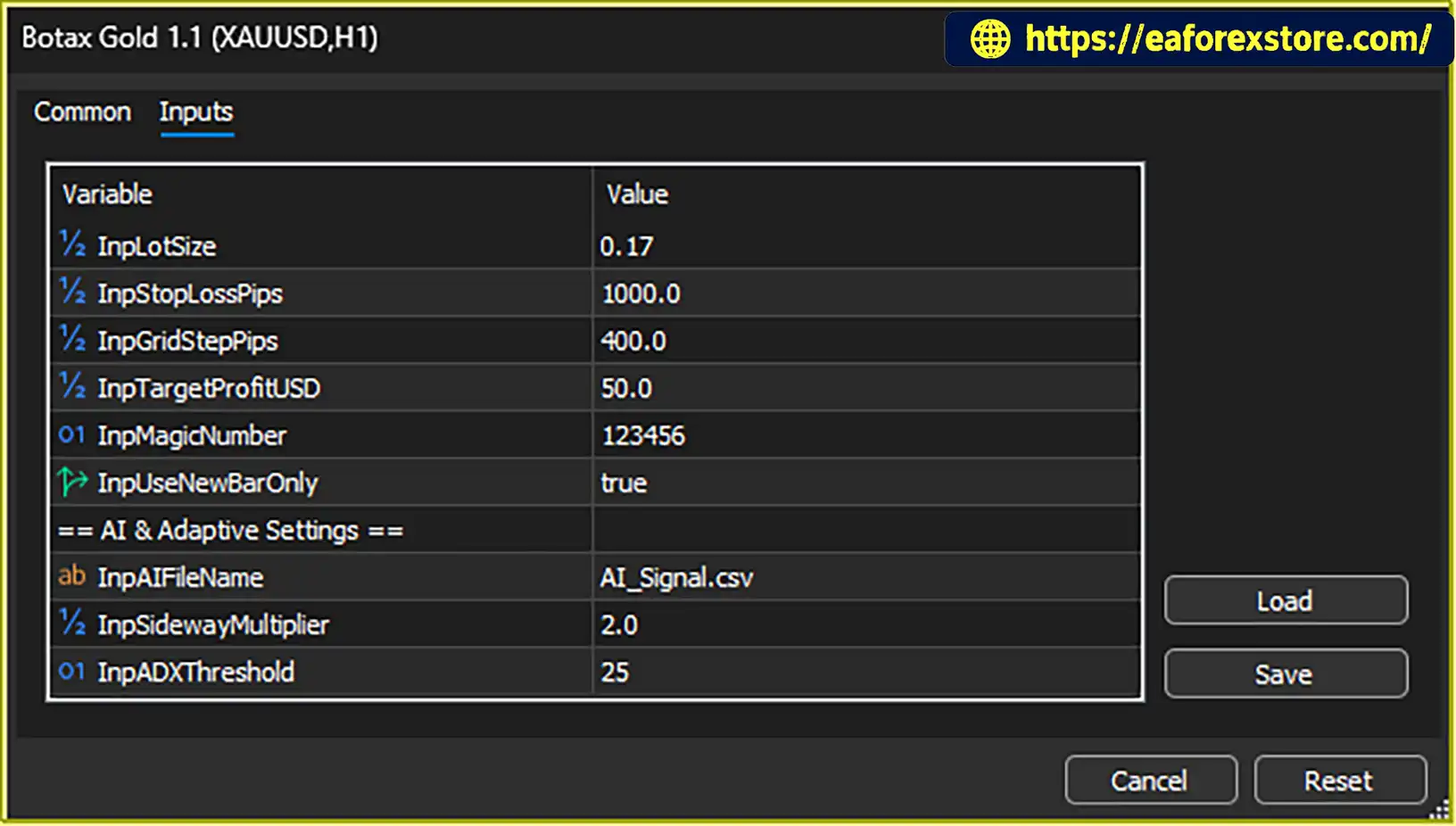
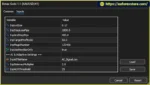
The EA’s default settings specify a lot size of 0.17 or 0.10, alongside a stated minimum balance of $2,000.
These are provider-suggested parameters rather than independently verified risk recommendations. The appropriate position size depends on the account currency, leverage, stop distance, contract specifications, and maximum acceptable drawdown.
Traders should carefully assess the risk associated with the recommended lot size before enabling automated trading on a live account.
Botax Gold EA MT5 includes a configurable Grid Step parameter, with a default value of 400 according to the supplied description.
Grid spacing determines the distance between relevant trade levels when the strategy uses additional entries according to its internal rules.
The exact meaning of the value 400 depends on the EA’s implementation and price-point conventions. Users should consult the documentation to confirm how the setting is measured and how it affects trade frequency and total exposure.
Grid-based recovery can accumulate multiple positions during persistent adverse market movements, potentially increasing floating losses and margin requirements.
The stated default Stop Loss parameter is 1000.
This setting is intended to provide a predefined loss-related threshold or protective distance, depending on how the EA implements its stop loss logic.
Because the unit and operational behavior are not specified in the supplied description, traders should verify whether the parameter represents points, a price distance, or another internal measurement before using it.
A correctly configured stop loss can help manage risk, but actual execution prices may differ during rapid market movements or periods of low liquidity.
Botax Gold EA MT5 includes a Target Profit parameter with a stated default value of 50.
This parameter is intended to define the strategy’s profit objective according to its internal calculation method. The description does not specify whether the value represents account currency, points, or another unit.
Traders should confirm how the target is calculated, whether it applies to individual positions or the overall trading cycle, and whether transaction costs are included.
The provider offers two licensing approaches:
Free consultation after purchase is also advertised. Buyers should confirm the license terms, supported MT5 accounts, update policy, renewal conditions, and customer support arrangements before purchasing.
Botax Gold EA MT5 follows a trend recovery approach designed to manage Gold trades through different market conditions. The precise entry and recovery rules depend on the EA’s internal implementation, but its stated operating concept can be summarized in the following stages.
The EA monitors the XAUUSD market and evaluates price movements according to its programmed trend and trading rules.
The supplied description does not specify the exact indicators or entry signals used to initiate the first position.
When the EA identifies a qualifying trading opportunity, it opens a position according to its entry logic and configured lot size.
The initial position establishes the starting point for the trading cycle.
If the market moves against an open position, the EA evaluates the trade’s performance according to its recovery rules.
The strategy is designed to manage floating losses rather than relying exclusively on immediate stop-out behavior or a single directional forecast.
According to the product description, Botax Gold uses its trend recovery logic to manage adverse positions and seek opportunities to offset floating losses.
The exact process may depend on the grid spacing, additional entry conditions, position sizing, and internal exit rules. These details should be verified in the supplied documentation.
Recovery mechanisms may require additional margin and can increase exposure if the market continues moving against the existing positions.
The EA uses its configured risk and profit parameters to manage trading outcomes. The stated defaults include a Stop Loss of 1000, Grid Step of 400, and Target Profit of 50.
Users should verify the units, calculation methods, and whether these parameters apply to individual positions or the complete trading cycle before deploying the system.
In version 1.1, the monitoring dashboard is designed to help users review the progress of individual positions and observe the EA’s activity.
This can support ongoing evaluation of trading behavior, but dashboard visibility does not itself prevent losses or guarantee successful recovery.
Botax Gold EA MT5 may appeal to traders who want to explore automated Gold trading with a trend recovery strategy and configurable trade management parameters.
Dedicated XAUUSD Trading: The EA focuses on Gold, allowing traders to evaluate its behavior on a single primary instrument.
Trend Recovery Approach: Its central strategy is designed to manage adverse price movements and attempt to recover floating losses when market conditions permit.
Extended Historical Testing Claims: The provider advertises testing across periods from 2004 to 2026, offering a starting point for evaluating the strategy’s historical behavior. These results should be independently verified.
Monitoring Dashboard: Version 1.1 introduces a dashboard intended to make position monitoring and trade analysis more convenient.
Configurable Trading Parameters: Lot size, grid spacing, stop loss, and target profit settings provide opportunities to adjust the system’s behavior.
Flexible Licensing: Lifetime, monthly, and yearly licensing options provide different purchasing arrangements.
Post-Purchase Consultation: The provider advertises free consultation after purchase, which may help users understand installation and configuration.
These features may make Botax Gold EA MT5 worth investigating, but the advertised recovery capability and historical testing claims should not be treated as proof of consistent profitability.
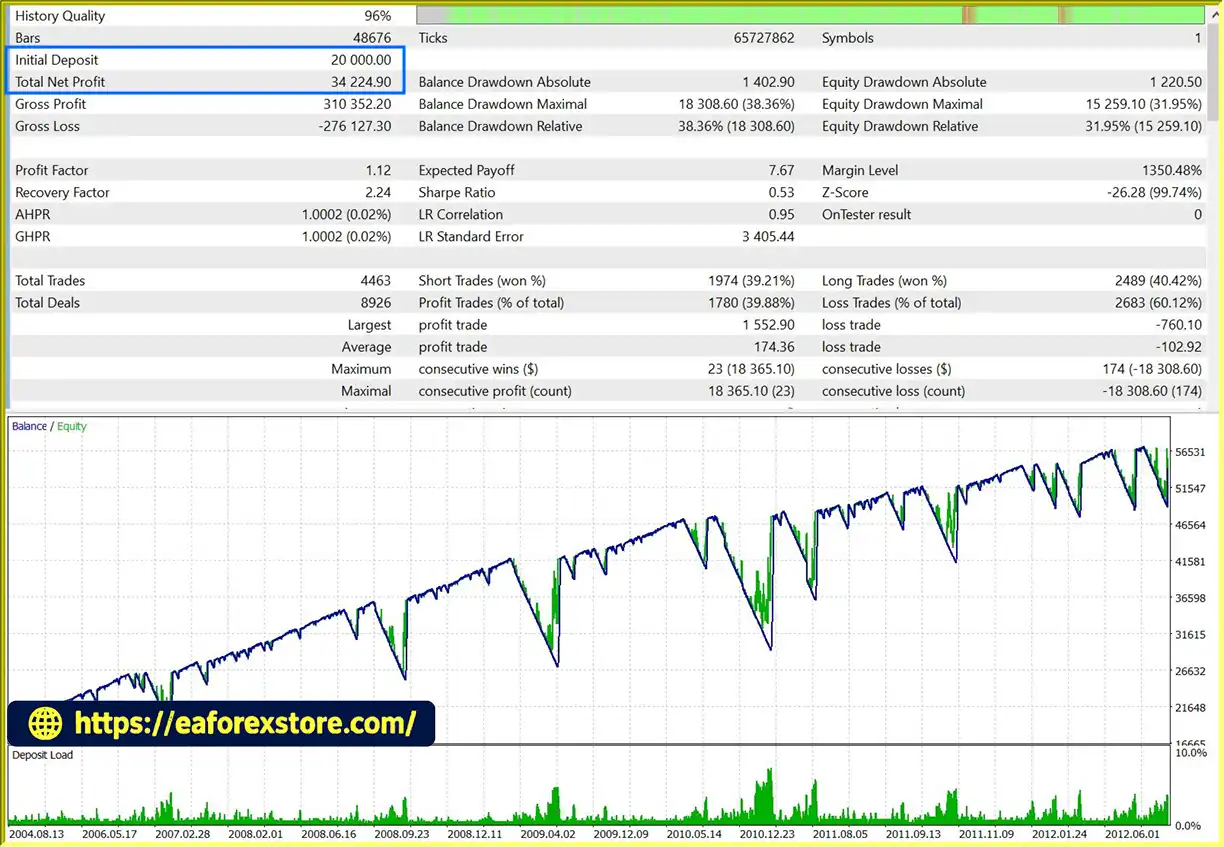
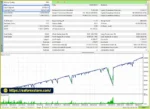
Botax Gold EA MT5 Backtets
Botax Gold EA Backtets
Risk management is especially important when using a trend recovery strategy that may maintain multiple positions while the market moves against the initial trade.
Although Botax Gold EA MT5 includes stop loss and target profit parameters, these settings do not eliminate the possibility of substantial losses.
The supplied description confirms a monitoring dashboard in version 1.1 but does not specify whether the EA supports push notifications, email alerts, or automatic warnings for high drawdown.
Before live deployment, verify whether the dashboard or EA provides information about:
If these features are unavailable, monitor the MetaTrader 5 Experts and Journal logs and check account equity and margin levels regularly.
A monitoring dashboard can improve visibility, but it cannot prevent all losses or replace active risk management.
Follow these general steps to install Botax Gold EA MT5 on MetaTrader 5. The exact procedure may vary depending on the files and installation instructions supplied by the provider.
setting
Choose the available license option, such as lifetime access or monthly or yearly rental. Confirm the supported MT5 version, license restrictions, update policy, and any account activation requirements.
Download the Botax Gold EA MT5 package and any accompanying documentation from the provider. Confirm that the files are compatible with MetaTrader 5.
Launch MT5 and log in to your trading account. Use a demo account for the initial installation and testing process.
In MetaTrader 5, select File → Open Data Folder and navigate to MQL5 → Experts.
Copy the supplied EA file, typically an .ex5 file, into the MQL5/Experts directory. Follow the provider’s instructions if additional files or indicators are required.
Return to MT5, open the Navigator panel, right-click Expert Advisors, and select Refresh. Restart the platform if the EA does not appear.
Open the Gold trading symbol offered by your broker. Confirm that the symbol’s contract specifications, price precision, and trading conditions are compatible with the EA.
Drag Botax Gold EA MT5 onto the chart and review the available settings.
Check the lot size, Stop Loss, Grid Step, Target Profit, and any additional risk management parameters. Do not use the stated default values until their units and risk implications are understood.
If the dashboard is included in the supplied package, follow the provider’s instructions to display and configure it. Confirm that the relevant position information and monitoring features operate correctly.
Use the MT5 Strategy Tester where supported to evaluate the EA with realistic historical data and transaction costs. Review net profit, maximum drawdown, recovery duration, margin usage, and total exposure.
Continue with demo forward testing before considering live deployment.
Only consider using the EA on a live account after verifying its behavior and assessing whether its maximum potential losses are acceptable. Use conservative position sizing and maintain clear limits for stopping the strategy.
>>> Join VIP Membership Now <<<
Botax Gold EA MT5 is an automated Gold trading Expert Advisor built around a trend recovery strategy, with configurable trading parameters and a monitoring dashboard introduced in version 1.1.
Its focus on XAUUSD, advertised historical testing, and recovery-oriented trade management may attract traders who want an automated alternative to conventional directional strategies. The availability of lifetime and rental licenses also provides flexibility in how users access the product.
However, the most important consideration is whether the EA can manage prolonged adverse market movements without exposing the account to unacceptable losses. Recovery strategies may accumulate floating losses and consume substantial margin before an exit becomes possible. Neither historical testing claims nor a monitoring dashboard can guarantee profitable results.
Before using Botax Gold EA MT5 with real funds, verify the historical reports, understand the recovery mechanism, confirm the units of all default settings, and test the strategy across different market conditions. Pay particular attention to maximum equity drawdown, total position exposure, and performance during persistent Gold trends.
Overall, Botax Gold EA MT5 may be worth evaluating for traders interested in automated XAUUSD trading and trend recovery systems. A disciplined approach to risk management, realistic performance expectations, and comprehensive testing should take priority over promotional claims of consistency or capital security.
Risk Disclaimer: Trading forex, Gold, and other financial instruments involves substantial risk and may not be suitable for every investor. You may lose some or all of your invested capital. Past performance does not guarantee future results. Always test automated trading systems on a demo account before using real funds.
1. What is Botax Gold EA MT5?
Botax Gold EA MT5 is an automated Expert Advisor for MetaTrader 5 designed specifically for Gold (XAUUSD) trading. It uses a trend recovery strategy intended to manage adverse price movements and seek opportunities to recover floating losses through programmed trade management rules.
2. How does Botax Gold EA MT5 work?
The EA monitors Gold market conditions and opens positions when its internal trading rules identify potential opportunities. If the market moves against an open position, its recovery mechanism attempts to manage the adverse movement and seek a profitable exit when conditions permit. The strategy also uses configurable parameters such as lot size, grid spacing, Stop Loss, and Target Profit. The exact entry and recovery algorithms should be confirmed in the product documentation.
3. Does Botax Gold EA MT5 guarantee the recovery of losing trades?
No. Although the EA is designed to recover floating losses under suitable market conditions, recovery is not guaranteed. Persistent adverse price movements can increase floating losses, margin requirements, and overall account exposure. Traders should evaluate maximum drawdown, position limits, and recovery behavior through backtesting and demo testing before using real funds.
4. What are the default settings for Botax Gold EA MT5?
According to the supplied product description, the stated default parameters include:
Lot Size: 0.17 or 0.10, depending on the referenced configuration.
Grid Step: 400.
Stop Loss: 1000.
Target Profit: 50.
Suggested Minimum Balance: $2,000.
The description does not fully specify the units or calculation methods for these values. Traders should verify the settings in the EA documentation and assess whether the proposed lot size is appropriate for their account balance and risk tolerance.
5. What backtest results are reported for Botax Gold EA MT5?
The supplied description reports two backtest results:
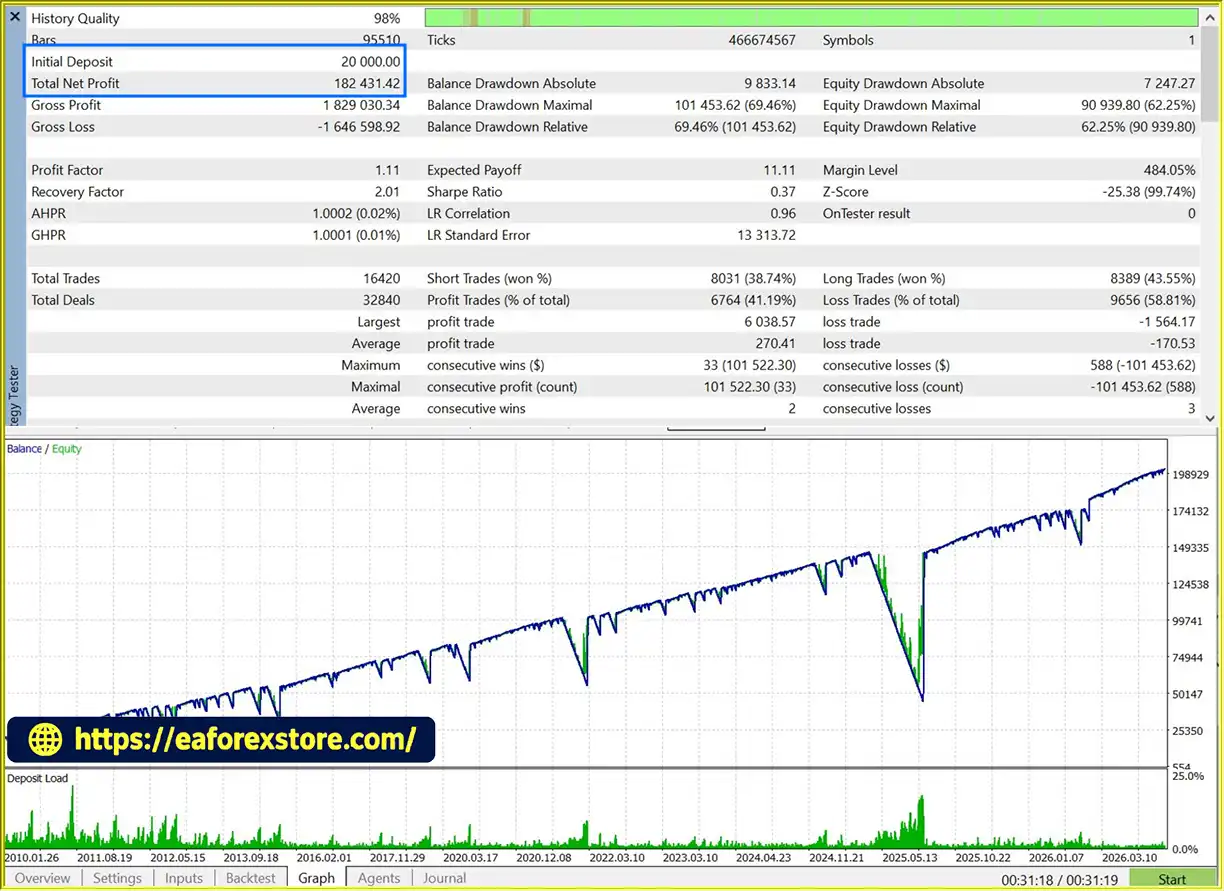
Backtest 1: $20,000 initial deposit, $182,431.42 net profit, 41.19% win rate, and 69.46% maximum drawdown.
Backtest 2: $20,000 initial deposit, $34,224.90 net profit, 39.88% win rate, and 38.36% maximum drawdown.
These figures are reported by the product source and have not been independently verified here. The testing periods, configurations, transaction costs, and other conditions should be checked before drawing conclusions. The reported maximum drawdowns are substantial and deserve particular attention when assessing risk.
6. What is new in Botax Gold EA MT5 version 1.1?
According to the product description, version 1.1 introduces a monitoring dashboard designed to help users review trading activity and track the progress of individual positions. The dashboard may make it easier to observe how the EA manages trades, but its exact indicators and monitoring functions should be confirmed in the product documentation.
7. Does Botax Gold EA MT5 support different licensing options?
Yes. The provider advertises lifetime licenses and monthly or yearly rental options. Free consultation after purchase is also listed as an available benefit. Before purchasing, users should confirm the current price, license duration, supported accounts, update policy, renewal terms, and customer support arrangements directly with the provider.
8. How do I install Botax Gold EA MT5 on MetaTrader 5?
Download the EA package from the provider and open MetaTrader 5. Select File → Open Data Folder, navigate to MQL5 → Experts, and copy the supplied .ex5 file into that folder. Return to MT5, refresh the Expert Advisors list in the Navigator panel, and attach Botax Gold EA MT5 to the appropriate XAUUSD chart. Configure the trading parameters only after verifying their meaning and risk implications. Finally, backtest the EA and conduct demo forward testing before considering live trading.
In stock
In stock
In stock
In stock
In stock
Out of stock
No account yet?
Create an Account












 Automatic EA
 EA Best Seller
 Expert Advisor MT4
 Expert Advisor MT5
 HFT EA


Reviews
Clear filtersThere are no reviews yet.