









-
 Unlimited Activations
-
 Instant delivery
-
 Easy to install






 Unlimited Activations
Instant delivery
Easy to install
Unlimited Activations
Instant delivery
Easy to install
 Free Update
 Free Install Support

Gold Off Still EA MT5 is an automated Expert Advisor (EA) for MetaTrader 5 (MT5), designed for gold trading on the XAUUSD market. It provides a set of configurable money-management tools, including equity-based risk sizing, risk-to-reward targeting, maximum lot limits, spread filtering, and chart visualization.
The EA allows traders to define the percentage of account equity allocated to each trade and calculate take-profit targets according to a selected risk-to-reward ratio. A maximum lot-size setting can restrict trading volume, while the spread filter prevents new entries when trading costs exceed the configured threshold.
Gold Off Still EA MT5 also offers automatic or manual pip-size configuration and visual chart elements, including a dashboard and lines representing detected high and low price levels. These features can help users monitor the EA’s displayed information and review its settings more conveniently.
However, the available product information does not fully explain the EA’s entry and exit strategy. Traders should therefore evaluate its actual trading behavior through backtesting and demo forward testing before considering live deployment.
Gold Off Still EA MT5 calculates position size based on a specified percentage of account equity. This allows the intended risk allocation to adjust as the account’s equity changes.
Percentage-based sizing can help traders maintain a consistent risk framework, provided the stop-loss distance, contract specifications, and lot calculations are configured correctly.
The selected risk percentage should be conservative enough to account for losing streaks and changing market conditions.
The EA calculates its take-profit target according to a predefined risk-to-reward ratio relative to the stop-loss distance.
For example, a 1:2 risk-to-reward ratio aims for a potential reward twice the planned risk on a trade. This does not mean the target will necessarily be reached, and actual outcomes depend on entry quality, execution costs, and market movement.
The maximum lot-size setting places a cap on the trading volume calculated by the EA.
This feature can help prevent position sizes from exceeding a trader’s chosen limit as account equity changes or when the calculated volume becomes unusually large.
Nevertheless, a lot cap does not replace appropriate risk sizing. Traders should verify that the maximum permitted volume remains suitable for their account balance and the volatility of gold.
The EA includes a configurable maximum spread filter. When the current spread exceeds the permitted threshold, the EA can skip new entries.
This feature is particularly relevant to gold trading because spreads can widen during news releases, market transitions, rollover periods, and volatile conditions.
A spread filter may help reduce exposure to excessive transaction costs, although it cannot eliminate all trading costs or guarantee better performance.
Gold Off Still EA MT5 supports manual pip-size input and automatic pip-size detection, with a reference setting intended for gold trading.
Broker specifications can differ in how prices, points, digits, and pip distances are represented. Traders should confirm the correct conversion for their broker rather than assuming that a reference value works universally.
Incorrect pip-size settings can affect spread filtering and other distance-based calculations.
The EA can display a dashboard and draw lines for detected high and low price levels on the chart. Users can customize the colors of the displayed levels.
These visual elements can make the EA’s chart output easier to inspect and help traders understand which price levels it is displaying.
However, visible levels alone do not establish the quality of the underlying trading strategy or guarantee that a trade will be profitable.
Gold Off Still EA MT5 combines configurable position sizing, risk-to-reward targeting, spread filtering, and chart visualization. Based on the available product description, its general operating process can be summarized as follows.
Step 1: Configure the Risk Parameters
The trader sets the intended risk percentage based on account equity and defines a maximum lot size. These inputs establish the EA’s position-sizing limits.
Step 2: Configure the Risk-to-Reward Ratio
The take-profit target is calculated in relation to the stop-loss distance according to the selected risk-to-reward ratio.
The exact entry and stop-loss generation rules should be confirmed in the official EA documentation because they are not fully described in the supplied product information.
Step 3: Check the Spread
Before opening a new trade, the EA can compare the current spread with the configured maximum. If the spread is too high, the entry may be skipped.
Step 4: Calculate the Trading Volume
The EA uses its equity-based risk settings and applicable lot-size limits to determine the position volume. Traders should verify the calculation with the broker’s contract specifications and the actual stop-loss distance.
Step 5: Display Relevant Chart Information
The dashboard and high-low lines can provide visual information about the levels detected by the EA, allowing users to monitor the chart display while testing the system.
Important: This workflow describes the documented features, not a verified reconstruction of the EA’s complete trading algorithm. The precise entry logic, stop-loss placement, and trade-management rules should be confirmed before use.
The EA places emphasis on equity-based position sizing, risk-to-reward targeting, and maximum lot limits. These settings allow traders to establish a more structured approach to managing individual trades.
A risk-to-reward ratio provides a consistent framework for defining planned targets relative to stop-loss distance. Traders can evaluate different ratios during testing to determine how they affect win rate, drawdown, and overall performance.
The spread filter can help avoid opening new trades when transaction costs exceed the trader’s chosen limit. This is useful when monitoring gold during changing market conditions.
The dashboard and colored high-low lines make selected chart information visible instead of relying exclusively on hidden calculations.
The option to use automatic detection or manual pip-size input provides flexibility when working with different broker quote formats.
The available controls focus on risk, reward, volume, spread, and chart appearance. This can make the main configuration easier to review, although traders must still understand the EA’s underlying trading logic before using it.
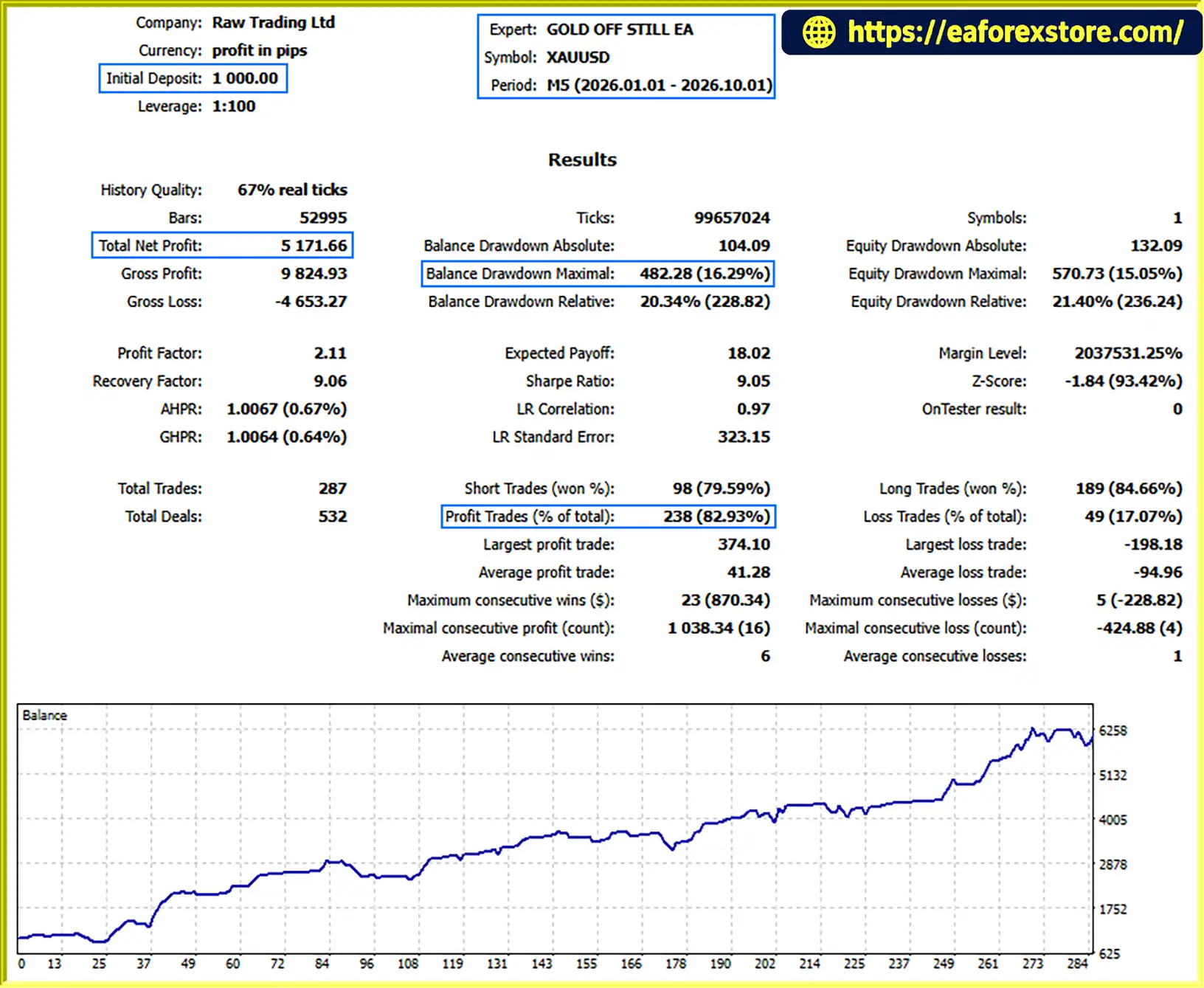
GOLD OFF STILL EA MT5 backtets
Gold Off Still EA MT5 includes several useful risk-related settings, but none can eliminate the risks associated with automated gold trading.
A high risk percentage can cause equity to decline quickly during consecutive losses. Start with a conservative setting and test how different risk levels affect maximum drawdown and recovery time.
Do not assume that the configured percentage represents a guaranteed maximum loss. Slippage, gaps, execution conditions, and differences in stop-loss calculations can increase the actual loss.
A higher potential reward relative to risk generally requires a larger favorable price movement. This may reduce the frequency with which targets are reached.
Evaluate the selected ratio alongside the strategy’s historical win rate, average trade outcome, spread, commission, and slippage. A favorable ratio alone does not establish a profitable trading system.
Set a maximum volume that is appropriate for the account and instrument. Confirm that the EA’s calculated lot size complies with the broker’s minimum volume, volume step, and maximum-volume requirements.
Test the spread filter against the broker’s actual XAUUSD conditions. A limit that is too high may allow expensive entries, while one that is too low may block many otherwise eligible trades.
Check whether the EA expects pips, points, or price-distance values for each relevant setting. Confirm how the broker quotes gold and validate the automatic detection feature before trading.
The supplied description does not provide enough information to establish precisely how trades are initiated, how stop losses are placed, or how the EA handles changing market conditions. Review the official documentation and examine the EA’s behavior in the Strategy Tester.
Use historical testing with realistic spread and execution assumptions, followed by demo forward testing. Evaluate net results after costs, maximum drawdown, losing streaks, average win and loss, and the stability of performance across different market conditions.
No EA can guarantee profits or prevent all losses.
Step 1: Download the EA
Obtain Gold Off Still EA MT5 from the official vendor or an authorized source. Ensure the file is compatible with MetaTrader 5.
Step 2: Open MetaTrader 5
Launch MT5 and log in to your trading account.
Step 3: Copy the EA File
In MT5, select File → Open Data Folder. Navigate to MQL5 → Experts and copy the EA file into that folder.
Step 4: Refresh the Navigator
Return to MT5 and refresh the Expert Advisors section in the Navigator, or restart the platform if necessary.
Step 5: Open the XAUUSD Chart
Open the gold trading chart required by the EA. Confirm the recommended timeframe in the official product documentation because it is not specified in the supplied description.
Step 6: Configure the Inputs
Review the equity risk percentage, risk-to-reward ratio, maximum lot size, maximum spread, pip-size mode, dashboard, and high-low line colors.
Confirm the units of every distance-related setting and ensure that the risk configuration is appropriate for the account.
Step 7: Enable Automated Trading
Enable algorithmic trading in MT5 and attach the EA to the intended chart. Check that it has the permissions required to operate.
Step 8: Test Before Live Trading
Run a Strategy Tester backtest, then conduct demo forward testing. Verify position sizing, stop-loss and take-profit behavior, spread filtering, pip-size calculations, and chart displays before considering a live account.
>>> Join VIP Membership Now <<<
Gold Off Still EA MT5 offers a collection of risk-management and chart-visualization features for traders who want to automate parts of their gold trading process. Its equity-based risk sizing, risk-to-reward targeting, maximum lot limit, spread filter, and configurable chart display provide useful controls for testing a structured trading approach.
However, the available product description does not fully explain the underlying trading strategy, and no verified performance figures have been supplied. These limitations make it important to investigate the EA’s entry logic and evaluate its results independently before using real money.
For traders considering Gold Off Still EA MT5, the priority should be to verify the settings, use realistic backtesting assumptions, and conduct sufficient demo testing. Risk controls can help structure trading decisions, but they cannot turn an unverified strategy into a guaranteed profitable system.
1. What is Gold Off Still EA MT5?
Gold Off Still EA MT5 is an automated Expert Advisor for MetaTrader 5 designed for Gold (XAUUSD) trading. It includes equity-based risk sizing, risk-to-reward take-profit calculations, maximum lot-size limits, spread filtering, and chart visualization tools.
2. How does Gold Off Still EA MT5 work?
The EA provides configurable risk and trading-cost settings to support automated trading. It can calculate position sizes based on account equity, set take-profit targets according to a selected risk-to-reward ratio, and filter new entries when the spread exceeds a specified threshold. However, its complete entry and exit strategy is not explained in the available product information.
3. What are the key features of Gold Off Still EA MT5?
Its main features include equity-based position sizing, configurable risk-to-reward ratios, maximum lot-size control, a maximum spread filter, automatic or manual pip-size configuration, a chart dashboard, and colored high-low price level lines.
4. What are the reported backtest results for Gold Off Still EA MT5?
According to the supplied product description, the EA achieved the following reported results on XAUUSD over nine months:
Initial deposit: $1,000
Total net profit: $5,171.66
Win rate: 82.93%
Maximum drawdown: 16.29%
These figures are reported backtest results, not independently verified live trading performance. Historical results do not guarantee future profits.
5. Does Gold Off Still EA MT5 support risk management?
Yes. The EA includes equity-based risk sizing, a maximum lot-size limit, risk-to-reward take-profit calculations, and spread filtering. These settings can help traders structure their risk parameters, but they cannot eliminate losses or guarantee a maximum loss under all execution conditions.
6. Can I customize the settings of Gold Off Still EA MT5?
Yes. Traders can configure the risk percentage, risk-to-reward ratio, maximum lot size, maximum spread, pip-size mode, dashboard display, and high-low line colors. The supplied package also lists three preset files: Gold_Signal_Risk 1%.set, Gold_Signal_Risk 2%.set, and Gold_Signal_Risk 3%. Review each preset before using it.
7. What are the advantages and limitations of Gold Off Still EA MT5?
The main advantages are flexible risk settings, position-size limits, spread filtering, pip-size configuration, and chart visualization. Its main limitation is that the complete trading strategy is not documented in the supplied description. Incorrect settings, adverse market conditions, spreads, slippage, and losing streaks can also negatively affect results.
8. How do I install Gold Off Still EA MT5 on MetaTrader 5?
Download the compatible EA file and copy it into the MQL5 → Experts folder using File → Open Data Folder in MT5. Refresh the Navigator, open the appropriate XAUUSD chart, attach the EA, and configure its inputs. Enable algorithmic trading and test the EA in the Strategy Tester and on a demo account before considering live trading. Confirm the recommended timeframe and other requirements in the official documentation.
In stock
In stock
In stock
In stock
In stock
Out of stock
No account yet?
Create an Account












 Automatic EA
 EA Best Seller
 Expert Advisor MT4
 Expert Advisor MT5
 HFT EA


Reviews
Clear filtersThere are no reviews yet.