









-
 Unlimited Activations
-
 Instant delivery
-
 Easy to install




 Unlimited Activations
Instant delivery
Easy to install
Unlimited Activations
Instant delivery
Easy to install
 Free Update
 Free Install Support

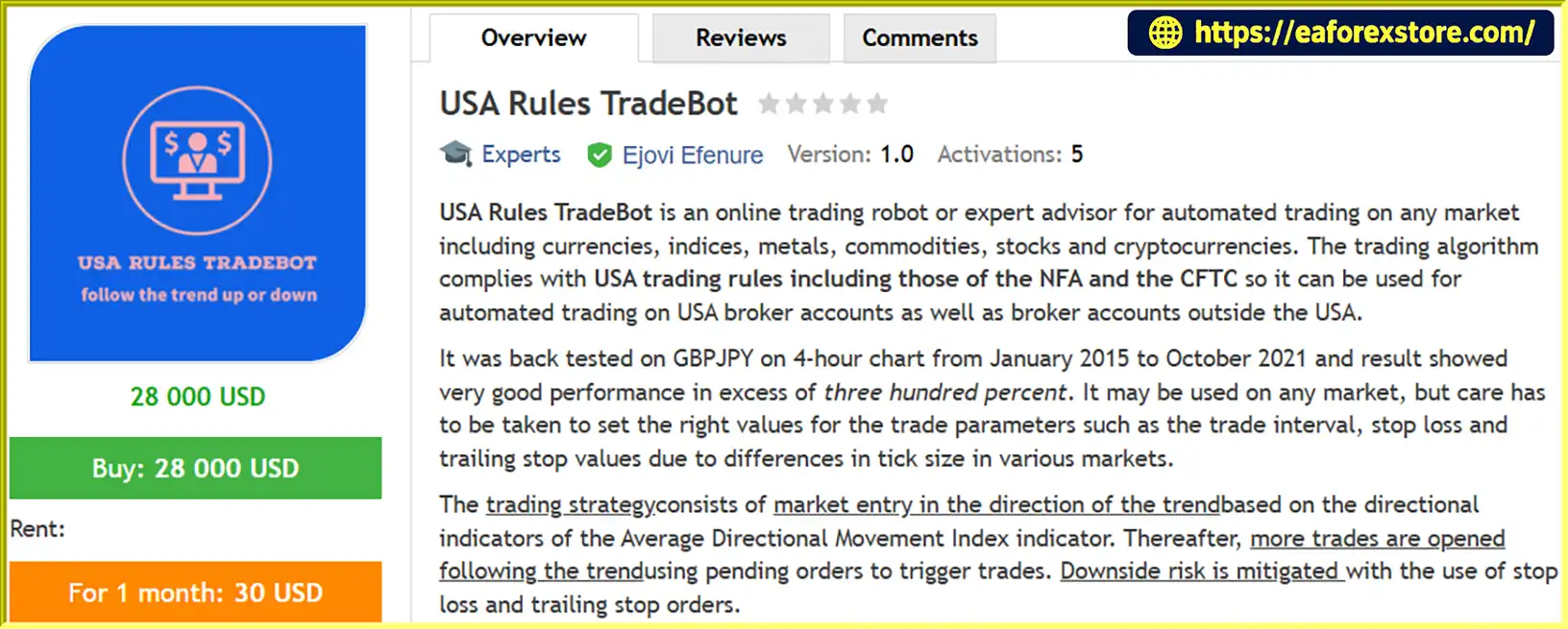
USA Rules TradeBot MT4 is an automated trading robot, also known as an Expert Advisor (EA), designed for the MetaTrader 4 (MT4) trading platform. Developed to support systematic, trend-following trading, this Forex EA can be used across multiple financial markets, including Forex, indices, precious metals, commodities, stocks, and cryptocurrencies, depending on the instruments available through the user’s MT4 broker.
One of the standout characteristics of USA Rules TradeBot MT4 is its trading approach, which is designed to accommodate US Forex trading restrictions, including applicable rules associated with the National Futures Association (NFA) and the Commodity Futures Trading Commission (CFTC). This makes it a potential option for traders using US-based brokers as well as international brokerage accounts, subject to individual broker requirements and regulatory restrictions.
The trading robot uses the Average Directional Movement Index (ADX) and its directional indicators to identify market trends and execute trades in the prevailing direction. It also incorporates pending orders, stop-loss protection, and trailing-stop functionality to help automate trade entries and exits.
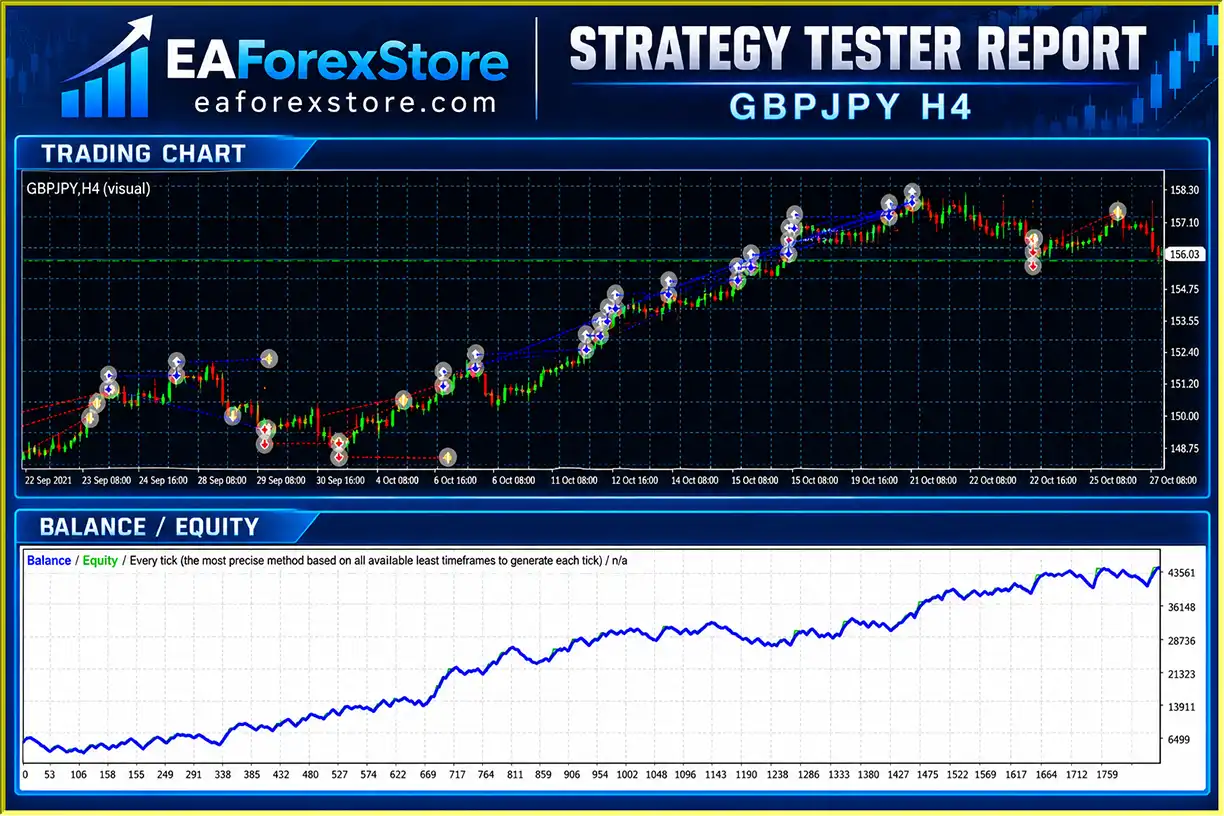
According to the developer’s historical testing information, USA Rules TradeBot MT4 was backtested on the GBP/JPY currency pair using the H4 timeframe between January 2015 and October 2021. The reported test performance exceeded 300%, although these results are historical simulations rather than independently verified live trading returns.
With customizable trading parameters, adjustable position sizing, and automated trade management, USA Rules TradeBot MT4 is designed for traders seeking a flexible, rules-based trading solution.
>>> Delivery time 24h-48h after payment.
>>> Refund if not delivered.
>>> You will receive the latest version without any limitations (ID+Time).Reviewed by Jason Stap <<<
USA Rules TradeBot MT4 Overview
USA Rules TradeBot MT4 offers several trading and risk management features intended to support automated market participation.
The Expert Advisor automatically analyzes market direction using the ADX directional indicators. Instead of relying on continuous manual monitoring, traders can configure the robot to identify trading signals and place orders according to its programmed strategy.
USA Rules TradeBot MT4 is developed with US Forex trading restrictions in mind, including relevant NFA and CFTC requirements.
Its design may appeal to traders who need an automated trading strategy compatible with restrictions imposed by US-regulated Forex brokers. However, actual compliance depends on the broker, account type, order execution, and applicable regulations.
Although the developer’s reported backtest focused on GBP/JPY, USA Rules TradeBot MT4 is designed for use on several MT4-supported markets:
Trading parameters should be adjusted for the price precision, volatility, contract specifications, and trading conditions of each instrument.
The EA incorporates the Average Directional Movement Index to help determine trend direction.
By evaluating directional indicators, the algorithm attempts to trade in the direction of established market momentum rather than opening positions randomly.
Following an initial market entry, the system can place additional pending orders in the direction of the prevailing trend.
This approach is intended to capture extended price movements while allowing traders to configure the distance between successive entries.
USA Rules TradeBot MT4 supports fixed lot sizes and capital-based position sizing.
Traders can use the FixedLotSize parameter or configure FractionalK-based sizing to adapt trading volume to the amount of capital available in their accounts.
Built-in stop-loss and trailing-stop settings help traders manage downside exposure and protect potential profits during favorable market movements.
Both features can be enabled, disabled, and customized based on the chosen trading strategy.
The SignalMail setting allows the EA to send email notifications through an email account configured in the MT4 terminal, helping users stay informed about trading activity.
The robot provides configurable settings for slippage, trade intervals, profit targets, risk limits, trailing entries, and other trade management functions.
These options allow users to test different configurations before applying them to live market conditions.
USA Rules TradeBot MT4 operates through a trend-following trading strategy that combines technical indicators, automatic order execution, and configurable risk management.
The trading algorithm monitors market conditions using the directional indicators of the Average Directional Movement Index.
These indicators help determine whether buyers or sellers are showing stronger directional momentum.
When the algorithm identifies a trading opportunity consistent with its programmed conditions, it prepares an entry in the direction of the prevailing trend.
Once the trading conditions are satisfied, the EA automatically opens a market position.
This process reduces the need for traders to manually identify every entry opportunity and submit orders themselves.
After the initial position is opened, USA Rules TradeBot MT4 can place additional pending orders following the trend.
The TradesInterval parameter determines the spacing between trades, allowing traders to customize how frequently additional positions may be triggered.
The EA continuously manages open positions using its configured protective settings.
Stop-loss orders help limit losses on individual trades, while trailing stops can adjust protective exit levels as the market moves favorably.
The robot can also use take-profit settings and account-level risk or reward thresholds.
When the market trend changes or an exit condition is triggered, the EA may close existing positions according to its programmed settings.
Its strategy also provides for entering trades in the opposite direction when reversal conditions are identified.
The actual execution of these orders depends on market liquidity, spreads, slippage, broker restrictions, and the trading account’s configuration.
USA Rules TradeBot MT4 offers a combination of automated execution, technical trend analysis, and adjustable trading controls.
Designed with US Broker Restrictions in Mind
Unlike trading systems that may rely on techniques restricted on certain US Forex accounts, USA Rules TradeBot MT4 is marketed as being developed to accommodate relevant US trading rules.
This may make it worth evaluating for traders using brokers subject to NFA and CFTC requirements.
Automated Trading Without Constant Manual Execution
The EA can monitor trading signals, open positions, manage pending orders, and execute configured exits automatically while MT4 is running and connected.
This can reduce the amount of manual intervention required during active market sessions.
Flexible Trading Configuration
The robot includes multiple parameters that allow traders to customize position sizing, trade spacing, risk thresholds, and exit conditions.
Its default settings offer a starting point for testing, while more experienced users can experiment with customized configurations.
Support for Different Trading Instruments
USA Rules TradeBot MT4 is not designed exclusively for a single currency pair. Its strategy can be applied to different instruments supported by the broker, provided that appropriate settings are selected.
Historical Backtesting Information
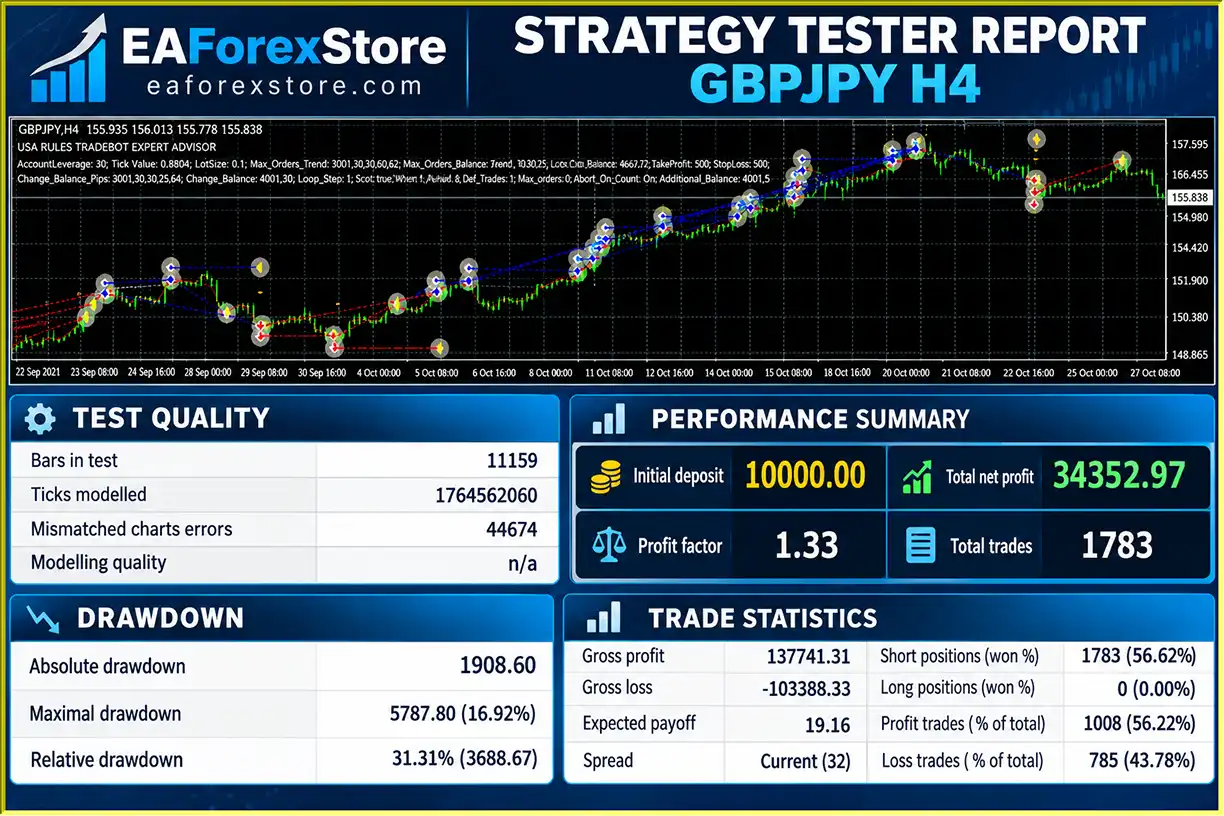
The developer reports that the EA achieved more than 300% performance in a GBP/JPY H4 backtest covering January 2015 through October 2021.
Although this result may be of interest, it does not establish future profitability. Traders should evaluate the complete test report, including drawdown, costs, modeling quality, and trade distribution, before drawing conclusions.
🔺GBPJPY pair – H4
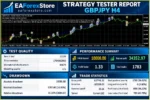
USA Rules TradeBot MT4 Backtets
USA Rules TradeBot MT4 EA Backtets
Risk management is an important component of USA Rules TradeBot MT4, particularly because the strategy can open multiple positions during an ongoing trend.
The EA includes several configurable parameters intended to control trading volume, manage losses, and define profit-taking behavior.
The UseStopLoss setting is enabled by default, with StopLoss set to 1500 fractional pips.
This function is intended to provide a protective exit mechanism when the market moves against an open position.
However, stop-loss orders cannot guarantee an exact exit price during gaps, rapid price movements, or unfavorable execution conditions.
The UseTrailingStop parameter is enabled by default, with TrailingStop set to 1400 fractional pips.
A trailing stop can move the protective exit level as the market develops favorably, helping the system retain part of an unrealized gain if prices subsequently reverse.
The EA includes a take-profit feature that is disabled by default.
Users can activate UseTakeProfit and customize the TakeProfit parameter, which has a default value of 2500 fractional pips.
The RiskPercent parameter is set to 50 by default.
According to the developer’s description, this setting represents the maximum percentage of trading capital the user is prepared to risk before the EA stops trading.
A 50% risk threshold is extremely aggressive and could result in substantial account losses. Traders should review this parameter carefully and consider substantially lower limits based on their individual risk tolerance.
The RewardPercent parameter is set to 10 by default.
It defines a reward threshold at which the system is intended to close trades and realize floating profits.
The way this threshold operates should be verified through testing before using real funds.
With SignalMail enabled, USA Rules TradeBot MT4 can send notifications using the email configuration available in MetaTrader 4.
This feature can help traders monitor automated trading activity without continuously watching the platform.
Automated trading does not eliminate financial risk. Trend-following strategies may struggle during sideways markets, sudden reversals, and highly volatile trading sessions.
Because USA Rules TradeBot MT4 can open additional positions, total account exposure may increase as more orders are triggered.
Traders should consider using smaller position sizes, reviewing cumulative exposure, backtesting different market conditions, and conducting forward tests on a demo account before trading live.
Installing USA Rules TradeBot MT4 follows the standard procedure for adding an Expert Advisor to MetaTrader 4.
Download and install the MetaTrader 4 trading platform from your broker or another trusted source.
Log in using your trading account credentials and make sure the platform is connected to the broker’s trading server.
Open MetaTrader 4 and select:
File → Open Data Folder → MQL4 → Experts
This directory contains the Expert Advisor files used by the platform.
Copy the USA Rules TradeBot MT4 Expert Advisor file, typically provided in EX4 or MQ4 format, into the Experts folder.
Restart MetaTrader 4 or refresh the Expert Advisors section in the Navigator panel.
Open the chart of the instrument you want to trade.
For example, traders wishing to evaluate the setup described in the historical backtest can begin with the GBP/JPY currency pair on the H4 timeframe.
This is a testing reference, not a recommendation that the historical settings will be profitable.
Find USA Rules TradeBot MT4 in the Navigator panel under Expert Advisors.
Drag the robot onto the selected trading chart or double-click its name.
Review the Common tab and enable automated trading permissions as appropriate.
Open the Inputs tab to review and customize the EA settings.
Important parameters include:
| Parameter | Function | Stated Default |
|---|---|---|
| MagicNumber | Identifies trades belonging to the EA | Not specified |
| SignalMail | Enables or disables email notifications | Not specified |
| FixedLotSize | Defines fixed trading volume | Not specified |
| UseFractionalKLots | Controls capital-based lot sizing | Not specified |
| FractionalK | Defines capital allocation for minimum lot sizing | Not specified |
| Slippage | Sets permitted slippage | 50 fractional pips |
| TradesInterval | Defines spacing between trades | 50 fractional pips |
| RiskPercent | Sets the risk threshold | 50% |
| RewardPercent | Sets the reward threshold | 10% |
| UseStopLoss | Enables stop-loss functionality | True |
| StopLoss | Defines stop-loss distance | 1500 fractional pips |
| UseTakeProfit | Enables take-profit functionality | False |
| TakeProfit | Defines take-profit distance | 2500 fractional pips |
| UseTrailingStop | Enables trailing-stop functionality | True |
| TrailingStop | Defines trailing-stop distance | 1400 fractional pips |
| UseTrailingEntry | Enables adjustment of pending orders | Not specified |
| TrailingEntry | Defines the trailing-entry setting | 2500 fractional pips |
Important: The EA uses fractional-pip values. On many five-digit Forex quotes, 10 fractional pips correspond to one standard pip. However, the correct interpretation depends on the instrument, broker’s quote precision, and EA implementation.
Click the AutoTrading button on the MT4 toolbar and confirm that automated trading is enabled for the EA.
Verify that the trading platform is connected, the selected instrument is available, and your broker permits the required order types.
Before using USA Rules TradeBot MT4 on a live account, open the MT4 Strategy Tester and evaluate the EA under different market conditions.
Test the chosen instrument, timeframe, lot size, stop-loss settings, spreads, and risk parameters.
After backtesting, run the robot on a demo account to observe how it handles live market prices and broker execution conditions.
Once the EA is configured, it can operate automatically while MetaTrader 4 remains running and connected.
A reliable VPS may help maintain platform availability if traders do not want to keep their personal computers running continuously.
Regular monitoring is still necessary to review account exposure, software behavior, execution errors, and changes in trading conditions.
>> Join VIP Membership Now <<<
USA Rules TradeBot MT4 is a customizable automated trading Expert Advisor that combines trend-following market analysis with pending-order execution and multiple risk management features.
Its ADX-based strategy, support for various trading instruments, and focus on US trading restrictions make it an option worth examining for traders interested in automated trading on MetaTrader 4.
The software also provides flexibility through configurable lot sizing, trading intervals, protective stops, and reward thresholds. These features may appeal to users who prefer a systematic trading approach while retaining control over key trade parameters.
However, the reported historical performance of more than 300% should be interpreted carefully. The backtest covers a specific currency pair, timeframe, and historical period, and the available information does not establish how the robot performs in live trading.
The aggressive default risk setting and the possibility of accumulating multiple positions are additional factors traders should evaluate before committing capital.
Overall, USA Rules TradeBot MT4 may be suitable for traders who want to explore automated, trend-following strategies and are comfortable testing and adjusting Expert Advisor settings.
For the best evaluation, start with historical backtesting, proceed to demo trading, review broker compatibility, and use risk limits appropriate to your account.
Risk Disclaimer: Forex, CFDs, and leveraged financial instruments involve substantial risk and may result in the loss of your trading capital. Automated trading software does not guarantee profits. Historical backtesting results are not reliable indicators of future performance. Regulatory compatibility should be independently verified with your broker and relevant authorities before live trading.
1. What is USA Rules TradeBot MT4 and how does it work?
USA Rules TradeBot MT4 is an automated Forex trading Expert Advisor (EA) designed for the MetaTrader 4 platform. It uses the Average Directional Movement Index (ADX) and directional indicators to identify market trends and execute trades automatically. The EA also supports pending orders, stop-loss protection, trailing stops, and customizable risk management settings to help traders manage positions without constant manual intervention.
2. Is USA Rules TradeBot MT4 profitable?
USA Rules TradeBot MT4 has reported positive historical backtesting results. In a GBP/JPY H4 backtest, the EA generated $34,352.97 in net profit from a $10,000 initial deposit, with a 56.22% win rate and 16.92% maximum drawdown. However, these results are based on historical simulations rather than independently verified live trading performance. Actual profitability depends on market conditions, broker execution, trading costs, and risk management settings.
3. Is USA Rules TradeBot MT4 compatible with US Forex brokers?
USA Rules TradeBot MT4 is designed with US Forex trading restrictions in mind, including relevant National Futures Association (NFA) and Commodity Futures Trading Commission (CFTC) requirements. This makes it a potential option for traders using US-regulated Forex brokers. However, compatibility and regulatory compliance are not guaranteed and should be verified with your broker before using the EA on a live trading account.
4. Which currency pairs and markets does USA Rules TradeBot MT4 support?
USA Rules TradeBot MT4 supports multiple financial instruments available through compatible MT4 brokers, including Forex currency pairs, stock indices, gold, silver, commodities, stocks, and cryptocurrencies. The developer's reported backtest focused on GBP/JPY using the H4 timeframe. Traders should optimize trading parameters for each instrument because volatility, spreads, and market conditions can significantly affect performance.
5. What is the minimum deposit required for USA Rules TradeBot MT4?
The official minimum deposit requirement for USA Rules TradeBot MT4 is not specified in the available product information. The developer's reported backtest used an initial balance of $10,000, but this does not necessarily represent the minimum capital required. The appropriate account size depends on your broker's margin requirements, selected lot size, leverage, and risk management settings.
6. Does USA Rules TradeBot MT4 have built-in risk management features?
Yes. USA Rules TradeBot MT4 includes several customizable risk management tools, such as stop-loss orders, trailing stops, optional take-profit levels, and account-level risk thresholds. It also supports fixed lot sizes and capital-based position sizing. However, the default RiskPercent setting is 50%, which is extremely aggressive. Traders should carefully adjust this parameter and test their settings before activating live trading.
7. Can USA Rules TradeBot MT4 run automatically 24/7 on a VPS?
Yes. USA Rules TradeBot MT4 can operate continuously when MetaTrader 4 is running on a reliable Virtual Private Server (VPS). VPS hosting allows the EA to monitor markets, execute trades, and manage open positions without requiring your personal computer to remain switched on. However, actual trading activity depends on market hours, broker availability, and configured trading conditions. Regular monitoring is still recommended.
8. How do I install USA Rules TradeBot MT4 on MetaTrader 4?
To install USA Rules TradeBot MT4, download the Expert Advisor file and copy it into the MQL4/Experts folder within your MetaTrader 4 data directory. Restart MT4, open your preferred trading chart, and attach the EA from the Navigator panel. Configure the lot size, ADX-based trading parameters, stop-loss settings, trailing stops, and risk limits. Finally, enable AutoTrading and test the robot using the MT4 Strategy Tester or a demo account before trading with real money.
In stock
In stock
In stock
In stock
In stock
Out of stock
No account yet?
Create an Account












 Automatic EA
 EA Best Seller
 Expert Advisor MT4
 Expert Advisor MT5
 HFT EA


Reviews
Clear filtersThere are no reviews yet.