









-
 Unlimited Activations
-
 Instant delivery
-
 Easy to install




 Unlimited Activations
Instant delivery
Easy to install
Unlimited Activations
Instant delivery
Easy to install
 Free Update
 Free Install Support

US30 Dow Jones Scalper MT4 is an automated trading Expert Advisor developed for the MetaTrader 4 platform. Designed specifically for trading the US30 index around the New York market opening, this EA uses a selective scalping approach that focuses on a limited number of trading opportunities rather than executing numerous orders throughout the day.
The trading system is designed to open a maximum of approximately zero to two trades per day, depending on market conditions. By concentrating its activity around the New York trading session, US30 Dow Jones Scalper MT4 aims to take advantage of price movements associated with the opening of the US stock market.
One of the distinguishing features of this Expert Advisor is its straightforward approach to position management. The robot does not use Grid, Martingale, or position topping-up strategies. Instead, every trade is opened with predefined Stop Loss and Take Profit levels, helping traders establish an intended risk and reward structure for each position.
The EA also incorporates a mandatory trailing-stop mechanism, which plays an important role in its position management strategy. According to the developer, enabling trailing is essential for the system’s intended long-term performance.
US30 Dow Jones Scalper MT4 has been tested primarily with IC Markets, VantageFX, and Fusion Markets. Among these brokers, IC Markets is specifically recommended by the developer. The EA requires competitive trading conditions, particularly low spreads and a low-latency VPS, because scalping strategies can be sensitive to transaction costs and execution delays.
The developer recommends a minimum deposit of $1,000, a RAW spread account, and a hedging account configuration. The EA can operate on any chart timeframe because its trading activity is primarily determined by the New York market opening rather than a specific chart interval.
With customizable risk-per-trade settings, strict trade exits, broker time synchronization, and limited daily trading frequency, US30 Dow Jones Scalper MT4 provides an automated index trading solution for traders interested in session-based scalping.
>>> Delivery time 24h-48h after payment.
>>> Refund if not delivered.
>>> You will receive the latest version without any limitations (ID+Time).Reviewed by Jason Stap <<<
US30 Dow Jones Scalper MT4 Overview
US30 Dow Jones Scalper MT4 is designed to identify trading opportunities around the opening of the New York stock market.
The strategy focuses on a relatively short trading window when the US30 index may experience increased trading activity and volatility.
Rather than monitoring all market sessions equally, the EA concentrates on conditions associated with the New York opening period.
The EA is designed to execute approximately zero to two trades per day.
This selective approach aims to avoid excessive trading and reduce unnecessary exposure to market conditions outside the intended trading window.
Some days may produce no trades if the algorithm does not identify suitable opportunities.
US30 Dow Jones Scalper MT4 does not rely on Grid or Martingale position recovery systems.
The robot does not progressively increase position sizes after losing trades or add recovery layers to existing positions.
This avoids certain risks associated with aggressive money management techniques, although losses remain possible.
Every trade includes predefined Stop Loss and Take Profit levels.
These orders establish intended exit conditions for both unfavorable and favorable price movements.
The actual monetary risk depends on trading volume, contract specifications, and execution quality.
The EA includes a trailing-stop feature that the developer states must remain enabled.
Trailing-stop management allows the system to adjust protective exit levels as a trade develops favorably.
This mechanism is an important part of the EA’s intended strategy and should not be disabled without understanding how doing so changes its behavior.
The Risk Percentage per Trade setting allows traders to configure how much account capital they intend to risk on an individual position.
For example, a 0.5% risk setting represents a planned risk of approximately $5 per trade on a $1,000 account, assuming the EA calculates position size as intended and orders execute at their specified prices.
Actual realized losses may exceed the intended amount because of slippage, gaps, and execution conditions.
The EA includes a Broker Server GMT parameter that must be configured correctly.
Because the robot trades around the New York market opening, accurate time synchronization is essential.
Incorrect GMT settings may cause the EA to trade outside its intended market window.
The developer reports testing the EA primarily with:
IC Markets is identified as the preferred broker.
These are developer-reported testing environments rather than proof that the EA will produce identical results across brokers.
US30 Dow Jones Scalper MT4 can operate alongside other Expert Advisors on the same MetaTrader 4 account.
Each EA should use a different Magic Number to help distinguish and manage its own trading positions.
The developer states that the EA has demonstrated favorable behavior during certain news events in testing.
However, high-impact economic announcements can significantly increase volatility, spreads, and slippage.
Users may manually disable the EA around important news releases.
A built-in news filter is described as a planned future feature rather than a confirmed feature of the supplied version.
US30 Dow Jones Scalper MT4 follows a session-based automated trading process focused on US30 price behavior around the New York market opening.
The EA monitors the trading environment and identifies the intended New York market opening period.
The Broker Server GMT setting is used to align the EA’s time calculations with the broker’s trading server.
Correct synchronization is particularly important because the robot’s trading opportunities are time-sensitive.
During the designated trading window, the algorithm evaluates market conditions to determine whether a valid scalping opportunity is available.
The developer does not disclose the precise technical indicators or entry formulas used by the system.
When the EA detects conditions that satisfy its internal entry rules, it generates a potential trading signal.
The system is designed to remain selective and avoid opening large numbers of trades throughout the day.
Before entering the market, the EA uses the configured Risk Percentage per Trade to determine the intended trading exposure.
A lower risk percentage generally results in a smaller position size, assuming other trading conditions remain unchanged.
When the entry conditions are satisfied, US30 Dow Jones Scalper MT4 automatically opens a position.
Each trade includes a predefined Stop Loss and Take Profit.
The EA does not use Martingale, Grid, or topping-up techniques to expand losing positions.
After the position is opened, the EA applies its trailing-stop functionality.
This feature is designed to manage the protective exit as the market moves favorably.
The developer emphasizes that trailing must remain enabled for the strategy to operate as intended.
Positions close according to the EA’s programmed exit conditions, including Stop Loss, Take Profit, and trailing-stop management.
Actual execution may differ from expected prices during periods of rapid volatility.
The EA is designed to open no more than approximately two trades per day.
Once its trading conditions or daily entry limits prevent further orders, it waits for the next eligible opportunity.
This process repeats during subsequent New York trading sessions.
US30 Dow Jones Scalper MT4 offers several features that may appeal to traders seeking a focused automated index trading strategy.
Specialized US30 Trading Approach
The EA is designed specifically for the Dow Jones-related US30 trading instrument rather than using a generic strategy across multiple markets.
Focused New York Trading Window
Its session-based approach concentrates trading activity around the US stock market opening.
Limited Number of Daily Trades
With approximately zero to two trades per day, the robot avoids high-frequency order accumulation throughout the entire trading session.
No Martingale or Grid Recovery
The EA does not rely on increasing trade sizes after losses or opening layered recovery positions.
Predefined Protective Orders
Each trade includes Stop Loss and Take Profit settings, providing an intended exit structure from the beginning.
Customizable Risk Percentage
Traders can adjust the planned risk allocation per trade according to their account size and risk tolerance.
Mandatory Trailing-Stop Management
The trailing-stop mechanism forms an integral part of the strategy’s intended trade management process.
Compatibility with Multiple Expert Advisors
Different Magic Numbers allow US30 Dow Jones Scalper MT4 to operate alongside other trading robots without intentionally sharing order identifiers.
Developer-Tested Broker Environments
The developer identifies specific brokers where the EA has been tested, providing a starting point for evaluating execution compatibility.
Overall, US30 Dow Jones Scalper MT4 is a specialized option for traders who prefer selective index scalping with predefined risk controls and limited daily trading activity.
🔺US30 (Dow Jones) index
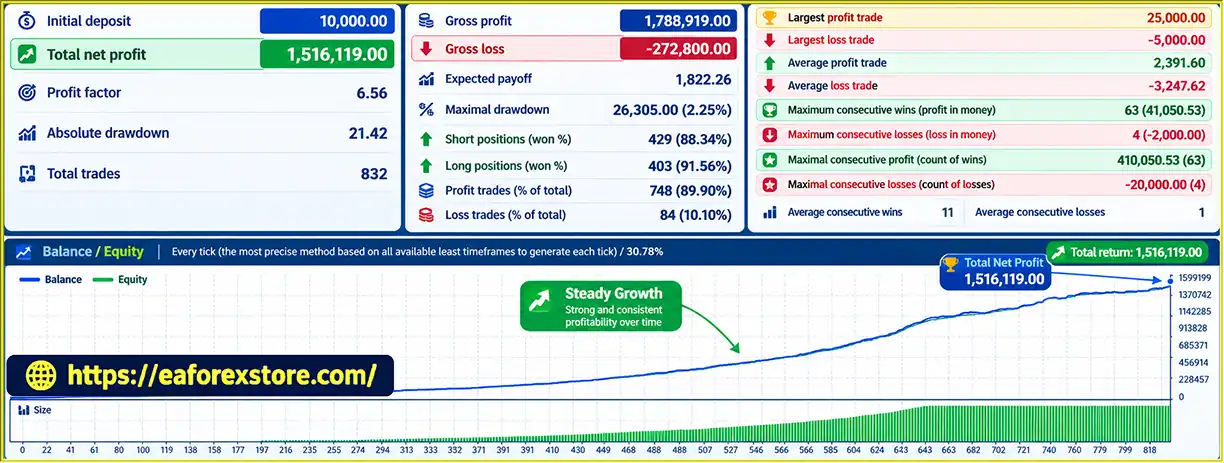
US30 Dow Jones Scalper MT4 Backtets
Risk management is especially important for automated US30 scalping because the index can experience sharp price movements around the New York market opening.
Although US30 Dow Jones Scalper MT4 includes several protective mechanisms, their effectiveness depends on correct configuration and broker execution conditions.
The Risk Percentage per Trade parameter determines the intended percentage of account capital exposed to each trade.
The developer suggests that drawdown should remain below 10% when using a 0.5% risk setting.
However, this is a developer claim rather than a guaranteed maximum drawdown. Actual drawdowns may be higher depending on market conditions, trade sequences, and execution quality.
Lower risk settings generally reduce the monetary exposure of individual positions.
Every position is opened with a predefined Stop Loss.
This is intended to limit individual trade losses without relying on recovery trades.
However, Stop Loss orders cannot guarantee execution at the specified price during sudden market movements or liquidity shortages.
The EA also uses predefined Take Profit levels.
These establish intended profit targets for individual trades and support systematic position closure.
The developer states that trailing-stop functionality must remain enabled.
The EA uses trailing as part of its strategy for managing favorable price movements.
Disabling trailing may materially change trading behavior and invalidate assumptions based on the developer’s testing.
The system is designed to open a maximum of approximately two trades per day.
This limits the number of new trading opportunities taken during a session, although it does not independently guarantee a maximum daily loss or account drawdown.
Because the EA does not use Grid, Martingale, or topping-up strategies, it avoids certain risks associated with repeatedly increasing exposure after losses.
Nevertheless, consecutive losing trades can still produce meaningful drawdowns.
Low spreads are particularly important for this EA.
Scalping strategies often target relatively small price movements, making transaction costs a significant component of overall performance.
The developer recommends RAW spread accounts with competitive trading conditions.
A low-latency VPS is strongly recommended.
Because the EA trades during a time-sensitive market window, delays in order submission or execution may affect results.
A VPS can improve platform availability and network consistency, but it cannot eliminate slippage or guarantee successful execution.
The New York opening period can overlap with important economic releases and periods of elevated market volatility.
Relevant events include:
The developer states that users may disable the EA during news events.
A dedicated automatic news filter is planned for a future version but is not confirmed in the current supplied specifications.
The product description does not confirm dedicated email alerts, mobile notifications, or custom risk warnings.
Users can monitor trades, execution information, and platform errors through the standard MetaTrader 4 Terminal, Experts, and Journal windows.
The recommended minimum deposit is $1,000.
However, account suitability depends on contract specifications, broker margin requirements, and the chosen risk percentage.
The developer’s historical drawdown statements should be evaluated through independent backtesting and demo trading.
Even with predefined Stop Loss orders and no Martingale strategy, US30 scalping can produce substantial losses during volatile market conditions.
Installing US30 Dow Jones Scalper MT4 follows the standard procedure for adding an Expert Advisor to MetaTrader 4.
Download and install MetaTrader 4 from a trusted broker offering a US30 trading instrument.
The developer reports testing the EA with IC Markets, VantageFX, and Fusion Markets, with IC Markets identified as the preferred option.
Use a demo account for initial setup and testing.
Before installation, review the developer’s stated requirements.
| Requirement | Specification |
|---|---|
| Trading Platform | MetaTrader 4 |
| Trading Instrument | US30 |
| Trading Timeframe | Any |
| Trading Session | New York market opening |
| Daily Trade Frequency | Approximately 0–2 trades |
| Minimum Recommended Deposit | $1,000 |
| Preferred Account Type | RAW / Low Spread |
| Account Mode | Hedging |
| Preferred Broker | IC Markets |
| VPS | Low latency strongly recommended |
| Martingale | Not used |
| Grid Trading | Not used |
| Trailing Stop | Must be enabled |
These requirements describe the intended operating environment and do not guarantee trading performance.
In MetaTrader 4, navigate to:
File → Open Data Folder → MQL4 → Experts
This folder contains Expert Advisor files.
Copy the US30 Dow Jones Scalper EA file, typically supplied in EX4 or MQ4 format, into the Experts directory.
Restart MetaTrader 4 or refresh the Expert Advisors list in the Navigator window.
Locate the US30 instrument in Market Watch.
Depending on your broker, the symbol may appear as:
Confirm that the selected instrument is supported by the EA and that its contract specifications match the intended trading conditions.
The developer states that the EA can operate on any timeframe.
Choose the chart period specified in the official setup instructions or use the developer’s provided configuration.
The robot’s main trading window is based on the New York market opening rather than a single chart timeframe.
Locate US30 Dow Jones Scalper MT4 under Expert Advisors in the Navigator panel.
Drag the EA onto the US30 chart.
Review the Common tab and enable the required automated trading permissions.
Open the Inputs tab and review the main settings.
| Parameter | Description | Important Note |
|---|---|---|
| Magic Number | Identifies the EA’s trades | Use a unique number when running multiple EAs |
| Risk Percentage per Trade | Sets the intended risk allocation | Developer references 0.5% as a lower-risk example |
| Broker Server GMT | Configures broker time synchronization | Must be set correctly |
| Enable Trailing | Activates trailing-stop management | Must remain enabled according to the developer |
The exact numerical defaults are not specified in the supplied product description.
Correctly setting Broker Server GMT is one of the most important installation steps.
The EA relies on accurate time calculations to identify the New York market opening.
Verify your broker’s server time and applicable GMT offset.
Remember that New York observes daylight saving time, so the relationship between New York local time and broker server time may change during the year.
Do not assume that a fixed GMT offset will remain correct across all seasons.
Review the Risk Percentage per Trade parameter.
The developer suggests that a 0.5% risk setting should generally keep drawdown below 10% based on its stated expectations.
However, this should not be treated as a guaranteed drawdown limit.
Start with a conservative risk setting during testing and evaluate the system’s actual trade sizing.
Confirm that Enable Trailing is activated.
The developer states that trailing must be enabled for the strategy to operate according to its intended configuration.
Use a VPS with reliable connectivity and low network latency to the broker’s trading infrastructure.
A stable connection is especially important for time-sensitive scalping strategies.
Confirm that MetaTrader 4 remains active and connected during the intended trading window.
Click the AutoTrading button in the MT4 toolbar.
Verify that the EA is running correctly and that the broker connection is active.
Check the Experts and Journal tabs for errors.
Although the developer states that the EA has already been optimized, independent backtesting remains valuable for validating its behavior under your broker’s conditions.
Important performance measurements include:
Testing should include both favorable and unfavorable market conditions.
Before deploying US30 Dow Jones Scalper MT4 with real capital, run it on a demo account.
Verify that trades occur during the intended New York opening window and that position sizes reflect the configured risk percentage.
Also check Stop Loss, Take Profit, and trailing-stop behavior.
If the EA is eventually used on a live account, regularly monitor trading activity, execution quality, and account drawdown.
Pay particular attention to changes in broker spreads, platform latency, and market volatility.
A VPS can help maintain continuous platform operation, but it does not guarantee profitable trading or prevent execution-related losses.
>> Join VIP Membership Now <<<
US30 Dow Jones Scalper MT4 is a specialized automated trading robot designed to identify scalping opportunities around the New York market opening.
Its strategy focuses on the US30 index and limits trading activity to approximately zero to two trades per day.
Unlike aggressive recovery-based trading systems, the EA does not use Grid, Martingale, or topping-up techniques. Each position includes predefined Stop Loss and Take Profit levels, while a mandatory trailing-stop mechanism supports trade management.
The ability to configure risk per trade provides additional flexibility for account management.
However, the strategy is sensitive to trading costs and execution conditions. The developer strongly recommends a low-spread RAW account and a low-latency VPS, with IC Markets identified as the preferred broker based on its testing.
The stated expectation of drawdown below 10% at 0.5% risk per trade should be viewed as an unverified developer estimate rather than a guaranteed outcome.
The available product information also does not include complete independently verified live trading statistics.
Overall, US30 Dow Jones Scalper MT4 may be worth evaluating for traders interested in selective, session-based US30 scalping without Martingale or Grid recovery strategies.
Before committing real capital, verify broker compatibility, configure the correct GMT settings, enable trailing-stop management, and conduct independent backtesting and demo trading under realistic market conditions.
Risk Disclaimer: US30 index trading, CFDs, and leveraged financial instruments involve substantial financial risk. Stop Loss orders, trailing stops, and predefined risk settings cannot guarantee profitability or prevent losses. Backtesting results and developer-reported drawdown estimates do not guarantee future performance. Traders may lose some or all of their invested capital.
1. What is US30 Dow Jones Scalper MT4 and how does it work?
US30 Dow Jones Scalper MT4 is an automated trading Expert Advisor (EA) designed specifically for the US30 Dow Jones index on MetaTrader 4. It uses a session-based scalping strategy focused on the New York stock market opening, executing approximately zero to two trades per day. Each trade includes predefined Stop Loss and Take Profit levels, along with a mandatory trailing-stop mechanism for automated position management.
2. Is US30 Dow Jones Scalper MT4 profitable?
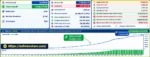
US30 Dow Jones Scalper MT4 has reported positive historical backtesting results. According to the supplied data, the EA generated $1,516,119 in net profit from a $10,000 initial deposit, with an 89.90% win rate and 2.25% maximum drawdown. However, these figures are historical backtest results rather than independently verified live trading performance. Actual profitability depends on market volatility, broker execution, spreads, slippage, and risk management settings.
3. What is the minimum deposit required for US30 Dow Jones Scalper MT4?
The developer recommends a minimum deposit of $1,000 for US30 Dow Jones Scalper MT4. The EA supports adjustable risk-per-trade settings, allowing traders to configure their intended account exposure. For example, a 0.5% risk setting represents approximately $5 of planned risk per trade on a $1,000 account. However, actual losses may exceed the intended amount during unfavorable execution conditions.
4. Which brokers are recommended for US30 Dow Jones Scalper MT4?
US30 Dow Jones Scalper MT4 has been tested primarily with IC Markets, VantageFX, and Fusion Markets. The developer specifically recommends IC Markets due to its reported testing experience. For optimal operating conditions, the EA requires a low-spread RAW trading account, reliable order execution, and a low-latency VPS. Performance may vary between brokers because of differences in spreads, contract specifications, and execution quality.
5. Does US30 Dow Jones Scalper MT4 use Martingale or Grid trading strategies?
No. US30 Dow Jones Scalper MT4 does not use Martingale, Grid, or position topping-up strategies. Instead, it follows a selective scalping approach with predefined Stop Loss and Take Profit levels for every position. The EA focuses on approximately zero to two trading opportunities per day rather than opening multiple recovery orders. However, avoiding Martingale and Grid strategies does not eliminate trading losses or drawdown risk.
6. What is the best timeframe and trading session for US30 Dow Jones Scalper MT4?
US30 Dow Jones Scalper MT4 is designed to operate around the New York stock market opening, when the US30 index may experience increased volatility and trading activity. According to the developer, the EA can run on any chart timeframe because its strategy depends primarily on market session timing. Traders must correctly configure the Broker Server GMT setting to synchronize trading activity with the intended New York opening window.
7. Does US30 Dow Jones Scalper MT4 require a VPS and trailing stop?
A low-latency VPS is strongly recommended for US30 Dow Jones Scalper MT4 because its scalping strategy is sensitive to execution delays and connection interruptions. Additionally, the developer states that the trailing-stop feature must remain enabled for the EA to operate as intended. Disabling trailing stops may significantly change trading behavior and affect performance compared with the developer's tested configuration.
8. How do I install US30 Dow Jones Scalper MT4 on MetaTrader 4?
To install US30 Dow Jones Scalper MT4, copy the Expert Advisor file into the MQL4/Experts folder within your MetaTrader 4 data directory. Restart MT4, open a US30 chart, and attach the EA from the Navigator panel. Configure the Broker Server GMT, Risk Percentage per Trade, and Magic Number settings, and ensure trailing stops remain enabled. Activate AutoTrading and test the EA on a demo account before using real funds.
In stock
In stock
In stock
In stock
In stock
Out of stock
No account yet?
Create an Account












 Automatic EA
 EA Best Seller
 Expert Advisor MT4
 Expert Advisor MT5
 HFT EA


Reviews
Clear filtersThere are no reviews yet.