





-
 Unlimited Activations
-
 Instant delivery
-
 Easy to install







 Unlimited Activations
Instant delivery
Easy to install
 Free Update
 Free Install Support

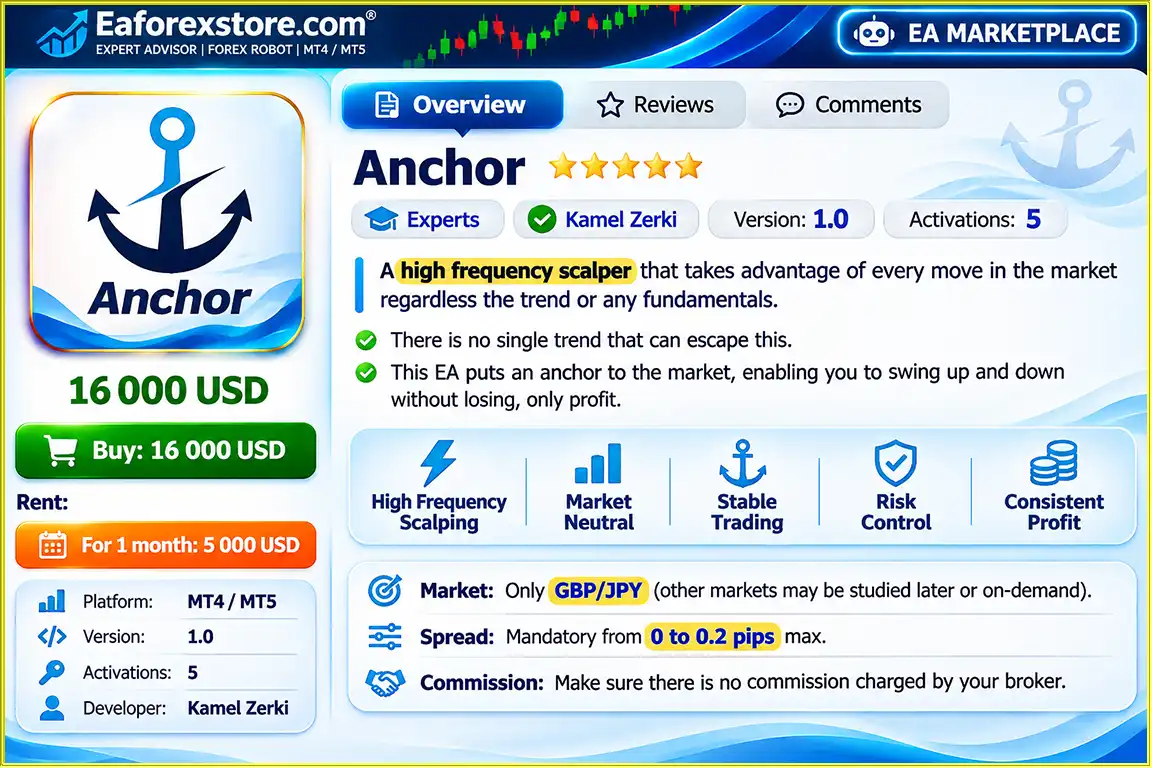
Anchor EA MT4 is an automated high-frequency Forex scalping Expert Advisor developed specifically for the GBPJPY currency pair on the MetaTrader 4 platform. Designed to capture short-term price movements, this trading robot aims to identify trading opportunities during both upward and downward market fluctuations without relying primarily on traditional trend-following strategies or fundamental analysis.
Unlike conventional Forex Expert Advisors that focus on predicting market direction, Anchor EA uses a proprietary anchor-based trading approach intended to take advantage of price movements in either direction.
The system is designed for frequent short-term trading activity, making execution speed, trading costs, and broker conditions essential to its operation.
However, Anchor EA MT4 has exceptionally strict broker requirements. According to the developer, the trading system requires spreads between 0 and 0.2 pips and zero trading commissions.
Important: Anchor EA MT4 is designed exclusively for GBPJPY. The developer explicitly warns that using the EA with unsuitable broker conditions may result in the complete loss of trading capital.
>>> Delivery time 24h-48h after payment.
>>> Refund if not delivered.
>>> You will receive the latest version without any limitations (ID+Time).
>> Reviewed by Jason Stap <<<
Anchor EA MT4 Overview
Anchor EA MT4 is designed to capitalize on small price fluctuations through frequent automated trading activity.
Its strategy focuses on short-term movements rather than long-term market forecasts, making transaction costs especially important.
The Expert Advisor is specifically developed for the GBPJPY currency pair.
Other Forex pairs are not currently supported, and the developer has not confirmed that the strategy works on alternative instruments.
The EA uses a proprietary anchor-based trading concept intended to capture movements in both market directions.
The developer describes this approach as allowing the strategy to benefit from upward and downward price fluctuations. However, this does not guarantee profitable trades or prevent drawdowns.
Anchor EA is designed to operate without relying exclusively on prevailing market trends or fundamental economic analysis.
This enables the strategy to seek potential trading opportunities during different market conditions, although its actual performance may vary.
Once installed and activated on MetaTrader 4, the Expert Advisor can automatically monitor GBPJPY prices and execute trades according to its programmed strategy.
The trading system requires exceptionally tight spreads:
Higher spreads can significantly reduce the profitability of short-term scalping strategies and may make this particular system unsuitable for live trading.
According to the developer, Anchor EA must operate on an account with zero trading commissions.
Commission-based execution can negatively affect the strategy’s net returns, especially when individual trades target very small market movements.
The developer strongly recommends testing Anchor EA on a demo account and performing historical strategy tests before purchasing or trading with real money.
Anchor EA MT4 operates through a high-frequency scalping approach specifically configured for GBPJPY price movements.
Step 1: GBPJPY Market Monitoring
The Expert Advisor continuously monitors GBPJPY price changes through the MetaTrader 4 trading platform while the terminal and trading connection remain active.
Step 2: Short-Term Price Movement Analysis
Instead of relying primarily on long-term trend predictions or fundamental economic events, the EA focuses on short-term market movements.
Step 3: Anchor-Based Strategy Execution
The robot applies its proprietary anchor-based trading logic to identify potential trading opportunities during upward and downward price movements.
The precise entry, exit, and position-management rules have not been disclosed in the supplied product description.
Step 4: Automated Trade Placement
When the programmed trading conditions are met, Anchor EA can automatically execute trading orders.
Because the system is designed for high-frequency scalping, execution delays and transaction costs can have a substantial effect on results.
Step 5: Continuous Trading Activity
The EA continues monitoring GBPJPY and responding to market conditions according to its algorithm.
Actual trade frequency, holding periods, and performance depend on market liquidity, broker execution, and the EA’s programmed rules.
Specialized GBPJPY Scalping Strategy
Anchor EA is developed specifically for GBPJPY rather than attempting to apply one strategy across numerous Forex instruments.
High-Frequency Trading Approach
The Expert Advisor focuses on short-term price movements, providing an automated way to explore frequent GBPJPY trading opportunities.
Designed for Both Market Directions
Its anchor-based strategy aims to identify trading opportunities during upward and downward market fluctuations.
Reduced Dependence on Trend Forecasting
The system does not primarily depend on identifying long-term market trends or predicting fundamental economic developments.
Automated Forex Trading
Anchor EA can monitor market conditions and execute programmed trades without requiring users to place every order manually.
Clearly Defined Broker Requirements
The developer specifies strict execution conditions, allowing prospective users to assess broker suitability before purchasing the product.
Suitable for Strategy Testing
Traders can evaluate Anchor EA through MetaTrader 4 demo trading and historical backtesting before considering real-money deployment.
These features describe the EA’s intended functionality rather than verified profitability or guaranteed strategy performance.
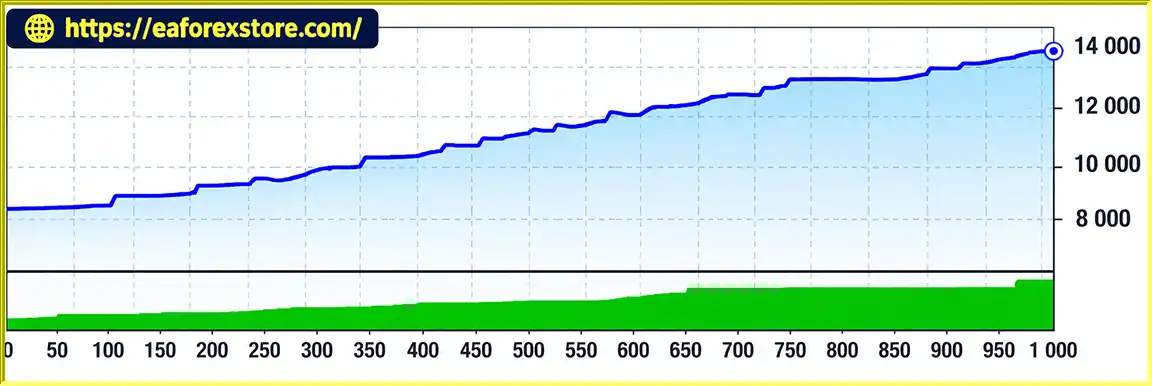
Anchor EA MT4 backtets
Risk management is particularly important when using Anchor EA MT4 because the strategy depends on exceptionally low trading costs and execution conditions.
The developer specifies a maximum acceptable spread of 0.2 pips.
| Trading Condition | Requirement |
|---|---|
| Minimum Spread | 0 pips |
| Maximum Spread | 0.2 pips |
| Trading Pair | GBPJPY |
| Trading Commission | $0 |
| Trading Platform | MetaTrader 4 |
Critical Warning: Do not purchase or deploy Anchor EA without verifying that your broker can consistently meet these requirements.
Anchor EA is designed for accounts that charge no trading commissions.
Even relatively small commissions can materially affect the results of a high-frequency scalping strategy.
Zero commission alone does not guarantee low trading costs, because brokers may incorporate costs into spreads or apply other charges.
Scalping performance can be highly sensitive to:
A broker advertising ultra-low spreads may not maintain those spreads during periods of volatility or major economic announcements.
The developer explicitly warns that trading Anchor EA under unsuitable broker conditions can lead to a complete account loss.
Even when the stated requirements are met, trading losses remain possible because the Forex market is unpredictable.
Before purchasing Anchor EA MT4, traders should test the strategy on a demo account under realistic broker conditions.
The developer recommends backtesting GBPJPY with a spread setting of 2 points, equivalent to 0.2 pips under the conventional three-decimal JPY-pair pricing format.
Traders should regularly monitor spreads, execution quality, open positions, account equity, and MetaTrader 4 trading logs.
The supplied documentation does not confirm whether Anchor EA includes built-in spread alerts, email notifications, push notifications, automatic drawdown protection, or emergency shutdown functions.
Risk Warning: No Forex Expert Advisor can eliminate trading risk or guarantee profits. High-frequency trading strategies may experience significant losses due to spreads, execution delays, market volatility, and unexpected price movements.
Step 1: Download Anchor EA MT4
Obtain the Anchor EA installation file from the official developer or a trusted source.
MetaTrader 4 Expert Advisors are generally distributed in EX4 or MQ4 format.
Step 2: Open MetaTrader 4
Launch MetaTrader 4 and log in to your trading account.
Before proceeding, confirm that your account meets the developer’s requirements for spreads and commissions.
Step 3: Access the Expert Advisors Directory
Navigate to:
File → Open Data Folder → MQL4 → Experts
Copy the Anchor EA file into the Experts folder.
Step 4: Restart MetaTrader 4
Restart the platform or refresh the Expert Advisors section in the Navigator panel.
Step 5: Open the GBPJPY Chart
Select GBPJPY from Market Watch and open its trading chart.
Anchor EA is designed exclusively for GBPJPY. Do not attach it to unsupported currency pairs.
Step 6: Choose the Correct Timeframe
Use the timeframe specified in the developer’s installation documentation.
The supplied product description does not identify a required timeframe, so a particular timeframe should not be assumed.
Step 7: Attach Anchor EA to the Chart
Drag Anchor EA from the Navigator panel onto the GBPJPY chart.
Review its available input parameters and verify the developer’s configuration instructions.
Step 8: Verify Broker Conditions
Before activating automated trading, check the following:
| Parameter | Required Condition |
|---|---|
| Trading Pair | GBPJPY Only |
| Maximum Spread | 0.2 pips |
| Commission | $0 |
| Platform | MT4 |
| Strategy | High-Frequency Scalping |
| Timeframe | Developer-Specified |
| Initial Testing | Demo Account |
| Backtesting Spread | 2 Points (0.2 Pips) |
Step 9: Test on a Demo Account
Run the EA on a demo account before considering any live trading.
Use MetaTrader 4 Strategy Tester to evaluate historical performance under the developer’s recommended GBPJPY spread conditions.
Also evaluate spreads, commissions, slippage, drawdown, and order execution during forward testing.
Step 10: Enable Automated Trading
After completing appropriate testing, enable automated trading in MT4 and the EA’s settings.
Monitor the Experts and Journal tabs for errors and confirm that trades are executing as intended.
A stable trading connection is important for high-frequency strategies. A low-latency VPS may help reduce terminal interruptions, although it cannot guarantee favorable execution or profitable results.
>> Join VIP Membership Now <<<
Anchor EA MT4 is a specialized high-frequency Forex scalping robot developed exclusively for the GBPJPY currency pair. Its proprietary anchor-based trading strategy aims to capture short-term price movements in both upward and downward markets without relying primarily on traditional trend-following or fundamental analysis.
The Expert Advisor’s main attraction is its automated approach to frequent GBPJPY trading opportunities. However, its unusually strict broker requirements are equally important to understand.
The developer requires spreads between 0 and 0.2 pips and zero trading commissions, explicitly warning that unsuitable trading conditions may result in complete capital loss.
Traders interested in Anchor EA MT4 should carefully verify broker suitability and conduct realistic demo testing and historical backtesting before purchasing.
For users researching automated GBPJPY scalping systems, Anchor EA presents a specialized trading concept, but its profitability, reliability, and risk-management capabilities require independent verification.
Anchor EA MT4 should be evaluated as a high-risk automated trading strategy rather than a guaranteed-profit Forex robot.
Disclaimer: Forex and CFD trading involves significant financial risk. Automated trading systems cannot guarantee profits or prevent losses. Past performance and backtesting results do not reliably predict future returns. Never invest money you cannot afford to lose.
1. What Is Anchor EA MT4 and How Does It Work?
Anchor EA MT4 is an automated Forex trading robot specifically designed for high-frequency GBPJPY scalping on the MetaTrader 4 platform. It uses a proprietary anchor-based trading algorithm to identify short-term price movements and execute trades automatically.
Unlike traditional trend-following Forex Expert Advisors, Anchor EA aims to identify trading opportunities during both upward and downward market fluctuations. Its strategy focuses on frequent, short-term trading rather than long-term market predictions.
2. Is Anchor EA MT4 Profitable, and How Much Money Can It Make?
Anchor EA MT4 is designed to generate trading opportunities through automated high-frequency Forex scalping on GBPJPY. The developer presents historical backtesting results showing an upward balance curve, but independently verified profitability figures and live trading records are not available.
Actual trading profits depend heavily on broker spreads, commissions, execution speed, slippage, and market volatility.
Anchor EA MT4 does not guarantee daily profits, fixed monthly returns, or risk-free trading. Traders should conduct realistic backtesting and demo trading before investing real capital.
3. Which Currency Pairs and Timeframes Does Anchor EA MT4 Support?
Anchor EA MT4 is designed exclusively for the GBPJPY currency pair, also known as the British Pound/Japanese Yen.
The trading robot uses a specialized anchor-based scalping strategy intended to capitalize on short-term GBPJPY price fluctuations.
The developer has not confirmed compatibility with other Forex pairs, including EURUSD, USDJPY, or XAUUSD.
The required trading timeframe is not specified in the available product documentation. Users should follow the developer's recommended timeframe and avoid applying the EA to unsupported trading instruments.
4. What Broker Conditions Are Required to Run Anchor EA MT4?
Anchor EA MT4 has exceptionally strict broker requirements because its high-frequency scalping strategy depends on extremely low trading costs.
According to the developer, the required trading conditions include:
Trading Pair: GBPJPY only.
Trading Platform: MetaTrader 4 (MT4).
Required Spread: 0–0.2 pips.
Trading Commission: $0.
Execution: Fast order execution with minimal slippage.
Account Testing: Demo trading and realistic backtesting before live deployment.
Traders must verify that their broker can consistently provide these conditions.
Important: The developer warns that using Anchor EA with unsuitable broker spreads or commissions may result in the complete loss of trading capital.
5. What Is the Minimum Deposit Required for Anchor EA MT4?
The developer has not provided a verified minimum deposit requirement for Anchor EA MT4.
The appropriate starting capital depends on the broker's leverage, margin requirements, position-sizing rules, and the trading strategy's actual drawdown.
Because Anchor EA uses a high-frequency GBPJPY scalping strategy, trading costs and execution quality are especially important.
Traders should first test the Expert Advisor on a demo account and evaluate position sizes, maximum drawdown, and capital requirements before using real funds.
6. Does Anchor EA MT4 Use Martingale, Grid, or Stop Loss Protection?
Anchor EA MT4 uses a proprietary anchor-based trading strategy focused on short-term GBPJPY price movements.
However, the available product documentation does not confirm whether the Expert Advisor uses Martingale or Grid techniques. Its precise position-sizing rules, Stop Loss settings, and Take Profit mechanisms have also not been disclosed.
Therefore, traders should not assume that the system includes specific risk-management protections without confirmation from the developer.
Before live trading, users should evaluate the EA's trading behavior, position exposure, and drawdown through comprehensive testing.
7. How Do I Install and Set Up Anchor EA on MetaTrader 4?
Installing Anchor EA MT4 follows the standard MetaTrader 4 Expert Advisor installation process.
Step 1: Download the Anchor EA installation file.
Step 2: Open MetaTrader 4 and navigate to File → Open Data Folder → MQL4 → Experts.
Step 3: Copy the Anchor EA file into the Experts folder.
Step 4: Restart MetaTrader 4 or refresh the Expert Advisors list.
Step 5: Open the GBPJPY trading chart.
Step 6: Select the timeframe recommended by the developer.
Step 7: Attach Anchor EA to the chart and review its available trading parameters.
Step 8: Confirm that your broker provides GBPJPY spreads of 0–0.2 pips and zero trading commissions.
Step 9: Test the Expert Advisor on a demo account before enabling live trading.
A stable internet connection or low-latency Forex VPS can help maintain continuous automated trading operation.
8. What Will I Receive After Purchasing Anchor EA MT4, and How Long Does Delivery Take?
After purchasing Anchor EA MT4, customers will receive the automated Forex trading robot installation file named Anchor EA.ex4, designed for MetaTrader 4.
According to the supplied product information, the purchase includes:
Delivery Time: 24–48 hours after payment.
Product Version: Latest available version.
License Conditions: Advertised without ID or time limitations.
Delivery Guarantee: Refund if the product is not delivered.
Trading Platform: MetaTrader 4.
Supported Currency Pair: GBPJPY only.
Customers should verify broker compatibility and trading requirements before purchasing Anchor EA MT4, particularly the maximum 0.2-pip spread and zero-commission conditions.
In stock
In stock
In stock
In stock
In stock
Out of stock
No account yet?
Create an Account












 Automatic EA
 EA Best Seller
 Expert Advisor MT4
 Expert Advisor MT5
 HFT EA



Reviews
Clear filtersThere are no reviews yet.