





-
 Unlimited Activations
-
 Instant delivery
-
 Easy to install





 Unlimited Activations
Instant delivery
Easy to install
 Free Update
 Free Install Support

Eazy Trader EA MT4 is a fully automated Forex trading Expert Advisor designed for night scalping on the MetaTrader 4 platform. Unlike trading robots that rely on martingale strategies, Eazy Trader EA uses a non-martingale approach and provides configurable take-profit, stop-loss, and lot-sizing parameters.
Developed with simplicity in mind, this automated Forex trading robot features a minimal number of input settings, allowing traders to configure the system without dealing with complicated trading parameters.
The EA is primarily recommended for the EURUSD currency pair on the M5 timeframe, with a GMT+2 broker server configuration and low trading spreads.
One of its notable characteristics is its relatively low minimum account requirement. According to the developer, Eazy Trader EA can operate with an initial deposit of approximately $50 or €50, depending on the account currency.
The system is designed to work with brokers offering tight spreads, fast execution, and micro-lot trading. A low-latency VPS is also recommended to maintain consistent automated trading performance.
For traders looking for a simple, non-martingale Forex robot focused on nighttime market opportunities, Eazy Trader EA MT4 offers an automated trading solution worth evaluating.
>>> Delivery time 24h-48h after payment.
>>> Refund if not delivered.
>>> You will receive the latest version without any limitations (ID+Time).> Reviewed by Jason Stap <<<
Eazy Trader EA MT4 Overview
Eazy Trader EA MT4 automatically manages trading operations according to its programmed strategy.
Once properly installed and configured, the Expert Advisor can execute trades without requiring users to manually enter every position.
The EA uses a night scalping approach, targeting short-term trading opportunities during nighttime market conditions.
Night scalping strategies generally seek to benefit from relatively small price movements during specific trading sessions.
However, low liquidity and widening spreads can create additional execution risks during these periods.
One of the main characteristics of Eazy Trader EA MT4 is that it does not use a martingale strategy.
Martingale trading typically involves increasing position sizes following losses. By avoiding this approach, Eazy Trader EA does not depend on the traditional martingale lot-doubling mechanism.
Nevertheless, the absence of martingale does not eliminate trading risks or prevent drawdowns.
The developer states that Eazy Trader EA can operate with an account balance starting from approximately $50.
This makes the EA accessible for testing with relatively small trading accounts, provided the broker supports the required minimum lot size and margin conditions.
The recommended trading configuration is:
These settings represent the developer’s preferred operating environment.
Eazy Trader EA includes an Autolot feature that allows traders to enable or disable automated position sizing.
The Auto Lot Increment parameter controls how lot sizes are calculated relative to account balance.
The EA provides adjustable take-profit and stop-loss parameters, both expressed in points.
These settings allow traders to define profit targets and loss limits for individual positions.
Eazy Trader EA includes Winter GMT Offset and Daylight Saving settings.
These parameters help align the EA’s trading schedule with the broker’s server time and seasonal clock changes.
The robot is designed with a limited number of input parameters, simplifying the setup process for traders who prefer automated trading systems without extensive manual configuration.
Eazy Trader EA MT4 operates by identifying and executing short-term Forex trading opportunities during its programmed nighttime trading period.
The Expert Advisor uses an automated night scalping strategy, with EURUSD M5 recommended as its primary trading environment.
The trader sets the Winter GMT Offset and enables Daylight Saving Time when applicable.
These parameters help the EA determine its trading schedule relative to broker server time.
The Expert Advisor operates on the EURUSD M5 chart and monitors market conditions according to its internal trading algorithm.
When its programmed trading conditions are satisfied, the EA can automatically open positions.
Because night scalping commonly targets relatively small price movements, execution speed and transaction costs can significantly affect results.
Traders can choose between fixed lot sizes and automatic lot calculation.
With Autolot enabled, the EA determines position size using its configured calculation parameters.
The EA uses the specified take-profit and stop-loss values to define trade exit levels.
These protective settings do not guarantee execution at the exact requested price during market gaps or periods of slippage.
The system can operate while MetaTrader 4 remains connected, automated trading is enabled, and the required market conditions are available.
The exact entry logic and internal trading indicators are not disclosed in the provided product description.
Eazy Trader EA MT4 is designed for traders seeking a straightforward automated Forex trading system with a specific focus on night scalping.
Simple Configuration
With a minimal set of input parameters, the EA reduces the complexity of configuring an automated trading strategy.
Non-Martingale Approach
The trading system does not rely on traditional martingale lot progression, which may appeal to traders who prefer avoiding that particular recovery method.
Small Account Compatibility
The developer’s stated minimum deposit of approximately $50 makes the product accessible to traders who want to begin with a relatively small account.
Automated Position Management
Fixed lot and Autolot options provide flexibility in configuring position sizes.
Defined Exit Parameters
Configurable take-profit and stop-loss settings allow users to establish predetermined exit levels.
Time-Based Trading Configuration
Winter GMT Offset and Daylight Saving settings support the correct scheduling of the EA’s nighttime trading activity.
Focused Trading Environment
The recommended EURUSD M5 configuration provides a clearly defined starting point for installation, backtesting, and demo evaluation.
Eazy Trader EA may be suitable for traders interested in testing automated night scalping, although its actual profitability depends on market conditions, execution quality, and risk management.
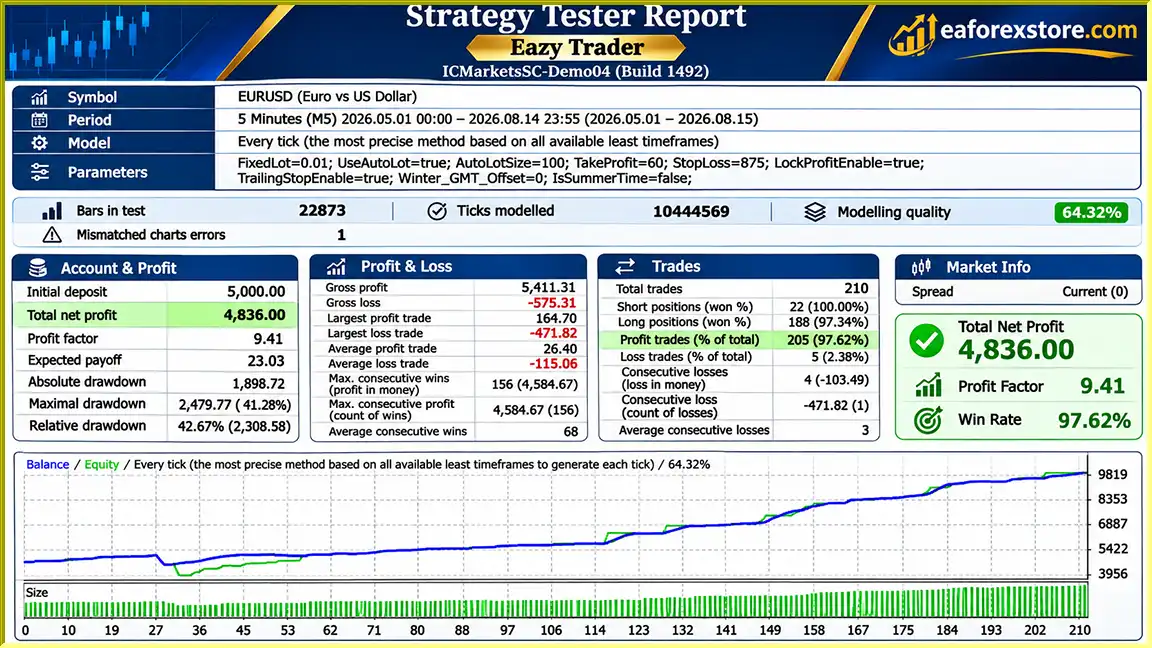
🔺EURUSD – 3.5Months
Eazy Trader EA MT4 Backtets
Risk management is essential when using Eazy Trader EA MT4, especially because night scalping strategies can be sensitive to spreads, slippage, and sudden market volatility.
| Parameter | Recommended Value |
|---|---|
| Trading Platform | MetaTrader 4 |
| Trading Strategy | Night Scalping |
| Currency Pair | EURUSD |
| Timeframe | M5 |
| Minimum Deposit | $50 (approximately €50, depending on exchange rate) |
| Broker Server Time | GMT+2 |
| Recommended Spread | 2–5 points |
| Preferred Leverage | 1:500 |
| Minimum Lot Size | 0.01 |
| VPS | Low latency, preferably no more than 3 ms |
| Lot Management | Fixed Lot / Autolot |
| Stop Loss | Configurable |
| Take Profit | Configurable |
These values reflect the developer’s recommendations, not independently validated optimal settings.
Fixed Trading Lot
Allows users to define a fixed trading volume rather than relying on automated lot calculation.
Autolot
Enables or disables automatic lot sizing.
Auto Lot Increment
Determines the account-balance increment used for the EA’s automatic lot calculation. The precise position-sizing formula should be verified with the developer.
Take Profit Level
Sets the trade’s profit target in points.
Stop Loss, Points
Defines the stop-loss distance in points, helping limit individual trade exposure under normal execution conditions.
The developer acknowledges that Eazy Trader EA may experience drawdowns and recommends withdrawing profits periodically, such as weekly or monthly.
However, regular profit withdrawals do not prevent drawdowns, reduce the risk of an open position, or guarantee the preservation of initial capital.
The recommended spread is 2–5 points.
Because night scalping often operates with relatively small profit targets, even modest increases in spreads or execution slippage may affect trading performance.
The developer recommends using a fast VPS with network latency of no more than approximately 3 milliseconds.
Low-latency connectivity may help reduce execution delays, although it cannot eliminate slippage or guarantee favorable fill prices.
Risk Warning: Automated Forex trading carries significant financial risk. Traders should evaluate position sizing, broker conditions, and historical strategy behavior before operating Eazy Trader EA on a live account.
Installing Eazy Trader EA MT4 requires a MetaTrader 4 trading platform, the Expert Advisor installation file, and a compatible Forex trading account.
Obtain the EA installation file from the product provider.
Depending on the distribution method, the file may be provided as an EX4 file or through the MetaTrader marketplace installation system.
Launch MetaTrader 4 and log in to your trading account.
The developer recommends using a broker offering tight EURUSD spreads, micro-lot trading, and reliable order execution.
For a manually supplied EX4 file:
If the EA is supplied through MQL5 Market, use its official installation workflow.
Locate EURUSD in the Market Watch window.
Open its chart and select the M5 timeframe.
Find Eazy Trader EA in the Navigator panel and drag it onto the EURUSD chart.
Open the EA’s settings window to configure the necessary inputs.
| Input Parameter | Description |
|---|---|
| Fixed Trading Lot | Fixed trading volume for manual lot-size configuration |
| Autolot | Enable or disable automatic lot calculation |
| Auto Lot Increment | Account-balance increment used in automatic lot calculation |
| Take Profit Level | Profit target expressed in points |
| Stop Loss, Points | Stop-loss distance expressed in points |
| Winter GMT Offset | Winter broker server GMT offset |
| Daylight Saving | Set to true when the applicable summer-time configuration requires it |
Set the Winter GMT Offset according to your broker’s server time.
The developer recommends a GMT+2 server configuration.
Make sure the setting corresponds to the EA’s expected server-time convention rather than simply using your local time zone.
When the applicable summertime setting is in effect, enable the Daylight Saving parameter as instructed by the developer.
Incorrect time settings may cause the EA to operate outside its intended trading session.
Enable automated trading in MetaTrader 4.
Check that the EA is successfully initialized and that the Experts and Journal tabs do not display configuration errors.
Before using real capital, test the EA on a demo account with broker conditions similar to the intended live environment.
Monitor spread behavior, trading hours, execution slippage, drawdown, and margin usage.
For continuous operation, consider running MetaTrader 4 on a reliable VPS with low latency to your broker’s trading server.
>> Join VIP Membership Now <<<
Eazy Trader EA MT4 is a fully automated Forex trading robot focused on nighttime scalping, with EURUSD M5 as its recommended trading environment.
Its main characteristics include a non-martingale strategy, relatively simple input configuration, fixed and automatic lot-sizing options, and adjustable take-profit and stop-loss parameters.
The developer’s stated minimum deposit of approximately $50 makes it accessible to traders interested in evaluating automated trading with a smaller initial account.
However, successful night scalping depends heavily on broker execution, tight spreads, accurate trading-session settings, and disciplined risk management.
The developer also acknowledges that drawdowns can occur, and the available product information does not provide independently verified historical results or maximum drawdown statistics.
For traders seeking a simple automated EURUSD night scalping system, Eazy Trader EA MT4 may be worth testing under realistic market conditions.
Explore Eazy Trader EA MT4, review its configuration requirements, and evaluate its trading behavior on a demo account before considering live deployment.
Disclaimer: Forex and CFD trading involve substantial risk, especially when leverage is used. No Expert Advisor can guarantee profits or eliminate losses. This article is for informational purposes only and does not constitute financial advice.
1. What is Eazy Trader EA MT4, and how does it work?
Eazy Trader EA MT4 is a fully automated Forex trading robot designed for night scalping on the MetaTrader 4 platform. It focuses on identifying short-term trading opportunities during nighttime market sessions, primarily using the EURUSD currency pair on the M5 timeframe. The Expert Advisor automatically executes trades based on its programmed strategy and supports configurable lot sizes, take-profit levels, and stop-loss settings.
2. What are the recommended settings for Eazy Trader EA MT4?
The developer recommends running Eazy Trader EA MT4 on the EURUSD currency pair with the M5 (5-minute) timeframe. The preferred broker server time is GMT+2, with spreads between 2 and 5 points and leverage of 1:500. The EA also provides adjustable Fixed Trading Lot, Autolot, Auto Lot Increment, Take Profit, Stop Loss, Winter GMT Offset, and Daylight Saving parameters. Traders should verify all settings before enabling live trading.
3. What is the minimum deposit required to use Eazy Trader EA MT4?
According to the developer, Eazy Trader EA MT4 can operate with a minimum deposit of approximately $50 or €50, depending on the trading account currency. The broker must support micro-lot trading with a minimum lot size of 0.01. However, a small starting balance offers limited protection against market volatility and drawdowns, so traders should carefully evaluate their margin requirements and risk exposure.
4. Does Eazy Trader EA MT4 use a Martingale trading strategy?
No. Eazy Trader EA MT4 uses a non-martingale Forex trading strategy. Unlike traditional martingale robots that increase position sizes after losses, Eazy Trader EA does not rely on this type of lot-doubling recovery system. Instead, it provides fixed lot and automatic lot-sizing options. However, avoiding martingale does not eliminate trading risks or guarantee consistent profits.
5. Is Eazy Trader EA MT4 profitable, and what are its backtest results?
The supplied Eazy Trader EA MT4 backtest report shows an initial deposit of $5,000, a reported net profit of approximately $4,836, a 97.62% win rate, and a maximum drawdown of 41.28% over 3.5 months. However, these results are not independently verified and should not be considered a guarantee of future profitability. Actual trading performance depends on market conditions, spreads, execution speed, and risk management.
6. Which Forex brokers are best suited for Eazy Trader EA MT4?
Eazy Trader EA MT4 is designed to work with Forex brokers offering tight EURUSD spreads, fast order execution, micro-lot trading, and compatible MetaTrader 4 accounts. The developer recommends spreads of approximately 2–5 points, leverage of 1:500, and GMT+2 broker server time. Since night scalping strategies are highly sensitive to trading costs and execution delays, choosing a reliable low-spread broker is particularly important.
7. Do I need a VPS to run Eazy Trader EA MT4 successfully?
A Forex VPS is not mandatory, but the developer strongly recommends using a low-latency VPS with approximately 3 milliseconds or less of network latency to the broker's trading server. A VPS can keep MetaTrader 4 running continuously, reduce interruptions caused by internet disconnections, and support automated nighttime trading. However, low latency cannot eliminate slippage or guarantee profitable trade execution.
8. How do I install and configure Eazy Trader EA MT4 on MetaTrader 4?
To install Eazy Trader EA MT4, download the Expert Advisor file and open MetaTrader 4. Navigate to File → Open Data Folder → MQL4 → Experts, then copy the EX4 file into the Experts folder. Restart or refresh MetaTrader 4, open the EURUSD chart, and select the M5 timeframe. Attach Eazy Trader EA, configure the lot-size, take-profit, stop-loss, GMT offset, and daylight saving settings, then enable AutoTrading. Test the EA on a demo account before using real funds.
In stock
In stock
In stock
In stock
In stock
Out of stock
No account yet?
Create an Account












 Automatic EA
 EA Best Seller
 Expert Advisor MT4
 Expert Advisor MT5
 HFT EA



Reviews
Clear filtersThere are no reviews yet.