





-
 Unlimited Activations
-
 Instant delivery
-
 Easy to install





 Unlimited Activations
Instant delivery
Easy to install
 Free Update
 Free Install Support

Swing Price Action Trader EA MT4, also known as SPA Trader, is an advanced Forex trading Expert Advisor designed for both fully automated and semi-automated trading on the MetaTrader 4 platform. Combining indicator-based market analysis, swing trading concepts, price action signals, and customizable trade management, this Expert Advisor provides traders with flexible control over their trading strategies.
Developed as an updated generation of the Two Forces trading product, SPA Trader introduces a multi-component market analysis system based on Strength X, Strength Y, momentum, and average-based trading conditions.
One of the most distinctive aspects of Swing Price Action Trader EA MT4 is its ability to function as both a trading indicator and an automated Expert Advisor. Traders can enable fully automated trading or manually initiate positions while allowing the EA to manage risk, stop losses, take profits, and trailing stops.
The system also features ATR-based risk management, partial profit-taking, automatic break-even adjustment, customizable closing rules, multi-timeframe analysis, and real-time trading notifications.
With its flexible trading modes and configurable parameters, SPA Trader is designed for Forex traders who want to combine discretionary decision-making with algorithmic trade management.
>>> Delivery time 24h-48h after payment.
>>> Refund if not delivered.
>>> You will receive the latest version without any limitations (ID+Time).> Reviewed by Jason Stap <<<
Swing Price Action Trader EA MT4 Overview
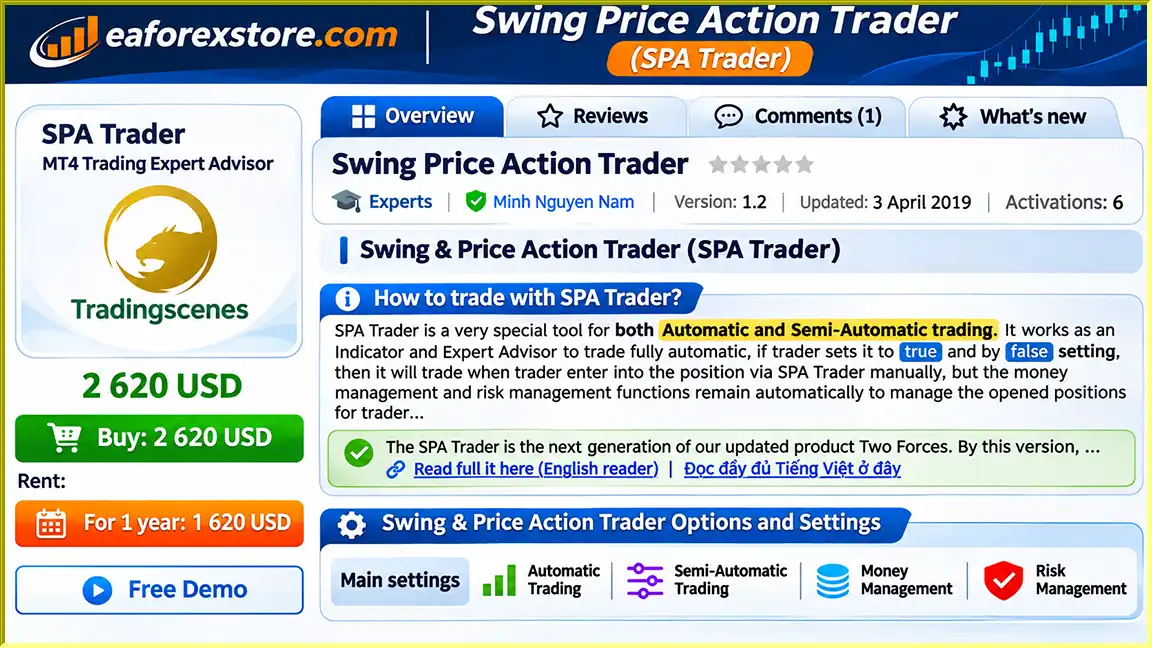
Swing Price Action Trader EA MT4 supports two trading modes.
Automatic Trading Mode: When the Auto Trading parameter is set to true, the Expert Advisor can execute trading operations automatically according to its programmed conditions.
Semi-Automatic Trading Mode: When Auto Trading is set to false, traders can manually initiate positions through SPA Trader while allowing the EA to manage supported money management and risk management functions.
This dual-mode functionality makes SPA Trader suitable for different trading preferences.
SPA Trader combines swing trading concepts with market strength and momentum analysis.
The system evaluates multiple trading conditions to help identify potential bullish, bearish, or non-trending market environments.
These conditions are displayed directly on the chart to support trading decisions.
The EA incorporates two proprietary market strength components known as Strength X and Strength Y.
Each component evaluates market conditions and produces directional indications:
The two strength readings can be averaged to provide an additional perspective on prevailing market direction.
The underlying mathematical formulas for Strength X and Strength Y are not disclosed in the supplied documentation.
Swing Price Action Trader EA MT4 uses Average True Range (ATR) concepts to calculate volatility-based trading levels.
Traders can configure the ATR timeframe, lookback period, and profit-taking percentages.
This allows trade management levels to reflect the recent volatility of the selected instrument.
SPA Trader includes an automatic money management option that calculates position sizes based on account balance and a configured percentage risk.
For example, a trader using a $10,000 account with a 2% risk setting and a 100-pip stop loss would have a theoretical risk budget of $200.
Under standard EURUSD conditions with approximately $10 per pip for one standard lot, the calculated position size would be approximately 0.20 lots.
Actual calculations depend on the instrument’s pip value, contract specifications, and trading account conditions.
SPA Trader supports three configurable profit-taking stages:
TP01: The first profit target, which can close a configured percentage of the position and move the stop loss to break-even.
TP02: The second profit-taking stage, after which trailing-stop functionality can begin.
TP03: An additional configurable profit-taking level used within the system’s trade management structure.
After the first configured profit target is reached, the EA can automatically move the stop loss to the entry price.
This feature is intended to reduce the remaining position’s exposure to unfavorable price movement.
However, commissions, swaps, slippage, and execution conditions may still affect the realized result.
SPA Trader includes trailing-stop functionality that can begin after the second take-profit level is reached.
This allows the EA to adjust its protective exit level as the market moves favorably.
The EA can operate across different chart timeframes.
A configurable Magic Number allows traders to distinguish positions managed by different EA instances or timeframe configurations.
SPA Trader includes four configurable closing-rule components based on averages, Strength X, Strength Y, and momentum.
This structure allows traders to customize how the system evaluates market conditions and manages positions.
The Expert Advisor supports several notification methods:
These options allow traders to monitor selected trading events without continuously watching the charts.
SPA Trader presents trading information directly on the MetaTrader 4 chart.
Strength X and Strength Y conditions are displayed as Long, Short, or Flat signals, with averaged readings intended to assist market trend evaluation.
Swing Price Action Trader EA MT4 combines market strength analysis, momentum evaluation, volatility-based trade management, and customizable trading rules.
The trader selects between fully automatic and semi-automatic operation using the Auto Trading parameter.
In automatic mode, the EA can execute trades based on its programmed conditions.
In semi-automatic mode, traders initiate positions manually through SPA Trader while retaining supported automatic management functions.
The system evaluates Strength X and Strength Y to assess potential market direction.
Each component produces a Long, Short, or Flat reading.
These signals are displayed on the chart and can be combined with other analytical conditions.
SPA Trader includes four rule components:
The developer describes a configuration in which the rules align in the same direction.
The exact logic and weighting of these conditions depend on the EA’s internal programming and selected settings.
When automatic money management is enabled, the system calculates position size using its risk percentage and stop-loss distance.
If fixed-lot trading is selected instead, position sizing follows the configured fixed volume.
The EA uses a selected ATR timeframe and lookback period to establish volatility-based distances.
Users can set percentage-based profit targets according to the calculated volatility.
Depending on the selected trading mode, SPA Trader either initiates trades automatically or manages positions opened manually through the system.
When TP01 is reached, the EA can close a configured portion of the position and move the remaining position’s stop loss to break-even.
After TP02, the trailing-stop mechanism can begin managing the remaining exposure.
The system continues evaluating relevant management conditions and can provide alerts through the enabled notification channels.
Swing Price Action Trader EA MT4 offers a combination of trading flexibility, market analysis, and automated position management.
Dual Trading Modes
The ability to switch between automatic and semi-automatic trading allows users to choose their preferred level of control.
Proprietary Market Strength Analysis
Strength X and Strength Y provide directional market readings that can support swing trading and price action analysis.
ATR-Based Position Management
Volatility-adjusted profit targets allow traders to configure trade management based on changing market conditions.
Automatic Risk-Based Lot Sizing
The money management feature can calculate position sizes according to account balance, risk percentage, and stop-loss distance.
Multi-Stage Profit Taking
Three take-profit levels support partial exits and continued participation in favorable market movements.
Break-Even and Trailing-Stop Features
Automated stop-loss adjustments help manage open positions after predefined profit conditions are met.
Multi-Timeframe Flexibility
Different timeframe configurations can be distinguished using separate Magic Numbers.
Comprehensive Notification Options
Pop-up, email, mobile, and sound notifications provide multiple ways to monitor trading activity.
Support for Discretionary Trading
The semi-automatic mode allows traders to retain control over entries while automating selected management tasks.
These features may appeal to traders seeking an Expert Advisor that combines manual decision-making with systematic trade execution and risk management.
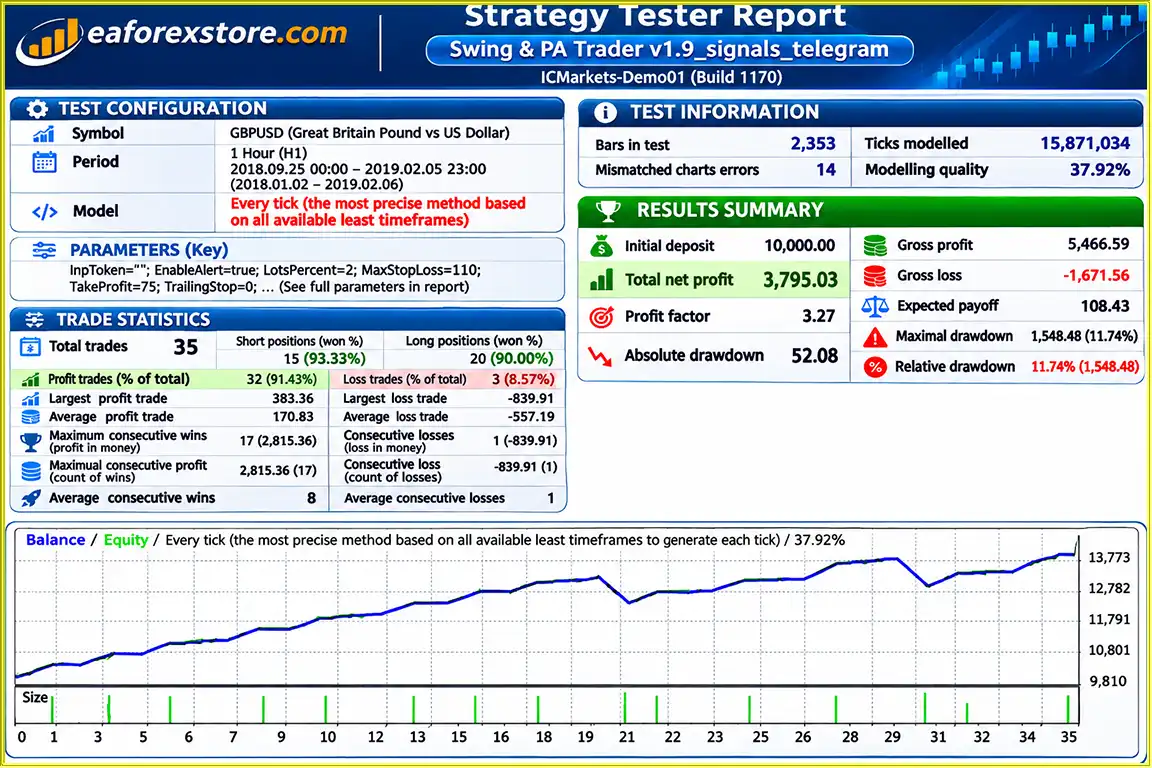
🔺GBPUSD – September 25, 2018, to February 5, 2019
Swing Price Action Trader EA MT4 Backtets
Risk management is a central component of Swing Price Action Trader EA MT4, with options for percentage-based position sizing, volatility-adjusted exit levels, partial profit-taking, and protective stop adjustments.
When Money Management is enabled, SPA Trader calculates trading volume according to the configured risk percentage and stop-loss distance.
For example:
| Parameter | Example Value |
|---|---|
| Account Balance | $10,000 |
| Risk Per Trade | 2% |
| Risk Budget | $200 |
| Stop-Loss Distance | 100 pips |
| Approximate EURUSD Position Size | 0.20 lots |
This illustration assumes a USD-denominated account and a pip value of approximately $10 per standard lot.
SPA Trader uses configurable ATR settings to calculate trading distances based on historical market volatility.
For example, if EURUSD has an average daily trading range of 80 pips and TP01 is configured at 60%, the first profit target would be:
80 pips × 60% = 48 pips
When price moves 48 pips favorably, the EA can execute the configured partial profit-taking action.
The EA supports multiple profit targets that allow traders to close portions of their positions at different stages.
This approach can help reduce remaining market exposure while allowing part of the position to continue participating in favorable price movements.
After TP01, the system can move the stop loss to the entry price.
However, break-even placement does not guarantee a zero-loss outcome because execution slippage and transaction costs may affect the final result.
After TP02, the trailing stop can begin adjusting the protective exit level.
This feature may help preserve part of an unrealized gain, although it cannot eliminate losses caused by market gaps or unfavorable execution.
| Alert Parameter | Function |
|---|---|
| Show Pop-Up Messages | Displays MetaTrader notifications |
| Send an E-Mail | Sends email notifications |
| Send Mobile Notifications | Sends mobile push notifications |
| Play an Alert Sound | Activates audible notifications |
Email and mobile alerts require the relevant MetaTrader notification services to be configured.
Risk Warning: Automated trade management can support risk control but cannot guarantee profitable results. Traders should independently test SPA Trader and verify position-sizing calculations before using real capital.
Installing Swing Price Action Trader EA MT4 requires MetaTrader 4, the Expert Advisor installation file, and a compatible trading account.
Obtain Swing Price Action Trader EA MT4 from the authorized product provider.
Verify that the installation file is compatible with MetaTrader 4.
Launch MetaTrader 4 and log in to your trading account.
For a manually supplied EX4 file:
If the product includes additional indicator files, follow the developer’s installation instructions for those components.
Select your preferred currency pair and timeframe.
The EA supports different timeframe configurations, although specific optimized instruments and timeframes are not provided in the source description.
Locate Swing Price Action Trader in the Navigator panel and attach it to the trading chart.
Open the EA input settings to configure the trading mode and management parameters.
Set Auto Trading = True for fully automated operation.
Set Auto Trading = False for semi-automatic operation, where trades are initiated manually through SPA Trader.
Enable Money Management if you want the EA to calculate position sizes according to risk percentage.
Review the risk amount, account balance, and stop-loss calculation before live deployment.
Enable the appropriate Risk Management setting and configure the ATR timeframe and lookback period.
Set the stop-loss, take-profit, and trailing-stop parameters according to your preferred trade management approach.
Set TP01, TP02, and TP03 according to the ATR-based percentages and partial closing rules supported by the EA.
For example, with an 80-pip daily ATR and a 60% TP01 setting, the first target would be 48 pips.
Review the settings for:
Adjust these settings according to your intended strategy, while retaining the developer’s defaults if their effects are not understood.
Assign a unique Magic Number to each EA instance when using multiple charts or configurations.
This helps the EA distinguish orders associated with different trading setups.
Configure the required notification options:
Enable the relevant email or push-notification services in MetaTrader when necessary.
Enable automated trading permissions in MetaTrader 4 as required by the selected operating mode.
Confirm that the EA is active and functioning correctly.
Run SPA Trader on a demo account and verify:
>> Join VIP Membership Now <<<
Swing Price Action Trader EA MT4 is a flexible automated trading system designed to combine swing trading, price action analysis, proprietary market strength indicators, and advanced position management.
Its ability to operate in both fully automated and semi-automated modes makes it particularly relevant for traders who want to retain control over trade entries while automating risk management and trade exits.
The integration of Strength X, Strength Y, ATR-based exit calculations, multiple take-profit levels, partial closing, break-even adjustment, and trailing-stop management provides a comprehensive range of trading configuration options.
However, the system’s flexibility also introduces configuration complexity. Traders need to understand how its money management, risk management, ATR settings, and closing rules interact.
Additionally, the proprietary strength calculations and historical performance characteristics have not been independently verified using the supplied information.
For traders interested in combining discretionary Forex trading with automated position management, Swing Price Action Trader EA MT4 offers a configurable platform worth evaluating through careful demo testing.
Disclaimer: Forex trading carries significant financial risk. Automated trading and risk management tools cannot guarantee profits or eliminate losses. This article is intended for informational purposes only and does not constitute financial or investment advice.
1. What is Swing Price Action Trader EA MT4, and how does it work?
Swing Price Action Trader EA MT4, also known as SPA Trader, is an automated Forex trading robot designed for the MetaTrader 4 platform. It combines swing trading, price action analysis, proprietary Strength X and Strength Y indicators, and momentum analysis to identify potential trading opportunities. The Expert Advisor supports both fully automated and semi-automated trading, allowing users to automate trade execution or manually enter positions while the EA manages risk and trade exits.
2. What is the difference between automatic and semi-automatic trading in SPA Trader?
Swing Price Action Trader EA MT4 offers two trading modes. In fully automatic mode, setting Auto Trading to True allows the EA to execute trades according to its programmed trading conditions. In semi-automatic mode, setting Auto Trading to False allows traders to initiate positions manually through SPA Trader while the system manages supported stop-loss, take-profit, trailing-stop, and money management functions. This flexibility makes SPA Trader suitable for traders who prefer different levels of control over their Forex strategies.
3. What are Strength X and Strength Y indicators in Swing Price Action Trader EA?
Strength X and Strength Y are proprietary market analysis components integrated into Swing Price Action Trader EA MT4. They evaluate market conditions and display Long, Short, or Flat signals to indicate potential bullish, bearish, or non-trending market environments. SPA Trader can combine these readings with momentum and average-based conditions to support trading decisions. However, the developer has not publicly disclosed the exact mathematical formulas behind these indicators.
4. How does Swing Price Action Trader EA MT4 manage trading risks?
SPA Trader includes several risk management features, including percentage-based automatic lot sizing, ATR-based stop-loss and take-profit calculations, partial profit-taking, automatic break-even adjustments, and trailing stops. Traders can configure their preferred risk percentage and volatility-based exit levels. These tools help automate position management, but they cannot guarantee capital protection or eliminate trading losses.
5. Is Swing Price Action Trader EA MT4 profitable, and what are its backtest results?
The supplied Swing Price Action Trader EA MT4 backtest report for GBPUSD covers September 25, 2018, to February 5, 2019. It reports an initial deposit of $10,000, a total net profit of $3,795.03, a 91.43% win rate, and a maximum drawdown of 11.74%. However, these performance figures have not been independently verified and should not be considered a guarantee of future profitability. Actual results depend on market conditions, trading settings, broker execution, and risk management.
6. How do TP01, TP02, and TP03 work in Swing Price Action Trader EA MT4?
Swing Price Action Trader EA MT4 supports three configurable take-profit levels. TP01 can close a selected percentage of an open position and automatically move the remaining position's stop loss to break-even. TP02 provides another profit-taking stage and can activate the trailing-stop mechanism. TP03 serves as an additional profit target within the EA's trade management system. These features allow traders to manage positions progressively while maintaining exposure to favorable price movements.
7. Which Forex currency pairs and timeframes are supported by SPA Trader MT4?
Swing Price Action Trader EA MT4 supports different Forex currency pairs and chart timeframes through its configurable trading parameters. Traders can adjust ATR settings, market strength analysis, momentum conditions, and trade management rules according to their preferred trading environment. The EA also supports unique Magic Numbers for different chart instances. However, the available product documentation does not specify a universally recommended currency pair or timeframe, so independent backtesting is recommended.
8. How do I install and configure Swing Price Action Trader EA MT4?
To install Swing Price Action Trader EA MT4, download the Expert Advisor file and open MetaTrader 4. Navigate to File → Open Data Folder → MQL4 → Experts and copy the SPA Trader EX4 file into the Experts folder. Restart or refresh MetaTrader 4, open your preferred currency pair chart, and attach the EA. Configure Auto Trading, Money Management, ATR settings, TP01–TP03, Strength X, Strength Y, momentum rules, and Magic Number. Enable the required trading permissions and test the Expert Advisor on a demo account before using real funds.
In stock
In stock
In stock
In stock
In stock
Out of stock
No account yet?
Create an Account












 Automatic EA
 EA Best Seller
 Expert Advisor MT4
 Expert Advisor MT5
 HFT EA



Reviews
Clear filtersThere are no reviews yet.