





-
 Unlimited Activations
-
 Instant delivery
-
 Easy to install






 Unlimited Activations
Instant delivery
Easy to install
 Free Update
 Free Install Support

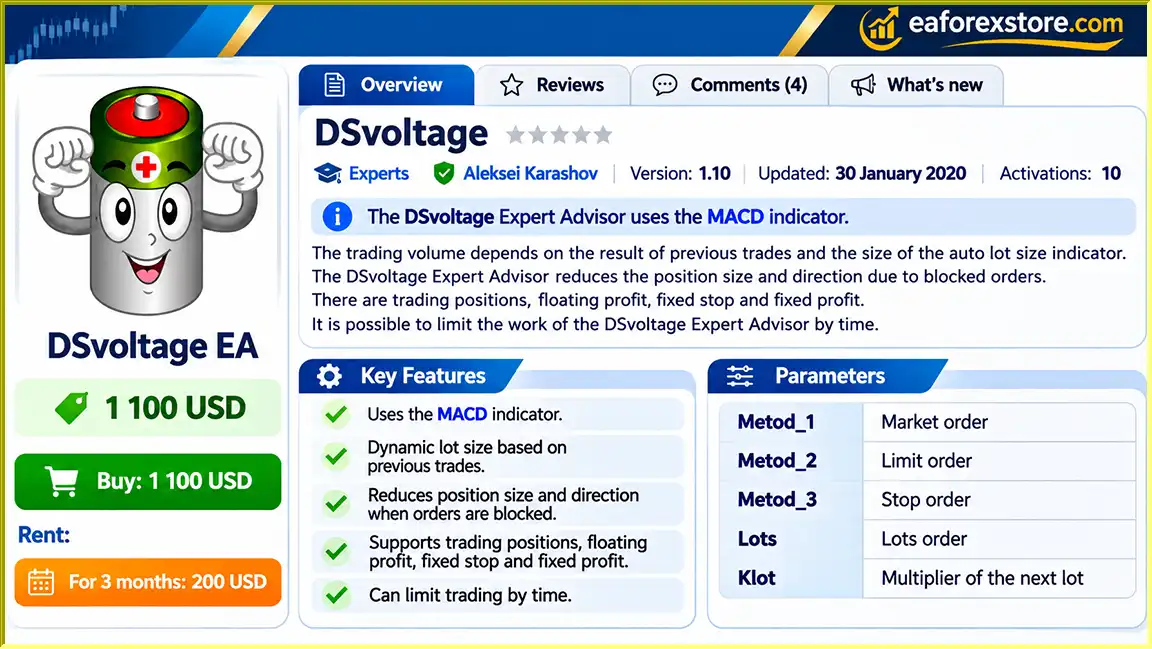
DSvoltage EA MT4 is an automated Forex trading Expert Advisor developed for the MetaTrader 4 platform. The trading system utilizes the Moving Average Convergence Divergence (MACD) indicator to support its trading decisions while incorporating flexible order execution, position sizing, hedging, and trade management features.
Unlike basic Forex robots that focus on a single order execution method, DSvoltage EA MT4 supports market orders, limit orders, and stop orders, giving traders multiple ways to configure automated trading activity.
The Expert Advisor also includes an adaptive trading volume mechanism influenced by previous trading results, lot-size settings, and the AutoLot function.
Another important feature is its ability to manage positions using hedging-related functionality, including opposing orders and adjustable position sizes.
For trade management, DSvoltage EA provides fixed stop-loss and profit settings, floating profit management, trailing stops, break-even adjustments, and controls for managing multiple orders.
The system also includes customizable trading hours, spread restrictions, slippage settings, and MACD configuration parameters.
For traders exploring MACD-based automated Forex trading, DSvoltage EA MT4 offers a configurable algorithmic trading system with multiple execution and position management options.
>>> Delivery time 24h-48h after payment.
>>> Refund if not delivered.
>>> You will receive the latest version without any limitations (ID+Time).> Reviewed by Jason Stap <<<
DSvoltage EA MT4 Overview
DSvoltage EA MT4 uses the MACD indicator as a central component of its trading algorithm.
MACD is a momentum-based technical indicator that evaluates the relationship between moving averages to help identify changes in market momentum and direction.
The EA includes configurable MACD parameters, allowing traders to adjust indicator calculations according to their preferred trading environment.
The Expert Advisor can execute trading operations automatically according to its programmed conditions.
Once installed and configured, DSvoltage EA can monitor trading signals, manage orders, and apply its selected position management rules.
DSvoltage EA MT4 supports three configurable order methods:
These methods provide flexibility in how the Expert Advisor places trades.
Market orders execute at available market prices, while limit and stop orders allow trading instructions to be placed at specified price levels.
The EA includes configurable lot-sizing parameters.
According to the developer, trading volume may depend on previous trading results and the automatic lot-sizing mechanism.
The Lots, Klot, and AutoLot parameters allow traders to configure different aspects of position sizing.
Because Klot controls the multiplier for subsequent lots, traders should carefully evaluate how this setting influences trading exposure.
DSvoltage EA MT4 includes hedging-related functionality involving position size, direction, and opposing orders.
This feature may allow the EA to manage exposure through positions in different market directions, depending on its internal trading logic.
However, hedging does not eliminate market risk and may increase trading costs or total position exposure.
The Expert Advisor includes parameters for individual stop-loss levels and overall order profit or loss thresholds.
These controls allow traders to configure selected exit conditions for open positions and groups of orders.
DSvoltage EA supports trailing-stop functionality for individual orders and multiple orders.
Trailing stops can adjust protective exit levels as the market moves favorably.
The BULevel and BUPoint parameters provide configurable break-even functionality.
This feature is intended to help manage open trades after specified favorable price movements.
The EA includes parameters for maximum spread and execution deviation.
These settings are intended to help manage order execution under changing market conditions.
DSvoltage EA allows users to configure trading hours.
Traders can define the starting and ending hours and minutes during which the EA is permitted to operate.
The AutoLot parameter provides automatic lot-sizing functionality for orders.
This allows the EA to adjust trading volume according to its internal calculation logic and configured inputs.
The Expert Advisor includes TesterMinPercentProfitTrades, a parameter described as the minimum percentage of profitable trades.
Its precise role in the strategy-testing process should be verified with the developer.
DSvoltage EA MT4 combines MACD-based market analysis with automated order execution and configurable position management.
The Expert Advisor uses MACD calculations to evaluate market conditions.
The TF2, MA1, MA2, MA3, and MaM parameters allow traders to configure the indicator’s calculation environment.
The exact entry conditions generated from these settings are not fully disclosed in the supplied documentation.
The EA evaluates market conditions according to its programmed MACD-based strategy.
When the required trading criteria are satisfied, the system may initiate an order using the selected execution method.
Depending on the configured settings, DSvoltage EA can use market orders, limit orders, or stop orders.
Pending orders may be placed at specified distances using the Step parameter.
The Expert Advisor determines trading volume using its configured lot-sizing settings.
The system includes fixed lot values, an automatic lot calculation option, and a multiplier for subsequent positions.
Previous trading results may also influence lot sizing according to the developer’s description.
The EA can manage opposing positions through its hedging-related logic.
The exact rules governing when opposing positions are opened, adjusted, or closed are not specified in the available product description.
DSvoltage EA applies the configured individual and overall order management thresholds.
These include StopLoss, Loss, and Profit parameters.
The Expert Advisor can manage active positions using trailing-stop and break-even settings.
These functions are intended to adjust exit conditions as trades develop.
The EA operates according to its configured trading hours.
StartHour, StartMin, EndHour, and EndMin allow traders to define the permitted trading period.
While MetaTrader 4 remains connected and automated trading is enabled, DSvoltage EA can continue monitoring and managing trading activity according to its settings.
DSvoltage EA MT4 provides a combination of MACD analysis, flexible order execution, and automated trade management.
MACD-Based Market Analysis
The EA uses a widely recognized momentum indicator to support its trading strategy.
Multiple Order Types
Support for market, limit, and stop orders provides flexibility in order placement.
Automated Lot Sizing
The AutoLot feature allows traders to configure automated position-sizing behavior.
Hedging Capabilities
The system includes functionality for managing opposing positions, offering an additional approach to position management.
Individual and Group Trade Controls
The EA provides parameters for both individual positions and groups of orders.
Trailing Stop Functionality
Configurable trailing stops support dynamic management of existing trades.
Break-Even Adjustment
Break-even settings provide an additional mechanism for adjusting protective levels.
Trading Hour Restrictions
Users can define when automated trading activity is permitted.
Customizable MACD Parameters
The indicator settings allow traders to adjust MACD calculations for different trading conditions.
These features make DSvoltage EA MT4 a flexible trading system for users interested in combining momentum analysis with automated order management.
However, its effectiveness depends on configuration, broker conditions, market volatility, and the risks associated with its position-sizing and hedging mechanisms.
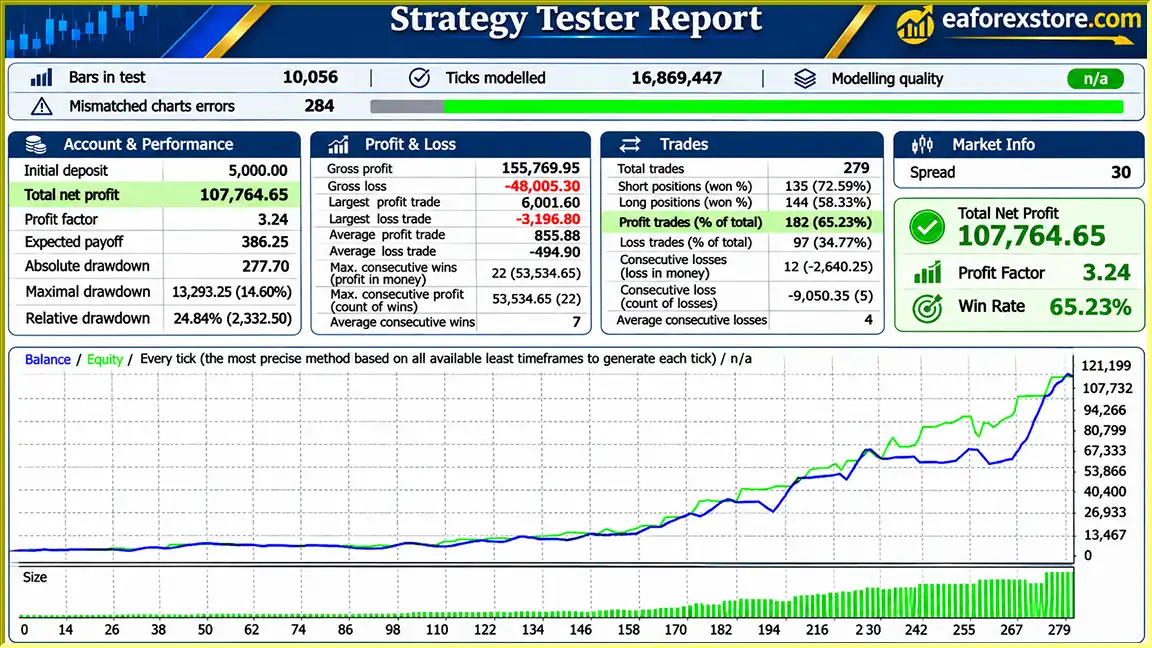
DSvoltage EA MT4 backtets
Risk management is especially important when using DSvoltage EA MT4, as the system includes lot multiplication, multiple order types, and hedging functionality.
| Parameter | Description | Provided Range / Setting |
|---|---|---|
| Metod_1 | Market order method | Not specified |
| Metod_2 | Limit order method | Not specified |
| Metod_3 | Stop order method | Not specified |
| Lots | Trading lot size | User-defined |
| Klot | Multiplier for the next lot | User-defined |
| Loss | Overall order loss threshold in points | 100–300 |
| Profit | Overall order profit threshold in points | 100–300 |
| StopLoss | Stop-loss setting for orders | 100–300 |
| Step | Distance for stop and limit orders | 0–100 |
| Expir | Time-related pending-order management | 0–100 |
| BULevel | Break-even activation level | 100–300 |
| BUPoint | Break-even adjustment in points | 0–10 |
| Spred | Maximum permitted spread | User-defined |
| TrailingStop | Individual order trailing stop | 100–300 |
| TrailingMStop | Trailing stop for all orders | 100–300 |
| AutoLot | Automatic lot sizing for orders | User-defined |
The ranges are reproduced from the developer’s documentation and are not necessarily optimal settings for every broker or instrument.
The Klot parameter controls the multiplier applied to subsequent lot sizes.
Depending on the value selected, this may result in increasing position sizes and greater financial exposure.
Traders should understand how the EA calculates new positions before activating aggressive lot multipliers.
Hedging may involve opening positions in opposite market directions.
Although this can change net directional exposure, it does not necessarily reduce total margin requirements, trading expenses, or liquidation risk.
Hedging rules and margin treatment also vary between brokers.
The StopLoss parameter specifies the stop-loss setting for orders.
Meanwhile, Loss is described as an overall order loss threshold.
The exact enforcement of these settings should be confirmed through testing.
Stop-loss instructions cannot guarantee execution at the intended price during rapid market movements.
The Profit parameter provides an overall profit threshold for orders.
The developer also mentions floating profit management, but does not disclose the complete calculation rules.
BULevel and BUPoint configure the EA’s break-even behavior.
These settings may help adjust exit levels after favorable price movements.
However, break-even execution may still produce small losses because of spreads, commissions, or slippage.
TrailingStop and TrailingMStop provide trailing-stop settings for individual trades and overall order management.
The precise calculation and activation rules should be verified in a demo environment.
The Spred parameter controls the maximum permitted spread at which the EA operates.
This can help restrict trading when transaction costs become unfavorable.
The EA includes configurable start and end times.
These controls allow traders to limit trading activity to selected periods, although the documentation does not establish whether positions already open are automatically closed when the trading period ends.
The supplied product information does not specify dedicated pop-up, email, mobile push, or sound-alert functionality.
Users should rely on MetaTrader’s available order monitoring and notification options unless additional EA-specific alerts are confirmed.
Risk Warning: Forex trading involves substantial risk, particularly when automated strategies use multiple positions, dynamic lot sizing, or hedging. Traders should carefully test all risk-management settings before live deployment.
Installing DSvoltage EA MT4 involves adding the Expert Advisor to MetaTrader 4 and configuring its trading, indicator, and risk-management settings.
Obtain the installation file from the product provider.
Make sure the EA is compatible with MetaTrader 4.
Open MetaTrader 4 and log in to your trading account.
Select a broker that supports the execution methods and hedging functionality required by the EA.
If the EA is supplied as an EX4 file:
Select your preferred currency pair and timeframe.
The developer has not provided a specific optimized currency pair or timeframe, so the chosen configuration should be independently tested.
Locate DSvoltage EA in the Navigator panel.
Drag the Expert Advisor onto the selected trading chart.
Review the following parameters:
Configure the available order-method options according to the EA’s supported input structure.
| Parameter | Description | Documented Range |
|---|---|---|
| TF2 | MACD indicator timeframe | Not specified |
| MA1 | First moving average parameter | 0–100 |
| MA2 | Second moving average parameter | 0–100 |
| MA3 | Third MACD-related parameter | 0–100 |
| MaM | MACD calculation method | 0–6 |
The documentation labels MA3 as “MA Boss,” but does not explain its precise role in the MACD calculation.
Set the following parameters:
Use conservative values during initial testing and verify how the settings interact.
| Parameter | Provided Range |
|---|---|
| Loss | 100–300 points |
| Profit | 100–300 points |
| StopLoss | 100–300 points |
| BULevel | 100–300 |
| BUPoint | 0–10 points |
| TrailingStop | 100–300 points |
| TrailingMStop | 100–300 points |
These parameters control aspects of loss management, profit targets, break-even behavior, and trailing-stop functionality.
Set Step and Expir according to the intended pending-order behavior.
Step is used for stop and limit order distances, while Expir is associated with time-related pending-order management.
The units and detailed Expir behavior should be confirmed with the developer.
| Parameter | Function |
|---|---|
| StartHour | Trading start hour |
| StartMin | Trading start minute |
| EndHour | Trading end hour |
| EndMin | Trading end minute |
Configure these parameters according to your preferred trading schedule and the broker’s server time.
Review the following settings:
Spred: Maximum spread at which the EA is permitted to operate.
Slip: Execution deviation or requote-related setting.
Magic: Unique identifier for the EA’s orders.
TesterMinPercentProfitTrades: Minimum percentage of profitable trades used within the EA’s testing-related functionality.
Enable automated trading in MetaTrader 4.
Confirm that the EA is correctly initialized and review the Experts and Journal tabs for errors.
Run DSvoltage EA on a demo account and evaluate:
>> Join VIP Membership Now <<<
DSvoltage EA MT4 is a configurable automated Forex trading robot that combines MACD-based market analysis with multiple order execution methods, dynamic lot sizing, hedging functionality, and advanced position management settings.
Its support for market, limit, and stop orders provides flexibility in trade execution, while the AutoLot, Klot, break-even, trailing-stop, and overall profit/loss controls offer several ways to customize trading behavior.
The ability to restrict trading hours and configure MACD calculations further increases the system’s adaptability.
However, features such as lot multiplication, multiple pending orders, and hedging require careful risk management. These mechanisms can increase trading exposure and should not be interpreted as guaranteed loss protection.
The available product description also does not provide independently verified performance statistics, recommended currency pairs, or complete details of the trading algorithm.
For traders interested in a MACD-based Forex Expert Advisor with automated order management and customizable execution settings, DSvoltage EA MT4 may be worth evaluating through backtesting and demo trading.
Explore DSvoltage EA MT4, review its trading parameters, and test its position management features before considering live deployment.
1. What is DSvoltage EA MT4, and how does it work?
DSvoltage EA MT4 is an automated Forex trading robot designed for the MetaTrader 4 platform. It uses the Moving Average Convergence Divergence (MACD) indicator to analyze market momentum and identify potential trading opportunities. The Expert Advisor supports automated trade execution, dynamic lot sizing, hedging, trailing stops, and break-even management. It can execute market, limit, and stop orders according to its configured trading strategy.
2. What trading strategy does DSvoltage EA MT4 use?
DSvoltage EA MT4 primarily uses a MACD-based trading strategy to evaluate market momentum and potential price direction. Traders can customize MACD settings through parameters such as TF2, MA1, MA2, MA3, and MaM. The EA also incorporates dynamic position sizing and hedging-related functionality. However, the developer has not fully disclosed its proprietary entry and exit algorithms.
3. Does DSvoltage EA MT4 support hedging and multiple order types?
Yes. DSvoltage EA MT4 supports hedging-related position management and three order execution methods: market orders (Metod_1), limit orders (Metod_2), and stop orders (Metod_3). Its hedging functionality can involve opening opposing positions based on the EA's internal trading rules. However, hedging does not eliminate financial risk and may increase trading costs, margin requirements, and overall exposure.
4. What are the recommended settings for DSvoltage EA MT4?
DSvoltage EA MT4 provides configurable trading parameters, including StopLoss, Loss, and Profit values ranging from 100 to 300 points. The Step parameter supports values from 0 to 100, while BULevel and TrailingStop have documented ranges of 100–300. Traders can also adjust Lots, Klot, AutoLot, Spred, Slip, MACD settings, and trading hours. These documented ranges are not necessarily optimal settings and should be tested before live trading.
5. Is DSvoltage EA MT4 profitable, and what are its backtest results?
The supplied DSvoltage EA MT4 backtest report shows an initial deposit of $5,000, a reported net profit of $107,764.65, a 65.23% win rate, and a maximum drawdown of 14.60%. However, these performance figures have not been independently verified and cannot guarantee future profitability. Live trading results may differ significantly due to market volatility, broker execution, lot-sizing parameters, and hedging exposure.
6. How does DSvoltage EA MT4 manage trading risks and lot sizes?
DSvoltage EA MT4 includes fixed lot settings, automatic lot calculation through AutoLot, and a Klot multiplier that can influence subsequent position sizes. Risk management features include individual stop losses, overall profit and loss thresholds, trailing stops, break-even adjustments, spread restrictions, and configurable trading hours. Traders should carefully evaluate lot multiplication and multiple-position exposure because these features can significantly increase potential losses.
7. Which Forex currency pairs and timeframes are best for DSvoltage EA MT4?
DSvoltage EA MT4 allows traders to select their preferred Forex currency pairs and chart timeframes. Its MACD configuration parameters provide flexibility for different trading environments. However, the available product documentation does not specify an officially optimized currency pair or recommended timeframe. Traders should independently backtest their chosen instruments and evaluate spreads, execution speed, historical drawdown, and strategy performance before live deployment.
8. How do I install and configure DSvoltage EA MT4 on MetaTrader 4?
To install DSvoltage EA MT4, download the Expert Advisor file and launch MetaTrader 4. Navigate to File → Open Data Folder → MQL4 → Experts, then copy the DSvoltage EA EX4 file into the Experts folder. Restart or refresh MetaTrader 4, open your preferred trading chart, and attach the EA. Configure MACD parameters, order execution methods, Lots, Klot, AutoLot, StopLoss, trailing stops, break-even levels, and trading hours. Enable AutoTrading and test the system on a demo account before trading with real funds.
In stock
In stock
In stock
In stock
In stock
Out of stock
No account yet?
Create an Account












 Automatic EA
 EA Best Seller
 Expert Advisor MT4
 Expert Advisor MT5
 HFT EA



Reviews
Clear filtersThere are no reviews yet.