
Product Overview
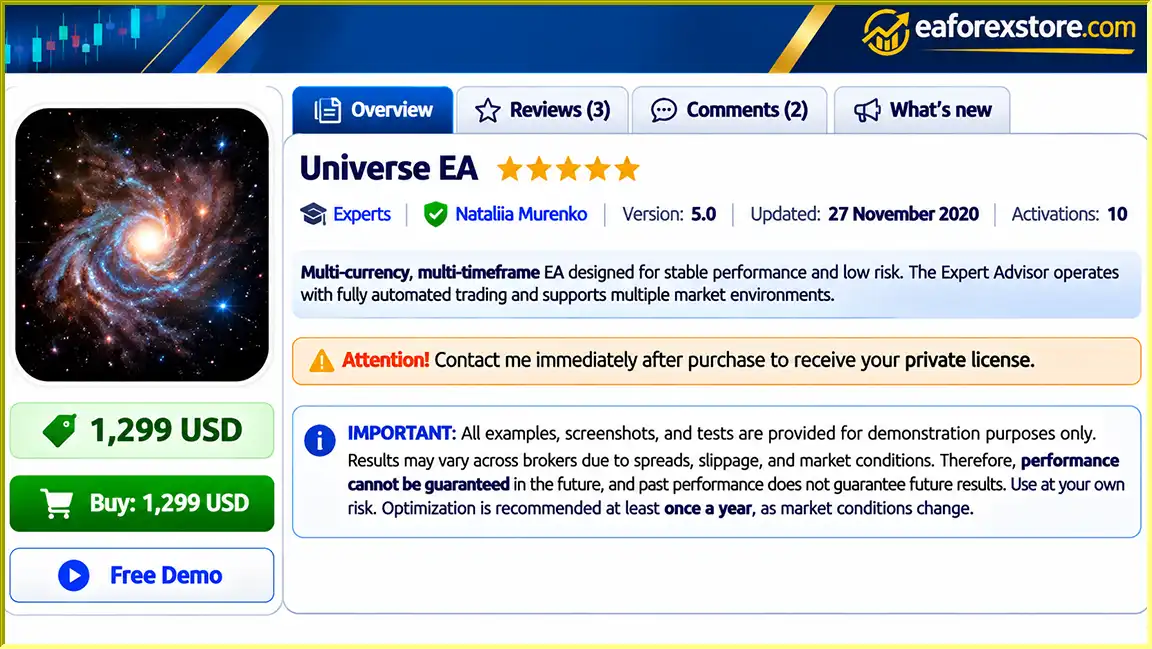
Universe EA MT4 is a fully automated Forex trading Expert Advisor developed for the MetaTrader 4 platform. Designed to combine technical market analysis, adaptive trading algorithms, and capital management tools, Universe EA aims to provide a structured approach to algorithmic Forex trading.
The Expert Advisor uses a combination of trading indicators and market filters to evaluate price movements, identify potential trading opportunities, and execute positions automatically when predefined conditions are satisfied.
One of the key characteristics of Universe EA MT4 is its emphasis on broker-specific optimization and individualized trading configurations. Rather than relying on universal settings, the developer recommends optimizing the EA according to each trader's broker, account balance, selected currency pair, and execution environment.
Universe EA operates on the M15 timeframe, with NZDCAD provided as the main example currency pair. Additional example instruments include AUDCAD, AUDUSD, and USDCAD.
The developer provides an NZDCAD optimization reference based on RoboForex ECN historical quotes. However, users must perform their own optimization before deploying the Expert Advisor on other brokers or currency pairs.
With fully automated trade execution, adaptive stop-loss functionality, and configurable capital protection mechanisms, Universe EA MT4 offers a flexible solution for traders interested in customized Forex automation.
About the Developer
- Author: Natalyia Nikitina
- Experience: Over +5 years of experience on MQL5.
- Notable Products: Universe EA MT4, Requiem MT5, Pelagia MT5, Solaris Imperium MT5, PropSurge One MT5, BaLLzProtector MT5, TradeRanger MT5, Winter MT5, Ride the wind MT5, Duramax MT5, Ride the wind MT5, Force Strategy MT5 and other advisors.
- Flagship Product: Universe EA MT4 is rated as the best performing product of the year.
>>> Delivery time 24h-48h after payment.
>>> Refund if not delivered.
>>> You will receive the latest version without any limitations (ID+Time).> Reviewed by Jason Stap <<<
Key Features Of Universe EA MT4
Fully Automated Forex Trading
Universe EA MT4 operates in a fully automated trading mode, reducing the need for continuous manual order placement.
Once correctly installed, optimized, and configured, the Expert Advisor can monitor market conditions, generate trading signals, and execute orders according to its programmed strategy.
Multi-Indicator Market Analysis
The EA combines technical indicators and filtering mechanisms to evaluate potential trading opportunities.
This analytical approach is intended to help the system distinguish between different market conditions and identify trading signals that satisfy its internal requirements.
The exact indicators and signal-generation formulas are not disclosed in the provided documentation.
Adaptive Market Conditions
Universe EA MT4 is designed to respond to changing market volatility and trading conditions.
Its configurable algorithm allows users to optimize parameters for different market environments, although adaptability does not guarantee consistent profitability.
Adaptive Stop-Loss Management
The Expert Advisor includes adaptive stop-loss functionality intended to manage trade exposure according to its configured rules.
Unlike a strictly fixed stop-loss approach, adaptive risk controls may adjust protective levels according to the algorithm's internal conditions.
The exact stop-loss calculation method is not specified in the supplied product information.
Capital Protection Mechanisms
Universe EA MT4 incorporates capital management scenarios intended to help control risk.
These features operate according to the EA's configured parameters and should be tested to verify how they behave during unfavorable market movements.
Broker-Specific Optimization
A distinguishing feature of Universe EA MT4 is its requirement for individualized optimization.
The developer emphasizes that trading parameters should be adjusted according to:
- Broker price quotations
- Spread and commission conditions
- Trading account balance
- Currency pair characteristics
- Order execution environment
- Selected trading parameters
This approach recognizes that trading conditions may vary substantially between brokers.
M15 Trading Timeframe
Universe EA is designed to operate on the M15 timeframe.
The 15-minute chart provides the trading environment specified by the developer for strategy testing and optimization.
Single-Currency Trading Mode
For live trading, Universe EA MT4 must operate in single-currency mode.
Each selected currency pair requires separate optimization and configuration.
The developer does not recommend treating one configuration as universally applicable across multiple currency pairs.
Multiple Example Currency Pairs
The developer provides the following instruments as examples:
- NZDCAD – Main example currency pair
- AUDCAD – Additional example
- AUDUSD – Additional example
- USDCAD – Additional example
These instruments are not guaranteed to perform equally across different brokers or trading accounts.
Quick Installation and Testing
Universe EA MT4 includes built-in parameters that allow users to begin exploring and testing the system after installation.
However, the developer stresses that default settings and unoptimized tests should not be considered representative of actual live trading performance.
How It Works
Universe EA MT4 follows a systematic trading process based on predefined market analysis rules, automated signal generation, and configurable risk management.
Step 1: Market Data Analysis
The Expert Advisor evaluates market price movements using its combination of technical indicators and filters.
These calculations are used to identify potential trading opportunities.
Step 2: Trading Signal Generation
When market conditions satisfy the EA's predefined rules, Universe EA generates a trading signal.
The exact entry conditions and proprietary signal calculations are not fully disclosed.
Step 3: Automated Order Execution
Once the required conditions are met, the Expert Advisor can automatically open a trading position.
Trade execution depends on broker conditions, available margin, and the selected trading configuration.
Step 4: Adaptive Risk Management
The EA applies its configured stop-loss and capital management mechanisms to open positions.
These mechanisms are designed to help manage trading exposure, but they do not eliminate the possibility of losses.
Step 5: Position Monitoring
Universe EA continues monitoring relevant market conditions and managing positions according to its internal algorithm.
Step 6: Broker-Specific Configuration
Before live deployment, traders must optimize the EA using historical data and execution conditions relevant to their selected broker.
For example, the developer's NZDCAD reference configuration is based on RoboForex ECN quotations.
Step 7: Single-Currency Live Operation
After optimization and evaluation, the EA can be launched on a separately configured currency pair.
The developer specifically requires single-currency operation for each live trading configuration.
Why Choose Universe EA MT4?
Universe EA MT4 is designed for traders seeking an automated Forex trading system with customizable parameters and an emphasis on individualized optimization.
Fully Automated Operation
The Expert Advisor handles market analysis and trade execution according to its programmed rules.
Adaptive Trading Framework
The system is designed to accommodate different levels of volatility and changing market conditions.
Risk Management Integration
Adaptive stop-loss and capital protection features provide configurable tools for managing trading exposure.
Broker-Specific Optimization
Instead of claiming that one preset works everywhere, the developer emphasizes optimization for each broker's trading conditions.
Defined M15 Trading Environment
The recommended M15 timeframe provides a consistent starting point for backtesting and strategy configuration.
Multiple Currency Pair Examples
NZDCAD, AUDCAD, AUDUSD, and USDCAD provide example instruments for evaluating the trading algorithm.
Low-Spread Account Compatibility
The EA is intended for accounts with consistently low spreads and reliable execution, including ECN, Raw Spread, Pro, and Zero account types.
Built-In Testing Parameters
Default inputs allow users to begin familiarization and preliminary strategy testing without constructing an initial configuration from scratch.
Universe EA MT4 may appeal to traders who prefer to optimize automated trading systems for their own broker rather than rely entirely on universal preset files.
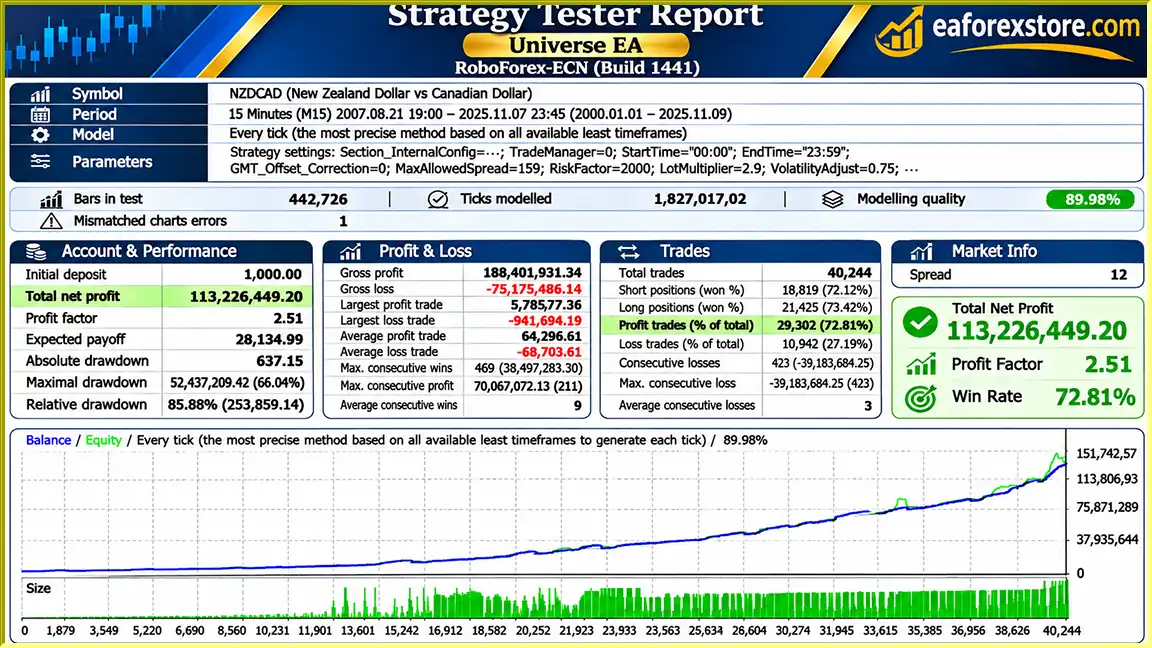
Universe EA MT4 Backtest Results
🔺NZDCAD – August 21, 2007, to November 7, 2025, covering over 18 years
- Initial Deposit: $1,000
- Total Net Profit: $1,132,264,449.20
- Win Rate (% of total): 72.81%
- Maximum Drawdown: 66.04%
Risk Management & Alerts
Risk management is a central consideration when using Universe EA MT4, particularly because the developer requires individualized optimization and recommends relatively high leverage.
Recommended Technical Requirements
| Parameter | Developer's Recommendation |
|---|---|
| Trading Platform | MetaTrader 4 |
| Timeframe | M15 |
| Primary Example Pair | NZDCAD |
| Additional Example Pairs | AUDCAD, AUDUSD, USDCAD |
| Live Trading Mode | Single-Currency |
| Account Type | ECN / Raw Spread / Pro / Zero |
| Leverage | From 1:500 |
| Minimum Deposit | From $1,000 |
| VPS | Recommended |
| Optimization | Required Individually |
These are developer-provided requirements rather than independently verified optimal trading conditions.
Adaptive Stop-Loss Protection
Universe EA includes adaptive stop-loss functionality.
This feature is intended to adjust protective trading conditions based on the EA's programmed strategy.
However, stop-loss execution can be affected by market gaps, volatility, and slippage.
Capital Protection Scenarios
The developer states that Universe EA includes capital protection mechanisms intended to help maintain risk within configured limits.
The exact rules, thresholds, and calculations are not disclosed.
Traders should verify the operation of these mechanisms through backtesting and demo trading.
Leverage and Margin Risk
The developer recommends leverage from 1:500.
While higher leverage reduces margin requirements for a given position size, it also allows traders to establish larger exposures relative to their account equity.
This can amplify losses and increase the risk of account liquidation.
Broker Execution Risk
Universe EA requires optimization for the selected broker because differences in spreads, commissions, quotations, and execution quality may influence trading results.
A configuration optimized using RoboForex ECN quotations should not automatically be assumed suitable for another broker.
Optimization and Overfitting Risk
Optimization can help identify settings that performed favorably on historical data.
However, excessive optimization may lead to overfitting, where a configuration performs well on past data but poorly under new market conditions.
Traders should use out-of-sample testing and forward testing to evaluate strategy robustness.
Single-Currency Exposure
The developer requires live operation in single-currency mode.
Each trading instrument should be optimized and managed separately.
Using multiple independently configured pairs can increase total account exposure, even if each individual configuration appears acceptable.
Trading Alerts and Notifications
The supplied documentation does not specify dedicated email alerts, mobile push notifications, or custom pop-up alerts.
Users can monitor trading activity through MetaTrader 4 and its supported terminal notification features.
Recommended Risk Management Practices
- Optimize each currency pair using broker-relevant historical data.
- Evaluate performance with out-of-sample testing.
- Conduct forward testing on a demo account.
- Use conservative position sizes.
- Monitor maximum drawdown and margin consumption.
- Confirm adaptive stop-loss behavior.
- Avoid assuming historical optimization guarantees future profits.
- Maintain reliable VPS connectivity when using continuous automated trading.
- Review broker-specific spreads, commissions, and execution conditions.
Risk Warning: Automated trading involves substantial financial risk. Adaptive stop losses, optimization, and capital management features cannot guarantee stable returns or prevent losses.
Pros and Cons
Pros
- Fully automated Forex trading functionality.
- Combines technical indicators and market filters.
- Designed to adapt to changing volatility conditions.
- Includes adaptive stop-loss functionality.
- Provides configurable capital protection mechanisms.
- Supports broker-specific optimization.
- Uses the M15 timeframe.
- Offers several example currency pairs.
- Includes built-in settings for initial testing.
- Compatible with low-spread trading account types.
- Designed for operation with minimal manual trade execution.
- Can be operated using VPS infrastructure.
Cons
- Requires individual optimization before live trading.
- Default settings are not intended to represent optimized performance.
- No universal preset files are provided for every broker.
- Optimization may require trading experience and technical knowledge.
- The recommended minimum deposit is $1,000.
- The recommended leverage of 1:500 introduces significant potential risk.
- Each currency pair requires separate configuration.
- Live deployment is restricted to single-currency mode.
- Optimization may result in historical overfitting.
- The exact trading indicators and entry algorithms are not disclosed.
- No independently verified performance statistics are supplied.
- Users are responsible for performing their own optimization.
How to Install Universe EA MT4
Installing Universe EA MT4 involves adding the Expert Advisor to MetaTrader 4, selecting an appropriate trading account, and optimizing the settings for the chosen currency pair.
Step 1: Download Universe EA MT4
Obtain the Expert Advisor installation file from the authorized product provider.
Make sure the installation file is compatible with MetaTrader 4.
Step 2: Open MetaTrader 4
Launch MetaTrader 4 and log in to your trading account.
The developer recommends an ECN, Raw Spread, Pro, or Zero account with consistently low spreads.
Step 3: Install the Expert Advisor
If the EA is supplied as an EX4 file:
- Click File → Open Data Folder.
- Navigate to MQL4 → Experts.
- Copy the Universe EA file into the Experts directory.
- Restart MetaTrader 4 or refresh the Navigator panel.
If the EA is distributed through the MetaTrader marketplace, use the official installation procedure.
Step 4: Select a Currency Pair
Choose the currency pair you want to evaluate.
The developer provides NZDCAD as the main example, with AUDCAD, AUDUSD, and USDCAD as additional examples.
Step 5: Set the M15 Timeframe
Open the selected currency pair chart and switch to the M15 timeframe.
Step 6: Attach Universe EA
Locate Universe EA in the Navigator panel and drag it onto the selected chart.
Open the Expert Advisor's input settings.
Step 7: Review Initial Settings
Universe EA includes built-in parameters for preliminary testing.
However, the developer emphasizes that these settings should not be treated as universally optimized for live trading.
Step 8: Run Strategy Optimization
Open the MetaTrader 4 Strategy Tester.
Select Universe EA, the intended currency pair, and the M15 timeframe.
Use historical data and trading-cost assumptions representative of your broker.
Optimize the parameters supported by the EA.
Step 9: Evaluate Optimization Results
Review relevant performance metrics, including:
- Total net profit
- Maximum drawdown
- Profit factor
- Number of trades
- Win rate
- Average profit and loss
- Consecutive losses
- Risk-adjusted performance
Avoid selecting settings solely because they produce the highest historical profit.
Step 10: Perform Forward Testing
Test the selected configuration on historical periods not used for optimization and then on a demo account.
This helps evaluate whether the strategy remains functional outside the data used to select its parameters.
Step 11: Configure Single-Currency Live Trading
When considering live deployment, use the individually optimized configuration for the selected currency pair.
The developer requires single-currency operation and does not recommend applying one configuration universally across instruments.
Step 12: Configure VPS Operation
For continuous automated trading, consider using a reliable VPS with stable connectivity to the broker's trading server.
Step 13: Enable Automated Trading
Enable automated trading in MetaTrader 4.
Confirm that the EA is properly initialized and check the Experts and Journal tabs for configuration or execution errors.
Step 14: Monitor Live Performance
If the EA is deployed on a live account, regularly review trading activity, account equity, drawdown, spreads, and execution conditions.
Reassess the configuration when market or broker conditions change.
What’s Included in the Download Package?
- Expertsp: Universe EA.ex4
>> Join VIP Membership Now <<<
Final Thoughts
Universe EA MT4 is a fully automated Forex trading robot that combines technical analysis, adaptive market filtering, stop-loss management, and capital protection mechanisms.
Its main distinguishing characteristic is its emphasis on individualized optimization rather than universal trading presets.
With an M15 trading timeframe, NZDCAD as the primary example instrument, and compatibility with low-spread account types, Universe EA provides a framework for traders who want to configure an Expert Advisor according to their own broker and account conditions.
However, the optimization requirement introduces additional complexity. Users must understand how to evaluate historical trading data, avoid overfitting, and test configurations under realistic execution conditions.
The developer also recommends a minimum deposit of $1,000 and leverage from 1:500, making position sizing and margin management important considerations.
Because the supplied information does not include independently verified profitability or drawdown records, claims of stable performance should be treated as objectives rather than established results.
For traders interested in a customizable M15 Forex Expert Advisor with automated execution and broker-specific optimization, Universe EA MT4 may be worth evaluating through systematic backtesting and demo trading.