
Product Overview
Meridian Super Gold EA MT5 is a fully automated gold trading robot for MetaTrader 5, designed to trade XAUUSD using 10 independent trading engines. Each engine has its own trading strategy, market filters, and risk management rules to identify trading opportunities under different market conditions.
Unlike traditional gold trading robots, Meridian Super Gold EA does not use Grid, Martingale, or lot doubling strategies. Every trade has its own Stop Loss (SL) and Take Profit (TP) to help manage risk.
The EA supports Fixed Lot and Risk Percent modes, automatic trade execution, market filtering, and weekend protection. It is easy to install, works on any XAUUSD chart, and requires no complicated settings.
Meridian Super Gold EA MT5 is designed for traders looking for a simple, disciplined, and risk-controlled automated gold trading solution.
About the Developer
- Author: Hoang Long Nguyen
- Experience: Over 1 years of experience on MQL5.
- Notable Products: Meridian Super Gold EA MT5, Meridian Super USOIL EA MT5, Meridian Super BTC EA MT5 and other advisors.
- Flagship Product: Meridian Super Gold EA MT5 is rated as the best performing product of the year.
>>> Delivery time 24h-48h after payment.
>>> Refund if not delivered.
>>> You will receive the latest version without any limitations (ID+Time).Reviewed by Jason Stap <<<

Key Features of Meridian Super Gold EA MT5
10 Independent Trading Engines
Meridian Super Gold EA MT5 uses 10 independent trading engines, each with its own entry timing, market filters, and position management rules.
These engines work together to identify trading opportunities under different market conditions. When one engine is waiting for a suitable setup, another may find an opportunity.
This multi-strategy approach reduces dependence on a single trading system and aims to create more balanced trading activity.
No Grid or Martingale Strategy
Unlike many automated gold trading robots, Meridian Super Gold does not use Grid, Martingale, lot doubling, or recovery trading strategies.
Every trade is opened independently with its own Stop Loss and Take Profit.
The EA does not increase position sizes to recover previous losses, helping traders avoid aggressive recovery-based trading methods.
Multiple Independent Trades
Meridian Super Gold supports multiple open positions simultaneously on hedging accounts.
Each trade represents a separate trading decision rather than part of a grid or recovery sequence.
This allows multiple trading engines to operate independently while maintaining individual position controls.
Automatic Stop Loss and Take Profit
Every trade includes a predefined Stop Loss (SL) and Take Profit (TP) from the moment it is opened.
These levels are calculated based on current gold market volatility, helping the EA adapt its protective orders to different trading conditions.
Intelligent Market Filters
The EA analyzes market conditions and avoids trading during weak, noisy, or excessively quiet periods.
Instead of opening unnecessary positions, Meridian Super Gold waits for trading conditions that meet its programmed requirements.
Flexible Lot Management
Meridian Super Gold offers two money management options:
- Fixed Lot Mode: Trade with a predefined lot size, starting from the default 0.01 lot.
- Risk Percent Mode: Automatically calculate position size based on account capital, selected risk percentage, and Stop Loss distance.
Risk Percent Mode is recommended for traders who want more consistent planned risk per trade.
Weekend and Holiday Protection
The EA is designed to automatically close open positions before extended market closures, including weekends and long holidays.
This feature helps reduce exposure to potential price gaps when the gold market reopens.
Broker Safety Checks
Before opening a trade, Meridian Super Gold EA MT5 checks available free margin and broker Stop Loss requirements.
These checks help reduce avoidable trading errors caused by insufficient margin or invalid order parameters.
Duplicate EA Protection
Meridian Super Gold EA MT5 includes duplicate instance protection.
If another copy of the EA is running on the same account and symbol, the additional instance remains inactive to prevent duplicated orders.
Compact Trading Dashboard
A simple dashboard displays open trading positions, allowing traders to monitor their automated gold trading activity directly from the MT5 chart.
How It Works
Meridian Super Gold EA MT5 uses ten independent trading engines to monitor XAUUSD market conditions and execute trades automatically.
Step 1: Market Analysis
The EA continuously analyzes gold price movements through its ten trading engines.
Each engine uses its own trading logic and market filters to evaluate potential trading opportunities.
Step 2: Trading Signal Detection
When market conditions meet an engine's requirements, the system identifies a potential trading setup.
Different engines can generate signals independently, allowing the EA to respond to various market conditions.
Step 3: Risk Calculation
Before opening a position, the EA calculates the appropriate lot size according to the selected money management mode.
In Risk Percent Mode, position size is calculated using the specified base capital, risk percentage, and Stop Loss distance.
Step 4: Order Execution
The EA checks available margin and broker trading requirements before submitting an order.
Once the conditions are satisfied, the trade is opened automatically with its own Stop Loss and Take Profit.
Step 5: Independent Trade Management
Each position is managed independently without Grid, Martingale, or recovery techniques.
Multiple trades may remain open simultaneously on hedging accounts.
Step 6: Market Closure Protection
Before scheduled extended market closures, the EA is designed to close open positions to reduce weekend and holiday gap exposure.
Step 7: Continuous Automated Trading
The system continues monitoring gold trading opportunities while MetaTrader 5 remains connected and automated trading is enabled.
A reliable VPS is recommended for uninterrupted 24/5 operation.
Why Choose Meridian Super Gold EA MT5?
Multiple Trading Strategies in One EA
Instead of relying on a single trading strategy, Meridian Super Gold EA MT5 combines ten independent trading engines within one automated gold trading system.
This allows different engines to identify opportunities based on their own conditions.
Designed for Disciplined Trading
The EA focuses on systematic trading rules, market filtering, and independent position management.
Its goal is to pursue more repeatable trading behavior rather than depend on occasional large winning trades.
No Dangerous Recovery Techniques
Meridian Super Gold EA MT5 does not use Martingale, Grid trading, or lot doubling.
Every position is opened independently with predefined protective levels, avoiding the need to increase trading volume after losses.
Advanced Risk Management
The EA includes automatic Stop Loss and Take Profit placement, Risk Percent position sizing, and broker safety checks.
These features help traders establish clearer risk parameters for automated trading.
Automatic Market Protection
Meridian Super Gold EA MT5 filters unsuitable market conditions and includes automatic position closure before extended market interruptions.
Easy Installation and Configuration
The EA works on an XAUUSD chart without requiring complex indicator adjustments or additional set files.
Simply select the preferred lot management mode and enable automated trading.
Suitable for Different Account Types
Meridian Super Gold EA MT5 supports hedging and netting accounts.
Hedging accounts are recommended because they allow multiple independent positions, while netting accounts maintain one net position per symbol.
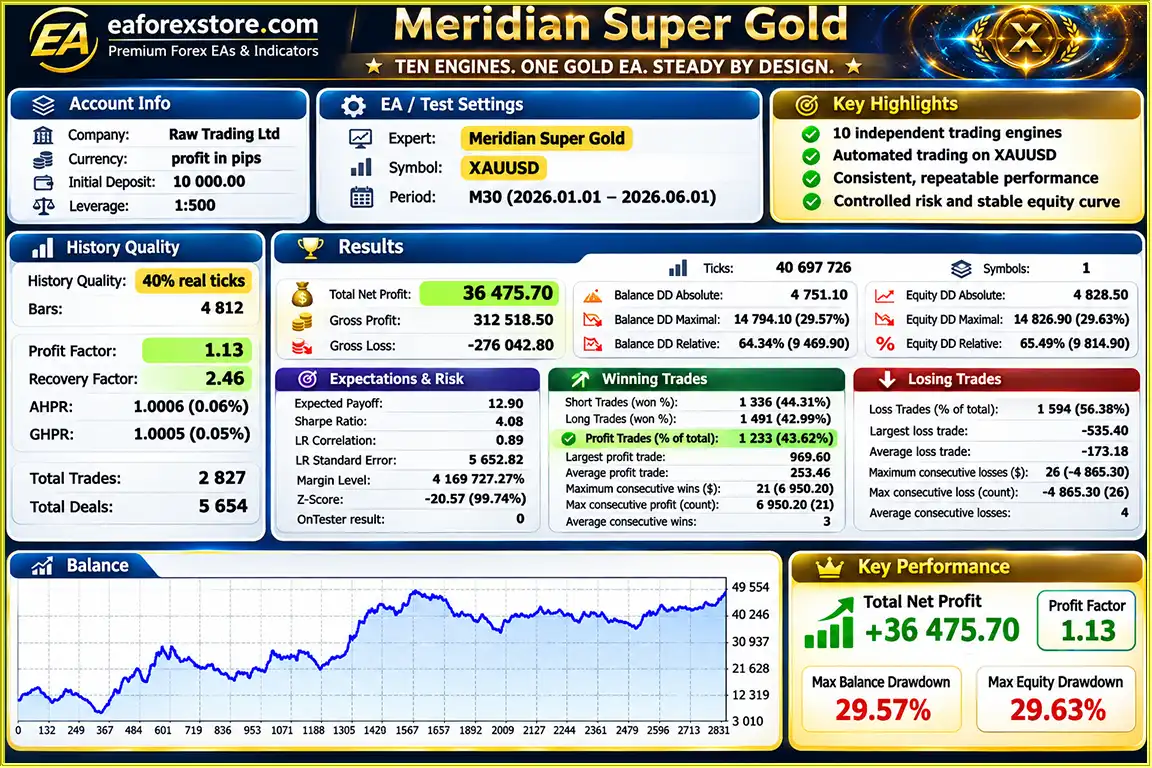
Meridian Super Gold EA MT5 Backtest Results
- Initial Deposit: $10.000
- Total Net Profit: $36.475,70
- Win Rate: 43,62%
- Maximum Drawdown: 29.63%
Risk Management & Alerts
Risk management is an important part of Meridian Super Gold EA MT5. The system includes multiple protective features designed to help control trading exposure and reduce operational risks.
Risk Percent Mode
Risk Percent Mode is the recommended money management setting.
The EA automatically calculates lot sizes based on the selected risk percentage, specified base capital, and Stop Loss distance.
For example:
- Account Balance: $10,000
- Risk Per Trade: 1%
- Planned Maximum Stop Loss Loss: $100 per trade
This helps maintain a consistent planned risk amount for each position under normal execution conditions.
However, trading costs, slippage, and market gaps can cause actual losses to exceed the planned amount.
Fixed Lot Mode
Traders can also choose Fixed Lot Mode, with a default trading volume of 0.01 lot.
This option is suitable for traders who prefer simple, predefined position sizing.
Automatic Stop Loss and Take Profit
Every trade is opened with its own Stop Loss and Take Profit levels.
These protective orders are calculated according to current gold market volatility.
No Grid or Martingale Exposure
Meridian Super Gold EA MT5 avoids Grid, Martingale, lot doubling, and recovery-based trading methods.
This reduces dependence on strategies that increase position exposure after losses.
Free Margin Protection
Before submitting a trade, the EA checks available free margin to help avoid orders that exceed account margin requirements.
Broker Stop-Level Verification
The system verifies broker stop-level requirements before opening positions, helping reduce order submission errors.
Weekend and Holiday Risk Protection
The EA is designed to close positions automatically before scheduled extended market closures, reducing exposure to potential opening gaps.
Duplicate Instance Protection
If a second EA instance is detected on the same account and symbol, the additional copy remains inactive to prevent duplicated trading activity.
Trading Dashboard
The built-in dashboard displays open positions and helps traders monitor trading activity.
Specific email, Telegram, or mobile push alerts are not confirmed as built-in features.
Important: Risk management tools cannot eliminate losses. Multiple simultaneous positions may create combined account exposure greater than the selected risk percentage for a single trade.
Pros and Cons
Pros
- Fully automated XAUUSD trading on MetaTrader 5.
- Powered by 10 independent trading engines.
- Multiple trading strategies within one Expert Advisor.
- No Grid, Martingale, or lot doubling.
- Every trade includes Stop Loss and Take Profit.
- Supports multiple independent positions on hedging accounts.
- Automatic Risk Percent position sizing.
- Fixed Lot Mode available.
- Intelligent market condition filters.
- Automatic weekend and holiday position closure.
- Free margin and broker stop-level safety checks.
- Duplicate EA instance protection.
- Supports hedging and netting accounts.
- Compact trading dashboard.
- Simple installation without additional set files.
- Compatible with multiple XAUUSD broker symbol formats.
Cons
- Designed specifically for gold trading.
- Requires MetaTrader 5.
- Recommended starting capital may be high for smaller accounts.
- A VPS is necessary for uninterrupted automated operation.
- Gold market volatility may cause slippage and unexpected losses.
- Multiple open positions may increase total account exposure.
- Netting accounts cannot maintain separate hedged positions on the same symbol.
- Results depend on market conditions and broker execution.
- Stop Loss protection cannot guarantee exact execution prices.
- Consistent profits are not guaranteed.
How to Install Meridian Super Gold EA MT5
Installing Meridian Super Gold EA MT5 is simple and does not require complicated indicator settings or additional configuration files.
Step 1: Install MetaTrader 5
Download and install MetaTrader 5 from your broker or the official MetaTrader website.
Log in to your trading account and ensure that XAUUSD trading is available.
Step 2: Add the Expert Advisor
Open MetaTrader 5 and navigate to:
File → Open Data Folder → MQL5 → Experts
Copy the Meridian Super Gold EA file into the Experts folder.
Restart MetaTrader 5 or refresh the Expert Advisors list.
Step 3: Open an XAUUSD Chart
Open a gold chart using your broker's supported symbol.
Compatible symbols include:
XAUUSD, XAUUSDc, XAUUSDm, XAUUSD.f, GOLD, #GOLD, and other supported variations.
The EA can be attached to any XAUUSD chart timeframe.
Step 4: Attach Meridian Super Gold EA
Find Meridian Super Gold EA MT5 in the Navigator panel and attach it to the gold chart.
Step 5: Configure Money Management
Choose between the following options:
Option 1: Fixed Lot Mode
Select Fixed Lot Mode and enter your preferred lot size.
Default lot size: 0.01 lot.
Option 2: Risk Percent Mode (Recommended)
- Set Lot mode to Risk percent.
- Enter your current account balance in Risk mode: base capital, USD.
- Set Risk mode: risk per trade, % of base.
Example:
For a $10,000 trading account with 1% risk per trade, the EA calculates the position size to target approximately $100 of loss if the Stop Loss is reached under normal execution conditions.
Step 6: Enable Automated Trading
Enable Algorithmic Trading in MetaTrader 5 and confirm that the EA has permission to execute trades.
Step 7: Check Recommended Settings
| Parameter | Recommended Configuration |
|---|---|
| Trading Platform | MetaTrader 5 |
| Trading Symbol | XAUUSD / GOLD |
| Trading Engines | 10 Independent Engines |
| Timeframe | Any XAUUSD Chart |
| Money Management | Fixed Lot / Risk Percent |
| Default Fixed Lot | 0.01 |
| Recommended Mode | Risk Percent |
| Minimum Deposit (Risk Mode) | $5,000+ at 0.5% Risk |
| Minimum Deposit (Fixed Mode) | $2,000 per 0.01 Lot |
| Account Type | Hedging Recommended |
| Netting Account | Supported |
| Broker Type | ECN / Raw / Zero Spread |
| Recommended Leverage | 1:500 |
| Stop Loss | Automatic |
| Take Profit | Automatic |
| Grid Trading | No |
| Martingale | No |
| VPS | Mandatory for Continuous 24/5 Operation |
The minimum deposits are developer recommendations and do not guarantee that a trading account will avoid margin calls or losses.
Step 8: Test on a Demo Account
Before trading with real money, test the EA on a demo account using your broker's trading conditions.
Start with a small lot size or a conservative risk percentage.
Step 9: Use a Reliable VPS
For uninterrupted automated trading, run MetaTrader 5 on a stable Forex VPS.
This helps maintain a continuous connection during trading sessions.
Step 10: Monitor Trading Performance
Use the built-in dashboard and MetaTrader 5 trading history to monitor open positions, trading performance, and account exposure.
Although Meridian Super Gold EA MT5 operates automatically, regular monitoring is still recommended.
What’s Included in the Download Package?
- Experts: Meridian Super Gold.ex5
>>> Join VIP Membership Now <<<
Final Thoughts
Meridian Super Gold EA MT5 is an advanced automated gold trading robot built around 10 independent trading engines, intelligent market filters, and structured risk management.
Unlike traditional XAUUSD trading robots that rely on a single strategy or aggressive recovery methods, Meridian Super Gold uses multiple independent trading systems without Grid, Martingale, or lot doubling.
With automatic Stop Loss and Take Profit, flexible lot management, weekend protection, and broker safety checks, the EA provides a disciplined approach to automated gold trading.
Its simple installation, support for different account types, and Risk Percent money management make it a practical option for traders looking to evaluate a multi-strategy XAUUSD Expert Advisor.
While Meridian Super Gold is designed to pursue more consistent and repeatable trading behavior, actual results depend on market conditions, broker execution, and account risk settings.