
Product Overview
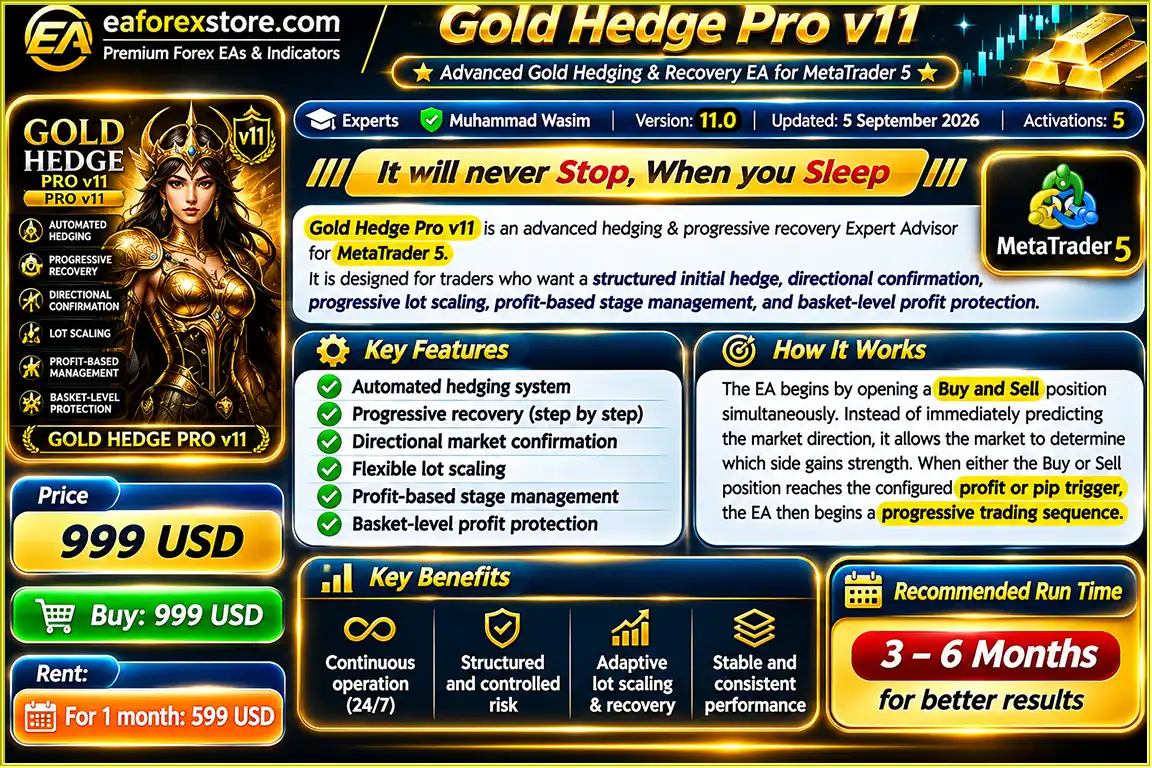
Gold Hedge Pro v11 EA MT5 is a fully automated gold trading robot for MetaTrader 5, designed to trade XAUUSD using an initial Buy and Sell hedge strategy, automatic direction confirmation, and progressive lot management.
The EA starts by opening Buy and Sell positions simultaneously, then selects the profitable direction when a configured profit or pip target is reached. It automatically manages additional positions, increases lot sizes, adjusts Stop Loss levels, and closes the opposite hedge position.
Gold Hedge Pro v11 EA MT5 also includes basket profit targets, maximum progression stages, margin protection, and automatic restart, helping traders manage their automated gold trading strategy through configurable settings.
The developer recommends evaluating the EA over a 3–6 month period to better understand its performance under different market conditions. This does not guarantee profitable results.
About the Developer
- Author: Muhammad Wasim
- Experience: Over 1 years of experience on MQL5.
- Notable Products: Gold Hedge Pro v11 EA MT5, Gold Wick Handler EA MT5,Trend Rider Pro v2 EA MT5, Gold Phantom Pro EA MT5, Gold Scal Pro v10 EA MT5, Gold Reaper Pro EA MT5, Gold Titan Core 3i EA MT5 and other advisors.
- Flagship Product: Gold Hedge Pro v11 EA MT5 is rated as the best performing product of the year.
>>> Delivery time 24h-48h after payment.
>>> Refund if not delivered.
>>> You will receive the latest version without any limitations (ID+Time).Reviewed by Jason Stap <<<
Key Features of Gold Hedge Pro v11 EA MT5
Initial Buy and Sell Hedge Strategy
Gold Hedge Pro v11 EA MT5 starts each trading cycle by opening two opposite positions simultaneously.
For example:
- Buy 0.01 lot XAUUSD.
- Sell 0.01 lot XAUUSD.
Instead of predicting whether gold prices will rise or fall, the EA monitors both positions and waits for the market to demonstrate directional strength.
Once either position reaches the configured trigger, the EA selects that direction for the next trading stage.
Automatic Direction Confirmation
The EA automatically identifies the profitable trading direction based on the initial hedge positions.
If the Buy position reaches the configured trigger first, the system begins a Buy progression.
If the Sell position reaches the trigger first, it begins a Sell progression.
The opposite hedge position is automatically closed once the winning direction has been confirmed.
Profit or Pip-Based Entry Triggers
Gold Hedge Pro v11 EA MT5 supports flexible directional confirmation using two trigger methods:
- Dollar Profit Trigger: Activates the trading progression when the selected position reaches a predefined monetary profit.
- Pip Distance Trigger: Activates the progression after price moves a configured pip distance.
Traders can enable either trigger method or use both according to their preferred strategy settings.
Progressive Lot Scaling
After confirming the trading direction, Gold Hedge Pro v11 automatically opens additional positions as the selected direction continues moving favorably.
Position sizes increase according to the configured Lot Multiplier.
This allows the EA to build a progressive trading sequence rather than using a constant lot size for every stage.
Because increasing lot sizes can substantially increase exposure, traders should select conservative multipliers and progression limits.
Automatic Profit-Based Stage Triggers
Each new trading stage can require a higher profit level before another position is opened.
These configurable stage requirements help control when the EA adds positions to the active trading sequence.
Instead of opening additional trades randomly, the EA follows predefined profit conditions.
Progressive Stop Loss Protection
Gold Hedge Pro v11 EA MT5 includes an automatic Stop Loss management system for progressive trading stages.
When a new position is opened, the EA uses previous protection levels and adjusts the preceding stage's Stop Loss toward the next stage's entry.
This creates a structured mechanism for protecting earlier positions as the trading sequence develops.
However, Stop Loss execution may be affected by market gaps, slippage, and broker conditions.
Total Basket Profit Target
The EA includes an optional Total Profit Target that monitors the combined floating profit of positions managed by the Expert Advisor.
When the configured profit target is reached, the EA automatically closes its managed positions.
For example:
- Total Profit Target: $50.
- Combined Floating Profit: $50.
- Action: Close all positions managed by the EA.
This feature helps traders define a profit objective for the complete trading cycle.
Maximum Progression Stages
Traders can configure the maximum number of additional trading stages allowed during a progression.
Once the selected limit is reached, the EA prevents further progression beyond that configured stage count.
This provides an important control over the number of progressive entries.
Automatic Trading Cycle Restart
After all managed positions are closed, Gold Hedge Pro v11 EA MT5 can automatically reset its trading sequence.
The EA then prepares to begin a new cycle using the initial Buy and Sell hedge strategy.
This allows continuous automated operation without manually restarting the Expert Advisor after every completed cycle.
Margin Protection
Before opening an additional position, Gold Hedge Pro v11 EA MT5 checks the account's available free margin.
If the available margin is insufficient, the EA pauses further progression rather than submitting another order.
This helps reduce avoidable margin-related order failures, although it does not eliminate the possibility of margin calls or liquidation.
Automatic Broker Lot Normalization
Gold Hedge Pro v11 EA MT5 automatically adjusts requested lot sizes to match the broker's trading specifications.
These include:
- Minimum permitted lot size.
- Maximum permitted lot size.
- Lot size increment or step.
This feature helps maintain compatibility with different broker trading environments.
How It Works
Gold Hedge Pro v11 EA MT5 follows a structured automated trading process based on initial hedging, direction confirmation, progressive position management, and basket profit control.
Step 1: Open Initial Hedge Positions
At the beginning of a trading cycle, the EA opens a Buy and Sell position simultaneously on XAUUSD.
For example, both positions may use an initial volume of 0.01 lot.
This initial hedge allows the system to monitor price movement in both directions.
Step 2: Monitor Market Direction
The EA continuously tracks the profit and price movement of both initial positions.
It waits until either the Buy or Sell side reaches the configured Dollar Profit Trigger or Pip Distance Trigger.
Step 3: Confirm the Trading Direction
When one side reaches the selected trigger, the EA identifies that direction as the active trading progression.
If the Buy side reaches its trigger first, the EA follows the Buy direction.
If the Sell side reaches its trigger first, it follows the Sell direction.
Step 4: Close the Opposite Hedge
After confirming the trading direction, the EA closes the opposite hedge position.
This allows the system to concentrate its progression on the selected direction.
Step 5: Open Progressive Positions
As the active direction continues moving favorably and the configured stage conditions are met, Gold Hedge Pro v11 opens additional positions.
Each new position is sized according to the selected Lot Multiplier.
Step 6: Adjust Stop Loss Protection
When new stages are added, the EA updates protective Stop Loss levels for previous positions according to its programmed stage-management rules.
This helps establish progressive protection as the sequence develops.
Step 7: Monitor Total Basket Profit
The EA continuously calculates the combined floating profit of its managed positions.
If the optional Total Profit Target is enabled, the system monitors whether the combined profit reaches the configured dollar amount.
Step 8: Close Positions at the Profit Target
When the basket reaches the specified Total Profit Target, the EA automatically closes the managed positions.
For example, if the profit target is $50, the EA attempts to close the basket once the combined floating profit reaches that value.
Actual realized profit may differ because of execution conditions and trading costs.
Step 9: Restart the Trading Cycle
After all managed positions have closed, the EA can automatically reset and prepare a new Buy and Sell hedge cycle.
This process allows Gold Hedge Pro v11 to operate continuously while automated trading remains enabled.
Why Choose Gold Hedge Pro v11 EA MT5?
No Need to Predict the Initial Market Direction
Gold Hedge Pro v11 EA MT5 begins by opening Buy and Sell positions simultaneously.
This allows the EA to observe which direction meets its configured profit or pip requirements before starting a progressive sequence.
Automatic Direction Selection
The EA automatically identifies the direction that reaches the selected trigger first.
This removes the need for manual intervention when selecting the initial trading direction.
Fully Automated Position Management
Gold Hedge Pro v11 manages initial hedges, directional confirmation, additional entries, lot scaling, Stop Loss adjustments, and opposite-position closure automatically.
Flexible Trading Triggers
Traders can choose Dollar Profit Triggers, Pip Distance Triggers, or both.
This flexibility allows the system to be configured for different trading preferences.
Configurable Progressive Trading
The EA allows users to adjust initial lot size, Lot Multiplier, profit requirements, and maximum progression stages.
This gives traders greater control over the structure and exposure of each trading sequence.
Basket-Level Profit Management
Instead of managing only individual positions, Gold Hedge Pro v11 can monitor the combined floating profit of the entire trading cycle.
The optional Total Profit Target allows the EA to close all managed positions when the selected basket profit is reached.
Automatic Stop Loss Adjustments
The EA progressively updates Stop Loss levels as additional positions are opened.
This feature provides a structured approach to managing previously opened stages.
Margin-Aware Trading
Before adding a position, Gold Hedge Pro v11 EA MT5 verifies available free margin.
If margin is insufficient, the EA pauses new progression entries.
Automatic Restart Capability
Once a trading cycle finishes, the system can automatically prepare a new initial hedge sequence.
This supports continuous automated gold trading without manually restarting the EA after each completed cycle.
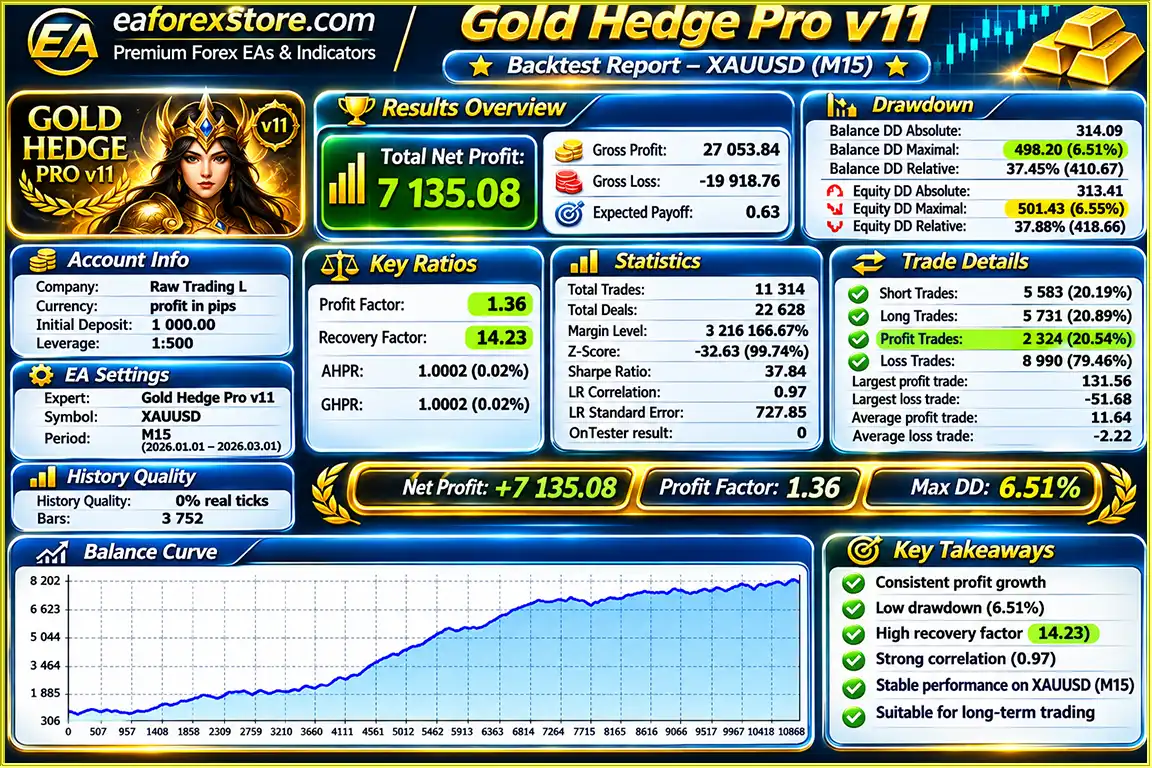
Gold Hedge Pro v11 EA MT5 Backtest Results
- Initial Deposit: $1.000
- Total Net Profit: $7.135,08
- Win Rate: 20,54%
- Maximum Drawdown: 6.51%
Risk Management & Alerts
Gold Hedge Pro v11 EA MT5 includes several trading controls designed to manage progressive position exposure and monitor account conditions.
Configurable Initial Lot Size
Traders can choose the starting lot size for the initial Buy and Sell hedge positions.
Using a smaller initial lot size can reduce starting exposure, although subsequent progressive entries may increase total risk.
Adjustable Lot Multiplier
The Lot Multiplier controls how much position volume increases during additional trading stages.
Higher multipliers increase market exposure more rapidly and may lead to larger profits or losses.
Maximum Progression Stage Limit
Traders can define the maximum number of progressive stages.
This prevents the EA from continuing to add positions beyond the configured progression limit.
Progressive Stop Loss Protection
The EA adjusts Stop Loss levels on earlier positions as new stages are opened.
These adjustments are designed to protect previously established positions as the trading sequence advances.
However, Stop Loss orders do not guarantee execution at the exact requested price.
Total Basket Profit Protection
An optional Total Profit Target closes all positions managed by the EA when their combined floating profit reaches the selected amount.
For example, setting the target to $50 instructs the EA to attempt basket closure when the combined profit reaches $50.
Free Margin Verification
Before each new progressive entry, the system checks available free margin.
If there is insufficient margin, additional progression is paused.
Broker Lot Size Protection
The EA normalizes trade volumes according to the broker's minimum lot, maximum lot, and lot step specifications.
This helps prevent invalid order volumes.
Automatic Hedge Closure
After directional confirmation, the EA closes the opposite initial hedge position.
This removes the opposing position but also leaves the account exposed to the chosen direction.
Trading Alerts and Notifications
Specific built-in Telegram alerts, mobile push notifications, and email alerts have not been confirmed in the supplied product information.
Traders can monitor the EA's positions, profit and loss, and trade history using MetaTrader 5.
Important Risk Considerations
- Initial hedging does not eliminate trading risk.
- Progressive lot scaling increases exposure as additional positions are opened.
- A confirmed trading direction may reverse unexpectedly.
- Closing the opposite hedge can result in a realized loss.
- Multiple progressive positions may create substantial combined exposure.
- Stop Loss orders may experience slippage.
- Basket profit targets do not guarantee a particular realized profit.
- Margin checks do not guarantee protection against margin calls.
- Continuous automated trading requires appropriate supervision.
- A 3–6 month evaluation period does not guarantee profitability.
Pros and Cons
Pros
- Fully automated XAUUSD trading on MetaTrader 5.
- Opens initial Buy and Sell hedge positions automatically.
- Does not require predicting the initial market direction.
- Supports automatic directional confirmation.
- Offers Dollar Profit and Pip Distance Triggers.
- Supports configurable progressive lot scaling.
- Includes automatic profit-based stage triggers.
- Provides progressive Stop Loss management.
- Automatically closes the opposite hedge after confirmation.
- Includes optional Total Basket Profit Target.
- Allows maximum progression stage limits.
- Supports automatic trading cycle restart.
- Checks available free margin before new entries.
- Automatically normalizes lot sizes to broker specifications.
- Provides adjustable money management parameters.
- Designed for continuous automated trading.
Cons
- Progressive lot scaling may increase losses significantly.
- Initial hedging requires a broker account that supports opposite positions.
- Closing the losing hedge may realize a loss before the progression develops.
- Strong market reversals may affect multiple progressive positions.
- Higher Lot Multipliers can increase margin requirements.
- Basket profit targets do not guarantee profits.
- Stop Loss orders cannot eliminate slippage.
- Margin protection cannot completely prevent liquidation.
- Performance depends on gold market conditions and broker execution.
- Continuous automated trading requires regular monitoring.
- No independently verified live trading performance has been provided.
How to Install Gold Hedge Pro v11 EA MT5
Installing Gold Hedge Pro v11 EA MT5 is straightforward, but correct configuration of lot sizes, triggers, and progression settings is important before starting automated trading.
Step 1: Install MetaTrader 5
Download and install MetaTrader 5 from your broker or the official MetaTrader website.
Log in to a trading account that supports XAUUSD and hedging.
Step 2: Add Gold Hedge Pro v11 EA
Open MetaTrader 5 and navigate to:
File → Open Data Folder → MQL5 → Experts
Copy the Gold Hedge Pro v11 EA file into the Experts folder.
Restart MetaTrader 5 or refresh the Expert Advisors list in the Navigator panel.
Step 3: Open an XAUUSD Chart
Open the gold trading symbol provided by your broker.
Ensure the chart is active and market data is updating correctly.
The supplied product information does not specify a required timeframe, so confirm the recommended timeframe with the developer before live trading.
Step 4: Attach the Expert Advisor
Locate Gold Hedge Pro v11 in the Navigator panel and attach it to the XAUUSD chart.
Enable the required automated trading permissions.
Step 5: Configure the Initial Hedge
Set the initial trading lot size.
For example:
- Initial Buy: 0.01 lot.
- Initial Sell: 0.01 lot.
Confirm that your trading account supports simultaneous Buy and Sell positions on the same symbol.
Step 6: Configure Direction Triggers
Choose your preferred direction confirmation method:
- Dollar Profit Trigger.
- Pip Distance Trigger.
- Both trigger methods.
Enter the appropriate trigger values according to your trading preferences.
Step 7: Configure Progressive Trading
Adjust the Lot Multiplier and profit-based stage triggers.
Set the maximum number of progression stages to define how many additional positions the EA can open.
Step 8: Configure Basket Profit Target
Enable the optional Total Profit Target if you want the EA to close all managed positions after reaching a selected combined floating profit.
For example:
Total Profit Target = $50
The EA will attempt to close its managed positions when the combined floating profit reaches $50.
Step 9: Review Margin Requirements
Before enabling live trading, review your account balance, leverage, available margin, and maximum potential exposure.
Progressive lot scaling can significantly increase margin requirements during multiple trading stages.
Step 10: Enable Algorithmic Trading
Enable automated trading in MetaTrader 5.
Confirm that Gold Hedge Pro v11 is active and has permission to manage positions.
Step 11: Test on a Demo Account
Test the EA on a demo account before using real capital.
The developer recommends running or evaluating Gold Hedge Pro v11 over 3–6 months to observe its behavior under different gold market conditions.
This evaluation period should be used to assess drawdowns, progression behavior, trade execution, and overall risk rather than assuming profitable performance.
Step 12: Monitor Trading Activity
Review the account's open positions, margin level, lot progression, and trading history regularly.
A reliable VPS can help maintain continuous MetaTrader 5 operation when the EA is intended to run without interruption.
Recommended Setup
| Parameter | Configuration |
|---|---|
| Expert Advisor | Gold Hedge Pro v11 EA MT5 |
| Trading Platform | MetaTrader 5 |
| Trading Symbol | XAUUSD |
| Trading Strategy | Hedge + Progressive Lot Scaling |
| Initial Positions | Buy + Sell |
| Example Initial Lot | 0.01 |
| Direction Trigger | Dollar Profit / Pip Distance |
| Lot Multiplier | Configurable |
| Progressive Stages | Configurable |
| Maximum Stages | Configurable |
| Stop Loss | Progressive Stage Protection |
| Opposite Hedge Closure | Automatic |
| Basket Profit Target | Optional |
| Automatic Restart | Supported |
| Margin Protection | Included |
| Broker Lot Normalization | Supported |
| Recommended Account | Hedging |
| Suggested Evaluation Period | 3–6 Months |
| VPS | Recommended for Continuous Operation |
What’s Included in the Download Package?
- Experts: Gold Hedge Pro v11.ex5
>>> Join VIP Membership Now <<<
Final Thoughts
Gold Hedge Pro v11 EA MT5 is an automated gold trading robot that combines initial Buy and Sell hedging, automatic direction confirmation, progressive lot scaling, and basket-level profit management.
Instead of selecting a market direction immediately, the EA begins with opposite positions and waits for one side to reach a configured profit or pip trigger.
Once the direction is confirmed, the system automatically manages the trading progression, adjusts Stop Loss levels, and closes the opposite hedge position.
Features such as configurable Lot Multipliers, maximum progression stages, Total Profit Target, margin verification, and automatic restart provide flexibility for traders who want to customize their automated gold trading strategy.
However, progressive lot scaling can create significant exposure, especially during sharp market reversals or extended trading sequences. Traders should carefully configure their risk settings, test the EA on a demo account, and monitor overall account margin.
The developer recommends evaluating Gold Hedge Pro v11 over a 3–6 month period to better understand its behavior in different market environments.
For traders looking for an MT5 gold hedging Expert Advisor with automatic progression and basket profit management, Gold Hedge Pro v11 offers a customizable automated trading framework.
Gold Hedge Pro v11 EA MT5 – Hedge First, Confirm Direction, Manage Progression Automatically.
Risk Disclaimer: Gold trading involves substantial financial risk. Hedging and progressive lot scaling do not guarantee profits or prevent losses. Increasing position sizes can create significant drawdowns, especially during market reversals. Stop Loss orders, profit targets, and margin checks cannot guarantee a fixed maximum loss. Always test the EA on a demo account before trading with real money.